
Trying auto mode with Claude Code via Amazon Bedrock, it appeared or didn't appear depending on the model

This page has been translated by machine translation. View original
I'm emi, a coffee lover.
While following the Claude Code changelog, I noticed there were two updates related to auto mode via Amazon Bedrock.
Auto mode is a permission mode where Claude Code works autonomously without asking the user for permission every time it executes a tool, while an AI judgment model (classifier) stops only dangerous operations.
In other words, it's a mode where the AI makes decisions like "This operation could be really bad if we mess up, so let me check with the user! This is just a read, so I can proceed!" while working through tasks.
I'll explain more about the classifier later.
- 2026/5/30 (
v2.1.158)- Auto mode becomes available on Amazon Bedrock, Vertex, and Foundry
- Requires opt-in by setting
CLAUDE_CODE_ENABLE_AUTO_MODE=1 - Targets Opus 4.7 and Opus 4.8
- 2026/7/11 (
v2.1.207)- Auto mode becomes available on Amazon Bedrock, Vertex, and Foundry without opt-in via
CLAUDE_CODE_ENABLE_AUTO_MODE - To disable auto mode, the method changed to using
disableAutoModein settings
- Auto mode becomes available on Amazon Bedrock, Vertex, and Foundry without opt-in via
I have a Claude Code running via Amazon Bedrock locally, so I tried it out. Auto mode did not appear with Sonnet 4.6, but when I switched the model to Opus 4.8, auto mode appeared. This article describes what I found.
Conclusion First
As of 2026/9/10, auto mode is available in Claude Code via Amazon Bedrock with Sonnet 5 / Opus 4.7 and later / Fable, but was not available with Sonnet 4.6.
Environment
- Windows + WSL2 (Ubuntu)
- Claude Code
v2.1.248 - Via Amazon Bedrock (launched by injecting temporary credentials with
aws-vault)
In the following article, I set up an environment to switch between the Claude Enterprise version and the Amazon Bedrock version of Claude Code on the same machine.
This time, I'm using the Bedrock version launch function claude-bedrock I prepared then. This function launches claude internally with CLAUDE_CODE_USE_BEDROCK=1, a region, and a model with the jp. prefix.
Official Documentation
The Claude Code official documentation Choose a permission mode describes the conditions for auto mode support.
- Target providers
- Amazon Bedrock
- Google Cloud's Agent Platform
- Microsoft Foundry
- Signed Claude apps gateway
- Auto mode supported models
- Claude Sonnet 5
- Opus 4.7 and later
- Fable
It states that Sonnet 4.5, Opus 4.5, Haiku, and claude-3 series are not supported on any provider.
This means that via Amazon Bedrock, Sonnet 4.6 is not included in the auto mode supported models. Since my claude-bedrock launches with Sonnet 4.6, according to this description, auto mode should not appear.
Auto mode appears by default when cycling through permission modes with shift+tab, but the starting mode is set to defaultMode (Manual if not configured). If you want auto mode to be the starting mode, you need to add "permissions": {"defaultMode": "auto"} to user settings ~/.claude/settings.json.
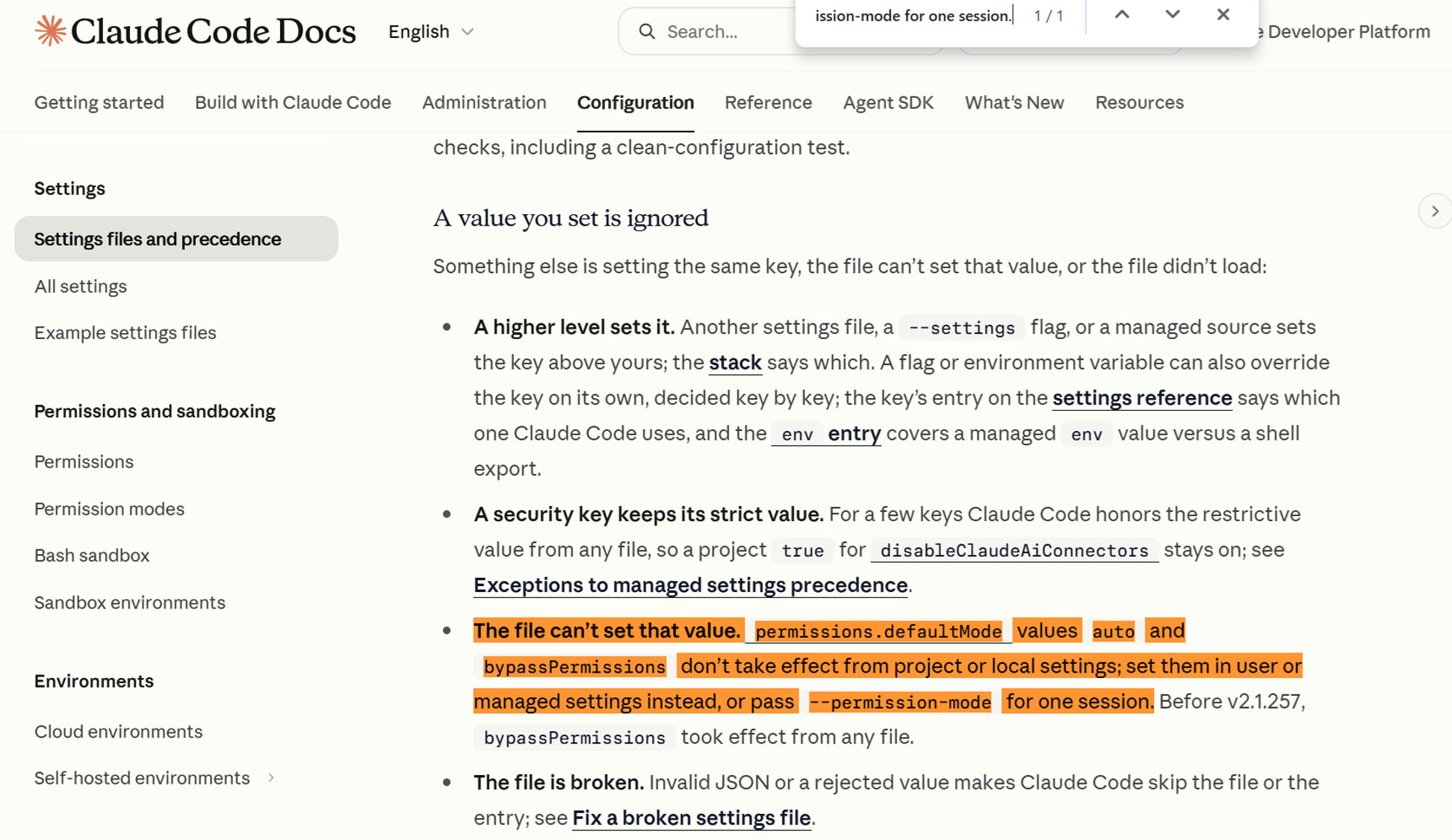
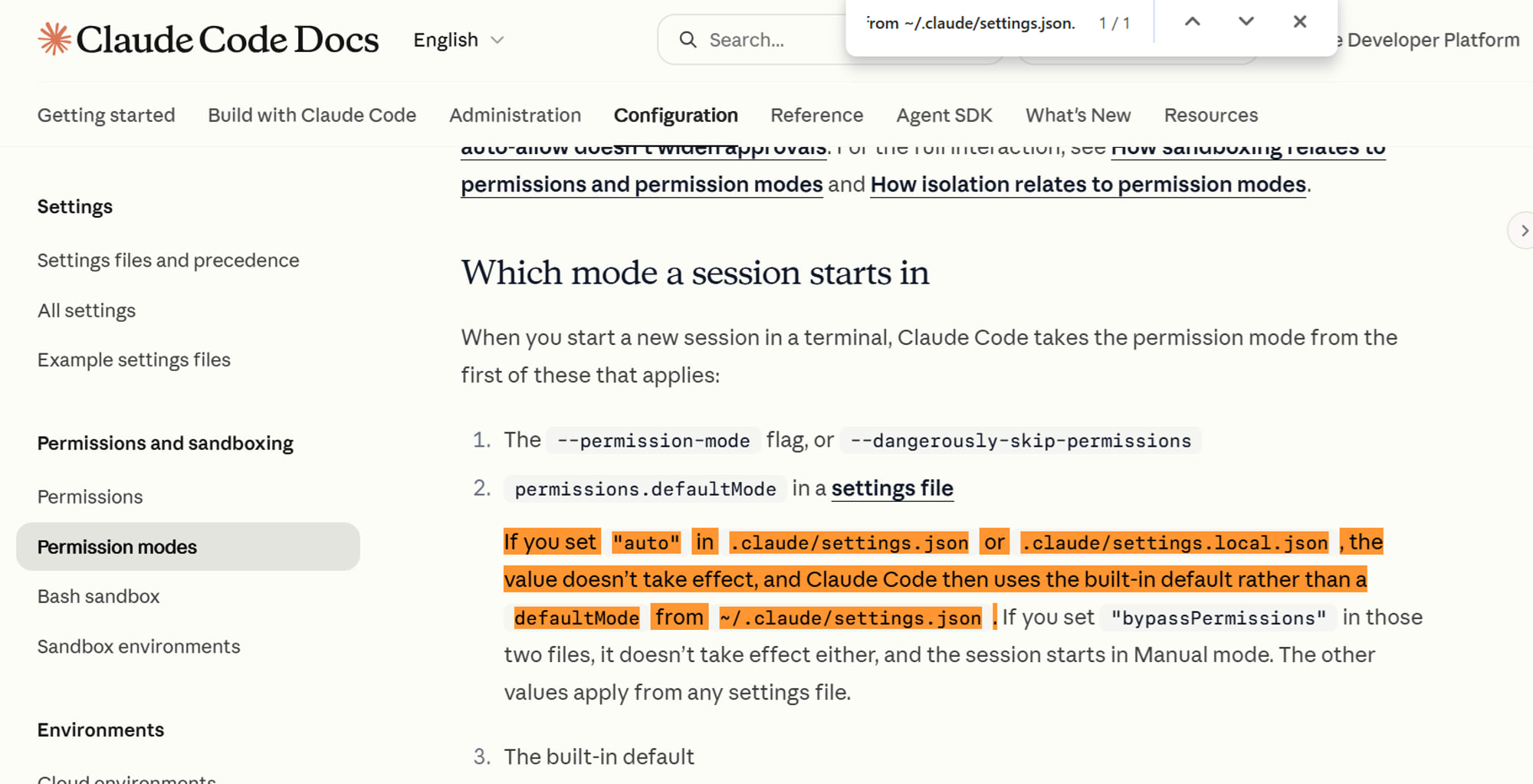
This defaultMode: "auto" will not take effect even if written in project-side settings (.claude/settings.json or .claude/settings.local.json). You need to either write it in user settings ~/.claude/settings.json or specify --permission-mode for each session.
Settings files and precedence
The file can't set that value. permissions.defaultMode values auto and bypassPermissions don't take effect from project or local settings; set them in user or managed settings instead, or pass --permission-mode for one session.
Settings files and precedence
Choose a permission mode
If you set "auto" in .claude/settings.json or .claude/settings.local.json, the value doesn't take effect, and Claude Code then uses the built-in default rather than a defaultMode from ~/.claude/settings.json.
Choose a permission mode
There is also a note about environment variables.
Between v2.1.158 and v2.1.206, CLAUDE_CODE_ENABLE_AUTO_MODE=1 was required, but from v2.1.207 onward, this environment variable has no effect (it is only accepted for compatibility). Since my environment is v2.1.248, the environment variable is no longer needed.
The mechanism of auto mode itself is explained in Anthropic's engineering article How we built Claude Code auto mode.
The classifier is another AI model that judges "whether this operation can be executed" on behalf of the user when in auto mode. The official documentation Choose a permission mode states that in auto mode, a second model called the classifier reviews actions on your behalf. How we built Claude Code auto mode also explains that the classifier evaluates each action before execution and acts as a substitute for a human approver.
According to this article, auto mode performs this judgment in two layers.
-
- Input-side check
- Checks in advance whether the content Claude reads (file contents, web fetch results, command output, etc.) contains any instructions trying to hijack Claude
-
- Execution-side check
- The classifier evaluates the actions Claude is about to perform (tool calls) before they are executed, and stops them if judged dangerous
Based on the above, I verified this locally.
Trying It Out
Checking the Version
claude-bedrock --version
Output▼
emiki@<hostname>:~/work/xx$ claude-bedrock --version
Enter MFA code for arn:aws:iam::<AWS account ID>:mfa/myprofile: xxxxxx
2.1.248 (Claude Code)
emiki@<hostname>:~/work/xx$
Checking the Auto Mode Configuration
The classifier has judgment criteria for "what to block and what to allow." The official documentation Configure auto mode refers to these judgment criteria as "rules," divided into lists such as allow (exceptions that are permitted even if they appear dangerous), soft_deny (operations that are blocked by default but can be permitted if the user explicitly instructs), hard_deny (operations that are unconditionally blocked), and environment (trusted repositories and domains).
claude auto-mode config is a command that displays the judgment criteria (rules) actually used by the classifier in JSON format. The rules include built-in ones prepared in advance by Anthropic (defaults), and users and organization administrators can also add custom rules in the autoMode block of ~/.claude/settings.json. claude auto-mode config displays the actual applied configuration that combines both. If you only want to see the built-in rules, there is a separate command called claude auto-mode defaults.
Since I haven't written anything in the autoMode block, the output this time is the default.
Since claude-bedrock passes arguments directly to claude, you can check with claude-bedrock auto-mode config. When I ran it both without environment variables and with CLAUDE_CODE_ENABLE_AUTO_MODE=1, the output was the same.
Output
emiki@<hostname>:~/work/xx$ claude-bedrock auto-mode config < /dev/null | head -5
{
  "allow": [
    "Security Discussion: Reading, discussing, reviewing, or writing security-related code, docs, configs, or threat models as part of the user's task is not in itself Credential Exploration, Exfil Scouting, or Auto-Mode Bypass ...",
    "Transient Retry: Retrying the same or a reformulated action after a transient failure ...",
    "Test Artifacts: Hardcoded test API keys, placeholder credentials in examples, or hardcoding test cases ...",
emiki@<hostname>:~/work/xx$
The output was the same when CLAUDE_CODE_ENABLE_AUTO_MODE=1 was added.
As mentioned above, the official documentation states that CLAUDE_CODE_ENABLE_AUTO_MODE has no effect from v2.1.207 onward and is only accepted for compatibility.
In my v2.1.248 environment as well, this variable does not cause an error, but it is in a state where it has no effect whether it is set or not.
Auto Mode Does Not Appear with Sonnet 4.6
Launch with claude-bedrock.
claude-bedrock
 ▐▛███▛█   Claude Code v2.1.248
▝▜██████▀  Sonnet 4.6 · Amazon Bedrock
  ▝▝ ▝▝    ~/work/xx

                                                            ● high · /effort
──────────────────────────────────────────────────────────────────────────────
❯
──────────────────────────────────────────────────────────────────────────────
  ⏸ manual mode on · ? for shortcuts · ← for agents · shift+click to native…
Right after launch, it showed Sonnet 4.6 · Amazon Bedrock, and the bottom displayed ⏸ manual mode on. When cycling through modes with shift+tab, the bottom display changed as follows.
──────────────────────────────────────────────────────────────────────────────
❯
──────────────────────────────────────────────────────────────────────────────
  ⏵⏵ accept edits on (shift+tab to cycle) · ← for agents · shift+click to n…
──────────────────────────────────────────────────────────────────────────────
❯
──────────────────────────────────────────────────────────────────────────────
  ⏸ plan mode on (shift+tab to cycle) · ← for agents · shift+click to nativ…
──────────────────────────────────────────────────────────────────────────────
❯
──────────────────────────────────────────────────────────────────────────────
  ⏸ manual mode on · ? for shortcuts · ← for agents · shift+click to native…
It cycled back to ⏸ manual mode on.
Auto mode did not appear. This is consistent with the official documentation.
Auto Mode Appeared After Switching to Opus 4.8
Switch to Opus 4.8 using /model inside Claude Code via Bedrock.
 ▐▛███▛█   Claude Code v2.1.248
▝▜██████▀  Opus 4.8 · Amazon Bedrock
  ▝▝ ▝▝    ~/work/xx

❯ /model
  ⎿  Set model to Opus 4.8 and saved as your default for new sessions

  ✘ Auto-update failed · Try claude doctor or npm i -g @anthropic-ai/claude…
──────────────────────────────────────────────────────────────────────────────
❯
──────────────────────────────────────────────────────────────────────────────
  ⏸ manual mode on · ? for shortcuts · ← for agents · shift+click to native…
Cycle through modes with shift+tab.
──────────────────────────────────────────────────────────────────────────────
❯
──────────────────────────────────────────────────────────────────────────────
  ⏵⏵ accept edits on (shift+tab to cycle) · ← for agents ·
──────────────────────────────────────────────────────────────────────────────
❯
──────────────────────────────────────────────────────────────────────────────
  ⏸ plan mode on (shift+tab to cycle) · ← for agents · shift+click to nativ…
──────────────────────────────────────────────────────────────────────────────
❯
──────────────────────────────────────────────────────────────────────────────
  ⏵⏵ auto mode on (shift+tab to cycle) · ← for agents · shift+click to nati…
auto mode on appeared.
──────────────────────────────────────────────────────────────────────────────
❯
──────────────────────────────────────────────────────────────────────────────
  ⏸ manual mode on · ? for shortcuts · ← for agents · shift+click to native…
It returned to ⏸ manual mode on.
Auto mode, which did not appear with Sonnet 4.6, appeared with Opus 4.8, which is consistent with the official documentation.
Closing
Whether auto mode appears in Claude Code via Amazon Bedrock currently depends on the model. As described in the official documentation, the supported models on Bedrock are Sonnet 5 / Opus 4.7 and later / Fable, and Sonnet 4.6 was not supported.
I'd like to try the autoMode.environment setting that tells the classifier trusted repositories and domains at some point.
For questions and requests about this article, please use the "Feedback to DevelopersIO" section at the bottom of the screen.
