
# Claude Code を Amazon Bedrock 経由で使う環境構築(WSL + aws-vault + 国内リージョン) ## Overview Setting up an environment to use Claude Code via Amazon Bedrock (WSL + aws-vault + domestic region)

This page has been translated by machine translation. View original
I'm emi, a coffee lover.
I'm already using Claude Code with Claude Enterprise, but I also wanted to check the behavior of Claude via Amazon Bedrock separately, so I set up my environment to switch between both on the same machine. Here are the configuration details.
Operating Environment
I worked on WSL2 (Ubuntu) on Windows. The versions of each tool are as follows.
| Tool | Version |
|---|---|
| AWS CLI | 2.28.2 (Python 3.13.4 / Linux WSL2) |
| Node.js | v22.16.0 |
| Claude Code | 2.1.248 |
| aws-vault | v7.2.0 |
Version check commands
emiki@<hostname>:~/work/xx$ aws --version; node --version; claude --version; aws-vault --version
aws-cli/2.28.2 Python/3.13.4 Linux/6.18.33.2-microsoft-standard-WSL2 exe/x86_64.ubuntu.22
v22.16.0
2.1.248 (Claude Code)
v7.2.0
emiki@<hostname>:~/work/xx$
Node.js is installed to run Claude Code.
Inference Profiles to Keep Data Within Japan
For use at Japanese companies, there is often a requirement to keep data within the country.
When calling newer Claude models on Bedrock, instead of specifying a model directly, you select something called an "inference profile."
Inference profiles are a mechanism that distributes requests across multiple regions to ensure throughput, and the profile ID has a prefix at the beginning indicating which area to route to. A prefix of us. routes within the United States, and jp. routes within Japan.
Which region requests and data flow to is determined by which inference profile you choose.
There are three main inference options.
- In-Region
- Keeps requests within a single region
- For cases with strict compliance requirements
- Geographic Cross-Region
- Routes across multiple regions within an area (US, Europe, APAC, etc.) while maintaining data residency
- Such as
jp.(within Japan) orapac.(within APAC)
- Global Cross-Region
- Routes anywhere in the world when there are no residency constraints
global.
For Opus 4.8, all inference options are available in Tokyo.
Which inference profiles (jp. / apac. / global., etc.) are available for each model varies by region, so please check the details page for each model.
This time, since I want to keep data within Japan, I'll look up inference profiles starting with jp..
Execution result▼
emiki@<hostname>:~/work$ aws bedrock list-inference-profiles --region ap-northeast-1 --query "inferenceProfileSummaries[?starts_with(inferenceProfileId, 'jp.')].inferenceProfileId" --output table
--------------------------------------------------
|              ListInferenceProfiles             |
+------------------------------------------------+
|  jp.anthropic.claude-sonnet-4-5-20250929-v1:0  |
|  jp.anthropic.claude-haiku-4-5-20251001-v1:0   |
|  jp.amazon.nova-2-lite-v1:0                    |
|  jp.anthropic.claude-sonnet-4-6                |
|  jp.anthropic.claude-opus-4-7                  |
|  jp.anthropic.claude-opus-4-8                  |
+------------------------------------------------+
emiki@<hostname>:~/work$
At this point, it appears that the latest generation Opus 5 / Sonnet 5 cannot be used with jp..
Bedrock Connectivity Check
Before proceeding to the Claude Code configuration, I'll verify that the selected model responds by making a raw Bedrock call.
Execution result▼
emiki@<hostname>:~/work$ aws bedrock-runtime invoke-model \
  --region ap-northeast-1 \
  --model-id "jp.anthropic.claude-sonnet-4-6" \
  --body '{"anthropic_version":"bedrock-2023-05-31","max_tokens":50,"messages":[{"role":"user","content":"こんにちは、ひとことで自己紹介して"}]}' \
  --cli-binary-format raw-in-base64-out \
  /tmp/bedrock-test.json && cat /tmp/bedrock-test.json
{
    "contentType": "application/json"
}
{"model":"claude-sonnet-4-6","id":"msg_bdrk_011CerzUcpWUedFA2UJcv7De","type":"message","role":"assistant","content":[{"type":"bash","bash":"こんにちは!私はAnthropic社が作ったAIアシスタントの**Claude**です。なんでもお気軽にどうぞ!😊"}],"stop_reason":"end_turn","stop_sequence":null,"stop_details":null,"usage":{"input_tokens":24,"cache_creation_input_tokens":0,"cache_read_input_tokens":0,"cache_creation":{"ephemeral_5m_input_tokens":0,"ephemeral_1h_input_tokens":0},"output_tokens":50}}
emiki@<hostname>:~/work$
A Japanese reply was in content. This confirmed that jp.anthropic.claude-sonnet-4-6 responds in the Tokyo region.
bashrc to Launch Claude Code as the Bedrock Version
Whether Claude Code runs in Bedrock mode is controlled by the environment variable CLAUDE_CODE_USE_BEDROCK. Setting it to 1 at launch activates Bedrock mode; without it, it runs as the regular Claude Enterprise version. Using this, I can launch the regular version as before with claude, and the Bedrock version under a different command name.
In my environment, credentials are stored in aws-vault, so at launch I issue temporary credentials with aws-vault exec, and within that context use env to set the necessary environment variables and call claude. I added the following function to ~/.bashrc.
# The regular Claude Enterprise version launches as-is with `claude` (no changes).
# The Bedrock version is run from outside the aws-vault subshell (bare shell).

# Bedrock version (primary model at launch: Sonnet 4.6)
claude-bedrock() {
  aws-vault exec myprofile -- env \
    CLAUDE_CODE_USE_BEDROCK=1 \
    AWS_REGION=ap-northeast-1 \
    ANTHROPIC_MODEL='jp.anthropic.claude-sonnet-4-6' \
    ANTHROPIC_SMALL_FAST_MODEL='jp.anthropic.claude-haiku-4-5-20251001-v1:0' \
    claude "$@"
}
Notes on env and ~/.bashrc
I'm writing this as a note for myself since I don't use Linux frequently on a daily basis.
-
envcommand- A command for "running the following command with specific environment variables set"
env CLAUDE_CODE_USE_BEDROCK=1 AWS_REGION=... claude- Means "launch
claudewithCLAUDE_CODE_USE_BEDROCK,AWS_REGION, etc. temporarily set"
- Means "launch
- Environment variables set with
envare only valid during thatclaudeexecution (they don't remain in the regular shell)
-
~/.bashrc- A configuration file that is automatically loaded every time bash (the shell commonly used on Linux) starts
- Writing a function like
claude-bedrock() { ... }means that just typingclaude-bedrockin the terminal will execute its contents- No need to type long commands every time
- After adding content, open a new terminal or run
source ~/.bashrcto apply the changes
ANTHROPIC_MODEL is Claude Code's main model. ANTHROPIC_SMALL_FAST_MODEL is the lightweight model Claude Code uses internally.
Both are fixed to jp., ensuring inference stays entirely within Japan.
With this, typing claude launches the regular Claude Enterprise version, and typing claude-bedrock launches the Bedrock version.
Launching Claude Code via Bedrock
Type claude-bedrock.
You'll be prompted for an MFA code, enter it. Claude Code launched successfully.
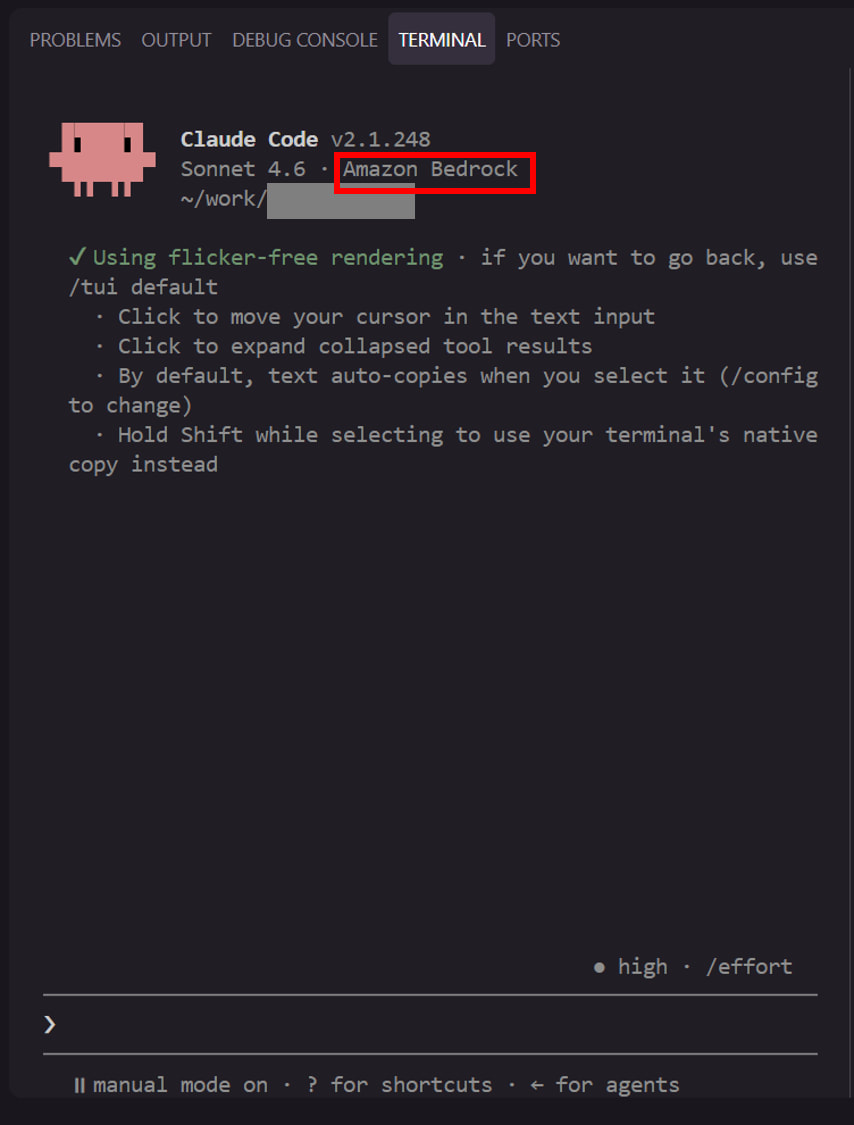
 ▐▛███▛█   Claude Code v2.1.248
▝▜██████▀  Sonnet 4.6 · Amazon Bedrock
  ▝▝ ▝▝    ~/work/xx

  ✔ Using flicker-free rendering · if you want to go back, use /tui default
    · Click to move your cursor in the bash input
    · Click to expand collapsed tool results
    · By default, bash auto-copies when you select it (/config to change)
    · Hold Shift while selecting to use your terminal's native copy instead
Amazon Bedrock is displayed, and the model is also the Sonnet 4.6 that was configured. On first launch, there was also a prompt from Claude Code asking whether to try the new full-screen renderer, but since this is just about display preference, you can choose whichever you prefer.
This lets you switch between the regular Claude Enterprise version with claude and Claude via Bedrock in the Tokyo region with claude-bedrock!
Filtering the /model list to only jp. compatible models
Model switching in the Bedrock version is also done with /model.
If you open /model as-is, inference profiles other than jp. will appear, as shown below.
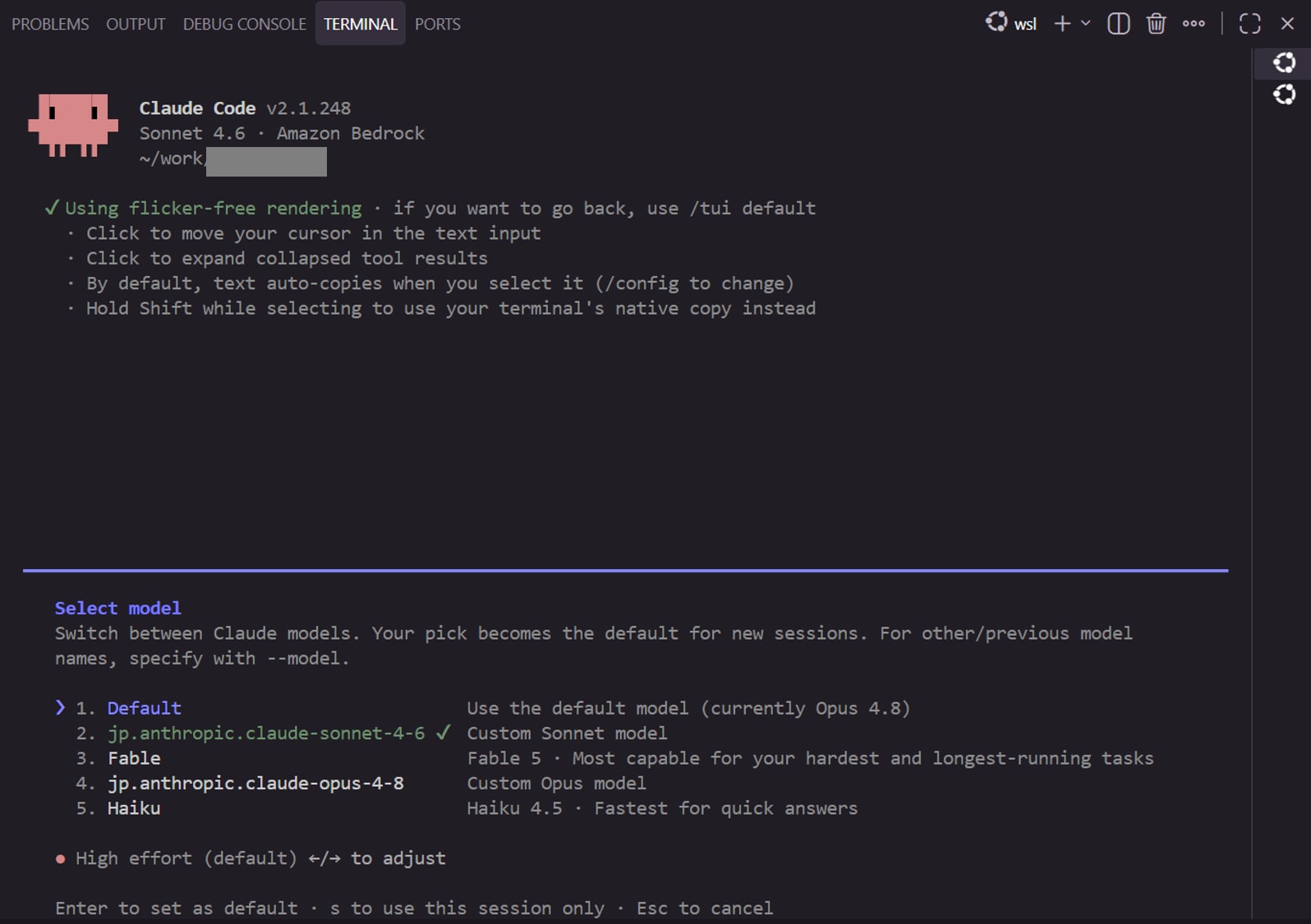
Select model
Switch between Claude models. Your pick becomes the default for new sessions. For other/previous model names, specify with --model.

❯ 1. Default                        Use the default model (currently Opus 4.8)
  1. jp.anthropic.claude-sonnet… ✔  Custom Sonnet model
  2. Fable                          Fable 5 · Most capable for your hardest and longest-running tasks
  3. jp.anthropic.claude-opus-4-8   Custom Opus model
  4. Haiku                          Haiku 4.5 · Fastest for quick answers

● High effort (default) ←/→ to adjust

Enter to set as default · s to use this session only · Esc to cancel
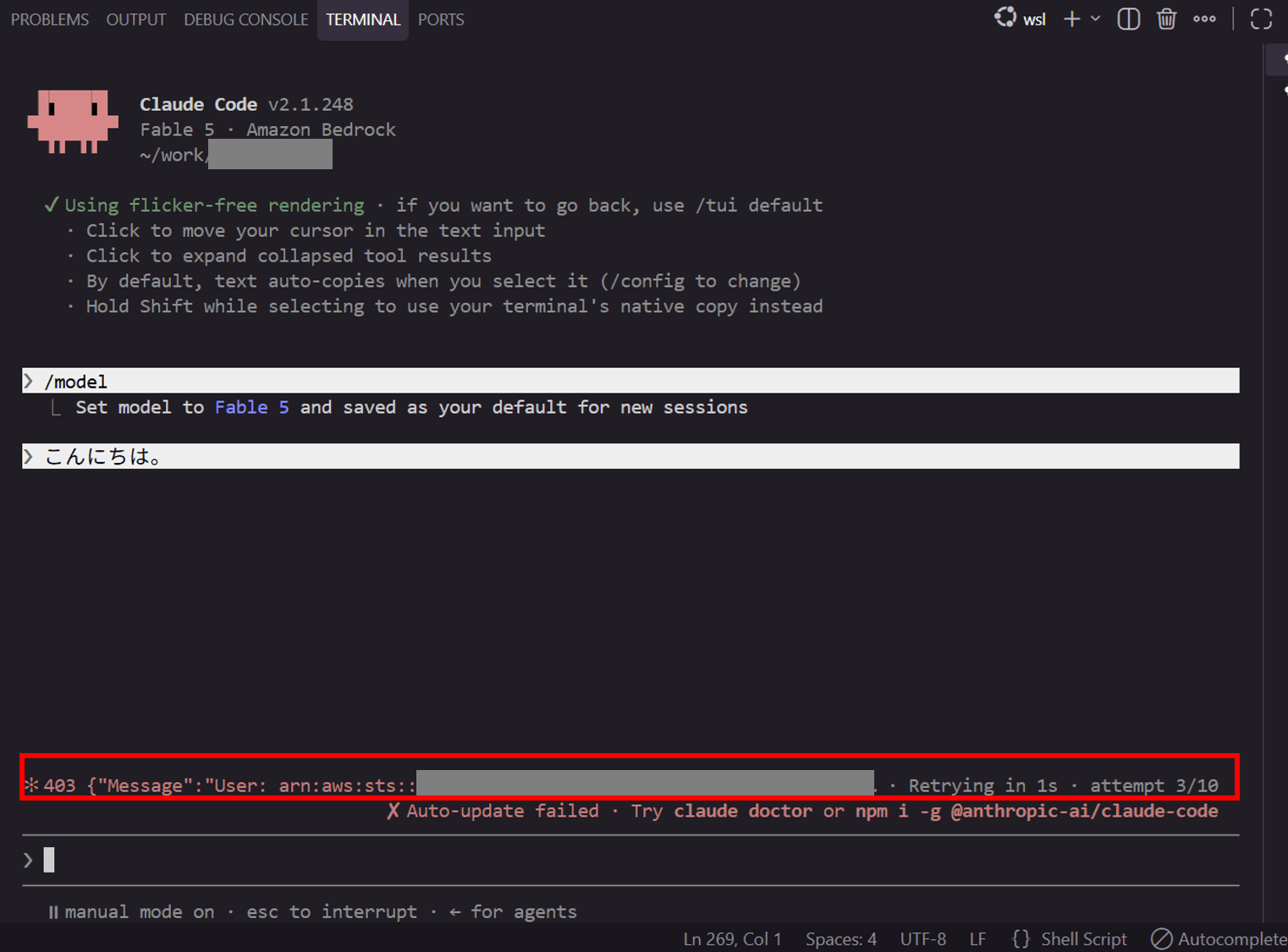
My test environment has the following regional restrictions, prohibiting use of regions other than Tokyo, Osaka, and US East (N. Virginia), so selecting a model other than jp. will result in a 403 error.
For this reason, I configure availableModels in ~/.claude/settings.json to prevent non-jp. models from appearing in the /model list.
Without changing the existing settings.json settings, I only add the following configuration. For Opus, I'm only including the latest 4-8 from the ones available with jp..
{
  "availableModels": [
    "jp.anthropic.claude-sonnet-4-6",
    "jp.anthropic.claude-opus-4-8",
    "jp.anthropic.claude-haiku-4-5-20251001-v1:0"
  ]
}
After restarting Claude Code and opening /model, it's now filtered to only jp. models as shown below.
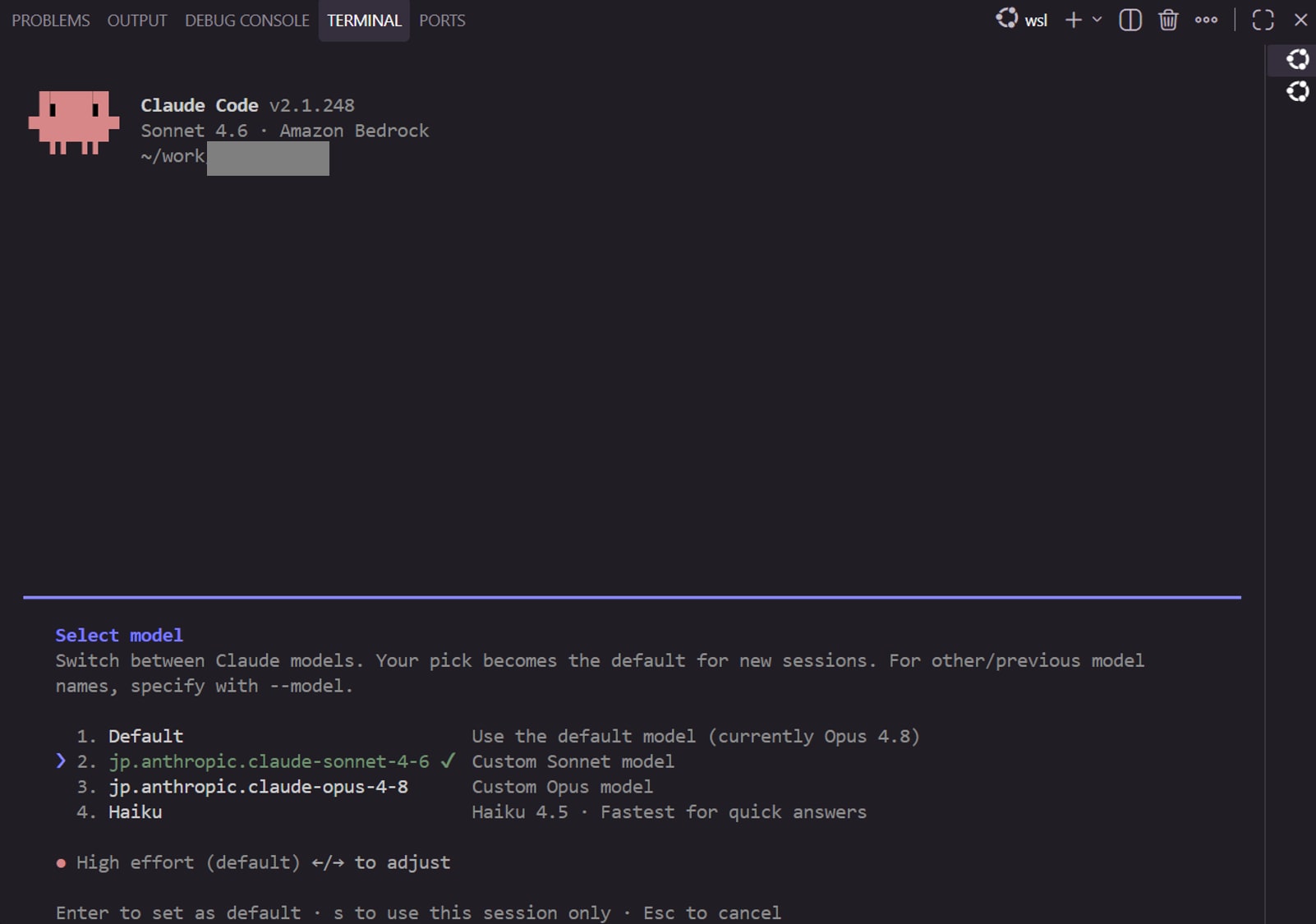
Select model
Switch between Claude models. Your pick becomes the default for new sessions. For other/previous model names, specify with --model.

  1. Default                           Use the default model (currently Opus 4.8)
❯ 2. jp.anthropic.claude-sonnet-4-6 ✔  Custom Sonnet model
  1. jp.anthropic.claude-opus-4-8       Custom Opus model
  2. Haiku                              Haiku 4.5 · Fastest for quick answers

● High effort (default) ←/→ to adjust

Enter to set as default · s to use this session only · Esc to cancel
Interestingly, Haiku is displayed with the generic label Haiku rather than its full jp. ID. I selected Haiku and sent a quick message.
 ▐▛███▛█   Claude Code v2.1.248
▝▜██████▀  Haiku 4.5 · Amazon Bedrock
  ▝▝ ▝▝    ~/work/xx

❯ /model
  ⎿  Set model to Haiku 4.5 and saved as your default for new sessions

❯ こんにちは~

  Thought for 4s

こんにちは。何かお手伝いできることはありますか?

✻ Cogitated for 4s · done 10:53 AM
Got a response. The display shows the generic label, but under the hood the jp. Haiku is being called.
Errors when switching models
As a bonus, I'll also show the error when selecting a non-jp. model and how to recover.
I selected Fable in /model and sent a message. The TUI display changed to Fable 5 · Amazon Bedrock.
❯ /model
  ⎿  Set model to Fable 5 and saved as your default for new sessions

❯ こんにちは。

✻ 403 {"Message":"User: arn:aws:sts::<AWS account ID>:assumed-role/myprofile/17… · Retrying in 1s · attempt 5/10
403 (access denied). Since Fable is not in the jp. list, it confirmed that it cannot be called with the Japan-domestic inference profile in the Tokyo region.
Simply switching back to jp.anthropic.claude-sonnet-4-6 in /model did not fix it. The 403'd requests kept retrying, and additional messages sent in the meantime piled up in the queue, resulting in none of them returning.
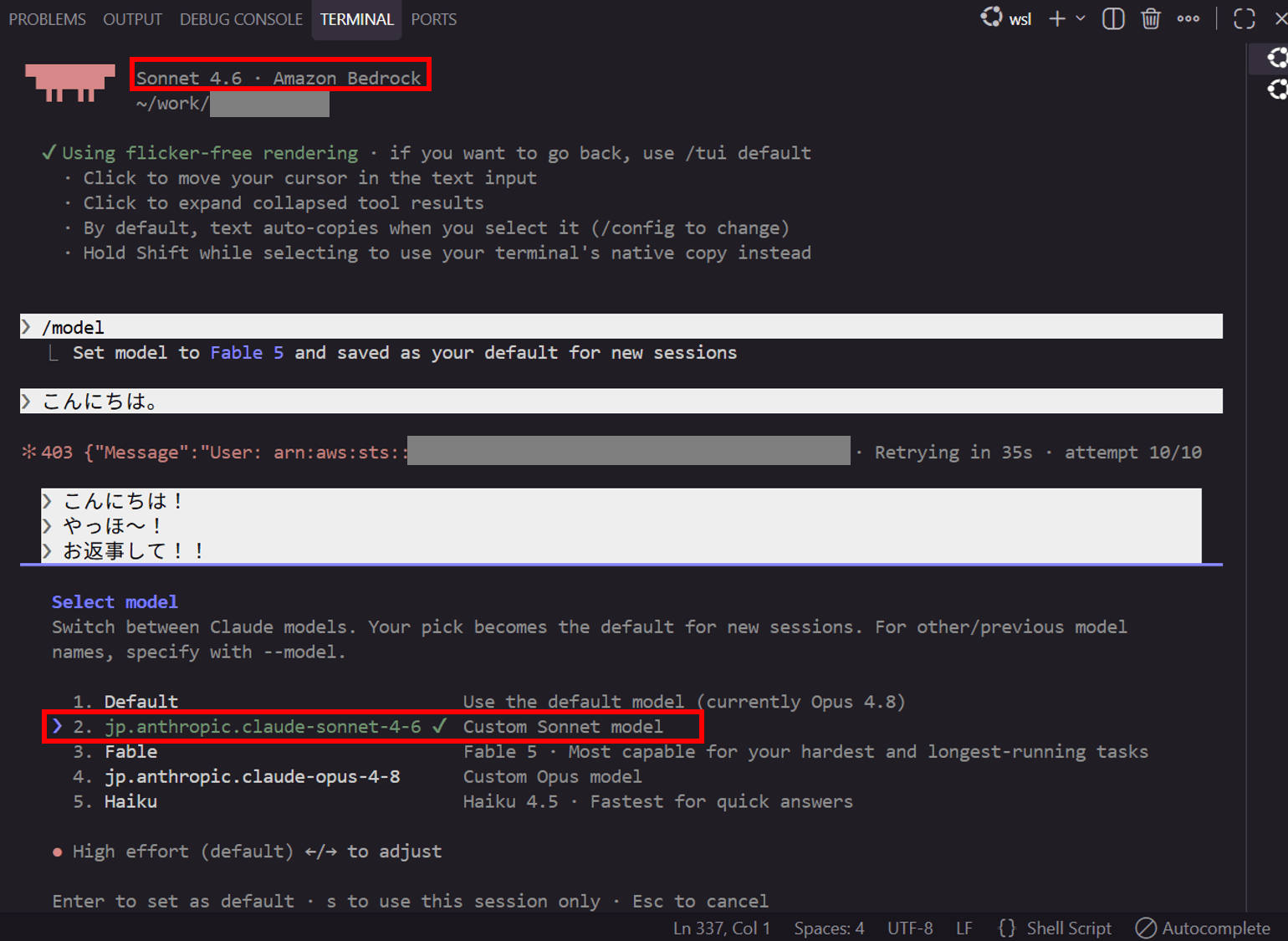
Pressing Esc to interrupt the retrying requests fixed it.
The accumulated messages all got replies in rapid succession.
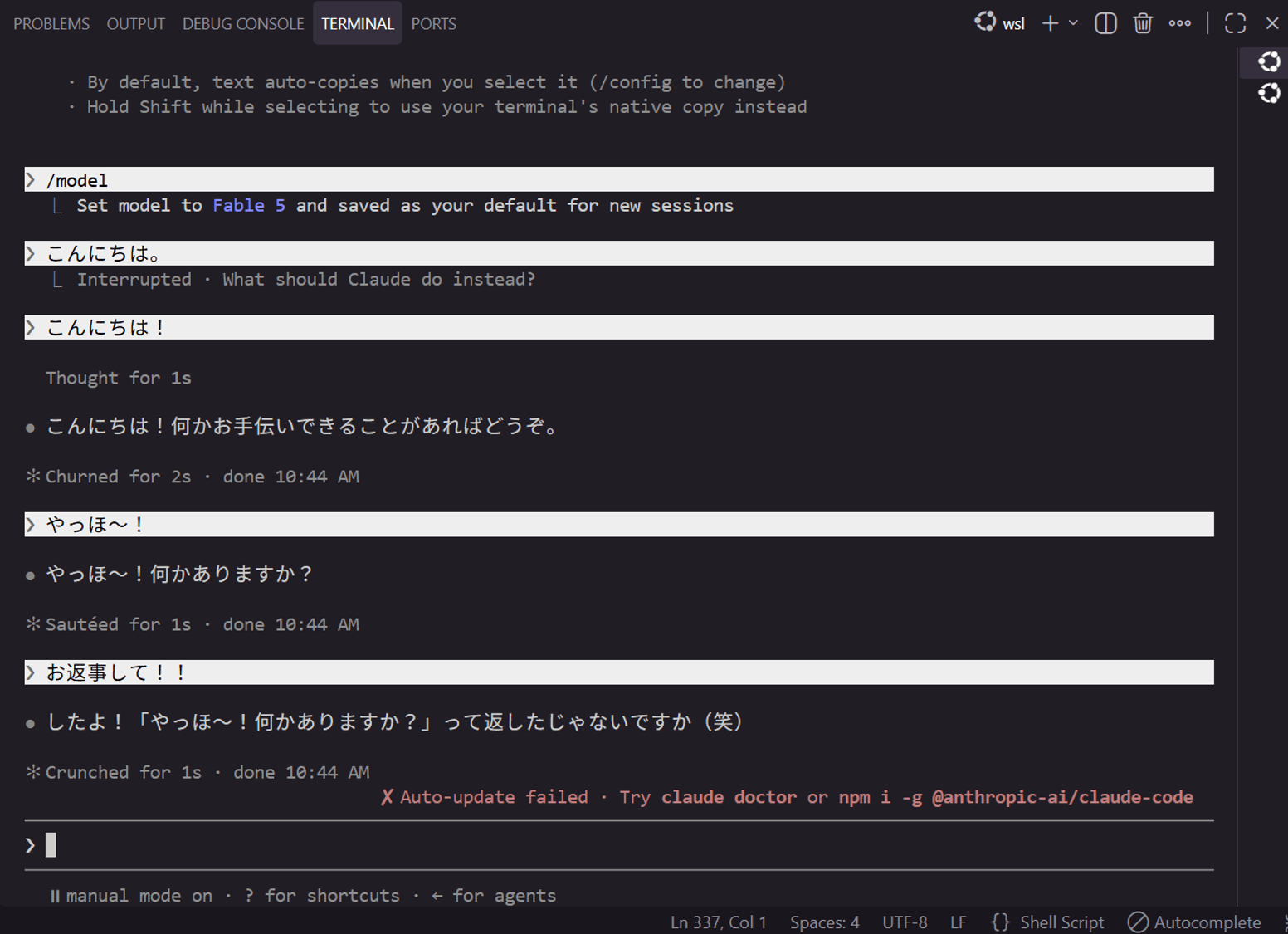
There's a lol in there (lol)
Issues
The ~/.claude/settings.json with availableModels written in it is currently read as a Claude Code configuration file shared by both the regular Claude Enterprise version and the Bedrock version.
This means that restricting availableModels to only jp. models for the Bedrock version also applies that restriction to the /model list in the regular Claude Enterprise version.
To separate this between the Enterprise version and the Bedrock version, it's necessary to think of a way to use separate settings.json files for each. Claude Code allows changing the configuration directory location via the CLAUDE_CONFIG_DIR environment variable, so by having only the claude-bedrock side read a different directory, the settings.json within it could also be separated.
I plan to verify this approach and write about it in a separate article.
Closing
I verified how to switch between Claude Enterprise and Claude on Bedrock for Claude Code in the WSL terminal. Switching itself is just a matter of setting CLAUDE_CODE_USE_BEDROCK, so coexistence with the Enterprise version was achieved easily.
Setting up Claude Code via Bedrock for the first time was a good learning experience.
If you have questions or requests about this article, please contact us via "Feedback for DevelopersIO" at the bottom of the page.
