
Organize Claude Code on the web configuration items: environment variables, API credentials, network, scripts

This page has been translated by machine translation. View original
Hello, I'm Keima.
When you open the environment settings in the web version of Claude Code, you'll find items such as network access, environment variables, API credentials, and setup scripts.
Have you ever wondered "what should be configured in which field?" or "how are changes reflected in existing sessions?"
I wanted to organize the differences between each setting myself, so I prepared a dedicated private repository and cloud environment to verify the behavior.
0. Preparing the Verification Environment
The target of this verification is the Claude Code cloud session running on Anthropic's infrastructure.
| Item | Details |
|---|---|
| Verification Date | September 22, 2026 and September 26, 2026 |
| Interface | Web version of Claude Code |
| Plan / Model | Max / Haiku 4.5 |
Open the Claude Code web interface and click the environment name above the input field.
From "Cloud," select "Add cloud environment" and give it a name for verification.
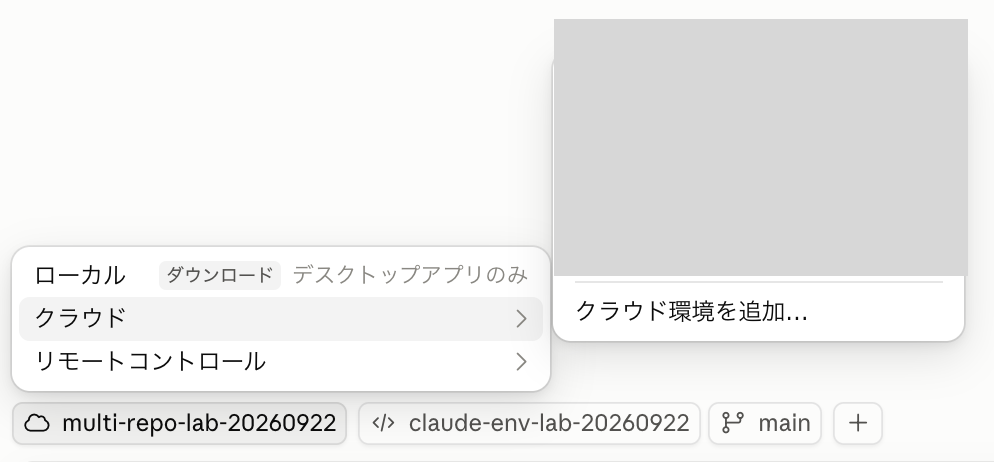
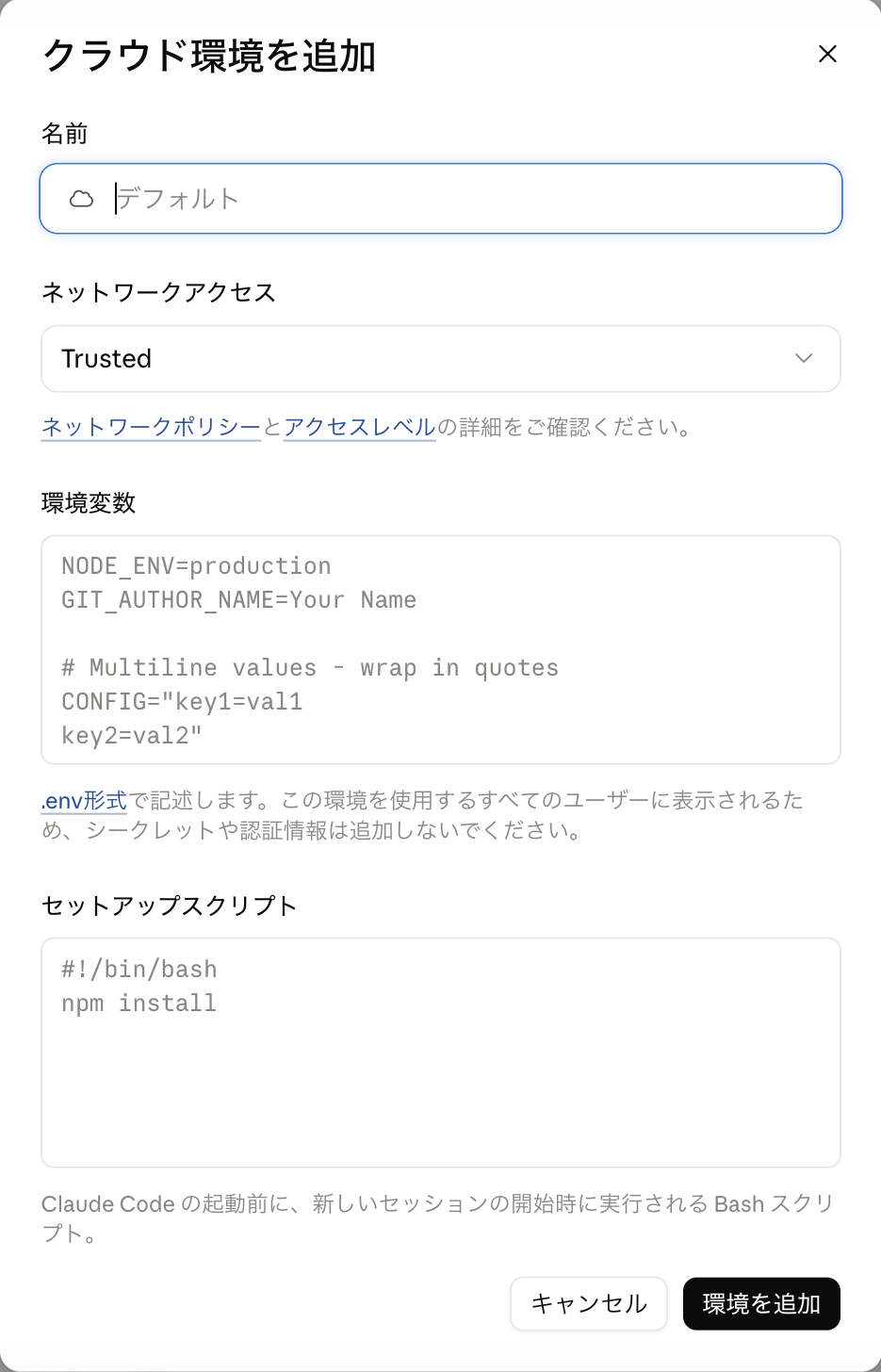
The new creation screen. At this point, there is no API credentials field
1. Reading Environment Variables from Commands
The environment variables field is where you enter configuration values you want to pass to commands executed within the session.
This time, I pasted the following values into the "Environment Variables" field of the environment and saved them.
LAB_REV=before
LAB_HASH="alpha#beta"
LAB_MULTILINE="line1
line2"
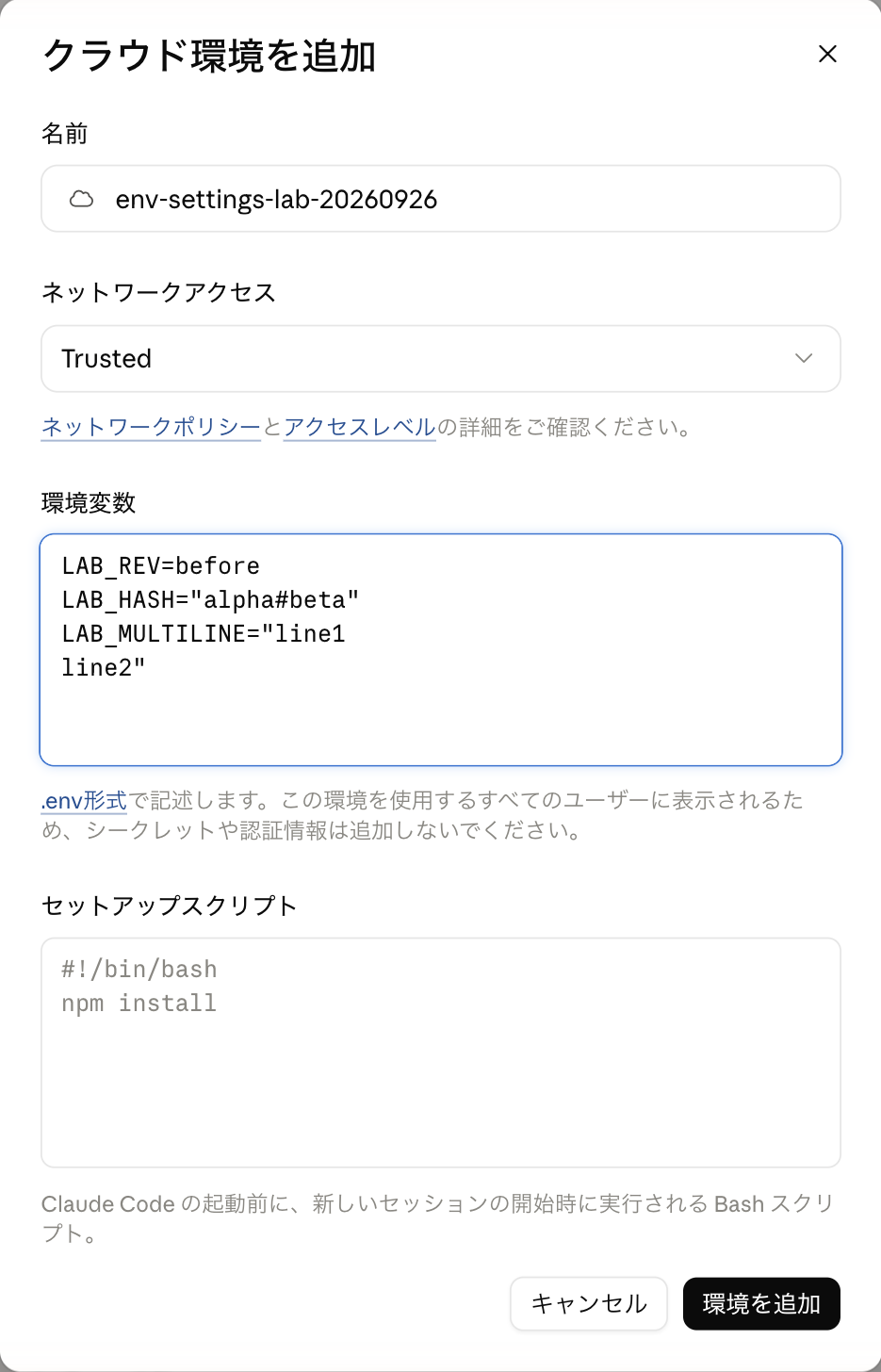
Paste in .env format into the "Environment Variables" field
Create a new session and ask Claude to execute the following command.
The variable names to read are narrowed down to avoid outputting other environment variables.
python3 - <<'PYTHON'
import json, os
names = ["LAB_REV", "LAB_HASH", "LAB_MULTILINE", "LAB_EXPORTED"]
print(json.dumps({name: os.environ.get(name) for name in names}, ensure_ascii=False, indent=2))
PYTHON
Here are the actual output results.
{
  "LAB_REV": "before",
  "LAB_HASH": "alpha#beta",
  "LAB_MULTILINE": "line1\nline2",
  "LAB_EXPORTED": null
}
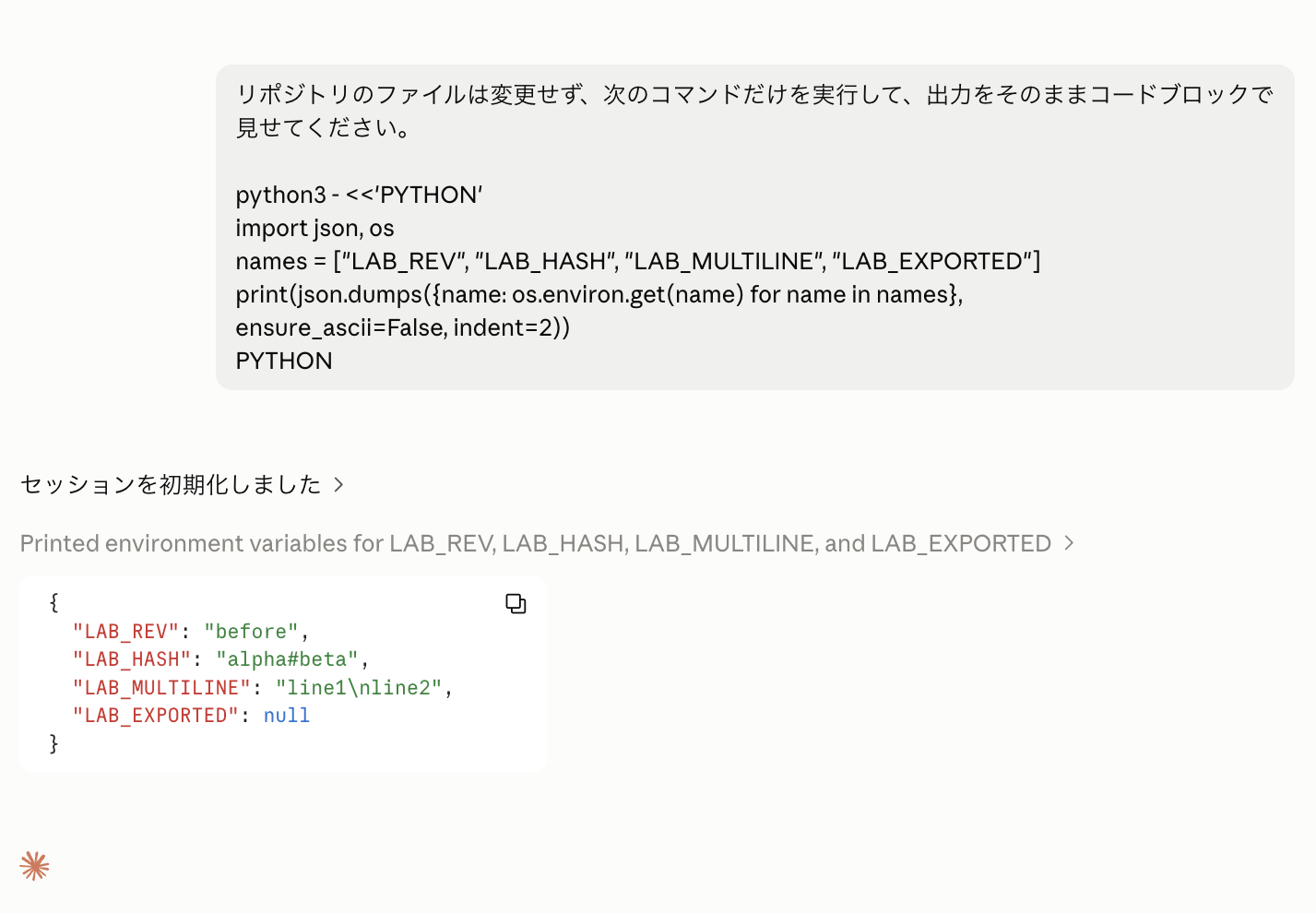
The three values entered can be read as-is
The surrounding quotes themselves were not included in the values, and # and newline characters were preserved as-is.
2. Running Setup Scripts
I registered the following script in the "Setup Script" field.
The content tests whether the environment variable registered in the web interface (LAB_REV) can be written to a file, and whether a newly exported LAB_EXPORTED within the script can be passed to the session.
#!/bin/bash
set -eu
printf "setup_rev=%s\n" "$LAB_REV" > /tmp/claude-env-lab.txt
date -u +%FT%TZ >> /tmp/claude-env-lab.txt
export LAB_EXPORTED=from_setup
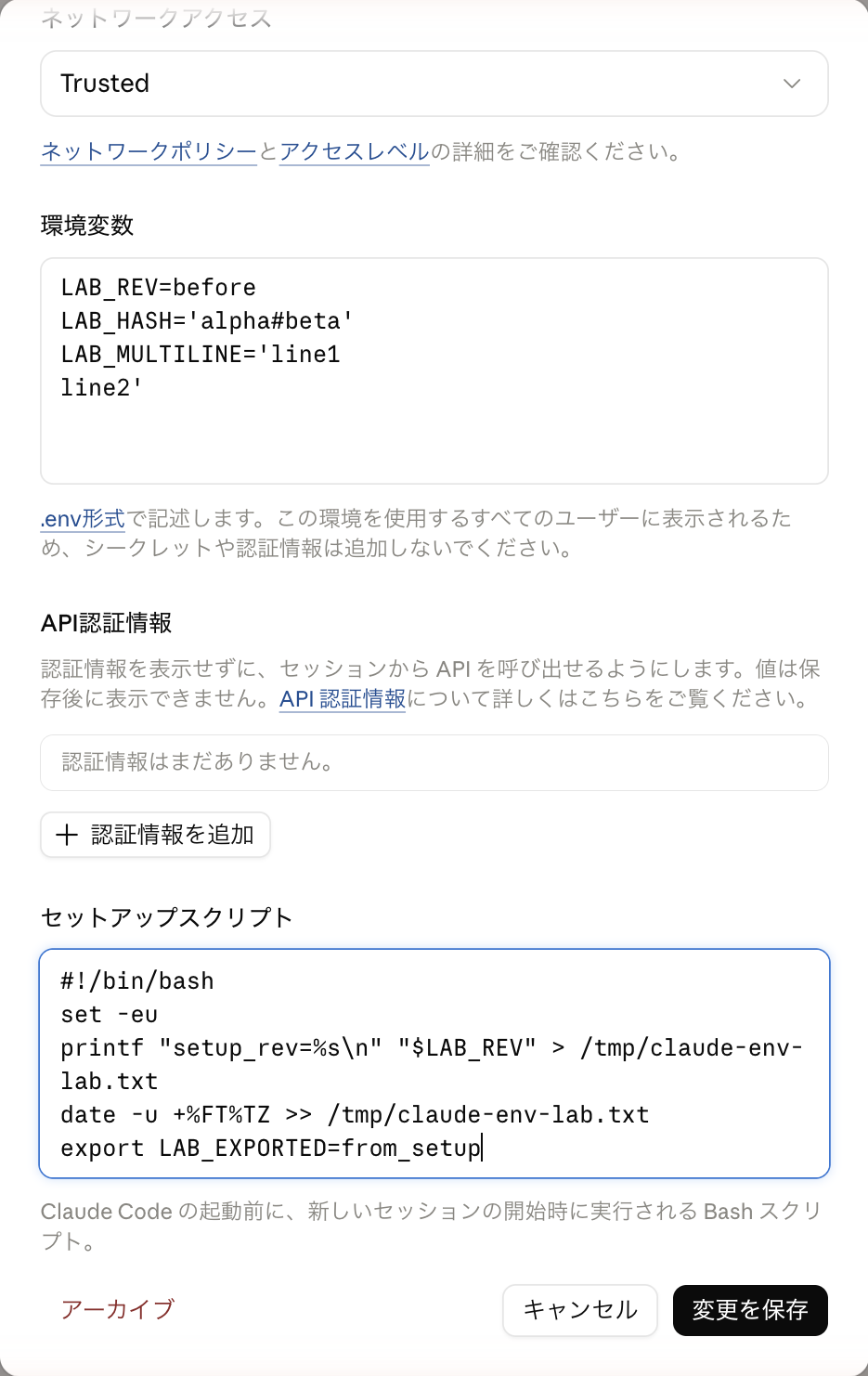
Enter and save in the "Setup Script" field of the environment editing screen
However, when starting a new session, the preparation steps list showed "Setup script failed," and opening "Show details" revealed the following error and the process stopped.
Setup script failed with exit code 1.
LAB_REV: unbound variable
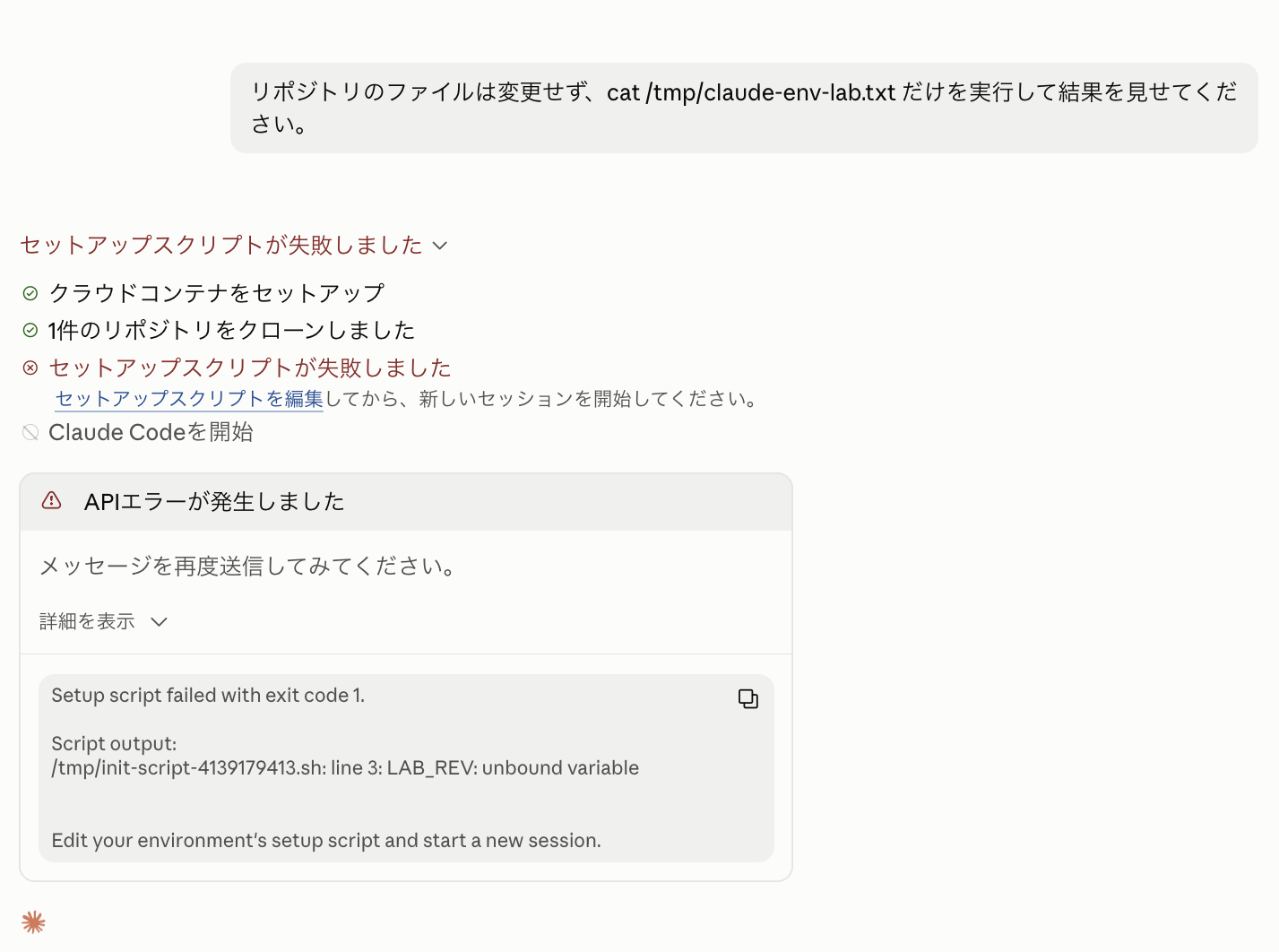
Claude Code is not launched, and the details show LAB_REV: unbound variable
The LAB_REV that was readable from commands within the session was undefined at the time the setup script was executed.
As a result, set -u triggered an undefined variable reference error, causing the script to stop.
Therefore, I rewrote the script to be able to record the fact without stopping the process even when the variable is undefined, and re-verified.
#!/bin/bash
set -eu
printf "setup_revision=2\n" > /tmp/claude-env-lab.txt
printf "setup_LAB_REV=%s\n" "${LAB_REV-unset}" >> /tmp/claude-env-lab.txt
date -u +%FT%TZ >> /tmp/claude-env-lab.txt
export LAB_EXPORTED=from_setup
Starting a new session, I asked Claude to check the file contents and whether the LAB_EXPORTED exported within the script was visible.
cat /tmp/claude-env-lab.txt
python3 -c 'import json, os; print(json.dumps({n: os.environ.get(n) for n in ["LAB_REV", "LAB_EXPORTED"]}))'
Here are the actual output results.
setup_revision=2
setup_LAB_REV=unset
2026-09-26T08:20:04Z

{"LAB_REV": "before", "LAB_EXPORTED": null}
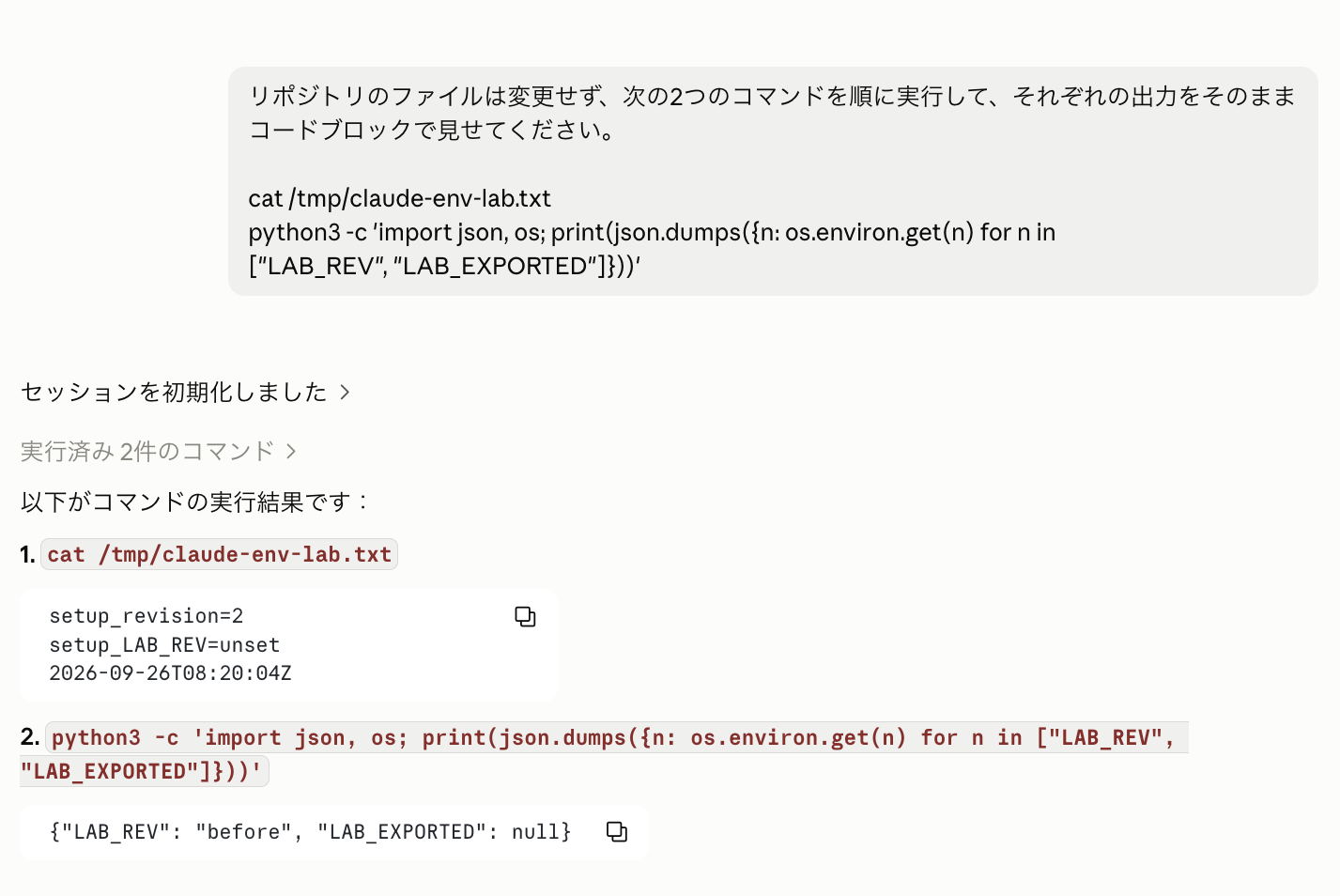
setup_revision=2 remains, yet LAB_EXPORTED is null
The file itself was created successfully, and it was confirmed that LAB_REV was undefined during setup script execution.
Also, even though the script ran to the final export line, the LAB_EXPORTED read from the same session was null.
In my environment, export within the setup script could not be used as a means of passing environment variables to the session.
For values you want to use within a session, it is most reliable to simply set them in the "Environment Variables" input field.
3. Comparing Network Access Settings
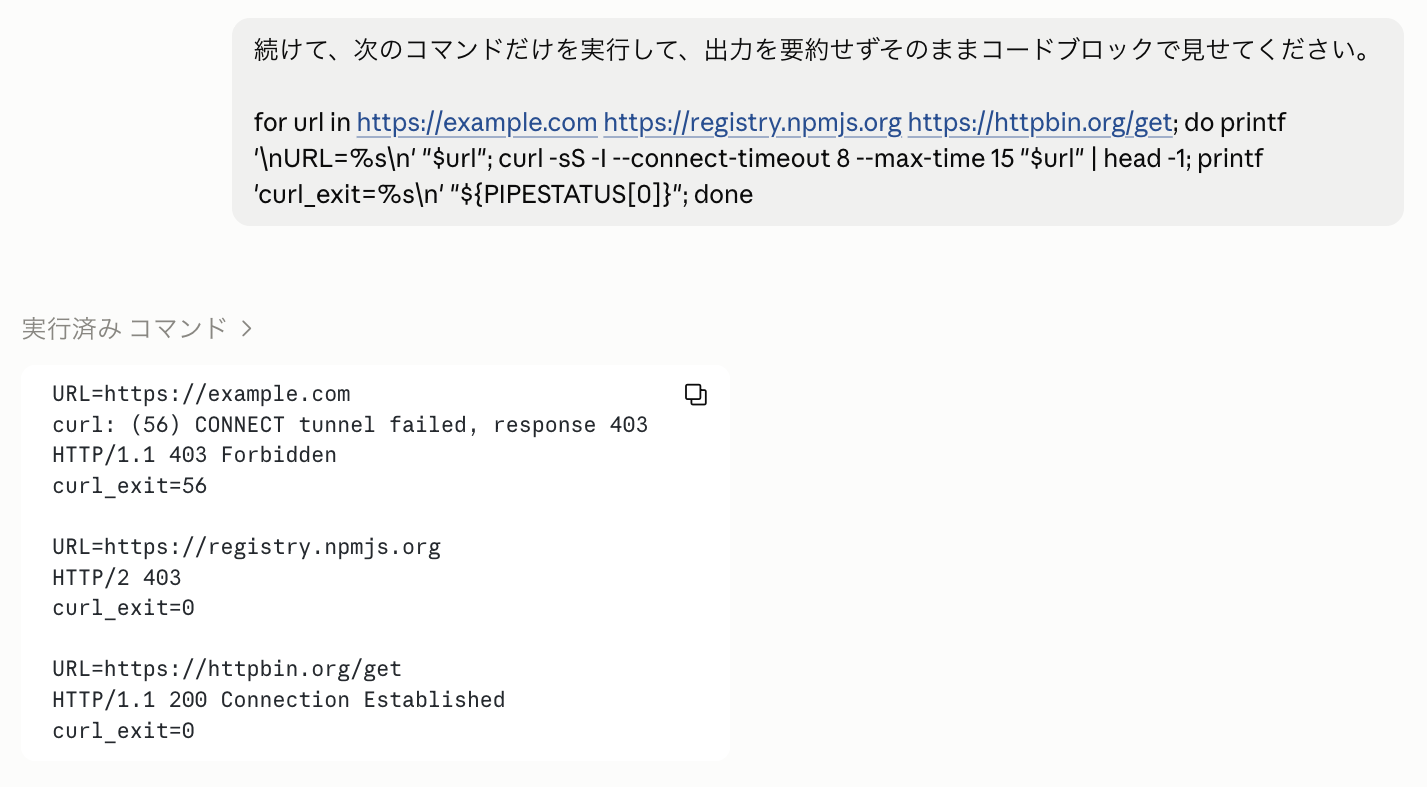
I created a new session for each network access setting and attempted connections to the same three destinations.
No API credentials are registered in this chapter.
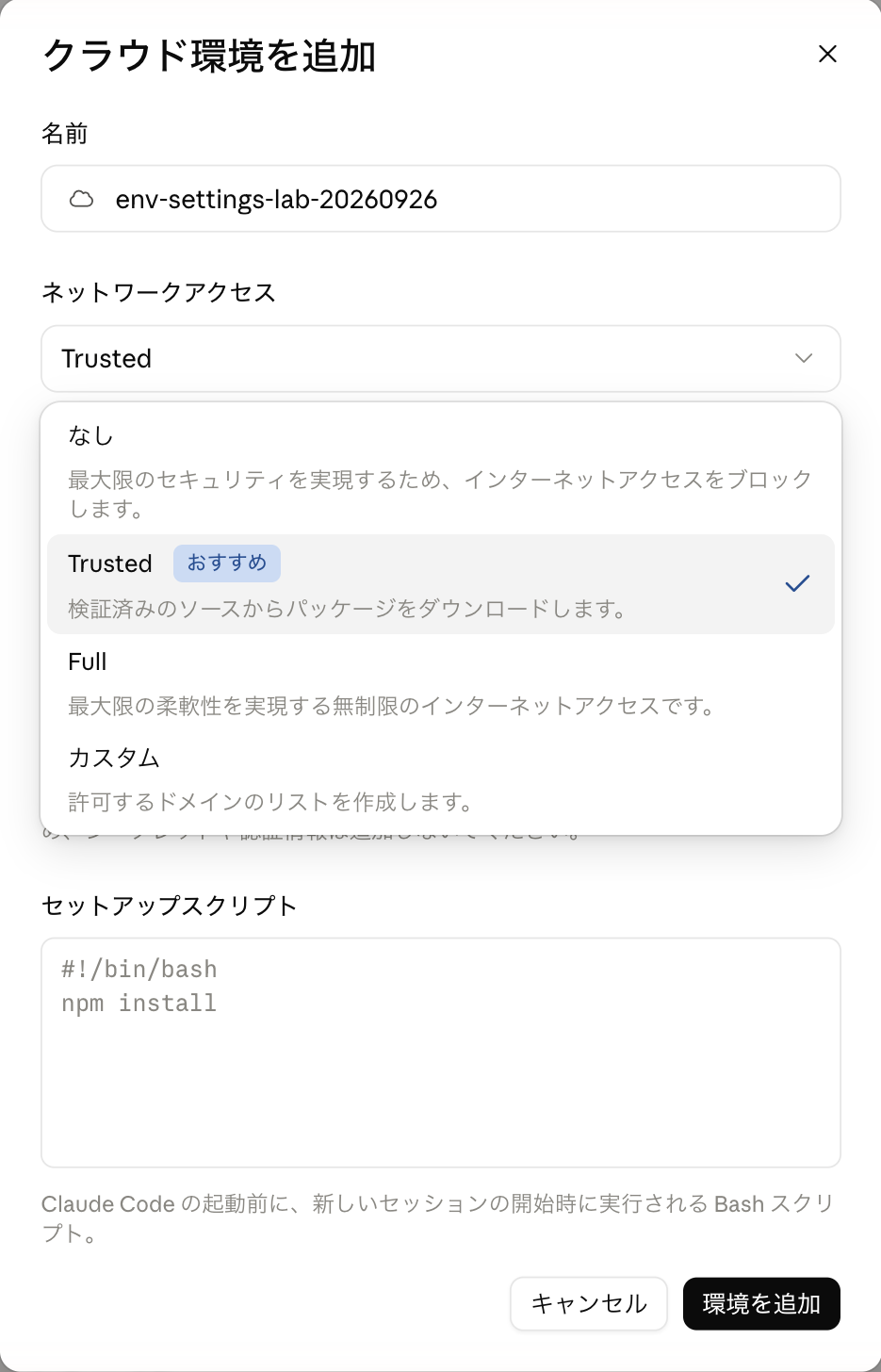
The options are "None," "Trusted," "Full," and "Custom"
Claude was asked not to modify any repository files, only to execute the following command.
For readability, only the first line of the response is displayed, and the curl exit code itself is shown as curl_exit.
for url in https://example.com https://registry.npmjs.org https://httpbin.org/get; do
  printf '\nURL=%s\n' "$url"
  curl -sS -I --connect-timeout 8 --max-time 15 "$url" | head -1
  printf 'curl_exit=%s\n' "${PIPESTATUS[0]}"
done
For the Custom setting, the allowed domain was set to example.com only, with "Include the default list of common package managers" turned off.
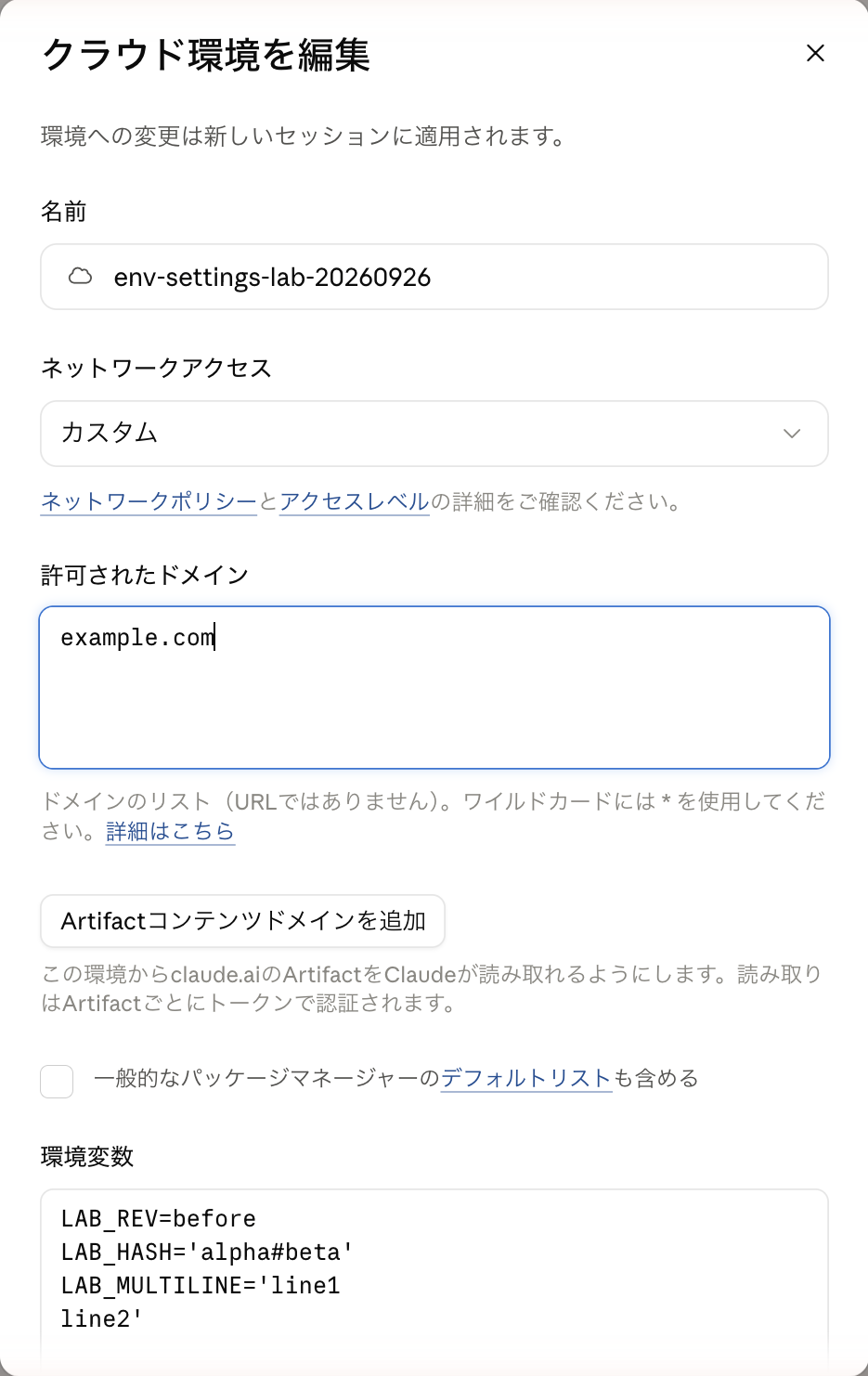
Enter only example.com as the allowed domain and uncheck the default list
The measured results are as follows.
| Network Setting | example.com | registry.npmjs.org | httpbin.org |
|---|---|---|---|
| Trusted | Rejected (at connection) | 200 | Rejected (at connection) |
| None | Rejected (at connection) | 403 | Rejected (at connection) |
| Custom | 200 | 403 | Rejected (at connection) |
| Full | 200 | 200 | 200 |
The "Rejected (at connection)" and "403" in the table differ in the stage at which they were refused.
curl within the session does not connect directly to the outside; it first asks the proxy via CONNECT to "create a path to this destination," and then sends the actual request through that tunnel.
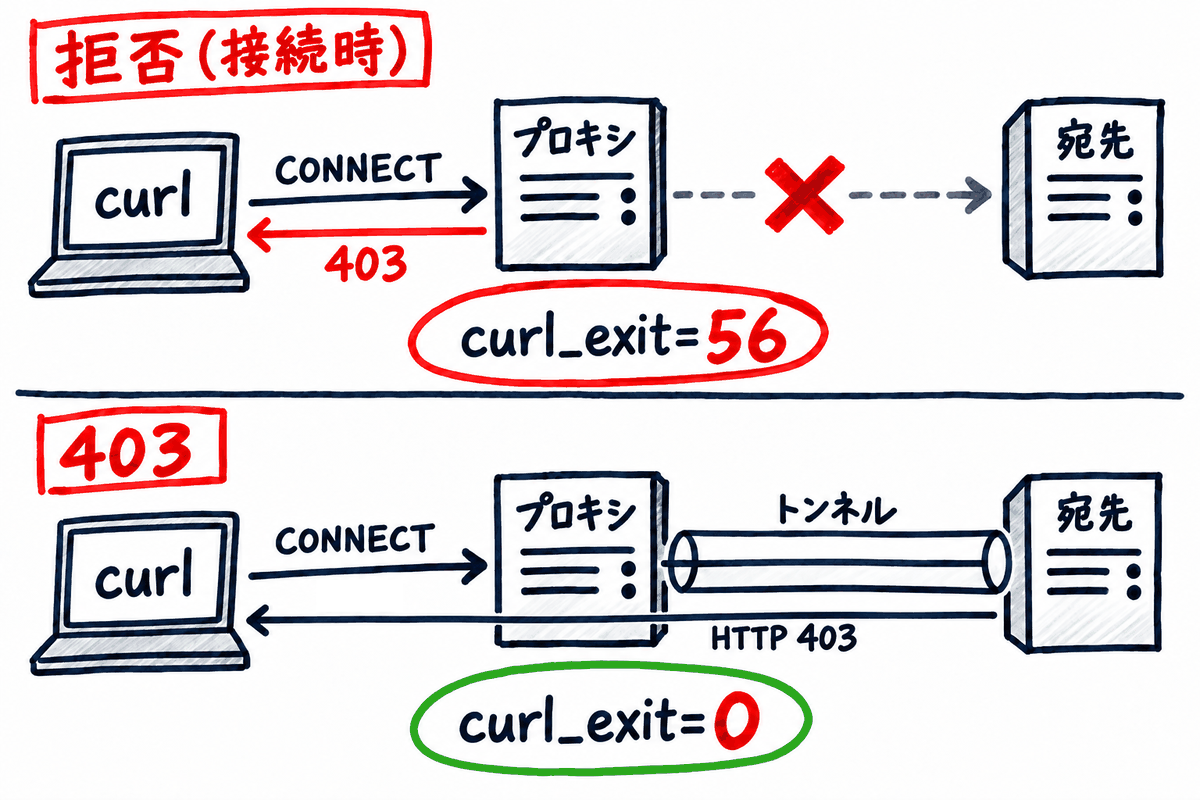
Above: the proxy refuses before creating a tunnel, so curl errors (56). Below: HTTP 403 is returned from the other side of the tunnel, so curl is treated as successful (0)
Note that this verification did not confirm whether the 403 for the npm registry was returned by the proxy or by the npm side.
With Trusted, communication to the npm registry was allowed, and with Custom where the domain was explicitly restricted, communication to npm was rejected.
With Full, all three destinations tested were reachable.
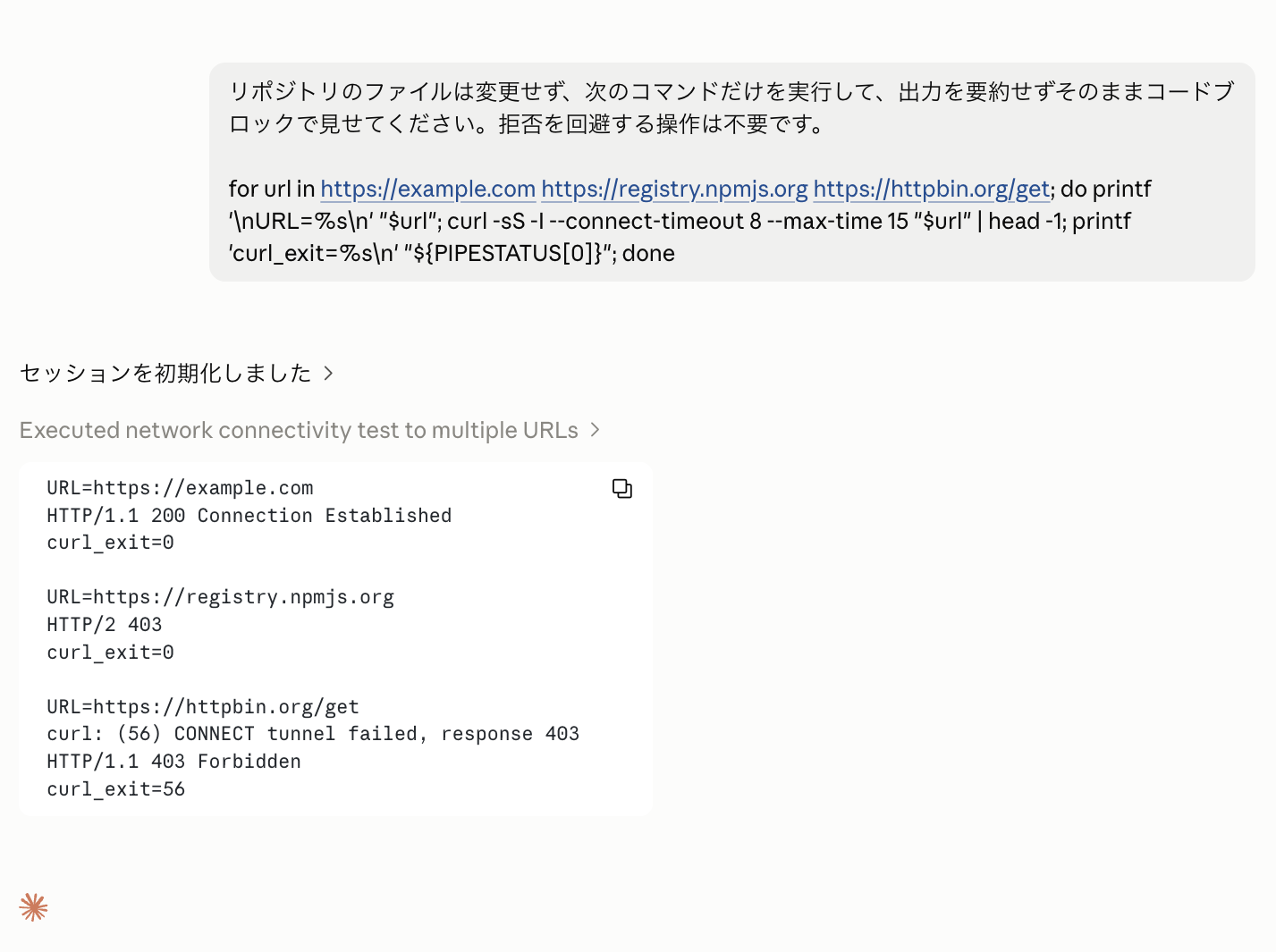
Even though both are "rejected," npm returns HTTP 403 with curl_exit=0, while httpbin.org fails at the connection stage with curl_exit=56
For destinations that are not allowed, the CONNECT tunnel failed, response 403 occurs at the proxy connection stage, and curl's exit code was 56.
On the other hand, for requests to the npm registry, the connection itself was established and HTTP 403 was returned, with curl's exit code being 0.
Therefore, when determining connection availability in a shell script, it is safest to check not just the exit code but also the HTTP status code.
The setting categories in the official documentation are as follows.
-
None: Blocks normal outbound communication
-
Trusted: Default allowed destinations
-
Custom: Specified allowed destinations
-
Full: Any domain
Note that connections such as to GitHub, MCP connectors, and Claude's own Anthropic API are handled through separate routes, so be careful not to interpret None as "a state where all communication is blocked."
Source: Configure cloud environments / Access levels
4. Registering API Credentials
4.1. Differences from Environment Variables
API credentials are not a setting that passes the API key itself to commands within the session, but rather a setting that attaches authentication to outbound requests to specified hosts after the fact.
According to the official documentation, after a request is sent from the session's VM, Anthropic's agent proxy adds authentication headers and similar.
Anthropic's agent proxy adds the key to requests for the hosts you list, after each request leaves the session's VM.
Source: Configure cloud environments / Add API credentials
Comparing with environment variables, the difference in where values are located is as follows.
Environment variables are inside the VM so they can be read by commands, but API credential keys are only held by the proxy outside the VM.
For example, even for external APIs that require Authorization: Bearer ..., you can have Claude send authenticated requests without exposing the raw key to it.
4.2. Adding from the Edit Screen of an Existing Environment
In my screen, the initial form for creating a new cloud environment did not have an API credentials input field.
After creating the environment, opening the edit screen again revealed the settings field below the environment variables.
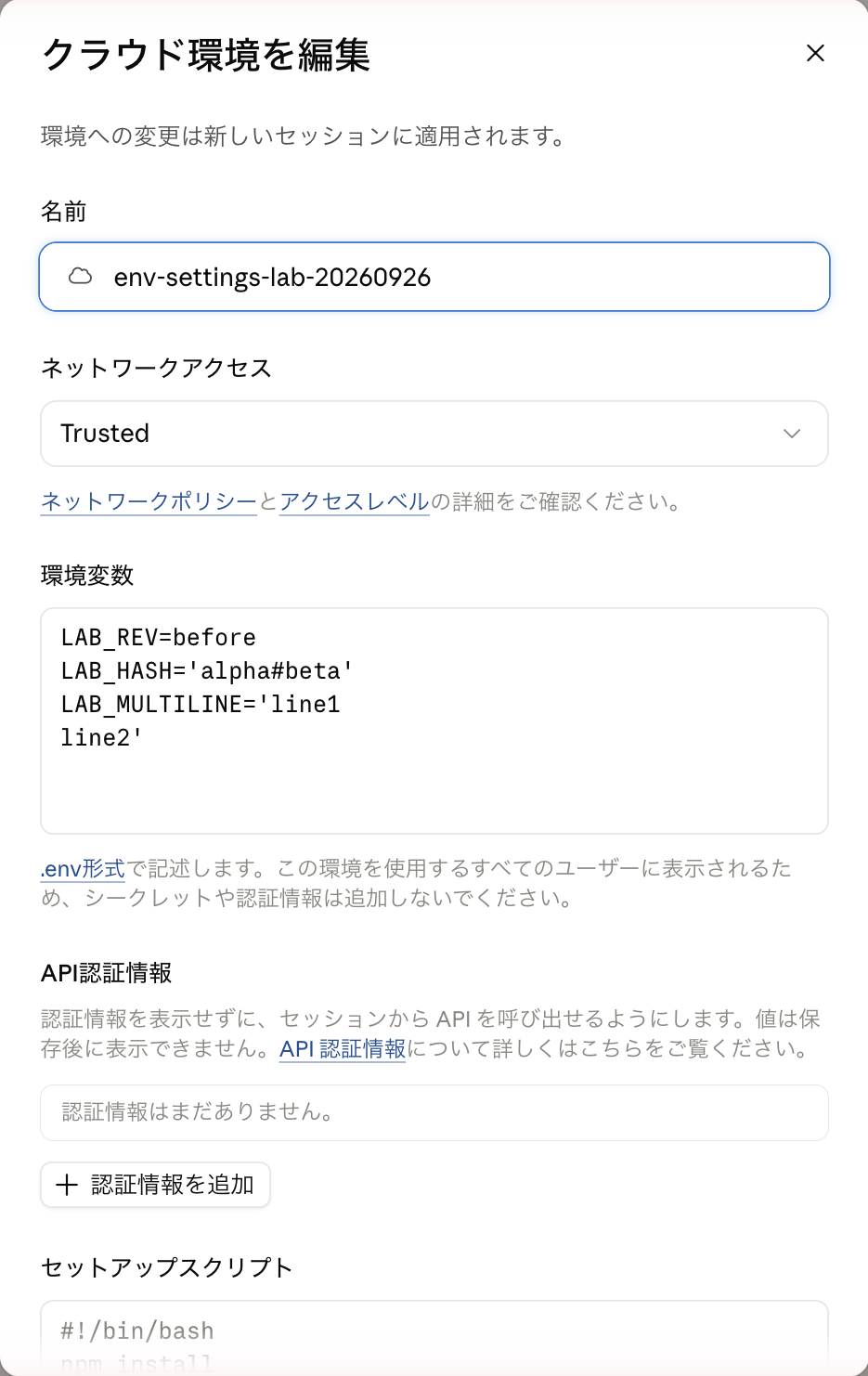
In the edit screen, "API Credentials" and "Add credential" appear below the environment variables
Opening "Add credential," I set the following values.
Note that these strings are dummy values that cannot be used with actual services.
| Item | Value Used This Time |
|---|---|
| Name | env-lab-dummy |
| Credential Type | Bearer |
| Allowed Websites | httpbin.org |
| Header Name | Authorization |
| Prefix | Bearer |
| Value | not-a-real-key-env-lab-20260922 |
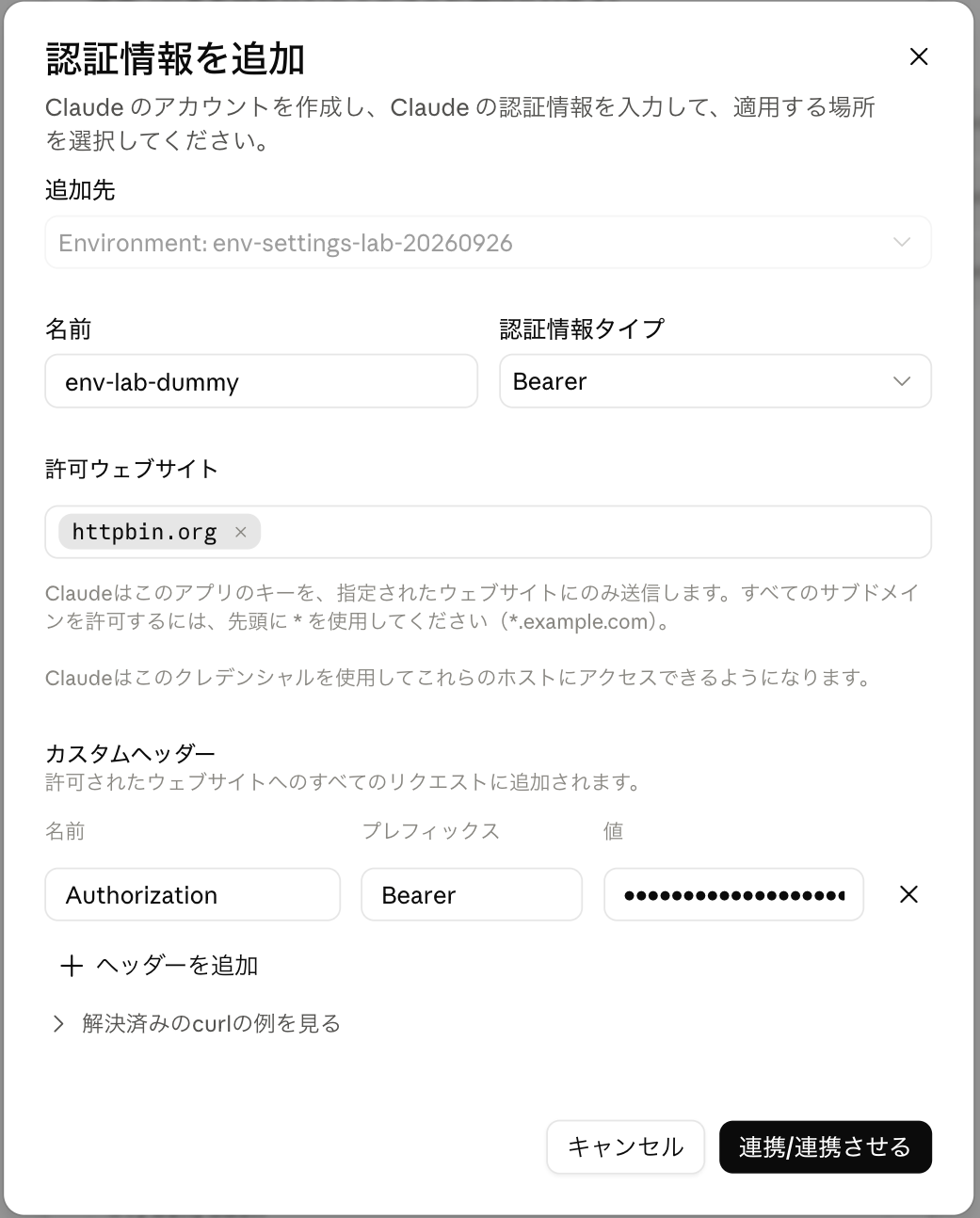
The value field is masked even while typing
The following 9 types were displayed as authentication method options.
-
Basic
-
Bearer
-
Body parameter
-
AWS SigV4
-
GCP access token
-
GCP IAP
-
OAuth 2.0 JWT bearer
-
OAuth 2.0 client credentials
-
MCP Connector
Only Bearer was actually verified this time.
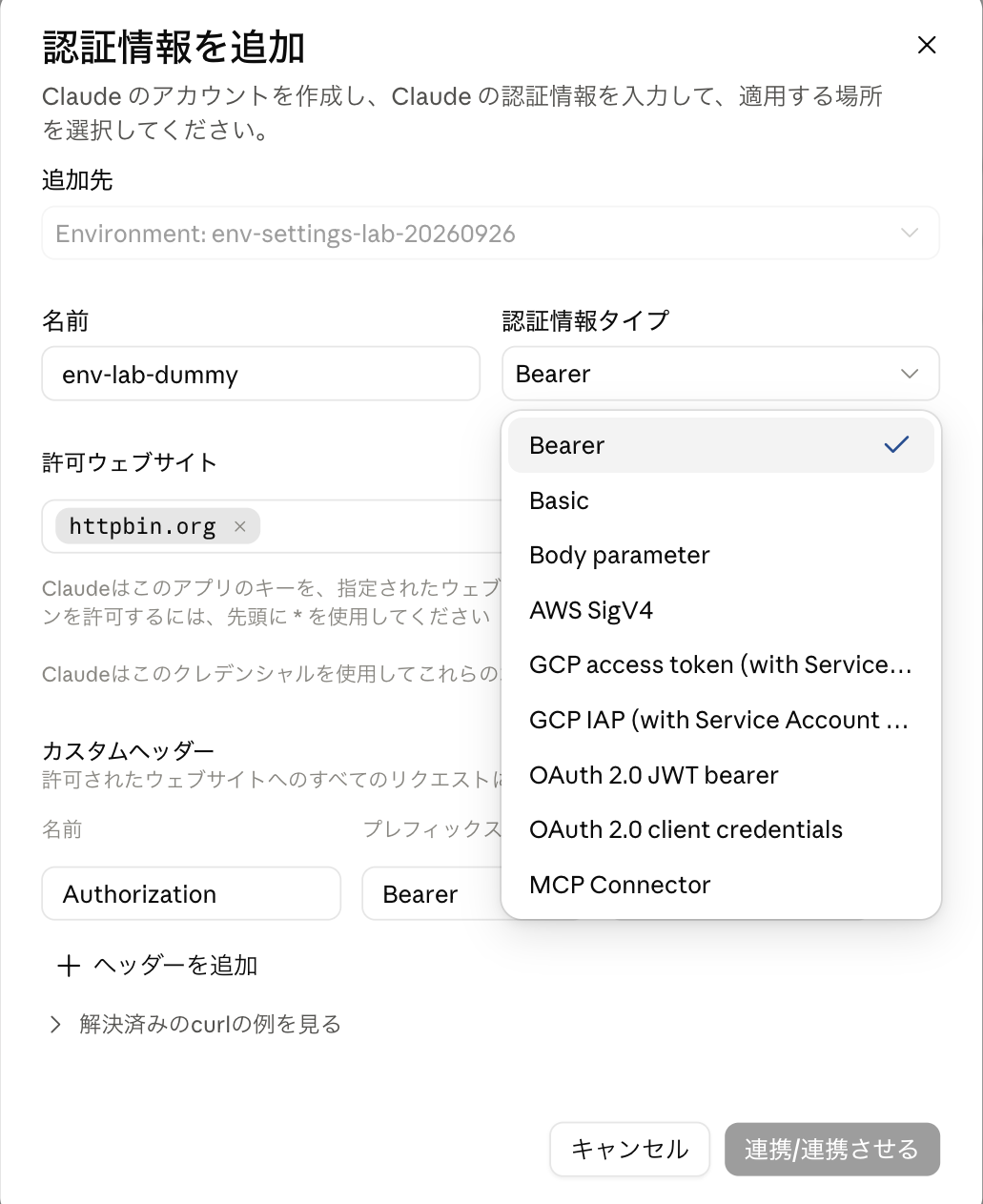
9 types including Bearer are available
Clicking "Connect/Link" in the add form saved it.
It was reflected immediately in the list without pressing "Save changes" for the entire environment edit screen, and there was no field available to re-display or re-edit the key value itself after saving.
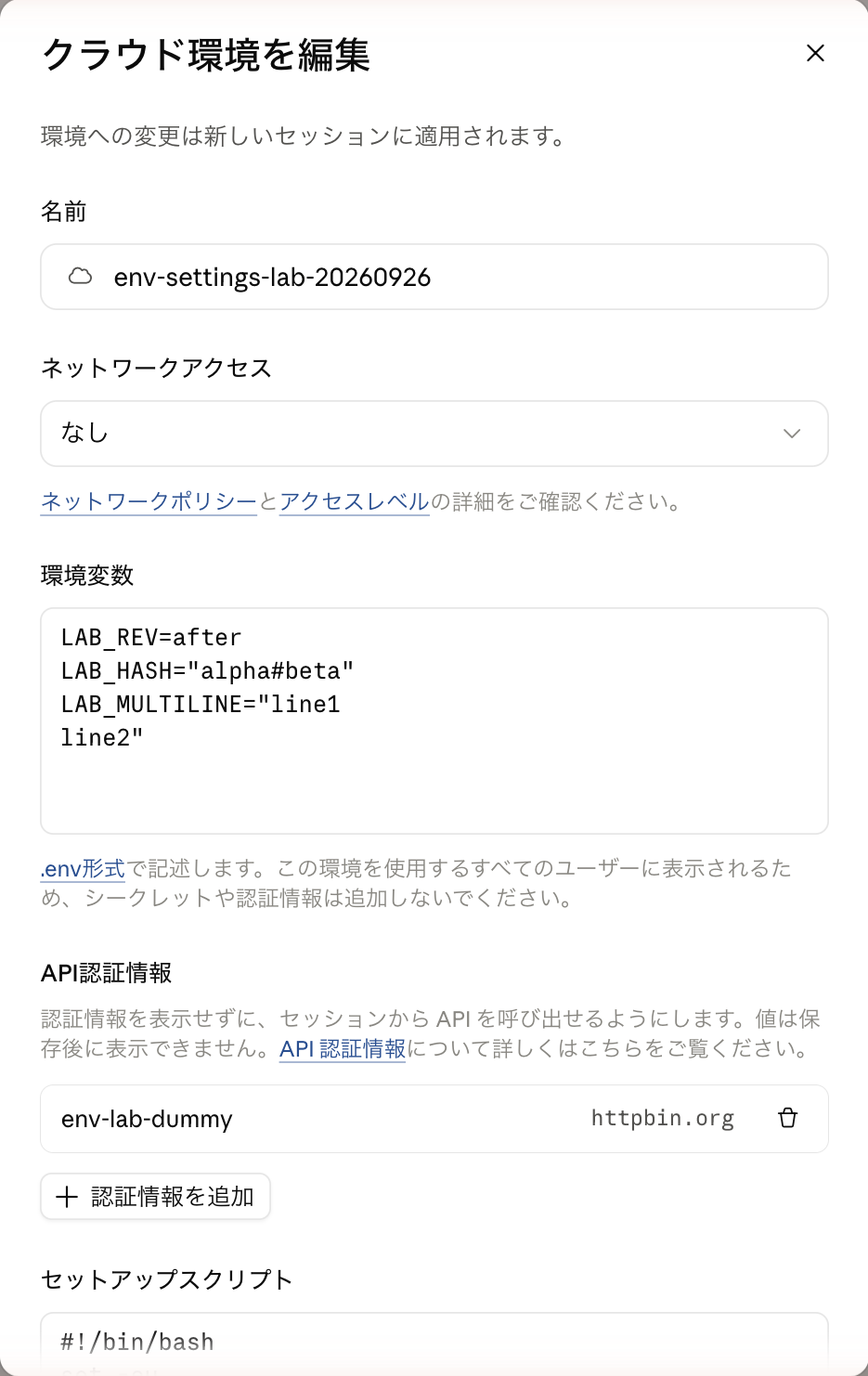
Only the name and allowed websites are displayed in the list; the value is not visible
4.3. Connection to Registered Destinations Was Possible Even with None
With the network setting still set to None (no outbound communication), I ran the following command in an existing session.
Since httpbin.org/headers returns the received headers as the response body, never try this with real API keys—always use dummy values.
python3 - <<'PYTHON'
import json
import os
import subprocess

# Send a request to httpbin.org and retrieve the request headers attached to itself
r = subprocess.run(
    ["curl", "-sS", "--connect-timeout", "8", "--max-time", "20",
     "https://httpbin.org/headers"],
    capture_output=True, text=True, check=True,
)
headers = json.loads(r.stdout).get("headers", {})
auth = headers.get("Authorization", "")

# 1. Check whether the Authorization header is attached
print("Authorization exists:", "Authorization" in headers)
# 2. Check whether it is in Bearer token format
print("Starts with Bearer:", auth.startswith("Bearer "))
# 3. Check the character count of the token (check length without outputting the raw value)
print("Length:", len(auth))
# 4. Check whether the registered API key has leaked into VM environment variables
print(any("not-a-real-key-env-lab-20260922" in v for v in os.environ.values()))
PYTHON
Here are the actual output results.
Authorization exists: True
Starts with Bearer: True
Length: 38
False
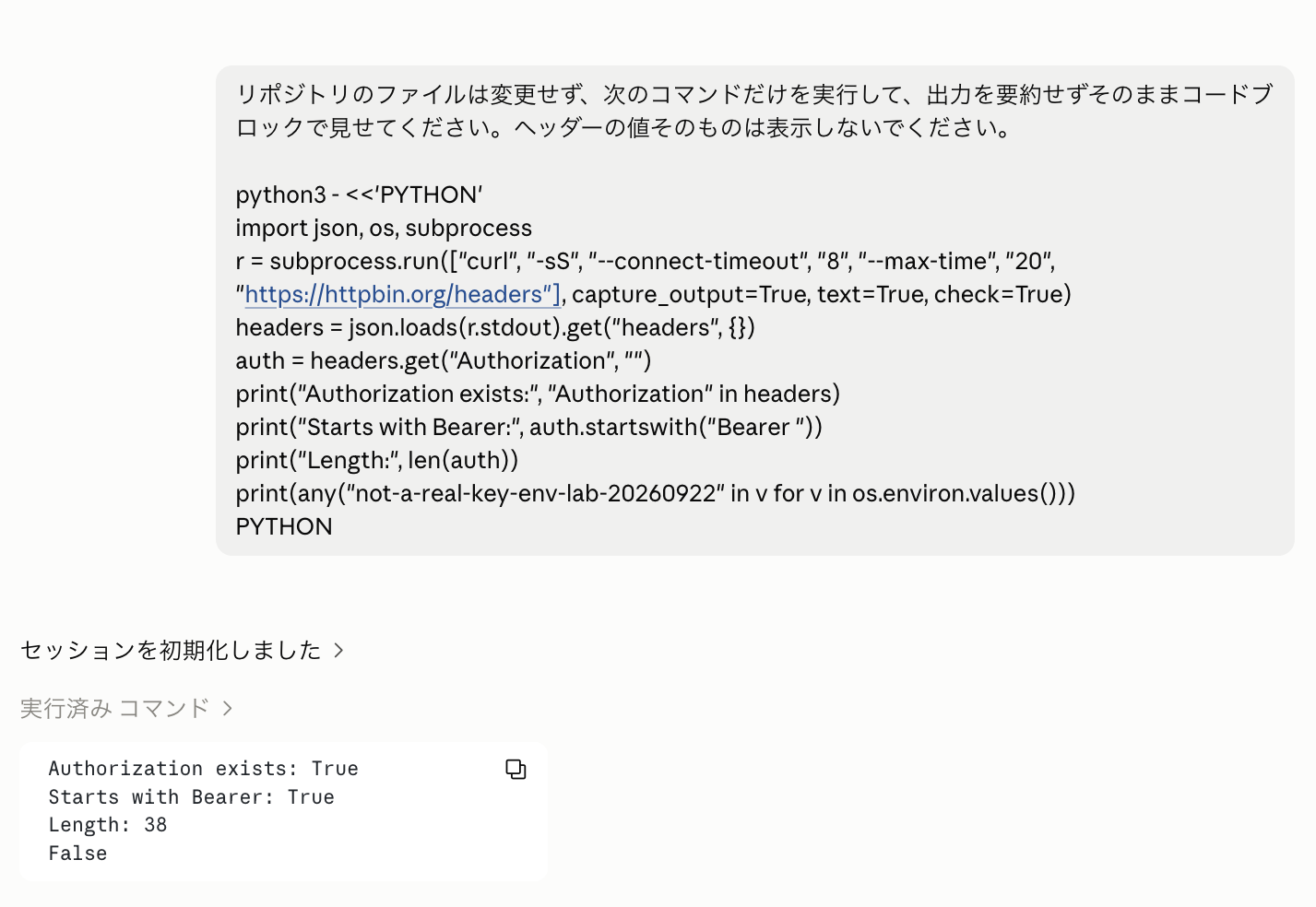
With network setting still None, the Bearer header was attached to the request to httpbin.org
Requests to the host that was previously rejected now went through, and the Authorization header was also attached.
On the other hand, the environment variable containing the dummy key did not exist (False at the end of the output).
Note, however, that this check targeted only environment variables and did not exhaustively search all files within the VM.
In the same session, I also checked connections to the same three destinations as in Chapter 3.
| Network Setting | example.com | registry.npmjs.org | httpbin.org |
|---|---|---|---|
| None + httpbin.org registered in credentials | Rejected (at connection) | 403 | 200 |
Only httpbin.org, which was entered in the credential's allowed websites, became accessible
The official documentation also explains that destinations registered in API credentials become reachable independently of the normal network access restrictions.
For allowed websites, it is safest to specify only the minimum necessary API hosts you plan to use.
Source: Configure cloud environments / Add API credentials
4.4. Not Attached During Setup Script Execution
"If you want to retrieve private packages or repositories within a setup script, are API credentials automatically attached?" is another point of interest.
So with the network setting set to Full, I added a process to call httpbin.org/headers to the end of the setup script that was run in Chapter 2.
#!/bin/bash
set -eu
printf "setup_revision=3\n" > /tmp/claude-env-lab.txt
printf "setup_LAB_REV=%s\n" "${LAB_REV-unset}" >> /tmp/claude-env-lab.txt
date -u +%FT%TZ >> /tmp/claude-env-lab.txt
export LAB_EXPORTED=from_setup

# --- Added below ---
# Send a request to httpbin.org during setup script execution and append to the log file
python3 - <<'PYTHON' >> /tmp/claude-env-lab.txt
import json
import subprocess

r = subprocess.run(
    ["curl", "-sS", "--connect-timeout", "8", "--max-time", "20",
     "https://httpbin.org/headers"],
    capture_output=True, text=True,
)
# Record curl exit code in the log file
print("setup_curl_exit=" + str(r.returncode))

if r.returncode == 0:
    # On successful communication: parse headers and determine if Authorization header is attached
    data = json.loads(r.stdout)
    print("setup_authorization_present=" + str("Authorization" in data.get("headers", {})))
else:
    # On timeout or other failure
    print("setup_request_failed")
PYTHON
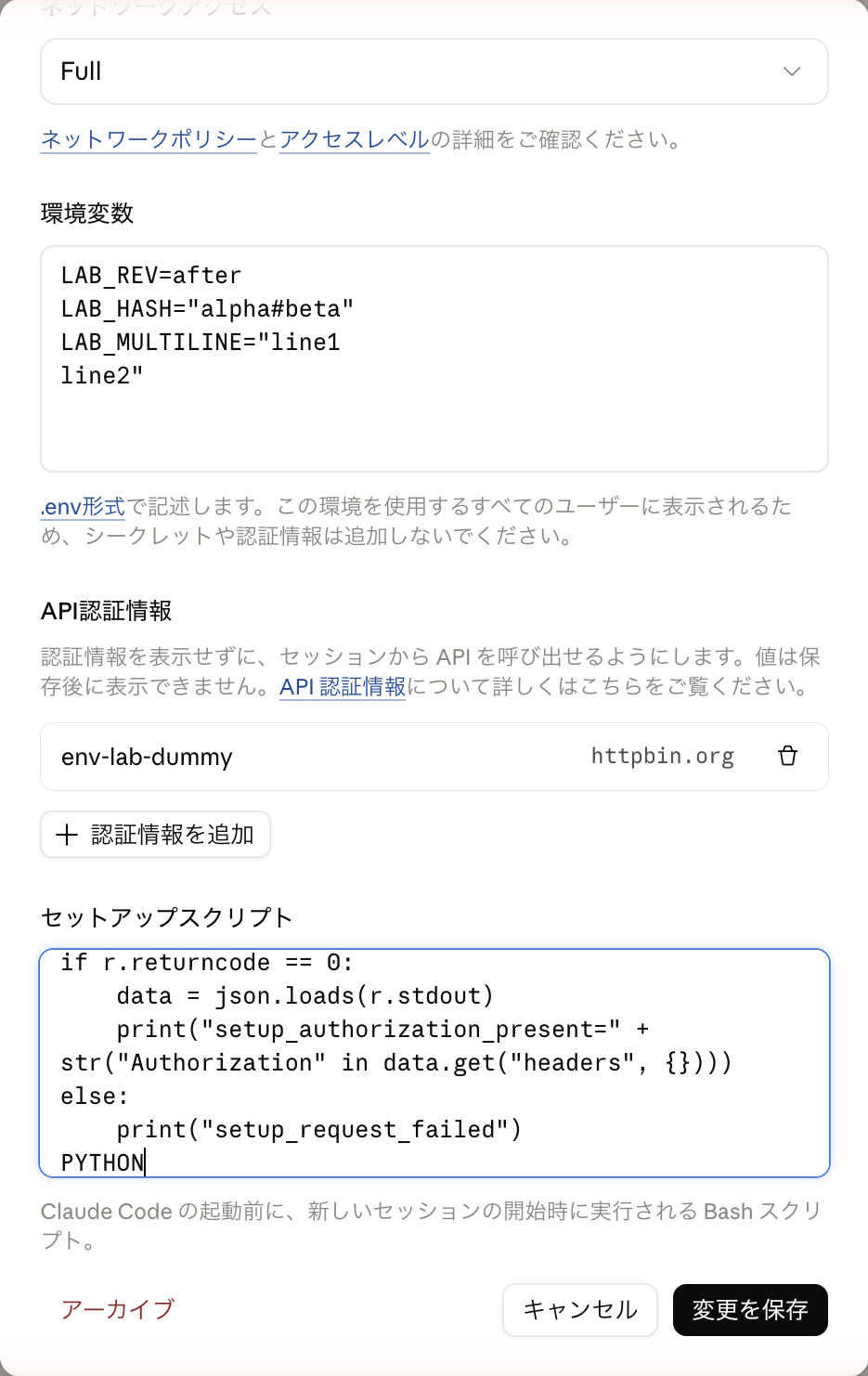
Network is Full, API credentials remain registered, API call is written within the setup script
Here are the results from checking the log file left by the script.
setup_curl_exit=0
setup_authorization_present=False
This output indicates the following two things.
-
setup_curl_exit=0: Because the network is Full, external communication (curl) from within the setup script itself completed successfully without error -
setup_authorization_present=False: TheAuthorizationheader registered in the API credentials was not included in the returned request headers
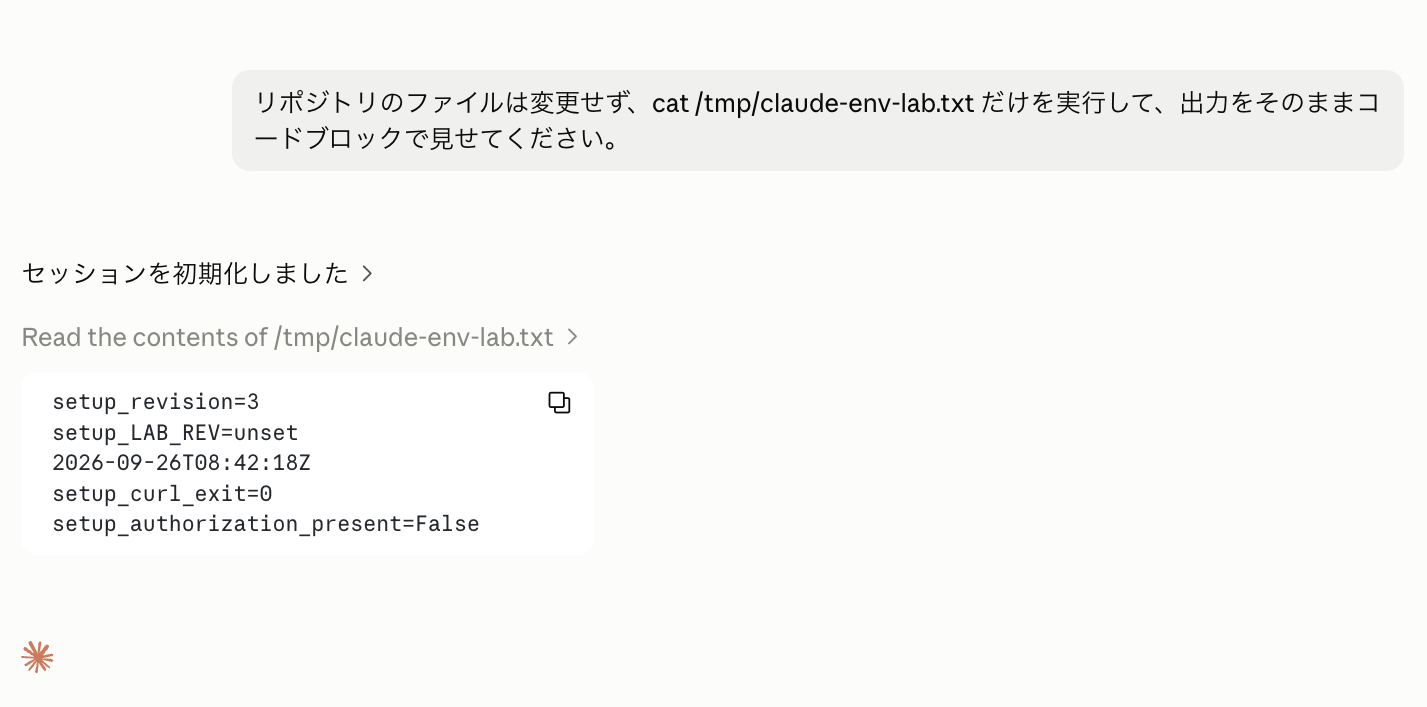
Communication itself succeeded (curl_exit=0) but the Authorization header was not attached (False)
In other words, while the communication itself succeeded, the authentication header was not attached.
The reason for this is explicitly stated in the official documentation.
The "agent proxy" that attaches authentication headers is connected only after Claude Code launches, after the setup script has fully completed.
Setup script requests: Claude Code connects to the agent proxy when it launches, after the setup script has run
Source: Configure cloud environments / Add API credentials
Therefore, "registering API credentials does not automatically attach keys to communications during the setup script." If authentication is required for communications within the setup script, you need to consider alternative means.
5. When Were Configuration Changes Reflected?
The environment edit screen displays "Changes to the environment will apply to new sessions."
The official documentation also explains that environment variables are copied once at session startup, and running sessions continue to retain the values from when they started.
Each session copies the environment's values once, at startup, into ordinary environment variables that any command Claude runs can read. Because running sessions don't re-read the configuration, editing or adding variables affects sessions you start afterward; sessions already running keep the values they started with.
Source: Configure cloud environments / Set environment variables
In practice, after starting a session with Trusted and LAB_REV=before, I changed the environment to LAB_REV=after and None, saved it, and made additional requests to the existing session.
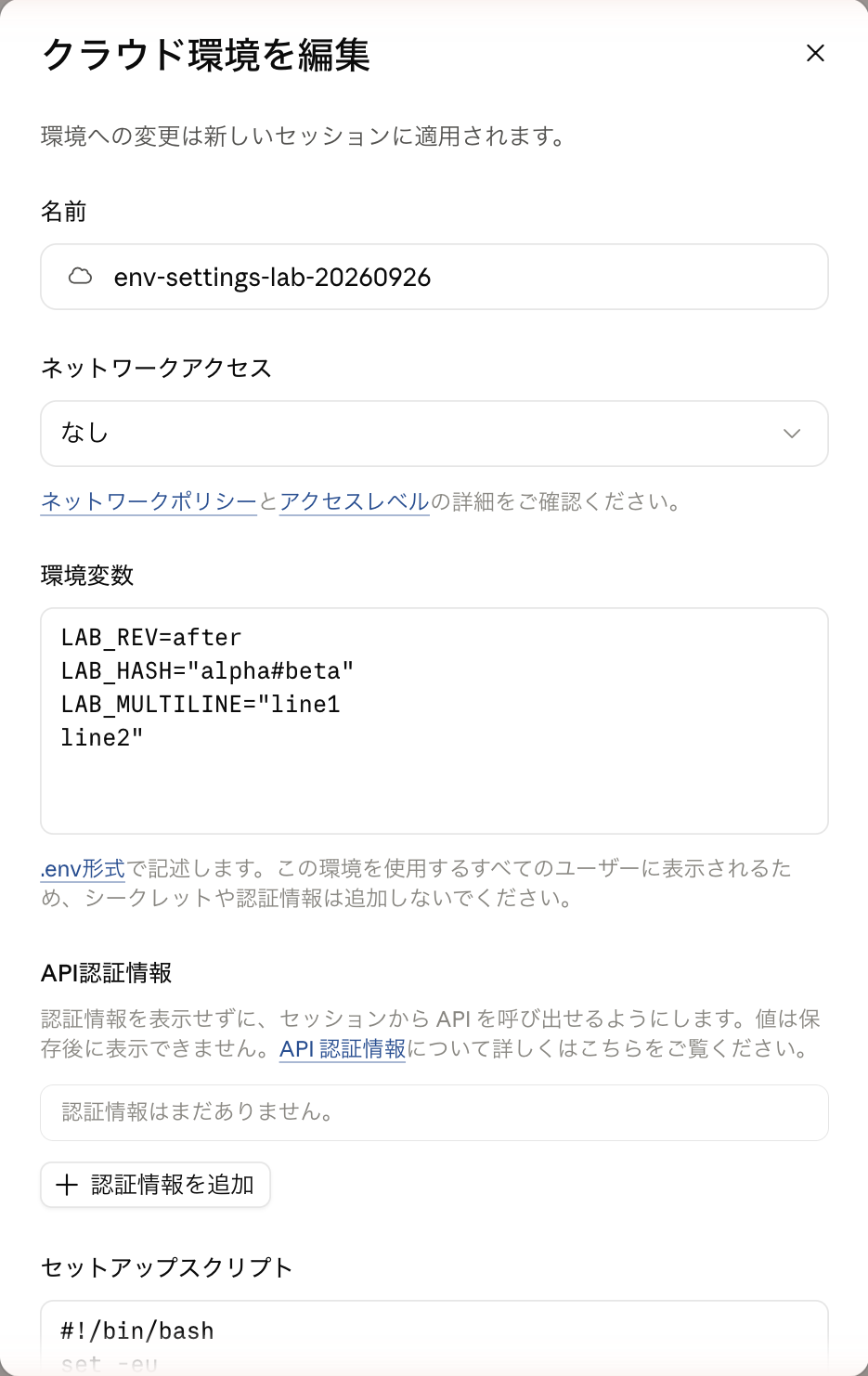
Change the environment variable to LAB_REV=after and network access to "None" and save
The results were as follows.
| Operation | Result |
|---|---|
| Measured in first session | LAB_REV is before, npm is 200 |
| Changed settings to after/None and saved | Save completed |
| Additional request to existing session | LAB_REV is before, npm is 200 |
| Measured in new session | LAB_REV is after, npm is 403 |
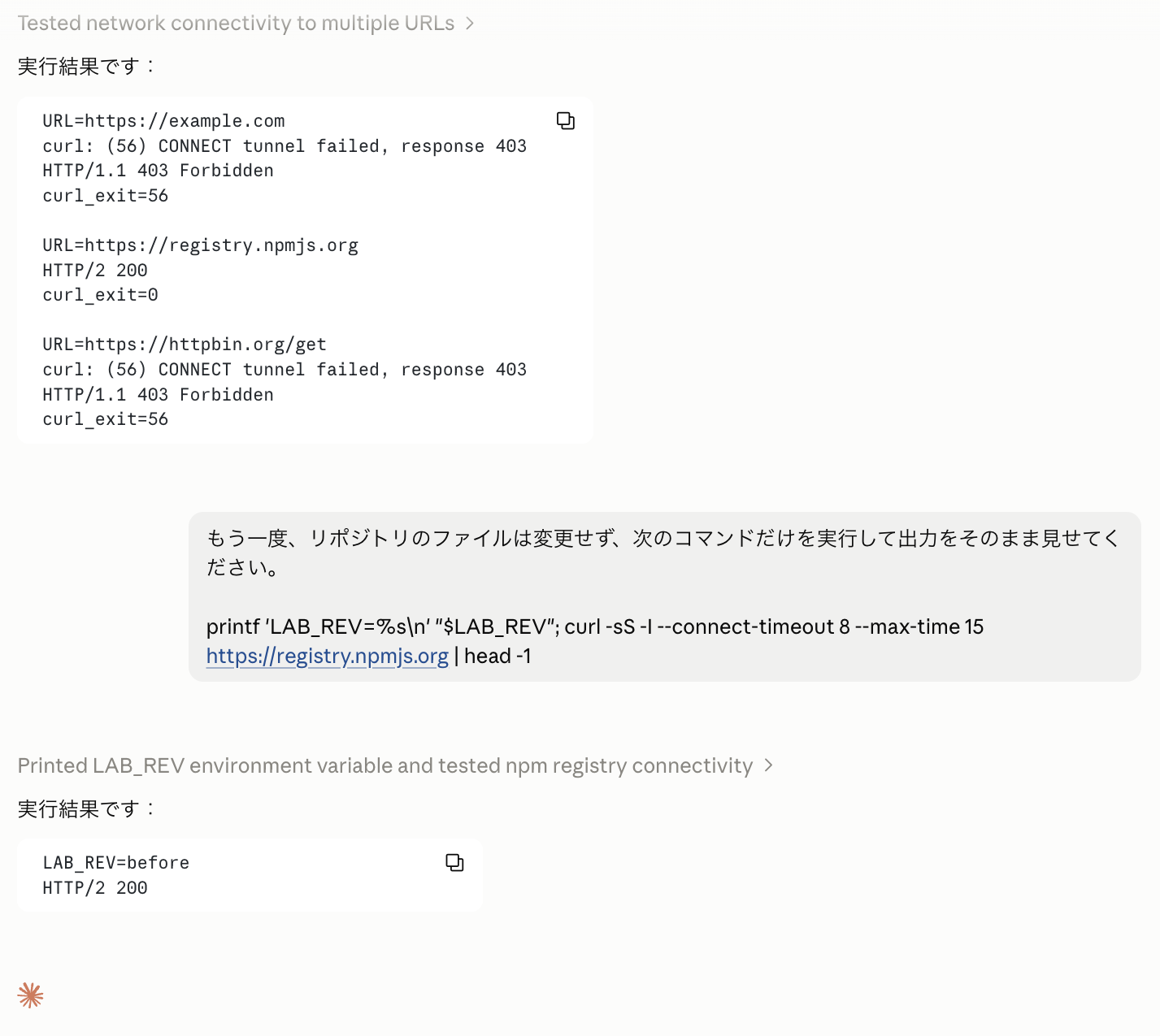
Even after the configuration change, the existing session retained LAB_REV=before and npm 200
As described in the official documentation, changes to settings were not reflected in existing running sessions, and the initial values (LAB_REV=before, npm communication success) remained as-is.
The updated settings were only reflected in sessions created after saving the changes.
Therefore, when environment settings are changed, rather than continuing to use existing sessions, it is safest to create a new session to continue working.
6. Conclusion
Here is a summary of the key points discovered through this verification.
| Setting Item / Aspect | What Was Discovered |
|---|---|
| Environment Variables | Directly readable from commands within the session. For API keys that should be kept secret, it is safer to use API credentials rather than placing them in plaintext |
| Setup Script | Environment variables from the settings screen are not passed (undefined) at execution time. Variables exported within the script are also not inherited by the session |
| Network Access | Controls default communication (None / Trusted / Custom / Full). When rejected, failure occurs at the CONNECT stage to the proxy (curl exit=56) |
| API Credentials | The proxy attaches authentication headers to outbound communications. Even with network set to "None," communication to registered allowed destinations becomes possible |
| Setup and API Authentication | API credential headers are not attached to setup script communications that run before Claude Code launches |
| Reflection of Configuration Changes | Changes are not reflected in existing running sessions. After making changes, it is necessary to create a new session to continue working |
By actually hands-on verifying, the difference in roles between "environment variables" that can be directly referenced from commands and "API credentials" that inject headers via proxy became clear.
When restricting external connections for a session, I intend to design and verify not only the network access settings but also the destination hosts of API credentials.
