
I Built a Skill in Claude Code That Generates an Overall Data Platform Architecture from a Requirements Sheet

This page has been translated by machine translation. View original
Introduction
This is kasama from the Data Division.
This time, I built and tried out a Skill that compiles the overall picture of a data platform into HTML from the answers to a requirements sheet, and I'd like to introduce it. In data platform projects, it takes time to go from deciding requirements to thinking about the architecture and how to proceed. This Skill compiles the screen mockups, architecture diagram, table structure, how to proceed, and next steps into a single HTML file, so that you can confirm the overall picture with stakeholders before starting the build.
Prerequisites
- Claude Code is installed
- You are on macOS and can use Homebrew
- You will use the draw.io desktop app, uv, and the official drawio skill
Architecture
When planning a data platform, you need to decide the same items every time: what you want to decide, where the data you want to use is stored and how many records there are, data freshness, and your existing cloud and BI tools. With this Skill, you fill in these items on a sheet, and the overall picture of the data platform is created from the answers. You can fill in the sheet yourself, or have people in the departments that will use the data fill it in.
Usage consists of the following 3 steps.
- Open the requirements sheet in a browser, fill it in, and press "Save answers". An HTML file with the answers embedded as JSON is downloaded
- Run
/data-platform-overview {path to the filled-in HTML}, and Claude Code reads the answers' JSON from the HTML - Claude Code writes out the overall picture as a single HTML file from the answers. The response text contains only the HTML path and the decisions that are needed, and does not repeat the contents of the HTML
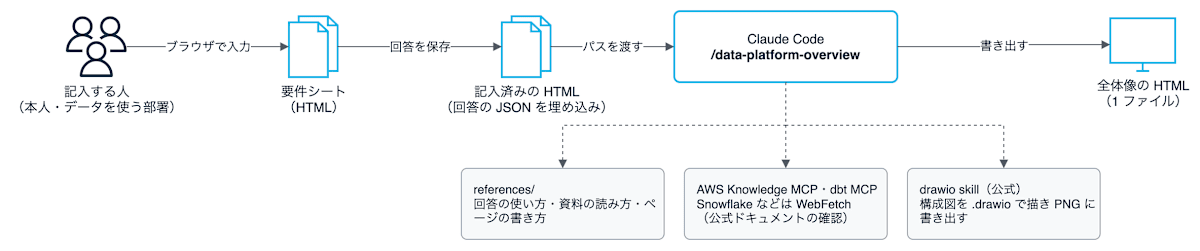
For the architecture, it compares a recommended plan and alternatives against each vendor's design guidance, and checks the specifications of the products used in the plan against the official documentation. AWS is read via the AWS Knowledge MCP server, dbt via the dbt MCP server, and Snowflake and Databricks via WebFetch. Procedures and constraints from actual operation are checked against DevelopersIO articles.
Implementation
The implementation code is stored on GitHub.
75_data_platform_overview_skill/
├── .mcp.json                              # AWS Knowledge MCP と dbt MCP の設定
├── README.md
└── .claude/skills/data-platform-overview/
    ├── SKILL.md
    ├── references/
    │   ├── answer-mapping-guide.md        # 回答の使い方と取り込みの選び方
    │   ├── architecture-sources-guide.md  # 構成の根拠を確かめる手段
    │   └── overview-style.md              # 全体像の HTML の書き方
    └── templates/
        ├── requirements-sheet.html        # 要件シート
        └── overview-page.html             # 全体像の HTML の枠と CSS
MCP server configuration
This is the configuration of the MCP servers for reading official documentation. Both the AWS Knowledge MCP server and the dbt MCP server can be used without credentials. The dbt MCP server is restricted to only the tools for searching documentation via the environment variable DBT_MCP_ENABLE_TOOLS.
Skills
This is the Skill's procedure. The decision criteria are split into the 3 files under references/, and each step specifies which file to read. With disable-model-invocation: true, Claude Code is prevented from automatically invoking the Skill based on the flow of the conversation.
This is a mapping table that defines, for each question on the sheet, which decision it is used for. For example, if "range of output" is "all data every time", it means a full refresh, and if it is "only what changed", it means applying differences. Answers not in the table are not used as a basis, and blanks, "unknown", and contradictions between answers are not filled in by guesswork but are moved to "Next steps".
For ingestion and loading, the method (daily differential, CDC, manual files, etc.) is decided from the answers before choosing a product. Product names are not written because they change with service additions and renamings. It searches the official documentation as of the execution date, in the order of features the DWH has, managed services of the same cloud, and short code.
This is a list of materials and means for confirming the basis of the architecture. Because the information at the time the model was trained may be outdated, it obtains the execution date and checks the release notes of the last 3 months for name changes and changes in availability. Then it checks the constraints of the chosen architecture (availability, whether it can be used in the Tokyo region, edition requirements) against the official documentation, and attaches URLs and confirmation dates to the sources.
This describes how to write each section of the overall-picture HTML. The architecture diagram is drawn with the official drawio skill, and for AWS and Google Cloud, the official icons included in draw.io are used. For Snowflake and dbt, which have no icons in draw.io, generic line icons are used instead of logo images. Graphs, table relationship diagrams, and Gantt charts are drawn inside the HTML without using draw.io, and cost amounts are not written.
This is the frame of the overall-picture HTML. The CSS and section headings are fixed in this file, and Claude Code rewrites only the {{...}} parts. This is so that the appearance and the order of sections do not change from run to run.
This is the requirements sheet filled in on the browser. When you press "Save answers", the answers are converted to JSON, embedded in the file, and the HTML is downloaded. Answers can be handed over without preparing a server, and when you reopen the saved file, the answers return to the input fields.
The requirements sheet and the overall-picture HTML do not communicate externally, and the answers are saved only inside the downloaded HTML. A <meta> tag for Content-Security-Policy makes the browser prohibit connections from the HTML to the outside.
This requirements sheet is an example made for this article. It was created separately from the sheets used in actual projects, so please treat the content of the questions as a rough reference.
Trying it out
Setup
Install the draw.io desktop app and uv. The draw.io desktop app is used to export the architecture diagram .drawio to PNG with the drawio command. uv is used to launch the dbt MCP server with uvx.
brew install --cask drawio
brew install uv
Next, install the official drawio skill from draw.io. The drawio skill is published on GitHub by jgraph, the developer of draw.io, and the repository doubles as a plugin marketplace for Claude Code. Launch Claude Code and run the following 2 commands.
/plugin marketplace add jgraph/drawio-mcp
/plugin install drawio@drawio
Finally, clone this article's repository and launch Claude Code in 75_data_platform_overview_skill. The Skill in .claude/skills/data-platform-overview/ and the MCP servers in .mcp.json are loaded when launched in this directory. At launch you will be asked whether to use the servers in .mcp.json, so allow it.
git clone https://github.com/cm-yoshikikasama/blog_code.git
cd blog_code/75_data_platform_overview_skill
claude
Entering and saving the answers
From here, I'll try it with test answers. All store names and numbers are dummies.
I opened templates/requirements-sheet.html in a browser and entered the test answers. The viewers are 50 people from the Sales Planning Department and store managers, and the use case is to look at the gap between sales and targets by store every Monday and decide which stores to give a boost.
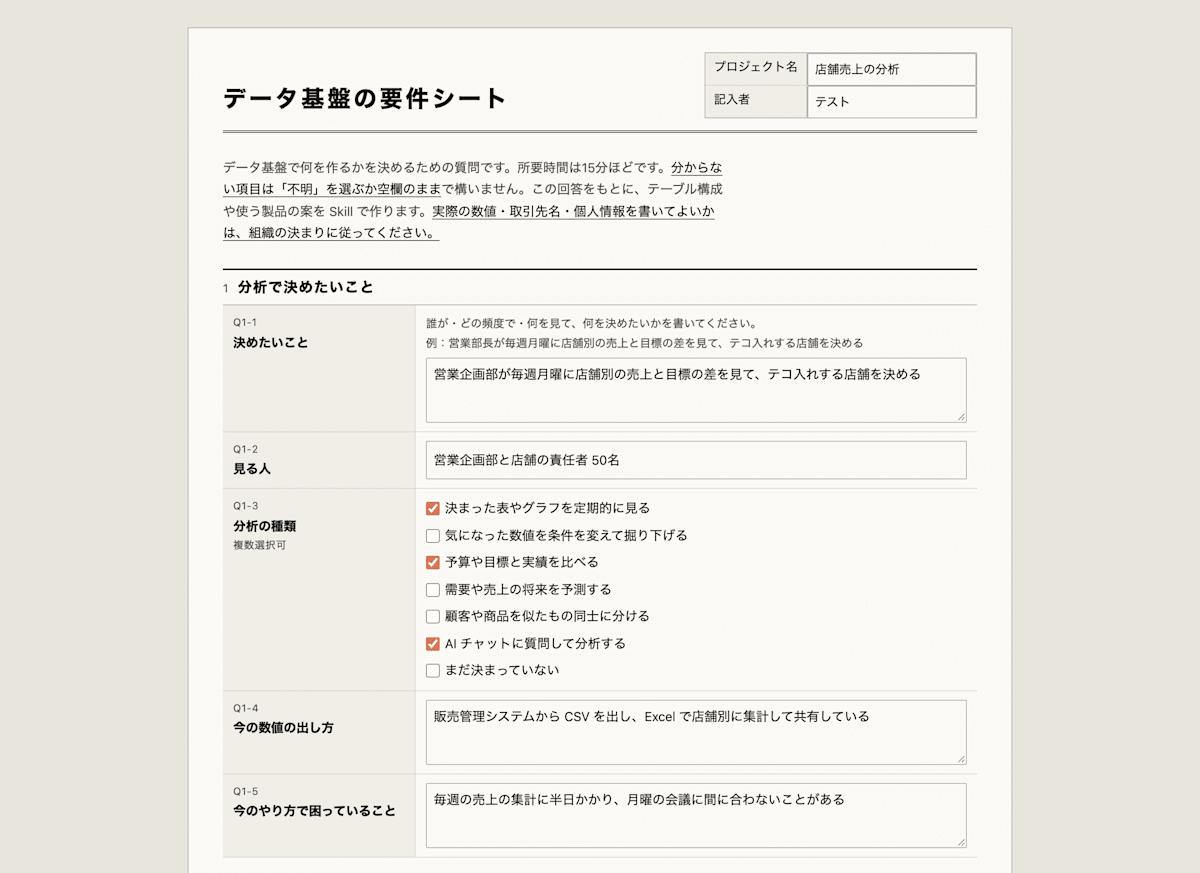
For Q2, I entered 4 rows: sales management/POS, the EC site DB, an HR/attendance SaaS, and a budget/target Excel file. The sales management/POS system uses SQL Server, with the output range set to "only what changed" and the column for identifying changed rows set to "there is an update timestamp column". For the budget/targets, I set the storage location to "unknown" and the data granularity to "monthly".

In Q4, I set Snowflake as the DWH as "under consideration for adoption", and chose "allow only from the internal network" for where connections to the data platform are permitted, and "there is a VPN" for the route connecting the internal network and the cloud.
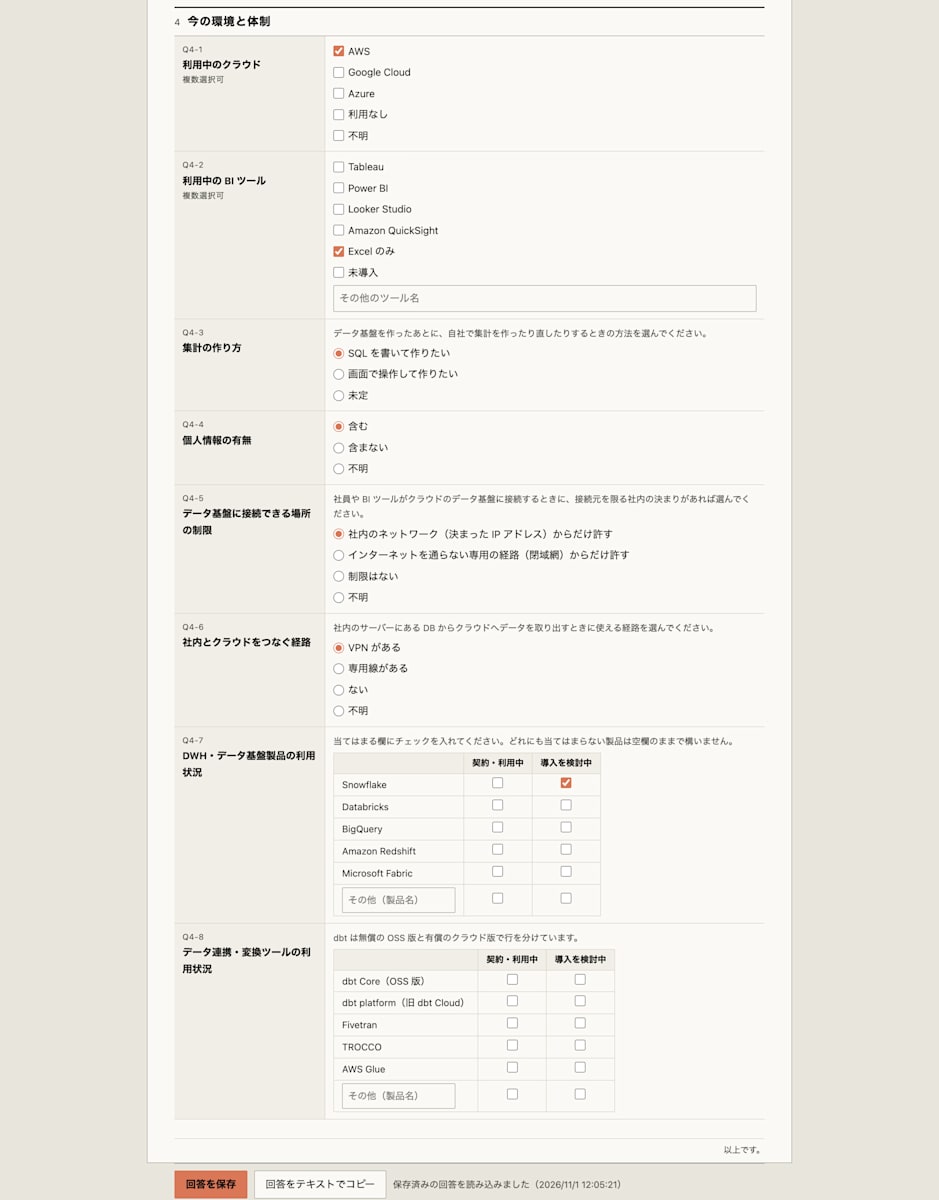
When I pressed "Save answers", a file named 要件シート_{プロジェクト名}_{日付}_{時刻}.html, with the project name and the save date and time in its name, was downloaded. When I opened this file in the browser again, the 4 rows of answers and the selected values returned to the input fields.
Creating the overall-picture HTML
Run the Skill with the path of the filled-in HTML as an argument.
/data-platform-overview ~/Downloads/要件シート_店舗売上の分析_20261103_0840.html
The run took 15 minutes 40 seconds. Claude Code checked the architecture constraints in the official documentation, drew the architecture diagram with the drawio skill, verified the display in Chrome, and then wrote out the HTML. The final response was as follows.
全体像の HTML を作りました。上部に「ダミーデータです」を表示しており、Q 番号はページにありません。

- 全体像の HTML: ~/Downloads/全体像_店舗売上の分析_20261103.html

## 判断が要ること

- Snowflake のリリースノートは 2026 年 10〜11 月の分しか読めていません。8〜9 月の分は見つからず、手順の決まりで探すのを打ち切りました。製品名の変更や一般提供への変更がないかの確認はその 2 か月分が抜けています。
- Snowflake Intelligence が一般提供か、どのリージョンで使えるかは公式ドキュメントで確かめられませんでした。このため理由の表には書かず、次にやることの 4 番目に入れました。
- 構成図の PNG は縮小せずに埋め込んでいるので、ページ上では横にスクロールして見ます。

## 分かったこと

- Snowflake 自身の SQL Server と MySQL のコネクタは、元の DB の設定変更を前提にしています。
  - SQL Server のコネクタは、DB とテーブルで変更追跡を有効にする必要があります。
  - MySQL のコネクタは、binlog を行の形式で出す設定と、テーブルごとの複製用のキーが要ります。
  - シートの回答にはこれらの変更がないので、販売管理と EC サイトの取り込みには AWS Glue の JDBC ジョブを選びました。
- dbt Projects on Snowflake をタスクで動かすときは、サーバーレスのタスクを使えません。ユーザーが管理するウェアハウスを指定する必要があります。
The files written out are the following 2, in the same folder as the requirements sheet.
全体像_店舗売上の分析_20261103.html   # 全体像の HTML(構成図の PNG を埋め込んだ 1 ファイル)
構成図_店舗売上の分析.drawio           # 構成図の元ファイル
Below are the contents of the overall-picture HTML. At the top, how to use this page and the answers taken as premises are listed. The premises field contains the content that was used to decide the architecture.
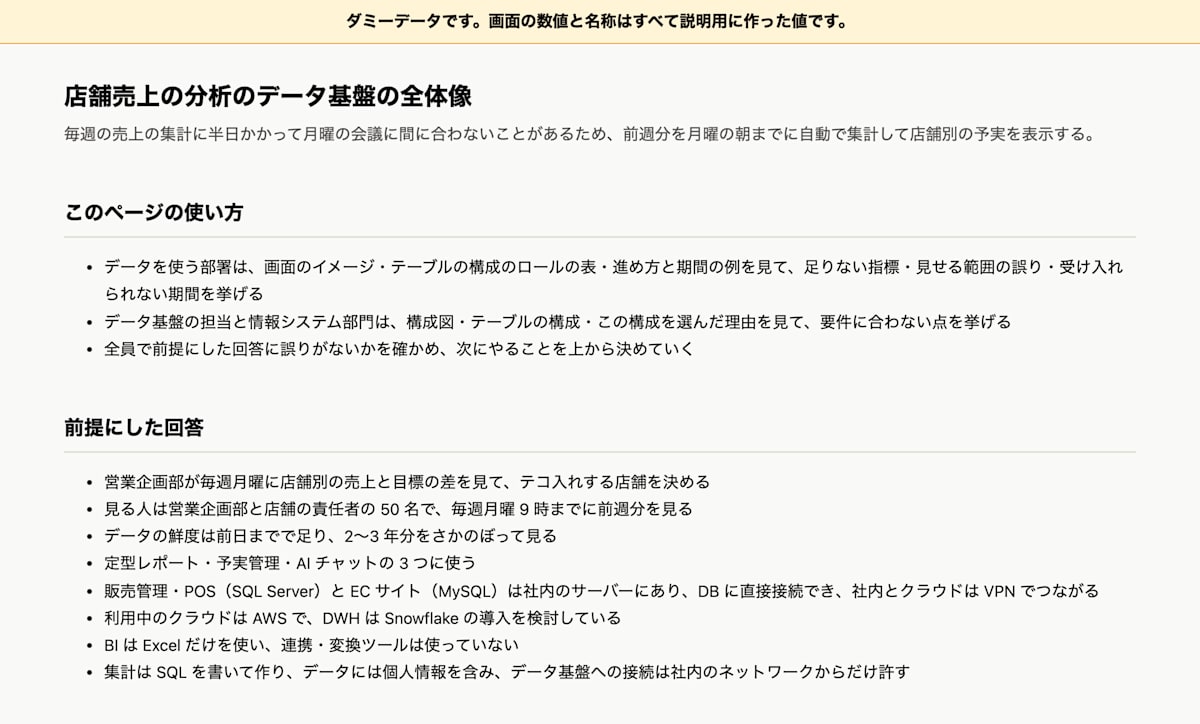
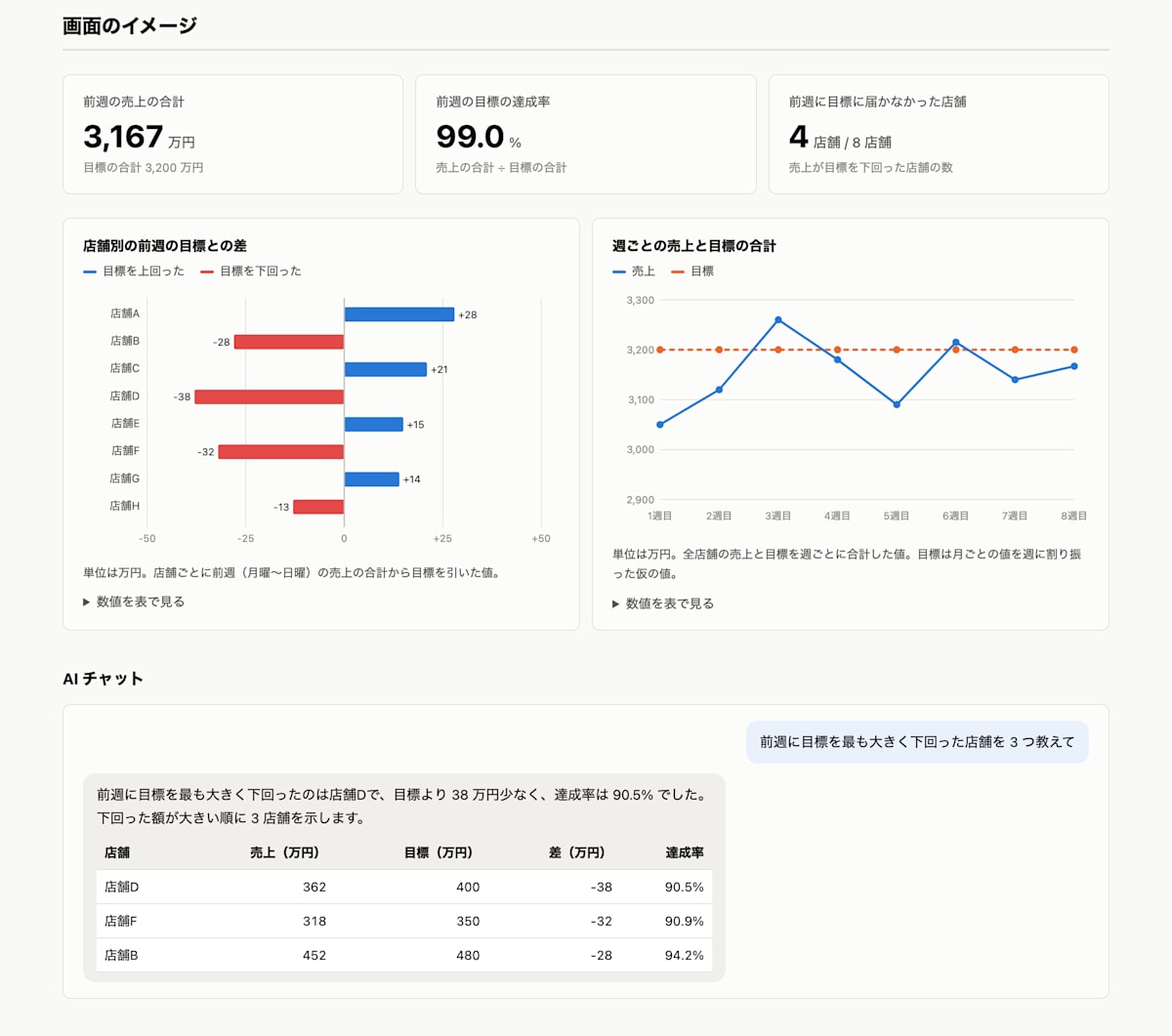
The screen mockup includes number tiles, a graph of the gap from targets by store, a graph of the trend of sales and targets for all stores, and an example of an AI chat. All numbers are dummies.
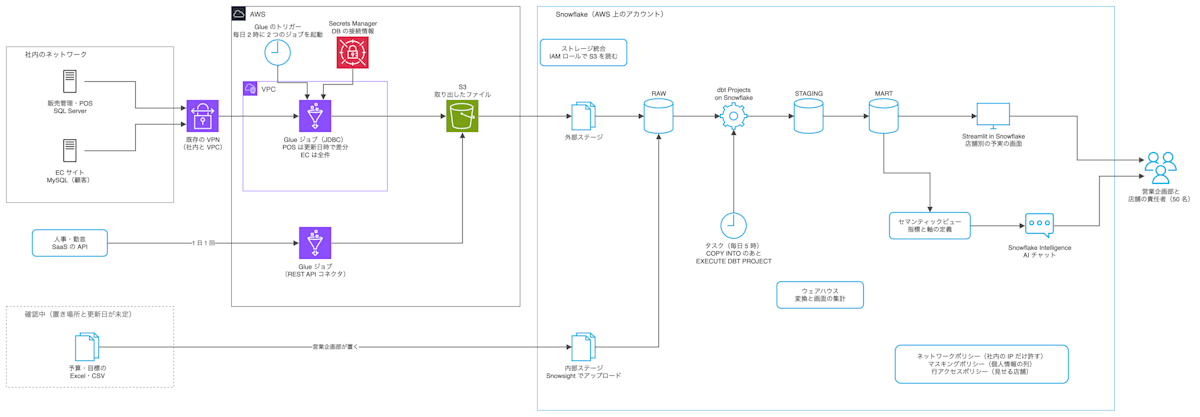
In the architecture diagram, over the existing VPN, an AWS Glue job extracts differences from SQL Server using the update timestamp column, and Snowflake tasks run the loading and transformation. The Skill searches for the ingestion product starting from Snowflake's own features. Snowflake also has a feature for ingesting directly from SQL Server (Openflow), and using it requires enabling change tracking on the source DB. Since it cannot be determined from the answers whether this can be enabled, AWS Glue, which works with the answers as they are, was chosen. Openflow is included among the alternatives not chosen in "Why this architecture was chosen", as a plan for the case where change tracking can be enabled.
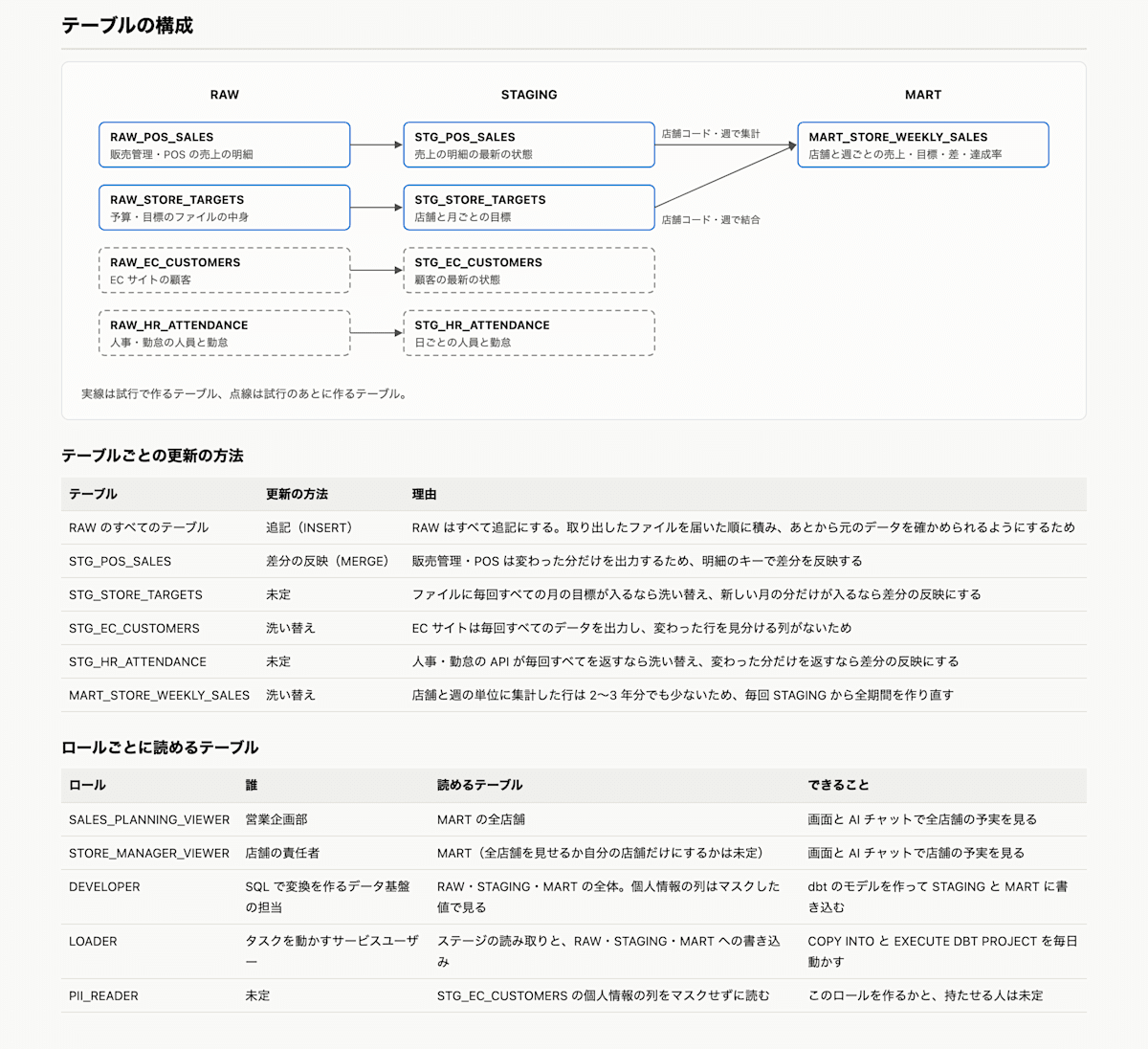
The table structure lists a relationship diagram of RAW, STAGING, and MART, the update method and reason for each table, and the tables each role can read. Whether to show store managers only their own store cannot be decided from the answers, so it is marked "undecided".
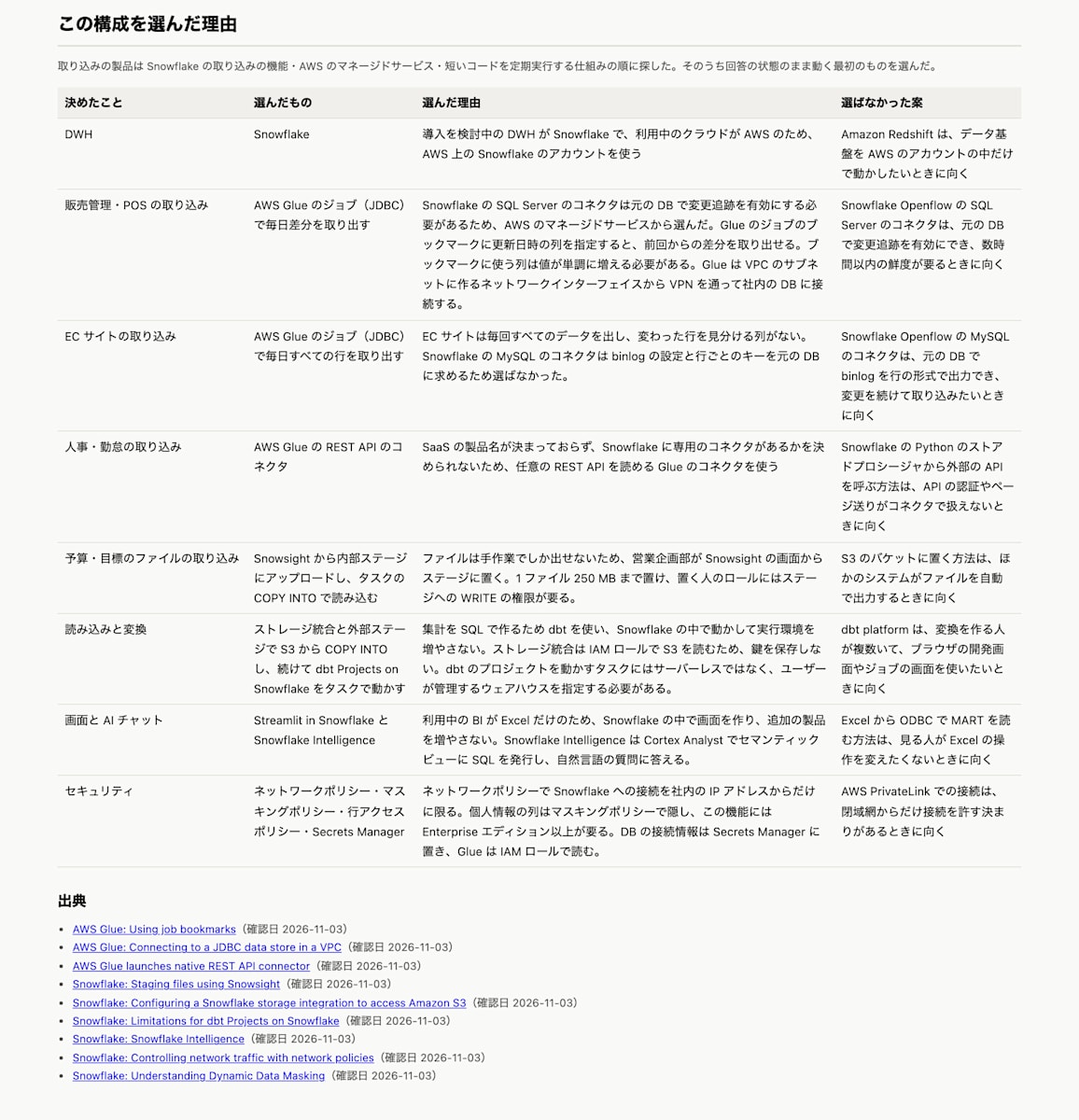
"Why this architecture was chosen" describes, for each decision, the reason for the choice, the alternatives not chosen, and the official documentation that was checked.
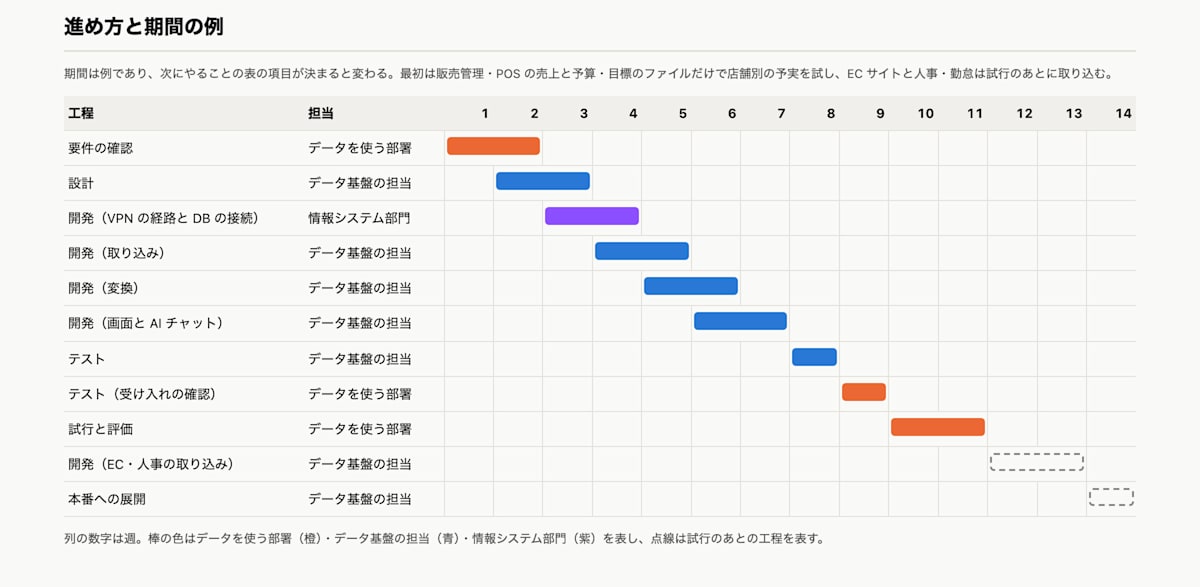
The example of how to proceed and the timeline covers the process from confirming requirements to deploying to production. Responsibilities are written in terms of the roles: the department using the data, the data platform team, and the IT department.
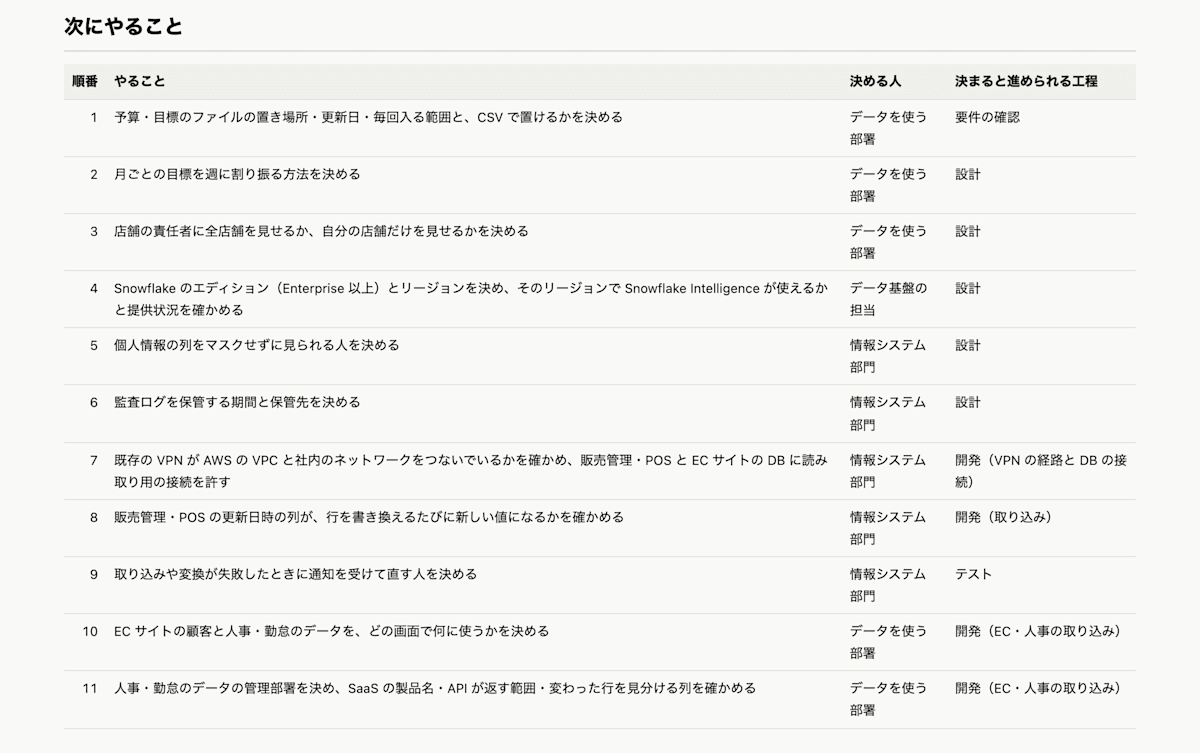
In the next steps, the undecided items are listed in order, each with the person who decides and the process that can proceed once it is decided.
Conclusion
This time, I built and tried a Skill that compiles the overall picture of a data platform into HTML from the answers to a requirements sheet. Because you can see the screens, architecture, tables, and how to proceed all together, you can share the overall picture of what you want to build with stakeholders at an early stage and grasp the outline. This HTML is for grasping the outline of the project and architecture, and it is by no means a guarantee that it is fine to build with this architecture. There are many other points to consider before building, such as the feasibility of the architecture, CI/CD, permission management, and security, so when actually building, please use it as one reference. I hope this is helpful to someone.