I didn't understand Claude Code at all, so I tried developing an iOS app with AI restrictions

This page has been translated by machine translation. View original
I had been unable to completely trust AI, only using it as a support rather than handing over the reins. However, seeing Claude Code becoming popular, I felt I couldn't afford to fall behind.
I'm not skilled enough to fully understand everything just by reading documentation, so I decided to experience it firsthand. Therefore, I chose to develop a new iOS app using Claude Code.
My initial goal was to develop entirely with AI restrictions, but in practice, there were aspects difficult for AI such as editing Xcode project files, resulting in an "AI-led + human support" approach. Nevertheless, I entrusted Claude Code with coding as much as possible to test how far development could progress with AI alone.
Test Environment
- macOS 15.5
- Xcode 16.4
- Claude Code Pro Plan
Setting up Claude Code
Claude Code is set up using npm. For installation methods, nokomoro3's article "Thorough explanation of Claude Code (Part 1)" is helpful.
The article shows generating a script to retrieve S3 bucket lists, but the setup process is common regardless of the end product, so you can follow the same steps for setup without issues.
What app to create
Since I had no specific ideas for creating a new test app, I brainstormed with Claude in chat mode to determine what kind of app to build. Developing an app I'd want to use myself helps maintain motivation through release. I like to progress with development while dogfooding.
After explaining my daily lifestyle to Claude, it suggested an app for counting squats. Considering this could work as a minimal viable product with simple features, I decided to develop it.
Using Claude's research feature, I had it consider the app concept, necessary screens, and even the app name. The research feature was excellent, informing me that squat counter apps are abundant in the app store and a red ocean market. However, since my purpose wasn't generating revenue but rather the development experience itself, I proceeded anyway.
After deciding on the app concept, next came the app name. I've previously had AI suggest app names, but they often weren't quite right or were names of existing apps. Therefore, I hadn't asked AI for app name suggestions for a long time, but using the research feature, I successfully got a fairly good name that wasn't already taken.
Preparation
With the app concept and name decided, I proceeded with app development. Claude Code seems to struggle with editing iOS app project structures, so the initial part needed to be done manually.
First, I created an Xcode project in an arbitrary directory. With Xcode 16 or higher, source code can be managed in folder format. In the traditional group format, adding source code to the project required editing the .xcproj file. While this could be done through Xcode's GUI when developing manually, editing .xcproj files is difficult for AI.
In folder format, simply placing source code in designated locations allows Xcode to automatically reference and include it in the build. I think this is a source code management method that matches the AI era.
Finally, I had Claude's chat mode organize the app concept and screen structure, and recorded this information in the repository's README.md.
Generating the app from scratch
On social media, some claim they created an app with just one word input. They probably articulated the app requirements and specifications in great detail at the initial generation stage.
However, I didn't have such a concrete app vision at this point. My first request to Claude Code was as follows:
* The project is currently a skeleton. Read the README.md and understand the app specifications
* Build the project and confirm it builds successfully.
* Run the project tests and confirm they pass.
* Create CLAUDE.md in Japanese.
An important point here was having the AI verify that the build passes and tests succeed. This ensured it would perform builds and tests during subsequent modifications.
After confirming basic functionality, I entered the following prompts sequentially to generate screens:
* Implement the HomeScreen.
* Implement the settings screen.
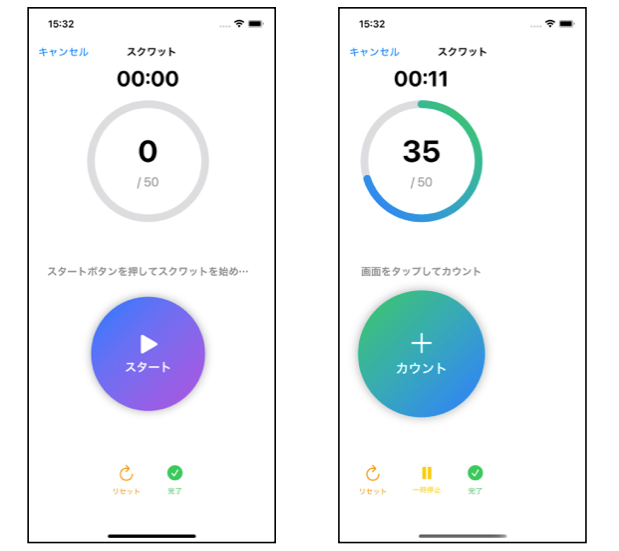
* Implement the squat screen.
* Please use NavigationStack for screen transitions.
Despite being generated from scratch, I was surprised by the high-quality UI produced.
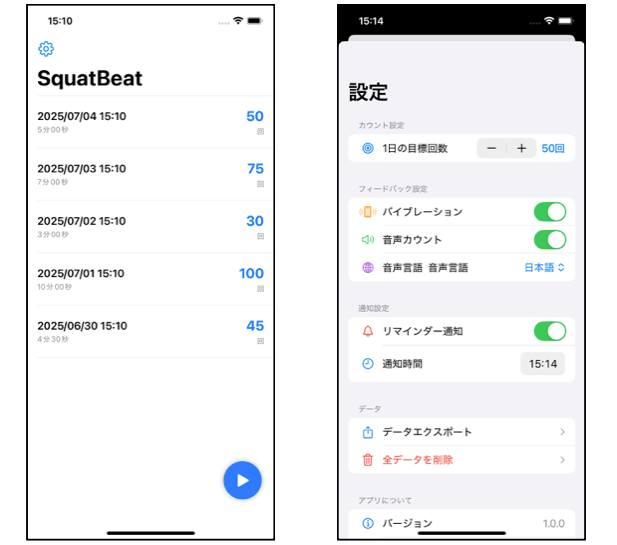
However, there were issues with the SwiftUI View implementation, such as improper frame modifier specifications causing the view to narrow after tapping the start button.
Transitioning from Claude Code execution confirmation to automation
My initial impression of Claude Code was that it would automatically edit source code or execute commands when instructed. This was the source of my suspicion mentioned at the beginning.
In reality, it asks the user for confirmation before executing commands. After repeatedly selecting 1. Yes and pressing Enter several times, I began to see which commands could safely be executed automatically.
Selecting 2. Yes, and don't ask again allows execution without user confirmation next time. Records of what to execute or not are added to .claude/settings.local.json.
For repository management, it's good to move settings to .claude/settings.json.
{
  "permissions": {
    "allow": [
      "Read(./**)",
      "Write(./**)",
      "Bash(ls:*)",
      "Bash(find:*)",
      "Bash(grep:*)",
      "Bash(mkdir:*)",
      "Bash(xcodebuild:*)",
      "Bash(swift:*)",
      "Bash(swift package init:*)",
      "Bash(swift test:*)",
      "Bash(swift build)",
      "Bash(swift -typecheck:*)",
      "Bash(xed:*)",
      "Bash(cat:*)",
      "WebFetch(domain:developer.apple.com)"
    ],
    "deny": [
      "Read(**/.env*)",
      "Read(**/GoogleService-Info.plist)",

      "Bash(rm -rf /)",
      "Bash(rm -rf ~)",
      "Bash(rm -rf /*)",
      "Bash(sudo rm:*)",
      "Bash(sudo dd:*)",
      "Bash(sudo mkfs:*)",
      "Bash(sudo fdisk:*)",
      "Bash(sudo mount:*)",
      "Bash(sudo umount:*)",
      "Bash(sudo:*)",
      "Bash(curl:*)",
      "Bash(wget:*)",
      "Bash(nc:*)",
      "Bash(netcat:*)",
      "Bash(ssh:*)",
      "Bash(scp:*)",
      "Bash(rsync:*)",
      "Bash(docker run:*)",
      "Bash(systemctl:*)",
      "Bash(service:*)",
      "Bash(killall:*)",
      "Bash(pkill:*)"
    ]
  }
}
Continued adjustments afterward
After fixing UI issues, I continued adding features and making adjustments. The main features added were:
- Persistent record storage using CoreData
- Reflecting settings from the settings screen to the squat screen
- Device vibration (haptic feedback) for each squat
- Reminder feature to encourage users to do squats
- Data export functionality
- Multi-language support
After implementing these features and fixing bugs, here's the final app:
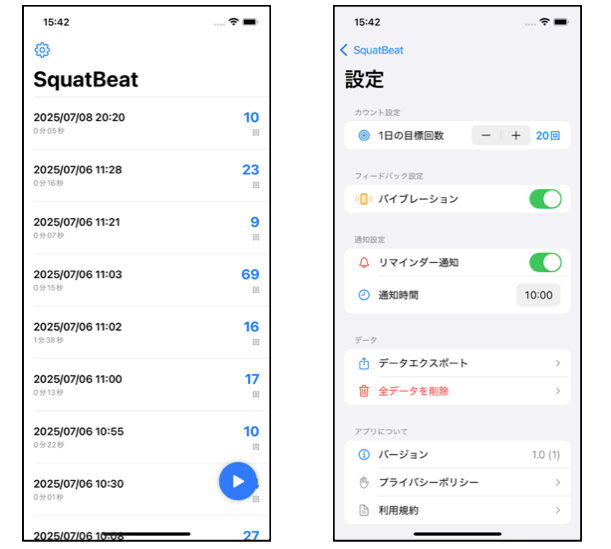
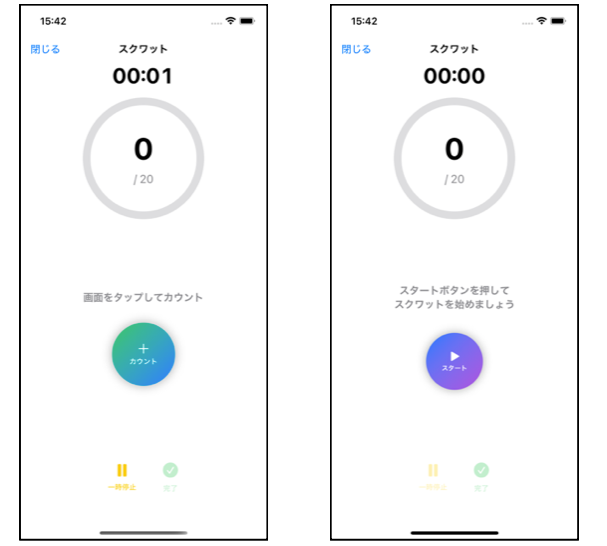
I was able to implement all necessary features for a squat app, including counting squats, displaying elapsed time, and checking past achievements. The UI is simple and easy to understand, resulting in a practical app. With Claude Code's help, I created an app I'd want to use daily.
Impressions after developing the app
Positive aspects
Even from scratch, high-quality results were achieved. Claude Code's capabilities exceeded my expectations, creating a practical app foundation from the initial generation. Its productivity in creating something from nothing far surpasses human capabilities.
Challenges
Even with Claude Code's performance, editing files like .xcproj and Info.plist proved difficult. These files have complex structures perhaps unsuitable for direct AI editing.
Also, there were issues like text not breaking properly and being omitted - minor problems that humans would likely notice were simply ignored.
About localization
While AI can handle translation work, having it directly edit .xcstrings files would consume enormous API usage and should be avoided.
.xcstrings is a JSON-based file but with a very complex format. Especially with the Pro plan, which has stricter usage limits than the Max plan, consuming large amounts of API for non-essential aspects of app development like localization is wasteful.
I also subscribe to GitHub Copilot Pro. Translation work could be delegated to Copilot's GPT-4o. I want to efficiently divide tasks by letting AI handle translations and automating conversion from CSV to .xcstrings files through scripts.
For personal development, I manage string resources in Google Sheets and use a script to parse CSV files into .strings (reference article). Creating a similar parsing script for .xcstrings and managing in Google Sheets might be practical.
Conclusion: Trying "AI-restricted" development
Claude Code proved to be a very useful tool. Significant time savings can be expected, especially in initial development. Although I called it "AI-restricted" in the title, manual intervention was required in the following areas:
Areas requiring manual handling:
- Initial project setup (creating Xcode project)
- Configuration file editing (adjusting
Info.plistand.xcprojfiles) - Localization files (direct editing of
.xcstrings) - Bug fixes (correcting logical bugs in AI-generated code)
Notes from development:
- Thorough building and testing after each change is essential. Even with AI-generated code, always verify functionality at each milestone
- AI might revert manually corrected code. When collaborating with AI, clearly communicate the intent behind changes
- Direct editing of Xcode-related files is difficult. Project files and configuration files need manual work
- While this was a small-scale new app development, the Pro plan might not be sufficient for large codebases
- The Pro plan reaches its limit in 2-4 hours
- Coding with Claude Code involves repeatedly requesting and reviewing AI-generated code. Be aware of fatigue when doing this for extended periods
While complete AI restriction is currently difficult, Claude Code's productivity in implementing core functionality was surprisingly high.
A realistic approach would be "AI-led + human support" rather than "AI restriction." Even so, mastering Claude Code can significantly improve development efficiency. As Claude Code deepens its understanding of Xcode project structures, more complete AI-restricted development might become possible in the future.
As someone who became a programmer because of the joy of programming, I have mixed feelings about AI replacing those enjoyable aspects.
References
The full text of prompts entered during development is published here:
An article introducing a custom script created in 2023 that parses CSV files exported from Google Spreadsheets into .strings files: