
The story of redesigning Claude Code skills — integrating xlsx/pptx/docx into ms-office-suite

This page has been translated by machine translation. View original
Introduction
I created an ms-office-suite skill using Claude Code's custom skills feature, bundling together processing for Excel, PowerPoint, and Word files.
Originally it was split into 3 separate skills — xlsx, pptx, and docx — but while reviewing the design, the idea came up that "consolidating into a single skill might be cleaner," so I reorganized the structure. This article introduces the design decisions behind that and the final structure.
Background: The Original Structure
Initially, Office file operations were built as 3 independent skills:
.claude/skills/
├── xlsx/
│   ├── SKILL.md
│   └── scripts/
├── pptx/
│   ├── SKILL.md
│   └── scripts/
├── docx/
│   ├── SKILL.md
│   └── scripts/
└── shared/          ← Utilities shared across the 3 skills
    ├── pack.py
    ├── unpack.py
    ├── validate.py
    └── libreoffice.py
This worked well enough, but some concerns emerged while using it.
The Awkwardness of shared/
The problem with the shared/ folder is that it's neither a skill nor anything else in particular. Since it has no SKILL.md, it can't be invoked as a /shared command — it just floats inside .claude/skills/. The SKILL.md files for all 3 skills had a path variable written as SHARED_DIR = .claude/skills/shared, making it an implicit dependency.
Redesigning the Structure
The first question was whether to consolidate the 3 skills into one.
Initially I thought about keeping them separate out of concern for "context window cost," but thinking it through, each skill's SKILL.md was around 50 lines, and all 3 together would be 150 lines. Consolidating them wouldn't make much of a difference.
The real issue was routing. For tasks like "read an xlsx" or "convert a pptx," having descriptions for all 3 skills loaded every time was inefficient.
That led to this structure:
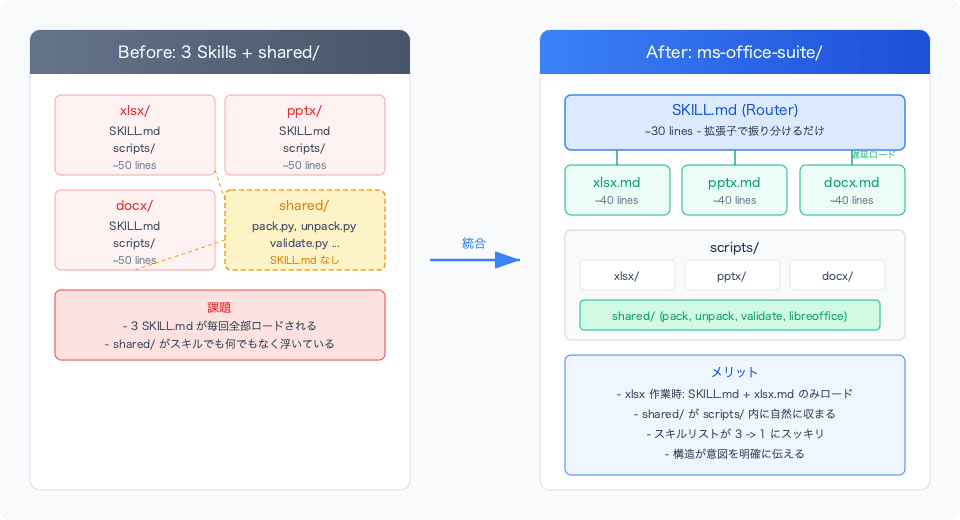
.claude/skills/ms-office-suite/
├── SKILL.md        ← Thin router (~30 lines)
├── xlsx.md         ← Detailed instructions for .xlsx (read when needed)
├── pptx.md         ← Detailed instructions for .pptx (read when needed)
├── docx.md         ← Detailed instructions for .docx (read when needed)
└── scripts/
    ├── xlsx/
    │   ├── read_xlsx.py
    │   └── write_xlsx.py
    ├── pptx/
    │   ├── read_pptx.py
    │   └── write_pptx.py
    ├── docx/
    │   ├── read_docx.py
    │   └── write_docx.py
    └── shared/
        ├── pack.py
        ├── unpack.py
        ├── validate.py
        └── libreoffice.py
Key Point: Making SKILL.md a Thin Router
SKILL.md only contains the routing logic by file extension:
---
name: ms-office-suite
description: Read, create, and edit Microsoft Office files (.xlsx, .pptx, .docx).
---

# Microsoft Office Suite Skill

Route by file extension:

| Extension | Instructions | Scripts | Package |
|-----------|-------------|---------|---------|
| `.xlsx`   | Read `SKILLS_DIR/xlsx.md` | `scripts/xlsx/` | openpyxl |
| `.pptx`   | Read `SKILLS_DIR/pptx.md` | `scripts/pptx/` | python-pptx |
| `.docx`   | Read `SKILLS_DIR/docx.md` | `scripts/docx/` | python-docx |

**After identifying the file type, read the corresponding .md file.**
As a result, when working with .xlsx files, only SKILL.md (~30 lines) + xlsx.md (~40 lines) are loaded. The details for pptx and docx are never read.
Key Point: Separating Format-Specific .md Files
Here's an excerpt from xlsx.md:
# Excel (.xlsx)

## Available Operations

### Read / Extract
```bash
uv run --with openpyxl SKILLS_DIR/scripts/xlsx/read_xlsx.py "$ARGUMENTS"
Edit (Unpack → Edit → Repack)
- Unpack:
uv run SKILLS_DIR/scripts/shared/unpack.py <file.xlsx> - Edit: Modify XML files directly
- Repack:
uv run SKILLS_DIR/scripts/shared/pack.py <dir> <output.xlsx> - Validate:
uv run SKILLS_DIR/scripts/shared/validate.py <output.xlsx>
Format-specific information — the library to use, script paths, and caveats — is all consolidated here.

### Key Point: Moving `shared/` to `scripts/shared/`

By moving `shared/` to `scripts/shared/`, the structure now communicates the intent that "this is a shared script library, not a skill."

## Contents of the Shared Scripts

There are 4 utilities inside `scripts/shared/`:

| Script | Role |
|-----------|------|
| `unpack.py` | Extracts an Office file (ZIP) into an XML tree |
| `pack.py` | Repacks edited XML into an Office file (with auto-repair) |
| `validate.py` | Checks ZIP integrity and XML well-formedness |
| `libreoffice.py` | Format conversion and formula recalculation via headless LibreOffice |

Since Office files are a combination of ZIP + XML, unpacking and editing the XML directly allows finer-grained control than libraries like python-pptx. pack.py also includes auto-repair for common XML corruption issues, such as fixing durableId values.

## A Typical Usage Flow

For example, to read an xlsx file:

```bash
uv run --with openpyxl .claude/skills/ms-office-suite/scripts/xlsx/read_xlsx.py "requirements.xlsx" --summary
When there are multiple sheets, you can specify a sheet with --sheet:
uv run --with openpyxl .claude/skills/ms-office-suite/scripts/xlsx/read_xlsx.py "requirements.xlsx" --sheet "User Requirements"
To extract text from a pptx:
uv run --with python-pptx .claude/skills/ms-office-suite/scripts/pptx/read_pptx.py "review.pptx"
Summary
Here are the key takeaways from this design change:
- Benefit of consolidation: The skill list is cleaner, and the awkward
shared/entity is gone - Lazy loading of context: By making SKILL.md a thin router, format-specific instructions are only read when needed
- Structure communicates intent: The location
scripts/shared/makes it explicit that this is "a shared script library, not a skill"
I think whether to go with "one feature per skill" or "consolidate related features into one skill" in Claude Code skill design depends on the use case. In this case, consolidating was natural because there was a common domain of "Office file operations." On the other hand, forcing completely independent tools into one skill would only complicate routing, so that judgment call remains important.
I hope this is helpful to anyone building Claude Code skills for handling Office files.
