![Using Claude Code Safely [Internal Study Session Slides]](https://images.ctfassets.net/ct0aopd36mqt/3KBTm8tdpO9RJJuaVvVzod/a9964bb03097b448b2327edc6920bf9f/Claude.png?w=3840&fm=webp)
Using Claude Code Safely [Internal Study Session Slides]

This page has been translated by machine translation. View original
We held a study session titled "Using Claude Code Safely" for our internal team members (Cloud Business Division, Consulting Department). The session covered basic concepts for using Claude Code securely, introduced permission/sandbox features, and included a simple demonstration.
I'm posting slides adjusted for DevelopersIO.
Here are the sample settings shared during the study session:
Slide content: Text information is provided below. I hope it's helpful.
Introduction
I'll talk about the purpose of this study session, agenda, and scope.
Purpose of the Study Session
Claude Code (and AI agents in general) is very convenient. However, it also comes with risks and can behave unpredictably.
In this study session, we'll learn how to set up guardrails so Claude Code can operate appropriately within defined boundaries.
Agenda
- Understanding how Claude Code works
- How to use Claude Code safely?
- Techniques for deterrence
- Techniques for restriction
- Techniques for isolation
- Other miscellaneous topics
What We'll Cover / What We Won't
What We'll Cover
- Claude Code's mechanisms and security concepts
settings.jsonpermissions / Hooks / sandboxing- Sharing recommended setting samples
What We Won't Cover
- Security of extensions like MCP / Skills
- Security of surrounding technologies (GitHub / Terraform / coding, etc.)
- Detailed instructions on writing
settings.json - Governance and compliance topics
- Geographic constraints for inference, data retention periods, audit requirements, etc.
Understanding How Claude Code Works
I'll explain how Claude Code works, especially the agentic loop and tools.
Agentic Loop
The agentic loop consists of three phases: context gathering, action execution, and result verification. You yourself are part of the loop.
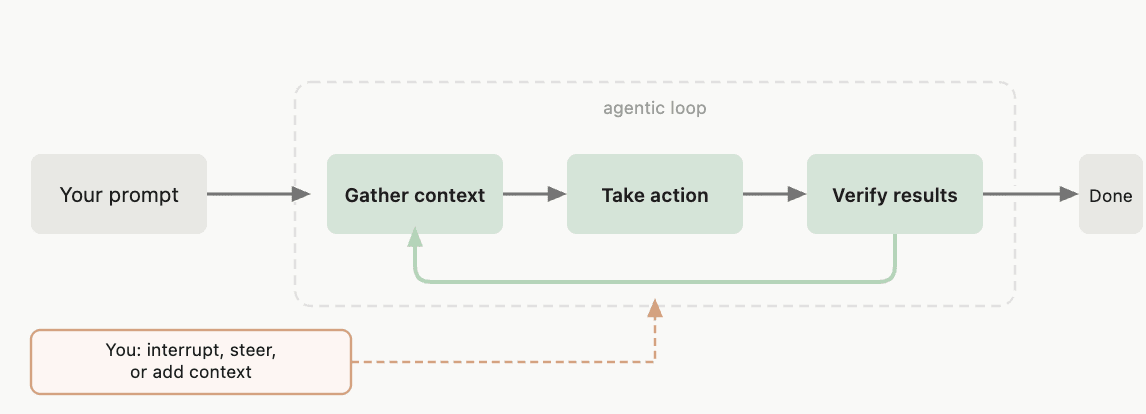
Source: How Claude Code Works - Claude Code Docs
Components of the Agentic Loop
The agentic loop is driven by an inference model and tools that execute actions.
- Model: Understands code and infers/decides what to do next
- Examples:
sonnet,opus
- Examples:
- Tools: Actually perform file operations, command executions, etc. based on the model's decisions
- Examples:
Read,Edit,Bash
- Examples:
Reference: What Built-in Tools Can Do
| Category | What Claude Can Do |
|---|---|
| File Operations | Read files, edit code, create new files, rename and reorganize files |
| Search | Search files by pattern, search content with regex, explore codebase |
| Execution | Execute shell commands, start servers, run tests, use git |
| Web | Web search, retrieve documentation, search for error messages |
– Quoted from: How Claude Code Works - Claude Code Docs (excerpt)
Tools are Key to Being Agentic
Without tools, Claude could only provide text responses. Tools enable it to execute actions.
<Tool control is the key to security!>
How to Use Claude Code Safely?
Tool control is essential for creating a secure environment.
Let's learn what approaches are available for control.
I've Considered These Three Axes
- Deter: Guide against executing dangerous tools
- Restrict: Prevent the execution of dangerous tools
- Isolate: Create an environment where executing dangerous tools is safe
How to Implement in Claude Code?
- Deter → CLAUDE.md
- Restrict → Permissions, Hooks
- Isolate → Sandbox, Dev Container
(I'll explain each approach later!)
Since We're in the Cloud Business Division, Let Me Relate This to AWS
※ Please don't take this too literally
Deter
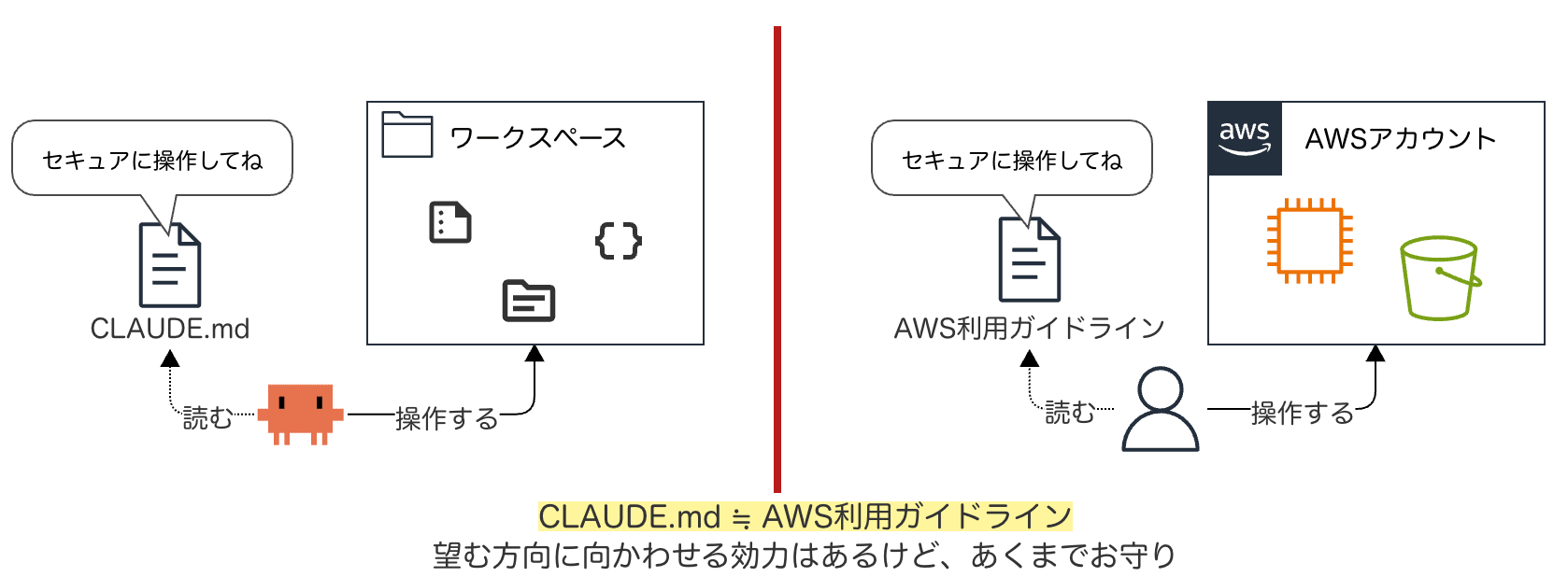
CLAUDE.md ≈ AWS usage guidelines. It has some power to guide in the desired direction but is essentially just a talisman
Restrict
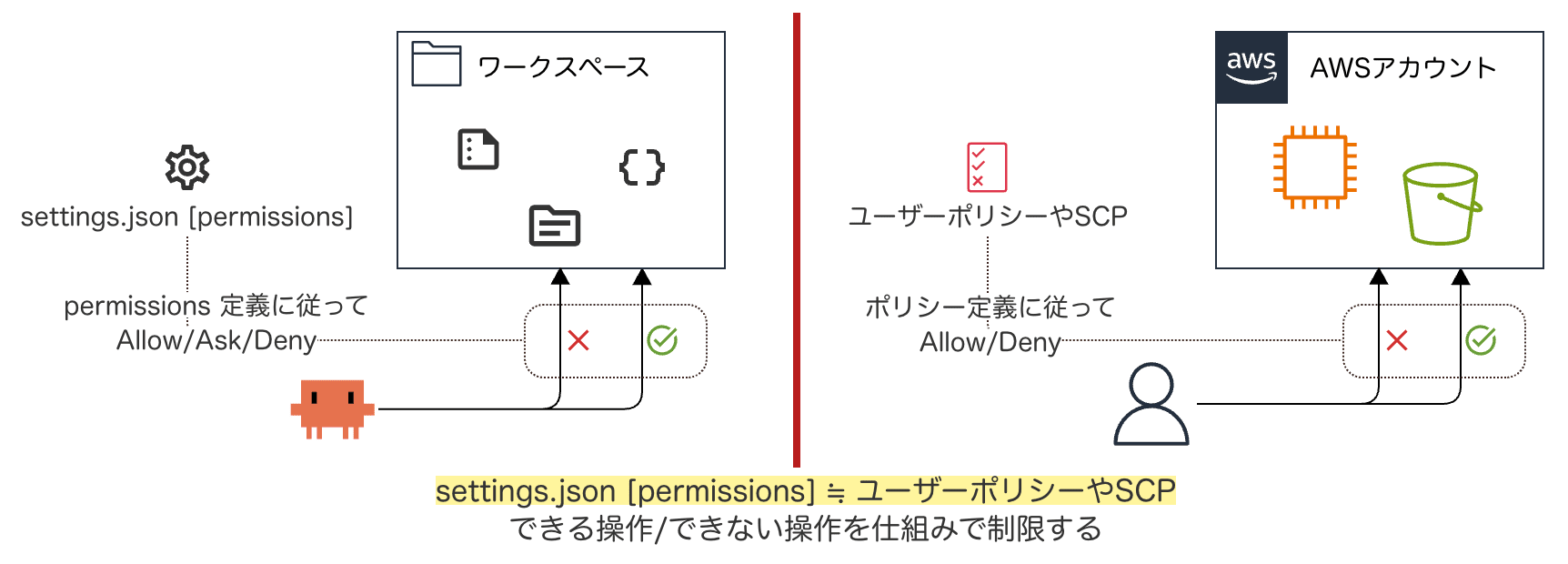
settings.json [permissions] ≈ User policies or SCPs. Systematically restricting what operations can/cannot be performed
Isolate
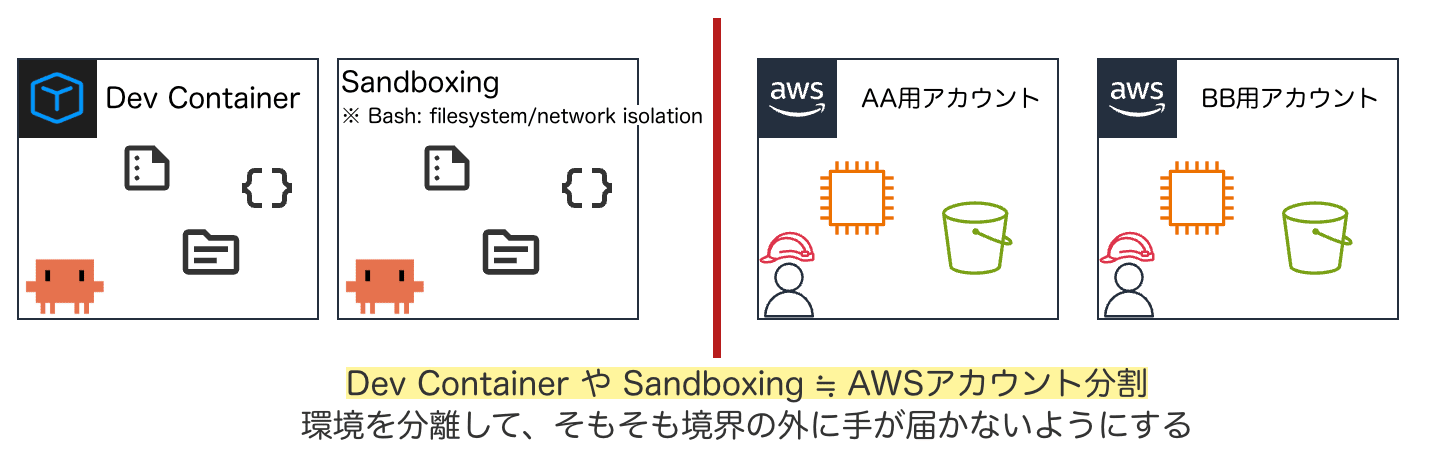
Dev Container or Sandboxing ≈ AWS account separation. Isolating environments so that access beyond boundaries isn't possible
Techniques for Deterrence
Let's consider techniques to request Claude not to execute dangerous tools.
CLAUDE.md
Let's look at how to provide permanent instructions to Claude using CLAUDE.md.
What is CLAUDE.md?
A CLAUDE.md file is a markdown file that provides persistent instructions to Claude for a project, personal workflow, or across an entire organization. Claude reads them at the start of each session.
Where to Place CLAUDE.md (Scope)
The scope of CLAUDE.md varies depending on where it's placed.
| Scope | Location | Shared With |
|---|---|---|
| Managed Policy | OS system directory | All users in the organization |
| Project Instruction | ./CLAUDE.md or ./.claude/CLAUDE.md |
Team members via source control |
| User Instruction | ~/.claude/CLAUDE.md |
Only you (common across all projects) |
– Choosing where to place your CLAUDE.md file - Claude Code Docs
Sample of "Requesting" Not to Execute Dangerous Tools
An example of writing "what not to do" in CLAUDE.md:
# Security

- Do not read, edit, or commit sensitive files like .env, credentials, etc.
- Do not hardcode secrets or API keys in code
- Do not execute destructive commands like rm -rf / or force push
Other Deterrence Measures
Besides CLAUDE.md, there are several other points to consider:
- You can place context files in .claude/rules/
- You can write rules scoped to specific files using the
pathsfield
- You can write rules scoped to specific files using the
- Avoid ambiguous instructions
- "Authentication is failing, fix it" → May lead to trial and error that expands the operational scope
- Don't ask Claude to perform destructive operations in the first place
terraform apply/destroy, directory deletion, etc.
Techniques for Restriction
Let's learn about mechanisms to mechanically control tool execution.
To do this, let's first understand tools.
Types of Tools
Claude Code executes actions through built-in tools. The main tools are:
| Tool | Description |
|---|---|
Bash |
Execute shell commands |
Read |
Read file contents |
Edit |
Make targeted edits to specific files |
Write |
Create or overwrite files |
WebFetch |
Retrieve content from specified URLs |
| ... | ... |
– Tools Reference - Claude Code Docs
Tools That Need Special Control
From a security perspective, these are the tools that particularly need control:
- Bash: Can execute any shell command
- Read: Can read sensitive files (like
.env) - Edit / Write: Can modify files that shouldn't be changed
Controlling Permissions with settings.json
Tool control is specified in the permissions section of settings.json.
What is settings.json?
It's a configuration file that defines Claude Code's behavior.
It defines permission rules, hooks, sandboxing, and various other settings.
- Reference: settings#available-settings
Where to Place settings.json (Scope)
The scope of settings.json depends on where it's placed.
| Scope | Location | Shared With |
|---|---|---|
| Managed | OS system level | All users in the organization |
| User | ~/.claude/settings.json |
Only you (all projects) |
| Project | .claude/settings.json |
Team members |
| Local | .claude/settings.local.json |
Only you |
– Configuration Scopes - Claude Code Docs
Specifying Permission Rules in the permissions Section
{
  "permissions": {
    "allow": [ ... ],
    "ask":   [ ... ],
    "deny":  [ ... ]
  }
}
- allow: Allow tool use without manual approval
- ask: Prompt for confirmation each time a tool is used
- deny: Deny tool use
Tips: Order of Evaluation
Permission rules are evaluated in the order deny → ask → allow.
The first rule that matches takes precedence, so deny always has the highest priority.
How to Write Permission Rules
Rules are written in the format Tool or Tool(specifier).
| Rule | Effect |
|---|---|
Bash |
Matches all Bash commands |
Bash(npm run *) |
Matches commands starting with npm run |
Read(~/.zshrc) |
Matches reading the ~/.zshrc file |
Edit(/src/**/*.ts) |
Matches editing TS files under <project root>/src/ |
Read(//**/.env*) |
Matches reading .env* files across the entire system |
– Permission Rule Syntax - Claude Code Docs (recommended reading!)
Sample Recommended Settings
An example to place in ~/.claude/settings.json:
{
  "permissions": {
    "deny": [
      "Read(//**/.env*)",
      "Read(//**/credentials*)",
      "Edit(//**/.env*)",
      "Edit(//**/credentials*)",
      "Bash(rm *)",
      "Bash(git *)"
]}}
- For a complete sample, see here → Gist
Other Restriction Methods: Hooks
There are areas that settings.json deny rules can't fully cover.
For such areas, let's use Hooks (and Sandbox, discussed next).
What are Hooks?
Hooks are user-defined shell commands (and more) that automatically execute at specific points in the Claude Code lifecycle. They're also specified in settings.json.
| Aspect | permissions (deny/allow) | Hooks |
|---|---|---|
| Method | Static pattern matching | Script-based checking |
| Flexibility | Combination of tools and patterns | Can implement arbitrary logic |
| Use Case | Basic access control | Decision-making with complex conditions |
– Claude Code Hooks - Claude Code Docs
Examples of Lifecycle Events
| Event | When Triggered |
|---|---|
SessionStart |
At the start of a session |
PreToolUse |
Just before a tool is called |
PostToolUse |
After a tool call succeeds |
Notification |
When Claude sends a notification to the user |
In the context of tool control, PreToolUse is commonly used.
Example of Using Hooks
Use a PreToolUse hook. Implement a hook that validates URLs in Bash commands and blocks unauthorized domains.
For specific implementation details, please refer to the Hooks Reference.
Techniques for Isolation
Let's learn about mechanisms to limit the scope of impact.
Sandboxing
A mechanism that restricts the filesystem and network of the Bash tool at the OS level.
What is Sandboxing?
Claude Code includes a native sandboxing feature that provides a safer environment for agent execution while reducing the need for continuous permission prompts. Instead of asking for permission for each bash command execution, sandboxing creates predefined boundaries that allow Claude Code to operate more freely while mitigating risks.
The scope of sandboxing is only the Bash tool and its child processes. Other built-in tools like Read, Edit, Write, WebFetch, etc., are not covered.
What's the Benefit?
The deny patterns in permissions match command strings.
"deny": ["Bash(cat .env)", "Bash(curl example.com)"]
However, commands can be rewritten in countless ways. python -c "print(open('.env').read())", less .env, my-custom-script .env, etc., can all bypass these restrictions.
Sandboxing restricts file access and network connections at the OS level, so the same constraints apply to all child processes regardless of the command name.
How to Enable
Add the following to settings.json (or enable with /sandbox):
{
  "sandbox": {
    "enabled": true,
    "autoAllowBashIfSandboxed": false
}}
How to Set Boundaries
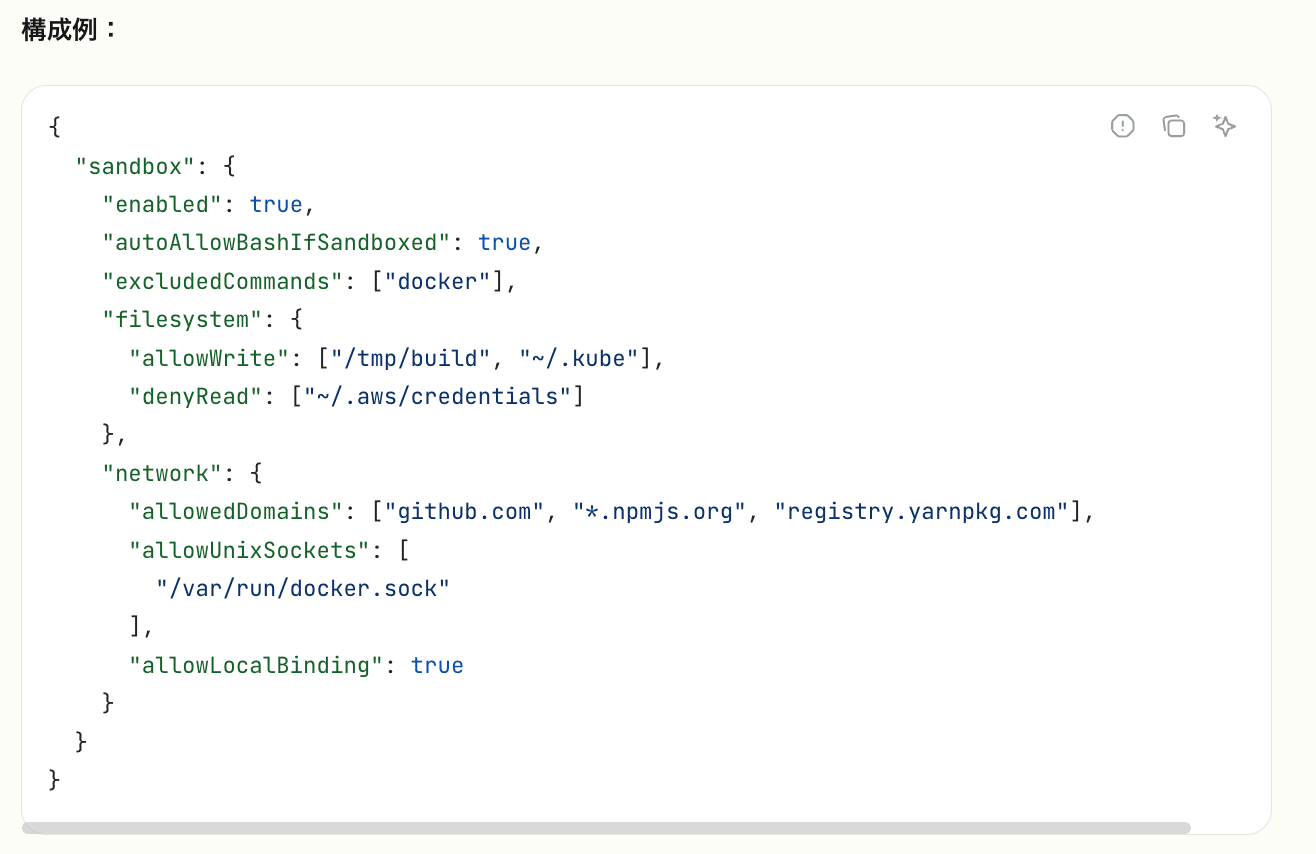
Source: Claude Code Settings - Claude Code Docs
Define in sandbox > filesystem, network. For detailed instructions, see the official reference. Sample → Gist
Other Isolation Method: Dev Container
If stronger isolation is needed, Dev Container is also an option.
- Run Claude Code inside a container, completely isolated from the host system
- Restrict network connection destinations with a firewall whitelist
- Anthropic provides a reference implementation
Miscellaneous Topics
Here are various tips, impressions, and notes.
Some sections may not be fully organized.
Be Careful Where You Launch Claude Code
By default, Claude Code can access files in the directory from which it was launched. Therefore, limiting where you launch it also limits the scope of access.
Avoid launching from large directories like home directories or directories with mixed projects/contexts. This reduces the risk of accessing unrelated files.
- Reference: Working Directory - Claude Code Docs
How to Use Permissions / Hooks / Sandboxing?
Permissions and sandboxing are complementary and both should be used.
- Basic control of each tool → Permissions
- OS-level containment of Bash execution → Sandboxing
Hooks are useful when advanced allow/deny decision processing is needed, which is difficult to control with Permissions or sandboxing.
Initial Impressions of Using Sandbox (Note Level)
-
It's quite useful to contain file read/write and network bypass that can't be fully prevented with permissions.deny Bash(xx)
-
By default, Bash execution requires no approval. I added
autoAllowBashIfSandboxed:falsebecause it's scary -
By default, when Bash execution fails in the sandbox, it tries to re-execute outside the sandbox after seeking approval
- Added
allowUnsandboxedCommands:falseto stop this bypass - It seems best to explicitly list commands you want to run outside the sandbox in
excludedCommands
- Added
-
Initially, there may be many Bash execution failures or network access approval/denial confirmations. It's realistic to gradually tune while using
-
For example, when executing the
awscommand, you'll repeatedly be asked for access approval to169.254.169.254(instance metadata) and*.amazonaws.com. It's good to allow these innetwork.allowedDomains -
Go tools like
gh/terraformfail to access macOS TLS trust services from within the sandbox- Can be worked around with
enableWeakerNetworkIsolation:true, but the trade-off is weaker network isolation
- Can be worked around with
Use Different Permission Modes
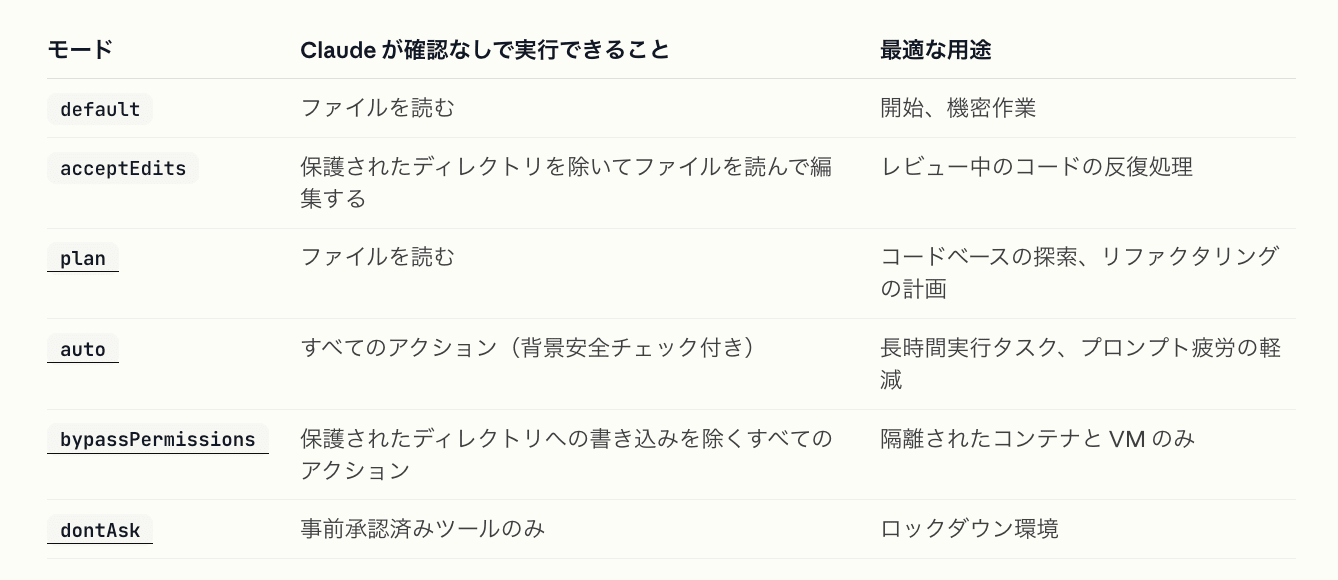
Permission modes list: default / acceptEdits / plan / auto / bypassPermissions / dontAsk and their respective uses
– Quoted from: Available Modes - Claude Code Docs
Generally Avoid Using dangerously-skip-permissions
The --dangerously-skip-permissions flag is equivalent to --permission-mode bypassPermissions. It skips all permission prompts except for writing to protected directories. Unless running in a strongly isolated environment, generally avoid using it.
Impressions of autoMode (Note Level)
- In autoMode, a classifier model judges the safety of actions and decides whether to execute without permission (currently in research preview)
- Brief impression: It executes various things without approval, which is a bit scary. I'd want to properly set up Permissions and Sandboxing before using it
- Untested: You can provide trusted infrastructure to the classifier with
autoMode.environment - Untested: You can override the classifier's built-in block/allow rules
- Define additional rules in
autoMode.allow/autoMode.soft_deny - Get the complete list of defaults with
claude auto-mode defaultsand edit based on that (don't start from an empty list)
- Define additional rules in
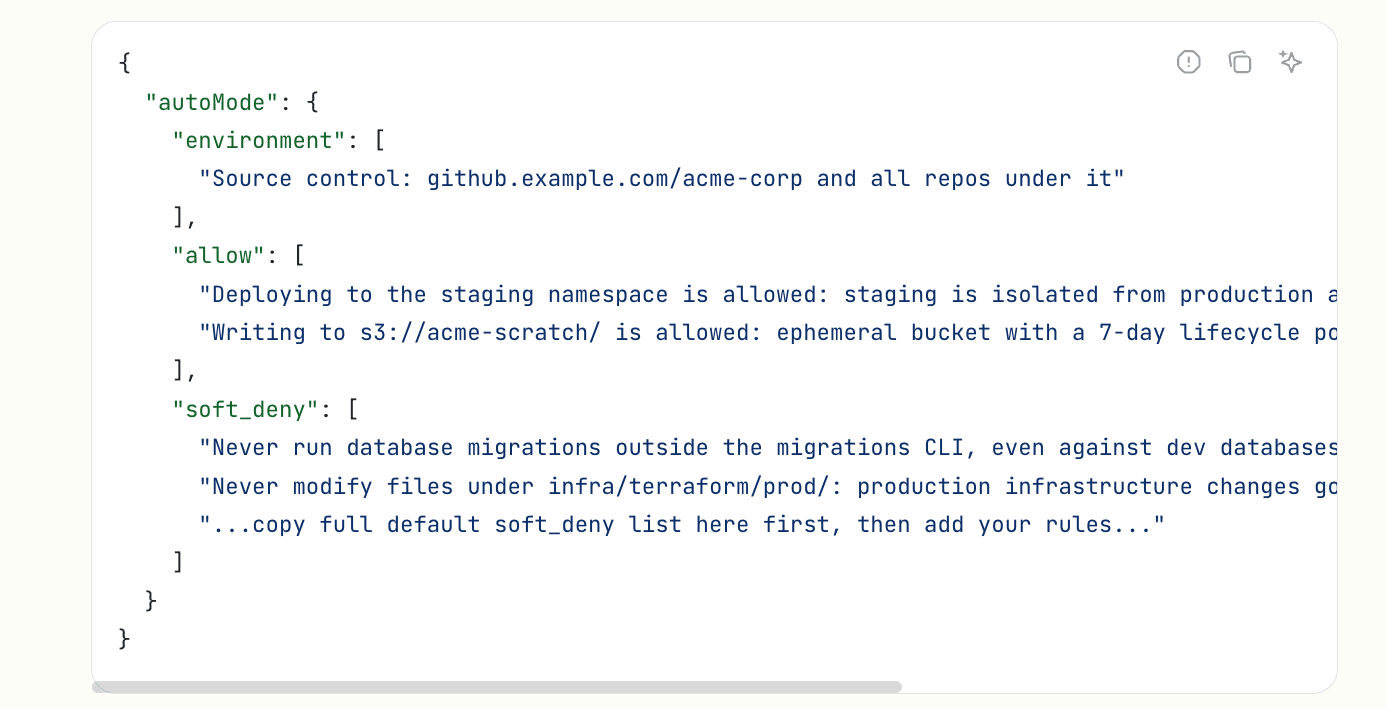
Source: Setting Permissions - Claude Code Docs
Small Tip: Remove "🤖 Co-Authored-By"
You can customize git commit and pull request messages by updating the attribution key. Here's a setting to make it empty:
{
  "attribution": {
    "commit": "",
    "pr": ""
}}
※ The includeCoAuthoredBy setting is deprecated.
Set Up the Environment Around Claude Code
- Secret management tools (1Password CLI, aws-vault, etc.)
- Avoid storing credentials as plaintext in
.envfiles - Eliminate the risk of Claude Code reading sensitive information
- Avoid storing credentials as plaintext in
.gitignore- Make sure sensitive information is ignored. Reduce the risk of accidentally including it in commits
- Also ignore personal settings like
settings.local.json. Prevent mixing personal settings with other members
- pre-commit
- Detect and block commits containing sensitive information using gitleaks
- And more...
Useful Resources
- Official documentation worth reading
- Claude Code Settings: Understand basic specifications and available configuration keys
- Settings > Permissions: Understand permission rule syntax
- Settings > Sandboxing: Understand sandboxing features
- Getting Started > Permission Modes: Understand permissions for each mode
- Reference > Tools: See the list of available tools
Conclusion
Here's what we covered today:
- Tool control is key to using Claude Code safely
- Deter: Request with CLAUDE.md, but consider it just a modest protection
- Restrict: Define deny/ask/allow in permissions. Supplement with Hooks for complex decisions
- Isolate: Contain the Bash tool at the OS level with sandboxing. Dev Container is also an option for stronger isolation
- Also set up the surrounding environment (secret management,
.gitignore, pre-commit, etc.)
Let's create a safe Claude Code environment!
References
Here are the links referenced in creating this material.
Claude Code Official Documentation
- Basic Information
- settings.json (Permissions/Tools/Hooks)
- Sandboxing, Dev Container
