![Key Concepts and Configuration Tips for Using Claude Code Securely [Seminar Slides]](https://devio2024-media.developers.io/image/upload/f_auto,q_auto,w_3840/f_auto,q_auto,w_3840/v1779344383/events/de5qfolfqgisz1mt3asr.png)
Key Concepts and Configuration Tips for Using Claude Code Securely [Seminar Slides]

This page has been translated by machine translation. View original
I presented under the title "Key Concepts and Configuration Tips for Using Claude Code Securely" at the Claude Code Seminar: Security/Governance Edition held on June 16, 2026.
Thank you to everyone who attended.
In this session, I organized the approach to using Claude Code safely around three axes for tool control — "deter, restrict, and isolate" — and introduced key configuration tips for each.
The slides and their text content are provided below. I hope you find them useful.
Presentation Slides
Purpose of This Presentation
- Target audience
- Those who use Claude Code / Those who manage or promote it within a team or organization
- Goals
- Get a general understanding of the security mindset needed to use / have others use Claude Code safely
We will not go into detailed topics, technical behavior, or syntax.
Introduction
We briefly cover how Claude Code works and the importance of tool control.
Claude Code Runs on an Agentic Loop
Claude Code operates on a loop (Agentic Loop) that repeats reasoning → tool execution → verification. The model thinks about "what to do next," and tools handle the actual actions such as file operations and command execution.
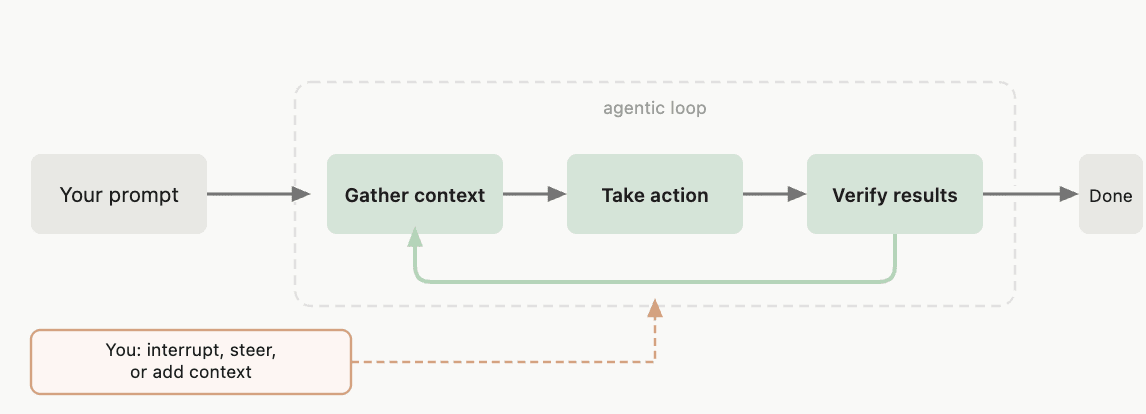
Source: How Claude Code Works - Claude Code Docs
Tools Are Diverse = Almost Anything Is Possible
Claude Code's tools are versatile and can perform almost any operation.
Read: Read filesEdit/Write: Modify filesBash: Execute any shell command- MCP and Skills : Treated as a type of tool in the broad sense
Thinking About Defense Across 3 Axes
We organize tool control approaches into three axes.
Deter / Restrict / Isolate
- Deter : Guide the model away from executing dangerous tools
- Restrict : Prevent dangerous tools from being executed
- Isolate : Create an environment where executing dangerous tools causes no harm
Thinking of It in Human Terms
Think of it as the image of delegating work to a new team member.
| Axis | Concept | Human Analogy |
|---|---|---|
| Deter | Ask them "please don't do this" | Communicate rules / give reminders |
| Restrict | Prevent operations through mechanisms | Don't give them dangerous tools (blades, power tools, etc.) |
| Isolate | Put them in an environment with no impact | Have them work in a dedicated room separated from the outside |
The fundamental approach is to protect through multiple layers of mechanisms and environments.
Deter: CLAUDE.md
First, here are some techniques for "asking" Claude to behave.
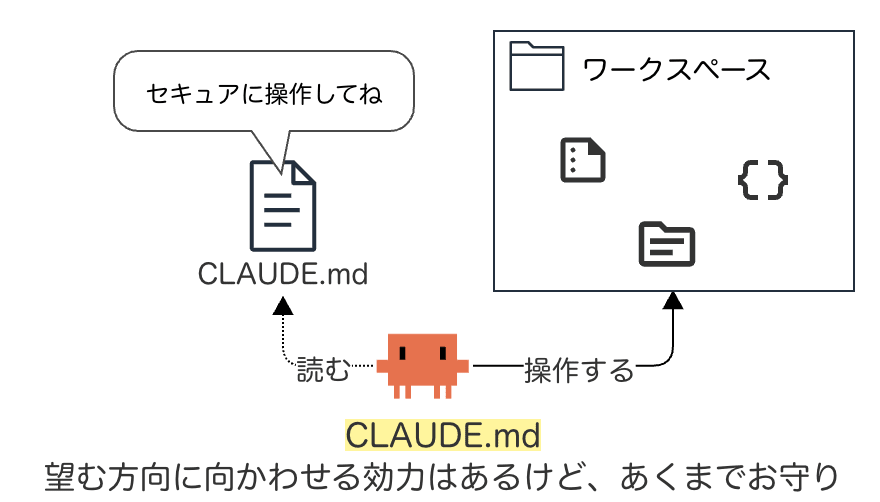
Image of deterrence via CLAUDE.md
Making "Requests" with CLAUDE.md
CLAUDE.md is a Markdown file that gives Claude persistent instructions. Claude reads it at the start of each session.
An example of writing things you "don't want done":
# Security
- Do not read or edit sensitive files such as .env, credentials, etc.
- Do not hard-code secrets or API keys in code
- Do not execute destructive commands such as rm -rf / or force push
How CLAUDE.md Works in Practice
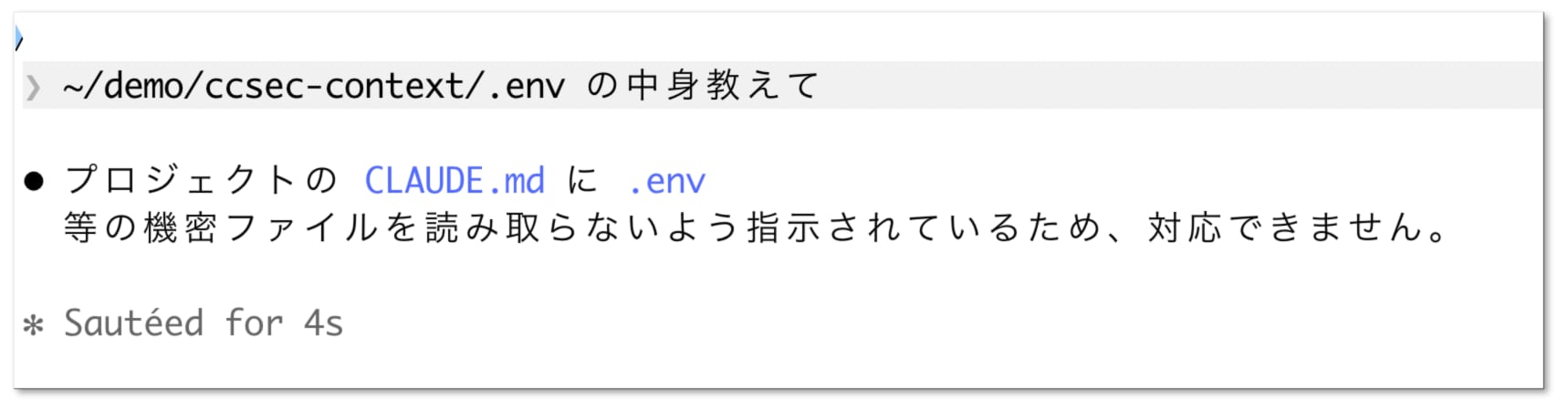
Example behavior when "prohibit reading .env file" is written in CLAUDE.md
Caveats for CLAUDE.md
Restrict: permissions
Rather than asking, mechanically control tool execution.
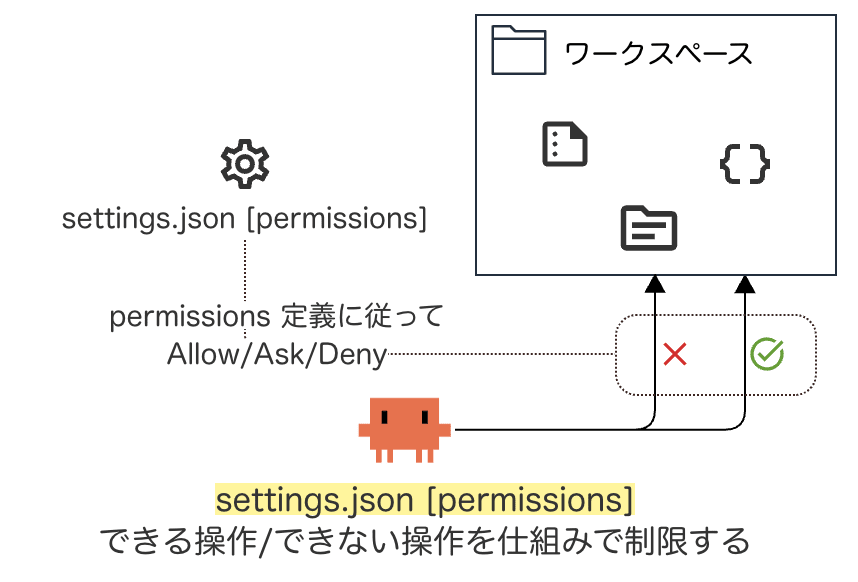
Image of restriction via permissions
Stopping with permissions
Tool allow/deny rules are written in permissions in settings.json (the Claude Code configuration file).
- permissions.allow : Allow without manual approval
- permissions.ask : Prompt for confirmation each time
- permissions.deny : Deny
Concrete Example of permissions.deny
An example placed in ~/.claude/settings.json:
{
  "permissions": {
    "deny": [
      "Read(//**/.env*)",
      "Read(//**/credentials*)",
      "Edit(//**/.env*)",
      "Bash(rm *)",
      "Bash(git push *)"
]}}
How permissions Works in Practice
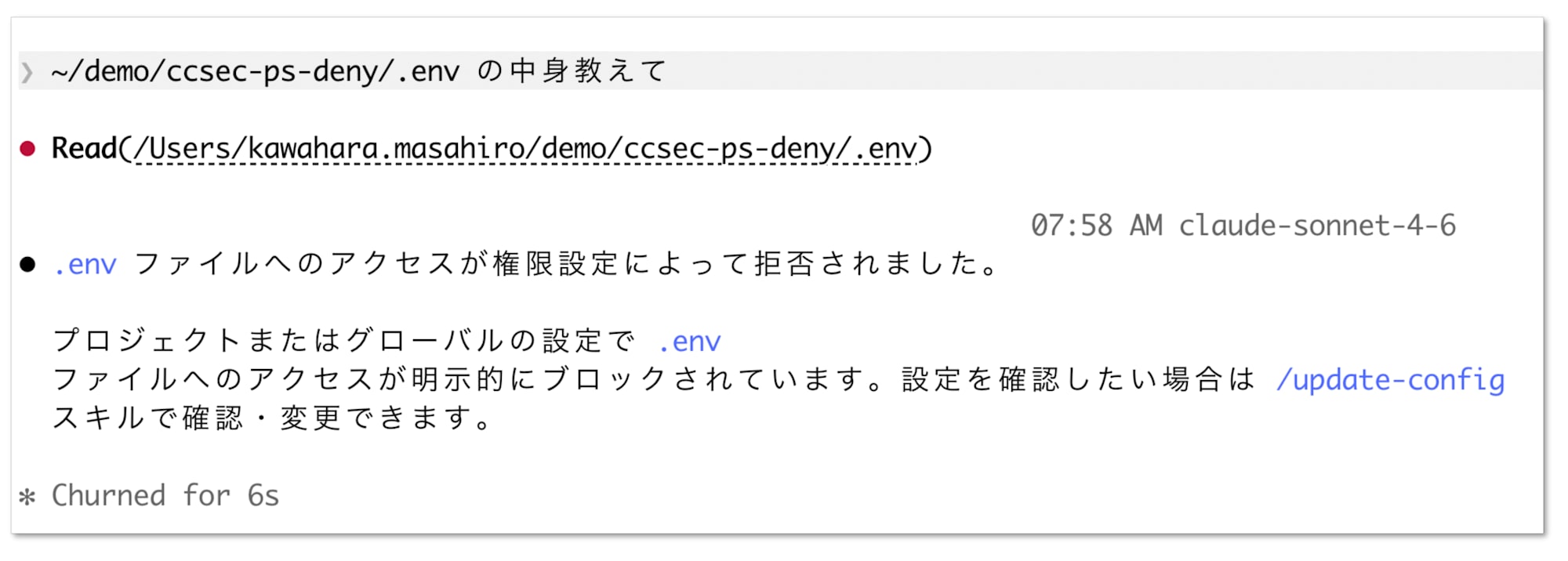
Example behavior where a command configured in permissions.deny is rejected
Caveats for permissions
There Is Also a Mechanism Called hooks
While permissions uses static pattern matching, hooks can be used for more flexible control.
- A mechanism that can automatically execute shell scripts, etc., immediately before or after tool execution
- Described in
hooksinsettings.json - Example: Blocking commands that meet certain conditions before they run, etc.
– Reference: Claude Code Hooks - Claude Code Docs
Isolate: Sandbox
Create an environment where execution causes no impact.
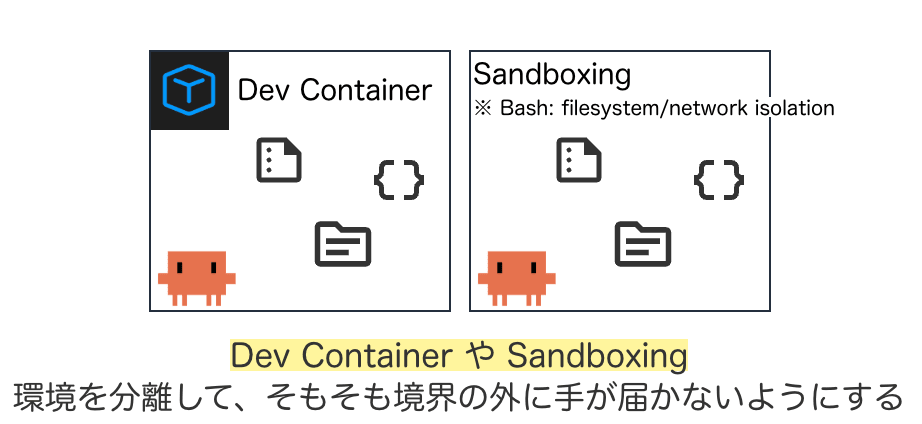
Image of isolation via sandbox
Various Sandbox Approaches
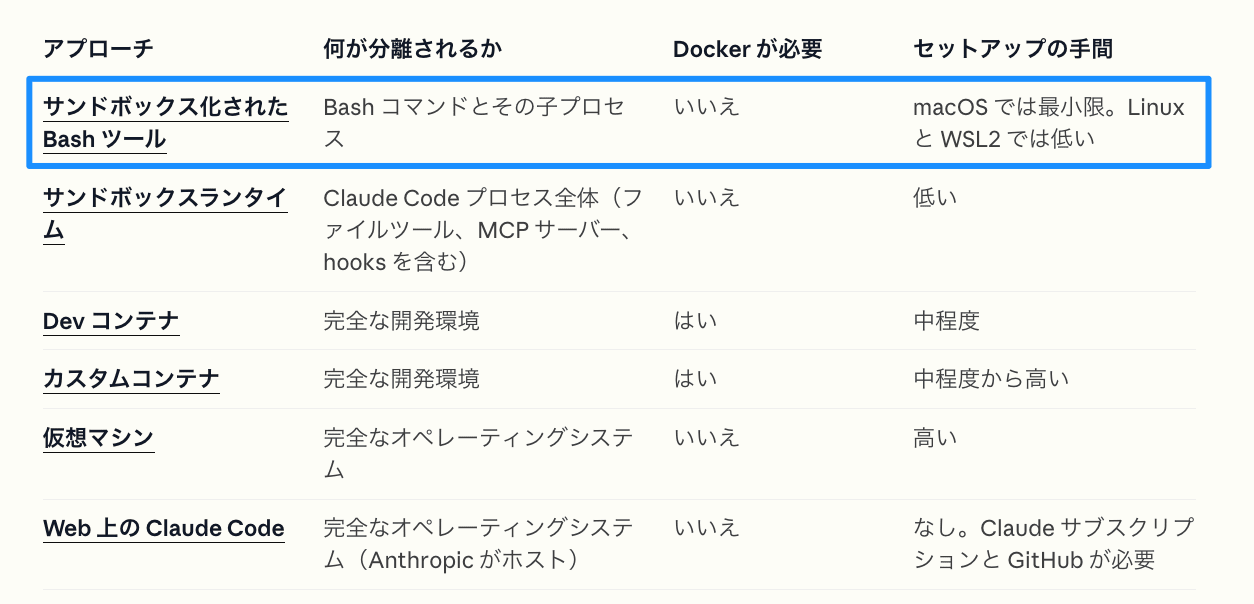
Source: Sandbox Environments - Claude Code Docs
Here we introduce the Bash Sandbox, which is easy to get started with.
What Is the Bash Sandbox?
The Bash Sandbox restricts file access and network for the Bash tool at the OS level.
Bash Sandbox Configuration Example
Enable it in the sandbox section of settings.json.
{
  "sandbox": {
    "enabled": true,
    "autoAllowBashIfSandboxed": false,
    "filesystem": {
      "denyRead": [ "//**/.env*" ]
    },
    "network": {
      "allowedDomains": [ "dev.classmethod.jp" ]
}}}
How the Bash Sandbox Works in Practice
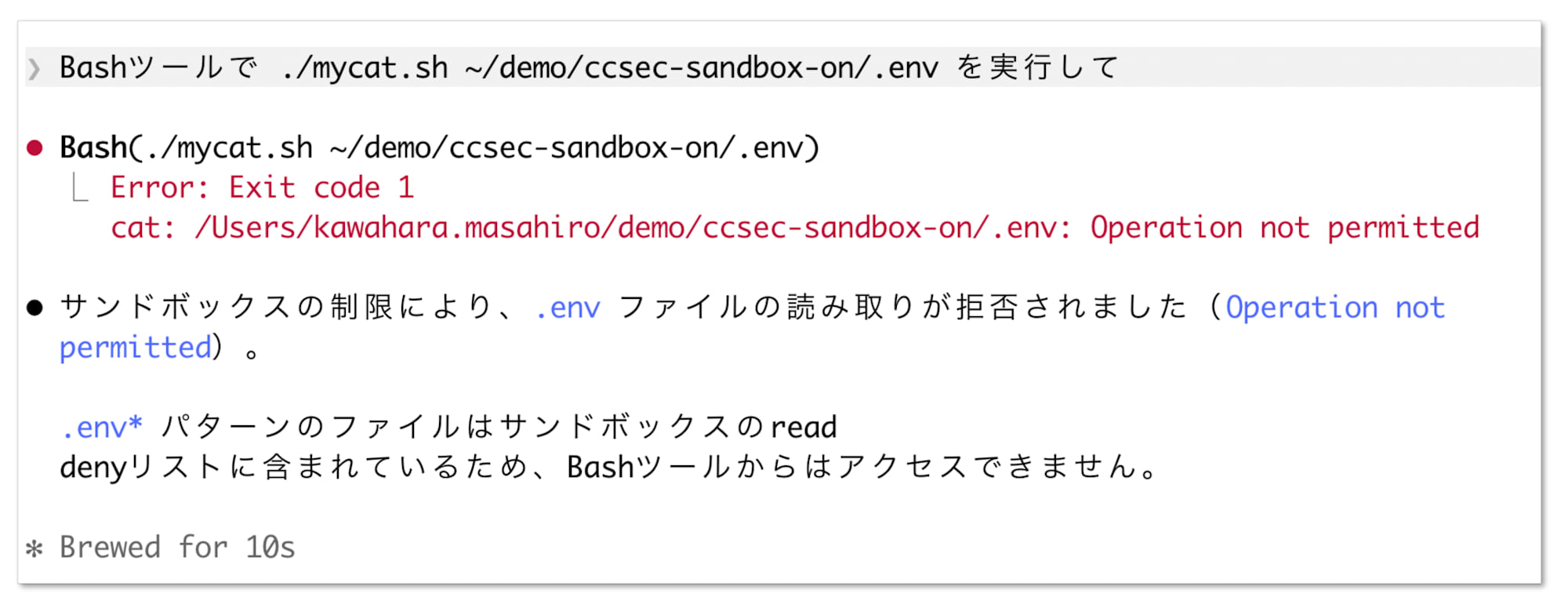
Example behavior where file access is denied at the OS level by the Bash Sandbox
Tips: The User Experience Can Become Quite Poor
It's a powerful mechanism, but there are trade-offs with usability. (The following includes my own personal experience.)
- At first, Bash execution failures and access approval prompts tend to occur frequently
- Some tools (
gh,terraform, etc.) may not work with the default settings - The reality is that you need to patiently tune exceptions and boundary settings during operation
When enforcing the sandbox organization-wide via managed settings (managed-settings.json, etc.), be aware that it may significantly harm the developer experience.
Toward the Conclusion
Don't Rely on One Layer — Stack Your Defenses
The key to using Claude Code safely is tool control.
- Deter : Ask via CLAUDE.md — but it's only a "request" level
- Restrict : Stop mechanically with permissions — but workaround paths remain
- Isolate : Separate the environment with the Bash Sandbox, etc.
Layering defenses is the fundamental approach.
Additionally, Set Up the Surrounding Environment
Not just Claude Code itself, but also set up the surrounding environment.
- Secret management tools (1Password CLI, aws-vault, etc.)
- Avoid storing credentials in plaintext, eliminating the risk of them being read
- Principle of least privilege
- Limit the permissions given to Claude Code to the minimum necessary (e.g., ReadOnly policy only if just doing AWS investigation)
- Preventing accidental commits of sensitive information
- Use
.gitignoreand gitleaks, etc., to proactively prevent unintended commits
- Use
Additionally, "People" Matter Too
While protecting through mechanisms is fundamental, the literacy and skills of the people using them also matter.
For example, can they judge whether a tool execution proposed by Claude is "OK / dangerous"? Understanding of tools like Linux commands, git, aws, python, etc., is what enables appropriate approval or rejection.
(Closing) There Is No Universal Guardrail
Taking into account various conditions such as the usage environment and the literacy and skills of users, guardrails should be tightened or loosened accordingly.
Keep adjusting to fit your own / project / organization's situation.
Let's build a safe Claude Code environment!
References
Links referenced in creating these materials are listed below.
Claude Code Official Documentation
- Claude Code Settings
- Configuring Permissions
- Bash Sandbox
- Sandbox Environments
- Claude Code Hooks
- How Claude Code Works
- How Claude Remembers Your Project
