Cutely Visualize Your Claude Code Sessions in a Web Browser and Say Goodbye to Losing Track of Them

This page has been translated by machine translation. View original
Introduction
Hello everyone, this is Akaike.
Until now, I have visualized Claude Code sessions in the following ways.
Both were a lot of fun to make, but they require dedicated hardware, so the barrier to everyday use was a bit high. (I'd like something realistic to use by now...)
So this time, I built a dashboard that lets you visualize Claude Code sessions in the browser.
Motivation
While working with multiple Claude Code sessions side by side, I had the following troubles.
-
How I usually use Claude Code
- I open VS Code for each folder and run Claude Code in each window
- I use VS Code because a large screen makes it easier to review the documents and code Claude creates
- I also tried the terminal app cmux, but viewing the documents it created was inconvenient, so I ended up coming back to VS Code...
-
What troubles me
- As windows increase, I can't tell which are processing and which are waiting for approval
- I often fail to notice a session stopped waiting for approval and leave it alone for a while
- With the mirror ball, I can't tell which session is waiting for approval, and the ESP32 device has a small screen that can only show one session
In this article, I define this state of losing track of sessions as "session lost."
So I wanted something that lets me check multiple sessions at a glance.
What I made
I made a plugin for Claude Code called Clawd Session House.
It prepares a room for Clawd for each session, and expresses the session's state through Clawd's movement in the room and the color of the light.
Live view
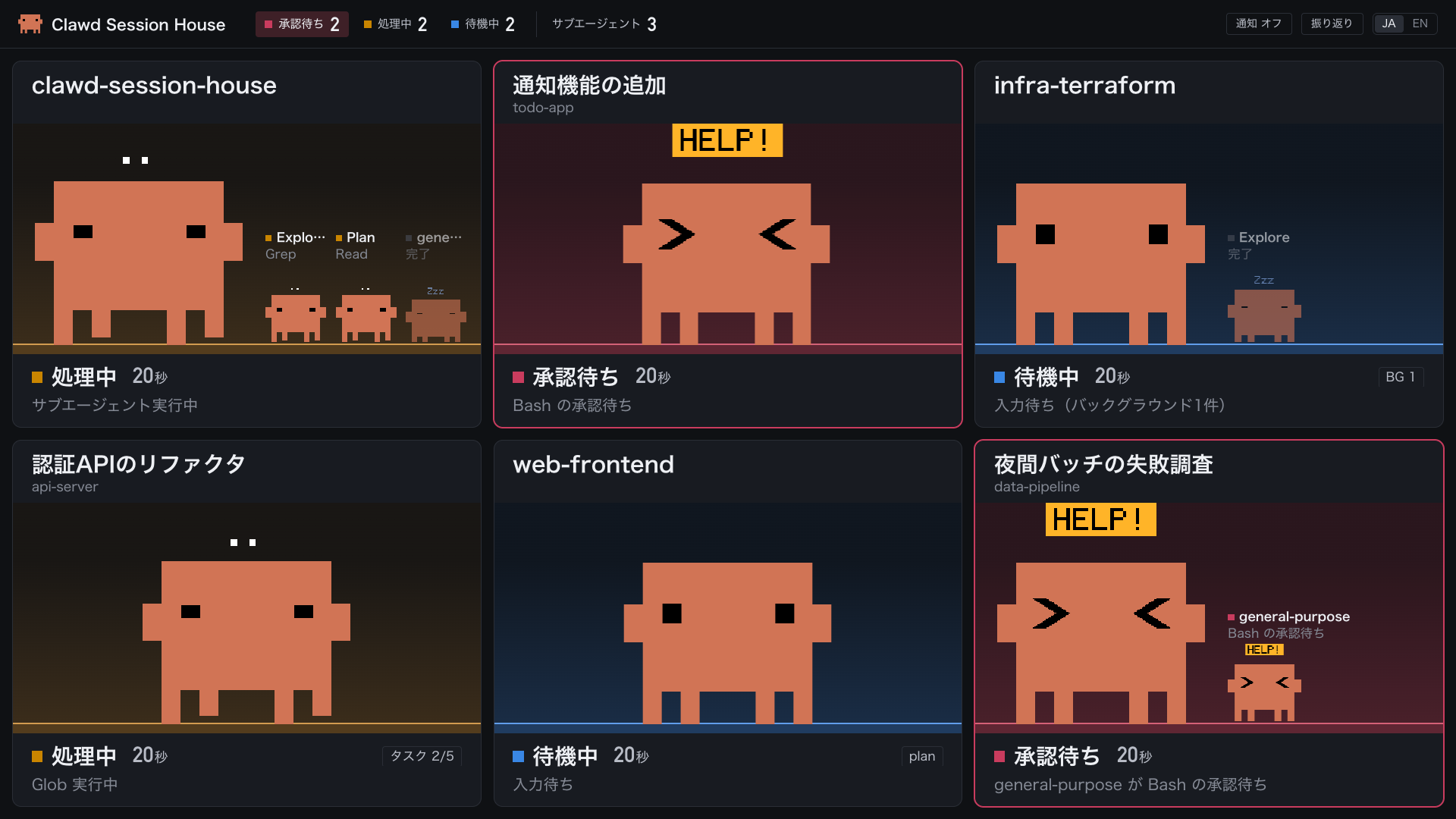
The live view arranges the running sessions one by one as tiles.
Roughly, it behaves as follows. It's soothing.
- Status
- Idle: The light is blue, and Clawd breathes and blinks
- Processing: The light is amber, and Clawd walks around thinking
- Waiting for approval: The light flashes red, and Clawd makes a troubled face and shows "HELP!"
- In addition to the elapsed time and the running tool, it also displays subagents, task progress, and background work
- It can show desktop notifications when a session starts waiting for approval and when a process that took more than 1 minute finishes
Review
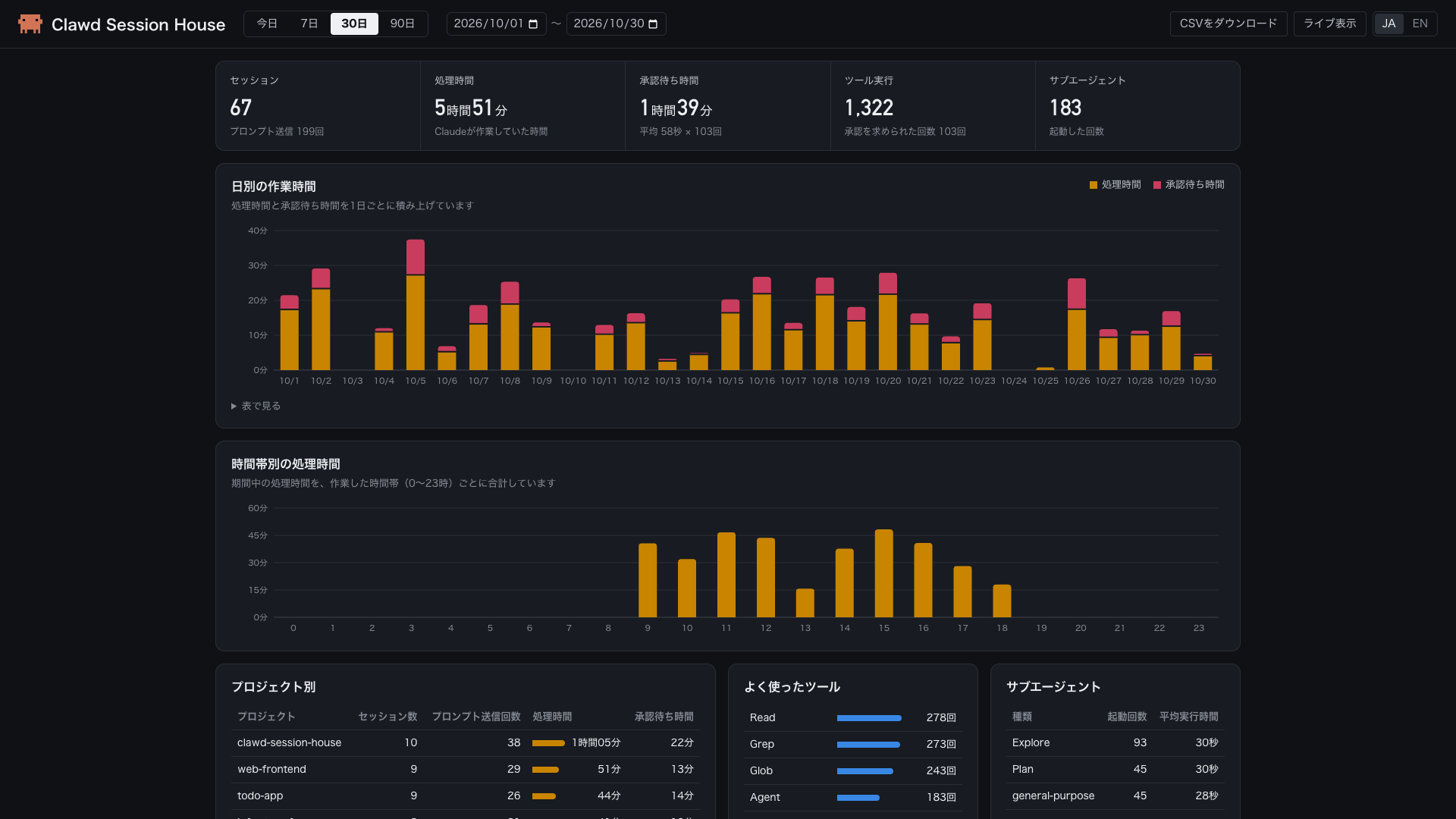
The review screen aggregates, from the recorded events, the time Claude spent working and the time it spent waiting for approval.
You can find projects with long approval waits and use that as a chance to revisit your allowed-command settings.
- Aggregation by day, time of day, and project
- The most-used tools and the number of launches for each type of subagent
- A timeline showing state transitions for each session
- Period selection and CSV download
These records are stored only in a local SQLite database.
Also, the body of prompts and the input contents of tools are neither saved nor displayed.
How to use
It runs on macOS, Linux, and WSL2 on Windows, and requires Python 3.9 or later and curl.
Run the following command inside Claude Code, then start a new session.
/plugin install clawd-session-house --marketplace Lamaglama39/clawd-session-house
For versions of Claude Code earlier than 2.1.275, add the marketplace first and then install.
/plugin marketplace add Lamaglama39/clawd-session-house
/plugin install clawd-session-house@lamaglama39
After that, just open http://127.0.0.1:8765/ in your browser.
Since I've prepared Skills, you can also ask Claude Code to "open Session House" and it will open the dashboard.
How it works
Overall picture
The overall structure is as follows.
First is Claude Code's hooks, the means of knowing the state.
Hooks are commands that Claude Code runs automatically at set timings, such as when a prompt is submitted, a tool is executed, or approval is requested.
Information such as the session ID and working folder is passed to the hook as JSON, so you can tell what happened in which session.
Next, the hook script sends the received JSON as is to the local server.
The server holds the state for each session ID, and notifies the browser via Server-Sent Events every time the state changes.
Server-Sent Events is a mechanism for continuously sending data from the server to the browser.
The server runs on only Python's standard library, so no additional packages are needed.
Finally, the browser draws Clawd in each tile according to the state it receives.
The server also records the same events in SQLite, and the review screen aggregates and displays those records.
Mapping events to states
Hook events and dashboard states are mapped as follows.
| Hook event | State |
|---|---|
UserPromptSubmit, PreToolUse, PostToolUse |
Processing |
PermissionRequest |
Waiting for approval |
Stop |
Idle |
SessionEnd |
Ended |
However, when you interrupt processing with Esc or deny in the approval dialog, Claude Code does not fire a hook, so the state change can't be detected from hooks alone.
Therefore, after such operations, the tile animation stays as it is until the next prompt is sent. (I'd like to improve this somehow in the future...)
Distributed as a plugin
The mechanism so far is packaged as a Claude Code plugin.
Hooks included in a plugin are registered automatically upon installation.
Users don't need to edit settings.json, and uninstalling also removes the hooks.
The server starts automatically when a session begins, so users don't even need to think about launching it.
Also, three operations—opening the dashboard, restarting the server, and stopping the server—are provided as skills.
You can call them from inside Claude Code, like /clawd-session-house:open.
Including the web app part, it can be distributed easily with a single command, so plugins are convenient and nice.
In closing
That was the story of visualizing Claude Code sessions in the browser.
Also, this dashboard was made entirely by chatting with Claude Code.
As long as you can extract session state with hooks, how you display it is up to you, so I encourage you all to build a dashboard that suits you and find the best way to manage your sessions.
I hope this article helps session-lost people all over the country.
