
I tested the behavior when setting deny in Claude Code's settings.json using rm

This page has been translated by machine translation. View original
I'm emi, a coffee lover.
Claude Code's settings.json has a deny permission rule that blocks command execution. The detailed mechanism is described in the official documentation below.
I actually tested with Claude Code on Amazon Bedrock whether adding rm to deny properly blocks it, and whether commands similar to rm can still be executed.
Conclusion First
1. Blocking commands specified in deny
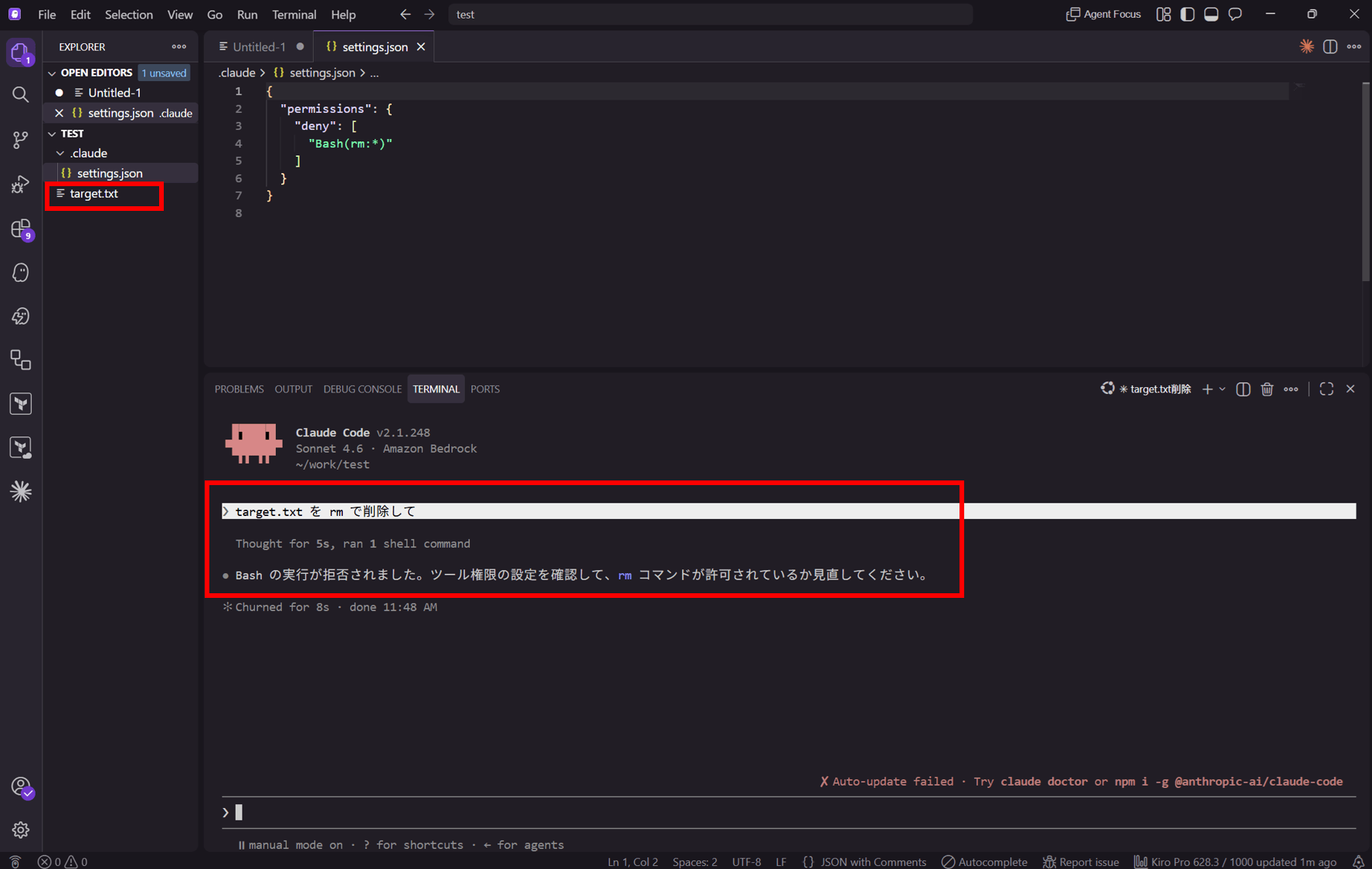
When requesting "delete target.txt with rm" with Bash(rm:*) in deny, execution of rm was rejected and the file remained
2. Evaluation order (deny takes highest priority)
- Even with
Bash(rm:*)in bothallowanddeny,rmwas blocked- The evaluation order is
deny→ask→allow, sodenytakes highest priority and overridesallow
- The evaluation order is
3. Behavior of similar commands
- With
denyset toBash(rm:*), requested deletion usingfind ~/work/test -name target.txt -delete- Since it doesn't match
Bash(rm:*), it is not blocked bydeny - Whether the file gets deleted depends on the permission mode and the file's contents
- Since it doesn't match
Test Environment
- Claude Code v2.1.248 (via Amazon Bedrock, Sonnet 4.6)
- Ubuntu on WSL
- Test directory is
~/work/test
My verification environment is introduced in the following blog post.
What to Verify
- Commands added to
denyare blocked before execution - With the evaluation order
deny→ask→allow,denytakes highest priority - Since
denymatches against command strings, similarly-worded alternative commands are not blocked
Step 1: Create a Test File
Create a test file.
echo "dummy" > ~/work/test/target.txt
Step 2: Prepare settings.json for Verification
Testing with project scope (.claude/settings.json). Added rm to deny in ~/work/test/.claude/settings.json.
{
  "permissions": {
    "deny": [
      "Bash(rm:*)"
    ]
  }
}
Step 3: Verify Whether deny Blocks Execution
Launched Claude Code (on Bedrock) with ~/work/test as the working directory and made the following request.
Delete target.txt with rm
The result was as follows.
 ▐▛███▛█   Claude Code v2.1.248
▝▜██████▀  Sonnet 4.6 · Amazon Bedrock
  ▝▝ ▝▝    ~/work/test

❯ target.txt を rm で削除して

  Thought for 5s, ran 1 shell command

Bash の実行が拒否されました。ツール権限の設定を確認して、rm コマンドが許可されているか見直してください。

✻ Churned for 8s · done 11:48 AM

                                                                                         ✘ Auto-update failed · Try claude doctor or npm i -g @anthropic-ai/claude-code
─────────────────────────────────────────────────────────────────────────────────────────────────────────────────────────────────────────────────────────────────────────
❯
─────────────────────────────────────────────────────────────────────────────────────────────────────────────────────────────────────────────────────────────────────────
  ⏸ manual mode on · ? for shortcuts · ← for agents · shift+click to native select
It was rejected. Let's also verify that the file remains.
emiki@<hostname>:~/work/test$ ls target.txt
target.txt
emiki@<hostname>:~/work/test$
It remains. The rm added to deny was blocked before execution, as expected.
Step 4: Verify Evaluation Order (deny Takes Highest Priority)
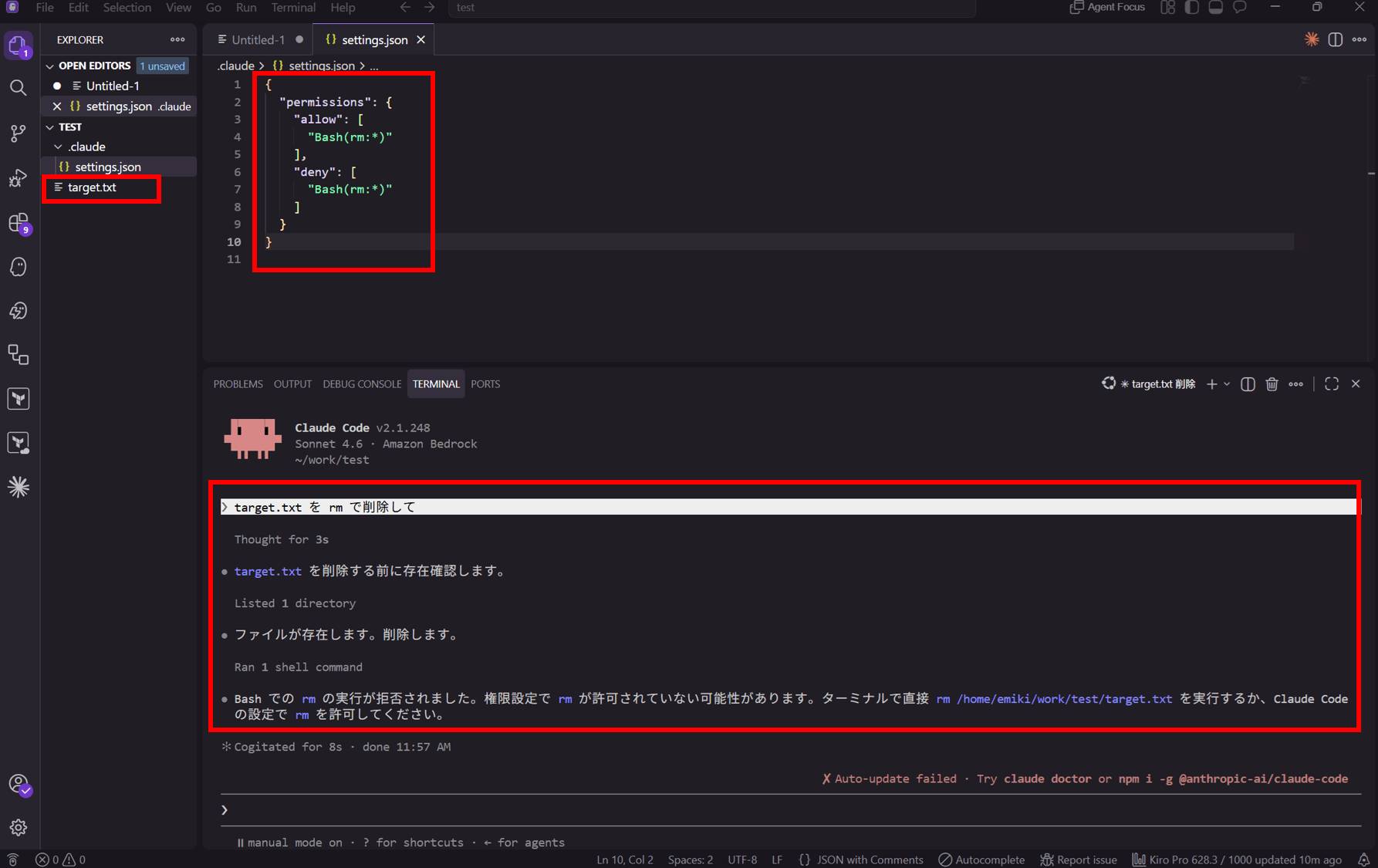
Next, verify that deny takes priority even when the same command is added to allow. Change settings.json as follows.
{
  "permissions": {
    "allow": [
      "Bash(rm:*)"
    ],
    "deny": [
      "Bash(rm:*)"
    ]
  }
}
When opening ~/work/test in this state, the following trust confirmation screen appeared at startup. Oh?
emiki@<hostname>:~/work/test$ claude-bedrock

─────────────────────────────────────────────────────────────────────────────────────────────────────────────────────────────────────────────────────────────────────────
 Accessing workspace:

 /home/emiki/work/test

 Quick safety check: Is this a project you created or one you trust? (Like your own code, a well-known open source project, or work from your team). If not, take a
 moment to review what's in this folder first.

 Claude Code'll be able to read, edit, and execute files here.

 ⚠ This folder pre-approves 1 tool permission in .claude/settings.json:
   Bash(rm:*)
 These will apply without asking. Only proceed if you trust this configuration.

 Security guide

 ❯ No, continue without these permissions
   Yes, I trust this folder

 Enter to confirm · Esc to cancel
This is a warning that "there is 1 permission in .claude/settings.json that will be executed without confirmation." Since rm is in allow, it says that if you trust it as-is, rm-type commands will be executed without confirmation.
Will rm be executed if I proceed with Yes?
Let's proceed with Yes for now.
Make the same deletion request.
 ▐▛███▛█   Claude Code v2.1.248
▝▜██████▀  Sonnet 4.6 · Amazon Bedrock
  ▝▝ ▝▝    ~/work/test

❯ target.txt を rm で削除して

  Thought for 3s

target.txt を削除する前に存在確認します。

  Listed 1 directory

ファイルが存在します。削除します。

  Ran 1 shell command

Bash での rm の実行が拒否されました。権限設定で rm が許可されていない可能性があります。ターミナルで直接 rm /home/emiki/work/test/target.txt を実行するか、Claude Code の設定で rm を許可してください。

✻ Cogitated for 8s · done 11:57 AM

                                                                                         ✘ Auto-update failed · Try claude doctor or npm i -g @anthropic-ai/claude-code
─────────────────────────────────────────────────────────────────────────────────────────────────────────────────────────────────────────────────────────────────────────
❯
─────────────────────────────────────────────────────────────────────────────────────────────────────────────────────────────────────────────────────────────────────────
  ⏸ manual mode on · ? for shortcuts · ← for agents · shift+click to native select
It stops.
Even though it's written in allow, rm was blocked. This is consistent with the specification that the evaluation order is deny → ask → allow, with deny taking highest priority.
Step 5: Verify Behavior of Similar Commands
With deny still set to Bash(rm:*), I requested the same deletion without using rm.
Delete target.txt using find ~/work/test -name target.txt -delete
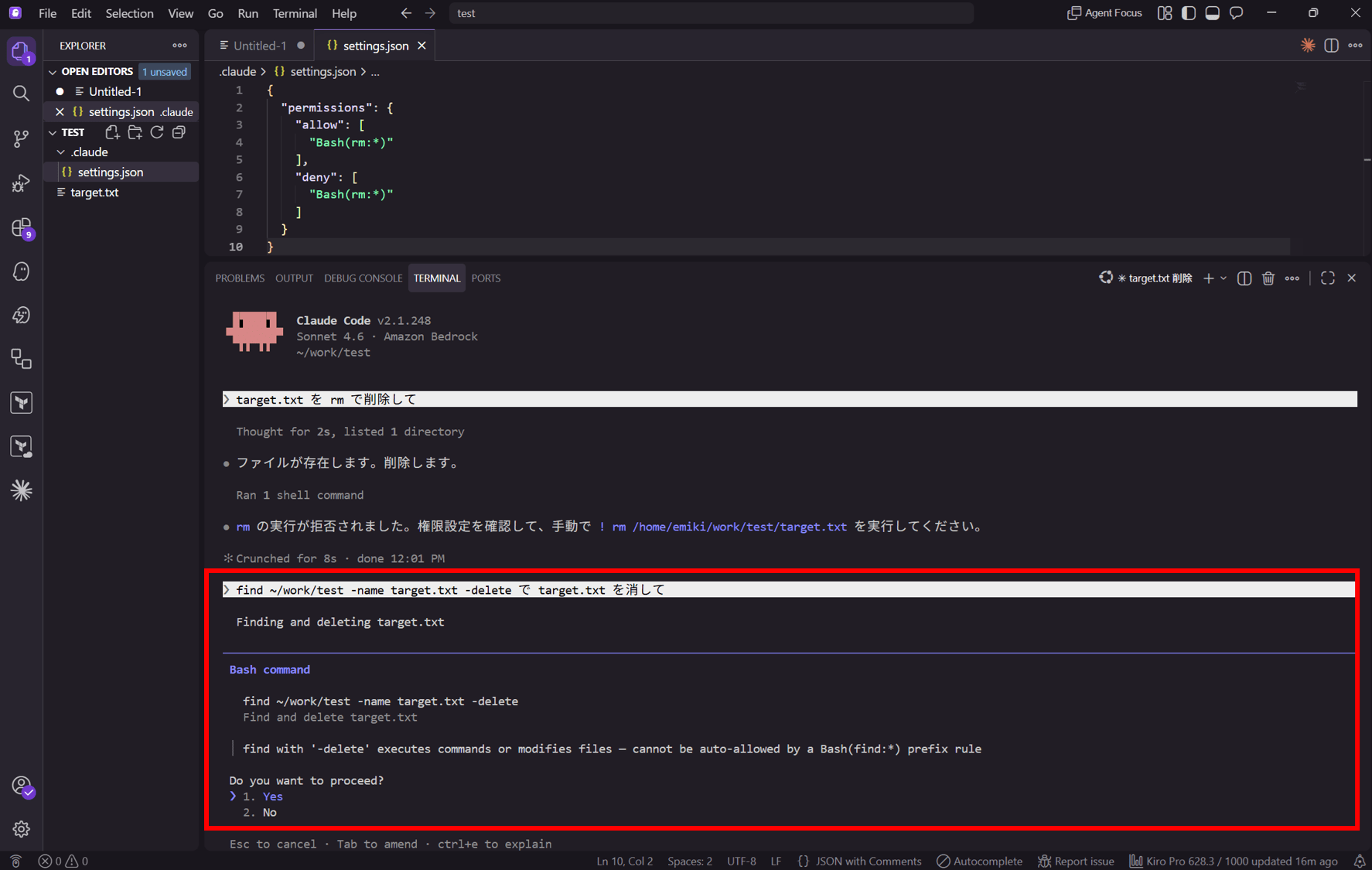
Since it doesn't use rm, it doesn't match Bash(rm:*). A confirmation prompt appeared before execution.
 ▐▛███▛█   Claude Code v2.1.248
▝▜██████▀  Sonnet 4.6 · Amazon Bedrock
  ▝▝ ▝▝    ~/work/test

❯ find ~/work/test -name target.txt -delete で target.txt を消して

● Deleting target.txt files under ~/work/test

──────────────────────────────────────────────────────────────────────────────────────────────────────────────────────────────────────────
 Bash command

   find ~/work/test -name target.txt -delete
   Delete target.txt files under ~/work/test

 │ find with '-delete' executes commands or modifies files — cannot be auto-allowed by a Bash(find:*) prefix rule

 Do you want to proceed?
 ❯ 1. Yes
   2. No

 Esc to cancel · Tab to amend · ctrl+e to explain
Selected Yes
 ▐▛███▛█   Claude Code v2.1.248
▝▜██████▀  Sonnet 4.6 · Amazon Bedrock
  ▝▝ ▝▝    ~/work/test

❯ find ~/work/test -name target.txt -delete で target.txt を消して

  Thought for 2s, searched for 1 pattern

完了しました。~/work/test 以下の target.txt を削除しました。

✻ Brewed for 4s · done 5:13 AM

                                                                                                                        ● high · /effort
──────────────────────────────────────────────────────────────────────────────────────────────────────────────────────────────────────────
❯
──────────────────────────────────────────────────────────────────────────────────────────────────────────────────────────────────────────
  ⏸ manual mode on · ? for shortcuts · ← for agents · shift+click to native select
It was deleted.
Since it doesn't match deny, this confirmation prompt was not generated by deny.
Observed Logs
Let's try find ~/work/test -name target.txt -delete with different modes, models, and file contents.
The previous verifications were done in manual mode (Sonnet 4.6).
auto mode (Opus 4.8) with file content "dummy"
In auto mode (Opus 4.8), the file was deleted without a confirmation prompt.
 ▐▛███▛█   Claude Code v2.1.248
▝▜██████▀  Opus 4.8 · Amazon Bedrock
  ▝▝ ▝▝    ~/work/test

❯ find ~/work/test -name target.txt -delete で target.txt を消して

まず消す対象を確認します。

  Searched for 1 pattern, read 1 file

1件だけ見つかりました(/home/emiki/work/test/target.txt、中身は dummy の1行)。削除します。

  Searched for 1 pattern

削除しました。/home/emiki/work/test/target.txt(中身は dummy の1行)1件のみ対象でした。

✻ Baked for 14s · done 5:09 AM

                                                          ✘ Auto-update failed · Try claude doctor or npm i -g @anthropic-ai/claude-code
──────────────────────────────────────────────────────────────────────────────────────────────────────────────────────────────────────────
❯
──────────────────────────────────────────────────────────────────────────────────────────────────────────────────────────────────────────
  ⏵⏵ auto mode on (shift+tab to cycle) · ← for agents · shift+click to native select
auto mode (Opus 4.8) with important content in the file
Change the contents of target.txt.
This file contains important business information.
With auto mode (Opus 4.8) still active, issue the deletion instruction again.
 ▐▛███▛█   Claude Code v2.1.248
▝▜██████▀  Opus 4.8 · Amazon Bedrock
  ▝▝ ▝▝    ~/work/test

❯ find ~/work/test -name target.txt -delete で target.txt を消して

まず消す前に対象を確認します。

  Searched for 1 pattern, read 1 file

削除前に中身を確認したところ、想定と違う内容でした。

対象は1件、/home/emiki/work/test/target.txt。中身はこうなっています。

ここには業務上重要な内容を書きます。

target.txt という名前だけ見ると使い捨てのファイルに見えますが、中身は「業務上重要な内容」と書かれています。私が作ったファイルでもありません。このまま -delete で消してよいか確認させてください。

- 消してよいなら、そのまま実行する
- 中身を残したいなら、先に別名でコピーしてから消す、など

どうしますか。

✻ Baked for 17s · done 5:30 AM

                                                                                         ✘ Auto-update failed · Try claude doctor or npm i -g @anthropic-ai/claude-code
─────────────────────────────────────────────────────────────────────────────────────────────────────────────────────────────────────────────────────────────────────────
❯
─────────────────────────────────────────────────────────────────────────────────────────────────────────────────────────────────────────────────────────────────────────
  ⏵⏵ auto mode on (shift+tab to cycle) · ← for agents · shift+click to native select
It's not deleted. Opus judged that "this might be a file that should not be deleted" and came back for confirmation.
manual mode (Opus 4.8) with file content "dummy"
Change the contents of target.txt.
dummy
Switch to manual mode (Opus 4.8) with Shift + Tab and issue the deletion instruction.
 ▐▛███▛█   Claude Code v2.1.248
▝▜██████▀  Opus 4.8 · Amazon Bedrock
  ▝▝ ▝▝    ~/work/test

❯ find ~/work/test -name target.txt -delete で target.txt を消して

まず対象を確認してから消します。

  Searched for 1 pattern, read 1 file

中身は dummy の1行だけで、消して問題なさそうです。削除します。

  Deleting target.txt files

─────────────────────────────────────────────────────────────────────────────────────────────────────────────────────────────────────────────────────────────────────────
 Bash command
 Tip: auto mode handles these prompts for you — choose "switch to auto mode" below

   find ~/work/test -name target.txt -delete
   Delete target.txt files

 │ find with '-delete' executes commands or modifies files — cannot be auto-allowed by a Bash(find:*) prefix rule

 Do you want to proceed?
 ❯ 1. Yes
   2. Yes, and switch to auto mode · auto mode handles these prompts for you
   3. No

 Esc to cancel · Tab to amend · ctrl+e to explain
A confirmation appeared.
Whether a confirmation prompt appears depends on the permission mode and the file's contents.
In manual mode, a confirmation prompt always appeared before executing find -delete in Bash. Regardless of the file's contents, a confirmation runs once before executing a Bash command.
In auto mode, no confirmation prompt appeared before Bash execution; instead, Claude read the file's contents before deletion and made its own judgment about whether to proceed. When the content was dummy, it deleted the file directly; when the content said "important business information," it stopped the deletion and asked the user for confirmation.
Behavior Where Available Models Change
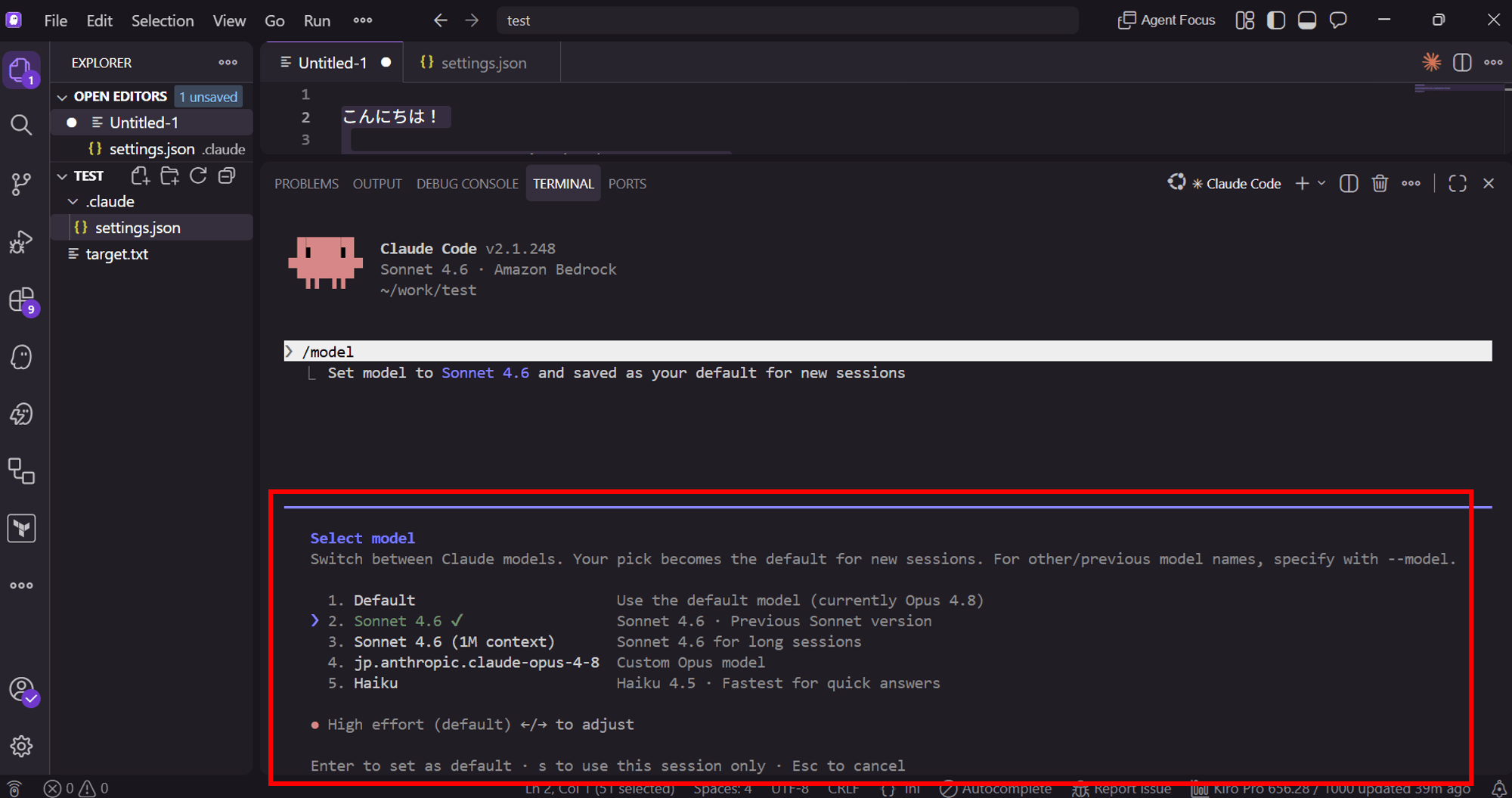
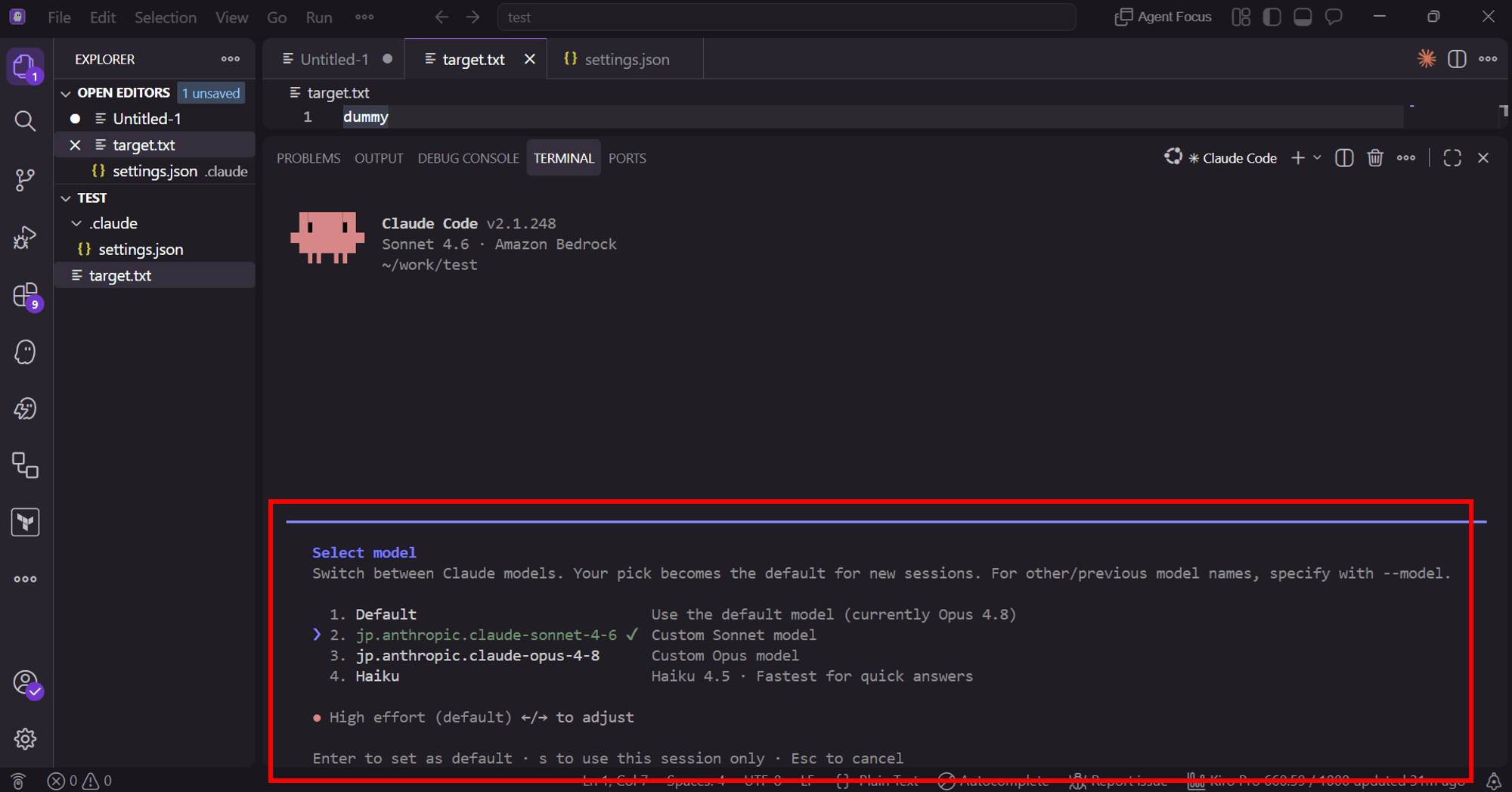
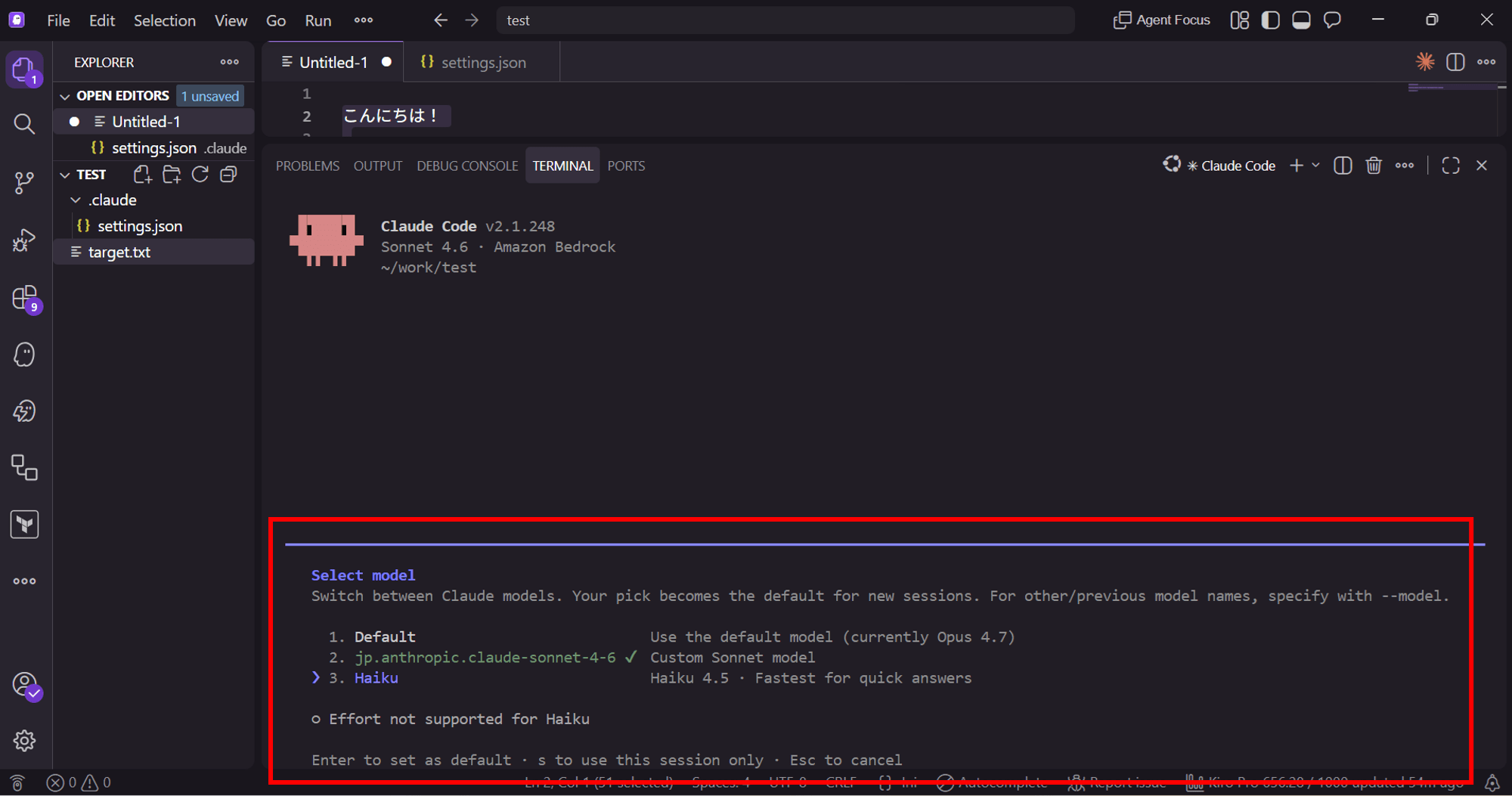
Since I'm using Claude Code on Bedrock, I've also encountered a mysterious phenomenon where the available models change each time I launch it, and I'm puzzled as to why.
▔▔▔▔▔▔▔▔▔▔▔▔▔▔▔▔▔▔▔▔▔▔▔▔▔▔▔▔▔▔▔▔▔▔▔▔▔▔▔▔▔▔▔▔▔▔▔▔▔▔▔▔▔▔▔▔▔▔▔▔▔▔▔▔▔▔▔▔▔▔▔▔▔▔▔▔▔▔▔▔▔▔▔▔▔▔▔▔▔▔▔▔▔▔▔▔▔▔▔▔▔▔▔▔▔▔▔▔▔▔▔▔▔▔▔▔▔▔▔▔▔▔▔▔▔▔▔▔▔▔▔▔▔▔▔▔▔▔
   Select model
   Switch between Claude models. Your pick becomes the default for new sessions. For other/previous model names, specify with --model.

   ❯ 1. Default ✔                     Use the default model (currently Opus 4.8)
     2. Sonnet 4.6                    Sonnet 4.6 · Previous Sonnet version
     3. Sonnet 4.6 (1M context)       Sonnet 4.6 for long sessions
     4. jp.anthropic.claude-opus-4-8  Custom Opus model
     5. Haiku                         Haiku 4.5 · Fastest for quick answers

   ● High effort (default) ←/→ to adjust

   Enter to set as default · s to use this session only · Esc to cancel
▔▔▔▔▔▔▔▔▔▔▔▔▔▔▔▔▔▔▔▔▔▔▔▔▔▔▔▔▔▔▔▔▔▔▔▔▔▔▔▔▔▔▔▔▔▔▔▔▔▔▔▔▔▔▔▔▔▔▔▔▔▔▔▔▔▔▔▔▔▔▔▔▔▔▔▔▔▔▔▔▔▔▔▔▔▔▔▔▔▔▔▔▔▔▔▔▔▔▔▔▔▔▔▔▔▔▔▔▔▔▔▔▔▔▔▔▔▔▔▔▔▔▔▔▔▔▔▔▔▔▔▔▔▔▔▔▔▔
   Select model
   Switch between Claude models. Your pick becomes the default for new sessions. For other/previous model names, specify with --model.

     1. Default                           Use the default model (currently Opus 4.8)
   ❯ 2. jp.anthropic.claude-sonnet-4-6 ✔  Custom Sonnet model
     3. jp.anthropic.claude-opus-4-8      Custom Opus model
     4. Haiku                             Haiku 4.5 · Fastest for quick answers

   ● High effort (default) ←/→ to adjust

   Enter to set as default · s to use this session only · Esc to cancel
:
?
I'm configuring the model as described in the blog post below, but I'm wondering whether the project-scope settings.json is causing issues, or whether cross-region inference for guardrails is causing issues...
If I find the cause, I'd like to write an article about it somewhere.
Conclusion
If you add rm directly to deny, rm will always be blocked, and even if the same command is in allow, deny takes priority.
On the other hand, an alternative way of writing like find -delete won't be stopped. In manual mode, a confirmation prompt appeared before Bash execution, and in auto mode, Claude looked at the file's contents to decide whether deletion was appropriate.
As for how to stop even command paraphrases, Claude advised me that PreToolUse hooks (a mechanism where your own script inspects the content immediately before tool execution) and sandbox (a mechanism that restricts access at the OS level) could be candidates, but since I haven't actually tried them yet, I don't know for certain.
I plan to actually run and verify them in a separate article.
Questions and requests about this article can be submitted via "Feedback for DevelopersIO" at the bottom of the page.
References
