
Finding out when Claude Code's claude.ai sign-in expires: loginExpiresAt in auth status and the expiration warning from claude -p

This page has been translated by machine translation. View original
Hello! I'm Yuji Nishimura from the Ops team!
If you're running claude -p from cron or scheduled tasks while logged in to Claude Code with a claude.ai account (Pro, Max, etc.), you may wonder when that sign-in will expire. According to the official documentation, once the saved login expires and can no longer be renewed, requests to the model fail until you sign in again.
In Claude Code 2.1.318, you can now check when the saved claude.ai sign-in expires in the following three places.
loginExpiresAtin the JSON ofclaude auth statuscredential_expires_atin the result ofclaude -p --output-format json- A one-line warning to stderr in the text output of
claude -p, starting 10 days before expiry
In this article, I prepared dummy login credentials with different expiry dates and checked what is displayed for each number of remaining days, and which login methods don't show a date. I also tried a short script that checks the remaining days before a scheduled run.
What changed this time
- Target version / date: Claude Code 2.1.318 (released November 4, 2026)
- Key points of the change:
- The addition of the three places above (the release notes list two items: the addition of two fields, and the warning from 10 days before)
- In addition, the sign-in failure when a saved claude.ai login has reached its expiry was fixed to say that the expiry has been reached, and
claude -pnow points toclaude auth loginandclaude setup-token(I haven't checked the actual display)
- Official link: v2.1.318 release notes
loginExpiresAt is not the expiry of the access token
As of November 14, 2026, the Claude Code documentation (the Authentication and CLI reference pages) did not explain what this date represents. The description of credential_expires_at in the type definition sdk.d.ts of the Claude Agent SDK (TypeScript) explains it as follows (checked in 0.3.323).
- For a saved claude.ai login, it represents the expiry recorded at sign-in. It is the deadline until which the access token can keep being renewed without signing in again (in the type definition's terms, the end of the refresh chain), and renewing the access token does not move this date
- If the server returned a date, that value is used; if not, a 30-day estimate is used
- The sign-in may actually end up to 3 days earlier than this date
- It does not query the server, so the date remains even for a login that was revoked midway. A past date probably means it has ended, but it is not certain that it has ended
- It is not shown when using an API key, a token passed via an environment variable, or another provider
In other words, even if Claude Code keeps renewing the access token automatically, you need to sign in again by this date (or 3 days before it at the earliest). I summarized the display changes confirmed in the verification below as a diagram showing the relationship between the remaining days and what Claude Code displays (a diagram I made myself).
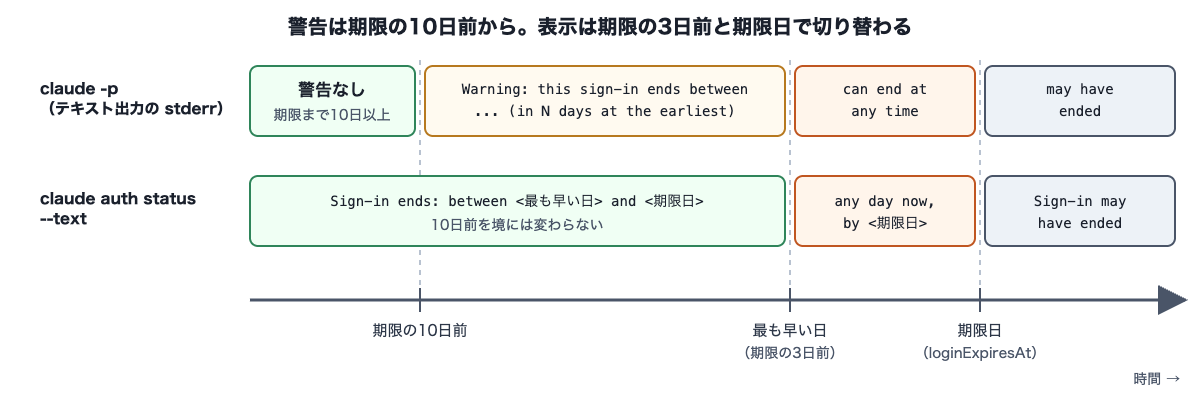
The claude -p warning appears from 10 days before expiry, and the wording switches at 3 days before expiry (hereafter, the earliest date) and at the expiry date. The display of claude auth status --text does not change at the 10-day mark.
As for interactive mode, according to the official documentation, Your login expires in 3 days · run /login to renew is shown at startup from 3 days before expiry. Since this is not relevant to scheduled claude -p runs, I did not check the interactive mode screen this time.
Trying it out
Environment and how I checked
- OS: Ubuntu 24.04 (Docker container, aarch64). On macOS 26.7.2 (Claude Code 2.1.319), I only checked
claude auth statuswith an actual claude.ai login - Tools: Claude Code 2.1.322 (after the change), 2.1.317 (before the change, for comparison), jq 1.7
- Run date/time: around 5 a.m. on November 14, 2026 (Japan time), which is around 8 p.m. on November 13 in UTC. Claude Code displays dates in UTC, so the dates in the output below start from November 13 (UTC)
On Linux, Claude Code stores claude.ai login information in ~/.claude/.credentials.json (official documentation). I prepared this file with dummy contents where only the expiry date (refreshTokenExpiresAt) was changed, and ran each case in a fresh home directory. The contents of the file are Claude Code's internal format and may change in the future.
The requests from claude -p are pointed at a test API server inside the container (one that just returns ok to every request) via ANTHROPIC_BASE_URL. No requests were made to an actual model.
1. Viewing the expiry date with claude auth status
I ran claude auth status with dummy login credentials whose expiry was set to 5 days later. With --text, it is displayed in a human-readable format.
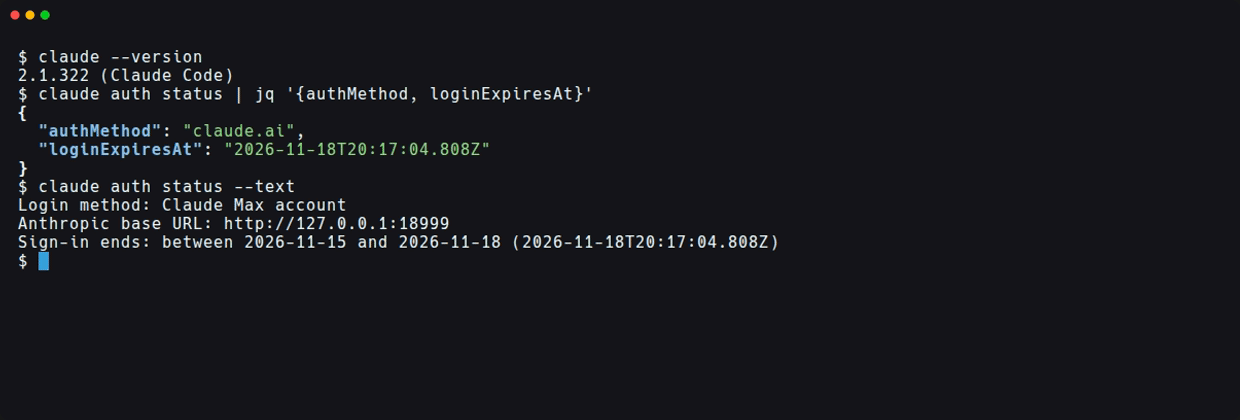
loginExpiresAt in the JSON showed the date I put in the login credentials as is (down to milliseconds). With --text, it is displayed as a range from the earliest date to the expiry date, like Sign-in ends: between 2026-11-15 and 2026-11-18. This reflects the point in the Agent SDK's description that the sign-in "may end up to 3 days earlier". The Login method line is shown because of the dummy login credentials, and the Anthropic base URL line appears because it is pointed at the test server.
The --text display when changing the expiry is as follows.
| Expiry date | Display of claude auth status --text |
|---|---|
| 20 days later | Sign-in ends: between 2026-11-30 and 2026-12-03 (...) |
| 5 days later | Sign-in ends: between 2026-11-15 and 2026-11-18 (...) |
| 2 days later (past the earliest date) | Sign-in ends: any day now, by 2026-11-15 (...) |
| 1 day past expiry | Sign-in may have ended: between 2026-11-09 and 2026-11-12 (...) |
With an actual login on macOS as well, a date appeared in loginExpiresAt of claude auth status, and a Sign-in ends: line appeared in --text. Since macOS stores login information in the Keychain, I did not check by rewriting a file as above. Because the day I signed in is unclear, I also did not check how long the expiry is for an actual sign-in.
2. Viewing the claude -p warning and credential_expires_at
With the same kind of dummy login whose expiry was set to 5 days later (recreated for each screenshot, so the times differ by a few dozen seconds from the first image), I ran claude -p with text output and JSON output. I redirected the responses to a file so that only stderr appears in the terminal.
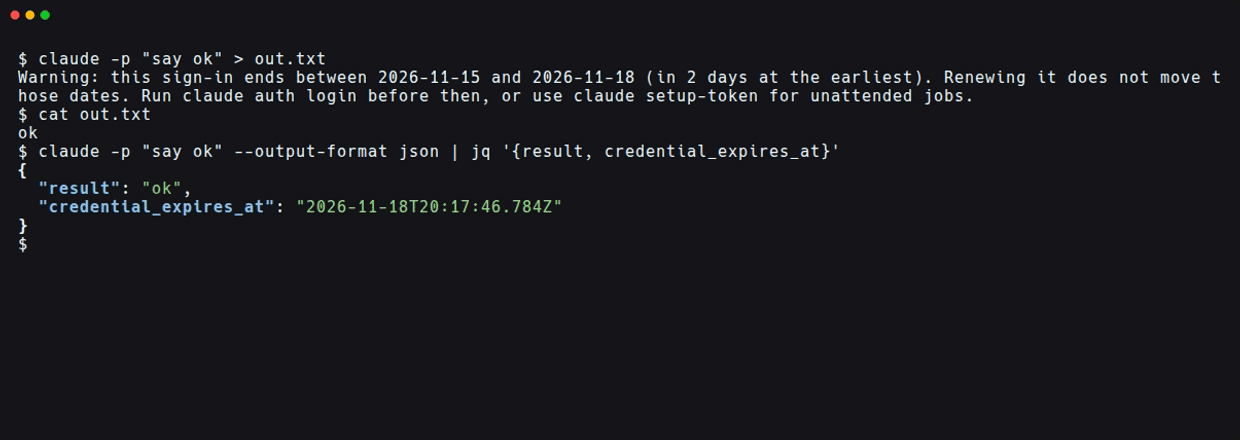
With text output, the following warning appeared on stderr. It was not mixed into the stdout response (ok).
Warning: this sign-in ends between 2026-11-15 and 2026-11-18 (in 2 days at the earliest). Renewing it does not move those dates. Run claude auth login before then, or use claude setup-token for unattended jobs.
The warning even points to the command for signing in again (claude auth login) and another method for unattended jobs (claude setup-token, a command that issues a token valid for one year).
With JSON output, running with the same login put the same date as loginExpiresAt in credential_expires_at, and nothing appeared on stderr.
I changed the expiry date and compared whether the text output warning appears.
| Expiry date | Text output warning (stderr) |
|---|---|
| 11 days later | Not shown |
| 1 minute after the 10-day mark | Not shown |
| 1 minute before the 10-day mark | this sign-in ends between 2026-11-20 and 2026-11-23 (in 7 days at the earliest) |
| 9 days later | this sign-in ends between 2026-11-19 and 2026-11-22 (in 6 days at the earliest) |
| 5 days later | this sign-in ends between 2026-11-15 and 2026-11-18 (in 2 days at the earliest) |
| 2 days later | this sign-in can end at any time from now until 2026-11-15 |
| 1 day past expiry | this sign-in may have ended between 2026-11-09 and 2026-11-12 |
The warning appeared from 10 days before the expiry date. The number of days in parentheses is counted to the earliest date, not the expiry date. Even in the case 1 day past expiry, the test server returned a response, but that is because the server does not verify authentication. I haven't checked whether a request is rejected on the actual service.
Dates are displayed in UTC. Even when I ran the 5-days-later case with TZ=Asia/Tokyo, the display used UTC dates (between 2026-11-15 and 2026-11-18) rather than Japan-time dates (11-16 / 11-19). The number of days (in N days) comes out the same either way in this case, so it can't be distinguished, but looking at the code included in Claude Code itself, it was counted by the difference in UTC dates.
3. Checking cases where no date appears
These are the results when changing the login method or version.
| Condition | claude auth status |
JSON of claude -p |
Text output warning |
|---|---|---|---|
| claude.ai login (no expiry recorded) | authMethod: "claude.ai", loginExpiresAt: null |
No credential_expires_at |
Not shown |
ANTHROPIC_API_KEY |
authMethod: "api_key", loginExpiresAt: null |
No credential_expires_at |
Not shown |
CLAUDE_CODE_OAUTH_TOKEN |
authMethod: "oauth_token", loginExpiresAt: null |
No credential_expires_at |
Not shown |
| Login 5 days later on 2.1.317 | No loginExpiresAt key at all |
No credential_expires_at |
Not shown |
The first row was reproduced by removing the expiry value from the login credentials file. I haven't checked in which cases an actual login ends up in this state. In claude auth status, the loginExpiresAt key remains with the value null, while in the JSON of claude -p the key disappears entirely. Using jq's // empty, both forms can be treated as empty.
CLAUDE_CODE_OAUTH_TOKEN is an environment variable for passing a token issued with claude setup-token. Since no expiry date is shown with this method, you need to keep track of the issue date yourself.
Checking remaining days before a scheduled run
claude auth status does not make requests to the model, so it can be called before a job or in a separate periodic check. I wrote a script that counts the days until the earliest date (3 days before loginExpiresAt) and returns exit code 1 if it falls below a threshold. jq is required.
#!/bin/bash
# Check how many days until the saved claude.ai sign-in expires, at the earliest
# loginExpiresAt is a date by which the sign-in may end up to 3 days earlier, so count from 3 days before it
threshold_days=${1:-7}

status=$(claude auth status) || { echo "claude auth status が失敗しました(未ログインなど)" >&2; exit 1; }
exp=$(printf '%s' "$status" | jq -r '.loginExpiresAt // empty')
if [ -z "$exp" ]; then
  echo "loginExpiresAt がありません(claude.ai のログイン以外、または期限が記録されていないログイン)"
  exit 0
fi

earliest=$(jq -rn --arg e "$exp" '$e | sub("\\.[0-9]+Z$"; "Z") | fromdateiso8601 - 3 * 86400')
# Count by the difference in UTC dates, same as Claude Code's warning
left=$(( earliest / 86400 - $(date +%s) / 86400 ))

if [ "$left" -lt "$threshold_days" ]; then
  echo "サインインが切れる最も早い日まで残り ${left} 日です(loginExpiresAt: $exp)" >&2
  exit 1
fi
echo "サインインが切れる最も早い日まで残り ${left} 日です(loginExpiresAt: $exp)"
claude auth status returns exit code 1 when not logged in (CLI reference), so the script also stops with exit code 1 in that case. jq's fromdateiso8601 cannot read fractional seconds, so sub strips the milliseconds. The days are counted by the difference in UTC dates to match the numbers in Claude Code's warning. If you count by truncating in 24-hour units, the 5-days-later case becomes "1 day", one fewer than the warning.
I ran it with a threshold of 7 days using the dummy login credentials from the previous section.
# 20 days later (exit code 0)
サインインが切れる最も早い日まで残り 17 日です(loginExpiresAt: 2026-12-03T20:14:46.229Z)
# 5 days later (exit code 1)
サインインが切れる最も早い日まで残り 2 日です(loginExpiresAt: 2026-11-18T20:14:51.928Z)
# 1 day past expiry (exit code 1)
サインインが切れる最も早い日まで残り -4 日です(loginExpiresAt: 2026-11-12T20:15:14.786Z)
# No expiry recorded / CLAUDE_CODE_OAUTH_TOKEN (exit code 0)
loginExpiresAt がありません(claude.ai のログイン以外、または期限が記録されていないログイン)
# Not logged in (exit code 1)
claude auth status が失敗しました(未ログインなど)
The "2 days" in the 5-days-later case matched in 2 days at the earliest in the claude -p warning.
If you place it before a job, it seems easier to use in a form that doesn't stop the job and only leaves a log or notification. For example, like this.
bash check-sign-in.sh 7 || echo "$(date) claude.ai のサインインの期限が近い" >> "$HOME/claude-sign-in.log"
claude -p "..."
Discussion of the verification results
- What was confirmed:
- In 2.1.322, the expiry date of the saved claude.ai login appeared with the same value in
loginExpiresAtandcredential_expires_at, and did not appear in 2.1.317 - The text output warning appeared when the expiry was 1 minute short of 10 days, and did not appear when it was 1 minute over. It is not mixed into the stdout response, and does not appear in JSON output
- The remaining days and the
betweendisplay change toany day now/can end at any timeafter the earliest date, and tomay have endedafter the expiry date. Dates are displayed in UTC, and the days are also counted by the difference in UTC dates (the days were confirmed in the code itself) - No date appears for API keys,
CLAUDE_CODE_OAUTH_TOKEN, or logins with no recorded expiry
- In 2.1.322, the expiry date of the saved claude.ai login appeared with the same value in
- What was cross-checked with official information:
- The warning from 10 days before and the two field names matched the v2.1.318 release notes
- The Agent SDK type definition's description that the sign-in "may end up to 3 days earlier" matched the
between <earliest date> and <expiry date>display. The fact that, even for a date in the past, it saysmay have endedrather than declaring that it has ended is also consistent with the type definition (that it doesn't query the server is itself based on the type definition's description)
- Operational notes:
- If a job with text output discards stderr, you won't notice the warning
- Jobs with JSON output don't emit the warning, so either record
credential_expires_ator set up a separate check like the one above - A
claude setup-tokentoken is valid for one year and suits long-term unattended runs, but since no expiry date is shown, keep track of the issue date
With dummy login credentials and a test server, the following three points could not be checked.
- How long the expiry is for an actual sign-in (the server's value, or the 30-day estimate)
- That the expiry does not move when the access token is renewed
- How a login past its expiry is actually rejected
The descriptions of these are all based on the Agent SDK type definition and the official documentation. Since the actual length of the expiry is unknown, it seems best to decide the script's threshold (7 days in the example) by looking at your own loginExpiresAt.
Summary
From Claude Code 2.1.318, the expiry date of the saved claude.ai sign-in can be obtained through loginExpiresAt in claude auth status and credential_expires_at in the JSON of claude -p. In text output, a warning appears on stderr from 10 days before expiry. This date is not the expiry of the access token but the expiry of the sign-in itself, which does not get extended by renewal, and in practice it can end up to 3 days earlier. Once you pass 3 days before expiry, the display changes to any day now / can end at any time, and after expiry it changes to may have ended.
If you run scheduled jobs with a claude.ai login, putting a remaining-days check using claude auth status in place lets you notice before the job stops. This date is not shown for API keys or claude setup-token tokens. For a claude setup-token token, which expires after one year, you'll need to keep track of the issue date yourself.
I hope this helps someone.
Reference links: