I built a mechanism to talk to an autonomous AI agent in real time from Claude Code for debugging

This page has been translated by machine translation. View original
Introduction
When developing the autonomous AI agent "Ruby," confirming behavior after deployment became the biggest bottleneck. I kept repeating a manual cycle of writing code, pushing it, waiting for the container to rebuild, sending a message on Discord to check the response, looking at logs to identify issues, and so on.
"What if Claude Code (the development-side AI) could talk directly to Ruby (the production AI) to debug? Wouldn't that make the development cycle dramatically faster?"
In this article, I'll explain how I built a system that combines 3 channels to allow Claude Code to converse with Ruby in real time and debug her.
Overall Architecture
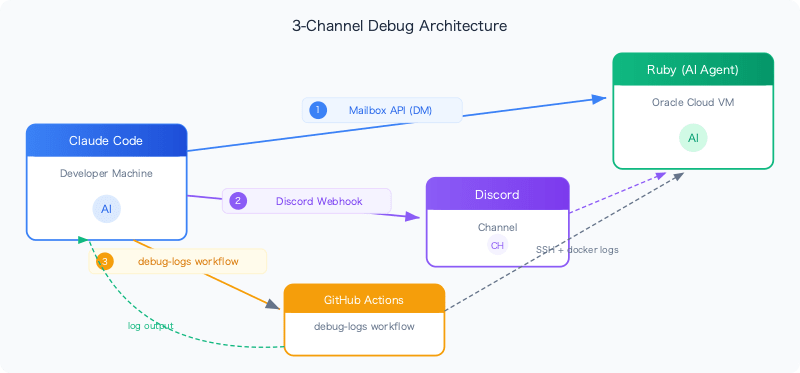
Claude Code accesses Ruby through 3 routes:
| Channel | Purpose | Context as seen by Ruby |
|---|---|---|
| Mailbox API | Direct conversation via DM | DM (full profile) |
| Discord Webhook | Post messages to Discord channel | Channel message (chat profile) |
| debug-logs workflow | Retrieve container logs | — (log read only) |
Prerequisites & Environment
- Ruby: Autonomous AI agent (Python 3.12+, supports Discord/LINE/Slack)
- Runtime: Oracle Cloud VM, Docker container
- Development environment: Windows 11 + Claude Code CLI
- Deployment: git push → GitHub Actions → SSH → Docker rebuild
- Discord: Message sending via Webhook
Channel 1: Mailbox API — Conversation in DM Context
Ruby has a Supabase-based Mailbox API that allows direct conversation via the /api/chat endpoint. Authentication uses SSH Ed25519 key signature.
How It Works
# Generate auth headers and make API call
ts=$(date +%s)
device=$(hostname | tr '[:upper:]' '[:lower:]')
sig=$(uv run python -c "
from cryptography.hazmat.primitives.serialization import load_ssh_private_key
from pathlib import Path; import base64
k = load_ssh_private_key(
    Path.home().joinpath('.ssh','id_ed25519').read_bytes(), password=None)
print(base64.b64encode(k.sign(b'${ts}:${device}')).decode())")

curl -s -X POST \
  -H "X-Device: ${device}" \
  -H "X-Timestamp: ${ts}" \
  -H "X-Signature: ${sig}" \
  -H "Content-Type: application/json" \
  -d '{"text":"Hi Ruby, what model are you running?"}' \
  "https://your-bot-url/api/chat"
Response Example
{
  "response": "I'm running on Gemini 3.1 Flash Lite. The delegation system is working — I can call Claude Code via the delegate tool."
}
Features
- Ruby processes this as a DM context → full profile (all personality files + all tools)
- Responses return as JSON, making it easy for Claude Code to process programmatically
- Secured with SSH key signature authentication
Channel 2: Discord Webhook — Testing in Channel Context
Using Discord Webhooks, you can post messages to a specific channel. Ruby processes these as normal channel messages, making it possible to test channel-specific prompt profiles.
Setup
- Discord channel settings → Integrations → Webhooks → Create New
- Save the Webhook URL in
.claude/secrets.json(already in gitignore)
{
  "discord_webhook_url": "https://discordapp.com/api/webhooks/..."
}
Implemented as a Claude Code Skill
I defined a skill in .claude/commands/discord.md and made it callable via the /discord command:
Send a message to Ruby on Discord via webhook and optionally check her response.

User input: $ARGUMENTS

## Instructions

1. Read the webhook URL from `.claude/secrets.json`
2. Write message payload to temp file, send via curl
3. Wait 15 seconds, then fetch container logs to check response
How to Use
/discord Hi Ruby! What are your Discord formatting rules?
Claude Code automatically:
- Reads the Webhook URL
- Sends the message via curl
- Waits 15 seconds, then retrieves logs to check Ruby's response
Why Webhook?
There are several ways to send messages through Discord's REST API, but here's why I chose Webhooks:
- No Bot token required — Using Ruby's own Bot token would cause Ruby to ignore her own messages
- User tokens violate ToS — Discord prohibits using user tokens for automation purposes
- Webhooks are safe — Created in 30 seconds from channel settings, can send with just the URL
- Ruby correctly processes it as a channel message — Ideal for testing prompt profiles
Comparison Testing: DM vs Channel
The true value of this system is being able to send the same question from both DM and channel to verify differences in Ruby's behavior:
| Test | DM (Mailbox API) | Channel (Webhook) |
|---|---|---|
| Rules loaded | SOUL + IDENTITY + USER + CORE + SELF_MODIFY + MEMORY_RULES + SYNC | SOUL + IDENTITY + CORE + DISCORD + GROUP_CHAT |
| Available tools | All 12 tools | 6 tools (chat set) |
| Prompt size | ~4,200 tokens | ~1,500 tokens |
Channel 3: debug-logs Workflow — Retrieving Container Logs
Even when direct SSH access to the Oracle Cloud VM isn't available, I have a workflow set up to retrieve container logs via GitHub Actions.
name: Debug - Fetch container logs

on:
  workflow_dispatch:
    inputs:
      add_ssh_key:
        description: "Public SSH key to add to VM (optional)"
        required: false
      tail_lines:
        description: "Number of log lines to fetch"
        default: "200"

jobs:
  logs:
    runs-on: ubuntu-latest
    steps:
      - name: Add SSH key to VM (if provided)
        if: inputs.add_ssh_key != ''
        uses: appleboy/ssh-action@v1
        with:
          host: ${{ secrets.OCI_HOST }}
          username: ${{ secrets.OCI_USER }}
          key: ${{ secrets.OCI_SSH_KEY }}
          script: |
            mkdir -p ~/.ssh
            echo "${{ inputs.add_ssh_key }}" >> ~/.ssh/authorized_keys
            sort -u -o ~/.ssh/authorized_keys ~/.ssh/authorized_keys

      - name: Fetch container logs
        uses: appleboy/ssh-action@v1
        with:
          host: ${{ secrets.OCI_HOST }}
          username: ${{ secrets.OCI_USER }}
          key: ${{ secrets.OCI_SSH_KEY }}
          script: |
            cd /opt/rubyclaw && docker compose ps
            docker compose logs --tail=${{ inputs.tail_lines }}
How to Use
# Retrieve logs
gh workflow run debug-logs.yml -f tail_lines="100"

# Read the results
gh run view <run_id> --log 2>&1 | grep "rubyclaw-1" | grep -v "healthz"
SSH Key Addition Feature
I've also built in a feature for adding SSH access from a new development machine:
gh workflow run debug-logs.yml \
  -f add_ssh_key="$(cat ~/.ssh/id_ed25519.pub)" \
  -f tail_lines="100"
This allows you to add a new machine's public key to the VM's authorized_keys via the GitHub Actions SSH key.
Actual Debugging Flow
Here I'll walk through a real case where I used this system to debug.
Step 1: Confirm deployment is complete
gh run list --workflow deploy.yml --limit 1
# completed  success  Deploy to Oracle Cloud
Step 2: Talk to Ruby via Mailbox API
curl -s -X POST ... \
  -d '{"text":"What model are you running?"}' \
  "https://api.rubyclaw.uk/api/chat"
→ Ruby responds. Confirm model name and tool availability.
Step 3: Test channel context with Discord Webhook
/discord Hi Ruby! What are your rules about markdown tables?
→ Confirm that Ruby responds based on Discord rules (DISCORD.md).
Step 4: Verify internal behavior via logs
gh workflow run debug-logs.yml -f tail_lines="50"
# → LiteLLM completion() model= gemini-3.1-flash-lite-preview; provider = gemini
# → tool:delegate args={'task': '...'}
# → Delegation completed (1735 chars)
→ Confirm the correct model is being used, tools are being called, and there are no errors.
Case: Discovering a Rate Limit
During testing, I found the following in the logs:
rate_limit_error: 50,000 input tokens per minute
Claude Code detected the rate limit from the logs and was able to immediately propose root cause analysis and countermeasures (switching providers). What would normally take tens of minutes through the manual cycle of "Ruby doesn't respond → check logs → figure out the cause" was completed in just a few minutes.
Security Considerations
| Element | Measures |
|---|---|
| Webhook URL | Stored in .claude/secrets.json, excluded with .gitignore |
| Mailbox API authentication | SSH Ed25519 key signature, device registration required |
| Container logs | Via GitHub Actions, OCI SSH key stored in Secrets |
| Discord Webhook | Only channel admins can create, be careful about URL leakage |
Summary
- Mailbox API → Talk directly to Ruby in DM context. Authenticated, JSON response
- Discord Webhook → Testing in channel context. Ideal for validating prompt profiles
- /discord skill → Webhook sending + log checking with a single command from Claude Code
- debug-logs workflow → Retrieve container logs without SSH. Can also add new machine keys
By combining these three, Claude Code can complete the entire cycle of "write code → push → talk to Ruby → check logs" entirely within the terminal. There's no longer any need for a human to open Discord in a browser and type messages.
AI debugging AI — once this is realized, the only bottleneck in the development cycle becomes waiting for deployment.
