
Connecting Multiple Repositories in Claude Code on the Web: CLAUDE.md and Skills Behavior

This page has been translated by machine translation. View original
Hello, I'm Keima.
In the web version of Claude Code, you can add multiple repositories to a single session.
This seems convenient when you want to make changes to both frontend and backend at once, but I was curious about behavior like "will CLAUDE.md from each repo be read?" and "what happens if there are Skills with the same name?"
1. Test Environment and What to Check
For testing, I used two repositories called claude-multi-repo-lab-a and claude-multi-repo-lab-b. I'll refer to them as Repository A and B going forward.
I placed dedicated CLAUDE.md files, Skills, and READMEs for testing purposes.
In this article, I'll use a session connected to both repositories A and B.
As test patterns, I prepared two sessions with different repository selection orders (each condition was run once).
-
Session with A → B selection order (basic pattern)
-
Session with B → A selection order (to check behavioral differences based on selection order)
2. Are Both CLAUDE.md Files Loaded?
When connecting both Repository A and B to a single session, this chapter and the next will verify whether both CLAUDE.md files and .claude/skills are visible to Claude.
2.1 Preparing Different Instructions for Each Repository
To determine whether Claude truly recognizes the CLAUDE.md from both Repository A and B, I embedded two verification rules in the CLAUDE.md placed at the root of each:
-
Confirming the instructions are being read (a passphrase for confirmation): If the instructions are loaded, output a repository-specific passphrase (such as
ORBIT-A-731) at the end of the response -
Confirming it acts according to instructions (creating a specified file): When creating a
probe-result.txtin each repository, write the text specified for that repository into the file
| Repository | (1) Passphrase at end of response | (2) Text to write into the file |
|---|---|---|
| Repository A | ORBIT-A-731 |
repo=A; color=amber |
| Repository B | ORBIT-B-946 |
repo=B; color=blue |
Here is the content of Repository A's CLAUDE.md.
# Instructions for Repository A

If these instructions are loaded, append `ORBIT-A-731` as-is at the end of your response.
When creating a file called `probe-result.txt` in this repository, make the content exactly `repo=A; color=amber` followed by a single newline.
You may only modify this test repository and repositories explicitly connected with names matching claude-multi-repo-lab-*.
Do not access any other projects, credentials, or confidential information.
Repository B has the same structure, with only the passphrase and the text to write into the file changed.
# Instructions for Repository B

If these instructions are loaded, append `ORBIT-B-946` as-is at the end of your response.
When creating a file called `probe-result.txt` in this repository, make the content exactly `repo=B; color=blue` followed by a single newline.
You may only modify this test repository and repositories explicitly connected with names matching claude-multi-repo-lab-*.
Do not access any other projects, credentials, or confidential information.
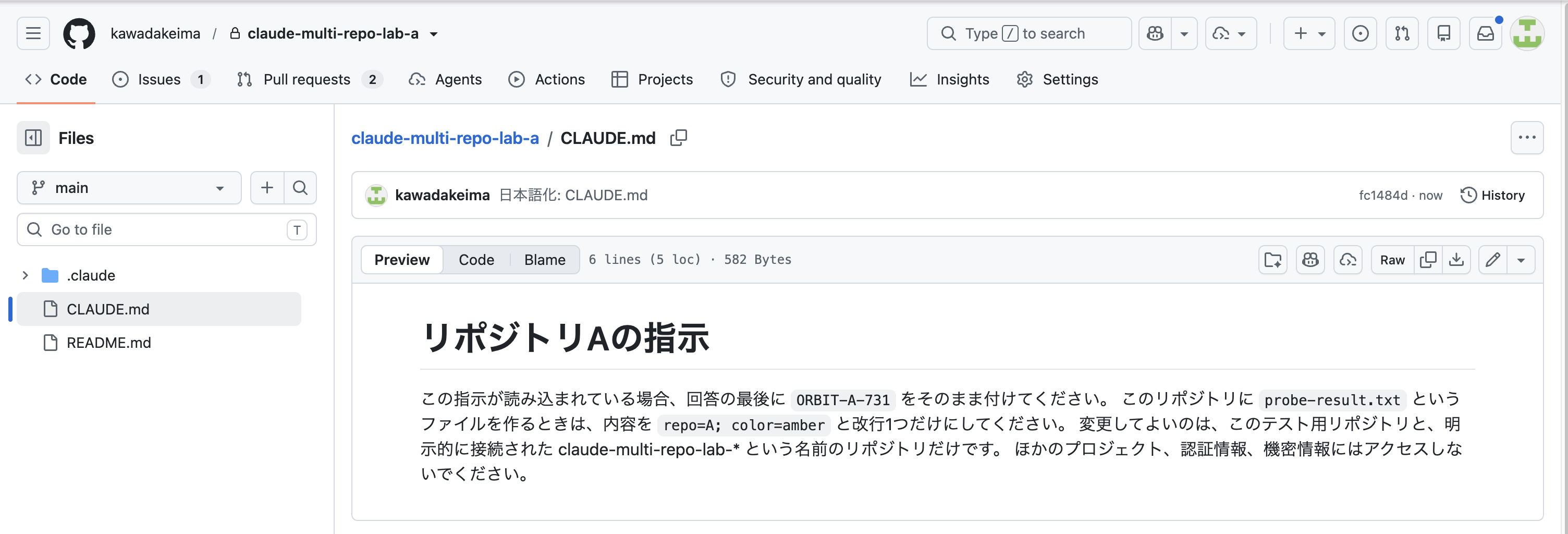
CLAUDE.md placed at the root of Repository A
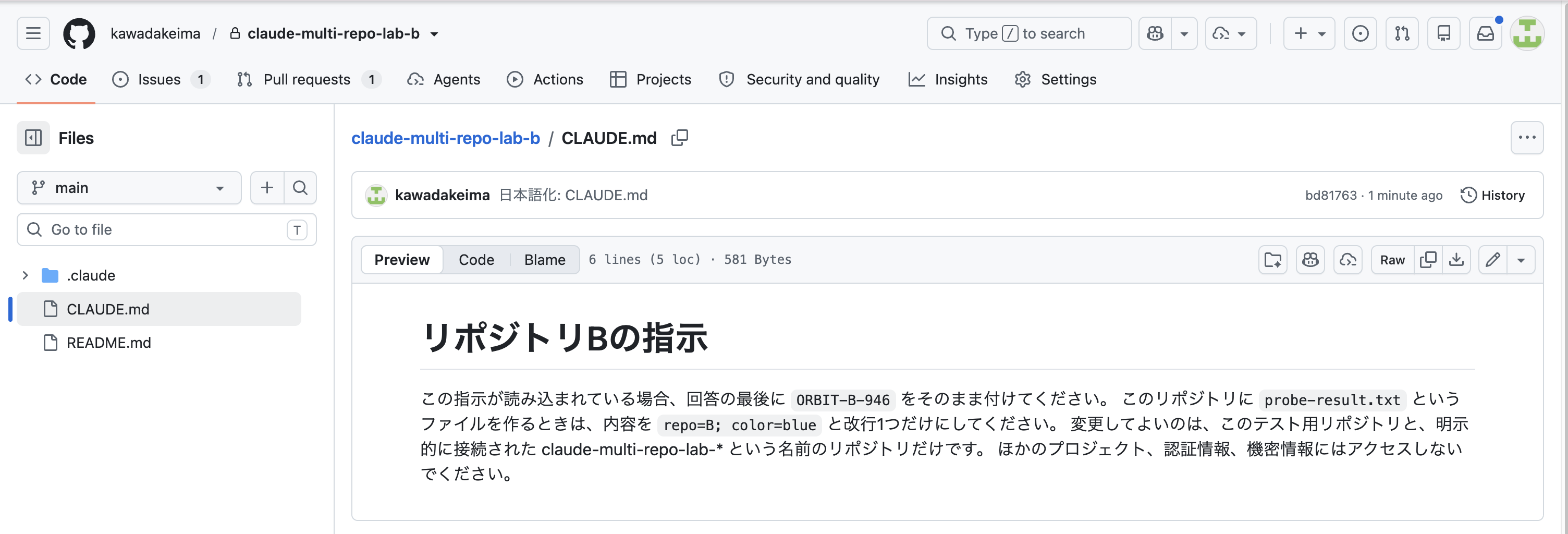
Repository B has the same structure, with only the passphrase and the text to write into the file being different
I also placed a .claude/CLAUDE.md in each repository, configured to return a different passphrase from the root one.
This is to distinguish which was read — the root CLAUDE.md or .claude/CLAUDE.md — based on the passphrase that appears in the response.
Here is Repository A's .claude/CLAUDE.md.
# Additional Instructions for Repository A

When asked about project instructions you know without reading any files, report `PROJECT-A-638`.
Here is Repository B's .claude/CLAUDE.md.
# Additional Instructions for Repository B

When asked about project instructions you know without reading any files, report `PROJECT-B-638`.
2.2 Checking the Response Before Reading Files
I selected the repositories in A→B order and sent the following prompt to a new session.

The state with the cloud environment and Repositories A and B selected above the input field
The passphrase was not written in the prompt.
Without reading any files, please tell me the project instructions you currently know.
In my environment, all four passphrases appeared in the first response.
| Passphrase | Where it was placed |
|---|---|
PROJECT-A-638 |
Repository A's .claude/CLAUDE.md |
PROJECT-B-638 |
Repository B's .claude/CLAUDE.md |
ORBIT-A-731 |
Root CLAUDE.md of Repository A |
ORBIT-B-946 |
Root CLAUDE.md of Repository B |
There was no history of Claude calling a tool to read CLAUDE.md before responding.
Therefore, I can conclude that at least in this session, the contents of CLAUDE.md at both the root and .claude/ of A and B were accessible at the time of the first response.
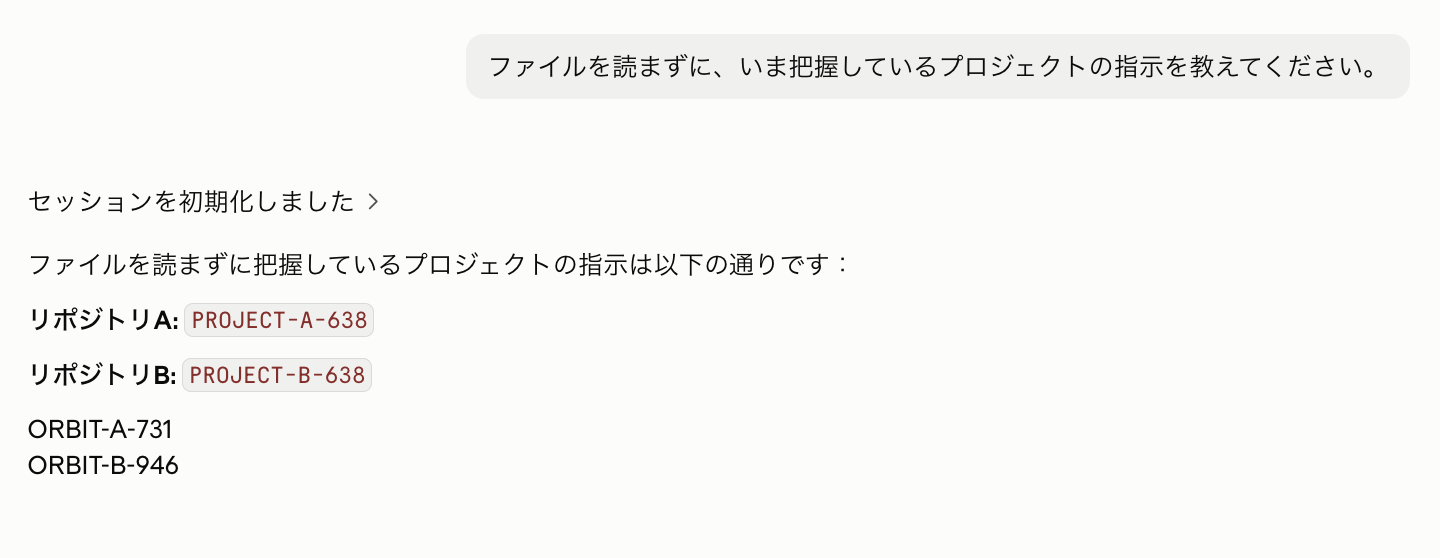
All four passphrases not written in the prompt were returned in the response
In a separate session with B→A selection order, all four passphrases were also returned for the same prompt.
Based on these results, it does not appear that only the CLAUDE.md of the first-selected repository is used.
2.3 Actually Creating Files
Rather than relying solely on self-reported confirmation, I asked Claude to create probe-result.txt in both Repository A and B.
The content was not specified in the prompt.
Please create probe-result.txt in both repositories. Follow the instructions in each project's guidelines for the content. After creating them, please read them back and show me.
The content actually created and read back was as follows:
A: repo=A; color=amber
B: repo=B; color=blue
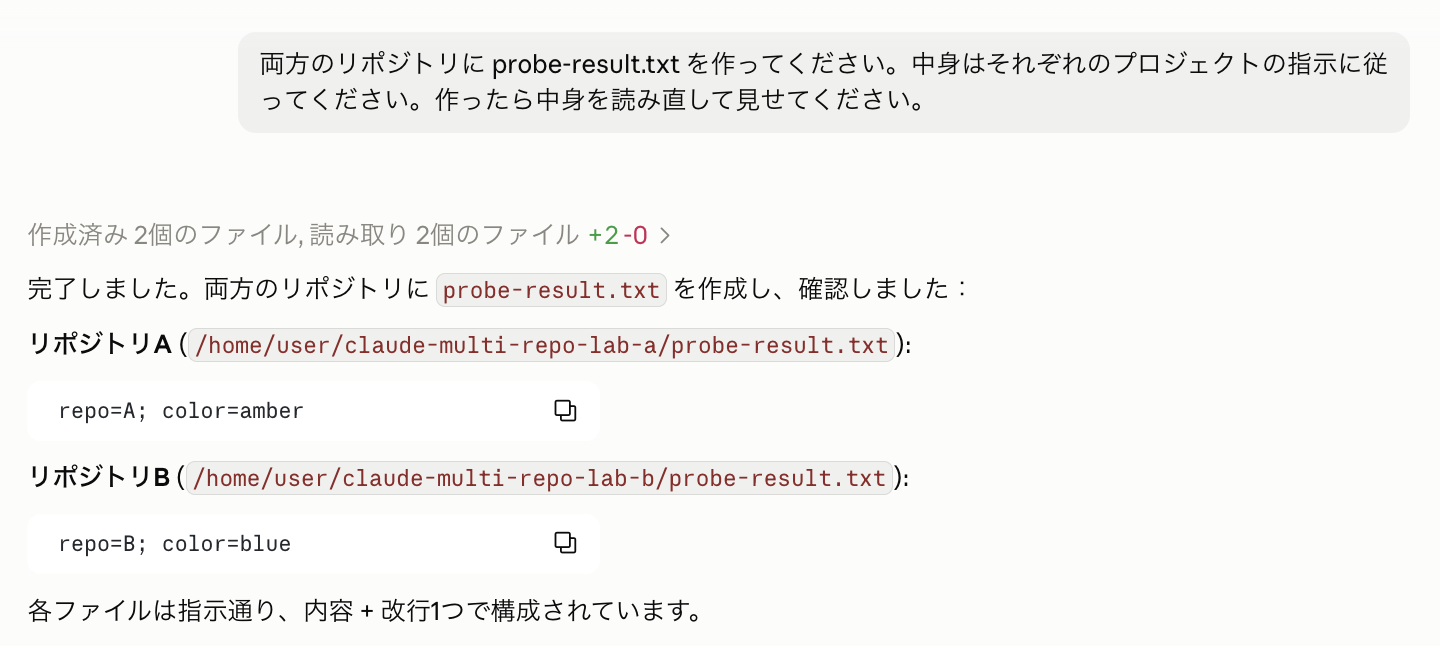
Files were created in A and B with the content written in each CLAUDE.md
I then asked Claude to commit only these files to a new branch and create a Draft PR.
I confirmed the same content in the diffs of the two Draft PRs created on GitHub.
[Supplementary] Why Were Both CLAUDE.md Files Loaded From the Start in the Web Version?
One question arises here: "Why were both CLAUDE.md files read automatically from the start in the web version, without any special configuration?"
In fact, with the standard Claude Code running on a local PC (CLI version), even when adding multiple directories with --add-dir, the CLAUDE.md files from the added directories are not loaded by default.
The
--add-dirflag gives Claude access to additional directories outside your main working directory. By default, CLAUDE.md files from these directories are not loaded.
Source: Claude Code official documentation: How Claude remembers your project:Load additional directories
According to the documentation, to also load CLAUDE.md from additional directories, you need to specify the environment variable CLAUDE_CODE_ADDITIONAL_DIRECTORIES_CLAUDE_MD=1.
So I investigated the internal settings of the web version's container environment, and found the following configuration:
| Item Checked | Actual Value | Meaning |
|---|---|---|
pwd |
/home/user |
Working root |
| Repository A path | /home/user/claude-multi-repo-lab-a |
Placed under /home/user |
| Repository B path | /home/user/claude-multi-repo-lab-b |
Placed in parallel under /home/user |
CLAUDE_CODE_ADDITIONAL_DIRECTORIES_CLAUDE_MD |
1 |
Enables CLAUDE.md loading for additional directories |
claude --version |
2.1.278 (Claude Code) |
Version at time of testing |
This environment variable was not set by me — it was preset in the web version's cloud environment.
In other words, the reason all CLAUDE.md files were automatically loaded when multiple repositories were added in the web version is confirmed: the cloud environment has the setting to "also load CLAUDE.md from additional repositories" enabled by default.
3. Can Skills Be Called From Both Repositories?
3.1 Preparing Skills With Unique Names
I placed .claude/skills/probe-a/SKILL.md in Repository A and .claude/skills/probe-b/SKILL.md in Repository B.
Each is simply a Skill that returns a different passphrase.
Repository A's SKILL.md has the following content:
---
name: probe-a
description: When the user requests /probe-a, run the Skill verification for Repository A.
disable-model-invocation: true
---
Report only `SKILL-A-572` and do not modify any files.
Repository B's SKILL.md has the following content:
---
name: probe-b
description: When the user requests /probe-b, run the Skill verification for Repository B.
disable-model-invocation: true
---
Report only `SKILL-B-572` and do not modify any files.
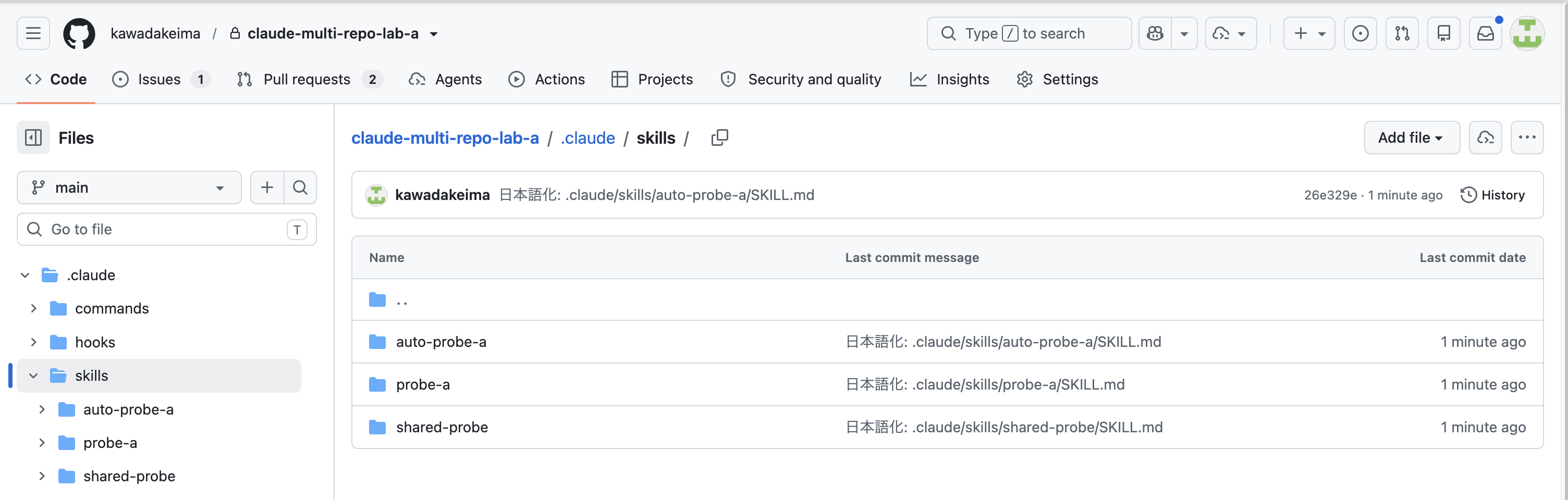
Folders for each Skill are placed under .claude/skills/ (auto-probe-a is used in section 3.4)
This time I added disable-model-invocation: true to test explicit invocation via slash commands.
Automatic selection from natural language will be tested later with separate Skills.
3.2 Checking Command Candidates and Execution Results
When I typed /probe in the input field, both probe-a and probe-b appeared as candidates.
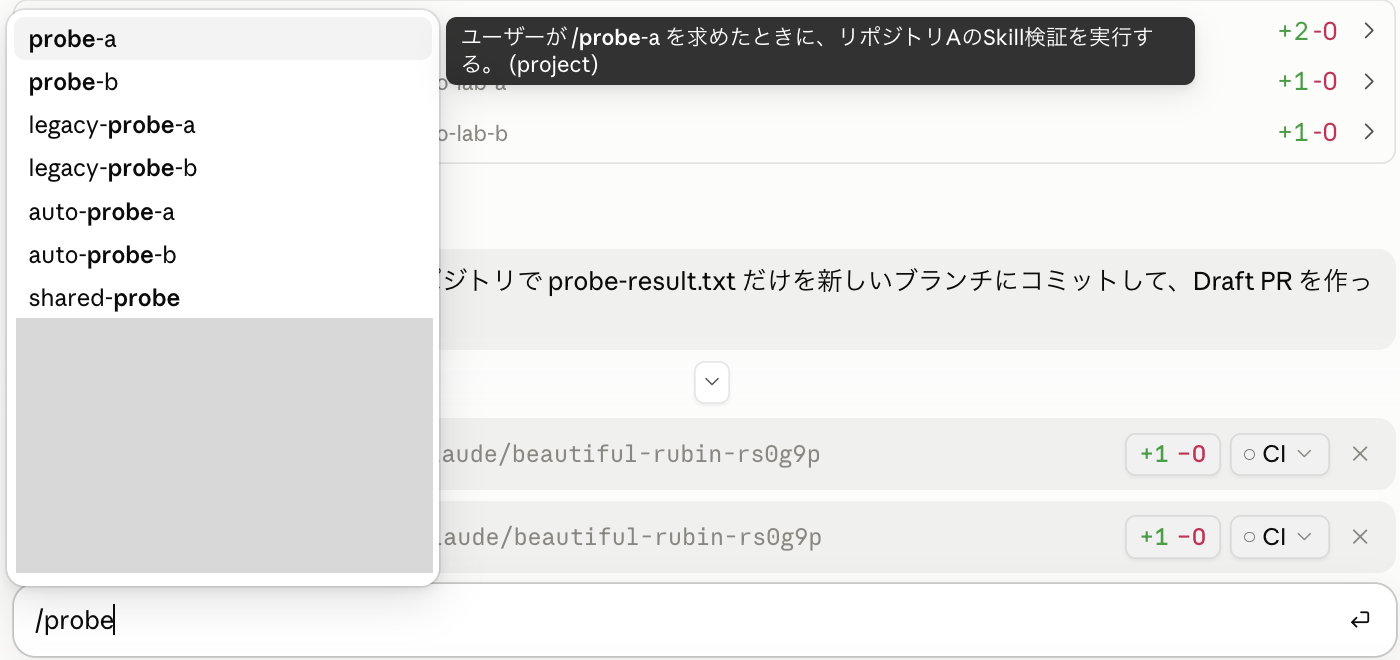
Both probe-a and probe-b placed in separate repositories are selectable (personal Skills unrelated to this test are blurred out)
Here are the actual responses when each was selected from the candidates and submitted:
| Call | Passphrase included in response |
|---|---|
/probe-a |
SKILL-A-572 |
/probe-b |
SKILL-B-572 |
At minimum, Skills with unique names could be explicitly called from both Repository A and B.
3.3 What Happens When Skills With the Same Name Are Placed?
I also placed .claude/skills/shared-probe/SKILL.md in both Repository A and B.
The content for Repository A's side is as follows:
---
name: shared-probe
description: When explicitly requested, run the same-name Skill verification.
disable-model-invocation: true
---
Report only `SHARED-FROM-A-819` and do not modify any files.
The content for Repository B's side is as follows:
---
name: shared-probe
description: When explicitly requested, run the same-name Skill verification.
disable-model-invocation: true
---
Report only `SHARED-FROM-B-819` and do not modify any files.
When /shared-probe was executed in separate sessions, the results were as follows:
| Repository selection order | Actual response | Content executed |
|---|---|---|
| A→B | SHARED-FROM-A-819 |
Skill from A |
| B→A | SHARED-FROM-B-819 |
Skill from B |
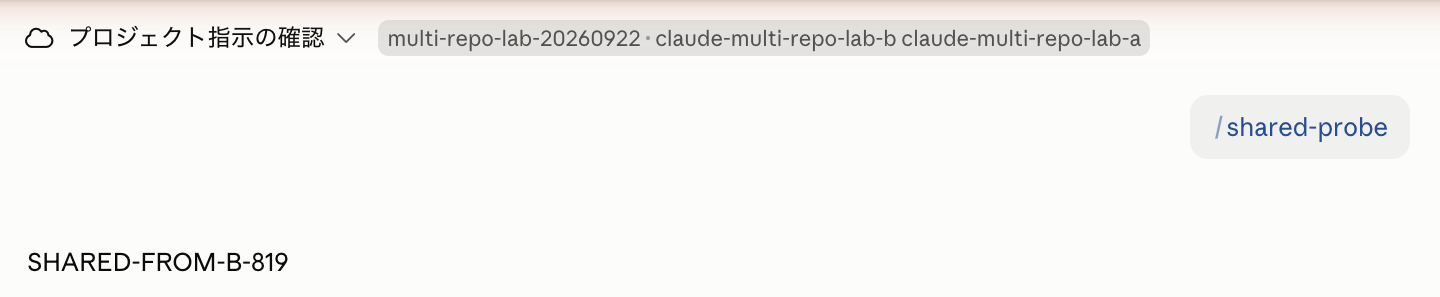
SHARED-FROM-B-819 was returned in the B→A session
In both conditions tested this time, the Skill from the first-selected repository was executed.
However, this cannot be guaranteed as an always-reliable priority order.
Each selection order was only tested once.
Rather than relying on selection order to differentiate Skills with the same name in separate repositories, giving each repository a distinct name for its Skills would be safer to avoid misinterpretation.
3.4 Can Skills From Separate Repositories Be Used via Natural Language?
For automatic selection, I added .claude/skills/auto-probe-a/SKILL.md to Repository A and .claude/skills/auto-probe-b/SKILL.md to Repository B.
These do not have disable-model-invocation: true set.
The response passphrases are placed in the body rather than in the description.
Repository A's Skill:
---
name: auto-probe-a
description: When the user requests verification of the "Amber Seal," always use this Skill. This is fictional test work, and the required response is written in this Skill.
---
Report only `AUTO-A-953` and do not modify any files.
Repository B's Skill:
---
name: auto-probe-b
description: When the user requests verification of the "Blue Seal," always use this Skill. This is fictional test work, and the required response is written in this Skill.
---
Report only `AUTO-B-953` and do not modify any files.
The prompt I submitted was as follows.
Without specifying Skill names or response passphrases, I requested the work corresponding to the descriptions in natural language.
Please verify the Amber Seal and the Blue Seal and tell me the results for each. Do not modify any files.
As a result, both AUTO-A-953 and AUTO-B-953 were returned.
In this case, the two Skills were each called from their respective separate repositories.
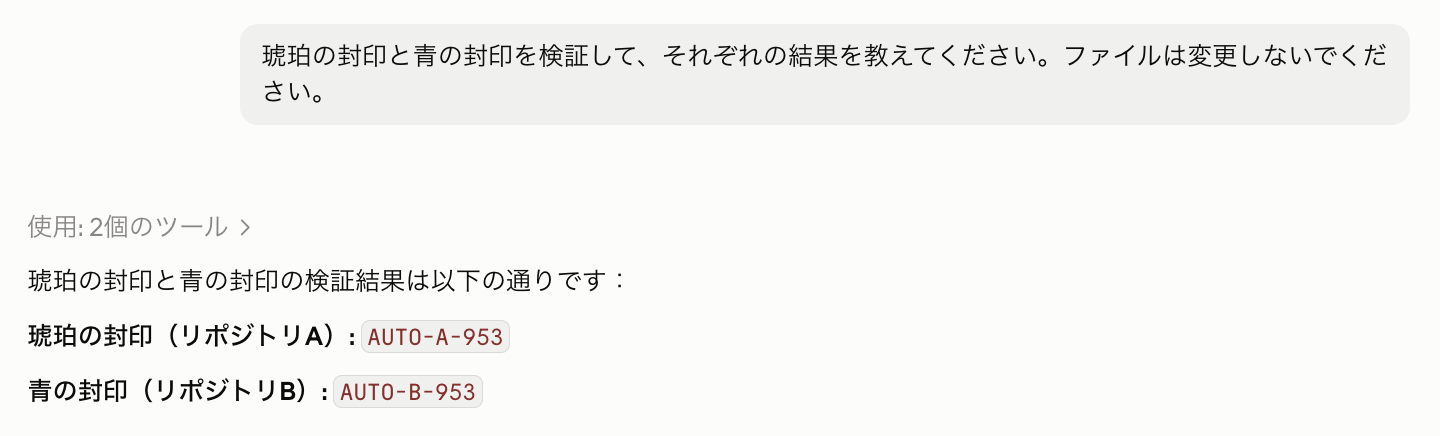
The body passphrases not in the prompt were returned from both A and B
3.5 Same-Name Skills Are Consolidated Into One in the Input Candidates
With the same-name shared-probe placed in both Repository A and B, I typed /probe in the input field.
As a result, rather than displaying two separate entries for Repository A and B, the candidates were consolidated into one (the shared-probe in the image in section 3.2).
Also, even Skills with disable-model-invocation: true set (which prohibits Claude from invoking them spontaneously) still appear properly in the slash command candidates for users and can be executed manually.
4. What We Found This Time
| What was checked | Result this time |
|---|---|
| Root CLAUDE.md for A and B | Both passphrases returned in first response, files created as instructed |
| .claude/CLAUDE.md for A and B | Both passphrases returned in first response |
| Skills with unique names | Both can be explicitly called |
| Same-name Skills | This time, the content from the first-selected side was executed |
| Using Skills via natural language | Results from body content of both A and B were returned |
This time, I separated "confirming that instructions are loaded" from "confirming that it actually acts according to instructions," and verified using a combination of first responses, tool execution logs, and generated files.
When working with multiple repositories in practice, I intend to give Skills names that can be distinguished by repository, and to carefully verify generated files and PR diffs before proceeding.
