I tried launching a Claude Managed Agents sandbox on AWS with Lambda MicroVMs × Claude Platform

This page has been translated by machine translation. View original
This is Iwata from the Retail App Co-Creation Department @ Osaka.
Lambda MicroVMs was launched on June 22, 2026, and coding assistants are introduced as one of its use cases.
When you actually visit the Lambda MicroVMs documentation, you'll find a mechanism for using Lambda MicroVMs as a sandbox environment for Claude's Managed Agents.
Using Lambda MicroVMs as a sandbox for Claude Managed Agents - AWS Lambda
Better late than never — in this blog post, I'll try out a sample for building a sandbox environment for Claude's Managed Agents on Lambda MicroVMs.
Architecture Overview
The environment we'll be building has the following architecture.
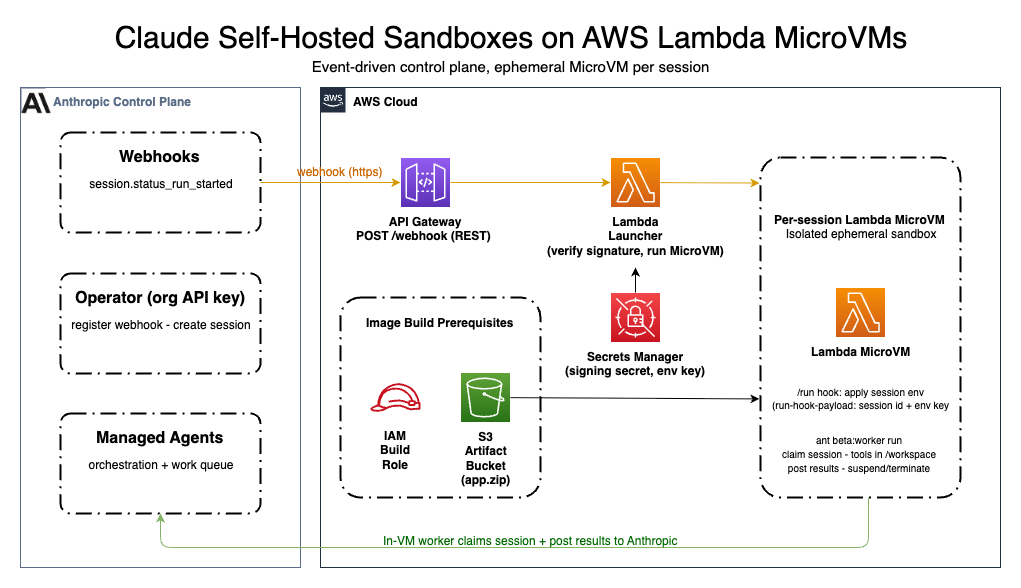
※ Image cited from https://github.com/aws-samples/sample-lambda-microvm-claude-managed-agents
The processing flow is as follows.
- When a session is started from the Claude console, a webhook sends a request to API GW
- Lambda is triggered from API GW, Lambda verifies the webhook signature, and if there are no issues, starts the MicroVM
- The worker on the started MicroVM retrieves and processes items placed in the work queue, then returns a response to Anthropic's control plane. Once all items have been processed, the MicroVM is terminated
This project is intended as a minimal sample, and is designed to terminate the MicroVM each time processing of an item retrieved from the work queue is complete. Therefore, it does not fully leverage the suspend/resume capability that is one of the benefits of Lambda MicroVMs, and further development would be needed for actual business use.
Let's Try It Out
Let's get started. An official sample is provided in the following repository, so we'll use it to set up the environment.
However, since I don't have administrator privileges on the Claude environment I normally use, I'll create an organization for verification using Claude Platform on AWS, and create the necessary resources within that organization. When using Claude Platform on AWS, SIGv4 signatures are used for various API calls, so I'll use a partially modified version of the repository above.
Preparing the Source Code
The base code is from aws-samples/sample-lambda-microvm-claude-managed-agents, but I'll modify some parts for Claude Platform on AWS. Note that the code I based this on is from commit hash aff9237f387ec2c5debae0f08bba5c526fe6b9ed.
The original implementation retrieves the environment key from SSM ParameterStore and uses it, but since Claude Platform on AWS allows various APIs to be called with SigV4 signatures, we'll remove the code related to the environment key.
First, let's modify the Lambda function code that handles the Claude webhook session.status_run_started and starts the MicroVM.
@@ -176,7 +176,6 @@ def _load_config() -> LauncherConfig:
     return LauncherConfig(
         environment_id=os.environ["ANTHROPIC_ENVIRONMENT_ID"],
         image_identifier=os.environ["MICROVM_IMAGE_IDENTIFIER"],
-        environment_key_param_name=os.environ["ENVIRONMENT_KEY_PARAM_NAME"],
         execution_role_arn=os.environ["MICROVM_EXECUTION_ROLE_ARN"],
         aws_region=region,
         signing_param_name=os.environ.get("SIGNING_PARAM_NAME"),
We'll also add a modification to include the workspace ID in the payload when starting the MicroVM, to match the MicroVM-side implementation introduced later.
@@ -23,8 +23,8 @@ def build_run_hook_payload(event: WebhookEvent, cfg: LauncherConfig) -> str:
     """Build the run hook payload JSON string for a started session."""
     session: dict[str, Any] = {
         "ANTHROPIC_SESSION_ID": event.session_id,
+        "ANTHROPIC_WORKSPACE_ID": event.workspace_id,
         "ANTHROPIC_ENVIRONMENT_ID": cfg.environment_id,
-        "ENVIRONMENT_KEY_PARAM_NAME": cfg.environment_key_param_name,
         "AWS_REGION": cfg.aws_region,
     }
     if cfg.base_url is not None:
@@ -17,7 +17,6 @@ class LauncherConfig:

     environment_id: str
     image_identifier: str
-    environment_key_param_name: str
     execution_role_arn: str
     aws_region: str
     signing_param_name: Optional[str] = None
@@ -33,6 +32,7 @@ class WebhookEvent:
     event_id: str
     data_type: str
     session_id: str
+    workspace_id: str

     @classmethod
     def from_payload(cls, payload: dict[str, Any]) -> "WebhookEvent":
@@ -41,4 +41,5 @@ class WebhookEvent:
             event_id=payload.get("id", ""),
             data_type=data.get("type", ""),
             session_id=data.get("id", ""),
+            workspace_id=data.get("workspace_id", ""),
         )
This removes ENVIRONMENT_KEY_PARAM_NAME from the MicroVM startup payload and replaces it with ANTHROPIC_WORKSPACE_ID.
Next, let's modify the JS code added to the MicroVM base image. As mentioned above, Claude Platform on AWS allows various API calls with SigV4 signatures, so we'll remove unnecessary code accordingly.
First, let's change the SDK from the standard Anthropic client SDK to the SDK for Claude Platform on AWS.
@@ -9,7 +9,7 @@
   },
   "dependencies": {
     "@anthropic-ai/sdk": "^0.104.1",
-    "@aws-sdk/client-lambda-microvms": "^3.600.0",
-    "@aws-sdk/client-ssm": "^3.600.0"
+    "@anthropic-ai/aws-sdk": "^0.7.0",
+    "@aws-sdk/client-lambda-microvms": "^3.600.0"
   }
 }
Next is the modification to the main worker implementation on the MicroVM.
The full diff is as follows.
@@ -17,9 +17,8 @@
 //      the idle policy is only the fallback if the call can't be made.

 import http from "node:http";
-import { SSMClient, GetParameterCommand } from "@aws-sdk/client-ssm";
 import { LambdaMicrovmsClient, TerminateMicrovmCommand } from "@aws-sdk/client-lambda-microvms";
-import Anthropic from "@anthropic-ai/sdk";
+import Anthropic from "@anthropic-ai/aws-sdk";
 import { WorkPoller, EnvironmentWorker } from "@anthropic-ai/sdk/helpers/beta/environments";

 // Hook server config.
@@ -35,38 +34,24 @@ async function readBody(req) {
   return Buffer.concat(chunks).toString("utf-8");
 }

-async function fetchEnvironmentKey(parameterName, region) {
-  const client = new SSMClient({ region });
-  const result = await client.send(
-    new GetParameterCommand({ Name: parameterName, WithDecryption: true }),
-  );
-  const value = result.Parameter?.Value;
-  if (!value) {
-    throw new Error(`SSM parameter ${parameterName} has no value`);
-  }
-  return value;
-}
-
 // Handle exactly the session named in the dispatch.
 async function handleSession(dispatch) {
   const sessionId = dispatch.ANTHROPIC_SESSION_ID;
   const environmentId = dispatch.ANTHROPIC_ENVIRONMENT_ID;
-  const parameterName = dispatch.ENVIRONMENT_KEY_PARAM_NAME;
-  const region = dispatch.AWS_REGION;
-  const baseURL = dispatch.ANTHROPIC_BASE_URL || undefined;

-  const environmentKey = await fetchEnvironmentKey(parameterName, region);
-  const client = new Anthropic({ authToken: environmentKey, baseURL });
-  const worker = new EnvironmentWorker({ client, environmentId, environmentKey, workdir: "/workspace" });
+  const client = new Anthropic({
+    workspaceId: dispatch.ANTHROPIC_WORKSPACE_ID,
+  });
+  const worker = new EnvironmentWorker({ client, environmentId, workdir: "/workspace", environmentKey: 'dummy' });

   console.log(`worker: looking for work item for session ${sessionId}`);
   const poller = new WorkPoller({
     client,
     environmentId,
-    environmentKey,
     reclaimOlderThanMs: 2000,
     drain: true,
     autoStop: false,
+    environmentKey: 'dummy'
   });

   for await (const work of poller) {
@@ -74,7 +59,7 @@ async function handleSession(dispatch) {
       continue;
     }
     console.log(`worker: handling session ${sessionId} (work ${work.id})`);
-    await worker.handleItem({ workId: work.id, environmentId, sessionId, environmentKey });
+    await worker.handleItem({ workId: work.id, environmentId, sessionId });
     console.log(`worker: session ${sessionId} complete`);
     return;
   }
When using the @anthropic-ai/aws-sdk client class, the workspace ID is required, so we modify it to set the workspace ID passed in the MicroVM startup payload in the constructor. Also, since there is no longer a need to set the environment key in the constructor, we've completely removed the process of retrieving the environment key from the SSM Parameter Store.
import Anthropic from "@anthropic-ai/aws-sdk";
//...omitted
  const client = new Anthropic({
    workspaceId: dispatch.ANTHROPIC_WORKSPACE_ID,
  });
We pass environmentKey: 'dummy' to the EnvironmentWorker and WorkPoller constructors.
   const worker = new EnvironmentWorker({ client, environmentId, workdir: "/workspace", environmentKey: 'dummy' });

   console.log(`worker: looking for work item for session ${sessionId}`);
   const poller = new WorkPoller({
     client,
     environmentId,
     reclaimOlderThanMs: 2000,
     drain: true,
     autoStop: false,
     environmentKey: 'dummy'
   });
Since SigV4 signatures are used for various API calls, environmentKey is not needed, but if environmentKey is not set, the SDK will throw an error in the internally called copyClientForHelper, so we work around this by passing a dummy string.
Finally, the SAM template.
The modifications here are, in addition to removing descriptions related to the environment key, adding permissions to call the Claude Platform on AWS API from the MicroVM execution role.
diff --git a/template.yaml b/template.yaml
@@ -26,15 +26,6 @@ Parameters:
     Default: claude-self-hosted-worker
     Description: Name of the built MicroVM image the launcher runs (resolved to a full ARN below).

-  EnvironmentKeyParamName:
-    Type: String
-    Default: /claude-microvm-sandbox/anthropic-environment-key
-    Description: >-
-      Name of the SSM Parameter Store SecureString holding the Anthropic
-      environment key. CloudFormation cannot create SecureString parameters, so
-      create this parameter out-of-band after deploy (see README) with
-      `aws ssm put-parameter --type SecureString`.
-
   SigningParamName:
     Type: String
     Default: /claude-microvm-sandbox/anthropic-webhook-signing-secret
@@ -67,9 +58,6 @@ Resources:
           # RunMicroVm requires the full image ARN, not a bare name. Build it
           # from the configured name + this account/region.
           MICROVM_IMAGE_IDENTIFIER: !Sub "arn:${AWS::Partition}:lambda:${AWS::Region}:${AWS::AccountId}:microvm-image:${MicroVmImageIdentifier}"
-          # Name of the SSM SecureString holding the environment key. Passed by
-          # *reference* (name only) into the MicroVM; the launcher never reads it.
-          ENVIRONMENT_KEY_PARAM_NAME: !Ref EnvironmentKeyParamName
           MICROVM_EXECUTION_ROLE_ARN: !GetAtt MicroVmExecutionRole.Arn
           # Webhook signature verification happens in-process (no API GW authorizer).
           SIGNING_PARAM_NAME: !Ref SigningParamName
@@ -370,24 +358,9 @@ Resources:
             Action:
               - "sts:AssumeRole"
               - "sts:TagSession"
+      ManagedPolicyArns:
+        - arn:aws:iam::aws:policy/AnthropicSelfHostedEnvironmentAccess
       Policies:
-        - PolicyName: read-environment-key
-          PolicyDocument:
-            Version: "2012-10-17"
-            Statement:
-              # Read only the environment-key SSM SecureString, scoped to its ARN.
-              - Effect: Allow
-                Action: "ssm:GetParameter"
-                Resource: !Sub "arn:${AWS::Partition}:ssm:${AWS::Region}:${AWS::AccountId}:parameter${EnvironmentKeyParamName}"
-              # kms:Decrypt for the SecureString KMS key, bounded to SSM and to
-              # this one parameter via the PARAMETER_ARN encryption context.
-              - Effect: Allow
-                Action: "kms:Decrypt"
-                Resource: "*"
-                Condition:
-                  StringEquals:
-                    kms:ViaService: !Sub "ssm.${AWS::Region}.amazonaws.com"
-                    kms:EncryptionContext:PARAMETER_ARN: !Sub "arn:${AWS::Partition}:ssm:${AWS::Region}:${AWS::AccountId}:parameter${EnvironmentKeyParamName}"
         - PolicyName: self-terminate
           PolicyDocument:
             Version: "2012-10-17"
@@ -412,6 +385,29 @@ Resources:
                 Resource:
                   - !Sub "arn:${AWS::Partition}:logs:${AWS::Region}:${AWS::AccountId}:log-group:/aws/lambda/microvms/${ImageNamePrefix}*"
                   - !Sub "arn:${AWS::Partition}:logs:${AWS::Region}:${AWS::AccountId}:log-group:/aws/lambda/microvms/${ImageNamePrefix}*:*"
+        - PolicyName: anthropic-inference-get-token
+          PolicyDocument:
+            Version: "2012-10-17"
+            Statement:
+              - Effect: Allow
+                Action:
+                  - "sts:GetWebIdentityToken"
+                Resource: "*"
+                Condition:
+                  ForAnyValue:StringEquals:
+                    sts:IdentityTokenAudience:
+                      - "https://api.anthropic.com"
+                      - "https://platform.claude.com"
+                  StringEquals:
+                    aws:CalledViaLast: "aws-external-anthropic.amazonaws.com"
+        - PolicyName: anthropic-inference-tag-token
+          PolicyDocument:
+            Version: "2012-10-17"
+            Statement:
+              - Effect: Allow
+                Action:
+                  - "sts:TagGetWebIdentityToken"
+                Resource: "*"

   # --- MicroVM image build prerequisites ----------------------------------
   # These support building the MicroVM image (a separate CLI step), not the
@@ -489,9 +485,6 @@ Outputs:
   MicroVmExecutionRoleArn:
     Description: Execution role the MicroVM assumes to read the environment key.
     Value: !GetAtt MicroVmExecutionRole.Arn
-  EnvironmentKeyParamName:
-    Description: Create this SSM SecureString parameter with the Anthropic environment key.
-    Value: !Ref EnvironmentKeyParamName
   SigningParamName:
     Description: Create this SSM SecureString parameter with the Anthropic webhook signing secret.
     Value: !Ref SigningParamName
Preparing on the Organization Side
Now that the source code is ready, let's work on the Claude Platform side.
First, create an "Environment" with the hosting type set to self-hosted.
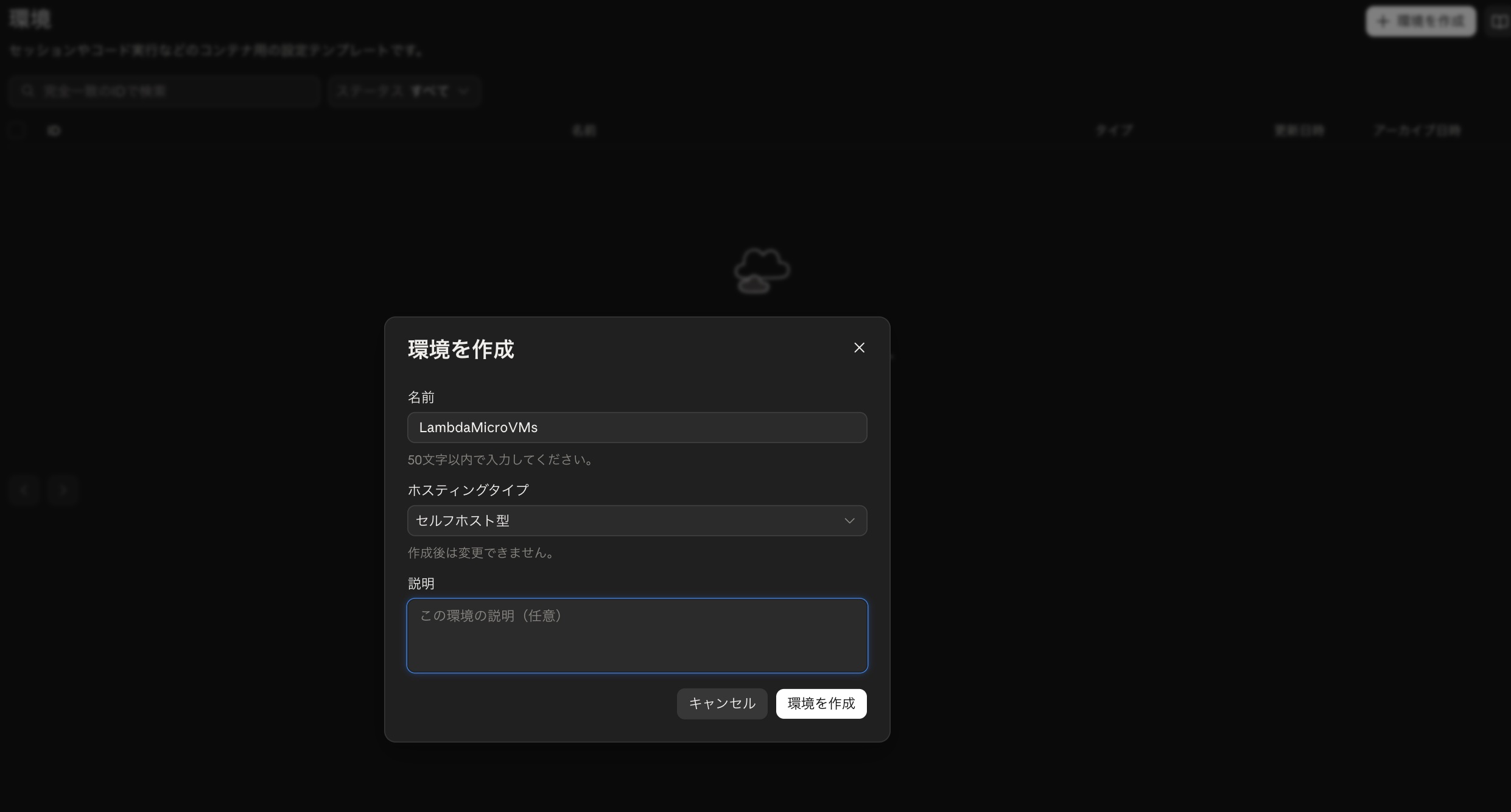
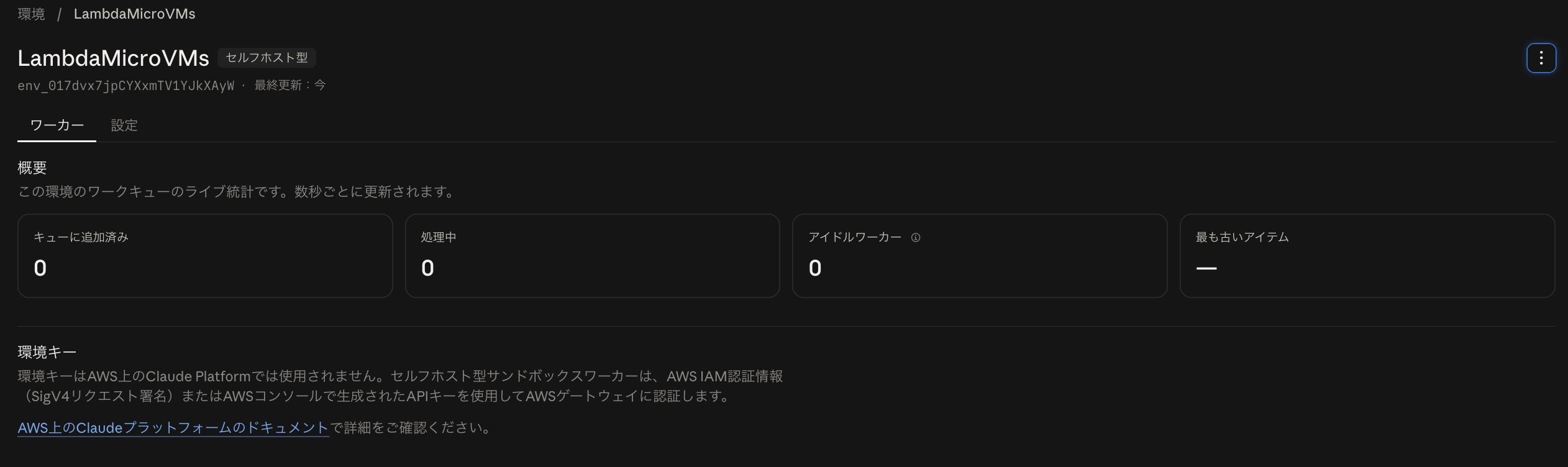
Once the "Environment" is created, make note of the ID for later use.
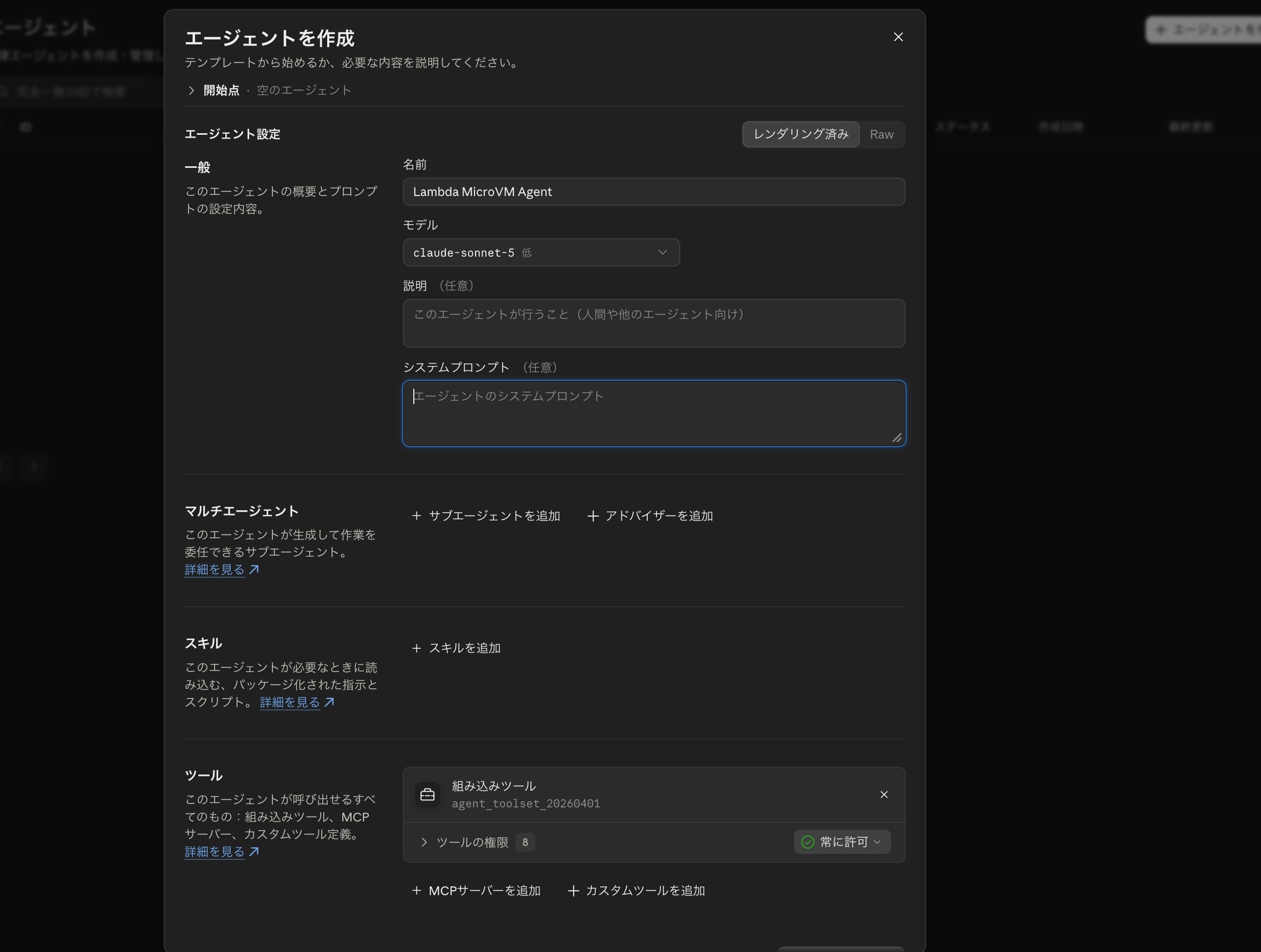
Next, create an agent. Since we're not doing anything particularly elaborate this time, I'm creating one with appropriate settings based on an empty template.
Deploying
Now that everything is ready, let's deploy the CFn stack to create all the necessary resources. Deploy using the SAM CLI with the following command.
sam build
sam deploy --guided --capabilities CAPABILITY_NAMED_IAM --parameter-overrides "AnthropicEnvironmentId=<Created Environment ID>"
You'll be prompted for parameters interactively. I'm mostly using the default values, but I'm setting the CFn stack name to claude-microvm-sandbox to make it easier to run the shell scripts later.
Configuring SAM deploy
======================

	Looking for config file [samconfig.toml] :  Not found

	Setting default arguments for 'sam deploy'
	=========================================
	Stack Name [sam-app]: claude-microvm-sandbox
	AWS Region [ap-northeast-1]: us-east-1
	Parameter ProjectName [claude-microvm-sandbox]:
	Parameter ImageNamePrefix [claude-self-hosted-worker]:
	Parameter AnthropicEnvironmentId [Created Environment ID]:
	Parameter MicroVmImageIdentifier [claude-self-hosted-worker]:
	Parameter SigningParamName [/claude-microvm-sandbox/anthropic-webhook-signing-secret]:
	#Shows you resources changes to be deployed and require a 'Y' to initiate deploy
	Confirm changes before deploy [y/N]:
	#SAM needs permission to be able to create roles to connect to the resources in your template
	Allow SAM CLI IAM role creation [Y/n]:
	#Preserves the state of previously provisioned resources when an operation fails
	Disable rollback [y/N]:
	LauncherFunction has no authentication. Is this okay? [y/N]: y
	Save arguments to configuration file [Y/n]:
	SAM configuration file [samconfig.toml]:
	SAM configuration environment [default]:
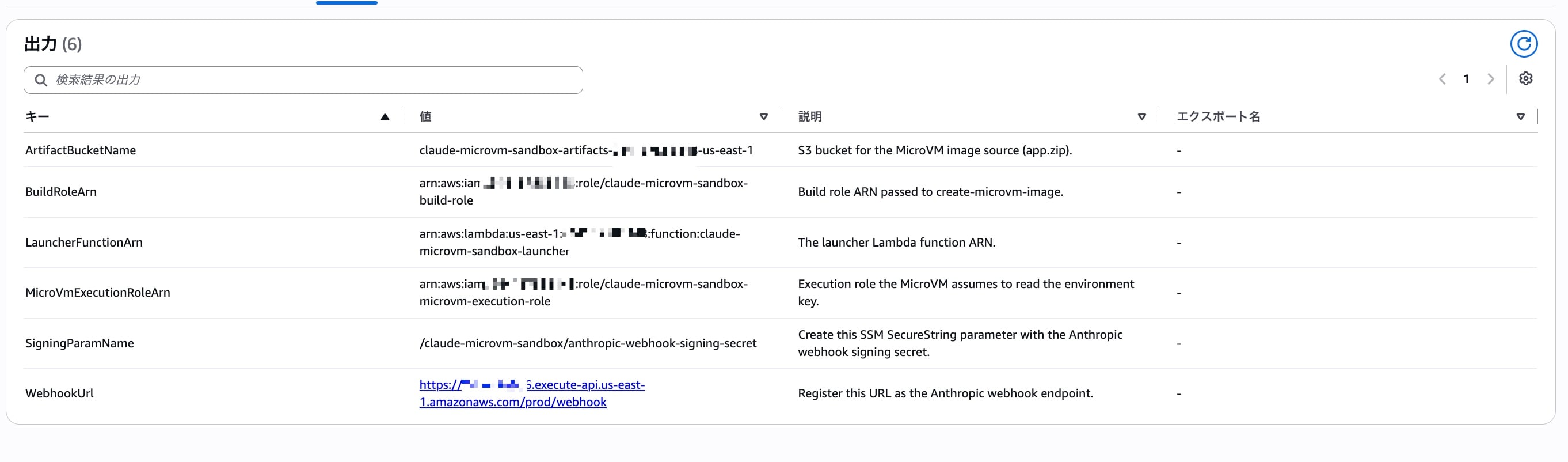
Once deployed, let's check the Outputs. The API GW endpoint is output in WebhookUrl, so make note of it.
Webhook-Related Configuration
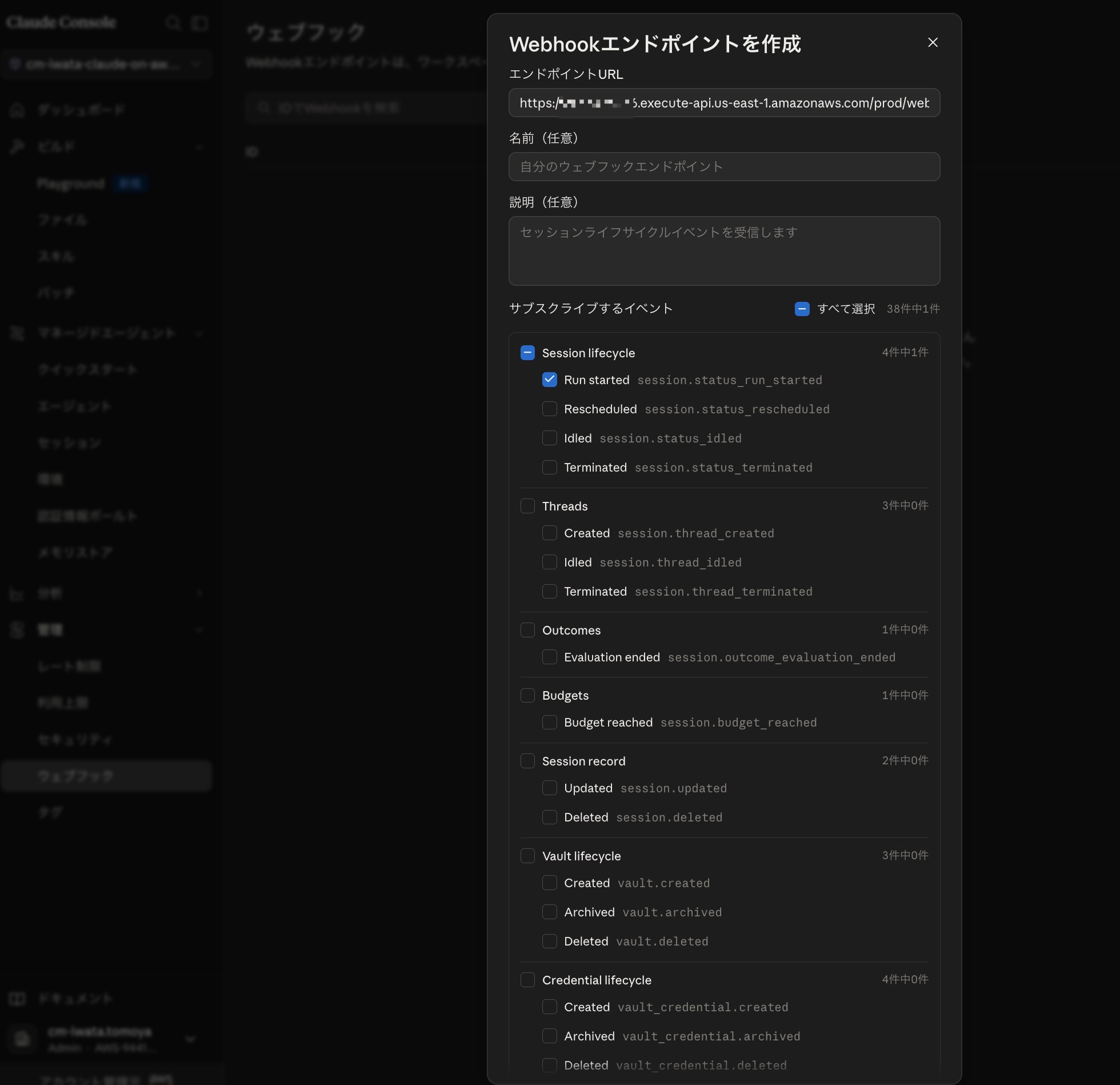
Return to Claude Platform and create a webhook endpoint.
Specify the API GW endpoint noted earlier as the URL, and specify session.status_run_started as the event to subscribe to.
Once creation is complete, a signing secret will be issued, so make note of the value.
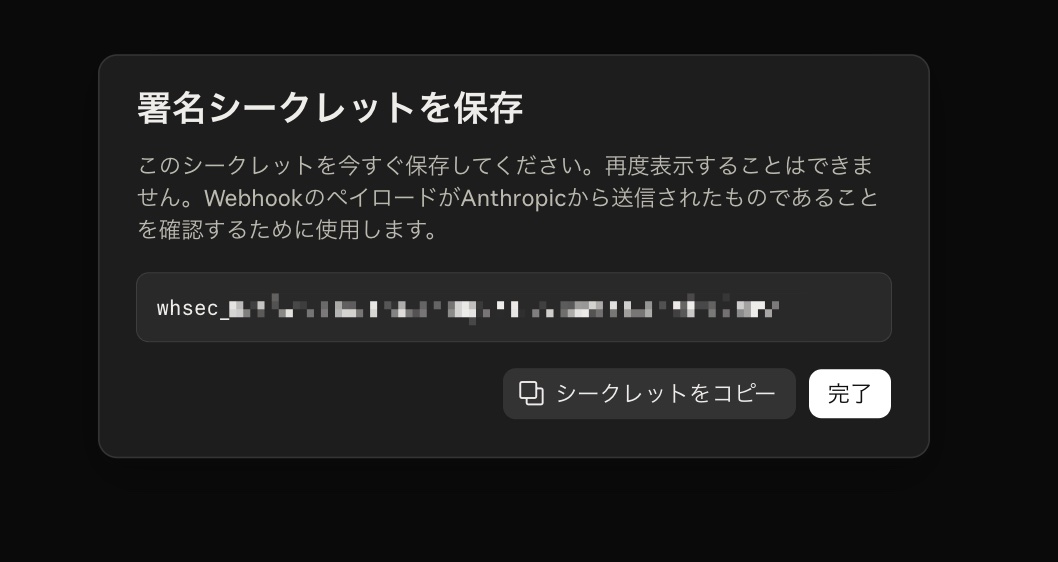
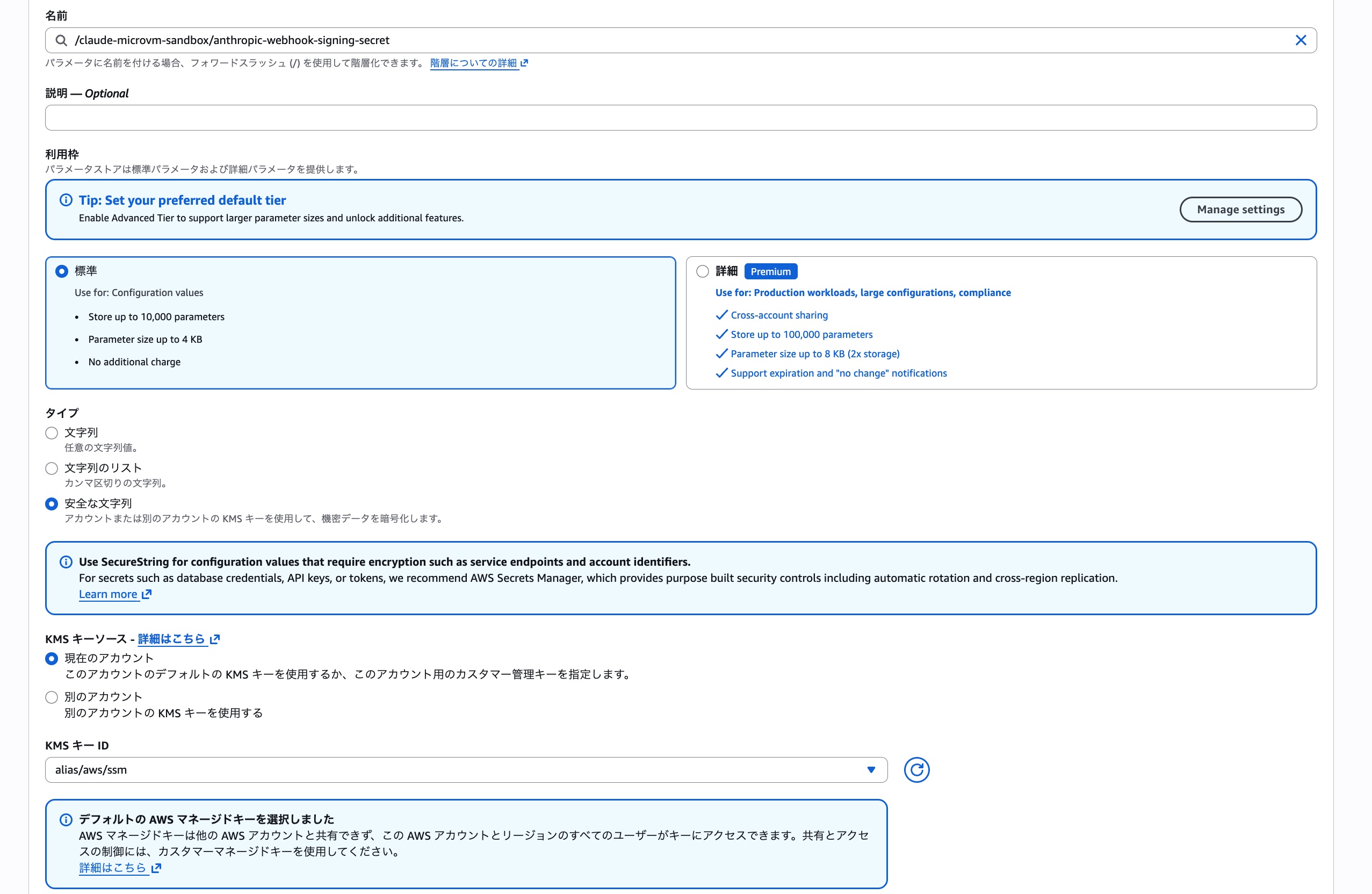
Register the noted secret value in SSM Parameter Store as a SecureString. If you've followed the steps so far, the parameter name will be /claude-microvm-sandbox/anthropic-webhook-signing-secret.
※ The parameter name can also be confirmed from the CFn stack output SigningParamName.
Registering the MicroVM Image
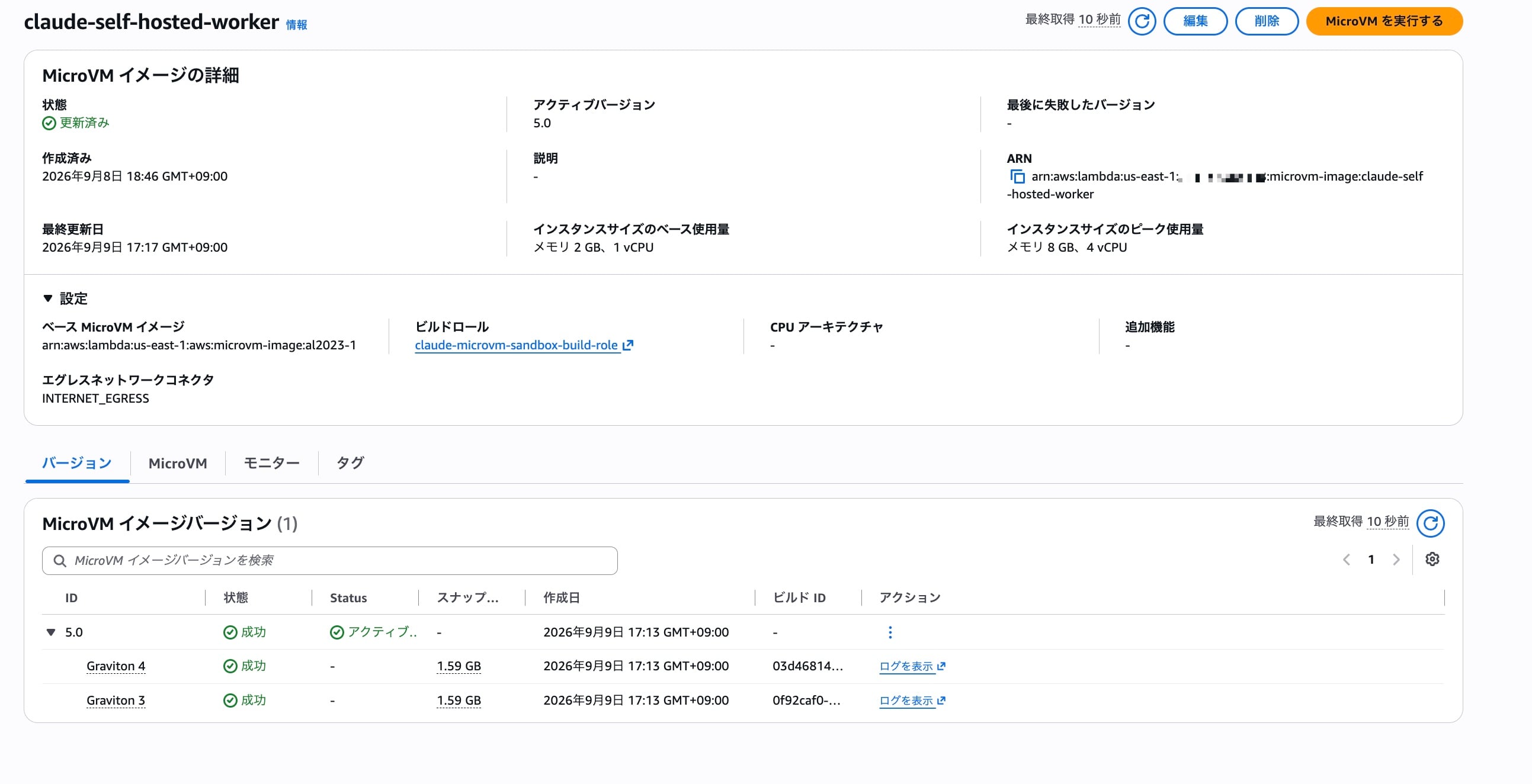
Run the shell script ./src/scripts/build-image.sh to create the MicroVM image. If you see the following output, you're good to go.
※ Since I repeated verification several times, the MicroVM image is at version 5.
Resolving artifact bucket and build role from stack 'claude-microvm-sandbox'...
Discovering a managed base image via list-managed-microvm-images...
Using base image: arn:aws:lambda:us-east-1:aws:microvm-image:al2023-1
Packaging /Users/iwata.tomoya/...omitted/sample-lambda-microvm-claude-managed-agents/src/microvm-image -> /var/folders/62/l795fhb51jgfcd1vlh1rp_sh0000gn/T/tmp.GpXZluwoFe/app.zip...
Uploading to s3://claude-microvm-sandbox-artifacts-<AWSAccountID>-us-east-1/deployments/app-20260909-171336.zip...
upload: ../../../../../../../../var/folders/62/l795fhb51jgfcd1vlh1rp_sh0000gn/T/tmp.GpXZluwoFe/app.zip to s3://claude-microvm-sandbox-artifacts-<AWSAccountID>-us-east-1/deployments/app-20260909-171336.zip
Checking for an existing MicroVM image named 'claude-self-hosted-worker'...
Found existing MicroVM image 'claude-self-hosted-worker' (arn:aws:lambda:us-east-1:<AWSAccountID>:microvm-image:claude-self-hosted-worker). Updating...
{
    "imageArn": "arn:aws:lambda:us-east-1:<AWSAccountID>:microvm-image:claude-self-hosted-worker",
    "name": "claude-self-hosted-worker",
    "state": "UPDATING",
    "latestActiveImageVersion": "4.0",
    "createdAt": "2026-09-08T18:46:41.129000+09:00",
    "baseImageArn": "arn:aws:lambda:us-east-1:aws:microvm-image:al2023-1",
    "baseImageVersion": "1.0",
    "buildRoleArn": "arn:aws:iam::<AWSAccountID>:role/claude-microvm-sandbox-build-role",
    "codeArtifact": {
        "uri": "s3://claude-microvm-sandbox-artifacts-<AWSAccountID>-us-east-1/deployments/app-20260909-171336.zip"
    },
    "egressNetworkConnectors": [
        "arn:aws:lambda:us-east-1:aws:network-connector:aws-network-connector:INTERNET_EGRESS"
    ],
    "resources": [
        {
            "minimumMemoryInMiB": 2048
        }
    ],
    "hooks": {
        "port": 9000,
        "microvmHooks": {
            "run": "ENABLED",
            "runTimeoutInSeconds": 5,
            "resume": "ENABLED",
            "resumeTimeoutInSeconds": 5,
            "suspend": "ENABLED",
            "suspendTimeoutInSeconds": 5,
            "terminate": "ENABLED",
            "terminateTimeoutInSeconds": 5
        },
        "microvmImageHooks": {
            "ready": "ENABLED",
            "readyTimeoutInSeconds": 300,
            "validate": "ENABLED",
            "validateTimeoutInSeconds": 300
        }
    },
    "updatedAt": "2026-09-09T17:13:51.618000+09:00",
    "imageVersion": "5.0"
}

Image build started. Monitor build logs in CloudWatch:
  /aws/lambda/microvms/claude-self-hosted-worker
The image transitions CREATING -> CREATED on success.
After waiting a while, the MicroVM image build should complete and the status should transition to success, so let's confirm that.
Let's Create a Session
Now that we're ready, let's create a session and try running the Bash tool on a MicroVM!
First, let's create a session.
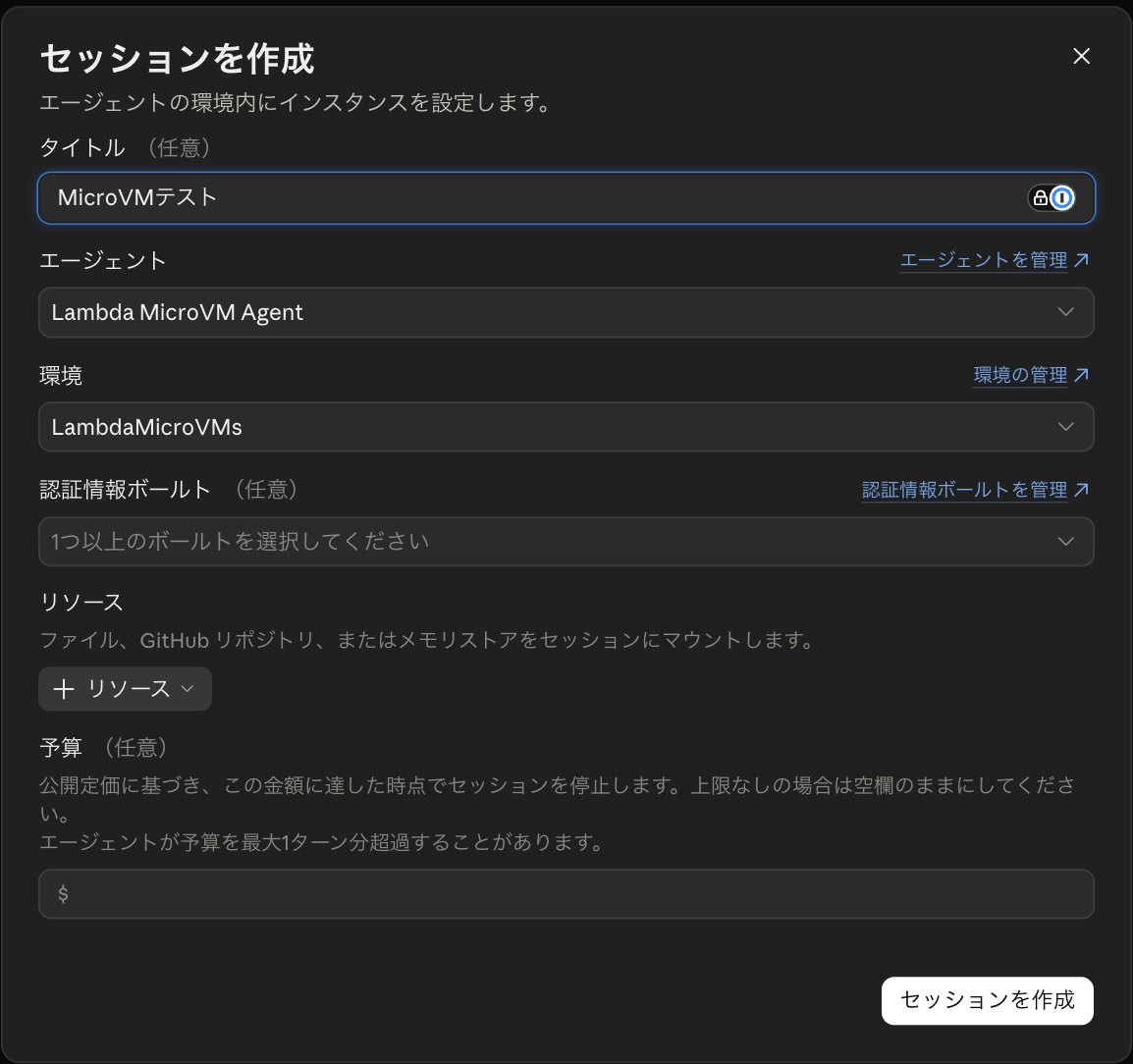
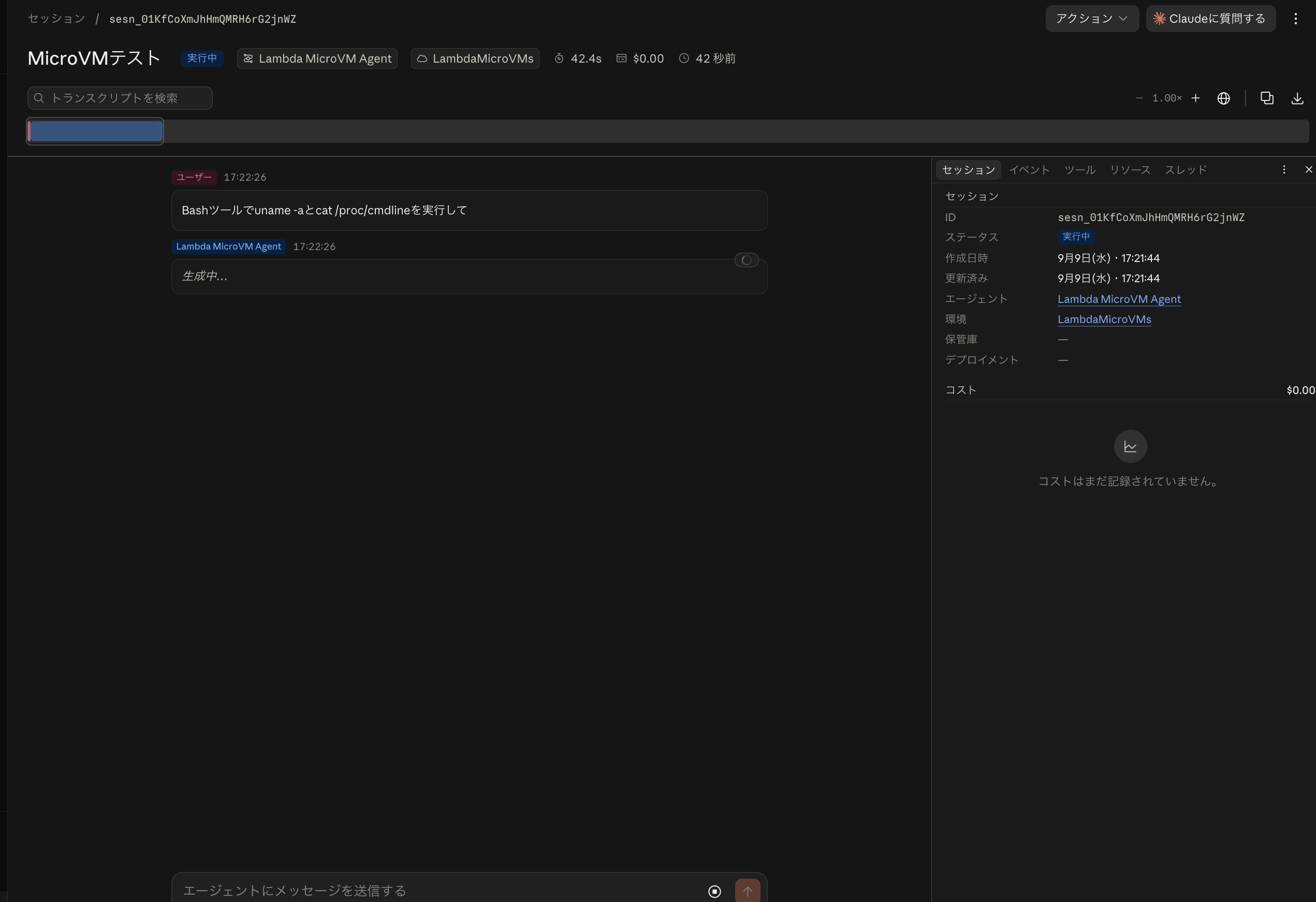
Within the created session, I asked it to run uname -a and cat /proc/cmdline with the Bash tool.
After waiting a moment, logs were output to the Lambda for webhook processing, and the MicroVM was started.
INIT_START Runtime Version: python:3.14.mainline.v63	Runtime Version ARN: arn:aws:lambda:us-east-1::runtime:dcc254f24e53b310604e77daf69eb00ee324eb039af7bf7cbfca2e47540298d3
START RequestId: 39f830b5-998f-4077-aeee-f80a08530572 Version: $LATEST
{
    "level": "INFO",
    "location": "_launch_and_dispatch:117",
    "message": "launched microvm_id=microvm-df4bf75a-e323-330c-9ae4-ae1a78abc31d for session_id=sesn_01KfCoXmJhHmQMRH6rG2jnWZ",
    "timestamp": "2026-09-09 08:22:32,306+0000",
    "service": "claude-microvm-sandbox-launcher",
    "cold_start": true,
    "function_name": "claude-microvm-sandbox-launcher",
    "function_memory_size": "1024",
    "function_arn": "arn:aws:lambda:us-east-1:<AWS Account ID>:function:claude-microvm-sandbox-launcher",
    "function_request_id": "39f830b5-998f-4077-aeee-f80a08530572",
    "xray_trace_id": "1-6aa11743-5010e21f4071f04450e2bd16"
}

END RequestId: 39f830b5-998f-4077-aeee-f80a08530572
REPORT RequestId: 39f830b5-998f-4077-aeee-f80a08530572	Duration: 1099.73 ms	Billed Duration: 4305 ms	Memory Size: 1024 MB	Max Memory Used: 170 MB	Init Duration: 3204.61 ms
XRAY TraceId: 1-6aa11743-5010e21f4071f04450e2bd16	Sampled: true
Here are the logs from the MicroVM side. We can see that it started successfully and is processing the session.
worker: looking for work item for session sesn_01KfCoXmJhHmQMRH6rG2jnWZ
(node:1) ExperimentalWarning: The Fetch API is an experimental feature. This feature could change at any time
(Use `node --trace-warnings ...` to show where the warning was created)
worker: handling session sesn_01KfCoXmJhHmQMRH6rG2jnWZ (work sesn_01KfCoXmJhHmQMRH6rG2jnWZ)
worker: session sesn_01KfCoXmJhHmQMRH6rG2jnWZ complete
(node:1) Warning: NodeVersionSupportWarning: The AWS SDK for JavaScript (v3)
versions published after the first week of January 2027
will require node >=22. You are running node v18.12.1.

To continue receiving updates to AWS services, bug fixes,
and security updates please upgrade to node >=22.

More information can be found at: https://a.co/c895JFp
worker: requested termination of microvm microvm-df4bf75a-e323-330c-9ae4-ae1a78abc31d
Let's check the management console using the MicroVM ID that was output in the logs.
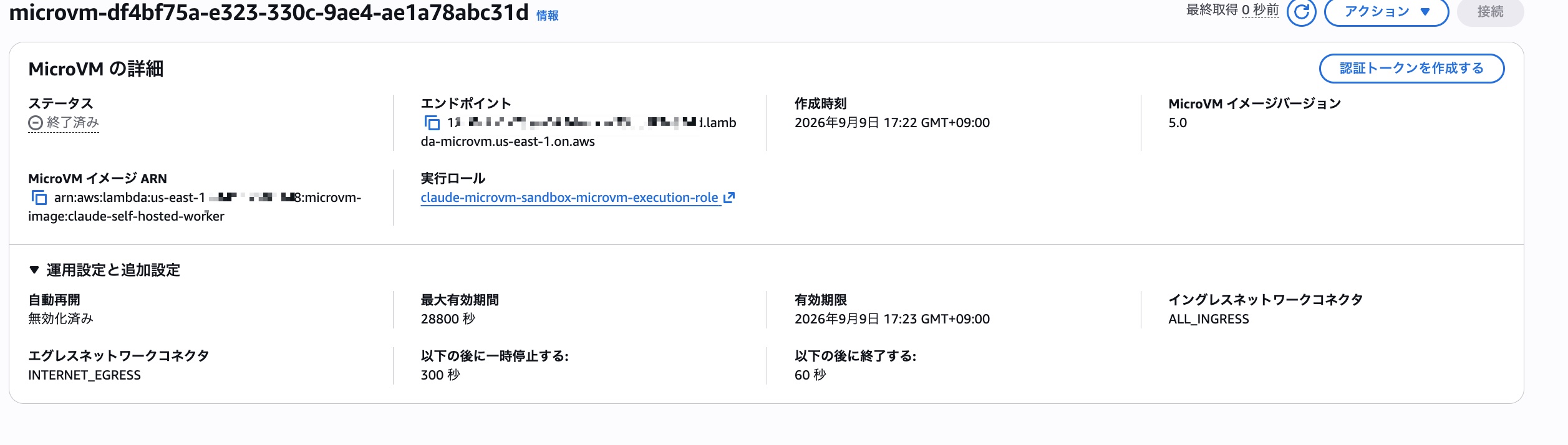
We can confirm that it started successfully.
Going back to the Claude platform, the Bash tool invocation from earlier had completed successfully.
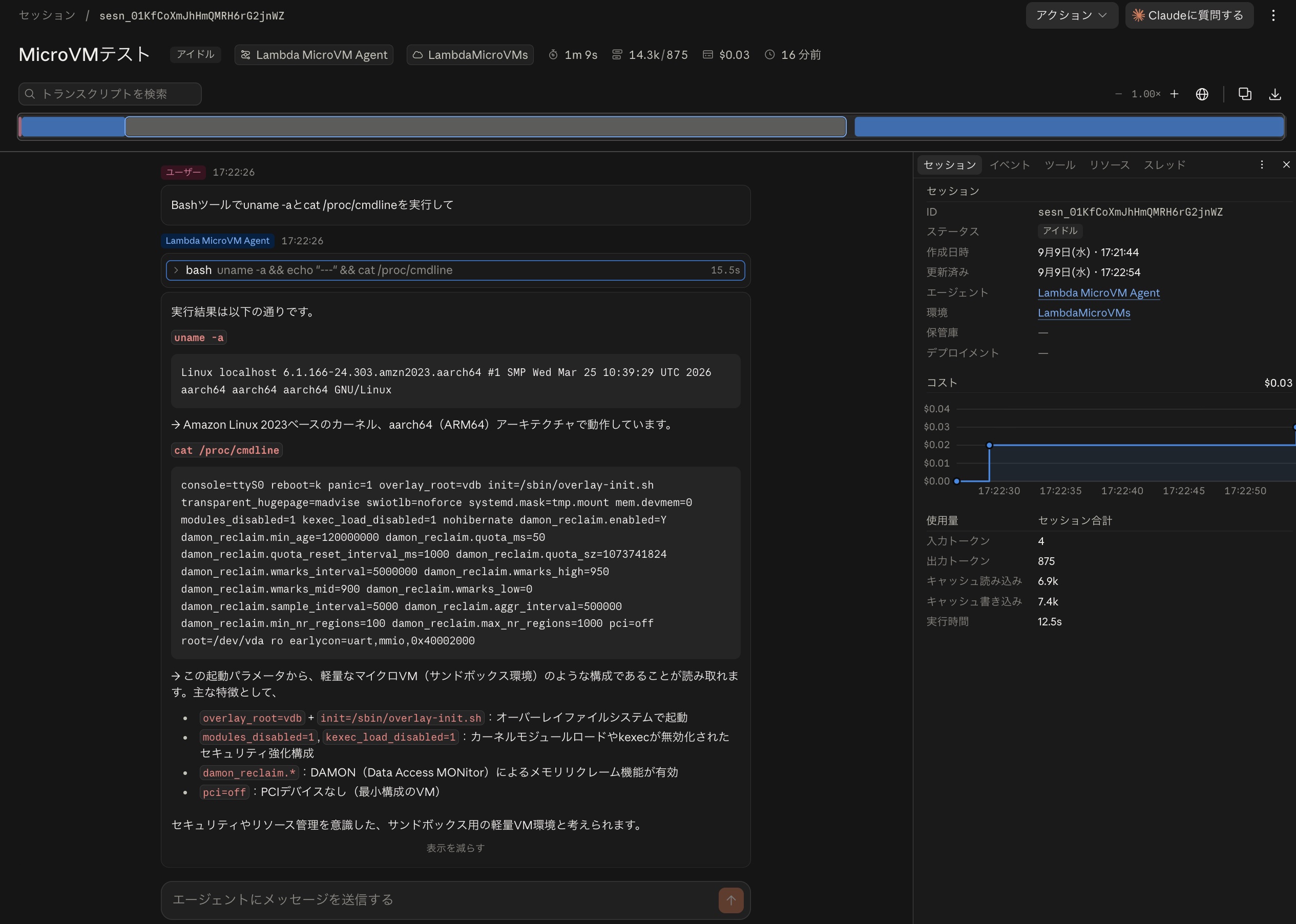
The result of running uname -a was as follows.
Linux localhost 6.1.166-24.303.amzn2023.aarch64 #1 SMP Wed Mar 25 10:39:29 UTC 2026 aarch64 aarch64 aarch64 GNU/Linux
Regarding /proc/cmdline, the following comment was returned.
From these boot parameters, we can read that this is a configuration similar to a lightweight MicroVM (sandbox environment). Key features include:
overlay_root=vdb + init=/sbin/overlay-init.sh: Booting with an overlay filesystem
modules_disabled=1, kexec_load_disabled=1: Security-hardened configuration with kernel module loading and kexec disabled
damon_reclaim.*: Memory reclaim functionality via DAMON (Data Access MONitor) is enabled
pci=off: No PCI devices (minimal VM configuration)It appears to be a lightweight VM environment for sandboxing, designed with security and resource management in mind.
That's exactly right!
For reference, here are the results when the same instructions were given in a cloud-based (non-self-hosted) environment.
The result of running uname -a is as follows.
Linux vm 6.18.44-fc-v24 #1 SMP PREEMPT_DYNAMIC @0 x86_64 x86_64 x86_64 GNU/Linux
Next, here is the result of running cat /proc/cmdline.
console=ttyS0 reboot=k panic=1 nomodule random.trust_cpu=1 ipv6.disable=1 swiotlb=noforce rdinit=/process_api -- --firecracker-init --addr 0.0.0.0:2024 --max-ws-buffer-size 32768 --block-local-connections --listen-vsock-port 2024 --log-vsock-port 5002
It's interesting to see that it's running on Firecracker from the kernel arguments.
The following comment was also obtained from Sonnet.
From this, we can see that this machine is running on Firecracker MicroVM (lightweight virtualization technology). The kernel version is
6.18.44-fc-v24("fc" suggests Firecracker),rdinit=/process_apiruns a dedicated process management program at startup, and it's configured to communicate with the API (port 2024) and logs (port 5002) via vsock.
Bonus ~Accessing AWS Resources from the Sandbox Environment~
Since we were able to launch the sandbox environment on Lambda MicroVMs, I also confirmed that we can benefit from IAM roles.
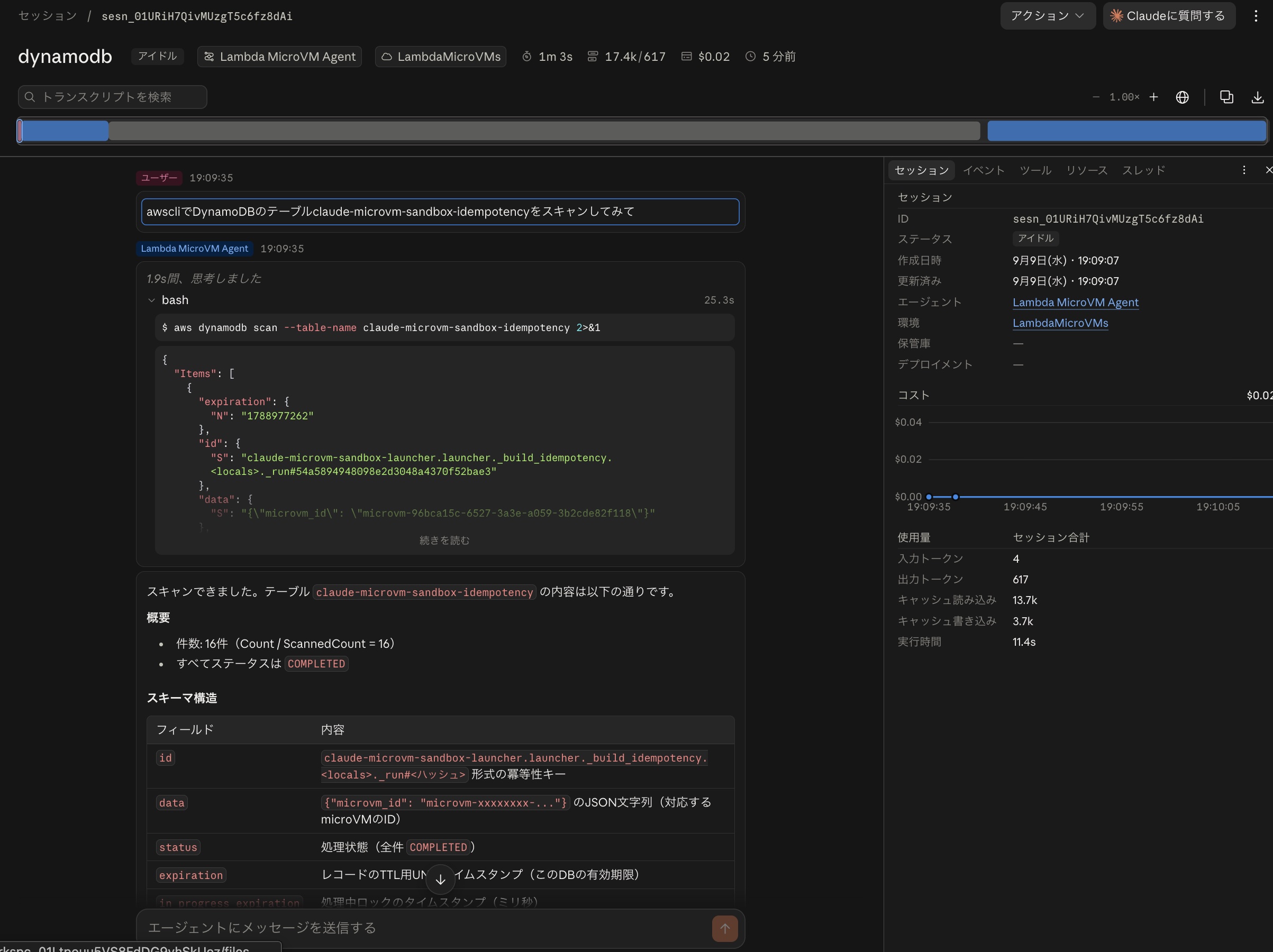
After adding AWS CLI installation steps to the Dockerfile for building the MicroVM image, and modifying the SAM template to add DynamoDB scan permissions to the IAM role for the MicroVM, I asked it to scan the DynamoDB table claude-microvm-sandbox-idempotency using the AWS CLI. The result was as shown below — it successfully accessed the DynamoDB table.
Summary
We tried launching the Claude Managed Agents sandbox using Lambda MicroVMs and Claude Platform on AWS. Compared to using an Anthropic-managed environment, the ability to use the IAM role assigned to the MicroVM is a pretty interesting point. Depending on your ideas, there seem to be many things you can do with it, so it might be worth keeping in mind as an option.
