I Tried Sending Emails with SendGrid from Cloud Run and Recording the Delivery Results in Cloud Logging

This page has been translated by machine translation. View original
Hello, I'm Sora from the Game Solutions Department.
This time, I'll write about sending email from Cloud Run via SendGrid's Web API, receiving the delivery results on Cloud Run via the Event Webhook, and keeping them in Cloud Logging.
Background
AWS has Amazon SES, but Google Cloud has no email sending service equivalent to SES.
The documentation on how to send email from a Compute Engine VM introduces ways to use third-party email services.
Using a reliable third-party email provider such as SendGrid, Mailgun, or Mailjet improves your IP reputation score.
The same page also states that connections to destination TCP port 25 outside the VPC network are blocked.
This time I'll use SendGrid from among these.
SendGrid can send via SMTP, but this time I'll send via the Web API (HTTPS).
The Web API just calls an HTTPS endpoint provided by SendGrid, so there's no need to prepare certificates and the like yourself.
Also, in SendGrid you can view delivery history, such as whether a sent email arrived or was opened, on the Activity Feed screen.
However, the viewable period is short: 3 days on the Essentials plan and 7 days on the Pro plan.
If you want to keep the history longer, or use it for processing such as disabling bounced recipients in your app, you'll have SendGrid send the events to your own environment via the Event Webhook.
This time, I'll try everything up to keeping those events in Cloud Logging.
Architecture
The architecture I built this time is as follows.
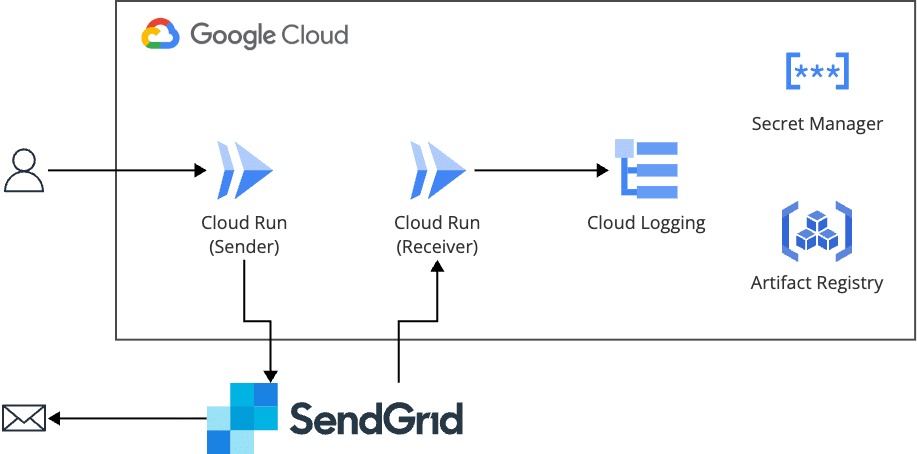
The sending-side Cloud Run sends email via SendGrid's Web API.
When an event such as delivery or open occurs, SendGrid POSTs it with a signature to the receiving-side Cloud Run via the Event Webhook.
The receiving side verifies the signature, writes each event to standard output one by one, and keeps them in Cloud Logging.
Main components
| Role | Component |
|---|---|
| Sending email | Cloud Run (sending side, authentication required, Go 1.27.3, sendgrid-go 3.16.1) |
| Receiving delivery results and writing logs | Cloud Run (receiving side, publicly exposed without authentication, Go 1.27.3, sendgrid-go 3.16.1) |
| Storing the SendGrid API key | Secret Manager |
| Storing container images | Artifact Registry |
| Storing and searching events | Cloud Logging |
| Sending email and notifying events | SendGrid (Web API v3, Event Webhook) |
I made the sending side and the receiving side separate Cloud Run services because whether to make a service public is a per-service setting, and combining them into one would make the sending function public as well.
Only the sending side is allowed to read the API key.
Building
I created the Google Cloud resources with Terraform.
I'll skip explaining the Terraform code.
The Event Webhook settings need the receiving side's URL, and the receiving side needs the public key, so I proceeded in this order: deploy the receiving side → create the Event Webhook → put in the public key and update the receiving side.
Creating the API key
For the sender address, I registered my own address with Single Sender Verification instead of domain authentication.
The recipient is also my own address.
The API key is created from "Settings" → "API Keys" → "Create API Key".
For permissions, choose "Custom Access".
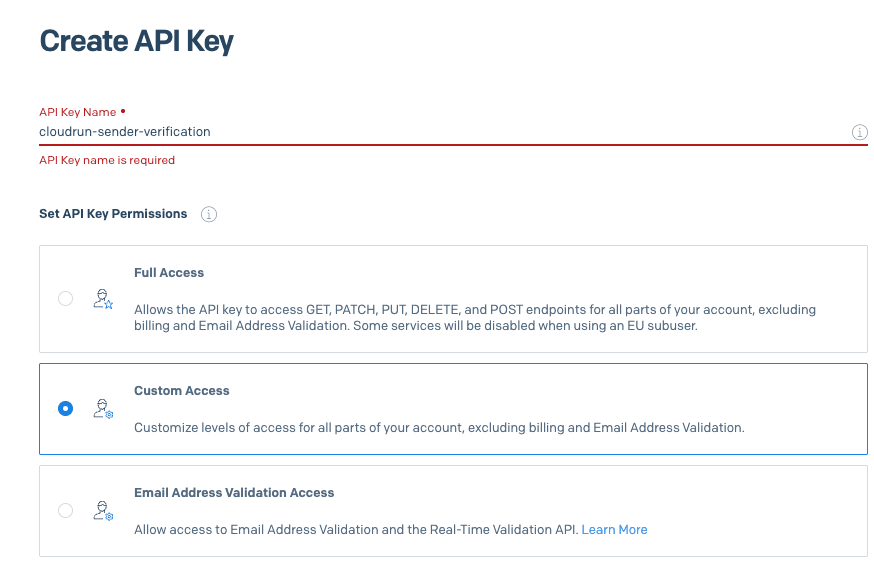
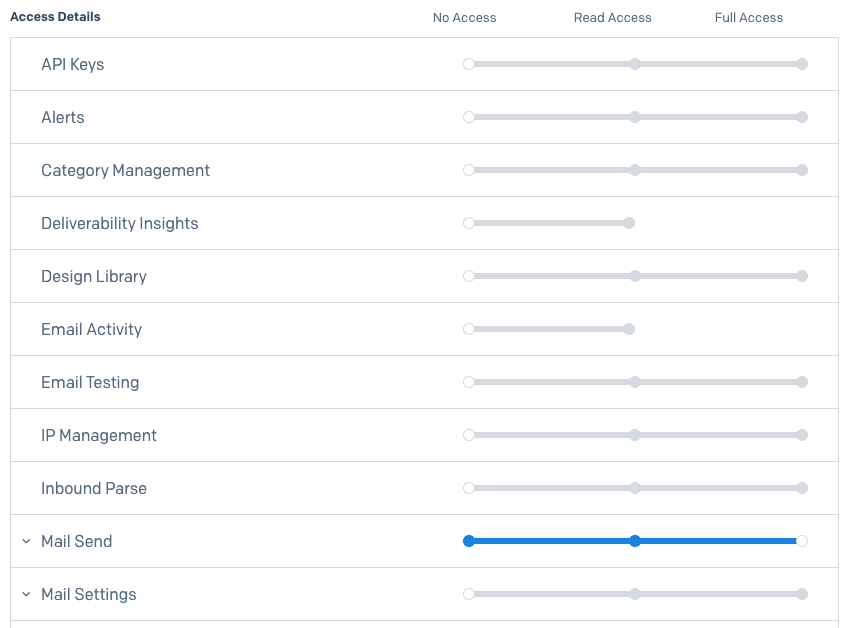
When you choose "Custom Access", a list appears with every item set to "No Access".
Since this time we only send email, I set only "Mail Send" to "Full Access".
The created API key is stored in Secret Manager and passed to the sending-side Cloud Run as an environment variable.
With Terraform I created only the secret container, and entered the value from the console.
This is because if you put the value in with Terraform, the API key remains in plain text in the state.
Receiving-side Cloud Run
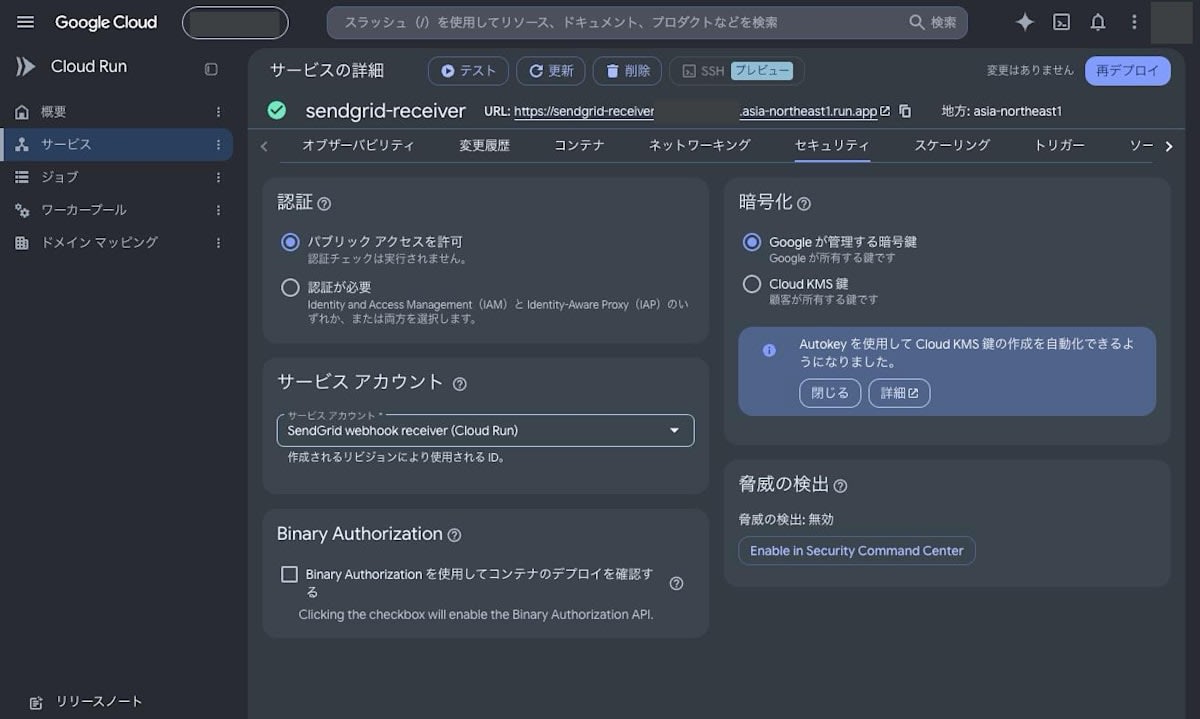
The receiving side is called by SendGrid, so I made it public with no Cloud Run authentication, and instead verify the Event Webhook signature in the app.
Requests from SendGrid can't carry a Google Cloud ID token, so the signature is used to confirm "was this sent from SendGrid?"
Note that Cloud Run URLs can be called over HTTPS from the start, so there's no need to prepare a certificate on the receiving side either.
SendGrid signs the request body and timestamp with ECDSA, and sends the result in the X-Twilio-Email-Event-Webhook-Signature and X-Twilio-Email-Event-Webhook-Timestamp headers.
Verifying the signature and timestamp
For verification, I use helpers/eventwebhook from the Go library published by Twilio SendGrid (sendgrid-go).
Signature verification requires the body exactly as received, so I pass the byte sequence before conversion to JSON (body).
signature := r.Header.Get(eventwebhook.VerificationHTTPHeader)
timestamp := r.Header.Get(eventwebhook.TimestampHTTPHeader)
if signature == "" || timestamp == "" {
	http.Error(w, "forbidden", http.StatusForbidden)
	return
}

ok, err := eventwebhook.VerifySignature(publicKey, body, signature, timestamp)
if err != nil || !ok {
	http.Error(w, "forbidden", http.StatusForbidden)
	return
}

// Reject anything older than 5 minutes or more than 1 minute in the future
sec, err := strconv.ParseInt(timestamp, 10, 64)
if err != nil {
	http.Error(w, "forbidden", http.StatusForbidden)
	return
}
if age := time.Since(time.Unix(sec, 0)); age > 5*time.Minute || age < -1*time.Minute {
	http.Error(w, "forbidden", http.StatusForbidden)
	return
}
// (Part of the log output is omitted)
publicKey is the "Verification key" shown on the Event Webhook screen, converted with eventwebhook.ConvertPublicKeyBase64ToECDSA.
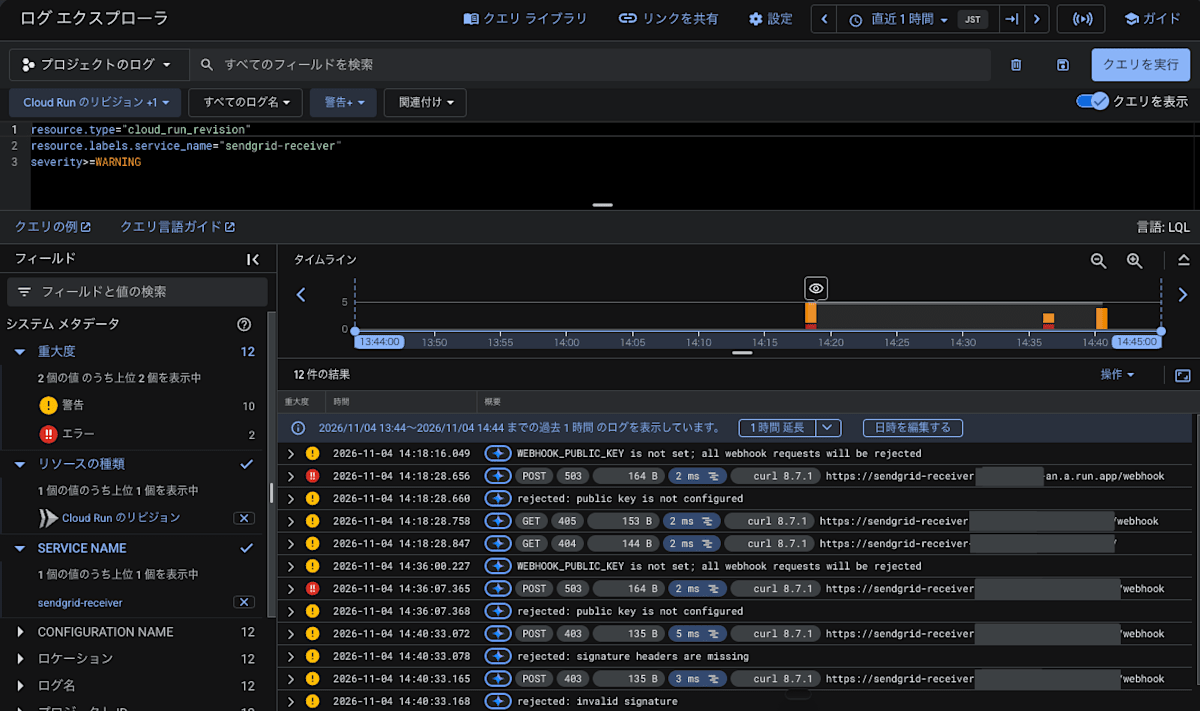
While the public key isn't yet set, all requests are rejected with a 503.
The timestamp check is a countermeasure against attacks that resend a stolen request later (replay).
The timestamp is covered by the signature so it can't be rewritten, and if old ones are rejected, a resent request won't get through.
SendGrid's documentation doesn't state an acceptable time window, so I used 5 minutes, the same as what Slack's official documentation recommends (for future timestamps, up to 1 minute to allow for clock skew).
To also prevent resends within 5 minutes, you would need a separate mechanism to remove duplicates by event ID (sg_event_id).
Log output of events
The body is an array of events, and multiple events are included together in a single request.
On the receiving side, I turn each event's fields as-is into one line of JSON and write it to standard output.
for _, ev := range events {
	eventType, _ := ev["event"].(string)
	attrs := []any{"log_type", "sendgrid_event"}
	for k, v := range ev {
		// (The processing that renames message and severity, which Cloud Logging treats specially, is omitted)
		attrs = append(attrs, k, v)
	}
	logger.Info("sendgrid event: "+eventType, attrs...)
}

// If a 2xx is not returned, SendGrid will resend
w.WriteHeader(http.StatusNoContent)
logger is Go's log/slog JSON handler, with key names changed to severity and message.
In Cloud Run, a single line of JSON written to standard output is ingested as jsonPayload, with severity treated as the log severity and message as the string shown in the list.
However, slog outputs the warning severity as WARN, while its name in Cloud Logging is WARNING, so I replace it.
Configuring the Event Webhook
Create it from "Settings" → "Mail Settings" → "Event Webhooks" with "Create new webhook".
For "Post URL", enter the receiving-side Cloud Run URL followed by /webhook.
This is because the receiving side accepts only POST /webhook.
For "Actions to be posted", check all of them.
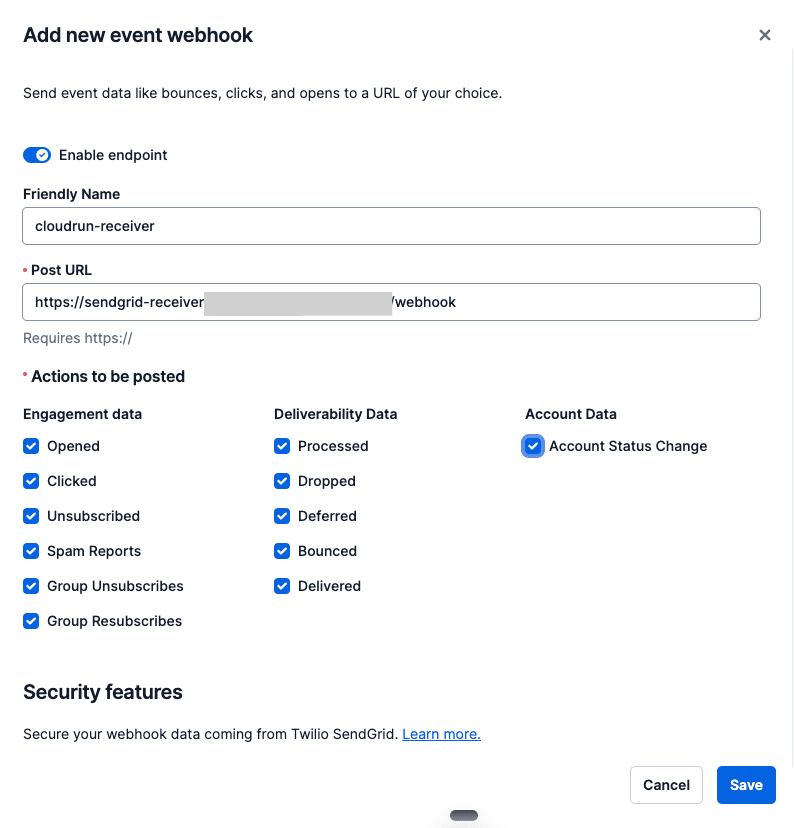
The signature setting is under "Security features" at the bottom of the same screen.
Turn on "Enable Signed Event Webhook", Save, and open it again to see the "Verification key".
The key isn't created just by turning it on; it's created when you Save.
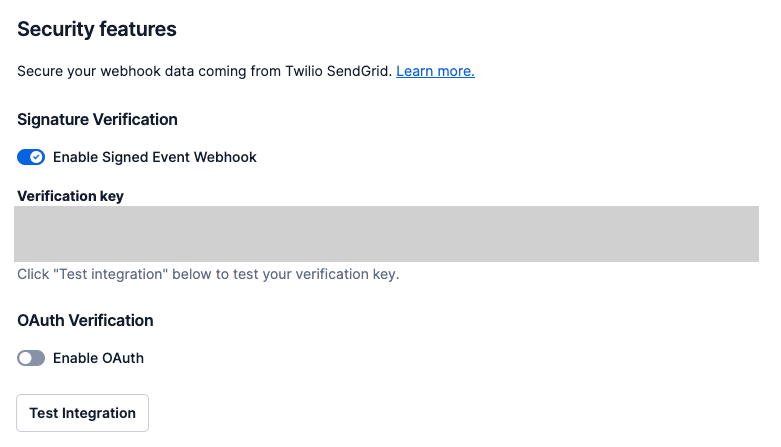
Put this public key into the receiving-side Cloud Run's environment variable and update it.
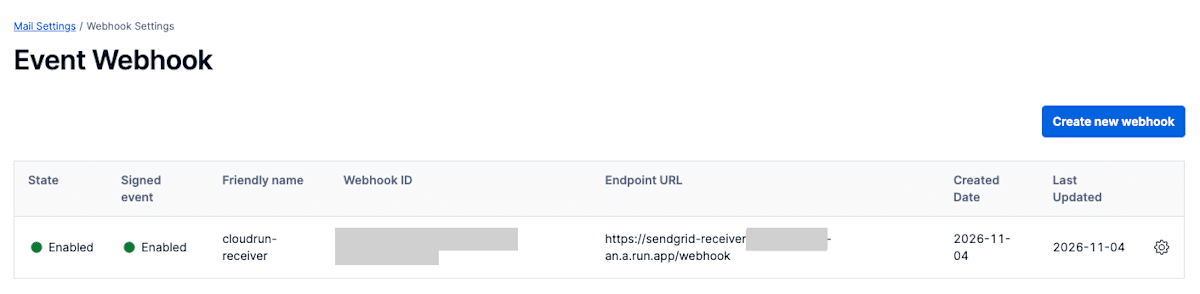
If "Signed event" in the list shows "Enabled", requests will be sent with a signature.
Verification
Checking with Test Integration
First, I had SendGrid send test events using "Test Integration" on the Event Webhook settings screen.
The receiving side returned 204, and the signature and timestamp verification passed.
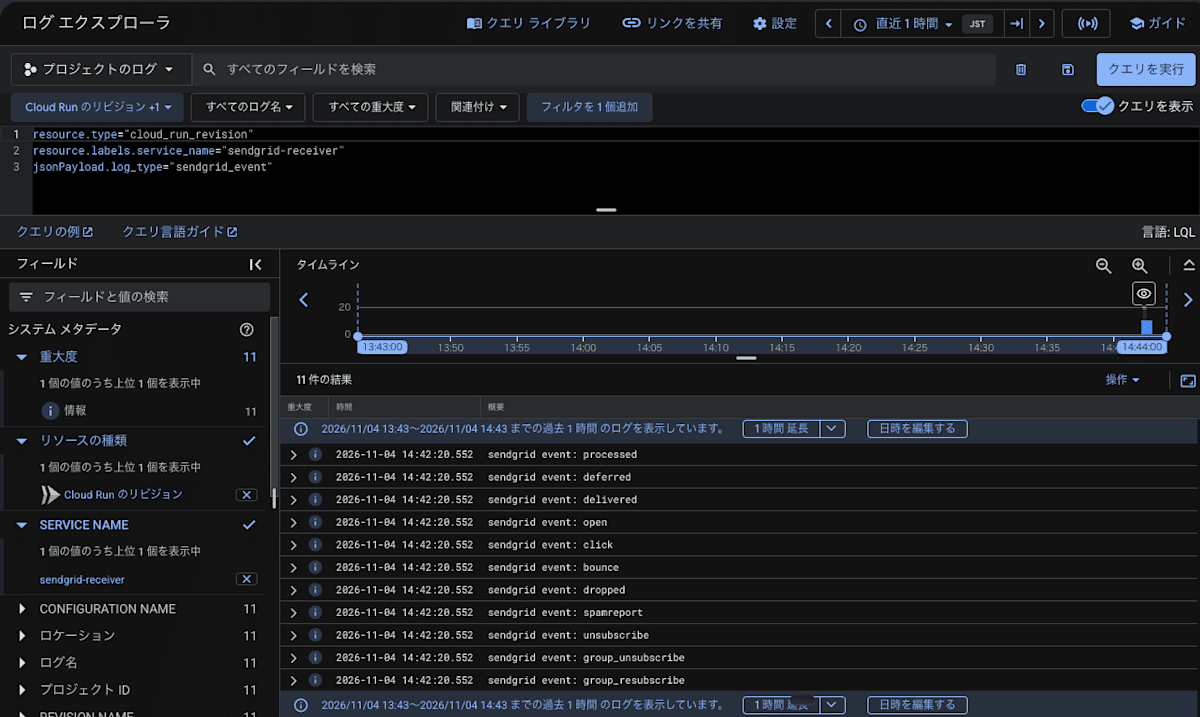
A single request contained 11 events together, including processed, deferred, delivered, open, click, and bounce.
Since they are written to the log one by one, 11 log lines with the same timestamp appear in a row.
Checking invalid requests
Next, I sent a request without a signature and a request with a bogus signature.
# No signature header
curl -s -o /dev/null -w '%{http_code}\n' -X POST https://sendgrid-receiver-xxxxx-an.a.run.app/webhook -d '[]'

# Bogus signature
curl -s -o /dev/null -w '%{http_code}\n' -X POST https://sendgrid-receiver-xxxxx-an.a.run.app/webhook \
  -H 'X-Twilio-Email-Event-Webhook-Signature: MEUCIQDfake' \
  -H "X-Twilio-Email-Event-Webhook-Timestamp: $(date +%s)" \
  -d '[]'
Both were rejected with 403.
Searching with severity>=WARNING shows Cloud Run's request logs alongside the logs of the reasons the receiving side rejected them.
The 503 near the top is a request I sent before putting in the public key.
Sending email from Cloud Run
The sending-side Cloud Run builds and sends the email with sendgrid-go.
The sender and recipient are passed via environment variables, and the API key is received as an environment variable from Secret Manager.
m := mail.NewV3Mail()
m.SetFrom(mail.NewEmail("Cloud Run Sender", cfg.fromEmail))
m.AddCategories("cloudrun-verification")
// A value that is carried as-is into Event Webhook events
m.SetCustomArg("request_id", requestID)

p := mail.NewPersonalization()
p.AddTos(mail.NewEmail("", cfg.toEmail))
m.AddPersonalizations(p)

m.Subject = fmt.Sprintf("Cloud Runからのテストメール(%s)", now)
m.AddContent(
	mail.NewContent("text/plain", "..."),
	mail.NewContent("text/html", "..."),
)

// client is created at startup with sendgrid.NewSendClient(API key)
resp, err := client.Send(m)
The request_id put into custom_args is carried as-is into Event Webhook events.
I also included an HTML body so that opens can be detected.
An open is detected when the 1-pixel image that SendGrid inserts at the end of the HTML is loaded.
The sending side is a service that requires authentication, so I call it with an ID token attached.
curl -s -X POST -H "Authorization: Bearer $(gcloud auth print-identity-token)" https://sendgrid-sender-xxxxx-an.a.run.app/send
{"request_id":"318919c59110125e","sendgrid_body":"","sendgrid_status_code":202,"x_message_id":"jBYgVCZQQq-QVbe7rOEJDw"}
SendGrid's Web API returns 202 when it accepts the email.
By the way, when I called it without the ID token, the request didn't even reach the app, and Cloud Run rejected it with 403.
Checking the received email
The received email was in Gmail's spam folder.
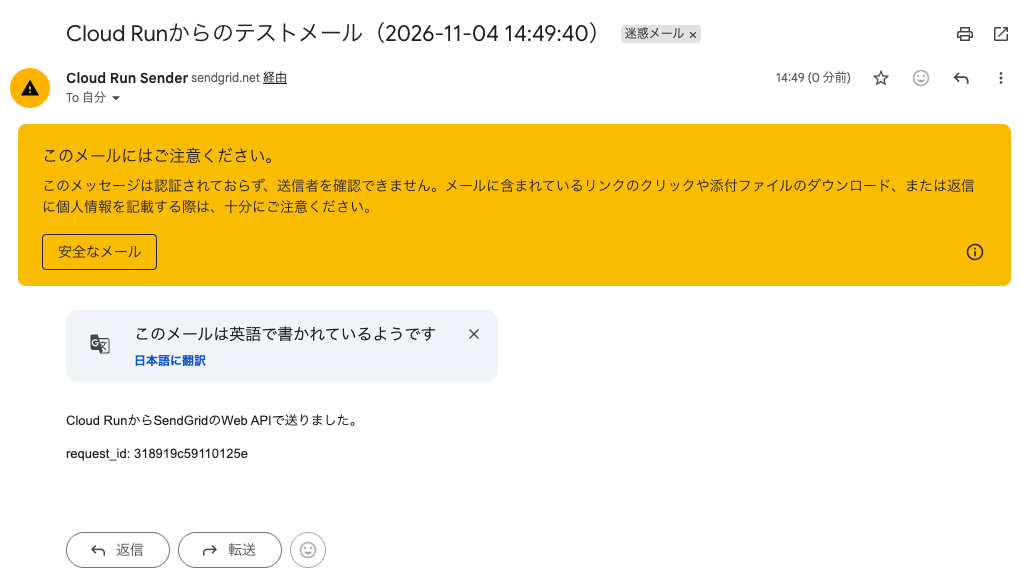
When I opened the sender details, both the sender and the signer were sendgrid.net, and "via sendgrid.net" was displayed.
Gmail's sender is the domain of the envelope sender (Return-Path) checked with SPF, and the signer is the domain of the DKIM signature.
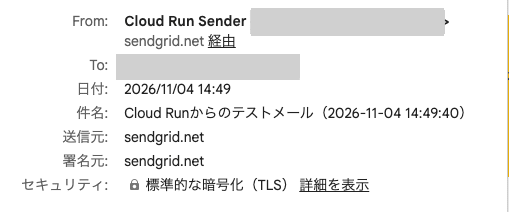
Because I sent with Single Sender Verification, neither matched the From domain, and DMARC failed.
The From domain's DMARC policy is p=quarantine (quarantine if it fails), which is why it landed in the spam folder.
The official documentation says that if you set up SendGrid's Domain Authentication, you can make the DKIM signature and the sender your own domain, and the "via sendgrid.net" display also disappears.
Also, when I opened it in the spam folder, no open event arrived.
This is thought to be because the image used to detect opens wasn't loaded in the spam folder.
When I pressed "Not spam", moved it to the inbox, and opened it there, the open event arrived.
Checking the delivery results
For the email sent at 14:49:40, the processed and delivered events arrived at the receiving side at 14:49:52.
The open event arrived at 14:54:06, after I opened it in the inbox.
By lining up the sending-side and receiving-side logs, you can check the flow from sending to opening on a single screen.
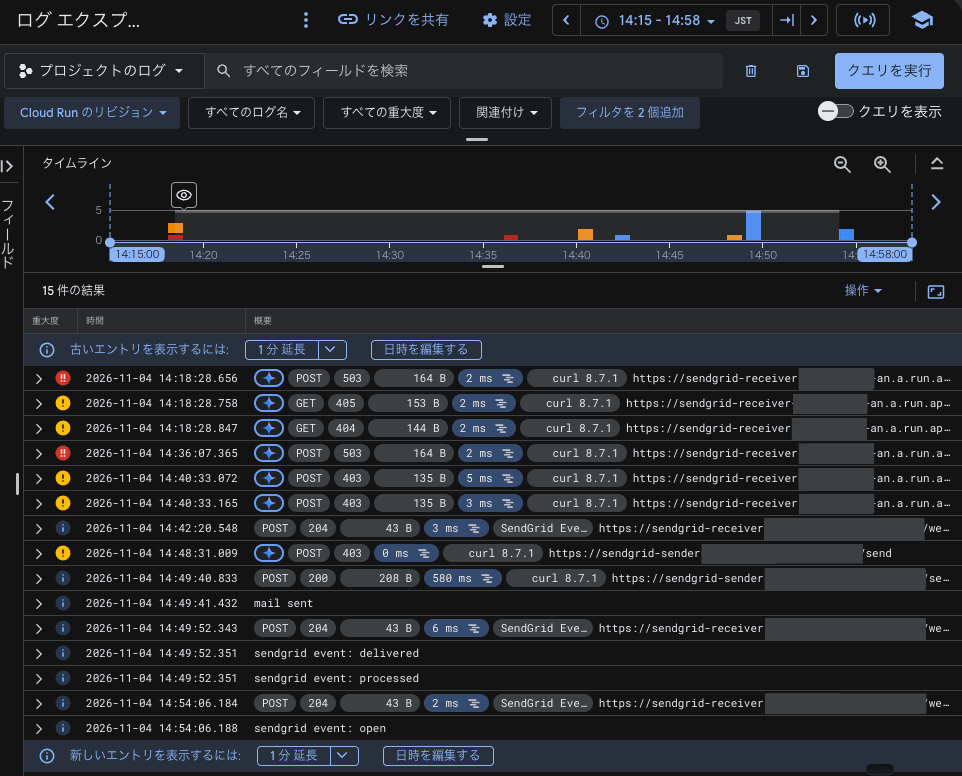
The response of the delivered event (the response from the receiving mail server) said 250 2.0.0 OK DMARC:Quarantine, so the earlier DMARC result also showed up here.
The contents of the open event are as follows.
{
  "category": ["cloudrun-verification"],
  "email": "xxxxx@example.com",
  "event": "open",
  "ip": "74.125.209.39",
  "log_type": "sendgrid_event",
  "message": "sendgrid event: open",
  "request_id": "318919c59110125e",
  "sg_content_type": "html",
  "sg_event_id": "iDmKv-V6T4emsvxR1FztYQ",
  "sg_machine_open": false,
  "sg_message_id": "jBYgVCZQQq-QVbe7rOEJDw.recvd-5bb5b9cb76-h6scr-1-6AEAC775-8.0",
  "timestamp": 1793771636,
  "useragent": "Mozilla/5.0 (Windows NT 5.1; rv:11.0) Gecko Firefox/11.0 (via ggpht.com GoogleImageProxy)"
}
The request_id I put in at send time is carried as-is, so you can identify which email the event belongs to.
sg_message_id was the x_message_id returned at send time with additional characters appended.
useragent being GoogleImageProxy is because Gmail loads email images via Google's servers.
You can also check the flow of the same email on SendGrid's screen ("Activity" → "Email Logs").
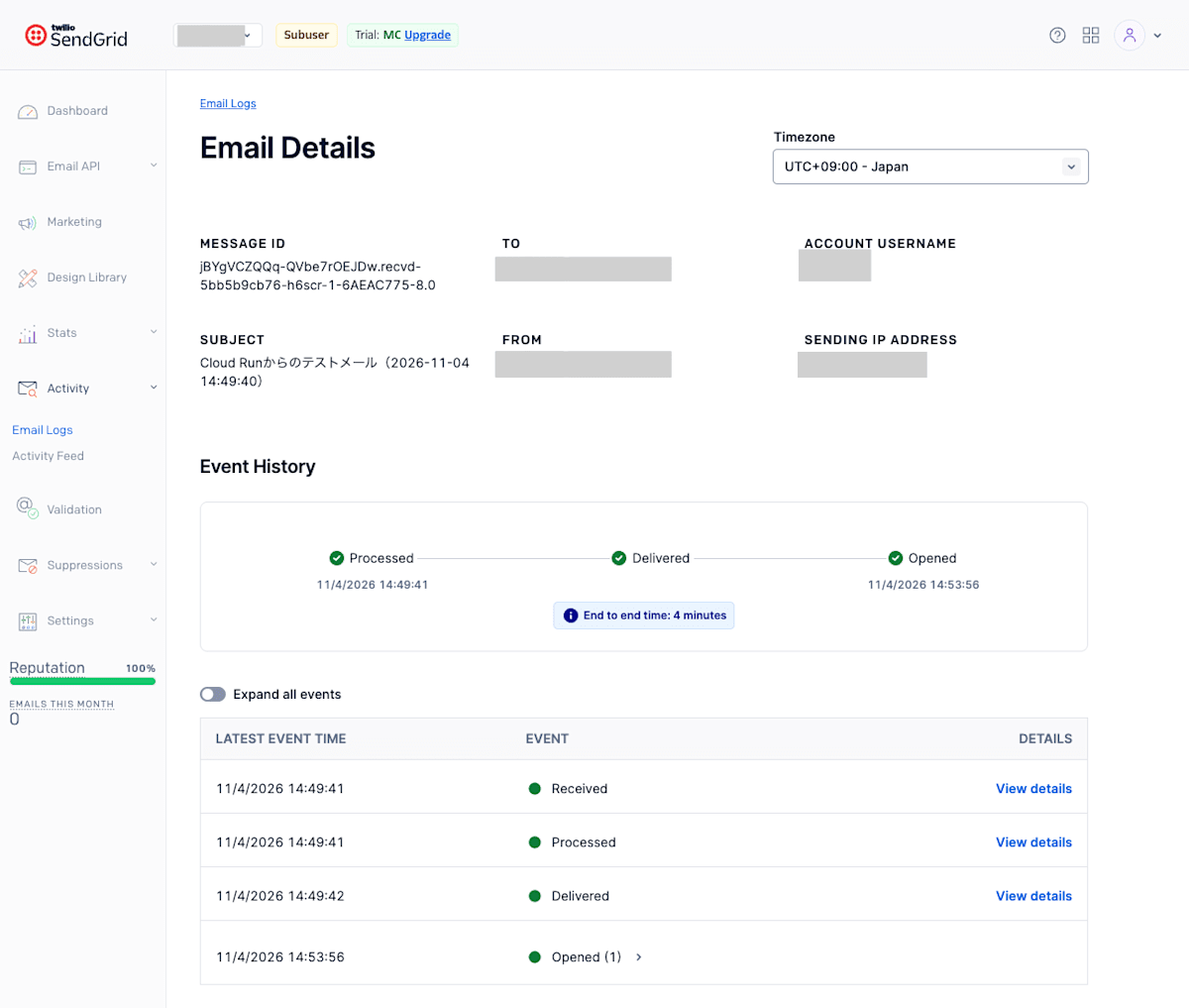
Comparing the times events were recorded on SendGrid's screen with the times they arrived at the receiving side, every event arrived about 10 seconds later.
Also, SendGrid's screen shows "Received", when the API request was accepted, but this did not arrive via the Event Webhook.
Supplement: Sending with a Dynamic Template
By the way, I also tried a setup where the subject and body are created with SendGrid's Dynamic Template and sent.
Create the template under "Email API" → "Dynamic Templates" and write the HTML in the Code Editor.
Where you want to insert values, wrap them in {{}} like {{sent_at}}; this can also be used in the subject ("Subject" under "Settings").
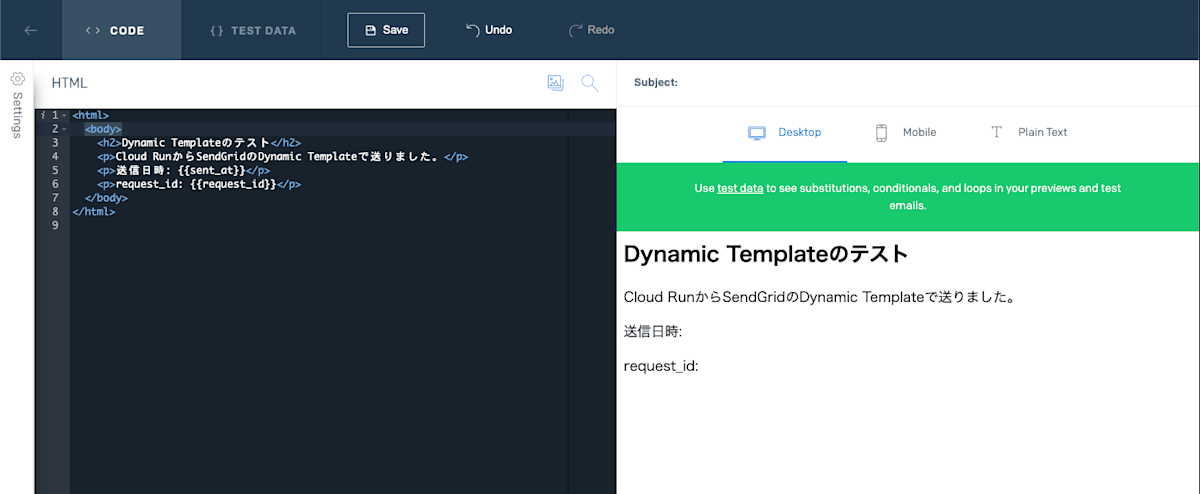
In the sending-side code, instead of building the subject and body, you just pass the template ID (Template ID) and the values.
m.SetTemplateID(cfg.templateID)
p.SetDynamicTemplateData("sent_at", now)
p.SetDynamicTemplateData("request_id", requestID)
An email with the values filled into the subject and body arrived.
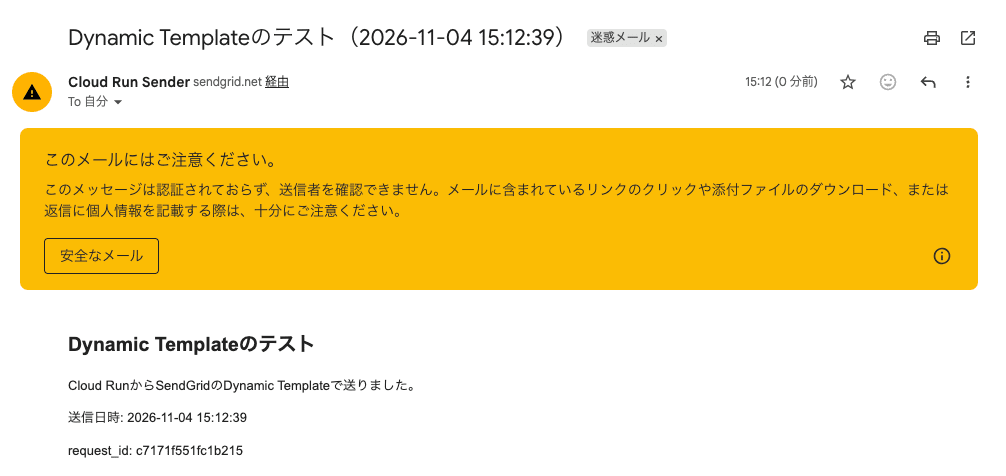
I changed nothing on the receiving side, but just like the first email, the processed, delivered, and open events arrived.
Even the image for detecting opens was inserted by SendGrid without my having to put it into the template's HTML myself.
Conclusion
This time, I sent email from Cloud Run via SendGrid, received the delivery results on Cloud Run via the Event Webhook, and made them searchable in Cloud Logging.
I hope this article is helpful to someone.