
I tried reducing costs by limiting Cloud Functions (gen2) warm instances to business hours only

This page has been translated by machine translation. View original
Introduction
I had set min-instances=1 on a chatbot running on Cloud Functions (2nd generation) to avoid cold starts. However, it seemed wasteful to maintain a warm instance at all times when there was almost no usage during nights and weekends.
When I looked into whether I could "keep it warm only during business hours," I found that Cloud Scheduler could handle this. However, there were a few pitfalls I encountered, so I'm sharing them here.
What I Want to Do
| Time Period | min-instances | State |
|---|---|---|
| Weekdays 9:00〜18:00 | 1 | Warm (immediate response) |
| Other times (nights/weekends) | 0 | Cold (starts on first request) |
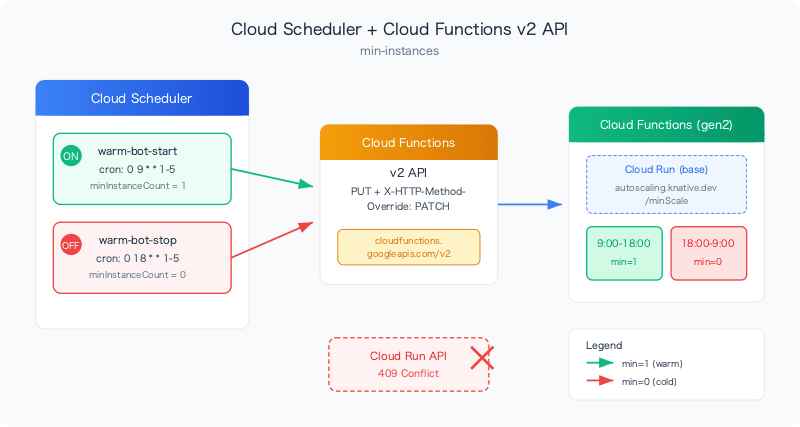
I'll create two Cloud Scheduler jobs to switch minInstanceCount=1 at the start of business hours and minInstanceCount=0 at the end of business hours.
Prerequisites
- Cloud Functions 2nd generation (Cloud Run based)
- Region:
asia-northeast1 - Runtime: Python 3.14
roles/editoris granted to the default compute service account
Pitfall 1: Cloud Scheduler Does Not Directly Support the PATCH Method
The PATCH method is required to partially update resources with the Cloud Run / Cloud Functions Admin API. However, only DELETE, GET, HEAD, POST, PUT can be specified with Cloud Scheduler's --http-method. PATCH is not available.
ERROR: argument --http-method: Invalid choice: 'patch'.
Valid choices are [delete, get, head, post, put].
Workaround: Use PUT + X-HTTP-Method-Override: PATCH header. This method is also introduced in the Google Cloud official documentation.
--http-method=PUT \
--headers="Content-Type=application/json,X-HTTP-Method-Override=PATCH"
Pitfall 2: The Cloud Run API Returns a 409 Error
At first, I tried using the Cloud Run Admin API (run.googleapis.com).
https://run.googleapis.com/v2/projects/YOUR_PROJECT/locations/REGION/services/YOUR_SERVICE?update_mask=scaling.min_instance_count
However, requests consistently failed with HTTP 409 (Conflict).
{
  "debugInfo": "URL_ERROR-ERROR_OTHER. Original HTTP response code number = 409",
  "status": "ABORTED"
}
Cause: Cloud Functions (2nd generation) runs on Cloud Run, but directly updating a service managed by Cloud Functions via the Cloud Run API causes a conflict in the management layer.
Solution: Use the Cloud Functions v2 API (cloudfunctions.googleapis.com) instead of the Cloud Run API.
https://cloudfunctions.googleapis.com/v2/projects/YOUR_PROJECT/locations/REGION/functions/YOUR_FUNCTION?updateMask=serviceConfig.minInstanceCount
The request body should also be formatted to match the Cloud Functions API:
{"serviceConfig": {"minInstanceCount": 1}}
Creating Cloud Scheduler Jobs
Here are the final commands taking into account the two pitfalls above.
Warm Start Job (Start of Business Hours)
gcloud scheduler jobs create http warm-bot-start \
  --location=asia-northeast1 \
  --schedule="0 9 * * 1-5" \
  --time-zone="Asia/Tokyo" \
  --uri="https://cloudfunctions.googleapis.com/v2/projects/YOUR_PROJECT/locations/REGION/functions/YOUR_FUNCTION?updateMask=serviceConfig.minInstanceCount" \
  --http-method=PUT \
  --headers="Content-Type=application/json,X-HTTP-Method-Override=PATCH" \
  --message-body='{"serviceConfig":{"minInstanceCount":1}}' \
  --oauth-service-account-email=YOUR_SA@developer.gserviceaccount.com
Warm Stop Job (End of Business Hours)
gcloud scheduler jobs create http warm-bot-stop \
  --location=asia-northeast1 \
  --schedule="0 18 * * 1-5" \
  --time-zone="Asia/Tokyo" \
  --uri="https://cloudfunctions.googleapis.com/v2/projects/YOUR_PROJECT/locations/REGION/functions/YOUR_FUNCTION?updateMask=serviceConfig.minInstanceCount" \
  --http-method=PUT \
  --headers="Content-Type=application/json,X-HTTP-Method-Override=PATCH" \
  --message-body='{"serviceConfig":{"minInstanceCount":0}}' \
  --oauth-service-account-email=YOUR_SA@developer.gserviceaccount.com
Key Points:
--schedule="0 9 * * 1-5"is Monday–Friday at 9:00,"0 18 * * 1-5"is Monday–Friday at 18:00--time-zone="Asia/Tokyo"specifies JST- For
--oauth-service-account-email, specify a service account with Cloud Functions update permission (cloudfunctions.functions.update).roles/editoris sufficient
Verification
Run the jobs manually to verify they work.
# Manually trigger warm start
gcloud scheduler jobs run warm-bot-start --location=asia-northeast1

# Check job status (status: {} = success)
gcloud scheduler jobs describe warm-bot-start --location=asia-northeast1 \
  --format="yaml(status,lastAttemptTime)"
Confirm that min-instances has actually changed:
# Check with Cloud Functions API
gcloud functions describe YOUR_FUNCTION --region=asia-northeast1 --gen2 \
  --format="value(serviceConfig.minInstanceCount)"

# Can also be verified with Cloud Run annotations
gcloud run services describe YOUR_FUNCTION --region=asia-northeast1 \
  --format="value(spec.template.metadata.annotations.'autoscaling.knative.dev/minScale')"
If status: {} is returned, it's a success. If status.code: 10 is returned, it's an HTTP 409 error, so check whether the API endpoint is correct.
Cost Comparison
| Configuration | Warm Hours/Month | Estimated Monthly Cost |
|---|---|---|
| Always min-instances=1 | ~730 hours | ~¥8,500〜10,000 |
| Scheduled (Mon–Fri 9–18) | ~195 hours | ~¥2,300〜2,700 |
This results in approximately 73% cost reduction.
Cold Start Trade-offs
Since min-instances=0 during off-hours (nights and weekends), a cold start will occur on the first request during those times.
Specifically:
- Container startup, Python runtime initialization, and dependency package loading will run
- If dependency packages are heavy (e.g.,
google-cloud-aiplatform), startup can take more than 30 seconds - For services with HTTP response timeouts like Google Chat, a timeout error may be displayed (the processing itself continues and the response is returned with a delay)
Enabling startup-cpu-boost will speed up startup, but it cannot be completely eliminated.
# Enable startup-cpu-boost (first time only)
gcloud run services update YOUR_FUNCTION --region=asia-northeast1 --startup-cpu-boost
If usage during off-hours is low, this trade-off should be acceptable.
Summary
- Using Cloud Scheduler + Cloud Functions v2 API, I was able to build a mechanism to maintain
min-instances=1only during business hours - For services managed by Cloud Functions (gen2), the Cloud Functions v2 API must be used instead of the Cloud Run API (to avoid 409 errors)
- Since Cloud Scheduler does not support PATCH, work around it with
PUT+X-HTTP-Method-Override: PATCH - Approximately 73% cost reduction (compared to always-warm). There is a trade-off of cold starts occurring outside business hours