
If you use Japanese keyword search with Cloudflare AI Search, choose the trigram tokenizer when creating it

This page has been translated by machine translation. View original
Hi! This is Yuji Nishimura from the Operations Department!
With the default porter tokenizer, the keyword search in Cloudflare AI Search sometimes returns no results for questions written in Japanese. The October 16, 2026 update made the trigram tokenizer support Japanese, Chinese, and Korean (CJK) queries, so I created a porter instance and a trigram instance in the dashboard and compared their search results. On the instance where I chose trigram at creation time, Japanese questions got hits, but when I switched the tokenizer later on an existing instance, the search results did not change within the scope of what I tested.
What changed
- Date: October 16, 2026 (Cloudflare Changelog)
- Key point of the change: With keyword search using the
trigramtokenizer, documents now match even for CJK queries. This also covers natural-language questions without spaces, such as経費精算の締め日はいつですか?. According to the changelog, queries without spaces were previously treated as a single exact-match phrase, and in many cases keyword search returned no results - Recommended setting: The changelog and the documentation recommend setting
keyword_tokenizertotrigramfor CJK content. Changing the tokenizer triggers a full re-index
The tokenizer is selected with keyword_tokenizer in the instance's indexing_options. There are two choices.
| Tokenizer | How it splits text | Use case in the documentation |
|---|---|---|
porter (default) |
Splits on spaces and punctuation and applies Porter stemming (running matches run) |
Natural language |
trigram |
Slides one character at a time and splits text into sequences of 3 characters (config matches configuration) |
Code, CJK content |
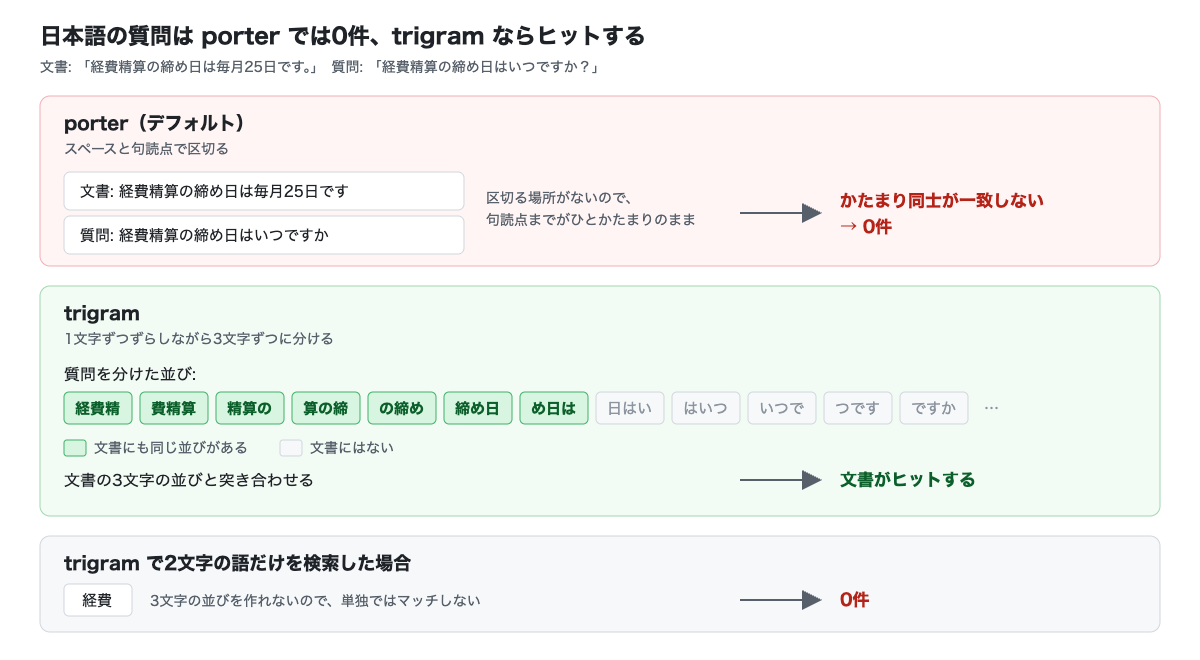
According to the documentation, Japanese and Chinese do not separate words with spaces, and in Korean particles are attached to words, so porter cannot split text word by word. trigram also has a limitation: words shorter than 3 characters do not match on their own.
I made a diagram showing how the two tokenizers differ when searching the same document with the same question. It is a conceptual diagram I created based on the documentation and the verification results described below.
Trying it out
Environment
- November 5, 2026, an account on the Workers Free plan
- I operated in the dashboard (Japanese UI). Billing for AI Search is scheduled to start on December 1, 2026 (Limits & pricing), so nothing was billed at the time of this verification
- The data source was built-in storage, and after creating the instance I added the following two Markdown files from the "Items" tab of the instance via "Upload files"
# 経費精算のルール

経費精算の締め日は毎月25日です。25日までに申請された経費は、翌月10日に給与と一緒に振り込まれます。

交通費を申請するときは、領収書の画像を添付してください。
# 有給休暇の申請

有給休暇は、取得する日の3営業日前までにワークフローから申請してください。

半日単位でも取得できます。
By default, a new instance uses hybrid search, with both vector search and keyword search enabled. This time, to avoid mixing in vector search results, I set the search method to keyword search only. All other settings, such as the keyword match mode (AND) and the match threshold (0.4, the minimum score required for a result to be returned), were left at their defaults.
1. Choose the tokenizer at creation time
In "AI Search" in the dashboard, choose "Create instance" from the arrow to the right of the "Create namespace" button. Give it a name, leave the data source as "Built-in storage", and proceed with "Next". Under "Indexing" in "Review settings", open "Show more" and the search method (SEARCH METHOD) and the keyword search settings (KEYWORD SETTINGS) appear. Choosing "Character trigram" from "Edit" under "Keyword tokenizer" sets it to trigram.
The next image shows the state with only "Keyword search" selected as the search method and "Character trigram" selected. The red frames (added by me) mark the selected search method and tokenizer.
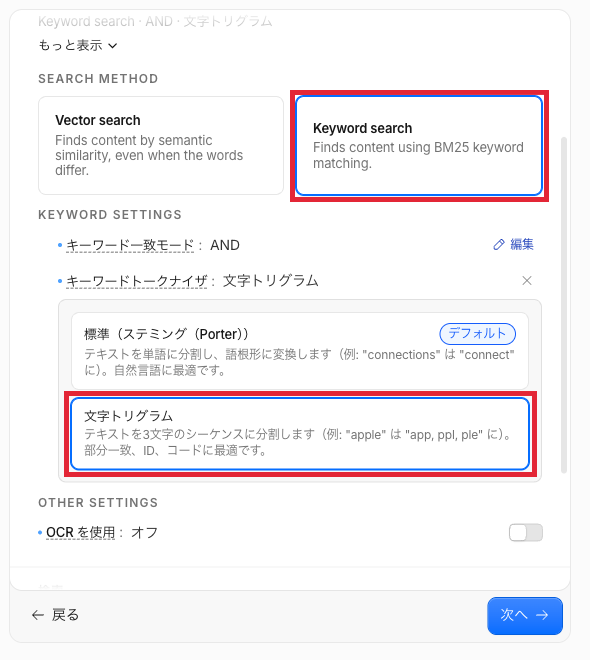
As of November 5, 2026, the description of "Character trigram" in the dashboard reads "Best for partial matching, IDs, and code", with no mention of CJK.
Using this procedure, I created two instances that differ only in the tokenizer.
ynishimura-cjk-porter: Standard (Stemming (Porter))ynishimura-cjk-trigram: Character trigram
2. Compare search results with the same question
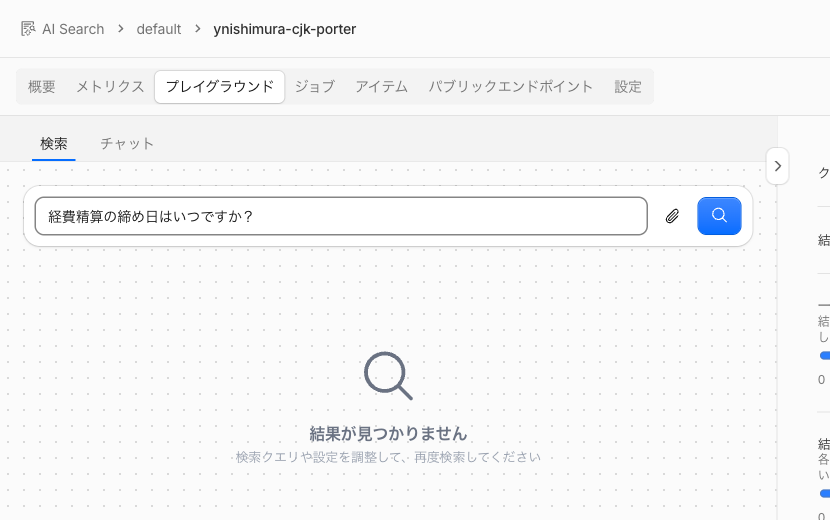
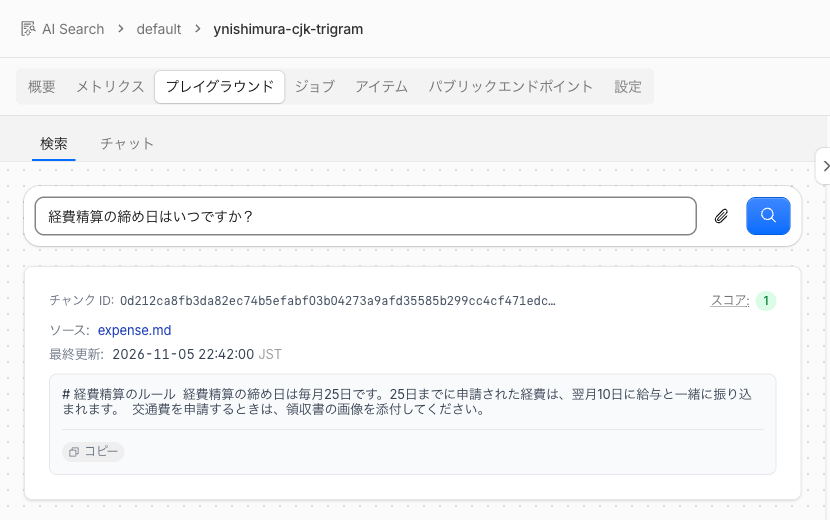
In "Search" on the "Playground" tab of each instance, I entered 経費精算の締め日はいつですか?, the same as the example in the changelog.
The porter instance showed "No results found". The result was the same even after lowering the match threshold to 0.
The trigram instance returned a chunk of expense.md and did not return paid-leave.md. The keyword match mode was still AND, but not all of the question's 3-character sequences (はいつ, ですか, and so on) needed to be in the document.
I also tried other queries.
| Instance | Query | Result |
|---|---|---|
porter |
経費精算 |
0 results |
trigram |
締め日 (3 characters) |
expense.md is hit |
trigram |
経費 (2 characters) |
0 results (0 results even with the match threshold at 0) |
経費精算 is a word that appears in the document as is, but porter returned 0 results. Because the document side stays as chunks that run up to the punctuation, a single word alone does not match. The 0 results for 経費 are consistent with the documentation's statement that words shorter than 3 characters do not match on their own. Japanese has many 2-character words such as 「経費」 and 「申請」, so if your use case often involves searches with only 2-character words, you need to account for this limitation.
3. Switch later on an existing instance
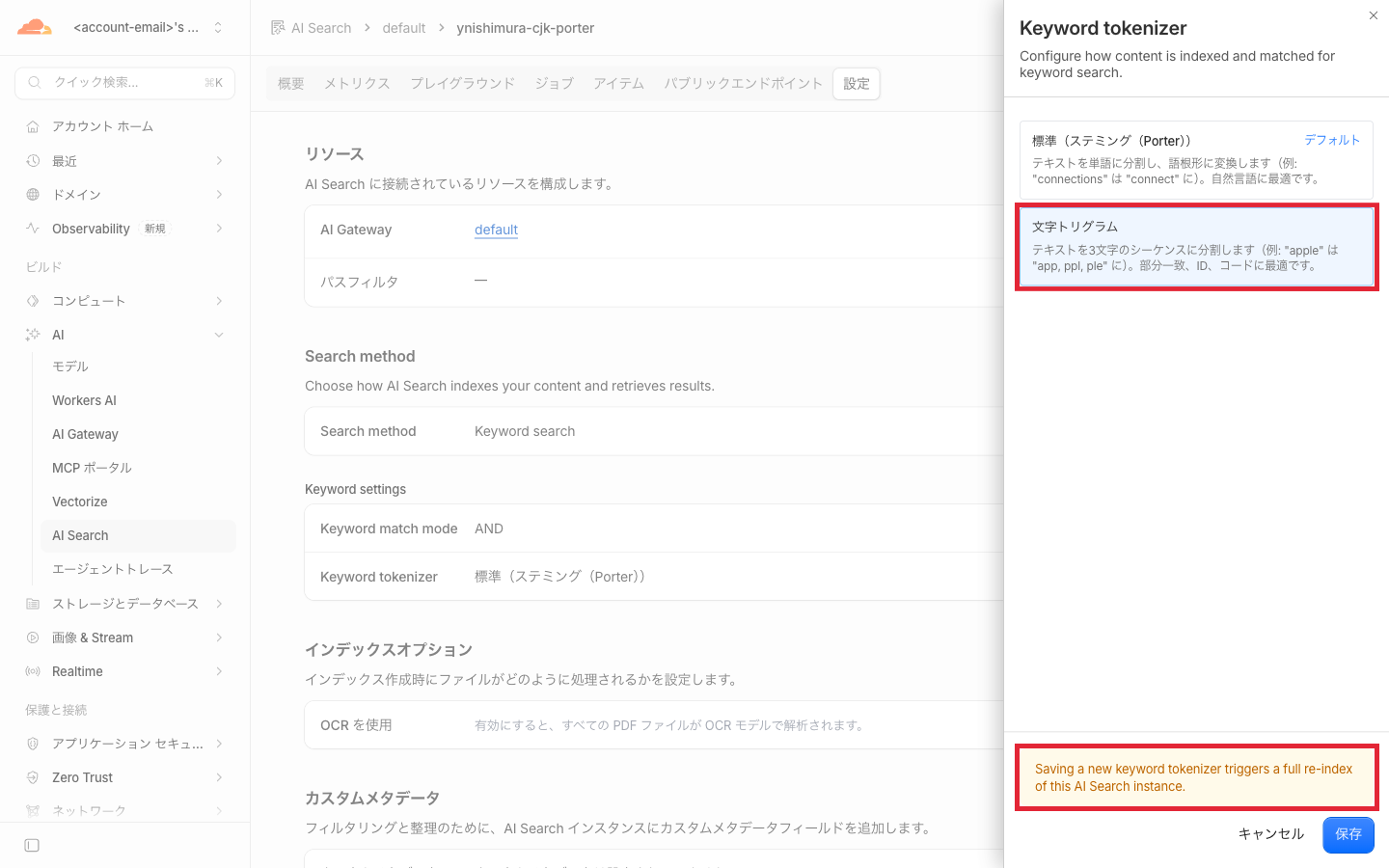
Assuming a scenario where you switch an instance already running on porter to trigram, I changed the tokenizer of ynishimura-cjk-porter afterwards. Selecting "Edit" for "Keyword tokenizer" on the instance's "Settings" tab shows the options along with the warning "Saving a new keyword tokenizer triggers a full re-index of this AI Search instance." (saving a new tokenizer triggers a full re-index). The red frames (added by me) mark the selected "Character trigram" and this warning.
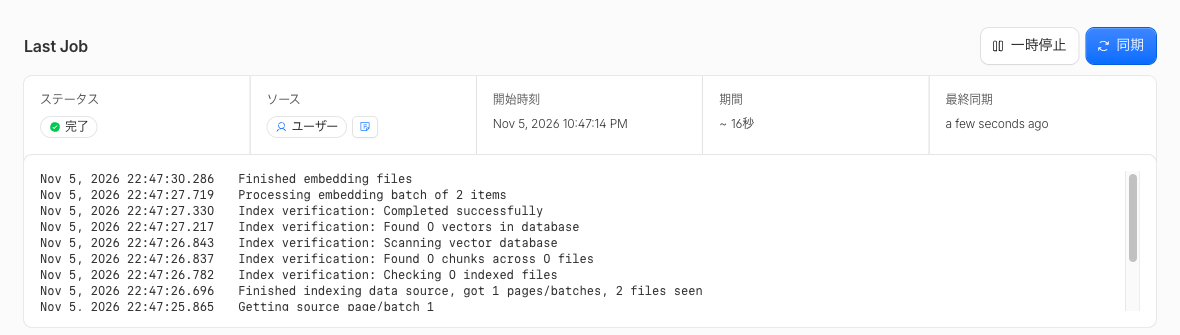
After saving, a job started 4 seconds later and completed in about 16 seconds. Processing embedding batch of 2 items and 2 files seen in the log are the record of the two files being processed again. The display on the Settings tab also changed to "Character trigram", and the instance settings retrieved by the dashboard also showed keyword_tokenizer: "trigram".
However, queries that get hits on an instance that used trigram from creation still returned 0 results.
| What I tried | Result |
|---|---|
From right after switching until about 9 minutes later, searched with queries that include a mid-sentence portion (経費精算の締め日はいつですか?, 締め日, 申請は, etc.) |
All returned 0 results (at the same time, the instance that used trigram from creation got hits) |
| Purged the similarity cache on the Settings tab, then searched | 0 results |
| Ran a full sync with "Sync" on the Jobs tab, then searched | 0 results |
After switching, added a new file (出張の申請は、出発日の5営業日前までに…) and searched with 出張の申請はいつまで? |
0 results |
Added the same file to the instance that used trigram from creation and searched with the same query |
The added file was hit |
On the switched instance, the only search that got a hit was 出張の申請は, which in the document is a continuous run up to the comma. This result is consistent with how porter splits on spaces and punctuation.
I also tried the reverse direction. I switched ynishimura-cjk-trigram, created with trigram, to porter, and after the re-index job (3 files, about 14 seconds) finished, I purged the similarity cache. When I searched for 営業日前, which had not been used on this instance before, it got a hit even though it is a mid-sentence portion that should not match under porter. This is also the same result as trigram at creation time.
Specifying the tokenizer in code
When creating an instance from Workers, pass indexing_options.keyword_tokenizer to create() of the namespace binding (ai_search_namespaces). The following example is assembled from the parameter definitions in the Workers binding reference, and I did not run it this time.
// Assumes AI_SEARCH is bound to ai_search_namespaces in the wrangler config
// Call this inside a function that receives env, such as a fetch handler
const instance = await env.AI_SEARCH.create({
  id: "my-instance",
  // If index_method is omitted, it becomes hybrid search with vector search and keyword search
  indexing_options: { keyword_tokenizer: "trigram" },
});
According to the reference, if you have never created an AI Search instance in the account, the token_id of a service API token is also required. You can also pass indexing_options to update(), but I have not tried whether search results change when switching with update(). Also, in the Wrangler CLI documentation as of November 5, 2026, ai-search create and ai-search update have no flag for specifying the tokenizer. Even when using Wrangler, you would specify the tokenizer via the dashboard, the Workers binding, or the REST API.
Discussion of the verification results
- What I confirmed: The instance where I chose
trigramat creation time got hits for the same Japanese question as in the changelog, whileporterreturned 0 results. Becauseportertreats everything up to the punctuation as one chunk, even経費精算, which appears in the document as is, did not match - What I checked against the official information: That changing the tokenizer triggers a re-index job was as stated in the documentation and the dashboard warning. The documentation only says that changing it triggers a full re-index, and does not mention when search results change after switching
- Operational notes:
- After switching the tokenizer on an existing instance, search with a Japanese question and check whether the results changed. If they did not, create a new instance with
trigramand load the data again - Hybrid search runs vector search and keyword search in parallel and merges the results (Hybrid search). So with the default hybrid search, even if the keyword side returns 0 results under
porter, results from the vector search side would likely still be returned, and it may be hard to notice from the search results as a whole. According to the documentation, with hybrid search you can check the keyword-side results viakeyword_scoreandkeyword_rankin thescoring_detailsattached to each chunk (I tried neither this time) - The documentation does not describe the time a re-index takes or its impact on billing. The 2 to 3 files this time finished in 14 to 16 seconds, but I have not tried how long it takes on an instance with a large amount of data. Starting December 1, billing will also cover ingestion (the token count of indexed chunks), so when rebuilding you also need to check the pricing in Limits & pricing
- In the process of creating an instance in the dashboard, a
defaultAI Gateway and adefaultnamespace were created automatically, and they remained even after I deleted the instance. After the verification I deleted the AI Gateway, and I left the namespace, which is not billed, empty
- After switching the tokenizer on an existing instance, search with a Japanese question and check whether the results changed. If they did not, create a new instance with
Summary
If you want to use Japanese keyword search in Cloudflare AI Search, set keyword_tokenizer to trigram when creating the instance. Within the scope I tried on November 5, 2026, the instance where I chose trigram at creation time got hits even for natural-language questions. On the other hand, when I switched an existing instance later in the dashboard, the search results did not change even after waiting about 9 minutes. For an existing instance, after switching, check the results with a Japanese question, and if they do not change, recreate it. Also keep in mind that words of 2 characters do not match on their own.
I hope this helps someone.
Reference links:
- AI Search keyword search supports Japanese, Chinese, and Korean queries (Cloudflare Changelog)
- Keyword search (Cloudflare AI Search docs)
- Hybrid search (Cloudflare AI Search docs)
- Workers binding (Cloudflare AI Search docs)
- Limits & pricing (Cloudflare AI Search docs)
- Wrangler CLI (Cloudflare AI Search docs)