Cloudflare Email Sending Is Now Available on the Free Plan, So I Tried It Out

This page has been translated by machine translation. View original
Introduction
On November 24, 2026, it was announced that Cloudflare Email Sending can now be used on the Workers Free plan.
Even with a Workers Free account, you can send email to verified destination addresses once you onboard a sending domain.
In this article, I onboard a sending domain on a Free account and share the results of sending from both a Workers binding and the REST API.
Test Environment
- Plan: Workers Free (no Workers Paid subscription)
- Sending domain: example.com (Cloudflare DNS, Free Website plan)
- DMARC configuration: already set up in March 2024 (
p=reject) - wrangler: 4.168.0
- Recipient: a verified destination address already registered in the account
- API token: one that includes Email Sending Write
The steps for adding and verifying a recipient are described in the following documentation.
Onboarding a Sending Domain
You can onboard a sending domain from the dashboard or via the API. The dashboard steps are described in the following documentation.
This time I used the API. You POST the name of the sending domain to the zone.
curl -X POST "https://api.cloudflare.com/client/v4/zones/<ZONE_ID>/email/sending/subdomains" \
  -H "Authorization: Bearer <API_TOKEN>" \
  -H "Content-Type: application/json" \
  --data '{"name": "example.com"}'
The response was as follows.
{
  "result": {
    "id": "<ID>",
    "tag": "<ID>",
    "name": "example.com",
    "enabled": true,
    "preview_enabled": true,
    "return_path_domain": "cf-bounce.example.com",
    "dkim_selector": "cf-bounce",
    "drop_suppressed_recipients": false,
    "created": "2026-11-25T16:52:49.26357Z",
    "modified": "2026-11-25T16:52:49.26357Z"
  },
  "success": true,
  "errors": [],
  "messages": []
}
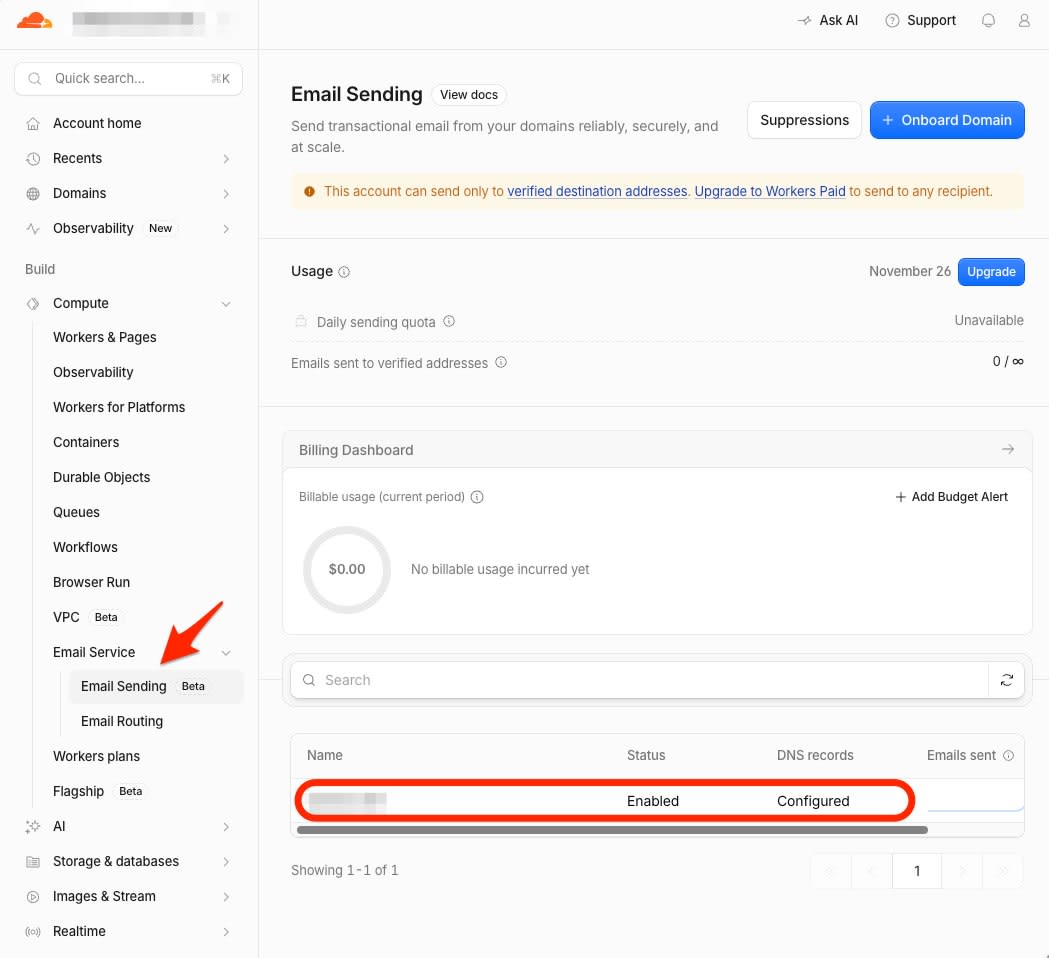
The Email Sending page in the dashboard displayed a notice for Workers Free (you can only send to verified destination addresses). The onboarded sending domain showed Status as Enabled and DNS records as Configured.
DNS Records Added
Before and after onboarding, the zone's DNS records went from 35 to 40. The five added records were 3 MX records for cf-bounce, 1 TXT record (SPF) for cf-bounce, and 1 TXT record (DKIM) for cf-bounce._domainkey.
For _dmarc, the domain already had a DMARC record configured, so nothing was added or changed.
After onboarding, I specified 1.1.1.1 as the resolver and retrieved each record with dig.
# dig @1.1.1.1 +short MX cf-bounce.example.com
38 route2.mx.cloudflare.net.
55 route1.mx.cloudflare.net.
77 route3.mx.cloudflare.net.
# dig @1.1.1.1 +short TXT cf-bounce.example.com
"v=spf1 include:_spf.mx.cloudflare.net ~all"
# dig @1.1.1.1 +short TXT cf-bounce._domainkey.example.com
"v=DKIM1; h=sha256; k=rsa; p=<DKIM_PUBLIC_KEY>"
# dig @1.1.1.1 +short TXT _dmarc.example.com
"v=DMARC1;  p=reject; rua=mailto:<id>@dmarc-reports.cloudflare.net"
Sending with a Workers Binding
To send from a Worker, add a send_email binding to the wrangler configuration. I named the binding EMAIL.
wrangler.jsonc
{
  "name": "email-sending-free-demo",
  "main": "src/index.ts",
  "compatibility_date": "2026-11-01",
  "send_email": [
    {
      "name": "EMAIL"
    }
  ]
}
The sender, the verified destination address, and an unverified recipient are passed with --var. Even on a Workers Free account, I was able to deploy a Worker with a send_email binding configured.
wrangler deploy \
  --var "FROM:alerts@example.com" \
  --var "TO:<VERIFIED_ADDRESS>" \
  --var "TO_UNVERIFIED:<UNVERIFIED_ADDRESS>"
src/index.ts
// FROM / TO / TO_UNVERIFIED are passed via wrangler's --var (dummy values in the article)
interface Env {
  EMAIL: SendEmail;
  FROM: string; // Example: alerts@yourdomain.com (an onboarded sending domain)
  TO: string; // verified destination address
  TO_UNVERIFIED: string; // a recipient that is not verified
}

export default {
  async fetch(request: Request, env: Env): Promise<Response> {
    const url = new URL(request.url);
    const to = url.pathname === "/unverified" ? env.TO_UNVERIFIED : env.TO;
    try {
      const result = await env.EMAIL.send({
        from: env.FROM,
        to,
        subject: "Disk usage above 90%",
        text: "Disk usage on db-1 is above 90%.",
      });
      return Response.json({ ok: true, messageId: result.messageId });
    } catch (error: any) {
      return Response.json(
        { ok: false, code: error.code, message: error.message },
        { status: error.code === "E_RECIPIENT_PLAN_RESTRICTED" ? 403 : 500 },
      );
    }
  },
} satisfies ExportedHandler<Env>;
When I accessed the URL of the deployed Worker, the following response was returned.
curl -i "https://email-sending-free-demo.<SUBDOMAIN>.workers.dev/"
HTTP/2 200

{"ok":true,"messageId":"<MESSAGE_ID_WORKERS@example.com>"}
The return value of send() is an object with messageId. The ok in the response is a value added by the Worker's code.
Sending with the REST API
You can also send with the REST API without using Workers. The endpoint and authentication method are described in the following documentation.
curl -X POST "https://api.cloudflare.com/client/v4/accounts/<ACCOUNT_ID>/email/sending/send" \
  -H "Authorization: Bearer <API_TOKEN>" \
  -H "Content-Type: application/json" \
  --data '{
    "from": "alerts@example.com",
    "to": "<VERIFIED_ADDRESS>",
    "subject": "Disk usage above 90% (REST)",
    "text": "Disk usage on db-1 is above 90%."
  }'
The response was as follows.
{
  "success": true,
  "errors": [],
  "messages": [],
  "result": {
    "message_id": "<MESSAGE_ID_REST@example.com>",
    "delivered": [],
    "queued": ["<VERIFIED_ADDRESS>"],
    "permanent_bounces": [],
    "suppressed_recipients": []
  }
}
The recipient was placed in the queued array, not delivered.
Received Emails
Both emails were received at the Gmail address registered as a verified destination address. The authentication results for the email sent via the Workers binding are as follows.
Return-Path: <bounces@cf-bounce.example.com>
Authentication-Results: mx.google.com; dkim=pass header.i=@example.com header.s=cf-bounce; dkim=pass header.i=@cloudflare-email.net header.s=cf2024-1; spf=pass (google.com: domain of bounces@cf-bounce.example.com designates 104.30.8.36 as permitted sender) smtp.mailfrom=bounces@cf-bounce.example.com; dmarc=pass (p=REJECT sp=REJECT dis=NONE) header.from=example.com
From: alerts@example.com
Message-ID: <MESSAGE_ID_WORKERS@example.com>
For DKIM, both the signature using the cf-bounce selector added during onboarding and the signature from cloudflare-email.net passed. SPF passed on the Return-Path of the cf-bounce subdomain, and DMARC also passed. The email sent via the REST API had the same authentication results.
I also sent the same two emails to an SES recipient registered as a verified destination address, received them, and compared the headers. The Gmail and SES verdicts were the same.
| Item | Gmail | SES |
|---|---|---|
| SPF | pass (bounces@cf-bounce.example.com) |
pass (same envelope-from) |
| DKIM | two passes (example.com and cloudflare-email.net) |
two passes (same signers) |
| DMARC | pass (p=REJECT, dis=NONE) |
pass |
Sending Records
Email Sending keeps a record of sent emails. The same data as the dashboard's Activity log can be retrieved with emailSendingAdaptive in the GraphQL Analytics API.
POST https://api.cloudflare.com/client/v4/graphql
query ($zoneTag: string!, $start: Time!, $end: Time!) {
  viewer {
    zones(filter: { zoneTag: $zoneTag }) {
      emailSendingAdaptive(
        filter: { datetime_geq: $start, datetime_leq: $end }
        limit: 50
        orderBy: [datetime_DESC]
      ) {
        datetime from to subject status eventType sendingDomain
        errorCause errorDetail dkim dmarc spf isSpam
      }
    }
  }
}
I was able to confirm the records of the two emails addressed to Gmail.
{
  "data": {
    "viewer": {
      "zones": [
        {
          "emailSendingAdaptive": [
            {
              "datetime": "2026-11-25T16:56:32Z",
              "dkim": "none",
              "dmarc": "none",
              "errorCause": "",
              "errorDetail": "",
              "eventType": "newEmailSending",
              "from": "alerts@example.com",
              "isSpam": 0,
              "sendingDomain": "example.com",
              "spf": "none",
              "status": "delivered",
              "subject": "Disk usage above 90% (REST)",
              "to": "<VERIFIED_ADDRESS>"
            },
            {
              "datetime": "2026-11-25T16:56:31Z",
              "dkim": "none",
              "dmarc": "none",
              "errorCause": "",
              "errorDetail": "",
              "eventType": "newEmailSending",
              "from": "alerts@example.com",
              "isSpam": 0,
              "sendingDomain": "example.com",
              "spf": "none",
              "status": "delivered",
              "subject": "Disk usage above 90%",
              "to": "<VERIFIED_ADDRESS>"
            }
          ]
        }
      ]
    }
  },
  "errors": null
}
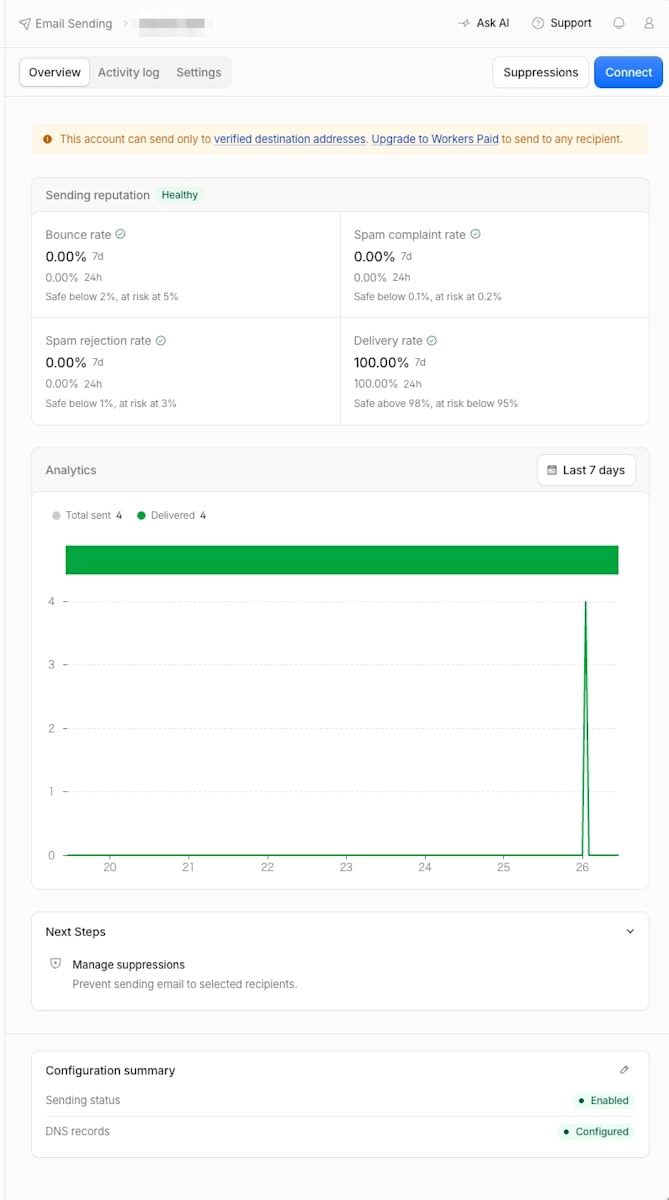
The domain's Overview showed Total sent of 4 and Delivered of 4 for the last 7 days, including the two emails to SES.
Sending to an Unverified Recipient
The recipients you can send to on Workers Free are limited to verified destination addresses. When you access /unverified, the Worker from earlier sends to a recipient that is not among the verified destination addresses. When I ran this on a Workers Free account with the sending domain onboarded, send() threw an error.
curl -i "https://email-sending-free-demo.<SUBDOMAIN>.workers.dev/unverified"
HTTP/2 403

{"ok":false,"code":"E_RECIPIENT_PLAN_RESTRICTED","message":"destination address is not a verified address; the account's plan allows sending only to verified addresses"}
The code and message are the values of the error thrown by send(). The HTTP 403 is a status that the Worker was set to return when the code is E_RECIPIENT_PLAN_RESTRICTED. In error handling, you can use this code to identify a recipient restriction due to the plan.
Summary
Even with a Workers Free plan account, once I onboarded a sending domain, I was able to send email to addresses registered as verified destination addresses.
If the recipients are known in advance, you can register those addresses, mailing lists, or aliases as verified destination addresses and approve them beforehand, and then a Worker on the Workers Free plan can send email to them.
According to the Changelog, sending to arbitrary recipients requires Workers Paid. If you want to send report emails to specific email addresses, try Email Sending, which is now available on the Workers Free plan as well.
