Toggling Cloudflare Flagship Flags with wrangler dev: Working with the Local Store and When to Use flags pull vs. remote: true

This page has been translated by machine translation. View original
Hello! I'm Yuji Nishimura from the Operations Department!
Cloudflare Flagship is Cloudflare's feature flag service, and Workers evaluate flags through a binding. Flags are created grouped into a unit called an app, and the Worker's binding specifies the app by app_id. When you develop a new feature hidden behind a flag, you want to try both the case where the flag is on locally and the case where it is off. However, you can't switch the remote flag every time.
The Changelog of November 2, 2026 announced that in local development, the Flagship binding no longer calls the remote app and instead evaluates flags with a local flag store. Local flags are created and changed by adding --local to the wrangler flagship flags commands, or from the Local Explorer screen.
npx wrangler flagship flags create <APP_ID> new-checkout --local           # Create it with dev stopped
npx wrangler flagship flags update <APP_ID> new-checkout --default on --local
npx wrangler dev                                                           # Evaluated with the local store
# While dev is running, change flags from http://localhost:8787/cdn-cgi/local/explorer
# To use remote flags, stop dev and copy them with flags pull <APP_ID>, or add remote: true to the binding
# <APP_ID> is the app_id of the flagship binding in wrangler.jsonc (if you only use the local store, an ID that doesn't exist on Cloudflare works too)
When I tried it with Wrangler 4.157.0, both the --local commands and flags pull stopped with an error while wrangler dev was running. This article summarizes how the Worker's evaluation changes when you change flags with the CLI and with Local Explorer, and how to choose between the two.
Since dev now evaluates with an empty local store, you need another way when you want to check local behavior with the same values as the flags operated on Cloudflare. In the second half, I use a Flagship app created on Cloudflare. I check how things behave when remote flags are copied with flags pull and when remote flags are evaluated with remote: true, and what changes if you forget to add --local.
What changed
- Announcement date: November 2, 2026 (Evaluate Flagship flags locally)
- Target versions: Evaluation with the local store is available from Wrangler 4.135.0 and
@cloudflare/vite-plugin1.56.0 (both released on September 18, 2026). Managing Flagship in Local Explorer is available from Wrangler 4.148.0 and Vite plugin 1.63.0 - Key points of the change:
- In local development with
wrangler dev, the Cloudflare Vite plugin, the Vitest integration, andcf dev, the Flagship binding evaluates flags with the local flag store - The local store starts out empty, so until you create flags, the default value written in your code is returned
- Flags are managed with commands that have
--local, Local Explorer, and thecfCLI. Remote flags can be copied all at once withnpx wrangler flagship flags pull <APP_ID> - If you want to evaluate with the remote app as before, add
remote: trueto the binding
- In local development with
According to the Configuration documentation, pull is not done automatically. Therefore wrangler dev works even offline, and flags you changed locally are never automatically overwritten by remote values. Note that wrangler flagship commands print an open beta warning every time they run. Local Explorer also shows Beta next to the logo at the top left of the screen.
How the local flag store works
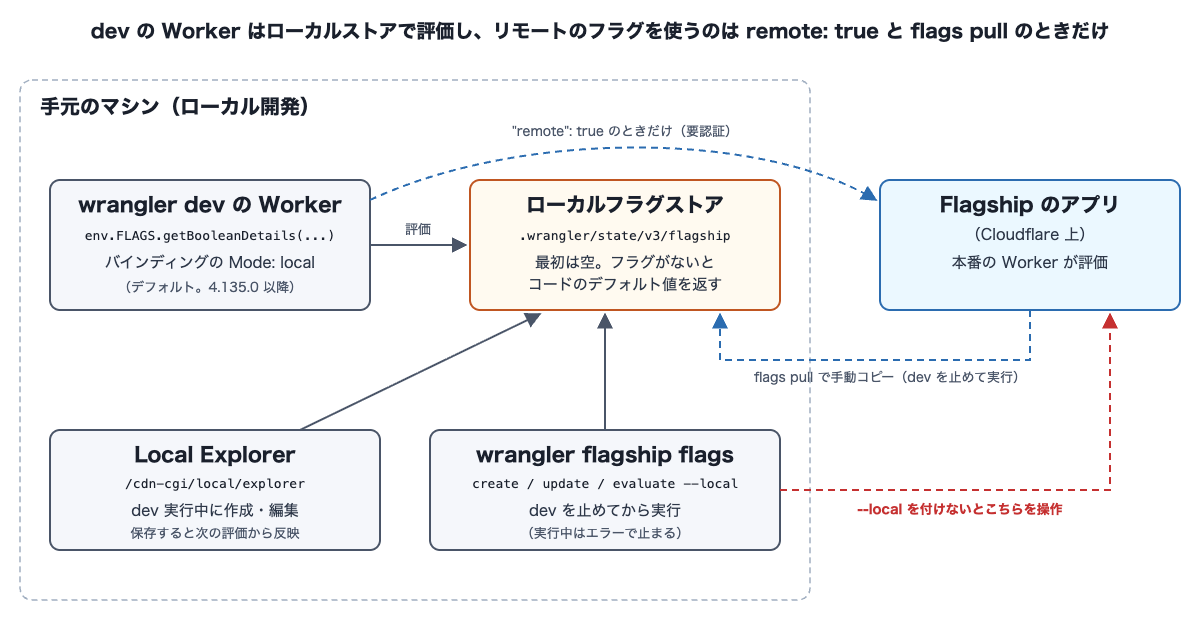
The diagram is a concept diagram I made myself, not an official architecture diagram. The Worker's binding running under wrangler dev evaluates flags with the local flag store in .wrangler/state/v3/flagship on your machine. In this article, there are two ways I manually change flags in the store: Local Explorer while dev is running, and commands with --local run with dev stopped.
The dev Worker and the local store interact with the remote app only when you add remote: true and when you stop dev and copy with flags pull. On the other hand, if you run a flag command without --local, it operates directly on the remote app.
Trying it out
Environment
- Ubuntu 24.04 (arm64) container, Node.js 24
- Wrangler 4.157.0 (installed in the project with
npm i -D wrangler@4.157.0). The commands in the text are written asnpx wrangler, but in the verification I ran the project'snode_modules/.bin/wranglerdirectly from scripts - Steps 1–5 (November 8, 2026): I was not logged in to Cloudflare. Apart from installing packages, everything was run non-interactively from scripts with the network disconnected. The result of starting
remote: truewithout an API token, mentioned in step 7, is under the same conditions - Steps 6–7 (November 10, 2026): I created a Flagship app in a Workers Free plan test account, authenticated with an API token, and ran with the network connected
- Command outputs are shown with the Wrangler banner and the open beta warning lines that appear every time, and the symbols (emoji) at the start of each line, omitted. App IDs are replaced with
<APP_ID>
1. Prepare a Worker with a Flagship binding
For the binding's app_id, I entered a dummy ID (demo-app) that doesn't exist on Cloudflare. This was to check whether, when evaluating only with the local store, you can try it without creating an app on Cloudflare.
{
  "name": "flagship-local-demo",
  "main": "src/index.js",
  "compatibility_date": "2026-11-01",
  "flagship": [
    { "binding": "FLAGS", "app_id": "demo-app" }
  ]
}
The Worker evaluates the new-checkout flag with getBooleanDetails() and returns the result as is. To try targeting, it passes the query string plan to the evaluation context.
export default {
  async fetch(request, env) {
    const url = new URL(request.url);
    const plan = url.searchParams.get("plan") ?? "free";
    const details = await env.FLAGS.getBooleanDetails("new-checkout", false, { plan });
    return Response.json({ plan, newCheckout: details.value, details });
  },
};
2. Start wrangler dev with no flags
I started wrangler dev with --ip 127.0.0.1 --port 8787, so the URLs below use 127.0.0.1.
npx wrangler dev --ip 127.0.0.1 --port 8787
In the binding list, Mode showed local. It started without errors even with no login and no network (a warning appears saying Request.cf cannot be fetched because there is no network; it is omitted in the output).
Your Worker has access to the following bindings:
Binding                   Resource      Mode
env.FLAGS (demo-app)      Flagship      local

Starting local server...
[wrangler:info] Ready on http://127.0.0.1:8787
At this point the store is empty, so the Worker returned false, the default value written in the code. reason is ERROR and errorCode is FLAG_NOT_FOUND.
curl 'http://127.0.0.1:8787/?plan=free'
{"plan":"free","newCheckout":false,"details":{"flagKey":"new-checkout","value":false,"variant":"default","reason":"ERROR","errorCode":"FLAG_NOT_FOUND","errorMessage":"Flag 'new-checkout' not found"}}
3. Stop dev and create a flag with --local
When I ran a --local command in another terminal while dev was running, it stopped with the following error.
npx wrangler flagship flags list demo-app --local
[ERROR] Cannot use local Flagship commands while a dev session for 'flagship-local-demo' is running. Stop the dev session and retry.
After stopping dev and running it again, I could create the flag. If you don't specify variations, it becomes a boolean flag with two variations, on (true) and off (false), and returns off.
npx wrangler flagship flags create demo-app new-checkout --local
Created flag
new-checkout  [boolean]  ● enabled
  VARIATIONS
    on   true
    off  false  default
  RULES
    (none) — always serves "off"
Note that in a run where I started npx wrangler dev in the background and stopped it with kill (SIGTERM), the same error kept appearing afterward. In the next run, I started the wrangler executable directly and stopped it with SIGINT, the same as Ctrl+C. After confirming that no wrangler or workerd processes remained, I ran the command and no error appeared. I did not isolate whether the cause was the difference in signals or processes left behind via npx.
When I changed the default to on with update --default on --local, the result of evaluate --local became Value true and Reason STATIC. STATIC is the reason given when an enabled flag with no rules returns its default (Evaluation reasons). With evaluate --local, you can check evaluation results without starting the Worker.
Next, I set the default back to off and added a rule that returns on only when plan is enterprise. The rule is written with the --rule syntax in the Wrangler command reference. The --rule of update replaces existing rules, so to add while keeping existing rules, use --add-rule.
npx wrangler flagship flags update demo-app new-checkout --default off \
  --rule "serve=on; when=plan equals enterprise" --local
npx wrangler flagship flags evaluate demo-app new-checkout --context plan=enterprise --local
npx wrangler flagship flags evaluate demo-app new-checkout --context plan=free --local
new-checkout  evaluated
  Value    true
  Variant  on
  Reason   TARGETING_MATCH

new-checkout  evaluated
  Value    false
  Variant  off
  Reason   DEFAULT
When I ran flags list demo-app without --local, it targeted the remote app and gave the error In a non-interactive environment, it's necessary to set a CLOUDFLARE_API_TOKEN environment variable .... As the message says, it asked for an API token because I ran it from a non-interactive script, and it may appear differently in an interactive terminal. I check the behavior when an API token is set and --local is not added in step 6.
4. Compare the Worker's evaluation with the CLI, and try disabling
When I restarted dev and sent requests to the Worker, the results were the same as the CLI's evaluate.
| Request | value | variant | reason |
|---|---|---|---|
/?plan=free |
false |
off |
DEFAULT |
/?plan=enterprise |
true |
on |
TARGETING_MATCH |
Next, I stopped dev, disabled the flag with flags disable demo-app new-checkout --local, restarted dev, and sent a request to /?plan=enterprise. Even for a request matching the rule, the default off (false) was returned, and reason was DISABLED. You can try the operation of disabling a flag to return to its default value (a kill switch) locally before doing it remotely. After checking, I stopped dev and re-enabled it with flags enable demo-app new-checkout --local.
5. While dev is running, change flags with Local Explorer
When I opened http://127.0.0.1:8787/cdn-cgi/local/explorer with dev running, the binding name FLAGS was under Flagship in the sidebar. Selecting FLAGS displays the flag list for the app ID (demo-app). The new-checkout created with the CLI appears here too.
Clicking a flag opens the Edit flag screen. Below the heading it says Saves to the local store. The Worker running in dev picks the change up on its next read., explaining that the save destination is the local store and that the Worker in dev reflects the change on its next read. Here I selected Default for on and pressed Save changes (the red frames were added by me).
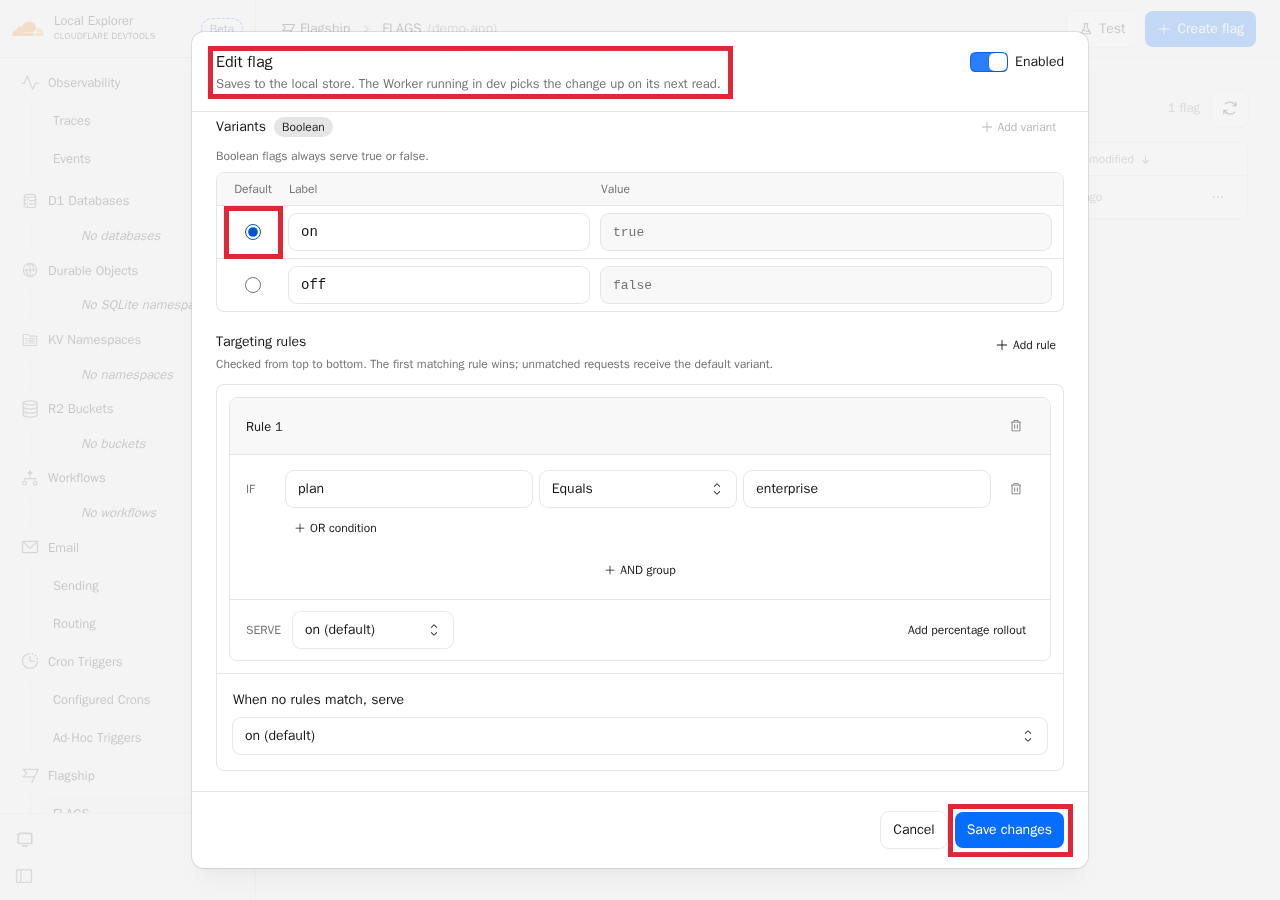
After saving, Default variant in the list changed to on true.

When I sent a request to the Worker without restarting dev, even plan=free, which was false before saving, returned true (variant was on, reason was DEFAULT).
When I stopped dev and ran flags get demo-app new-checkout --local, on was the default and the plan rule was still there. Even after restarting dev, evaluation used the default (on) changed in Local Explorer. What you save in Local Explorer and what you change with the CLI both go into the same local store (.wrangler/state/v3/flagship).
This store is under .wrangler/state. Therefore, when I deleted .wrangler/state and ran flags list demo-app --local, it displayed No flags in this app yet., and the flags I had created were gone.
6. Copy remote flags to the local store with flags pull
From here on, I use a Flagship app on Cloudflare. Commands that operate on the remote app require either logging in with wrangler login or an API token with Flagship permissions. With a token lacking Flagship permissions, wrangler flagship apps list returned Authentication error [code: 10000]. I created an app, created the new-checkout flag without --local, and added the same plan rule as in step 3.
npx wrangler flagship apps create ynishimura-flagship-local-demo
npx wrangler flagship flags create <APP_ID> new-checkout
npx wrangler flagship flags update <APP_ID> new-checkout --default off \
  --rule "serve=on; when=plan equals enterprise"
I rewrote app_id in wrangler.jsonc to the ID of the created app, and deleted .wrangler to empty the local store. Then, to see how pull treats flags changed locally and flags that exist only locally, I created two flags only in the local store before pull: local-only, which doesn't exist remotely, and new-checkout, which has the same key as the remote one but with no rules and the default set to on.
npx wrangler flagship flags create <APP_ID> local-only --local
npx wrangler flagship flags create <APP_ID> new-checkout --local
npx wrangler flagship flags update <APP_ID> new-checkout --default on --local
When I ran pull with dev stopped, it displayed that it copied one remote flag and left local-only untouched.
npx wrangler flagship flags pull <APP_ID>
Pulled 1 flag from <APP_ID> into the local flag store.
Left 1 local-only flag untouched: local-only
These do not exist in the remote app, either because they were created locally or because they were deleted remotely.
In the local store after pull, new-checkout, whose default I had set to on locally, had been replaced with the remote contents (default off, one rule). That flags with the same key are overwritten is also written as Matching keys are overwritten. in Flagship's Wrangler command reference.
npx wrangler flagship flags list <APP_ID> --local
┌──────────────┬───────────┬─────────┬─────────┬───────┐
│ key          │ status    │ type    │ default │ rules │
├──────────────┼───────────┼─────────┼─────────┼───────┤
│ local-only   │ ● enabled │ boolean │ off     │ 0     │
├──────────────┼───────────┼─────────┼─────────┼───────┤
│ new-checkout │ ● enabled │ boolean │ off     │ 1     │
└──────────────┴───────────┴─────────┴─────────┴───────┘
When I started dev and sent requests to the Worker, plan=free gave false (reason was DEFAULT) and plan=enterprise gave true (reason was TARGETING_MATCH), results matching the remote flag's settings. Also, when I ran pull with dev running, it stopped with the same error as the --local commands in step 3 (Cannot use local Flagship commands while a dev session ... is running).
Next, I stopped dev, ran update without --local, and changed the remote default to on.
npx wrangler flagship flags update <APP_ID> new-checkout --default on
The remote default seen with flags get without --local became on, while the local store's default seen with flags get --local remained off. Even if you forget to add --local, only the remote flag gets rewritten like this. Even after restarting dev, a request to plan=free returned false. When I ran pull again, the local store's default also became on.
I also checked how flags deleted remotely are treated (this was run after step 7). I ran flags delete <APP_ID> new-checkout --force without --local and deleted the remote flag. When I then ran pull, new-checkout was treated, like local-only, as a flag existing only in the local store, and it remained in the local store.
Pulled 0 flags from <APP_ID> into the local flag store.
Left 2 local-only flags untouched: local-only, new-checkout
7. Evaluate the remote app's flags with remote: true
With the local store empty, I started wrangler dev with "remote": true added to the binding. The remote new-checkout at this point was in the state where the default was changed to on in step 6 (one rule). The deletion described at the end of step 6 was done after step 7, so it still exists at this point.
Extracting only the flagship part of wrangler.jsonc, it is as follows.
  "flagship": [
    { "binding": "FLAGS", "app_id": "<APP_ID>", "remote": true }
  ]
The binding's Mode became remote, and dev started after establishing a connection to the remote (I started it with --port 8788).
env.FLAGS (<APP_ID>)      Flagship      remote

Establishing remote connection...
Starting local server...
[wrangler:info] Ready on http://127.0.0.1:8788
As in steps 1–5, when I started it without setting an API token and with the network disconnected (November 8, 2026, run from a non-interactive script), Mode also became remote. However, it hit the following error at the stage of starting the remote connection, and dev did not start.
[ERROR] Failed to start the remote proxy session. Error reloading remote server: In a non-interactive environment, it's necessary to set a CLOUDFLARE_API_TOKEN environment variable for wrangler to work.
In dev started with the API token set, the local store is empty, but the Worker returned results evaluated with the remote flags.
| Request | value | variant | reason |
|---|---|---|---|
/?plan=free |
true |
on |
DEFAULT |
/?plan=enterprise |
true |
on |
TARGETING_MATCH |
With dev still running, I set the remote default back to off with update without --local.
npx wrangler flagship flags update <APP_ID> new-checkout --default off
When I then sent requests to /?plan=free every 5 seconds, the evaluation changed without restarting dev. However, true was returned up to the request 31 seconds after update completed, and it became false (variant was off) at the request 36 seconds after. I measured only once, and since requests were every 5 seconds, all I can say is that the value changed somewhere between 31 and 36 seconds.
The Concepts documentation says that after changing a flag it can take up to 30 seconds to propagate everywhere, and the previous value may be returned in the meantime. This time it took about the same or slightly longer. Since I measured from dev with remote: true, I did not isolate whether the time was taken by Flagship-side propagation or by Wrangler's remote connection.
With CLI evaluation as well, I saw a result that looked like a value from before propagation finished. When I ran flags evaluate without --local right after adding the rule in step 6, even plan=enterprise returned the result from before the rule was added (Value false, Reason STATIC). When I ran it again about 2 minutes later, after finishing the checks in step 7, it became TARGETING_MATCH (I changed the default twice in between, but the rule was unchanged).
Discussion of the results
- What was confirmed: With
wrangler devin Wrangler 4.157.0, the Flagship binding evaluated flags with the local store, and the Worker ran with no login and no network. Even with a nonexistent app ID, you can evaluate if you create flags in the local store. The--localcommands and Local Explorer both read and write the same store - What was checked against official information: That the code's default value is returned with an empty store was as stated in the Changelog and documentation. That changes in Local Explorer are reflected without restarting dev matched the on-screen description. That
pullis not done automatically, and thatpulloverwrites flags with the same key and leaves flags that exist only in the local store, were also as stated in the documentation. Withremote: true, evaluation used the remote flags even when the local store was empty, which was not inconsistent with the documentation's explanation that the local store is not used. For the time until a flag change is reflected, the documentation says up to 30 seconds, whereas this time it was 31–36 seconds (a single measurement) - What I could not find in the documentation: In Wrangler 4.157.0, neither the
--localcommands norpullcould be used while dev was running. It was not written in the documentation I checked, and I learned it from the error message. Also, that flags deleted remotely are treated as flags existing only locally and remain afterpullwas something I learned from the output ofpull
Within the range I tried with Wrangler 4.157.0, you end up choosing between the CLI and Local Explorer depending on whether dev is running.
| What you want to do | While dev is running | While dev is stopped |
|---|---|---|
| Change a flag | Edit flag in Local Explorer | --local commands |
| Create a flag | Create flag in Local Explorer (not tried this time) | flags create --local |
| Copy remote flags to the local store | Not possible (flags pull also errored) |
flags pull |
| Check evaluation results | Send a request to the Worker | flags evaluate --local |
Local Explorer seems suited to going back and forth between on and off while dev is running and watching the Worker's responses and screen changes. If you want to recreate a fixed flag state every time, stopping dev and running --local commands makes it easier to keep the procedure as a script.
There are two ways to use remote flags. Summarizing the results of what I tried and what the documentation says, it is as follows.
flags pull |
remote: true |
|
|---|---|---|
| Flags the Worker evaluates | Flags copied into the local store | Flags of the remote app |
| Remote changes | Not reflected until you pull again |
Reflected without restarting dev (this time 31–36 seconds after the update) |
| Local changes | Values changed with --local or Local Explorer are used. Flags with the same key are overwritten on the next pull |
Not used (per the documentation. This time I confirmed that with an empty local store, evaluation used remote values) |
| Authentication | Needed when running pull (per the documentation) |
Needed to start dev |
If you want to develop while seeing values that others switch in the dashboard as they are, remote: true seems right; if you want to use remote values as a starting point and try changing values locally, pull seems to fit.
The following are the areas I did not try this time.
- Using commands without
--localorremote: truewhile logged in withwrangler login. Steps 6–7 were tried with API token authentication. Also, that token had permissions other than Flagship (such as editing Workers scripts), so I haven't checked whether dev withremote: truecan be started with a token that has only Flagship permissions - Whether
--localcommands andpullerror while dev is running in Wrangler 4.158.0 and later (the latest as of November 10, 2026 is 4.160.0) - The local store with the Vite plugin, the Vitest integration,
cf dev, andcf flagship ... --local. According to the documentation, the storage location is.wrangler/state(the same aswrangler dev) for Vite plugin 1.x and.cloudflare/statefor 2.0 beta, and when runningpullwith 2.0 beta you need--persist-to .cloudflare/state.cf's--localis also said to operate on the same store aswrangler devif you add--persist-to .wrangler/state - Evaluation with the Test button in Local Explorer, and creating from Create flag. The Local Explorer documentation says both are available
- Percentage rollout (distributing users by proportion), split (distributing traffic across multiple variations by proportion), and string, number, and JSON flags. According to the documentation,
pullalso puts the account tag used for percentage rollout distribution into the local store, but I haven't verified it because the flags this time did not have a percentage rollout configured - Behavior with versions before Wrangler 4.135.0. I don't know how the steps in this article behave in projects using an older Wrangler
Summary
With Wrangler 4.135.0 and later, the Cloudflare Flagship binding evaluates flags with the local flag store in wrangler dev. The store starts empty, and when there is no flag the code's default value is returned. Flags could be created and changed with wrangler flagship flags ... --local while dev is stopped, and changed with Local Explorer (/cdn-cgi/local/explorer, Wrangler 4.148.0 and later) while dev is running (creating from Local Explorer was not tried this time). Changes saved in Local Explorer were reflected from the next evaluation without restarting dev.
Remote flags do not automatically go into the local store. flags pull copies remote flags into the local store and overwrites flags with the same key with the remote contents. Flags that exist only in the local store remain, including flags deleted remotely. When you add remote: true to the binding, the dev Worker evaluates with the remote app's flags. Remote changes were reflected without restarting dev (in this single measurement, 31–36 seconds later). If you want to develop while seeing values that others switch in the dashboard as they are, remote: true seems right; if you want to use remote values as a starting point and try changing values locally, pull seems to fit.
The local flag store can be used when you want to check both the on and off paths of a flag locally without changing remote flags. However, you need to be careful that commands without --local operate on the remote app, and that with Wrangler 4.157.0 both --local commands and pull error while dev is running.
I hope this is helpful to someone.
Reference links:
- Evaluate Flagship flags locally (Cloudflare Changelog)
- Flagship: Configuration (Local development)
- Flagship: Binding API Methods
- Flagship: Concepts (Flag propagation)
- Flagship: Evaluation reasons
- Wrangler commands: Flagship
- Flagship: Wrangler commands (Local flag store)
- Local Explorer
- Cloudflare Flagship