Insert a Worker into allowed traffic using the Forward action in Cloudflare Gateway

This page has been translated by machine translation. View original
Hi there! I'm Nishimura Yuji from the Operations team!
When you want to add custom processing to traffic allowed through Cloudflare Zero Trust Gateway, until now you had to set up your own proxy like NGINX and insert it into the traffic path. It was a configuration where you operated a group of proxies just to handle things like displaying an access reason input page, adding headers based on roles, or sending Slack notifications for specific access conditions.
According to the changelog, the Forward action that entered public beta on October 15, 2026, is a feature that moves this processing to Cloudflare Workers. It forwards requests allowed by Gateway's HTTP policies to a Worker, where it can run as inline middleware. Based on the official changelog, documentation, and blog post, this article summarizes what the Forward action can do, what the Worker receives, the architecture, billing, and limitations. I also ran the Worker-side code locally and tested communication through Gateway using a test Zero Trust organization.
The Forward Action That Proxies Allowed Traffic to a Worker
Forward is a new action added to Gateway's HTTP policies. It proxies traffic that matches a policy condition and has been allowed to a specified Worker. The Worker acts as inline middleware between the end user and the origin, receiving headers and the request body and being able to modify them. It can also rewrite the response after forwarding to the origin before returning it to the user.
What the Worker Receives and What It Can Do
Gateway calls the handle(request, context, next) method of the GatewayMiddleware class exported by the Worker. This is not the normal fetch() handler.
request: The original HTTP request (including the body stream)context: The Gateway context. Contains fields such as source IP, host, normalized URL, and policy ID, along withidentity()which returns user information anddevicePosture()which returns device posture (state)next(request): Sends the request to the original destination via Gateway and returns the response. Can only be called once. The destination URL or host cannot be changed
Using identity() and devicePosture(), you can write processing that takes into account "who" is accessing and "from which device." Type definitions are provided in the npm package @cloudflare/zt-types (version 2026.10.1 and later).
There are broadly three types of processing a Worker can perform:
- Request/response transformation: Rewrite headers and body.
- Returning custom pages: Return an interstitial (coaching) page that requires users to enter a reason before accessing sensitive destinations.
- Asynchronous side effects: Perform only background processing without modifying the request. Examples include Slack notifications, writing to R2, sending logs to external pipelines, calling webhooks, and updating KV.
Processing Flow and Architecture
Even with Forward, Gateway continues to handle the proxy foundation. According to the official explanation, the flow is as follows:
- TCP connections, TLS termination and re-encryption, certificate management, and HTTP version negotiation are handled by Gateway. The Worker only writes transformation logic.
- HTTP request policies are evaluated before Forward policies.
- Gateway inspects the original request body before passing it to the Worker. If body inspection determines it should be blocked, Worker processing may be interrupted.
- The final response is inspected by Gateway before being returned to the user.
In terms of latency, since Gateway and Workers run on the same machines in the Cloudflare network, dispatching to a Worker becomes a local function call. It is explained that no network hops occur, and the only added latency is the Worker's execution time.
Eligible Plans and Billing
The changelog states that the Forward action is available on all Zero Trust plans. The blog post notes that during public beta, it works without feature restrictions on Workers Free, Workers Paid, and Workers for Enterprise.
Traffic sent to the Worker is billed as regular Worker requests.
Configuration Steps
According to the official documentation, the prerequisites and steps are as follows:
- Prerequisites: Enable Gateway HTTP filtering and route test device traffic through Gateway. To target HTTPS, enable TLS decryption and install the root certificate on the device. The Worker and Gateway policy must be in the same account, and the account must have a workers.dev subdomain configured.
- Worker: Deploy a Worker that exports
GatewayMiddleware. The official configuration example usesworkers_dev: falseandpreview_urls: falseto keep the Worker off public URLs. - Policy: In Cloudflare One under Traffic controls > Firewall policies > HTTP, select Forward as the action and specify the deployed Worker. When creating via API, set
action: "forward"and put the Worker ID (32-digit hexadecimal) inrule_settings.forward.worker_id.
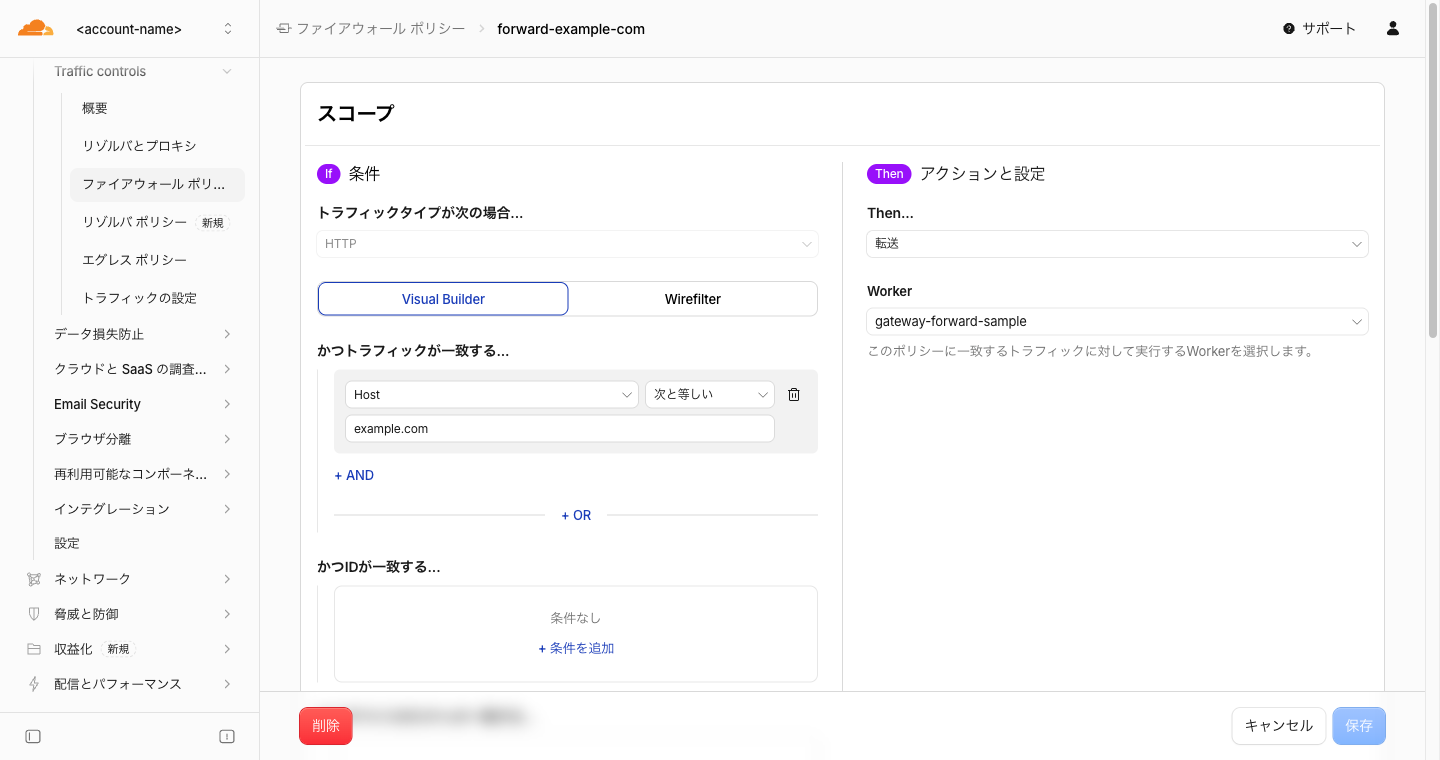
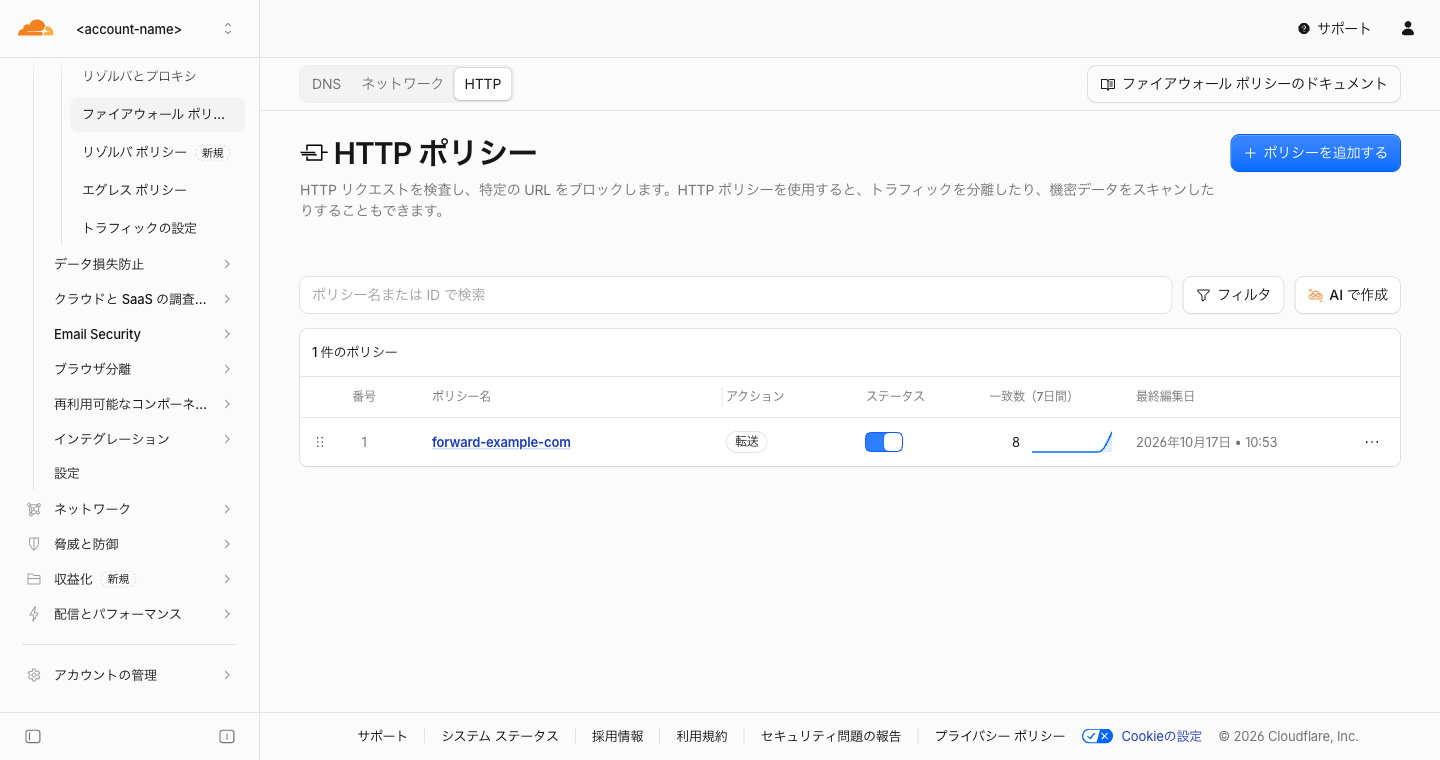
If the dashboard is displayed in Japanese, Forward appears as「転送」and Firewall policies appears as「ファイアウォール ポリシー」. This time I created a policy via API and opened it in the edit screen. The condition is when Host is example.com, the action is "Forward," and in the Worker field you select the Worker to run.
The official example is a passthrough Worker that simply adds an x-gateway-worker header to the response.
import { WorkerEntrypoint } from "cloudflare:workers";
import type {
  GatewayMiddlewareContext,
  GatewayMiddlewareNext,
} from "@cloudflare/zt-types";

export class GatewayMiddleware extends WorkerEntrypoint {
  async handle(
    request: Request,
    context: GatewayMiddlewareContext,
    next: GatewayMiddlewareNext,
  ): Promise<Response> {
    const response = await next(request);
    const headers = new Headers(response.headers);
    headers.set("x-gateway-worker", "gateway-worker");
    return new Response(response.body, {
      status: response.status,
      statusText: response.statusText,
      headers,
    });
  }
}
In addition to this, seven types of Worker templates are available, including Slack notifications, file saving to R2, HTML watermarking, coaching pages, and JSON field redaction.
Testing the Worker Side Locally
As a range that can be verified without going through Gateway, I tested the following three things using wrangler 4.151.0 and @cloudflare/zt-types 2026.10.1.
Deployment and Worker ID
I deployed the passthrough Worker above to a Workers Free plan account using wrangler deploy with the official configuration (workers_dev: false, preview_urls: false). Although the script has no fetch() handler or default export, the deployment succeeded. Since it has no public URL, the output shows No targets deployed. The ID retrieved via the List Workers API was in the 32-digit hexadecimal format to be specified in the policy. I deleted the Worker after verification.
wrangler dev Requires a Default Export
When attempting to start the same script with wrangler dev, the build stopped with the following error:
✘ [ERROR] No matching export in "src/index.ts" for import "default"
Since Gateway only calls GatewayMiddleware, a default export is not required for deployment. However, wrangler dev assembles scripts with the assumption of a default export. So I prepared a local-only entry file and started it with wrangler.dev.jsonc that only changes main in wrangler.jsonc to src/dev.ts.
// Local-only entry point. Gateway only calls GatewayMiddleware
export { GatewayMiddleware } from "./index.ts";
export default { fetch: () => new Response("not used", { status: 404 }) };
Mimicking Gateway's Invocation to Call handle()
Gateway calls handle() via Workers RPC. So I created a test Worker with a Service Binding to the named entry point, and called it by passing a fake context and fake next. next is simply a function that counts the number of times it's called and returns a fixed response. This test Worker only mimics how Gateway calls it and is not Gateway itself.
There are two targets to call. One is the passthrough Worker above (gw/). The other is the Available context example (posture/), which requires an email address and a specific posture check and returns 503 if retrieval fails. I added the same form of local-only entry to each and call them from the test Worker (sim/) via Service Binding.
{
  "name": "gateway-sim",
  "main": "src/index.ts",
  "compatibility_date": "2026-10-16",
  "services": [
    { "binding": "PASS", "service": "gateway-forward-sample", "entrypoint": "GatewayMiddleware" },
    { "binding": "POSTURE", "service": "gateway-posture-sample", "entrypoint": "GatewayMiddleware" }
  ]
}
const res: Response = await env.PASS.handle(
  new Request("https://example.com/hello"),
  {
    srcIp: "198.51.100.10", srcPort: 50000, networkProtocol: "tcp",
    accountId: "<account-id>", policyId: "00000000-0000-0000-0000-000000000000",
    host: "example.com", uri: "https://example.com/",
    identity: async () => ({ email: "user@example.com" }),
    devicePosture: async () => ({ checks: { passed: [] } }),
  },
  next,
);
Passing the configuration files of the three Workers to wrangler dev runs them in a single process.
npx wrangler dev -c sim/wrangler.jsonc -c gw/wrangler.dev.jsonc -c posture/wrangler.dev.jsonc
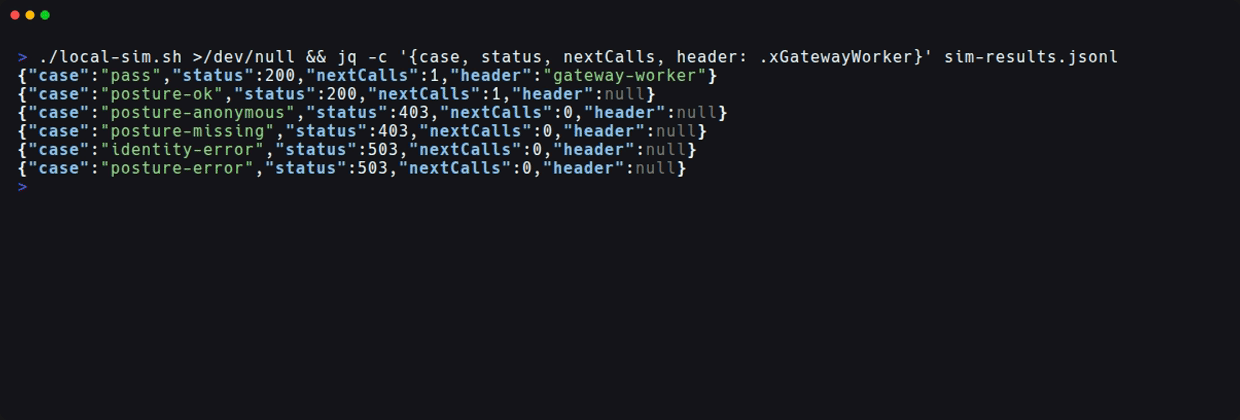
I ran 6 patterns with different context contents using a script (local-sim.sh) that calls the test Worker and writes results to JSONL. The results are as follows:
| Pattern | Status | next Calls |
|---|---|---|
| Passthrough | 200 (with x-gateway-worker) |
1 time |
| Posture example: has email, check passed | 200 | 1 time |
Posture example: anonymous (identity() returns null) |
403 | 0 times |
| Posture example: required check not passed | 403 | 0 times |
Posture example: identity() throws exception |
503 | 0 times |
Posture example: devicePosture() throws exception |
503 | 0 times |
In patterns that reject, next is not called and no request to the original destination occurs. According to the documentation, if exceptions from identity() or devicePosture() are not caught, Gateway returns 500. As in this example, you should catch them with try/catch and decide which status to return yourself.
Testing Through Gateway
Next, I ran it with actual communication through Gateway. Here is what I prepared:
- Device: Installed Cloudflare One Client in a Linux container and registered it with a service token. Since everything is contained within the container, the communication path and certificate store on my local PC are not affected.
- Gateway: Created and enabled a root certificate, turned on TLS decryption. Added the public portion of the certificate to the container's trust store.
- Worker: A modified version of the official passthrough example that also returns a summary of the received
contextin thex-gateway-contextheader - Policy: Created an HTTP policy via API that Forwards when
http.request.host == "example.com".
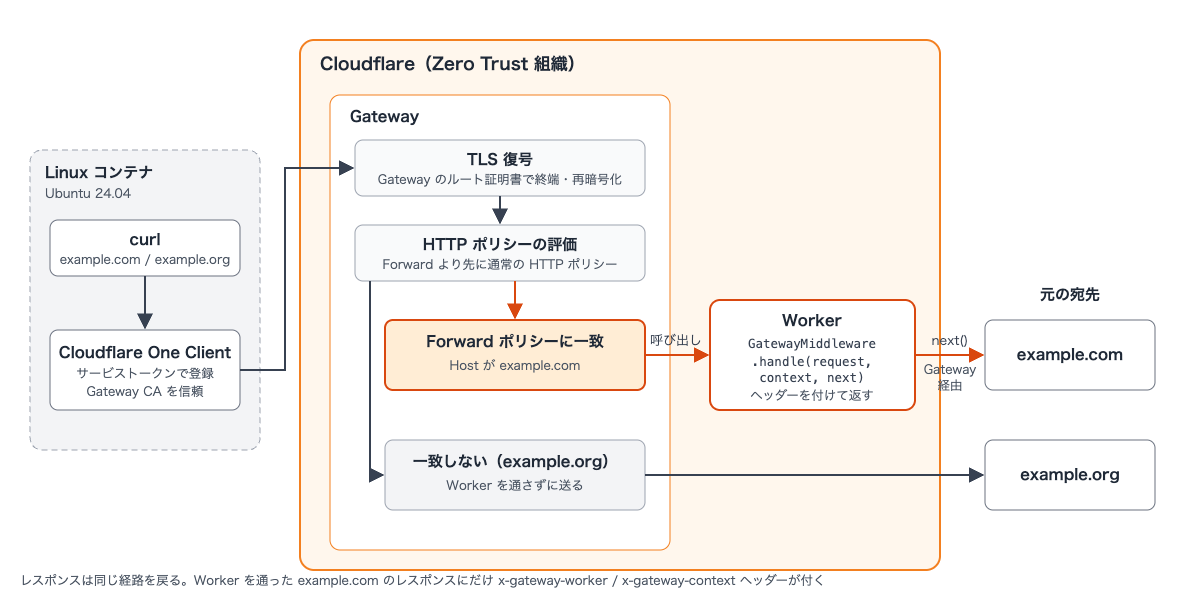
The configuration diagram is as follows. This is a conceptual diagram created by the author and is not an official architecture diagram. Traffic from the container is sent to Gateway via Cloudflare One Client, and after TLS decryption and HTTP policy evaluation, only example.com matching the Forward policy is passed to the Worker. The Worker sends the request to the original destination via Gateway through next().
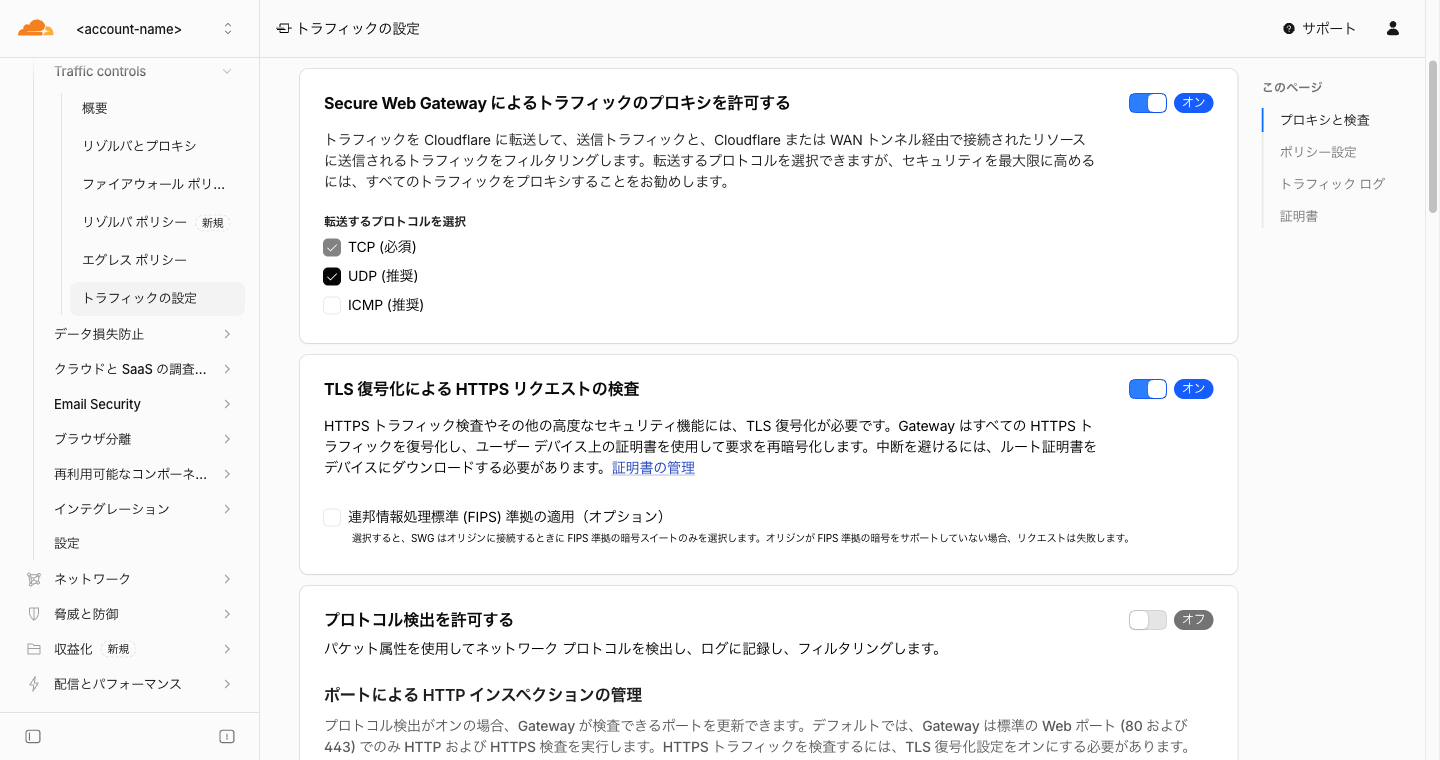
TLS decryption can be confirmed as enabled in the dashboard under Traffic controls > Traffic settings (displayed as「トラフィックの設定」in Japanese).
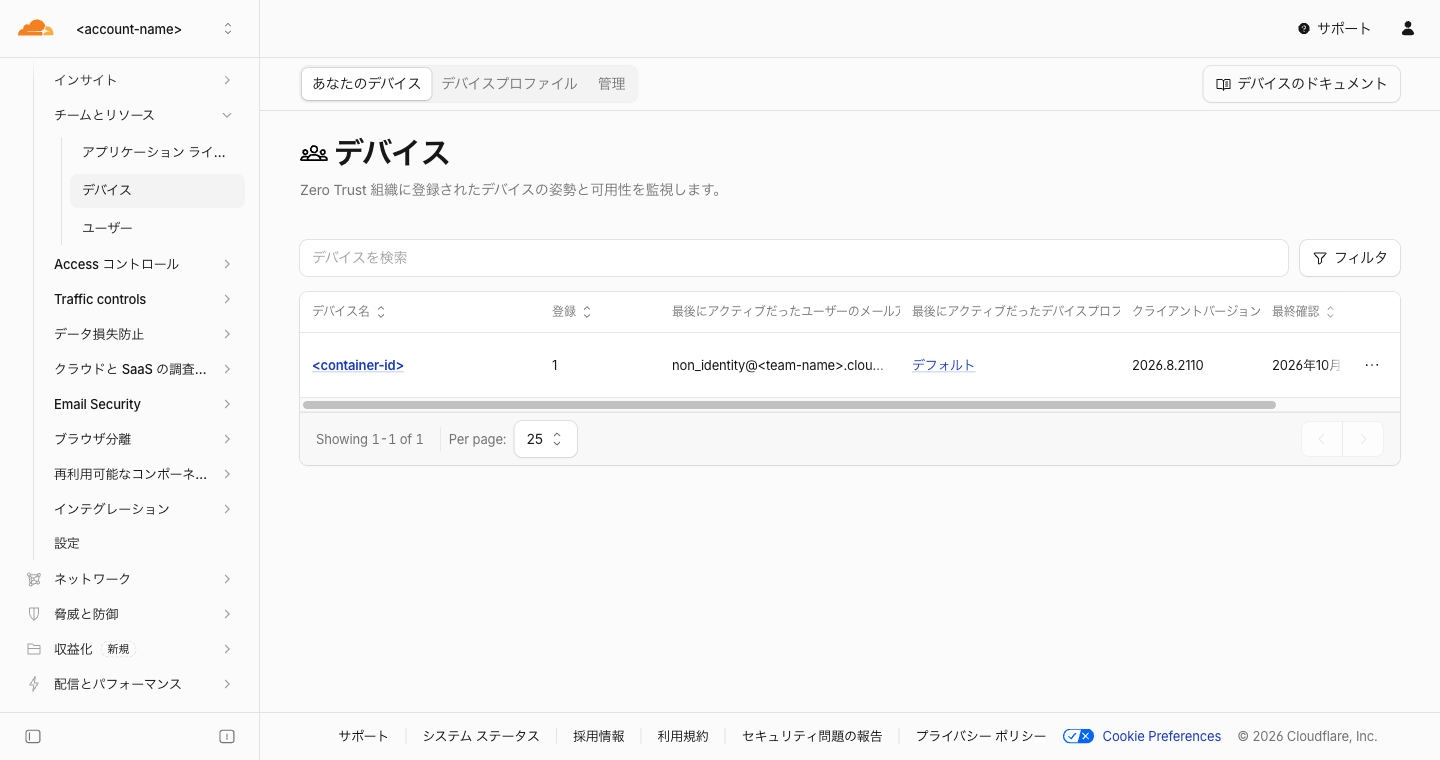
Successfully registered devices appear in the device list on the dashboard. Since I registered using a service token, the email address is non_identity@<team-name>.cloudflareaccess.com.
In the HTTP policy list, the created policy appears with action "Forward."
Only Requests Matching the Policy Go Through the Worker
From the container, I sent requests to example.com, which is covered by the policy, and example.org, which is not.
$ curl -sS -o /dev/null -D - https://example.com/
HTTP/2 200
x-gateway-context: {"keys":["accountId","devicePosture","domainCategories","dstIp","dstPort","host","identity","internalSrcIp","networkProtocol","onrampType","policyId","sni","srcIp","srcPort","uri","vnetId"],"host":"example.com","uri":"https://example.com/","requestUrl":"https://example.com/","networkProtocol":"tcp","onrampType":"device_client","sni":"example.com","dstPort":443,"domainCategories":2,"identity":"object(email:non_identity@<team-name>.cloudflareaccess.com, groups:0)","posture":"passed:0"}
x-gateway-worker: gateway-worker
$ curl -sS -o /dev/null -D - https://example.org/
HTTP/2 200
Only the example.com response has the headers added by the Worker, and example.org is returned without going through the Worker. x-gateway-context is a summary created on the Worker side of the received values, with arrays converted to counts (domainCategories has 2 entries). I also confirmed that TLS is decrypted by Gateway from the fact that the certificate issuer is "Gateway CA - Cloudflare Managed G1."
What was in context was 14 of the 16 fields listed in the documentation table, plus identity() and devicePosture(). proxyEndpoint and embeddedProtocols were not present. The onrampType representing the connection method was device_client.
identity() for Devices Registered with a Service Token
According to the documentation, identity() returns null if there is no identified user. However, for a device registered with a service token, instead of null, an object with the email address non_identity@<team-name>.cloudflareaccess.com was returned (with 0 groups).
The official posture example tested in the local section makes the judgment "return 403 if no email address." Therefore, access from this device is not blocked by the presence or absence of an email address. If you want to block access from devices registered with service tokens, it seems better to judge by allowed domains or groups rather than the presence or absence of an email address. According to the documentation, you can also add identity and posture conditions to Forward policy conditions, so another approach is to exclude such devices on the policy side.
How It Appears in Logs
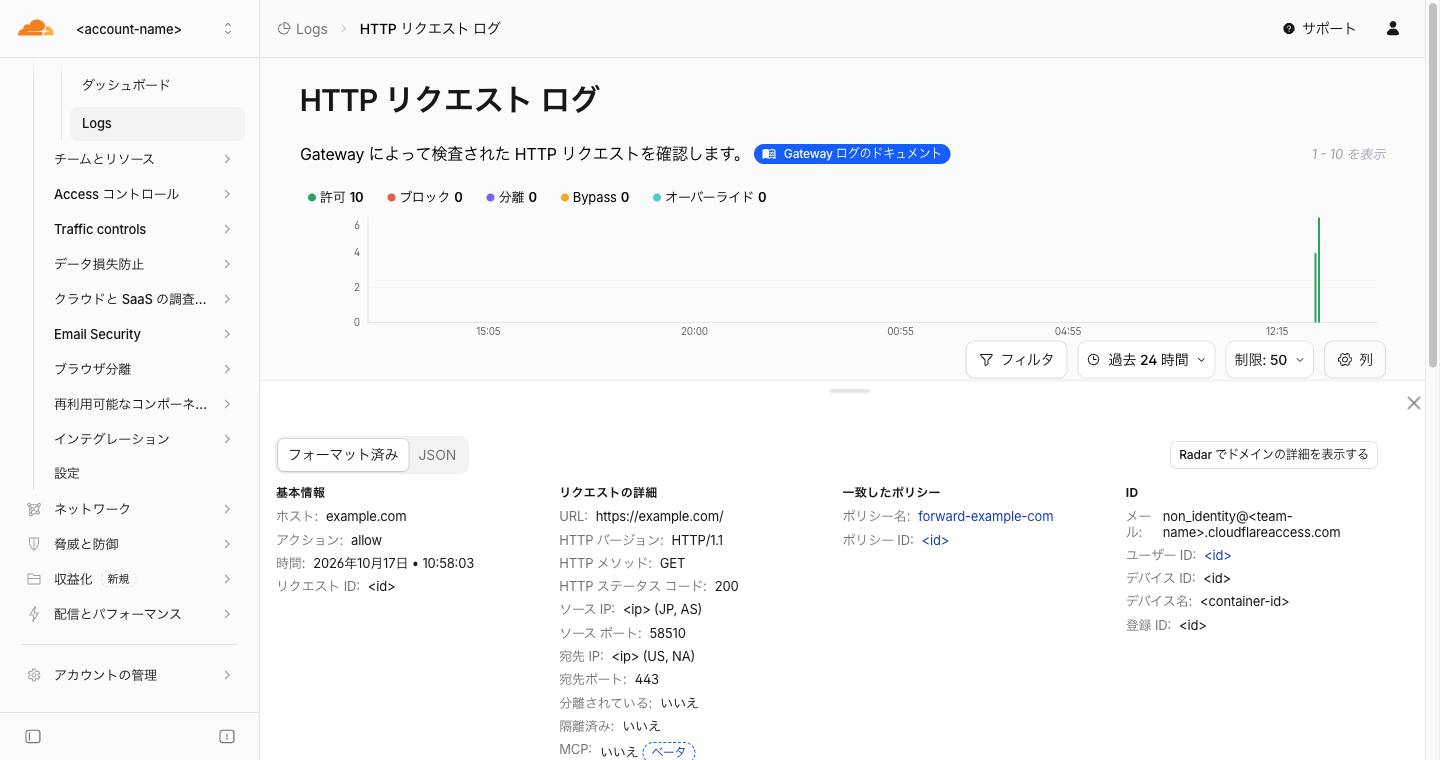
In Gateway's HTTP request logs, the action for requests matching the Forward policy was displayed as "Allow." Since the Forward policy name appears in the policy name column, you can distinguish which requests went through the Worker by that column.
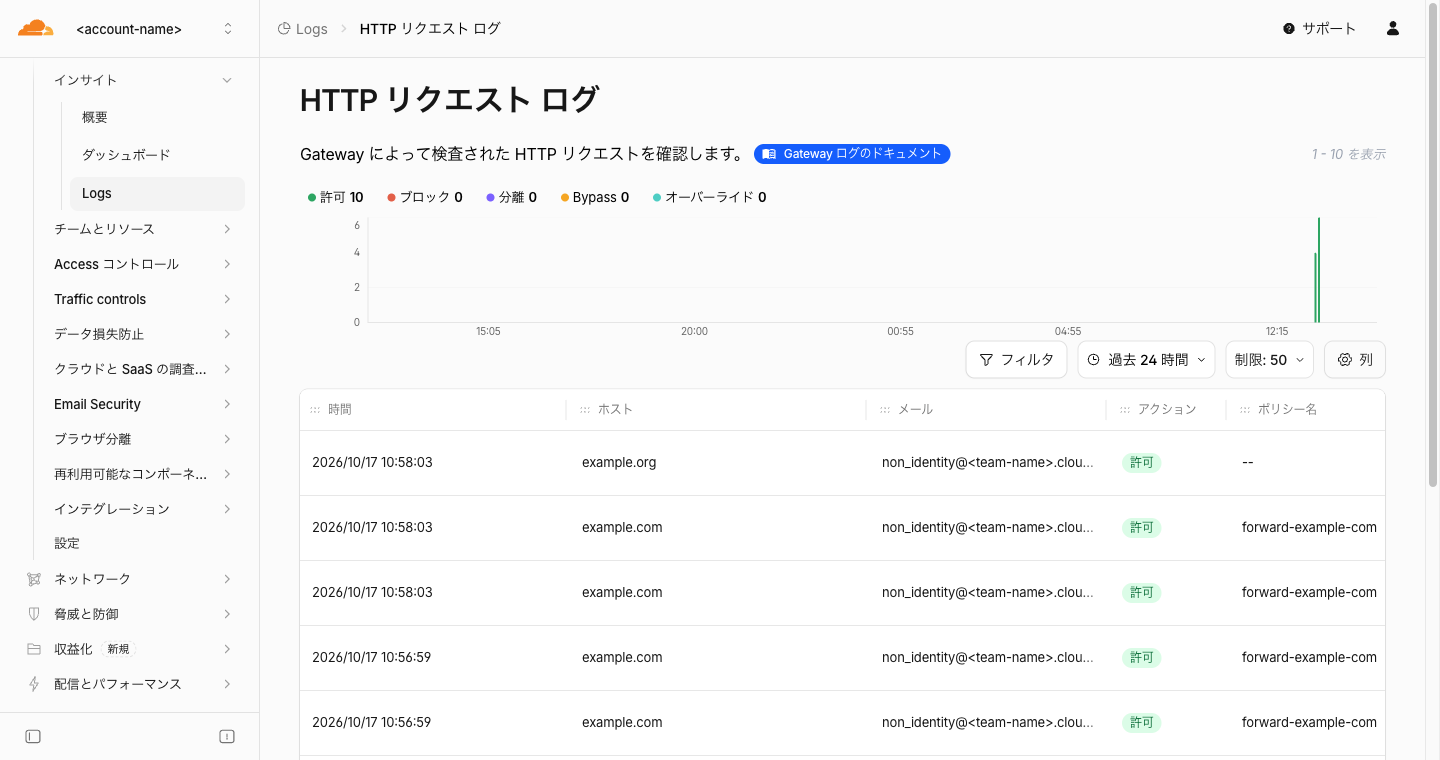
Even when opening a row to see details, the action was allow and only the Forward policy name appeared in the matched policy. The JSON view also had no item indicating that the request went through a Worker.
Expected Use Cases
Summarizing the use cases mentioned in the blog post:
| Use Case | Overview |
|---|---|
| Reason input page (interstitial) | Require users to enter a reason before accessing sensitive destinations, manage TTL-based sessions in KV, and keep audit logs via D1 or Hyperdrive |
| Dynamic header injection | Extract roles from JWT and set headers like X-App-Role on upstream requests (the blog post shows an example where role extraction is done with Custom Functions described below) |
| File inspection and log storage | Send matching files to an external sandbox or save them to R2 |
| Real-time notifications on match | Send the user, rule, and destination URL to Slack or PagerDuty when a policy is matched |
Note that the blog post also mentions DLP matches as a notification example. However, the documentation's limitations state that DLP match results and body inspection results cannot be used in Forward conditions.
Related Features Announced at the Same Time
The Forward action was announced as part of a broader effort to bring Worker logic into Gateway. The same blog post introduces the following two features:
- Custom Functions: A feature that calls a Worker during policy evaluation and returns strings, numbers, or booleans to use as selectors in the policy builder. Designed as "data in, value out," it's suited for stateless evaluations that complete quickly. The blog post states it is planned for delivery by the end of 2026.
- DLP custom validation: A feature that runs Worker validation logic after a DLP detection matches, allowing you to supplement or veto the judgment. This lets you verify "whether the data is actually valid" using your own information sources, which regular expressions alone cannot determine. It was available at the time the blog post was published.
While Forward is suited for inline transformation of live user requests, Custom Functions is suited for short, stateless evaluations — this distinction is presented as guidance for how to use each. Worker logic can currently be brought into Gateway and DLP, with Email Security planned as the next target.
Caveats and Limitations
- Workers Free has execution time limits and daily request limits (see Workers limits). Routing Gateway traffic through a Worker increases Worker requests, so care is needed about limits when using Free.
- Workers used with Forward interrupt live user requests. The blog post states that you should design carefully with a narrow scope to minimize impact on user experience.
- When Worker invocation or communication fails, it is fail closed. Gateway will not skip the Worker and send the original request through.
- WebSocket, HTTP CONNECT tunnels, protocol upgrades, HTTP trailers, and traffic matching Do Not Inspect do not go through the Worker. Also, if HTTP traffic leaving a Workers VPC matches a Forward policy, Gateway discards it without calling the Worker.
- Even if you delete the Worker referenced by a Forward policy, the policy remains. Subsequent requests matching it will result in HTTP 500, so you need to reassign or delete the policy before deleting the Worker.
next()can only send to the original destination. A regularfetch()inside the Worker becomes an independent subrequest, and the user's Gateway policies and egress IP are not used.- The Forward action is in public beta. The end date of the beta is not mentioned in the changelog, documentation, or blog post.
Summary
Cloudflare Gateway's Forward action is a feature that proxies HTTP policy-allowed traffic to a Worker, enabling inline middleware for request/response transformation and asynchronous processing. Since Gateway and Workers run on the same machines, dispatch becomes a local function call without the round-trip overhead of an external proxy. It is available during public beta on all Zero Trust plans, and Worker traffic is billed as regular Worker requests.
When actually testing through Gateway, only requests matching the policy went through the Worker, and context contained connection information and registered device information. Since the action in logs remains "Allow," you identify whether a request went through a Worker by the policy name. Even for devices registered with a service token, identity() returned an object with an email address, so it's safer not to rely solely on the presence or absence of an email address for identity checks. When testing locally, adding a default export for wrangler dev and a test Worker that calls handle() lets you verify branching behavior without Gateway. Note that failure is fail closed, and deleting a Worker causes matched requests to return 500.
I hope this is helpful to someone.
Reference Links: