
Confirm that Cloudflare Workers size limit has been unified to uncompressed 64 MB across all plans using wrangler

This page has been translated by machine translation. View original
Hey there! I'm Nishimura Yuji from the Operations team!
Cloudflare Workers has long had a bundle size limit of "3 MB compressed (Free) / 10 MB compressed (Paid)." Many people likely had to keep an eye on the post-gzip size when deploying heavy frameworks or dependencies.
According to the official changelog (2026-09-04), the compressed size limit has been removed, and the system has changed to only check "uncompressed 64 MB" across all plans. Since the actual number used for evaluation changed, I verified the size subject to evaluation using wrangler's dry-run, then actually deployed to a Free plan account to test whether bundles exceeding the old limit would pass, and how a bundle exceeding 64 MB would be rejected.
What Changed This Time
- Target / Date: Cloudflare Workers, announced in the 2026-09-04 changelog
- Key changes:
- Old: Compressed — Free 3 MB / Paid 10 MB
- New: Uncompressed 64 MB across all plans. The compressed size limit has been removed
- Official links: Increased Worker size limit (changelog), Workers Limits (official documentation)
In the official Limits documentation as well, the Worker size limit is listed as 64 MB for both Workers Free and Workers Paid, with the following note:
There is no compressed size limit. Only the uncompressed bundle size counts.
(The intent is that there is no limit on compressed size, and only the uncompressed bundle size is counted.)
Note that the official documentation and wrangler output use MiB / KiB in base-1024 units (64 MiB = 67,108,864 bytes). In this article, I use MB / KB for readability, and command output is shown as-is.
Points Worth Noting
Since the number used for evaluation has changed from "compressed" to "uncompressed," the impact varies depending on the bundle's contents.
- What to pay attention to: The
Total Upload(uncompressed size) shown inwrangler's output is now directly the value evaluated against the 64 MB limit. The post-gzip number you used to watch is now just a reference value. - What to check in your own environment: Workers that bundle assets such as images, fonts, or WASM that are already compressed or minified and don't compress well with gzip will be directly affected by the uncompressed size. That said, since the limit is a generous 64 MB, cases that previously struggled with the 10 MB compressed limit will have considerably more headroom.
- Free and Paid now share the same limit: Under the old rules, Free was strict at 3 MB compressed. With this change, Free is now also uncompressed 64 MB, the same as Paid, making it much easier for configurations that bundle large WASM, Next.js (OpenNext), Prisma, etc. and were hitting the 3 MB compressed limit to fit within the Free plan.
Let's Try It Out
First, I'll verify the size subject to evaluation using wrangler deploy --dry-run, then actually deploy to a Free plan account.
Environment
- OS: Ubuntu 24.04 (arm64, disposable container)
- Node.js: v24.21.0
- wrangler: 4.149.0
- Cloudflare: Workers Free plan account
1. Prepare a minimal Worker for verification
To illustrate the difference between uncompressed and gzip sizes, I prepared a Worker that embeds a highly compressible repeating string (about 2 MB).
import { BIG } from "./big.js";

export default {
  async fetch() {
    return new Response("len=" + BIG.length);
  },
};
name = "size-limit-demo"
main = "src/index.js"
compatibility_date = "2026-09-01"
src/big.js contains export const BIG = "AAAA..."; (approximately 2 million characters) — a repetition of the same character that results in an extremely small post-gzip size (as you can see in the output below).
2. Check the size subject to evaluation with dry-run
wrangler deploy --dry-run builds only the bundle without actually deploying and outputs its size. No login is required.
npx wrangler@4.149.0 deploy --outdir bundled/ --dry-run
The output was as follows (wrangler banner lines are omitted):
Total Upload: 1953.33 KiB / gzip: 2.10 KiB
No bindings found.
--dry-run: exiting now.
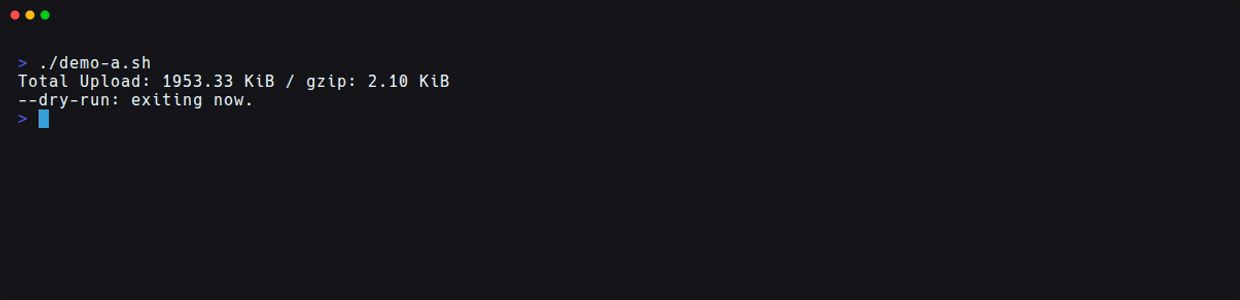
Total Upload is 1953.33 KB (uncompressed) and gzip is 2.10 KB. Because it's a repeating string, gzip compresses it extremely small, but the value used for the 64 MB evaluation is the uncompressed Total Upload. Checking the actual size of the generated bundle also confirmed 2,000,212 bytes uncompressed and 2,159 bytes gzipped, matching the Total Upload side.
3. Deploy a bundle exceeding the old limit to the Free plan
Next, I created a Worker embedding 8 MB of random characters. Since random strings compress poorly with gzip, the compressed size also far exceeds the old Free limit of 3 MB.
npx wrangler@4.149.0 deploy
Total Upload: 8192.21 KiB / gzip: 6170.27 KiB
Deployed blog-verify-size-b triggers (0.46 sec)
Even with a compressed size exceeding 6 MB, the deployment succeeded, and accessing the public URL returned len=8388608. Under the old rules, this size would have been rejected on the Free plan.
4. How a bundle exceeding 64 MB uncompressed is rejected
Finally, I created a Worker with 65 MB of repeating characters and deployed it. The post-gzip size was just under 65 KB.
Total Upload: 66560.21 KiB / gzip: 64.91 KiB
✘ [ERROR] Your Worker failed validation because it exceeded size limits.
   - Your Worker exceeded the uncompressed size limit of 64 MiB. [code: 10027]
No matter how small the post-gzip size is, if the uncompressed size exceeds 64 MB, it is rejected with error code 10027.
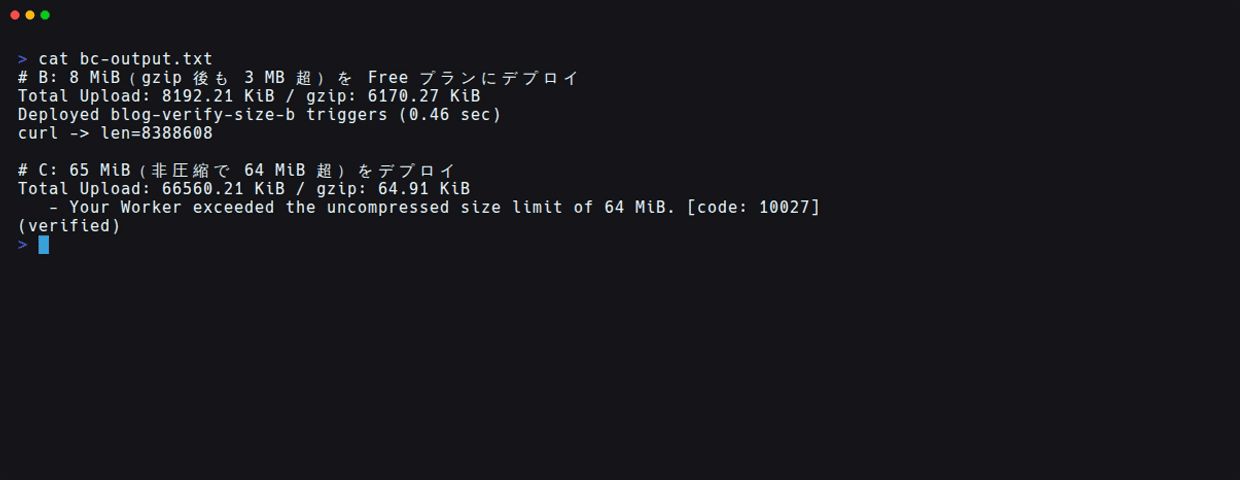
The Workers created for verification were deleted with wrangler delete after confirmation.
Analysis of Verification Results
- What was confirmed: That
wrangler deploy --dry-runoutputsTotal Upload(uncompressed) andgzip(reference) without requiring login; that a Worker with more than 6 MB compressed can be deployed even on the Free plan; and that a Worker with 65 MB uncompressed is rejected withcode: 10027even if the post-gzip size is just under 65 KB. - What was cross-referenced with official information: I confirmed that the old limits stated in the changelog (compressed Free 3 MB / Paid 10 MB) and the new limits (uncompressed 64 MB across all plans, compressed limit removed) match the current content in the Limits documentation.
- Not verified: Behavior on the Paid plan (the official documentation states the same 64 MB as Free, but I didn't test it this time), the boundary right around 64 MB, and the relationship between large bundles and the startup time limit (1 second) were not verified.
How to Handle This in Practice
- Cases worth checking soon: Workers that were close to the 10 MB compressed limit and relied on techniques like code splitting or externalizing assets may be able to revisit their configuration with 64 MB uncompressed headroom in mind. If your CI or pre-deployment checks use the post-gzip size as a threshold, updating them to reflect that the evaluation target has changed to uncompressed will keep them aligned with reality.
- Cases where a wait-and-see approach is fine: Projects with originally small bundles are unaffected. The number itself hasn't changed dramatically — it's just the axis used for evaluation that shifted — so there's no urgent need to change settings.
- What to agree on as a team: If you have pre-deployment checks, aligning them to use
Total Uploadfromwrangler deploy --dry-runas the baseline will reduce confusion among team members about "which size to look at." Any internal documentation that assumed the old limits (3 MB / 10 MB compressed) should be updated.
Summary
Cloudflare Workers' size limit has changed from 3 MB / 10 MB compressed to uncompressed 64 MB across all plans. The key point is that the number used for evaluation has shifted from "compressed" to "uncompressed."
- Even on the Free plan, a Worker with more than 6 MB compressed was successfully deployed
- When the uncompressed size exceeds 64 MB, it is rejected with
code: 10027even if the post-gzip size is small - By checking
Total Uploadinwrangler deploy --dry-run, you can verify the size subject to evaluation in advance without needing to log in
If you have any configurations that were optimized around the old limits, it might be worth revisiting them.
I hope this is helpful to someone.
Reference links: