
Including the traceId in the response using spanContext() in Cloudflare Workers: Verifying the behavior together with setStatus and updateName

This page has been translated by machine translation. View original
Hello! I'm Yuji Nishimura from the Operations Department!
When a Cloudflare Worker returns a 500 error, investigation gets much easier if you can immediately look up "which trace belongs to this request." In the Cloudflare Changelog dated October 26, 2026, three methods were added to Workers' custom spans: spanContext(), setStatus(), and updateName(). With spanContext(), you can read the traceId and spanId from your Worker's code.
This article summarizes the results of running these three methods both in a local environment using Wrangler's wrangler dev and on a Worker deployed to a Workers Free plan account. I also checked what is and isn't visible in the production Workers Observability dashboard and in the local Local Explorer.
What Changed
- Date: October 26, 2026
- Target: the
Spanreturned by the custom span API (import { tracing } from "cloudflare:workers"orctx.tracing) - Added methods:
| Method | What it does | Main use case |
|---|---|---|
span.spanContext() |
Returns traceId (32 hex digits), spanId (16 hex digits), and traceFlags |
Put the traceId in logs and error responses to match them against traces |
span.setStatus(status) |
Sets the span's status to "unset" / "ok" / "error". When "error", a message can also be attached |
Treat processing that returned a failure without throwing an exception as a failure in the trace |
span.updateName(name) |
Changes the name of a span after it has started. The root span can also be changed | Give a name like GET /users/:id after routing has been decided |
According to the Changelog and the Custom spans documentation, status is included in traces exported to an OpenTelemetry destination. However, it is not yet displayed in the Workers Observability dashboard, and you cannot filter by status.
Trying It Out
Environment
- macOS 26.6.1, Node.js v24.22.1
- wrangler 4.153.0 (workerd 1.20261023.1). I used the same version for both local and deployed runs
compatibility_dateis2026-10-27
To use custom spans, tracing must be enabled.
{
  "name": "span-context-demo",
  "main": "src/index.js",
  "compatibility_date": "2026-10-27",
  "observability": { "traces": { "enabled": true } }
}
The Worker Used for Verification
Based on the Changelog sample, I prepared a Worker that renames the root span to the pattern name decided by routing and includes the traceId in the response on failure. /inspect and /status-only are endpoints for verification. /inspect returns the return values of each method as JSON, and /status-only creates spans for checking how things appear in the dashboard and Local Explorer.
import { tracing } from "cloudflare:workers";

const routes = [
  { pattern: "/users/:id", re: /^\/users\/[^/]+$/ },
  { pattern: "/fail", re: /^\/fail$/ },
];

export default {
  async fetch(request) {
    const url = new URL(request.url);
    const root = tracing.getActiveSpan();
    const route = routes.find((r) => r.re.test(url.pathname));
    // ルーティングが決まってからルートspanの名前を変える
    root?.updateName(`${request.method} ${route?.pattern ?? "unknown"}`);

    if (url.pathname === "/status-only") {
      // setStatusだけを呼び、例外は記録しないspan
      tracing.enterSpan("status-error-no-exception", (span) => {
        span.setStatus({ code: "error", message: "set by setStatus only" });
      });
      // コールバックの中で名前を変えるspan
      tracing.enterSpan("rename-me", (span) => {
        span.updateName("renamed-inside-callback");
      });
      return new Response("ok");
    }

    if (url.pathname === "/inspect") {
      const out = {};
      out.root = root?.spanContext();
      const s = tracing.startSpan("probe");
      out.probe = s.spanContext();
      try {
        s.setStatus({ code: "OK" });
        out.upperOK = "no error";
      } catch (e) {
        out.upperOK = `${e.name}: ${e.message}`;
      }
      try {
        s.setStatus({ code: 1 });
        out.numericOK = "no error";
      } catch (e) {
        out.numericOK = `${e.name}: ${e.message}`;
      }
      s.setStatus({ code: "ok" });
      s.setStatus({ code: "error", message: "after ok" });
      s.updateName("probe renamed");
      s.end();
      s.updateName("ignored after end");
      out.probeAfterEnd = s.spanContext();
      out.isTracedAfterEnd = s.isTraced;
      return Response.json(out);
    }

    return tracing.startActiveSpan("handle", async (span) => {
      try {
        if (route?.pattern === "/fail") throw new Error("boom");
        span.setStatus({ code: "ok" });
        return Response.json({ ok: true, traceId: root?.spanContext().traceId });
      } catch (err) {
        span.recordException(err);
        span.setStatus({ code: "error", message: "Route handler failed" });
        return Response.json(
          { error: "Internal error", traceId: root?.spanContext().traceId },
          { status: 500 },
        );
      } finally {
        span.end();
      }
    });
  },
};
1. Extracting the traceId with spanContext()
First I deployed with npx wrangler deploy and sent requests to /inspect, /users/42, /fail, and /status-only. <subdomain> is replaced by your own workers.dev subdomain.
npx wrangler deploy
curl -s https://span-context-demo.<subdomain>.workers.dev/inspect
curl -s https://span-context-demo.<subdomain>.workers.dev/users/42
curl -s -w '\nstatus=%{http_code}\n' https://span-context-demo.<subdomain>.workers.dev/fail
curl -s https://span-context-demo.<subdomain>.workers.dev/status-only
The response from /inspect on the deployed Worker (formatted for readability) is as follows.
{
  "root": { "traceId": "6e0da3b4d885342c176779762cd8ad62", "spanId": "5d7c853b01467569", "traceFlags": 0 },
  "probe": { "traceId": "6e0da3b4d885342c176779762cd8ad62", "spanId": "9563fb68e394c262", "traceFlags": 0 },
  "upperOK": "TypeError: Span status code must be 'unset', 'ok', or 'error'.",
  "numericOK": "TypeError: Span status code must be 'unset', 'ok', or 'error'.",
  "probeAfterEnd": { "traceId": "6e0da3b4d885342c176779762cd8ad62", "spanId": "9563fb68e394c262", "traceFlags": 0 },
  "isTracedAfterEnd": false
}
/fail returned status code 500, with the traceId in the body.
{"error":"Internal error","traceId":"bd70802ea981dc3218b669ff4cf6599d"}
- The root span and the span created from it returned the same traceId, and the spanIds were different values
- Even after
span.end(),spanContext()returned the same IDs. On the other hand,isTraced, which indicates whether the span is being recorded, becamefalse traceFlagswas0both on the deployed Worker and locally (described later in section 2). According to the Custom spans documentation, the currenttraceFlagsdoes not indicate whether sampling is applied. Therefore, you cannot use this value as-is for the flags of atraceparentheader passed to downstream services
upperOK and numericOK are explained in section 3.
2. Checking Whether the Returned IDs Match the Trace
I opened the "Observability" tab of the deployed Worker and switched the view to "Traces". In the images below, the email address, account ID, and workers.dev subdomain are masked.
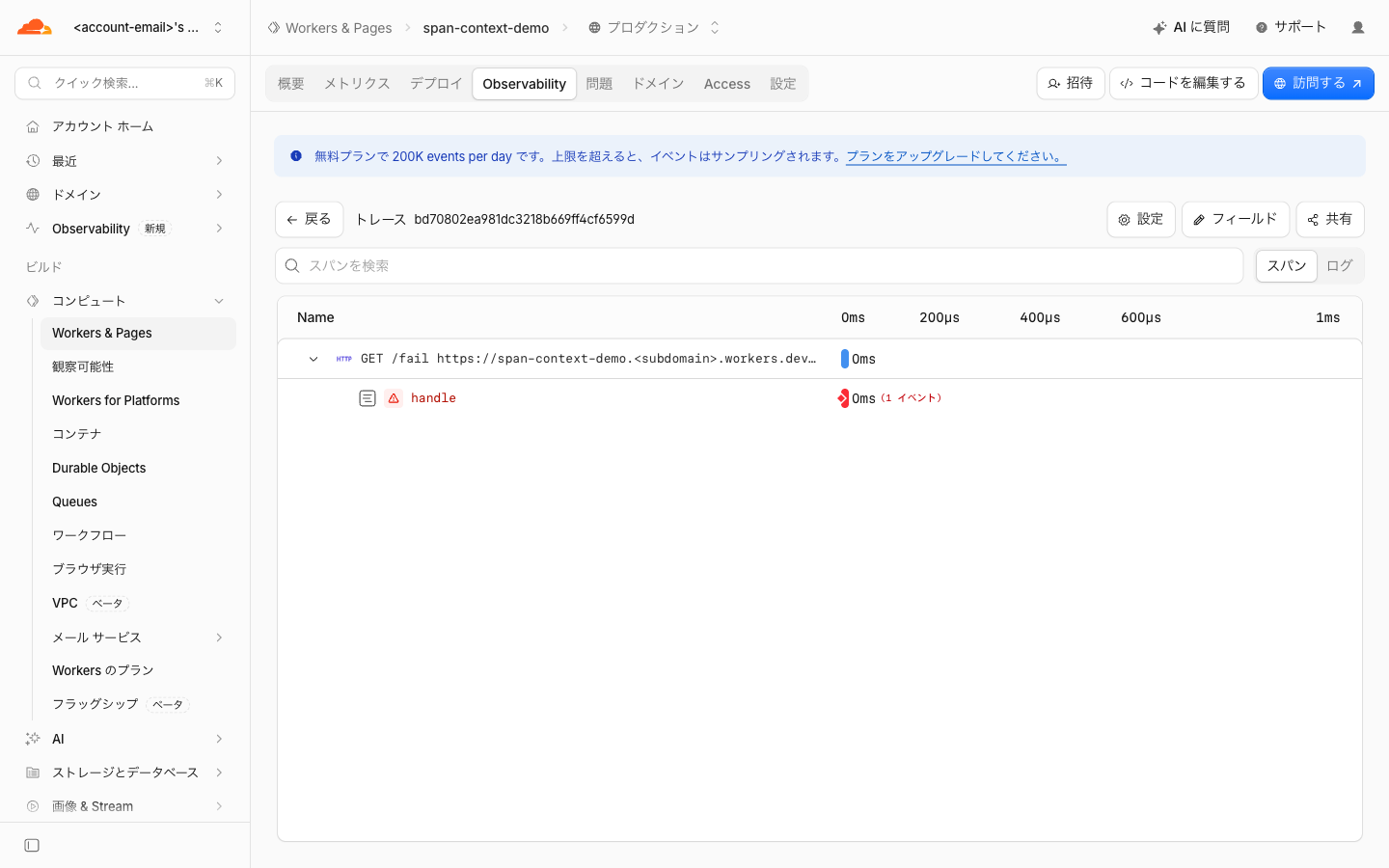
When I opened the trace for /fail, the trace ID at the top of the screen matched the bd70802ea981dc3218b669ff4cf6599d that I had put in the 500 response.
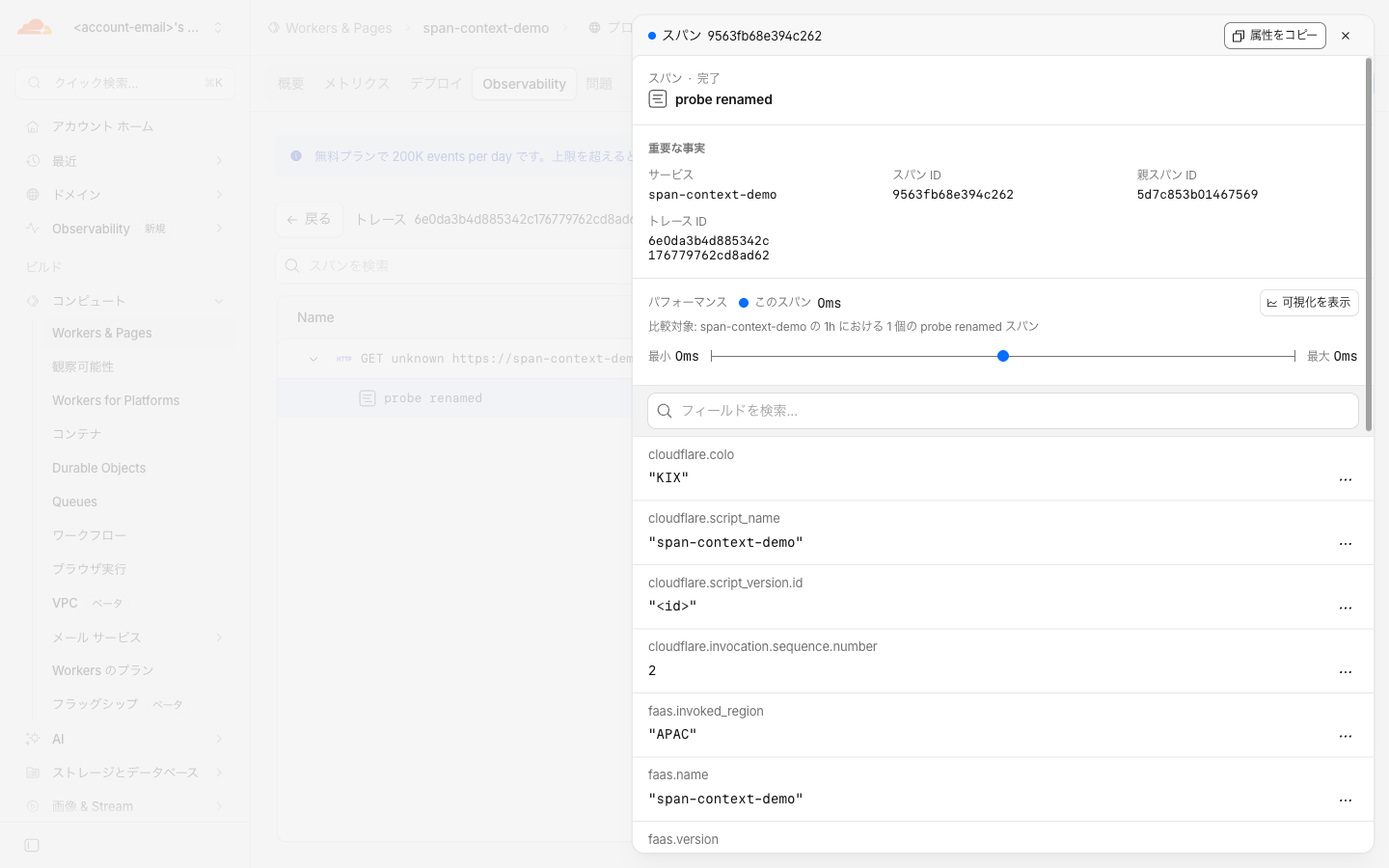
The trace for /inspect also had a trace ID identical to the 6e0da3b4d885342c176779762cd8ad62 in the response. When I opened the details of the child span, the span ID matched the spanId of probe (9563fb68e394c262), and the parent span ID matched the spanId of the root span (5d7c853b01467569).
I matched the IDs in the same way with local wrangler dev. Local Explorer becomes available when you start wrangler dev. This time I started it on port 8799 instead of the default 8787.
npx wrangler dev --port 8799
curl -s http://localhost:8799/inspect
The local /inspect returned different IDs from the deployed one above.
{
  "root": { "traceId": "80b4bb1f3a5dbea3e0e51fe7e441cbcb", "spanId": "0656b932b4d27cbe", "traceFlags": 0 },
  "probe": { "traceId": "80b4bb1f3a5dbea3e0e51fe7e441cbcb", "spanId": "2363150df2c77110", "traceFlags": 0 }
}
Using this traceId, I retrieved the spans from the Local Explorer API.
curl -s -X POST http://localhost:8799/cdn-cgi/local/explorer/api/local/observability/query \
  -H 'Content-Type: application/json' \
  -d '{"sql":"SELECT trace_id, span_id, parent_id, name FROM spans WHERE trace_id = '\''80b4bb1f3a5dbea3e0e51fe7e441cbcb'\''"}'
["80b4bb1f3a5dbea3e0e51fe7e441cbcb","0656b932b4d27cbe",null,"GET"]
["80b4bb1f3a5dbea3e0e51fe7e441cbcb","2363150df2c77110","0656b932b4d27cbe","probe"]
The spanId in the response was the same value as the span_id recorded in Local Explorer. The parent_id of probe was also the same value as the spanId of the root span.
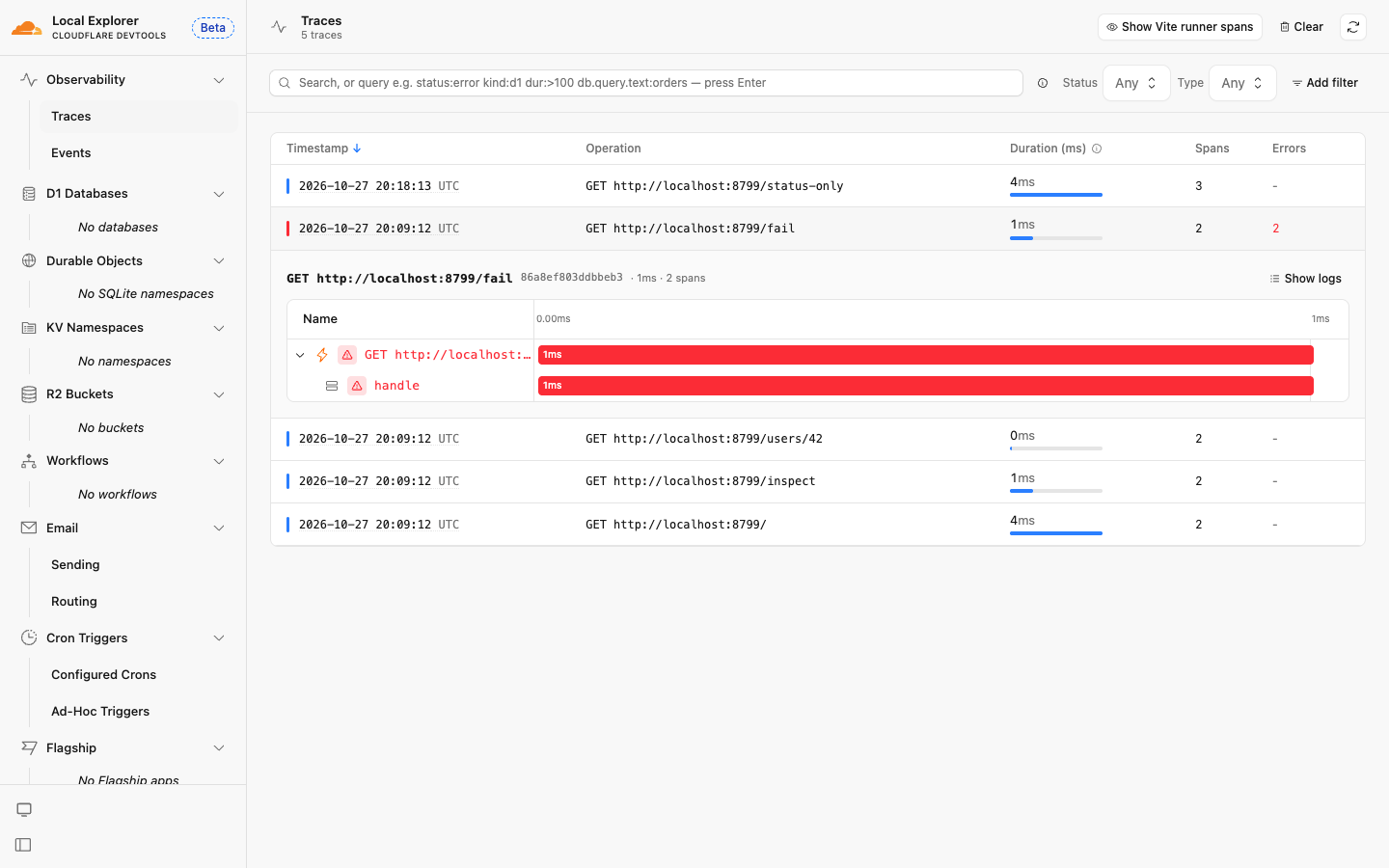
When I sent /fail locally as well, I was able to open the corresponding trace from the Local Explorer screen using the traceId included in the 500 response.
3. Values Accepted by setStatus() and How It Appears in Traces
Specify code as a lowercase string. Both an uppercase setStatus({ code: "OK" }) and a numeric setStatus({ code: 1 }) resulted in a TypeError, both on the deployed Worker and locally (upperOK and numericOK in the /inspect response in section 1). Since SpanStatusCode.OK in OpenTelemetry JS is the number 1, existing OpenTelemetry code will not work as-is.
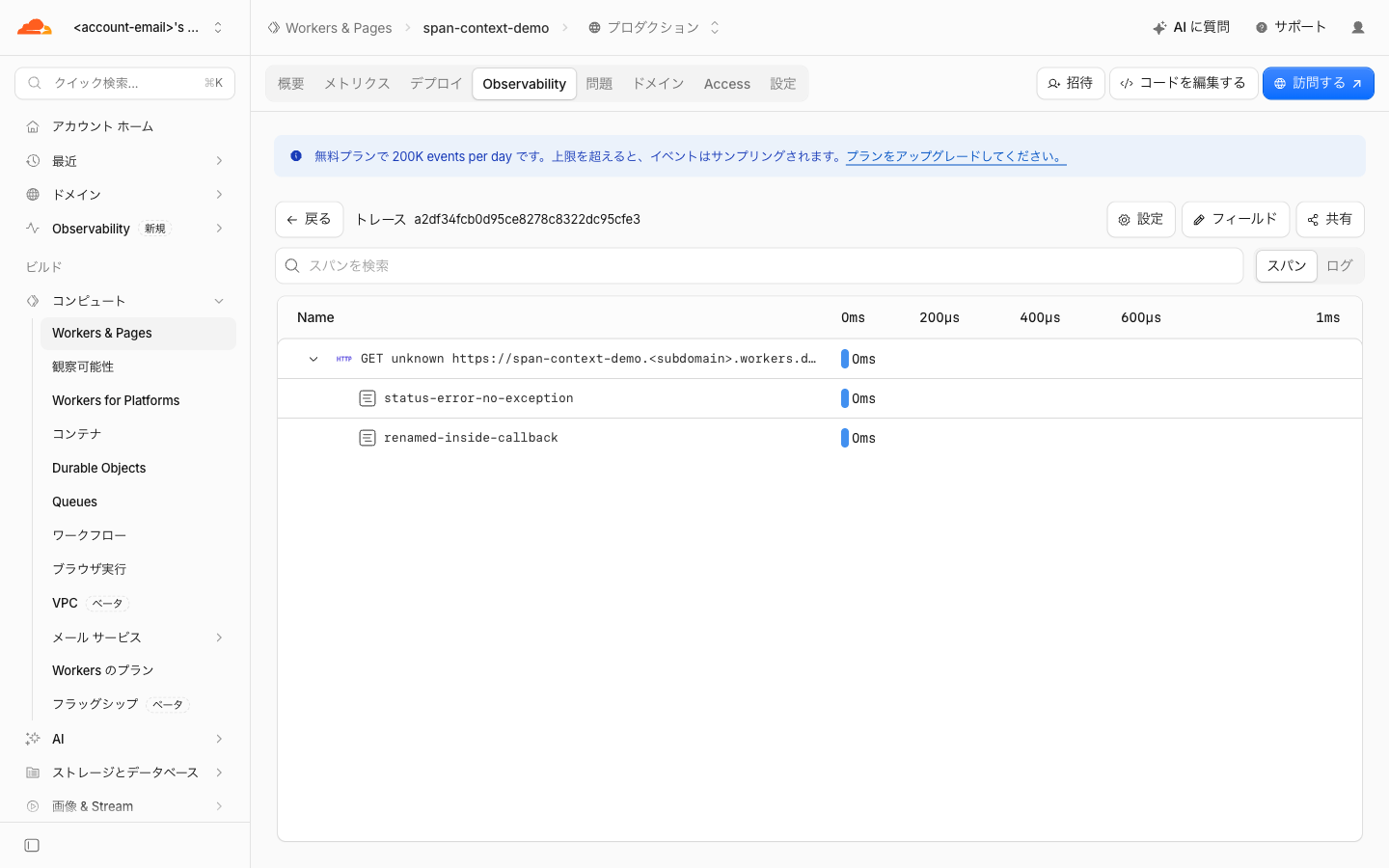
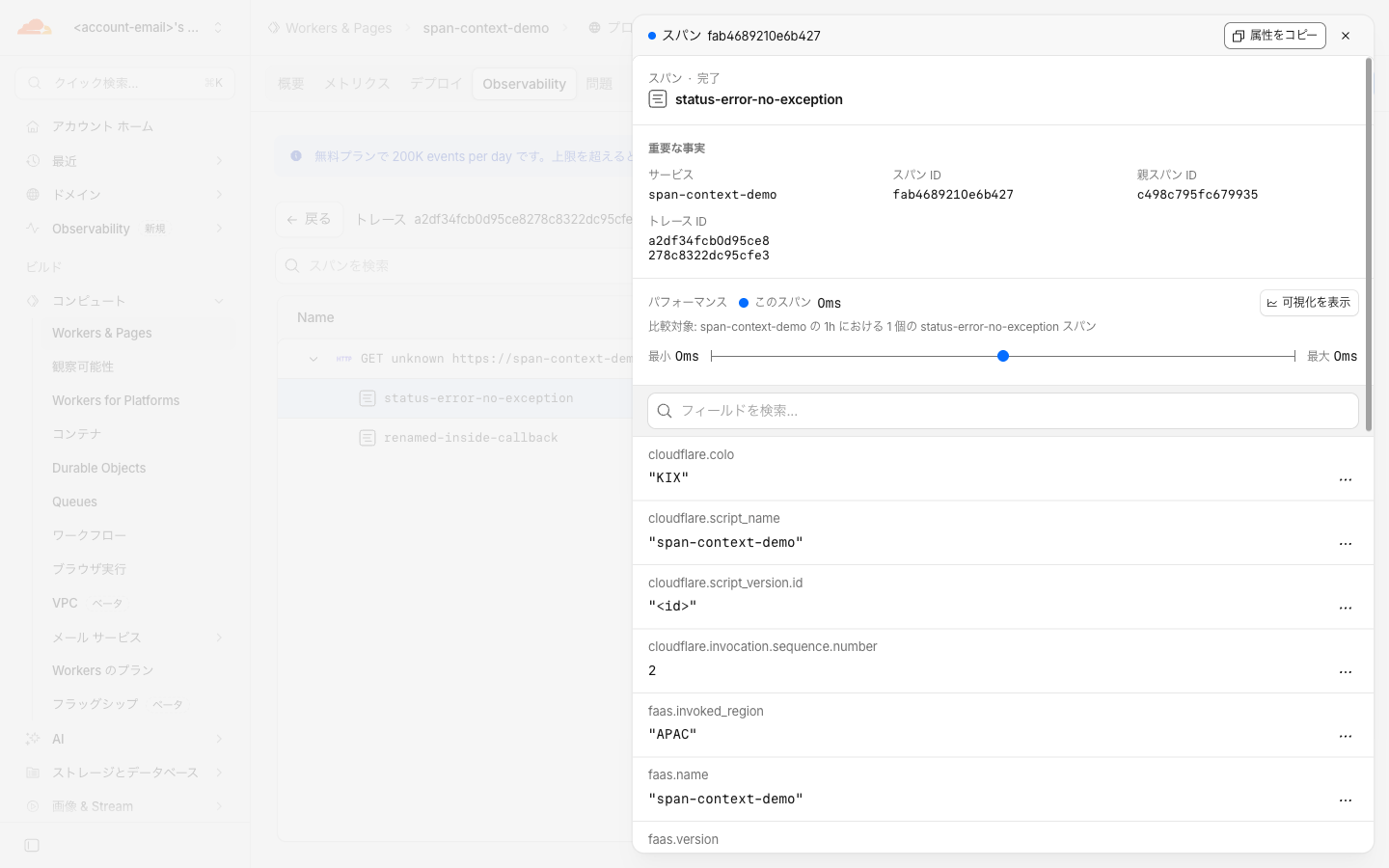
I checked how status appears with /status-only. In the status-error-no-exception span, only setStatus({ code: "error" }) is called. In the production dashboard, this span was not shown as an error, and its details also showed "Completed". There was also no item representing status in the attribute list.
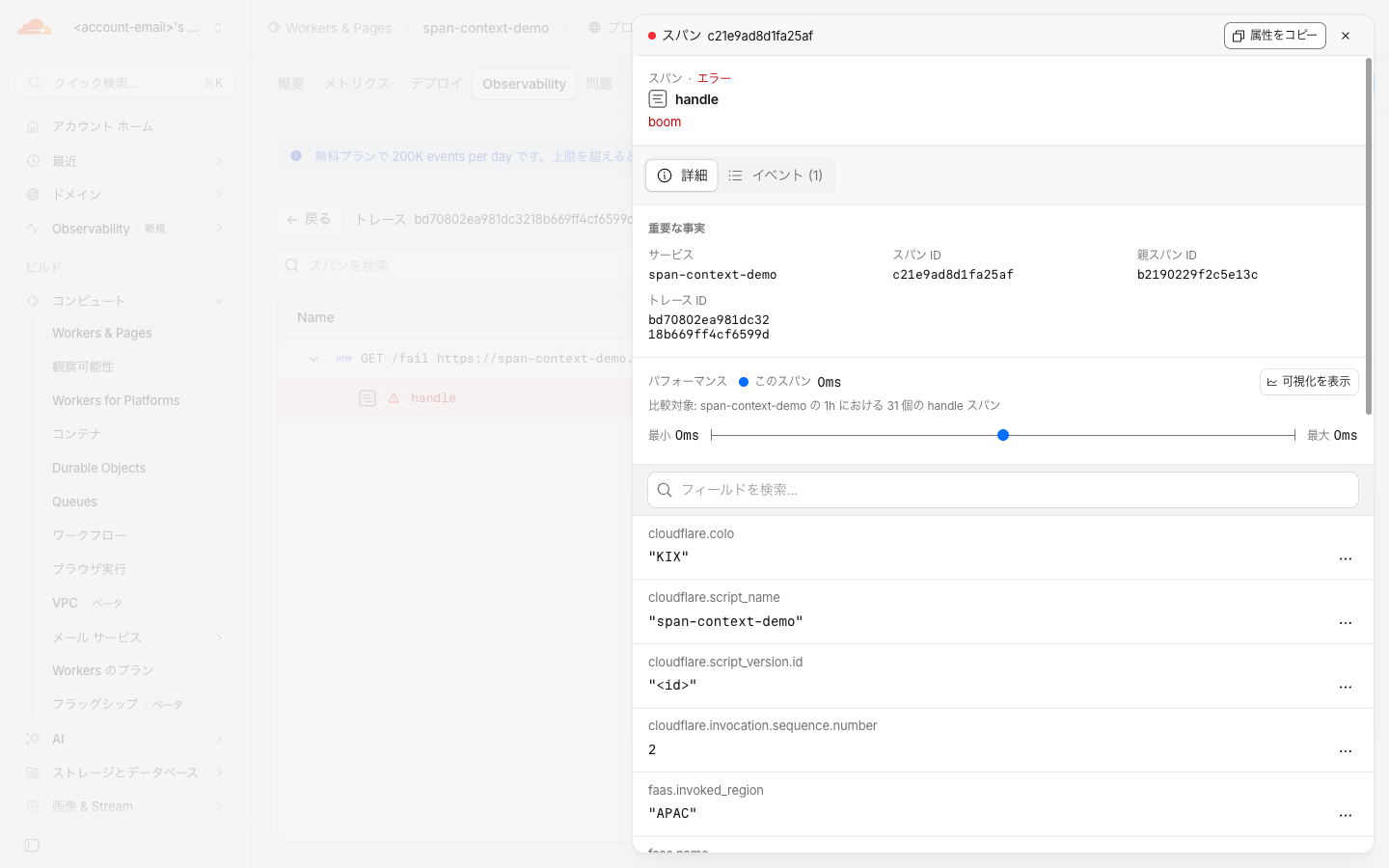
On the other hand, the handle span of /fail, which also called recordException(), was shown as "Error" in the details, and the exception message boom appeared. boom was also displayed in the Errors column of the trace list.
The local Local Explorer showed the same tendency.
| Methods called on the span | Dashboard display | Local Explorer outcome | Local Explorer error column |
|---|---|---|---|
Only setStatus({ code: "error" }) |
Completed | ok |
None |
recordException(err) and setStatus({ code: "error" }) |
Error (boom) |
error |
Error: boom |
In the Local Explorer image at the end of section 2, the root span is also shown in red, but the outcome of the root span retrieved via the API was ok. I have not checked under what conditions the screen shows the root span in red. In the production dashboard, the root span was not shown as an error.
As of October 28, 2026, I could not find any item representing status in either the dashboard (the trace list and the attributes in the span details) or Local Explorer (the screen and the spans retrieved via the API). For the dashboard, the Changelog says it is "not yet displayed," so it may be displayed in the future. For Local Explorer, I have not determined whether it does not support status or whether it simply wasn't visible with the verification method used this time. What I was able to confirm is only that "it can be called without throwing an exception." To check status, you need to configure export to OpenTelemetry and view it at the destination.
The Custom spans documentation also describes the following behavior.
setStatuscalls after setting"ok"are ignored- Setting
"unset"does not clear a previously set"error" messageis kept only whencodeis"error"- Setting the status does not end the span, and no exception is recorded
Since I had no means of observing the values this time, all I confirmed is that setting "error" after "ok" does not throw an exception.
4. Where updateName() Takes Effect
For updateName(), the results differed between the production dashboard and the local Local Explorer.
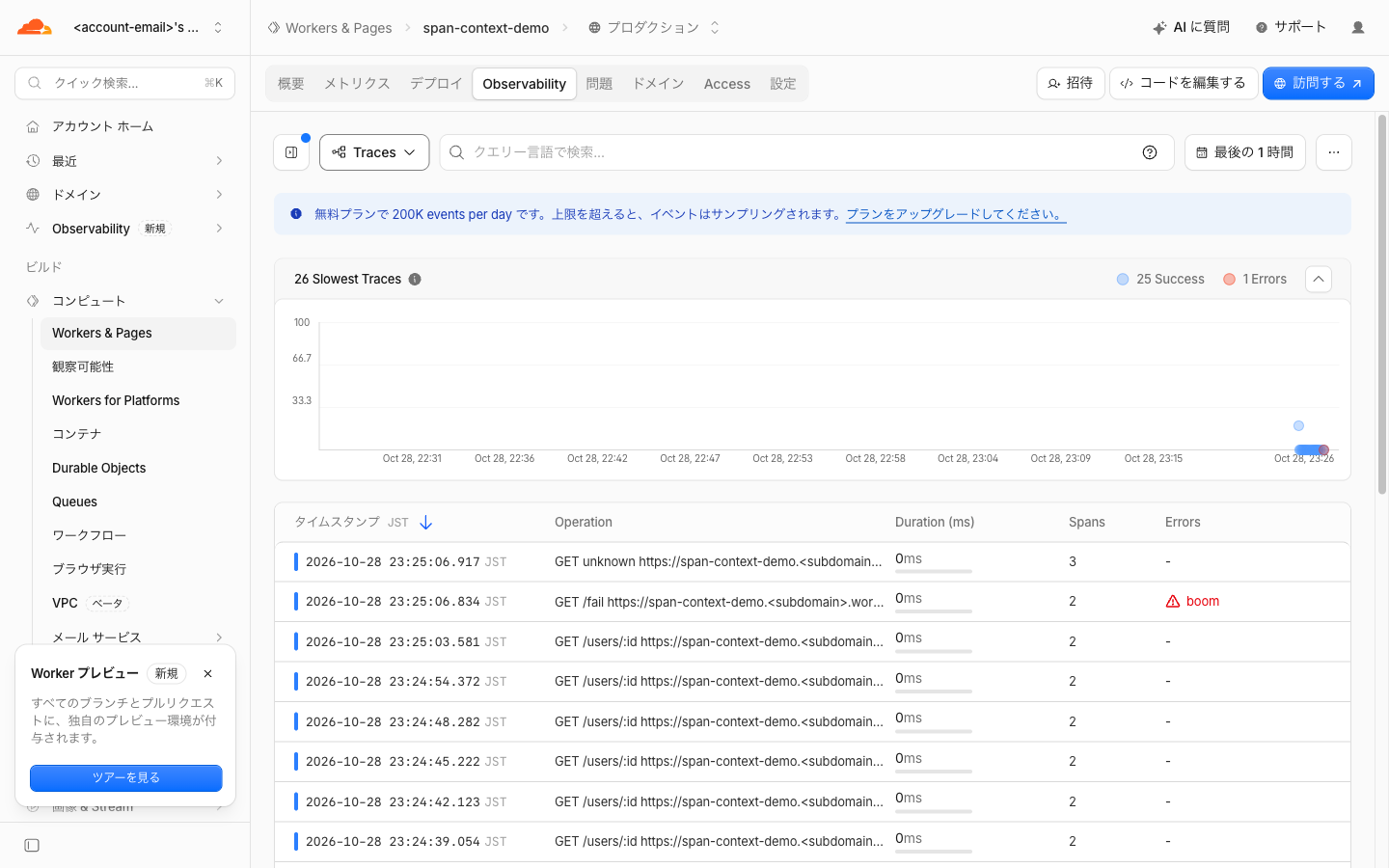
In the production dashboard, the changed names were reflected.
- Root span: The Operation column in the Traces list became
GET /users/:id,GET /fail, andGET unknown. On the screen, the request URL is displayed after the name - The span for which
updateName("probe renamed")was called afterstartSpan("probe")was displayed asprobe renamed. TheupdateName("ignored after end")called afterend()was not reflected, as the documentation describes (the/inspectimage above) - The name changed inside the callback of
enterSpan("rename-me", ...)was also displayed asrenamed-inside-callback(the/status-onlyimage above)
On the other hand, in Local Explorer of wrangler 4.153.0, as far as I could see in the name column of the screen and the API, the names changed with updateName() were not recorded.
- Even after changing the root span's name to
GET /fail, the recorded name remainedGET. On the screen it is displayed with the URL asGET http://localhost:8799/fail - Even when calling
updateName("probe renamed")afterstartSpan("probe"), the recorded name wasprobe - Even when changing the name inside the callback of
enterSpan("rename-me", ...)in/status-only, it was recorded asrename-me
Since the same code was reflected in the production dashboard, the name not changing locally is not necessarily a mistake in the code. I have not determined whether Local Explorer does not support updateName() or whether there is something lacking in the verification method used this time. It may also change with future wrangler updates. The documentation explains that the changed name is also reflected in exported traces, and that it is truncated to 64 bytes.
Discussion of the Verification Results
The table separates what was confirmed in the verification (confirmed) from what is based on the documentation.
| Method | Worker response | Local Explorer | Dashboard | OpenTelemetry export |
|---|---|---|---|---|
spanContext() |
Confirmed (deployed and local) | ID match confirmed | ID match confirmed | Not verified |
setStatus() |
TypeError for invalid code confirmed |
Not found (4.153.0) | Not displayed (as of Oct 28) | Included (Changelog and documentation) |
updateName() |
- | Not reflected (4.153.0) | Reflected (confirmed) | Reflected (documentation) |
"Not found," "not displayed," and "not reflected" are the results of checking with the method used this time, as of October 28, 2026. They may change with future updates.
- According to the documentation,
spanContext()returns IDs regardless of whether the trace is actually stored- Even when tracing is disabled or for requests excluded from recording by sampling, a non-zero ID is returned if Workers Logs is enabled. This ID is the same as the traceId attached to logs, but the span is not stored. Therefore, even if you search the dashboard's Traces with the traceId included in the response, the trace will not be found. In this case, you search Workers Logs with the same traceId
- If observability itself is disabled, an all-zero ID is returned
- This time, I enabled tracing, left the sampling settings at their defaults, and sent only a small number of requests. I have not verified these two cases on actual hardware, and they are written based on the documentation
- In existing OpenTelemetry code that passes the numeric
SpanStatusCode, rewrite those places to the strings"ok"/"error" - To have it displayed as an error in the dashboard, also call
recordException(). What I confirmed this time is only the case where it is used together withsetStatus({ code: "error" })
Summary
Using spanContext(), newly added to Cloudflare Workers custom spans, you can put the traceId in responses and logs to link requests with traces. The returned IDs matched the trace IDs both in the production Workers Observability dashboard and in the local Local Explorer.
Names changed with updateName() were reflected in the production dashboard but not in Local Explorer of wrangler 4.153.0. The status set with setStatus() was not found on either screen as of October 28, 2026. To check status, you will need to view it at the OpenTelemetry destination. To see an error in the dashboard, also call recordException().
I hope this is helpful to someone.
Reference links: