Restricting Instance Execution and Storage to the EU with Jurisdiction in Cloudflare Workflows

This page has been translated by machine translation. View original
Hello! I'm Yuji Nishimura from the Operations team!
When running processing that handles EU users' data on Cloudflare Workflows, there are situations where you want to restrict both the location where it runs and the location where data is stored to the EU. In the Changelog of October 27, 2026, it became possible to set a jurisdiction on a Workflow.
The setting only requires adding one line to the Wrangler configuration file. However, the jurisdiction is determined when the Workflow is created and cannot be changed afterward. In this article, I set jurisdiction: "eu" on a Free plan account and check how to verify the setting, what happens when you try to change it after creation, how it is handled when created with an old Wrangler, and the procedure for recreating it. I also check what happens when it is written on the referencing side via script_name and how it is handled in local development.
What changed
- Target version / date: The Changelog of 2026-10-27. Wrangler 4.152.0 or later is required
- Summary of the change: When you set
jurisdictionon a Workflow, that Workflow's instances run within the specified region, and the data is also stored within it. It is a feature for meeting requirements about data location, such as GDPR and FedRAMP, the certification program for cloud services for US government agencies - Allowed values:
eu(European Union),us(United States),fedramp(FedRAMP Moderate data centers) - Where to set it: The
workflowsbinding, or a Workflow declared inexports(I only tried theworkflowsbinding this time) - Official documentation: Data location
The Data location page also states the following.
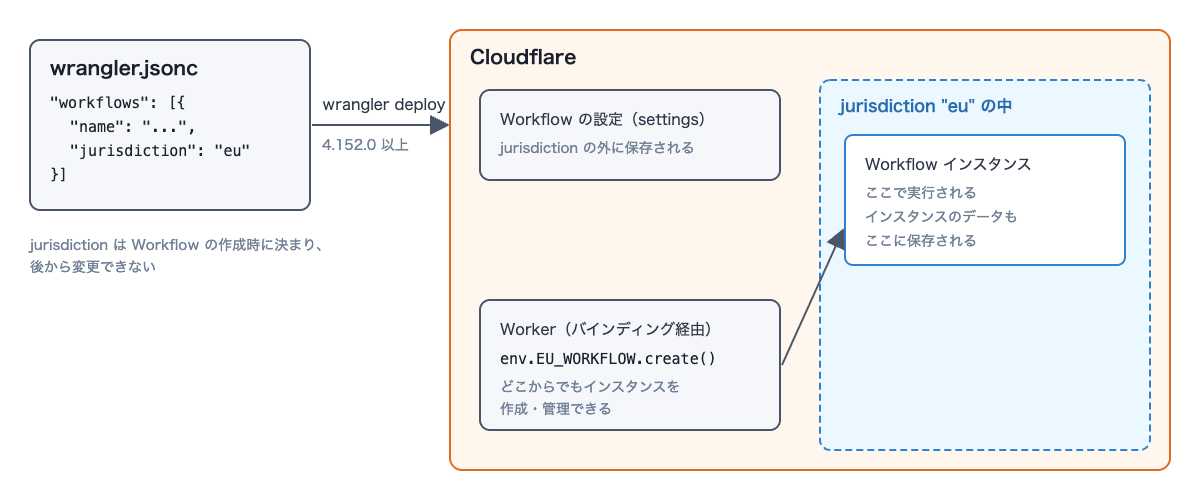
- The jurisdiction is determined at creation and cannot be changed afterward
- The Workflow's settings are stored outside the jurisdiction
- A Worker can create and manage instances of a Workflow with a jurisdiction from anywhere. If you want to control the region in which Cloudflare responds to requests, the page says to consider Regional Services
- The jurisdiction is ignored in local development
- It cannot be specified together with
script_name
The following diagram is my own conceptual diagram based on the description above, not an official architecture diagram.
Add one line to wrangler.jsonc and verify with describe
Add jurisdiction to workflows in wrangler.jsonc.
{
  "name": "blog-verify-wf-jurisdiction",
  "main": "src/index.js",
  "compatibility_date": "2026-10-27",
  "workers_dev": false,
  "preview_urls": false,
  "workflows": [
    {
      "name": "blog-verify-wf-eu",
      "binding": "EU_WORKFLOW",
      "class_name": "EuWorkflow",
      "jurisdiction": "eu"
    }
  ]
}
Since I don't use public URLs, I also included "workers_dev": false and "preview_urls": false. If you write it in TOML, add jurisdiction = "eu" to each entry of workflows as well (the Changelog has a TOML example).
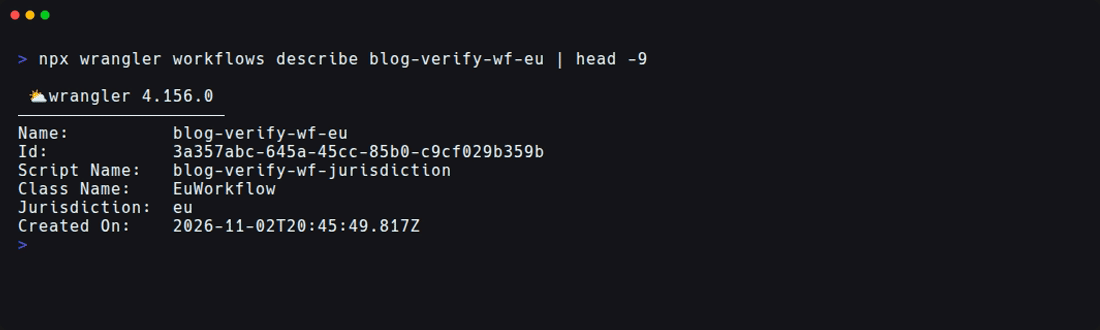
After deployment, you can check the jurisdiction with wrangler workflows describe.
npx wrangler workflows describe blog-verify-wf-eu
If you're only adding it to a newly created Workflow, that's all there is to it. From here, I'll check, in order, trying to change it after creation, using an old Wrangler, the recreation procedure, referencing from another Worker, and local development.
Environment tested
- Wrangler 4.156.0 (4.151.3 for comparison)
- Node.js v24.21.0 (Linux container)
- A Cloudflare (Free plan) account
- The Workers and Workflows created for verification were deleted after checking
What I used for verification is a Workflow with just two step.do steps and one 2-second step.sleep. For checking local development, I also included a fetch handler that creates an instance.
import { WorkflowEntrypoint } from "cloudflare:workers";

export class EuWorkflow extends WorkflowEntrypoint {
  async run(event, step) {
    const first = await step.do("record start", async () => ({ startedAt: new Date().toISOString() }));
    await step.sleep("short wait", "2 seconds");
    return await step.do("finish", async () => ({ ...first, params: event.payload }));
  }
}

export default {
  async fetch(request, env) {
    const url = new URL(request.url);
    if (url.pathname === "/create") {
      const instance = await env.EU_WORKFLOW.create({ params: { from: "fetch" } });
      return Response.json({ id: instance.id, status: await instance.status() });
    }
    if (url.pathname === "/status") {
      const instance = await env.EU_WORKFLOW.get(url.searchParams.get("id"));
      return Response.json(await instance.status());
    }
    return new Response("ok\n");
  },
};
Instances on Cloudflare were created with wrangler workflows trigger, and in local development they were created from this fetch handler.
Deploy with a jurisdiction
Running wrangler deploy with the configuration above deployed without errors.
Uploaded blog-verify-wf-jurisdiction (1.46 sec)
Deployed blog-verify-wf-jurisdiction triggers (7.01 sec)
  workflow: blog-verify-wf-eu
A Jurisdiction: eu line appeared in the output of wrangler workflows describe. The following image was taken after the deployment that rewrote it to us in the next section failed and I redeployed with jurisdiction removed from the configuration; the jurisdiction is still eu.
I created an instance and checked its status.
npx wrangler workflows trigger blog-verify-wf-eu '{"from":"cli"}'
npx wrangler workflows instances describe blog-verify-wf-eu latest
Duration:              2 seconds
Last Successful Step:  finish-1
Status was Completed, and the instance finished in about 2 seconds. All three steps, record start, short wait, and finish (two step.do and one step.sleep), succeeded.
The Changelog and documentation do not state any plan requirements, but as of November 3, 2026, I was able to deploy and run instances even on a Free plan account. On the Free plan, I only tried creating with eu; I did not try whether us and fedramp can be newly created.
The jurisdiction cannot be changed after creation
I prepared a wrangler.us.jsonc with jurisdiction set to "us" and ran npx wrangler deploy -c wrangler.us.jsonc against the already created Workflow, and it stopped with the following error.
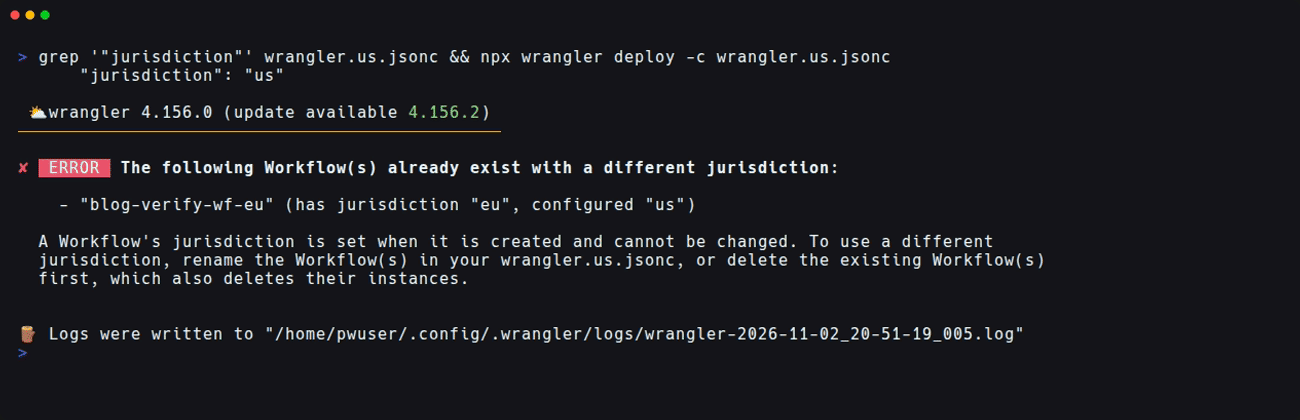
✘ [ERROR] The following Workflow(s) already exist with a different jurisdiction:

    - "blog-verify-wf-eu" (has jurisdiction "eu", configured "us")

  A Workflow's jurisdiction is set when it is created and cannot be changed. To use a different jurisdiction, rename the Workflow(s) in your wrangler.us.jsonc, or delete the existing Workflow(s) first, which also deletes their instances.
The exit code was 1, no Uploaded line appeared, and it stopped before the Worker was uploaded. wrangler versions upload produced the same error. Even after the error, the Workflow's jurisdiction remained eu.
Conversely, when I removed the jurisdiction line from the configuration file and deployed, it succeeded without even a warning. In describe, Id and Created On were unchanged and it was still Jurisdiction: eu; what was updated was Modified On and the ID of the latest version. The documentation also states that removing it from the configuration does not change the existing jurisdiction. Since it remains eu even when not written in the configuration file, check the actual value with wrangler workflows describe.
With an old Wrangler, the jurisdiction is ignored
Using Wrangler 4.151.3, which predates jurisdiction support, I deployed a new Workflow (blog-verify-wf-old-eu) with a configuration that included jurisdiction: "eu". A warning appeared, but the deployment succeeded.
▲ [WARNING] Processing wrangler.jsonc configuration:

    - Unexpected fields found in workflows[0] field: "jurisdiction"

There is a newer version of Wrangler available (current: 4.151.3, latest: 4.156.2). Try upgrading, as it might support this configuration option.
When I looked at the created Workflow with describe from 4.156.0, there was no Jurisdiction line; it had been created without a jurisdiction.
If you upgrade to Wrangler 4.156.0 from this state and deploy with the same configuration, it would attach a jurisdiction after the fact, so it stops with the same error as before.
- "blog-verify-wf-old-eu" (has no jurisdiction, configured "eu")
If you pin the Wrangler version in CI or similar, you need to upgrade Wrangler to 4.152.0 or later before writing the jurisdiction. If you overlook the warning, a Workflow without a jurisdiction gets created, and you can't attach one afterward.
To change the jurisdiction, delete and recreate
The error message suggests renaming the Workflow, or deleting the existing Workflow and recreating it. What I tried this time was deleting and recreating; I did not check how the original Workflow and its instances are handled when you use a different name. Deleting also removes the instances, so if there are execution results you want to keep, you need to check them first.
I deleted blog-verify-wf-old-eu, which had been created without a jurisdiction, and then deployed again.
npx wrangler workflows delete blog-verify-wf-old-eu
npx wrangler deploy
Running the delete command displayed Workflow "blog-verify-wf-old-eu" removed successfully., along with a note that terminating running instances can take a few minutes.
The deployment succeeded, and Jurisdiction: eu appeared in describe. The Workflow's Id and Created On were new.
When I ran wrangler workflows instances list right after recreating it, one instance that had completed before the deletion was displayed. About 3 minutes later, running instances describe with that instance ID returned the error workflows.api.error.instance.invalid_id [code: 10404]. I did not isolate why it appeared in the list right after.
Don't write it on the referencing side with script_name
I also tried writing jurisdiction on a binding that references another Worker's Workflow with script_name.
{
  "name": "blog-verify-wf-caller",
  "main": "src/index.js",
  "compatibility_date": "2026-10-27",
  "workers_dev": false,
  "preview_urls": false,
  "workflows": [
    {
      "name": "blog-verify-wf-eu",
      "binding": "EU_WORKFLOW",
      "class_name": "EuWorkflow",
      "script_name": "blog-verify-wf-jurisdiction",
      "jurisdiction": "eu"
    }
  ]
}
Wrangler 4.156.0's wrangler deploy --dry-run finished without errors. In a deployment without --dry-run, an error occurred after the Worker script was uploaded.
Uploaded blog-verify-wf-caller (0.92 sec)

✘ [ERROR] Workflow "blog-verify-wf-eu" has "jurisdiction" configured but references external script "blog-verify-wf-jurisdiction". Configure jurisdiction on the worker that defines the workflow.
At the time of the error, the script had already been uploaded, and blog-verify-wf-caller remained in the account (I deleted it with wrangler delete during cleanup). Write the jurisdiction only on the Worker that defines the Workflow. I did not try creating an instance from the caller side with a correct configuration that omits the jurisdiction, so the claim that it can be called from another Worker is based on the documentation's statement that instances can be "created and managed from anywhere."
It is ignored in local development
With wrangler dev, when I called /create of the fetch handler with the configuration still containing jurisdiction: "eu", an instance was created, and /status 5 seconds later returned complete. The jurisdiction was not displayed in the dev server logs or in the output of wrangler workflows describe --local. As the documentation says, the jurisdiction is not used in local development. Therefore, the constraint that it can't be changed after creation has to be verified with a verification Workflow deployed to Cloudflare (I did not try changing the value locally).
Things to check before adopting it
| What to check | Reason |
|---|---|
| Is Wrangler 4.152.0 or later? | 4.151.3 only gave a warning and created a Workflow without a jurisdiction, and it couldn't be attached afterward |
| Is it an existing Workflow or a newly created one? | It can't be attached to an existing Workflow. Use a different name, or delete (the instances are deleted too) and recreate |
| Is it written on the defining Worker? | Writing it on the referencing side via script_name makes the deployment fail. It was not detected by --dry-run in Wrangler 4.156.0 |
| The actual jurisdiction | It doesn't change even if you remove it from the configuration file, so check with wrangler workflows describe |
| What is placed outside the jurisdiction | According to the documentation, the Workflow's settings are stored outside, and the location of the calling Worker is not restricted (not verified this time) |
Summary
- According to the documentation, writing
jurisdiction: "eu"in the Cloudflare Workflows configuration restricts instance execution and data storage to the EU (I have not verified the execution location from the outside). As of November 3, 2026, I was able to deploy and run instances even on a Free plan account - Check the actual jurisdiction with
wrangler workflows describe, not with the configuration file - The jurisdiction is determined at creation. If you rewrite it to a different value,
wrangler deployandwrangler versions uploadstop with an error before uploading. Removing it from the configuration does not cause an error, anddescribestill showed the jurisdiction from creation - With Wrangler 4.151.3,
jurisdictionwas ignored with a warning and a Workflow without a jurisdiction was created. Before writing the jurisdiction, you need to upgrade Wrangler to 4.152.0 or later - To change the jurisdiction, delete with
wrangler workflows deleteand recreate. Deleting also removes the instances - Writing it on the referencing side via
script_namemakes the deployment fail after the script is uploaded. Write the jurisdiction only on the defining Worker - Since
wrangler devdoes not use the jurisdiction, verify the constraint that it can't be changed after creation on Cloudflare
I hope this helps someone.