I tried disabling automatic remediation of Config Rules deployed with CloudFormation StackSets for only specific accounts

This page has been translated by machine translation. View original
Hello! I'm Yoshida from the Cloud Business Division.
In the previous article, I introduced a method to avoid conflicts with baseline StackSets when using CloudFormation StackSets auto-deployment in a Control Tower environment.
Previous article: I wanted to specify Control Tower-managed StackSets as a dependency for CloudFormation StackSets
By triggering OU moves via SetupOU, we were able to automatically deploy Config Rules and auto-remediation (SSM Automation) to all accounts.
However, during operations, a case arose where we wanted to "stop auto-remediation for specific accounts only."
The trigger was that when migrating an account from another organization, the S3 public access block was set to OFF at the account level.
Although it was individually set to ON at the bucket level, it was not configured at the account level.
Since the destination OU has StackSets deployed that enforce S3 public access block, after moving the OU, auto-remediation runs and forcibly turns it ON at the account level.
This time we handled it by turning it ON before migration, but if there are accounts that need to be legitimately set to OFF, it would conflict with auto-remediation.
This article introduces a method to disable auto-remediation for specific accounts only using CloudFormation Conditions.
What We Want to Do
The requirements are as follows.
- Deploy Config Rules to all accounts to visualize compliance status
- Disable only Config Rule auto-remediation for specific accounts
- Maintain CloudFormation StackSets auto-deployment (don't want to stop automatic deployment when new accounts are added)
- Minimize operational overhead
For normal accounts, when a Config Rule detects non-compliance, auto-remediation is executed, but for exception accounts, auto-remediation is not configured and only non-compliance detection is performed.
Account Exclusion from Auto-Deployment is Not Supported
The first thing that comes to mind is "excluding accounts from auto-deployment targets," but this is not supported as an AWS specification.
Auto-deployment is a StackSet-level setting and cannot be adjusted by OU, account, or region. ※1
The auto-deployment feature is enabled at the StackSet level. You cannot adjust auto-deployment by selecting OUs, accounts, or Regions.
Also, AccountFilterType: DIFFERENCE (a filter that excludes specific accounts) available during manual deployment does not apply to auto-deployment. ※1
Auto-deployment does not consider account-level targeting filters. When you enable auto-deployment targeting specific accounts, the StackSet continues to deploy and deploys to newly added accounts in the deployed organization.
Since there is no way to exclude accounts on the StackSets side, we switched to a policy of controlling from the template side.
Controlling Auto-Remediation with CloudFormation Conditions
As an alternative, we considered a method to control the creation of RemediationConfiguration resources using Conditions in the CloudFormation template.
We add an exception account ID parameter to the template and define a Condition that compares it with the AWS::AccountId pseudo-parameter.
Parameters:
  ExceptionAccountId1:
    Type: String
    Default: ""
    Description: Account ID to exclude from auto-remediation (leave empty if not used)
  ExceptionAccountId2:
    Type: String
    Default: ""
    Description: Account ID to exclude from auto-remediation (leave empty if not used)

Conditions:
  IsException1: !Equals [!Ref AWS::AccountId, !Ref ExceptionAccountId1]
  IsException2: !Equals [!Ref AWS::AccountId, !Ref ExceptionAccountId2]
  IsExceptionAccount: !Or
    - !Condition IsException1
    - !Condition IsException2
  AutoRemediationEnabled: !Not [!Condition IsExceptionAccount]
The key point is that while StackSets parameters are common to all accounts, AWS::AccountId resolves to a different value for each deployment target account.
Therefore, even with the same parameter values, the Condition evaluation results differ per account.
By attaching Condition: AutoRemediationEnabled to the RemediationConfiguration resource, this resource is not created for exception accounts.
Since no condition is attached to the Config Rule, compliance status visualization is maintained for all accounts.
When the parameter is an empty string (default value), it does not match a 12-digit account ID, so auto-remediation is enabled for all accounts.
Unless exceptions are configured, there is no impact on existing behavior.
Template Example
Here is the complete Config Rule + auto-remediation template for S3 public access block.
AWSTemplateFormatVersion: "2010-09-09"
Description: "Config Rules Auto Remediation S3 Public Access Block - Multi-region deployment supported"

Parameters:
  ControlPlaneRegion:
    Type: String
    Default: ap-northeast-1
    Description: Region where IAM resources are created
  ExceptionAccountId1:
    Type: String
    Default: ""
    Description: Account ID to exclude from auto-remediation (leave empty if not used)
  ExceptionAccountId2:
    Type: String
    Default: ""
    Description: Account ID to exclude from auto-remediation (leave empty if not used)

Conditions:
  IsControlPlaneRegion: !Equals [!Ref AWS::Region, !Ref ControlPlaneRegion]
  IsException1: !Equals [!Ref AWS::AccountId, !Ref ExceptionAccountId1]
  IsException2: !Equals [!Ref AWS::AccountId, !Ref ExceptionAccountId2]
  IsExceptionAccount: !Or
    - !Condition IsException1
    - !Condition IsException2
  AutoRemediationEnabled: !Not [!Condition IsExceptionAccount]

Resources:
  IAMRole:
    Type: "AWS::IAM::Role"
    Condition: IsControlPlaneRegion
    Properties:
      Path: "/"
      RoleName: "config-remediation-s3-public-access-block"
      AssumeRolePolicyDocument:
        Version: "2012-10-17"
        Statement:
          - Effect: "Allow"
            Principal:
              Service: "ssm.amazonaws.com"
            Action: "sts:AssumeRole"
      MaxSessionDuration: 3600
      ManagedPolicyArns:
        - !Ref IAMManagedPolicy

  IAMManagedPolicy:
    Type: "AWS::IAM::ManagedPolicy"
    Condition: IsControlPlaneRegion
    Properties:
      ManagedPolicyName: "config-remediation-s3-public-access-block-policy"
      Path: "/"
      PolicyDocument:
        Version: "2012-10-17"
        Statement:
          - Action:
              - "s3:GetBucketPolicyStatus"
              - "s3:GetBucketPublicAccessBlock"
              - "s3:PutBucketPublicAccessBlock"
              - "s3:GetAccountPublicAccessBlock"
              - "s3:PutAccountPublicAccessBlock"
              - "s3:PutAccessPointPublicAccessBlock"
            Resource: "*"
            Effect: "Allow"

  S3AccountLevelPublicAccessBlocks:
    Type: AWS::Config::ConfigRule
    Properties:
      ConfigRuleName: "s3-account-level-public-access-blocks-periodic"
      Source:
        Owner: AWS
        SourceIdentifier: "S3_ACCOUNT_LEVEL_PUBLIC_ACCESS_BLOCKS_PERIODIC"
      Scope:
        ComplianceResourceTypes:
          - "AWS::S3::AccountPublicAccessBlock"
      InputParameters:
        IgnorePublicAcls: "True"
        BlockPublicPolicy: "True"
        BlockPublicAcls: "True"
        RestrictPublicBuckets: "True"
      MaximumExecutionFrequency: "TwentyFour_Hours"

  ConfigureS3PublicAccessBlock:
    Type: AWS::Config::RemediationConfiguration
    Condition: AutoRemediationEnabled
    Properties:
      Automatic: true
      ConfigRuleName: !Ref S3AccountLevelPublicAccessBlocks
      MaximumAutomaticAttempts: 1
      RetryAttemptSeconds: 1
      Parameters:
        AccountId:
          StaticValue:
            Values:
              - !Ref AWS::AccountId
        RestrictPublicBuckets:
          StaticValue:
            Values:
              - "true"
        BlockPublicAcls:
          StaticValue:
            Values:
              - "true"
        IgnorePublicAcls:
          StaticValue:
            Values:
              - "true"
        BlockPublicPolicy:
          StaticValue:
            Values:
              - "true"
        AutomationAssumeRole:
          StaticValue:
            Values:
              - !Sub "arn:aws:iam::${AWS::AccountId}:role/config-remediation-s3-public-access-block"
      TargetId: "AWSConfigRemediation-ConfigureS3PublicAccessBlock"
      TargetType: "SSM_DOCUMENT"
Conditions perform two controls.
IsControlPlaneRegion is region control for IAM resources.
Since IAM is a global resource, it is created in only one region during multi-region deployment.
This is unrelated to the exception handling in this case, but it is a common pattern when deploying across multiple regions with StackSets.
AutoRemediationEnabled is the exception handling in this case.
Condition: AutoRemediationEnabled is attached to ConfigureS3PublicAccessBlock (RemediationConfiguration).
Since this resource is not created for exception accounts, the Config Rule operates but auto-remediation is not executed.
Let's Try It
Let's verify the behavior of the template described above.
We use two accounts as follows.
- Account A
- Normal account
- The OU where this account is placed is set as the auto-deployment target OU for StackSets
- StackSets auto-deployment is expected to run, creating a Config Rule with auto-remediation configured
- Account B
- Exception account
- After creating the StackSets, move it to the OU where Account A is placed
- StackSets auto-deployment is expected to run and create a Config Rule, but auto-remediation is not configured
First, here are the results for Account A.
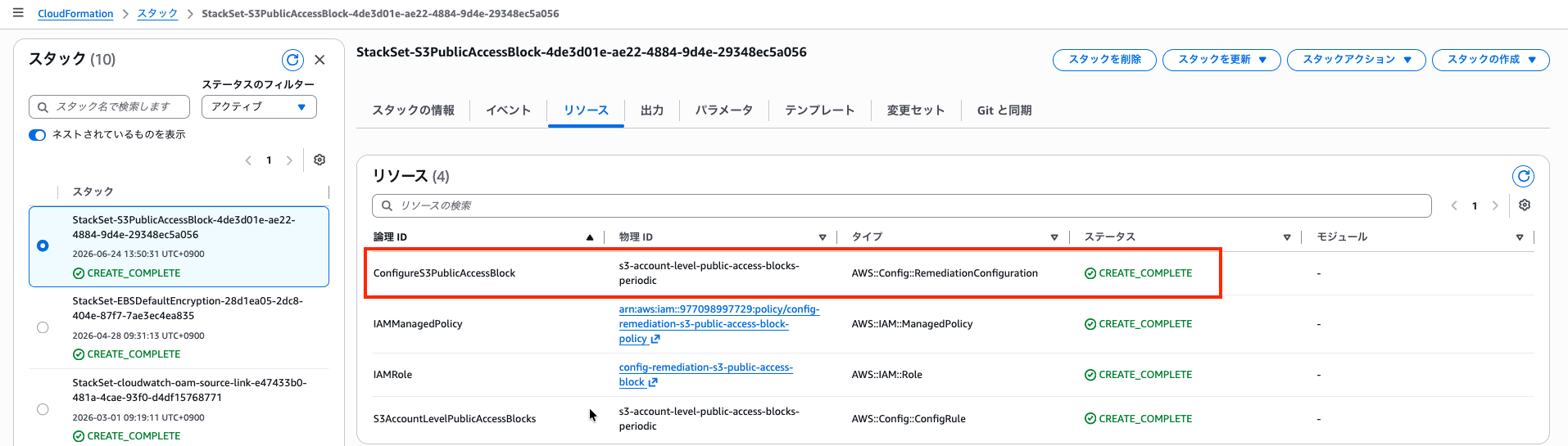
This is a screenshot of the resources created for the stack instance.
It looks like the RemediationConfiguration for the Config Rule has been created.
Let's check the actual Config Rule.
The remediation action is properly configured.
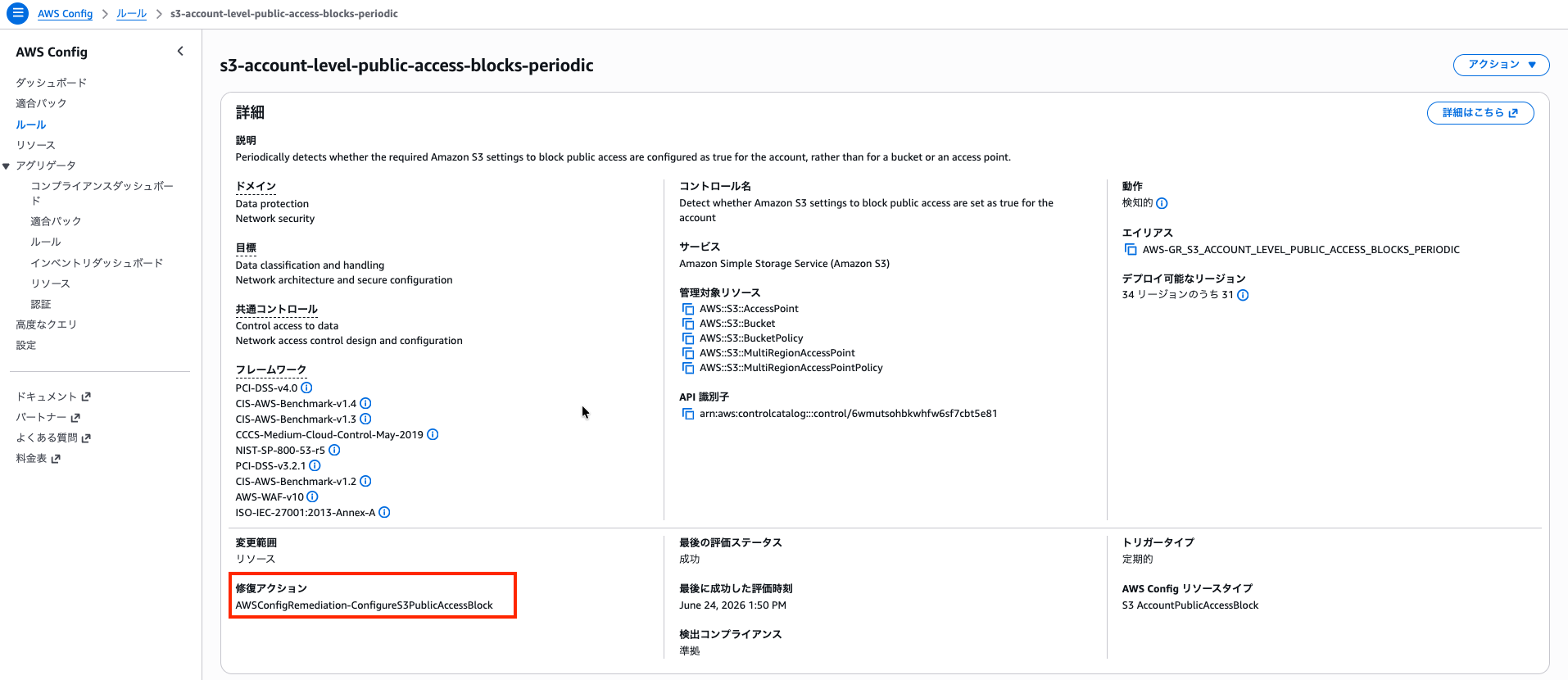
This is the behavior of a normal account.
Next, here are the results for Account B.
The RemediationConfiguration for the Config Rule is absent from the resources created for the stack instance.
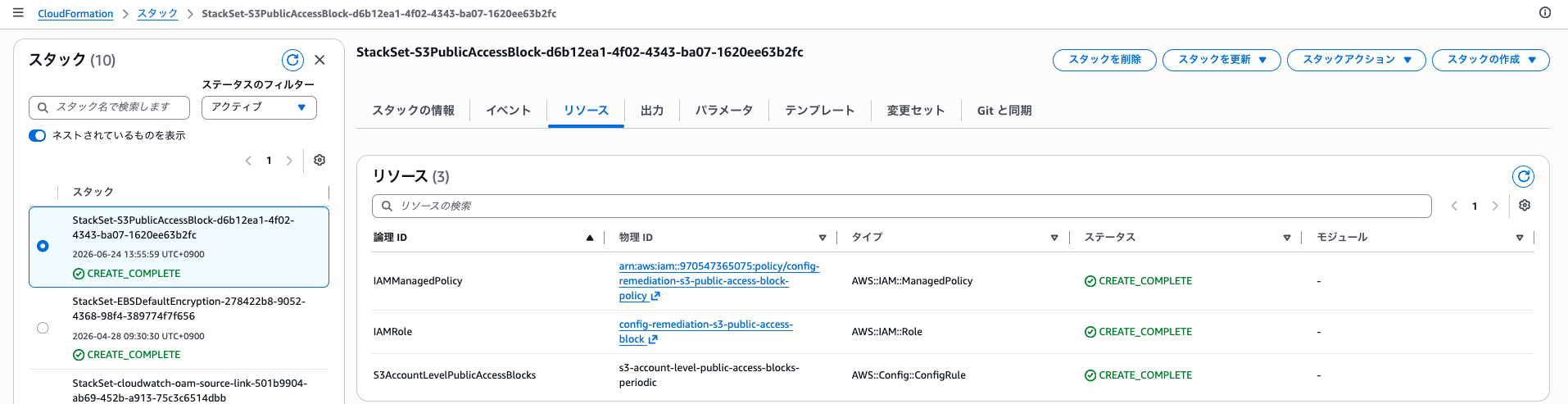
Even when checking the Config Rule, the Rule exists but the remediation action is not configured.

This is the behavior of an exception account.
About Operations (Adding Exception Accounts)
Set the account ID to be excluded in ExceptionAccountId1 or ExceptionAccountId2 in the StackSets parameters.
When setting two or more, add parameters to the template such as ExceptionAccountId3.
However, please note that the number of conditions that can be specified in !Or is between 2 and 10.
Conclusion
While CloudFormation StackSets auto-deployment does not allow exclusion at the account level, by combining template Conditions with the AWS::AccountId pseudo-parameter, resource creation can be controlled per account.
This approach of maintaining visibility through Config Rules while disabling only auto-remediation can be applied with the same pattern to other Config Rule + auto-remediation StackSets, such as deletion of default security group rules.
That's all from Yoshida of the Cloud Business Division!