
I Tried Bypassing a CloudFront VPC Origin Failure Using Inter-Region VPC Peering

This page has been translated by machine translation. View original
Introduction
From 16:45 JST (12:45 AM PDT) to 20:18 JST (4:18 AM PDT) on July 16, 2026, an outage occurred in which 5xx errors increased for connections via CloudFront VPC origins. The timeline below is based on the final report from the AWS Service Health Dashboard (SHD).
| Time (PDT) | Time (JST) | Details |
|---|---|---|
| 12:45 AM | 16:45 | Outage began (5xx errors increased for VPC origin users) |
| 2:57 AM | 18:57 | Root cause identified |
| 3:52 AM | 19:52 | Mitigation applied |
| 4:18 AM | 20:18 | Fully recovered |
The root cause was that the fleet that manages private connections to VPC origins reached an internal constraint. Because this constraint was exceeded, routing configuration was no longer correctly distributed to the network processors, which affected connections via VPC origins.
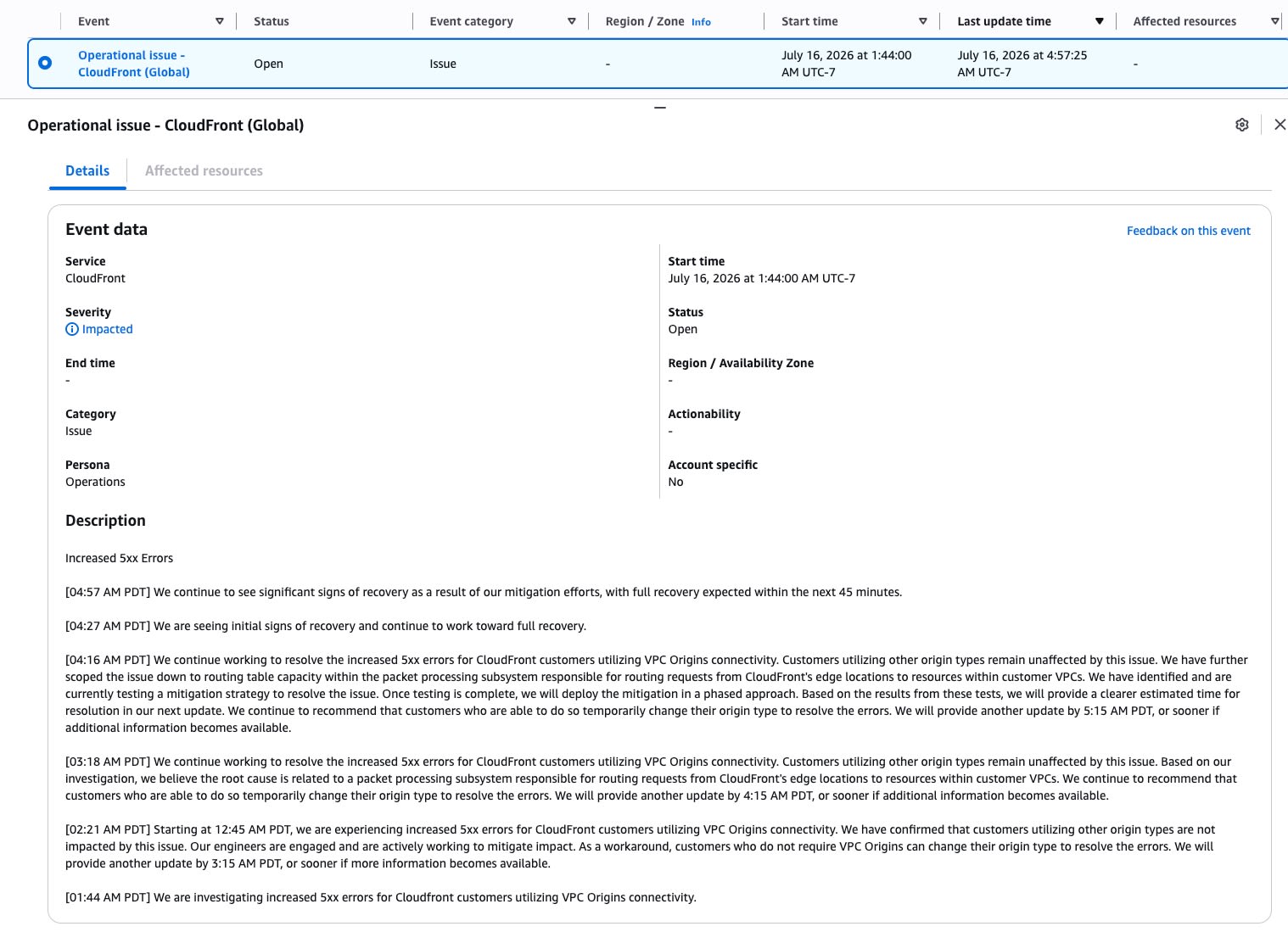
Between 12:45 AM and 4:18 AM PDT, we experienced increased 5xx errors for CloudFront customers utilizing VPC Origins connectivity. [...] We identified the root cause of the issue as an internal constraint on the fleet that manages connections to private VPC origins. When this constraint was reached, the system responsible for distributing routing configuration to our network processors failed to load the updated configuration data correctly, affecting routing of VPC Origin connections.
As a workaround, changing to an origin type other than VPC origin ("change their origin type") was advised. This article is a practical example of this recommended workaround, recording how I designed and built a path that does not go through a VPC origin, and how long it took to recover. The assumed configuration of the target service is explained in the following article.
Observing the Outage
I extracted CloudFront access logs v2 with Amazon Athena and aggregated them per minute.
This shows the trend in the number of status=0 (ClientCommError) responses and in latency, which increased in step with the VPC origin outage.
| Time | Total | status=0 | 0 rate | 404 | P95(s) | P99(s) |
|---|---|---|---|---|---|---|
| 16:45 | 1,542 | 1 | 0.1% | 8 | 0.796 | 1.224 |
| 16:46 | 1,724 | 0 | 0.0% | 6 | 0.871 | 1.134 |
| 16:47 | 1,346 | 0 | 0.0% | 16 | 0.770 | 1.187 |
| 16:48 | 1,441 | 1 | 0.1% | 3 | 0.765 | 1.253 |
| 16:49 | 1,273 | 0 | 0.0% | 8 | 0.831 | 1.646 |
| 16:50 | 1,331 | 0 | 0.0% | 17 | 0.792 | 1.408 |
| 16:51 | 1,657 | 0 | 0.0% | 3 | 0.799 | 1.446 |
| 16:52 | 1,479 | 0 | 0.0% | 34 | 0.802 | 1.469 |
| 16:53 | 1,152 | 39 | 3.4% | 26 | 0.751 | 1.700 |
| 16:54 | 729 | 200 | 27.4% | 53 | 30.518 | 30.784 |
| 16:55 | 732 | 250 | 34.2% | 60 | 30.326 | 30.554 |
| 16:56 | 643 | 245 | 38.1% | 53 | 30.311 | 30.613 |
| 16:57 | 826 | 278 | 33.7% | 42 | 30.339 | 30.627 |
| 16:58 | 703 | 261 | 37.1% | 62 | 30.312 | 30.562 |
| 16:59 | 674 | 299 | 44.4% | 69 | 30.312 | 30.448 |
This is the breakdown by major HTTP status. The normal rate is calculated as "(total − status=0 − 404) / total".
| Time | Total | 200 | 301 | 404 | 0 | 200 rate | Normal rate |
|---|---|---|---|---|---|---|---|
| 16:45 | 1,542 | 1,417 | 87 | 8 | 1 | 91.9% | 99.4% |
| 16:46 | 1,724 | 1,561 | 126 | 6 | 0 | 90.5% | 99.7% |
| 16:47 | 1,346 | 1,263 | 37 | 16 | 0 | 93.8% | 98.8% |
| 16:48 | 1,441 | 1,369 | 43 | 3 | 1 | 95.0% | 99.7% |
| 16:49 | 1,273 | 1,210 | 27 | 8 | 0 | 95.1% | 99.4% |
| 16:50 | 1,331 | 1,191 | 49 | 17 | 0 | 89.5% | 98.7% |
| 16:51 | 1,657 | 1,600 | 29 | 3 | 0 | 96.6% | 99.8% |
| 16:52 | 1,479 | 1,364 | 41 | 34 | 0 | 92.2% | 97.2% |
| 16:53 | 1,152 | 1,028 | 33 | 26 | 39 | 89.2% | 94.4% |
| 16:54 | 729 | 436 | 27 | 53 | 200 | 59.8% | 65.3% |
| 16:55 | 732 | 357 | 47 | 60 | 250 | 48.8% | 57.7% |
| 16:56 | 643 | 311 | 19 | 53 | 245 | 48.4% | 53.7% |
| 16:57 | 826 | 445 | 47 | 42 | 278 | 53.9% | 61.3% |
| 16:58 | 703 | 328 | 36 | 62 | 261 | 46.7% | 54.1% |
| 16:59 | 674 | 259 | 31 | 69 | 299 | 38.4% | 45.4% |
The progression of the outage:
- Normal until 16:52 (normal rate of 97% or higher, P95 under 1 second)
- 16:53: Signs began (39 ClientCommErrors appeared)
- 16:54: Outage became apparent (
status=0at 200 requests, P95 spiked to 30 seconds, per-minute request count in the logs decreased) - From 16:55 onward: The normal rate hovered around 50% and did not recover
Because the processing time in the logs had stretched to about 30 seconds, most of the connection failures that occurred at 16:53 were probably recorded in the 16:54 logs.
Degraded Behavior of the Existing Failover
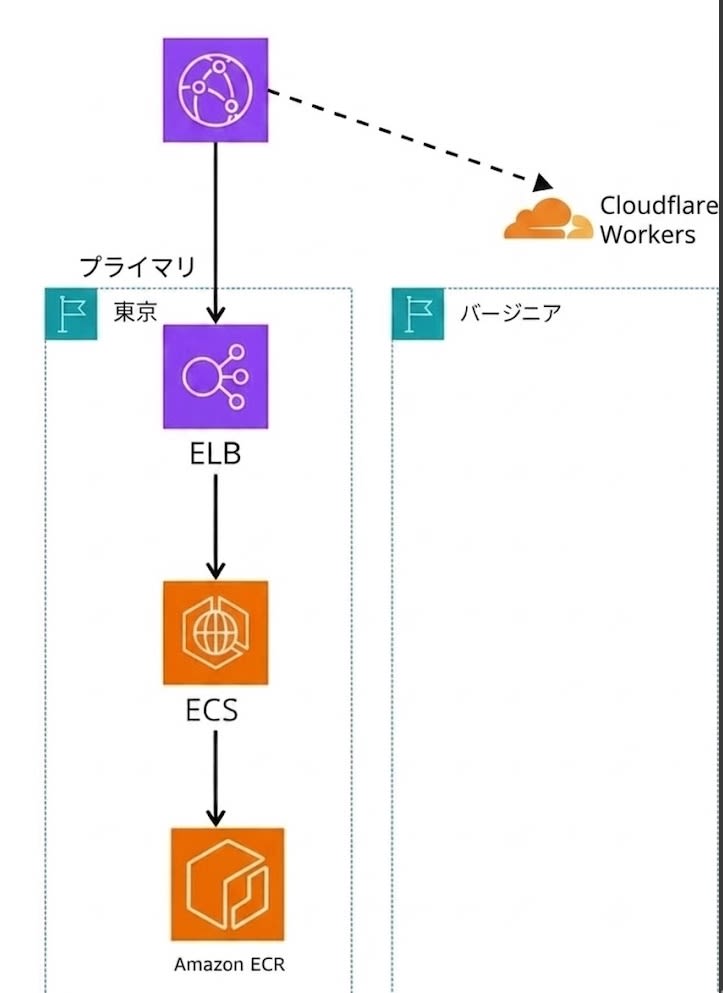
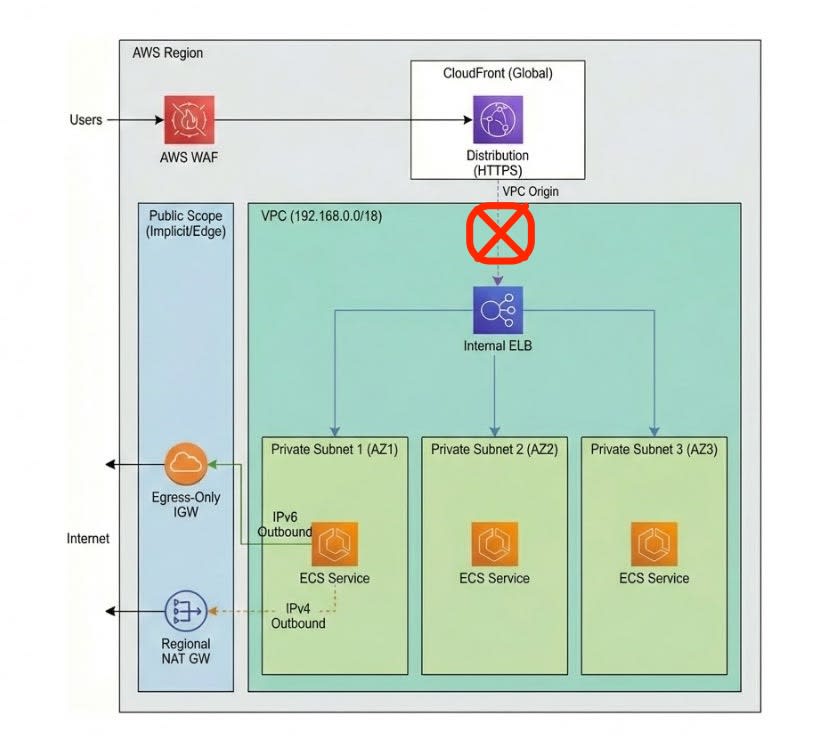
This service has CloudFront origin failover configured, with Cloudflare Workers registered as the secondary origin. Even after reaching the origin via the VPC origin began to fail, the top page and article pages continued to be served normally from this degraded fallback. On the other hand, dynamic features such as pre-publication preview could not be covered by the fallback and were affected, so I carried out recovery work using a bypass configuration.
Design Decisions for the Bypass Configuration
The approach was to add a path to CloudFront that does not go through a VPC origin. Since the failure rate was rising for requests via the VPC origin, I judged that if I could bypass that segment and reach the existing backend (ALB → ECS in the Tokyo region), the functionality could be restored.
At the time I started the work, I was not certain that it was a VPC origin outage. Considering the possibility that there was a problem with the path from CloudFront directly into the VPC origin in the Tokyo region, I chose a Public ALB in N. Virginia (us-east-1) as the entry point of the path.
This is the final path.
CloudFront → バージニアALB(HTTPS) → Inter-Region VPC Peering → 東京NLB(固定IP) → 東京ALB → ECS
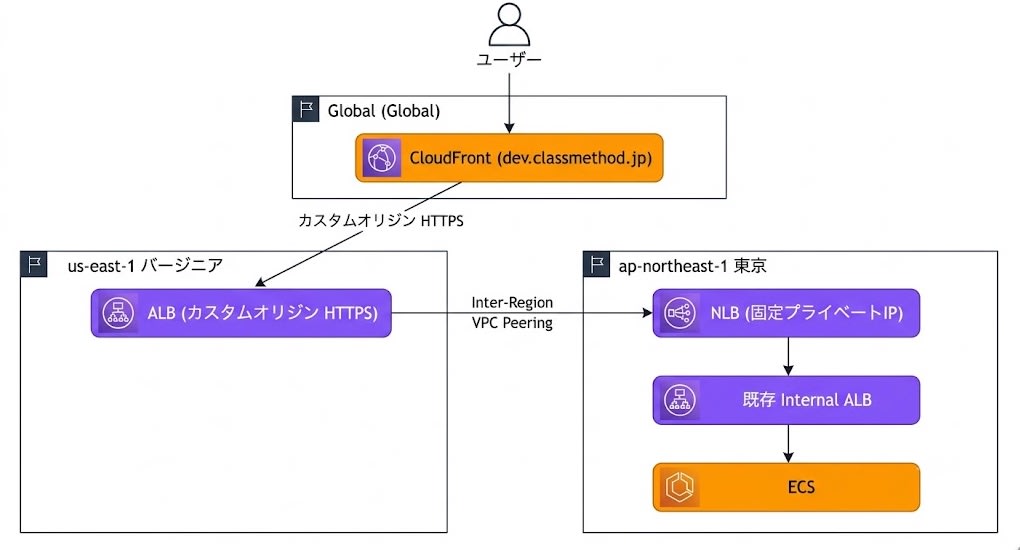
Because the private IPs of an ALB change, I placed an NLB (target type ALB) on the Tokyo side in order to fix the target across the VPC peering.
Steps to Build the Bypass Configuration
I describe the steps for the final configuration in order. Resource identifiers have been replaced with dummy values.
Creating the Inter-Region VPC Peering
I created a VPC peering connection with the default VPC in N. Virginia (172.31.0.0/16) as the requester and the production VPC in Tokyo (192.168.0.0/18) as the accepter.
aws ec2 create-vpc-peering-connection \
  --vpc-id vpc-xxxxxxxxxxxxxxxxx \
  --peer-vpc-id vpc-xxxxxxxxxxxxxxxxx \
  --peer-region ap-northeast-1 \
  --tag-specifications 'ResourceType=vpc-peering-connection,Tags=[{Key=Name,Value=temp-bypass-interregion}]' \
  --region us-east-1
VpcPeeringConnectionId: pcx-xxxxxxxxxxxxxxxxx
Status: initiating-request
Accept it on the Tokyo region side.
aws ec2 accept-vpc-peering-connection \
  --vpc-peering-connection-id pcx-xxxxxxxxxxxxxxxxx \
  --region ap-northeast-1
Status: active
Route Table Configuration (Bidirectional)
Add a route to the other side's CIDR in the route tables of both VPCs.
# Virginia side: Add a route to the Tokyo VPC CIDR
aws ec2 create-route \
  --route-table-id rtb-xxxxxxxxx \
  --destination-cidr-block 192.168.0.0/18 \
  --vpc-peering-connection-id pcx-xxxxxxxxxxxxxxxxx \
  --region us-east-1

# Tokyo side: Add a route to the Virginia VPC CIDR
aws ec2 create-route \
  --route-table-id rtb-xxxxxxxxxxxxxxxxx \
  --destination-cidr-block 172.31.0.0/16 \
  --vpc-peering-connection-id pcx-xxxxxxxxxxxxxxxxx \
  --region ap-northeast-1
Security Group Configuration
I created a security group for the ALB on the Virginia side and allowed HTTP/HTTPS from the internet.
aws ec2 create-security-group \
  --group-name temp-bypass-alb-sg \
  --description "Temporary bypass ALB SG" \
  --vpc-id vpc-xxxxxxxxxxxxxxxxx \
  --region us-east-1

aws ec2 authorize-security-group-ingress \
  --group-id sg-xxxxxxxxxxxxxxxxx \
  --protocol tcp --port 443 --cidr 0.0.0.0/0 \
  --region us-east-1

aws ec2 authorize-security-group-ingress \
  --group-id sg-xxxxxxxxxxxxxxxxx \
  --protocol tcp --port 80 --cidr 0.0.0.0/0 \
  --region us-east-1
On the Tokyo side, I allowed HTTP from the Virginia VPC in the existing ALB's security group.
aws ec2 authorize-security-group-ingress \
  --group-id sg-xxxxxxxxxxxxxxxxx \
  --protocol tcp --port 80 --cidr 172.31.0.0/16 \
  --region ap-northeast-1
Tokyo: Creating an Internal NLB (Fixed Private IPs, Target Type ALB)
To fix the IPs for the target across the peering, I created an internal NLB in Tokyo. Private IPs are explicitly assigned to each subnet.
aws elbv2 create-load-balancer \
  --name temp-bypass-nlb \
  --type network \
  --scheme internal \
  --subnet-mappings \
    SubnetId=subnet-xxxxxxxxxxxxxxxxx,PrivateIPv4Address=192.168.0.10 \
    SubnetId=subnet-xxxxxxxxxxxxxxxxx,PrivateIPv4Address=192.168.16.10 \
    SubnetId=subnet-xxxxxxxxxxxxxxxxx,PrivateIPv4Address=192.168.32.10 \
  --region ap-northeast-1
固定IP: 192.168.0.10, 192.168.16.10, 192.168.32.10
Create a target group with target type alb, register the existing ALB, and create a TCP:80 listener.
aws elbv2 create-target-group \
  --name temp-bypass-nlb-tg \
  --protocol TCP \
  --port 80 \
  --target-type alb \
  --vpc-id vpc-xxxxxxxxxxxxxxxxx \
  --region ap-northeast-1

aws elbv2 register-targets \
  --target-group-arn arn:aws:elasticloadbalancing:ap-northeast-1:123456789012:targetgroup/temp-bypass-nlb-tg/xxxxxxxxxxxxxxxx \
  --targets Id=arn:aws:elasticloadbalancing:ap-northeast-1:123456789012:loadbalancer/app/existing-alb/xxxxxxxxxxxxxxxx \
  --region ap-northeast-1

aws elbv2 create-listener \
  --load-balancer-arn arn:aws:elasticloadbalancing:ap-northeast-1:123456789012:loadbalancer/net/temp-bypass-nlb/xxxxxxxxxxxxxxxx \
  --protocol TCP \
  --port 80 \
  --default-actions Type=forward,TargetGroupArn=arn:aws:elasticloadbalancing:ap-northeast-1:123456789012:targetgroup/temp-bypass-nlb-tg/xxxxxxxxxxxxxxxx \
  --region ap-northeast-1
Virginia: Creating an Internet-facing ALB (HTTPS, ACM Wildcard Certificate)
I created an internet-facing ALB in Virginia to serve as the CloudFront origin.
aws elbv2 create-load-balancer \
  --name temp-bypass-alb \
  --type application \
  --scheme internet-facing \
  --subnets subnet-xxxxxxxxxxxxxxxxx subnet-xxxxxxxxxxxxxxxxx \
  --security-groups sg-xxxxxxxxxxxxxxxxx \
  --region us-east-1
DNSName: temp-bypass-alb-xxxxxxxxxx.us-east-1.elb.amazonaws.com
I created a target group with target type ip and attached the ACM wildcard certificate to the HTTPS listener. HTTP is redirected to HTTPS.
aws elbv2 create-target-group \
  --name temp-bypass-tg \
  --protocol HTTP \
  --port 80 \
  --target-type ip \
  --vpc-id vpc-xxxxxxxxxxxxxxxxx \
  --region us-east-1

aws elbv2 create-listener \
  --load-balancer-arn arn:aws:elasticloadbalancing:us-east-1:123456789012:loadbalancer/app/temp-bypass-alb/xxxxxxxxxxxxxxxx \
  --protocol HTTPS \
  --port 443 \
  --certificates CertificateArn=arn:aws:acm:us-east-1:123456789012:certificate/xxxxxxxx-xxxx-xxxx-xxxx-xxxxxxxxxxxx \
  --default-actions Type=forward,TargetGroupArn=arn:aws:elasticloadbalancing:us-east-1:123456789012:targetgroup/temp-bypass-tg/xxxxxxxxxxxxxxxx \
  --region us-east-1

aws elbv2 create-listener \
  --load-balancer-arn arn:aws:elasticloadbalancing:us-east-1:123456789012:loadbalancer/app/temp-bypass-alb/xxxxxxxxxxxxxxxx \
  --protocol HTTP \
  --port 80 \
  --default-actions 'Type=redirect,RedirectConfig={Protocol=HTTPS,Port=443,StatusCode=HTTP_301}' \
  --region us-east-1
Virginia ALB → Registering the Tokyo NLB Fixed IPs as Targets
Register the fixed private IPs of the Tokyo NLB in the target group of the Virginia ALB. Since these are IP targets across the VPC peering, AvailabilityZone=all is specified.
aws elbv2 register-targets \
  --target-group-arn arn:aws:elasticloadbalancing:us-east-1:123456789012:targetgroup/temp-bypass-tg/xxxxxxxxxxxxxxxx \
  --targets Id=192.168.0.10,Port=80,AvailabilityZone=all \
            Id=192.168.16.10,Port=80,AvailabilityZone=all \
            Id=192.168.32.10,Port=80,AvailabilityZone=all \
  --region us-east-1
Registering the DNS CNAME Record
I made the ALB reachable at bypass.example.com, ensuring this hostname matches the domain covered by the ACM wildcard certificate set on the ALB's HTTPS listener. This allows it to be used as an HTTPS origin from CloudFront.
Adding an Origin to CloudFront + Switching the Failover Group's Primary
I added a new origin bypass-alb-origin to the CloudFront distribution. The domain is bypass.example.com, and the protocol is HTTPS only (TLSv1.2). I switched the primary of the existing origin failover group to bypass-alb-origin and kept the Cloudflare Workers origin as the secondary.
Confirming Recovery
At 18:42 JST, I confirmed normal operation via the bypass path. I had waited about one hour from the outage onset (16:53) for AWS to recover, but it did not, so I started building the bypass configuration at 18:03. It took about 39 minutes from starting to recovery. I confirmed normal operation of features such as pre-publication preview.
Summary
In responding to this CloudFront VPC origin outage, I followed the "change to an origin type other than VPC origin" advice given in AWS Health and switched to a bypass path that does not go through a VPC origin. This allowed me to restore the dynamic features that had been affected.
The bypass configuration I built is for temporary recovery, so I plan to remove the additional NLB and ALB to avoid unnecessary costs. Going forward, a topic to consider is whether to prepare public subnets in the Tokyo VPC in advance in preparation for similar outages. This workload does not require Block Public Access, so simply adding public subnets would have no cost impact. On the other hand, the mere existence of public subnets creates the risk of IPv4 address charges and of unintended exposure. I would like to consider this while weighing these trade-offs.
