
Cloudinary usage API explained in detail — Deep diving into field specifications and aggregation logic

This page has been translated by machine translation. View original
In a previous blog post, I introduced Cloudinary's pricing structure and how to check usage.
In this article, I'll dive deeper into the usage() method that I briefly mentioned previously.
Note that much of this article's content summarizes behaviors not documented in the official documentation that I've verified through testing. Specifications may change without notice, so I recommend confirming on your own and contacting Cloudinary support for important decisions.
What is the usage method
- Retrieves usage and credit/unit consumption on a daily basis
- Since it uses API execution (API keys are issued per cloud environment), the data is environment-specific
- Can specify data for up to 90 days in the past
If you need data from more than 90 days ago, you can refer to the Usage Reports in the console (up to 12 months, excluding consumed units) or the Quota Dashboard (current billing cycle only), or contact Cloudinary support.
The Admin API, including usage(), has a rate limit of 500 requests per hour. Enterprise plans have 2,000 requests or more (actual value can be confirmed from Settings > Security).
How to call
The date parameter is optional. You can specify a date up to 90 days in the past to retrieve data, or omit it to get current day data.
Python
import cloudinary, cloudinary.api
result = cloudinary.api.usage(date = "2026-04-01")
Node.js
const cloudinary = require("cloudinary").v2;
const result = await cloudinary.api.usage({ date: "2026-04-01" });
For other environments, please refer to the documentation.
Response
Field explanations
The response consists of the following fields.
For Enterprise plans, the field name "credits" is still used. For non-Enterprise plans, read "units" instead of "credits" in the table below.
| Field | Description |
|---|---|
| plan | Contract plan name |
| last_updated | Date of the last data update (previous day of the request) |
| date_requested | The date specified in the request (current date at UTC 0:00 if omitted) |
| transformations | Number of transformations (usage), units consumed by transformations (credits_usage), breakdown by processing type (breakdown) |
| objects | Total assets (usage = original assets + derived assets) |
| bandwidth | Delivered data volume (usage, in bytes) and consumed units (credits_usage) |
| storage | Storage usage (usage, in bytes) and consumed units (credits_usage) |
| impressions | Image delivery count (usage) and consumed units (credits_usage) - Only used in Enterprise contracts since January 2024 that measure images by delivery count instead of bandwidth |
| seconds_delivered | Video delivery seconds (usage) and consumed units (credits_usage) - Only used in Enterprise contracts that measure videos by seconds instead of bandwidth |
| credits | Total units consumed across all items (usage) — When calling without a date option, also includes credit limit or contracted units (limit) and usage percentage (used_percent) |
| resources | Total number of original assets |
| derived_resources | Total number of derived assets (transformed assets) |
| requests | Number of API requests |
| (Add-ons) | Such as aws_rek_tagging, google_tagging, cloudinary_ai, object_detection, etc., each with usage (usage) and limit (limit) if used |
| media_limits | Contract plan's file size limits for images/videos/other files (image_max_size_bytes, video_max_size_bytes, raw_max_size_bytes, in bytes), pixel size limits for images/other (image_max_px, asset_max_total_px) |
| rate_limit_allowed | Admin API rate limit (maximum number of calls) |
| rate_limit_reset_at | Rate limit reset time |
| rate_limit_remaining | Remaining number of rate limit calls |
The usage for transformations, bandwidth, impressions, seconds_delivered, and add-ons shows the usage for that day. Only storage is an exception, showing cumulative usage as of the specified date. See "Calculation method for each item" below for details.
Response example
{
  "plan": "Free",
  "last_updated": "2026-04-01",
  "date_requested": "2026-04-02T00:00:00Z",
  "transformations": {
    "usage": 26,
    "credits_usage": 0.03,
    "breakdown": {
      "transformation": 26
    }
  },
  "objects": {
    "usage": 541
  },
  "bandwidth": {
    "usage": 9227721,
    "credits_usage": 0.01
  },
  "storage": {
    "usage": 295753639,
    "credits_usage": 0.28
  },
  "impressions": {
    "usage": 41,
    "credits_usage": 0
  },
  "seconds_delivered": {
    "usage": 0,
    "credits_usage": 0
  },
  "credits": {
    "usage": 0.32,
    "limit": 25,
    "used_percent": 1.28
  },
  "resources": 130,
  "derived_resources": 411,
  "requests": 43,
  "aws_rek_tagging": {
    "usage": 1,
    "limit": 50
  },
  "cloudinary_ai": {
    "usage": 20,
    "limit": 15
  },
  "media_limits": {
    "image_max_size_bytes": 10485760,
    "video_max_size_bytes": 104857600,
    "raw_max_size_bytes": 10485760,
    "image_max_px": 25000000,
    "asset_max_total_px": 50000000
  },
  "rate_limit_allowed": 500,
  "rate_limit_reset_at": "2026-04-02T09:00:00.000Z",
  "rate_limit_remaining": 499
}
Unit consumption calculation rules
Converting usage to units
The conversion rates for each item per credit/unit vary by plan and contract.
For example, Storage in the free plan is converted to credits as follows, and we can see it's rounded to the second decimal place:
295753639 ÷ 1,073,741,824 (1 GiB) = 0.275.. → 0.28 ✅
"storage": {
  "usage": 295753639,
  "credits_usage": 0.28
},
For conversion rates by plan and detailed unit conversion, please refer to my previous article.
Note that the "GB" or "TB" mentioned in conversion rates are actually calculated as "GiB" and "TiB" as confirmed with support.
Calculation method for each item
While other items show daily usage, Storage shows the cumulative amount as of the specified date, which typically increases gradually.
Here are the unit numbers from day 1 and day 30 for an account:
| Item | Units on 3/1 | Units on 3/30 |
|---|---|---|
| transformations | 0.44 | 0.36 |
| bandwidth | 0 | 0 |
| storage | 5.36 | 5.94 |
| impressions | 0.25 | 0.26 |
| credits (total) | 6.05 | 6.56 |
Daily unit consumption is around 6, but the monthly unit consumption for this account was 25.29. This is significantly different from simply adding daily totals (about 6 × 30 days = 180). This is because Storage (about 5.4), which makes up most of the daily total, is counted as the maximum value during the period (only once per month) rather than a daily total.
The actual calculation for the period can be derived as follows:
- sum(
transformations+bandwidth+impressions) + max(storage)storageis the final day value (maximum) for the month- Others are the daily total for the month
⚠️ However, the behavior when large amounts of assets are deleted to reduce storage usage has not been confirmed.
Billing cycle boundaries
The period for referencing consumed units/credits referred to as "one month" is not a calendar month, but varies by environment.
- Regular plans: Always referenced over the past 30 days.
- Enterprise plans: The billing cycle varies by contract, with one month being defined as one month of the billing cycle.
👉🏼 For example, if an Enterprise contract has a billing cycle from "June 17, 2025 to June 16, 2026," then one month is from the 17th of each month to the 16th of the next month.
You can also check the actual monthly boundaries from the Quota Usage page.
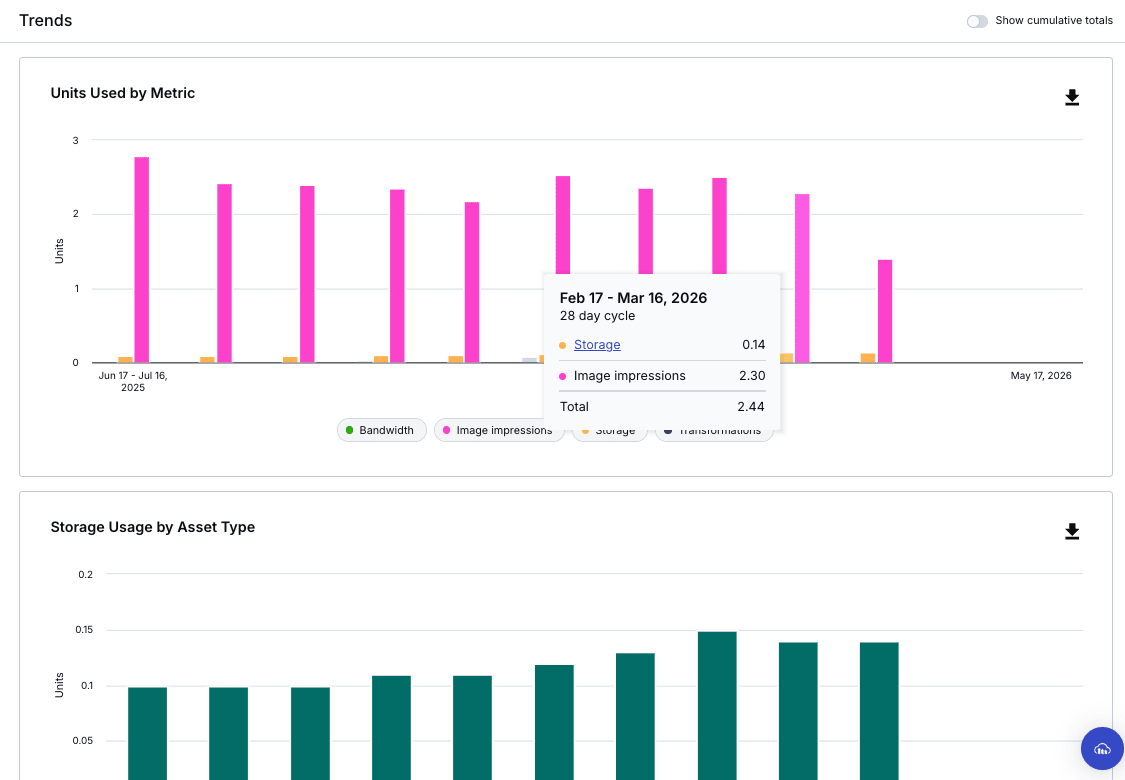
For plans using Image Impressions or Video Seconds
For these plans, images (for impressions) or videos (for seconds_delivered) are converted to units using these metrics, so their respective Bandwidth does not incur unit consumption.
However, due to system specifications, the usage value of bandwidth continues to include image and video delivery volumes. Therefore, when converting to units, there may be discrepancies with the credits_usage value.
Example for Image Impressions plan:
"bandwidth": {
  "usage": 25760033270, // Usage is measured by images
  "credits_usage": 0    // No unit consumption as there's no bandwidth usage for videos/others
},
...
"impressions": {
  "usage": 1328582,
  "credits_usage": 0.XX  // Image delivery consumes units through impressions
},
Script to calculate one billing cycle month
Based on the calculation rules above, I've implemented a script to calculate units for one month.
Python script:
from datetime import date, timedelta

import cloudinary, cloudinary.api

cloudinary.config(
    cloud_name="your_cloud_name",
    api_key="your_api_key",
    api_secret="your_api_secret",
)

START = "2026-02-17"
END   = "2026-03-16"

d0, d1 = date.fromisoformat(START), date.fromisoformat(END)
dates  = [(d0 + timedelta(n)).isoformat() for n in range((d1 - d0).days + 1)]

rows = []
for day in dates:
    r = cloudinary.api.usage(date=day)
    t, b, s, i = r["transformations"], r["bandwidth"], r["storage"], r["impressions"]
    rows.append({
        "t_credits": t["credits_usage"],
        "b_credits": b["credits_usage"],
        "s_credits": s["credits_usage"],
        "i_credits": i["credits_usage"],
    })

total_t = sum(r["t_credits"] for r in rows)
total_b = sum(r["b_credits"] for r in rows)
total_s = max(r["s_credits"] for r in rows)
total_i = sum(r["i_credits"] for r in rows)
print(f"t_credits: {total_t:.2f}")
print(f"b_credits: {total_b:.2f}")
print(f"s_credits: {total_s:.2f}")
print(f"i_credits: {total_i:.2f}")
print(f"total:     {total_t + total_b + total_s + total_i:.2f}")
Results:
t_credits: 11.51
b_credits: 0.00
s_credits: 5.97
i_credits: 7.81
total:     25.29
Comparison and uses with Quota Usage
Quota Usage, which I introduced in my previous blog, is optimal for checking unit consumption for the entire account, although it's still in beta. You can easily analyze it with graphs from the console.
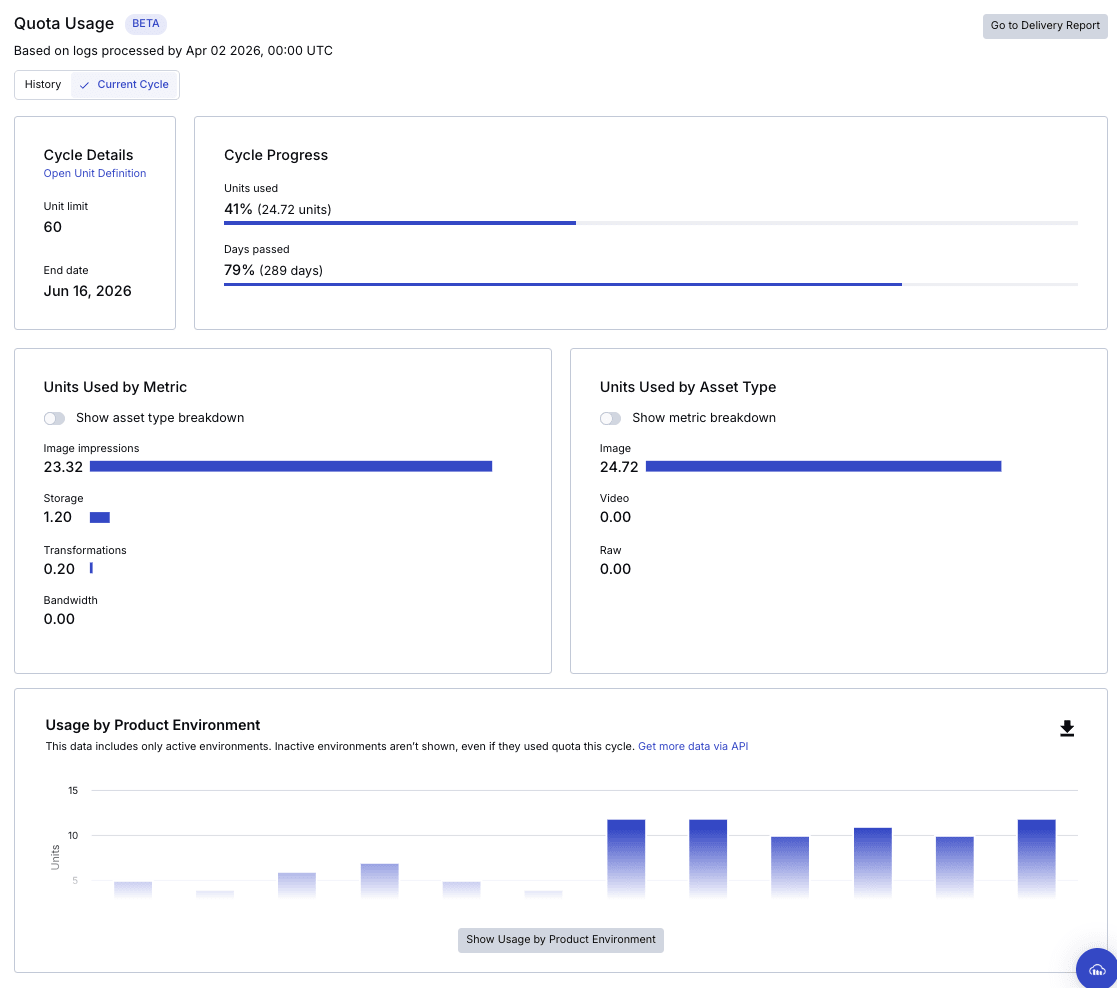
However, it requires Master admin permissions.
The Usage/Delivery Reports in the console allow admins to analyze usage for each environment. The usage API becomes useful when more flexible value manipulation is needed or when checking consumed units without Master admin permissions.
usage() API |
Quota Usage | Usage / Delivery Reports | |
|---|---|---|---|
| Access method | API (script) | Console (Beta) | Console |
| Retrieval unit | Per cloud environment | Entire account (some by environment) | Per cloud environment |
| Data period | Past 90 days (daily) | Current billing cycle | Past 12 months |
| Granularity | Daily | Monthly/cycle | Monthly |
| Unit consumption | Shown ✅ | Shown ✅ | Not shown ❌ |
| Usage | Included ✅ | Overview only ✅ | Included ✅ |
| Graph display | None ❌ | Available ✅ | Available ✅ |
| Required permission | API key for target environment | Master admin rights | Admin rights |
| Notes | Beta - not guaranteed for audit purposes | CSV/PDF export available |
I hope this is helpful!