
I tried importing Claude Code's settings and chat history using /import added in Codex CLI 0.140.0

This page has been translated by machine translation. View original
Hey there! I'm Yuji Nishimura from the Operations Division!
A slash command called /import was added in Codex CLI 0.140.0. Since I use both Claude Code as my main tool and Codex CLI alongside it, I actually tried it out inside the TUI to see how much of the configuration candidates and chat history could be carried over.
I also reviewed the Codex implementation to make sure what appears selected on screen matches what actually gets imported.
What is /import
It's a slash command added in Codex CLI 0.140.0 that imports Claude Code settings, skills, and chat history into Codex CLI.
Previously it was implemented as an automatic migration flow on startup, but it was changed so that users execute it intentionally. It's not a CLI subcommand — it's a slash command that can only be used inside the Codex CLI TUI.
On screen, it's displayed in 3 main groups.
Tools & setup: Settings / Skills / Plugins / MCP servers / Agents / Hooks / Slash commandsCurrent project: Instructions (converts CLAUDE.md to AGENTS.md) / Project-level PluginsChat sessions: Past chat history
In the implementation, only items that Codex determines to be "not yet imported" or "has differences" at that point in time are displayed. Therefore, even if settings.json or skills/ exist on the Claude Code side, if equivalent settings or directories already exist on the Codex side, they may not appear on screen.
Trying It Out
Environment
- Codex CLI 0.141.0
/importaddition release: Codex CLI 0.140.0- macOS
1. Running /import
Start a Codex CLI interactive session and type /import inside the TUI.
The following overview screen (Step 1) will be displayed.
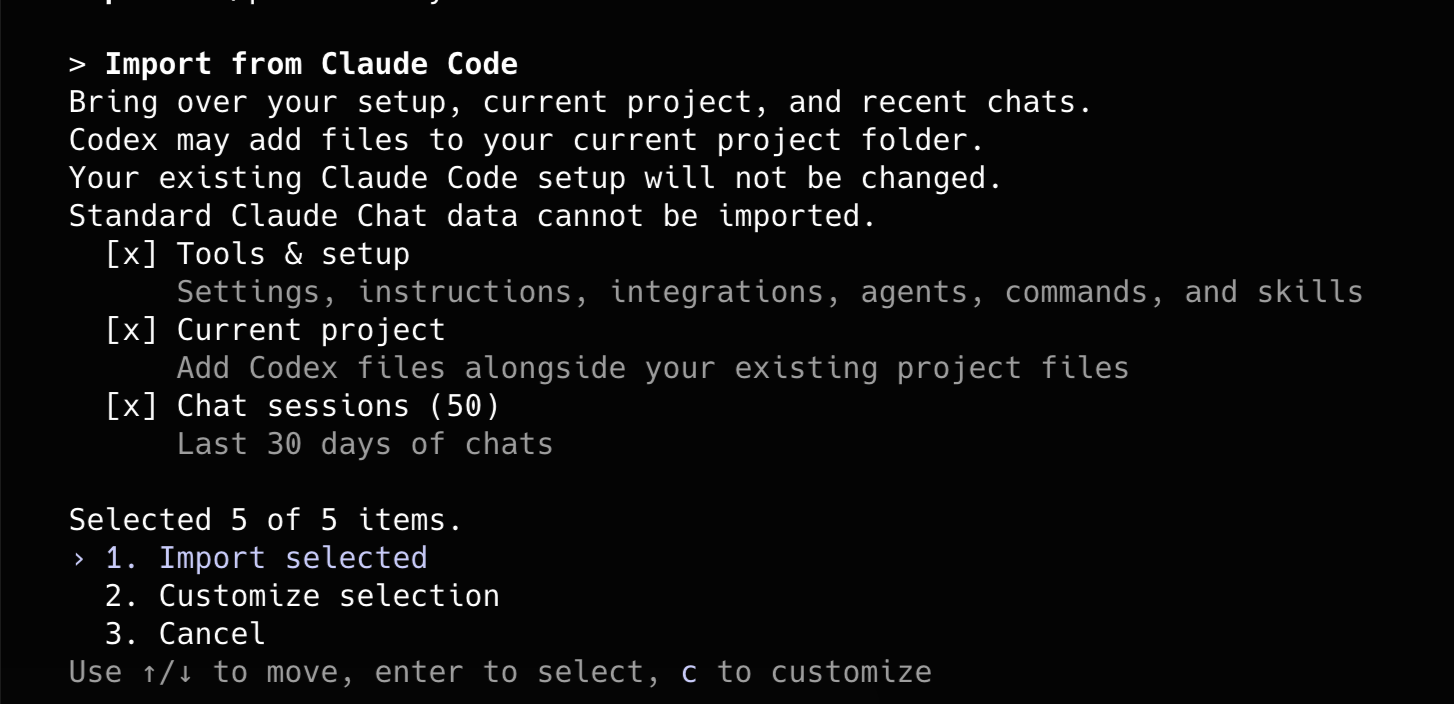
On this screen, initially all 3 groups — Tools & setup, Current project, and Chat sessions — were selected. The display shows Selected 5 of 5 items.. This refers not to the 3 groups themselves, but to the total number of items detected inside the groups (the 5 items individually expanded in the next Step 2).
2. Choosing What to Import
Selecting 2. Customize selection from the overview screen takes you to the customization screen (Step 2). You can toggle individual items with the spacebar, making it possible to select things like "import only settings" or "skip chat history."
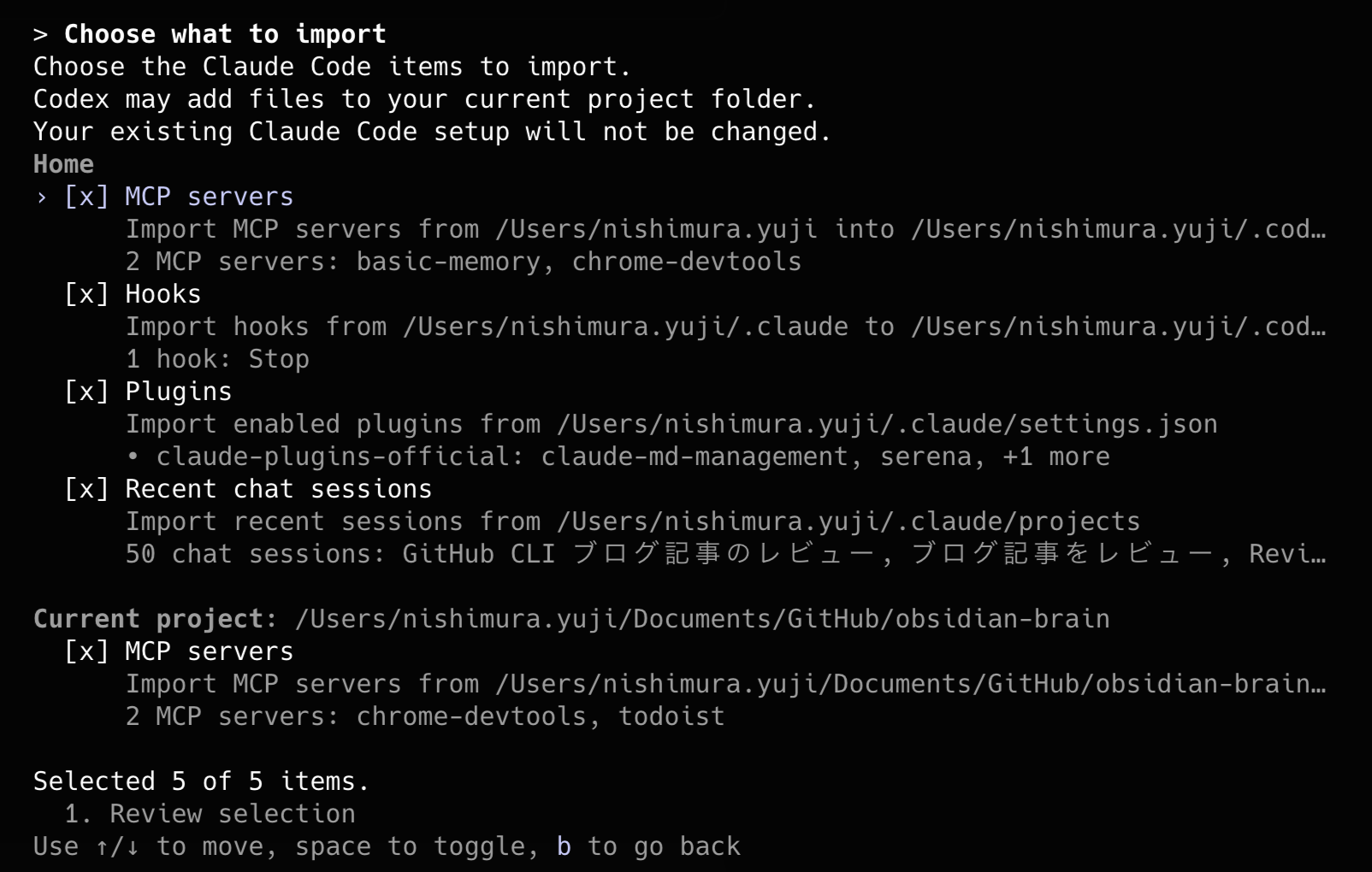
In this environment, the following 5 items were detected on the customization screen.
- Home MCP servers
- Home Hooks
- Home Plugins
- Recent chat sessions
- Current project MCP servers
My Claude Code environment has environment variables and hook settings in ~/.claude/settings.json, skills in ~/.claude/skills/, plugins in ~/.claude/plugins/, and accumulated local chat history. However, what appears as unimported items in this screenshot's selection screen is the 5 items listed above. As mentioned earlier, items where equivalent settings already exist on the Codex side do not appear on this selection screen.
This time I selected only Recent chat sessions to check how it works. After customizing and returning to the overview screen, only Chat sessions (50) was selected. On the overview screen it's displayed as the group name Chat sessions, and (50) represents the number of detected sessions.
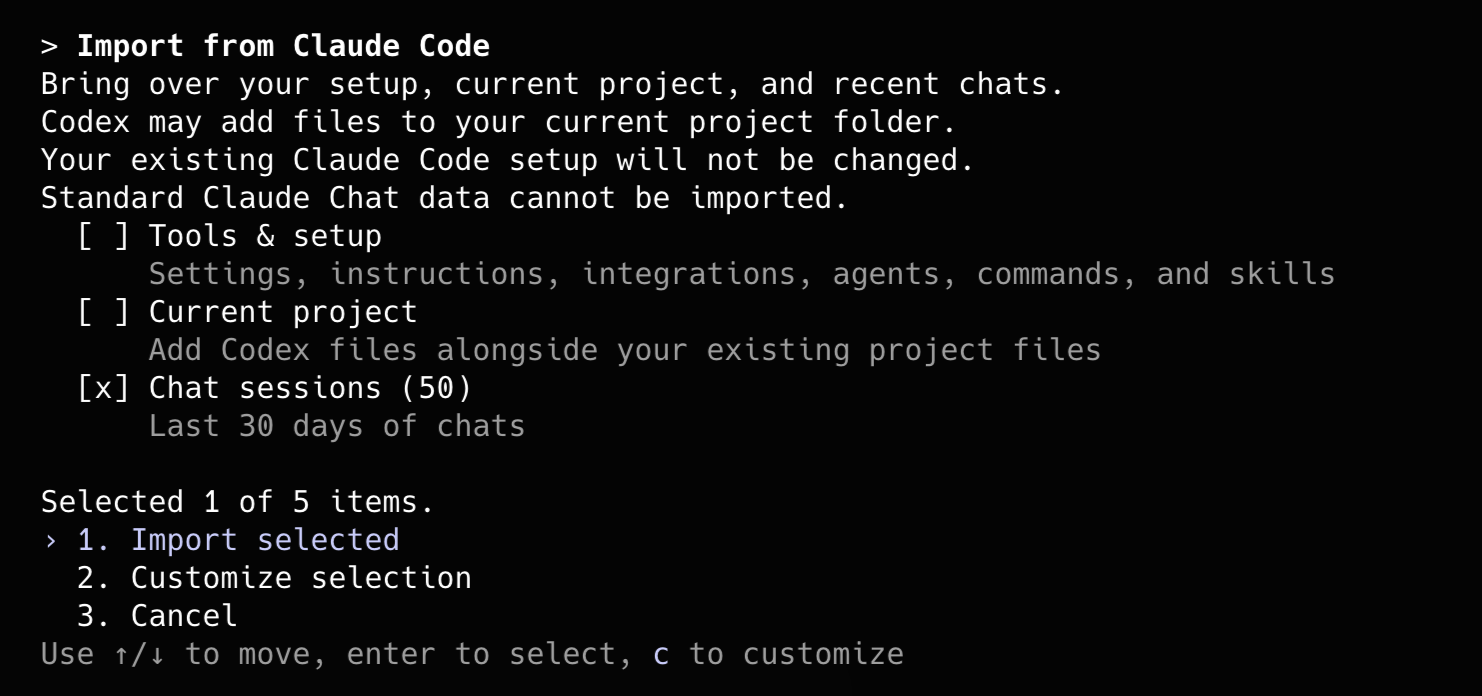
I executed 1. Import selected in this state.
3. Checking the Import Results
After execution, a start log and completion log are displayed in the chat area.

The log this time shows 4 additional items remain.. This means that since only 1 of the 5 detected items was selected for import, the remaining 4 items still remain as unimported.
The import runs asynchronously in the background. You can continue working in the TUI while importing. After completion, you can re-run /import to check the remaining items again.
As shown on the screen, the imported setup becomes effective from new chat sessions. If you import settings and plugins as well, it's safer to verify in a new chat rather than judging only by the currently running session.
Behavior Confirmed from the Implementation
Reading the Codex 0.140.0 implementation, the behavior of settings can be summarized as follows.
- It cannot be executed during remote sessions or local app-server daemon connections. It's designed to run in embedded app-server local TUI sessions.
- Detection looks at both the Home side and the current project side. This is why items like Home MCP servers / Hooks / Plugins and Current project MCP servers appear as separate items as they did this time.
- From
settings.json, what gets converted to Codex'sconfig.tomlin the implementation is mainlyenvandsandbox.enabled. If existing Codex settings exist, missing values are added in a merge. ~/.claude/skills/copies unimported skill directories to the Codex skills directory. However, if a directory with the same name already exists it is skipped, and inSKILL.md, notations like Claude / CLAUDE.md are replaced with Codex-oriented equivalents.~/.claude/plugins/does not behave by copying the entire directory. Based on the enabled plugins and marketplace information in Claude Code'ssettings.json, it adds the marketplace on the Codex side and installs plugins.- Claude Code hooks are converted to Codex's
hooks.json. However, the conversion targets are mainly synchronous command hooks, and hook shapes that are not supported are skipped. - Chat history detects up to 50 items from JSONL files under
~/.claude/projectsthat have been updated within the past 30 days. Already imported history is excluded via a ledger.
For this reason, rather than thinking "everything on the Claude Code side is always copied," it's better to understand it as: "items that Codex can convert and determines to be unimported appear as candidates, and only the selected ones are imported."
Impressions from Trying It Out
What I actually imported this time was only the chat history, and I confirmed the behavior of settings, skills, plugins, and hooks by reading the implementation. These are my impressions with that in mind.
For rule synchronization between AI coding agents, there are also OSS tools like rulesync. Given that such options exist, I think it's a good thing that an official import channel on the Codex CLI side is available without needing an additional tool in between.
The import implementation is not a simple rename — as mentioned earlier, it copies while also replacing terminology like CLAUDE.md and Claude Code with Codex-oriented equivalents.
However, since it's a mechanical conversion, tool names specific to Claude Code like AskUserQuestion, or operational rules premised on Claude Code, will remain as-is. It's probably a good idea to review the AGENTS.md after import to check whether it aligns with the actual tool names and operations in Codex.
The fact that /import became a user action rather than automatic execution means the design avoids a situation where "settings get mixed in without your knowledge." Being able to run it yourself at the timing you need feels easy to use.
However, there are also points to be careful about in environments that already have dotfiles or sync tools set up. Since /import adds and merges selected items to the Codex side, importing items that overlap with your existing design could introduce unintended configuration differences.
Summary
I confirmed that Codex CLI's /import can carry over Claude Code configuration candidates and chat history to Codex CLI.
- Can be executed simply by typing
/importinside the TUI (not available during remote sessions or daemon connections) - Tools & setup / Current project / Chat sessions can be toggled individually across 3 groups
- Only the selected items from among the detected items are actually imported
- Chat history candidates are limited to within the past 30 days, up to a maximum of 50 items
- Runs asynchronously in the background, and setup becomes effective from new chat sessions
- Convenient for situations where you want to manually import differences, but in environments where synchronization is already systematized, you need to narrow down what to import
I hope this is helpful to someone.
Reference links:
- Codex CLI v0.140.0 release notes
- PR #27071: /import slash command
- PR #27070: Import from Claude Code
- PR #27703: restore source-specific import copy
- Codex 0.140.0 implementation: external_agent_config_migration_flow.rs
- Codex 0.140.0 implementation: external_agent_config.rs
- Codex 0.140.0 implementation: external-agent-sessions detect.rs

