
I Tried Out Cognito Token Exchange with AgentCore Gateway

This page has been translated by machine translation. View original
Introduction
Hello, I'm Jinno from the Consulting Department, and I love Amazon Bedrock AgentCore.
Amazon Cognito now supports OAuth 2.0 token exchange (RFC 8693)!
I'll combine it with AgentCore Gateway and quickly try out the flow where an agent calls an API on behalf of a user.
You can think of it as the Cognito version of the On-Behalf-Of (OBO) flow I tried with Entra ID!
For how to narrow scopes on the Cognito side, Suzuki Ryo's article is also a helpful reference, so please take a look at it as well!
Key Changes
First, let's briefly go over how token exchange works!
Token exchange is an OAuth 2.0 mechanism that swaps the token you hold for a new token intended for a different destination. It can be used to call another service on behalf of a user (On-Behalf-Of, or OBO for short).
For example, imagine an internal assistant AI calling a procurement system on behalf of an employee.
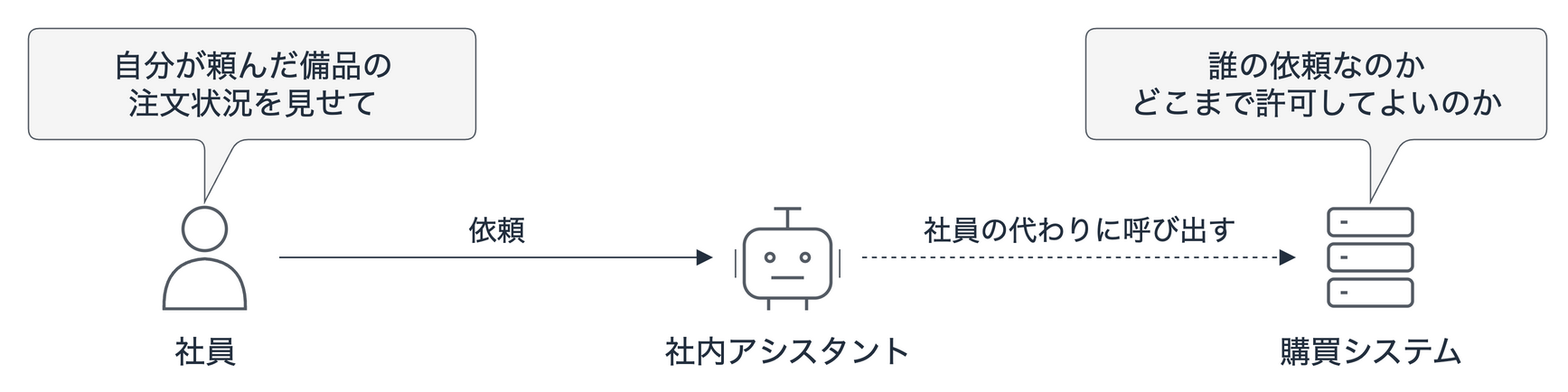
If you pass the employee's token as is in this scenario, it could also be used to call various systems other than the procurement system, which is not great. It would be scary if an AI agent took some strange action on its own, right?
That's because the employee's token doesn't contain a destination, and its scope (range of permissions) remains broad.
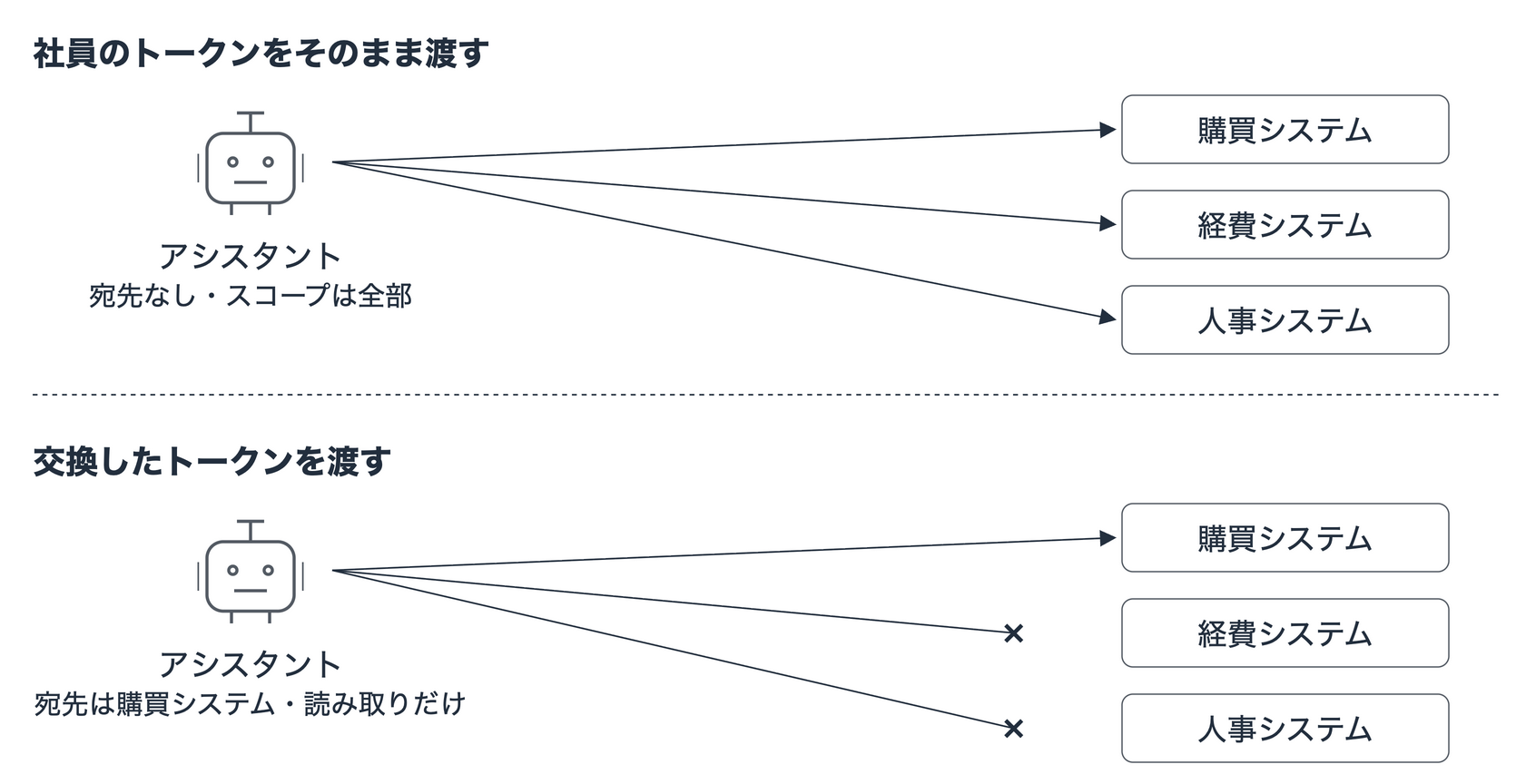
The OAuth 2.0 security best practices (RFC 9700) also recommend limiting an access token's permissions to the minimum needed for its purpose and restricting its destination to a specific server.
So the assistant passes the employee's token and its own token to Cognito, and receives a token addressed to the procurement system with narrowed permissions. This lets you have an AI agent use external systems safely!
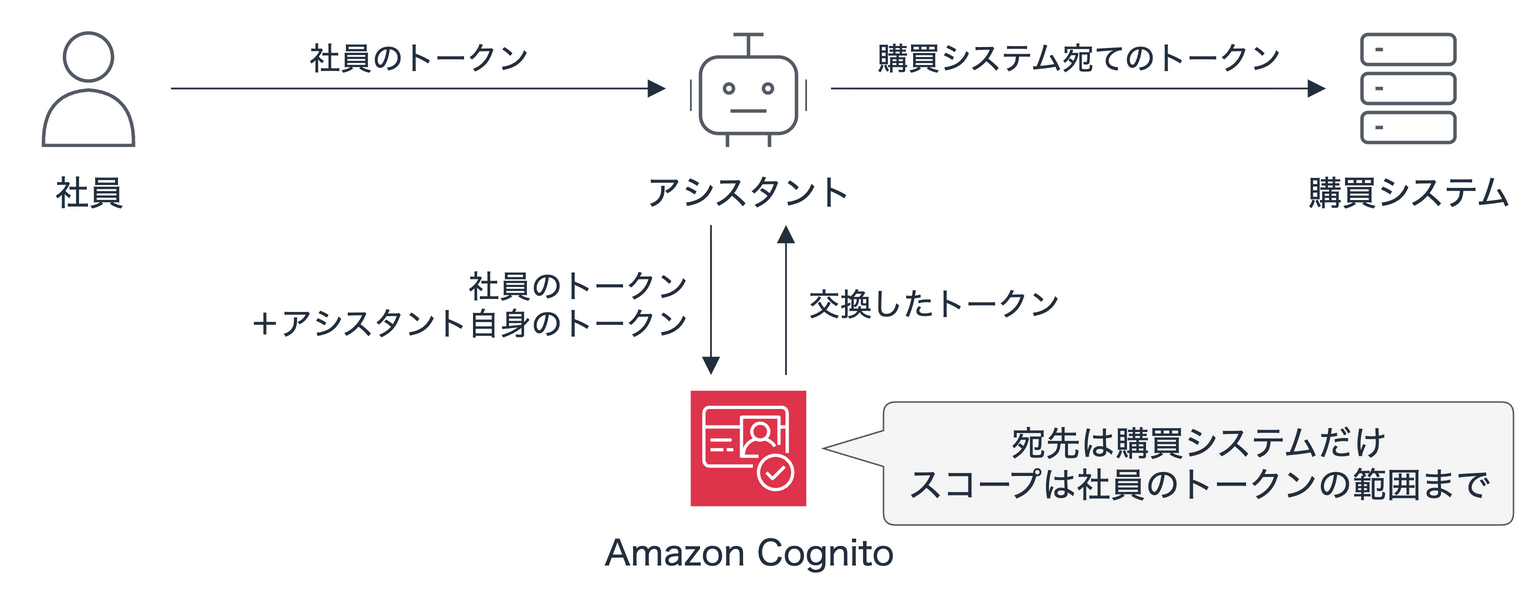
The procurement system can receive the exchanged token and determine the following.
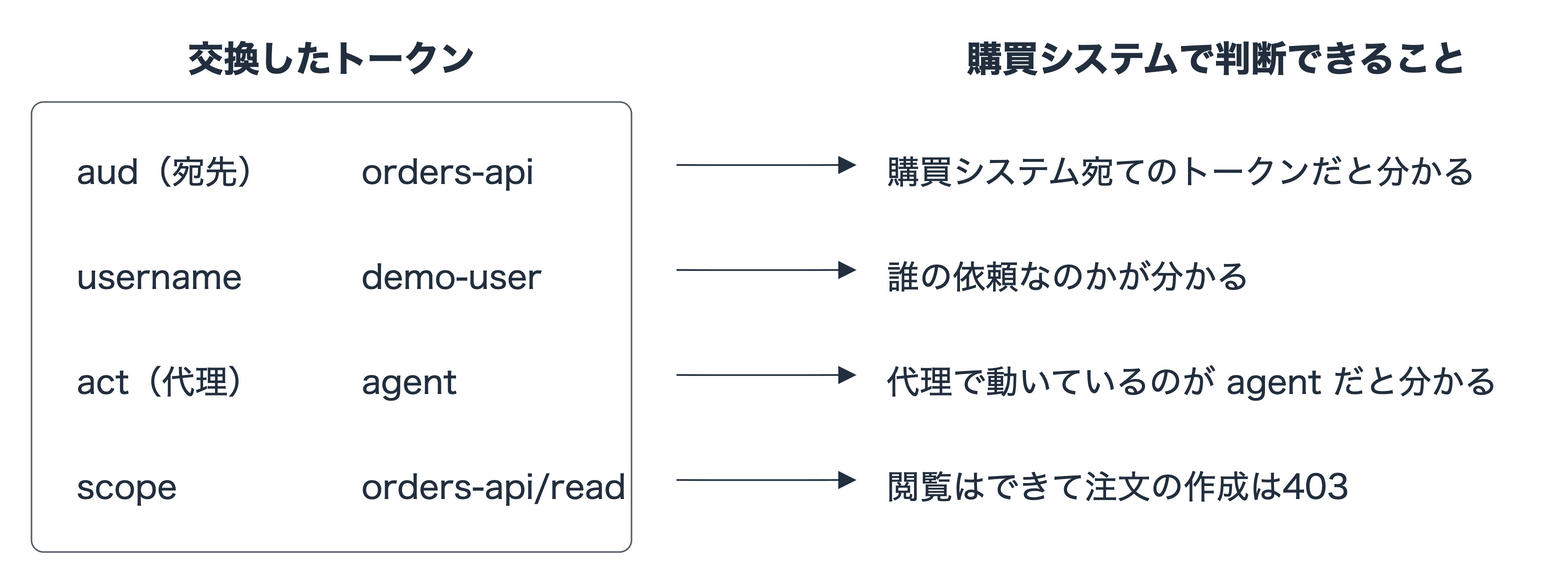
You can clearly tell both who made the request and whether it's on someone's behalf!!
Other Details
The exchange can be performed through the token endpoint (the URL that issues tokens, /oauth2/token) or the new GetDerivedToken API.
It's available for the Essentials and Plus feature plans, and refresh tokens are not issued.
Architecture and Token Flow in This Article
Now that we've got the basic idea, shall we try it out!
This time I built an orders API (standing in for a procurement system) with API Gateway (HTTP API) and Lambda, and set it to accept only tokens whose destination is orders-api. The Lambda returns the username, destination, scope, and acting-party information of the token it received.
Tokens are passed around in the following order.
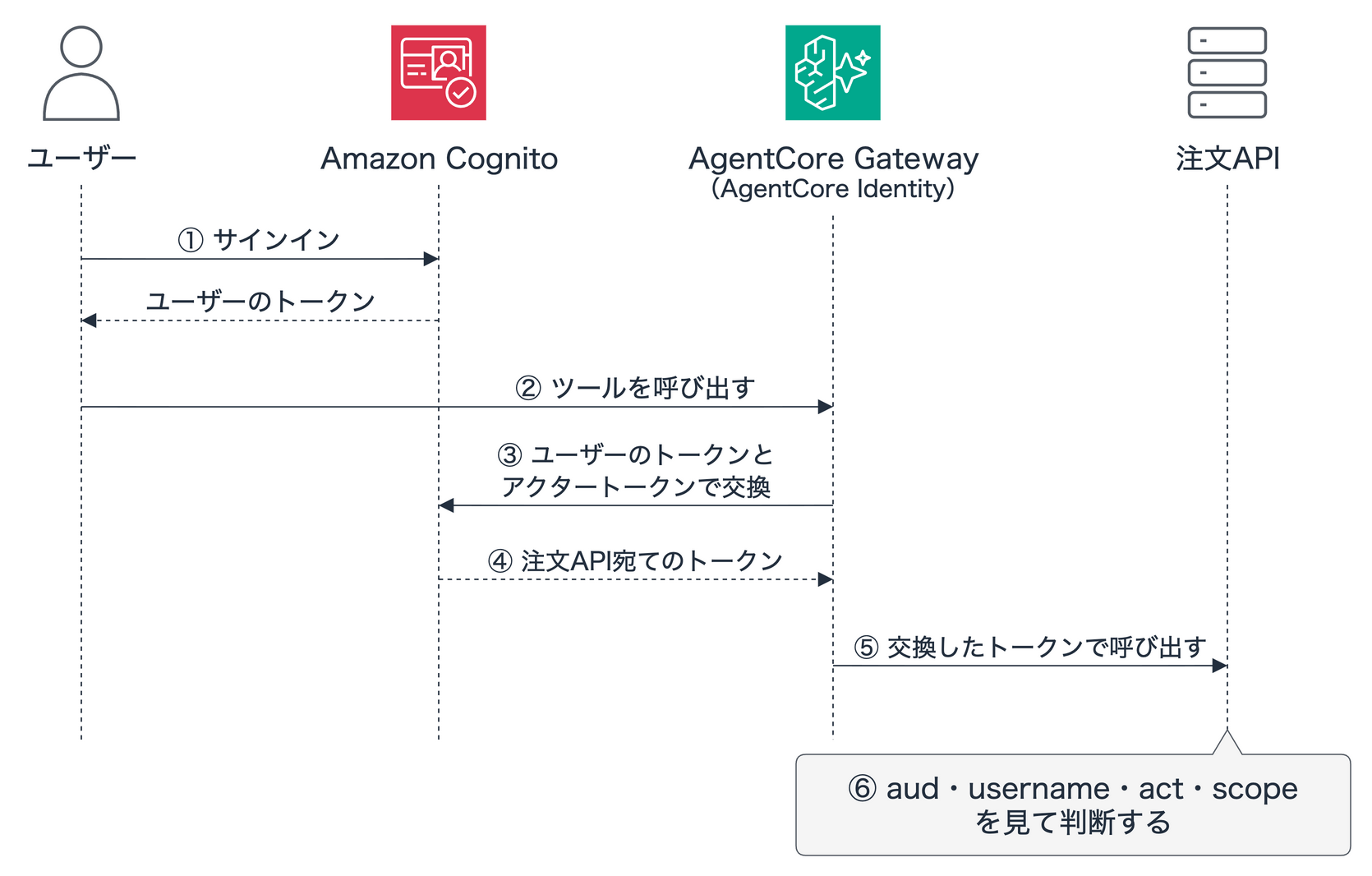
- The user signs in with Cognito and receives a token (no destination included)
- The user calls a Gateway tool with that token
- Gateway, through AgentCore Identity, passes the user's token and the agent's own token (the actor token) to Cognito
- Cognito returns a token addressed to the orders API
- Gateway calls the orders API with that token
- The orders API looks at the token's destination, user, acting party, and scope to make a decision
In "Let's Try It," I'll first try steps 3 and 4 with the AWS CLI and then leave them to Gateway.
The region is N. Virginia (us-east-1), and the AWS CLI is version 2.42.3 (get-derived-token, used for the exchange, requires 2.40.4 or later). The username in the article has been replaced with demo-user.
Show the working folder and the JWT decoder decode.py
mkdir cognito-token-exchange && cd cognito-token-exchange
uv init --no-readme
uv add httpx
import sys, base64, json
keys = sys.argv[1:]
p = sys.stdin.read().strip().split(".")[1]
p += "=" * (-len(p) % 4)
c = json.loads(base64.urlsafe_b64decode(p))
print(json.dumps({k: c.get(k) for k in keys} if keys else c, ensure_ascii=False, indent=1))
Let's Try It
Let's get started right away!
Preparing Cognito and the Orders API
First, create the following resource servers and app clients in Cognito.
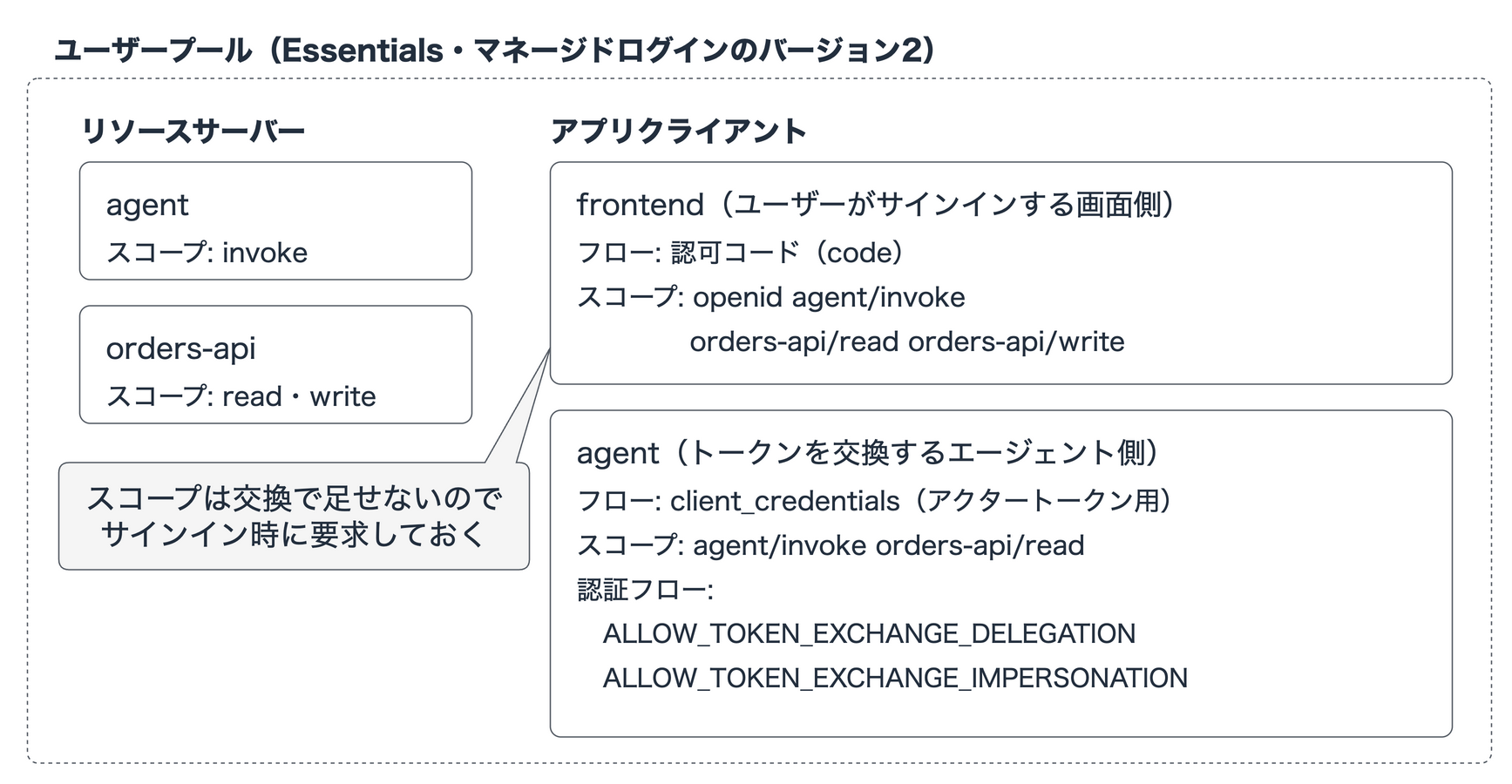
The new setting this time is the authentication flow that allows token exchange on the agent client.
I added two authentication flows!
ALLOW_TOKEN_EXCHANGE_DELEGATION is for exchanges that also attach the agent's own token, and the issued token contains the acting-party information (act).
ALLOW_TOKEN_EXCHANGE_IMPERSONATION is for exchanges without the agent's token, and the result is indistinguishable from the user calling directly. I'll try both this time.
aws cognito-idp create-user-pool-client --user-pool-id "$POOL_ID" \
  --client-name agent --generate-secret \
  --allowed-o-auth-flows-user-pool-client --allowed-o-auth-flows client_credentials \
  --allowed-o-auth-scopes agent/invoke orders-api/read \
  --explicit-auth-flows ALLOW_TOKEN_EXCHANGE_DELEGATION ALLOW_TOKEN_EXCHANGE_IMPERSONATION
The domain is created with managed login version 2.
Script to create Cognito and the orders API
set -euo pipefail
export AWS_REGION=us-east-1
ACCOUNT_ID=$(aws sts get-caller-identity --query Account --output text)

# Essentials プランのユーザープール
POOL_ID=$(aws cognito-idp create-user-pool --pool-name obo-demo \
  --user-pool-tier ESSENTIALS --query UserPool.Id --output text)

# トークンエンドポイントを使うためのドメイン
DOMAIN=obo-demo-${ACCOUNT_ID}
aws cognito-idp create-user-pool-domain --user-pool-id "$POOL_ID" \
  --domain "$DOMAIN" --managed-login-version 2 > /dev/null

# リソースサーバー(エージェントと注文API)
aws cognito-idp create-resource-server --user-pool-id "$POOL_ID" \
  --identifier agent --name agent \
  --scopes ScopeName=invoke,ScopeDescription=invoke > /dev/null
aws cognito-idp create-resource-server --user-pool-id "$POOL_ID" \
  --identifier orders-api --name orders-api \
  --scopes ScopeName=read,ScopeDescription=read ScopeName=write,ScopeDescription=write > /dev/null

# ユーザーがサインインする画面側のクライアント
FRONT_CLIENT_ID=$(aws cognito-idp create-user-pool-client --user-pool-id "$POOL_ID" \
  --client-name frontend --no-generate-secret \
  --allowed-o-auth-flows-user-pool-client --allowed-o-auth-flows code \
  --allowed-o-auth-scopes openid agent/invoke orders-api/read orders-api/write \
  --callback-urls http://localhost:8765/callback \
  --supported-identity-providers COGNITO \
  --explicit-auth-flows ALLOW_REFRESH_TOKEN_AUTH \
  --query UserPoolClient.ClientId --output text)

# サインイン画面のブランディング(Cognitoのデフォルトのデザイン)
aws cognito-idp create-managed-login-branding --user-pool-id "$POOL_ID" \
  --client-id "$FRONT_CLIENT_ID" --use-cognito-provided-values > /dev/null

# トークンを交換するエージェント側のクライアント
AGENT_CLIENT_ID=$(aws cognito-idp create-user-pool-client --user-pool-id "$POOL_ID" \
  --client-name agent --generate-secret \
  --allowed-o-auth-flows-user-pool-client --allowed-o-auth-flows client_credentials \
  --allowed-o-auth-scopes agent/invoke orders-api/read \
  --explicit-auth-flows ALLOW_TOKEN_EXCHANGE_DELEGATION ALLOW_TOKEN_EXCHANGE_IMPERSONATION \
  --query UserPoolClient.ClientId --output text)

cat > .env.ids <<EOV
AWS_REGION=us-east-1
POOL_ID=$POOL_ID
DOMAIN=$DOMAIN
FRONT_CLIENT_ID=$FRONT_CLIENT_ID
AGENT_CLIENT_ID=$AGENT_CLIENT_ID
EOV
cat .env.ids
import base64
import json

def handler(event, context):
    # Extract caller information from the token already verified by API Gateway
    token = event["headers"]["authorization"].split()[1]
    payload = token.split(".")[1]
    claims = json.loads(base64.urlsafe_b64decode(payload + "=" * (-len(payload) % 4)))
    caller = {k: claims.get(k) for k in ("username", "aud", "scope", "act")}

    if event["routeKey"].startswith("POST"):
        return {"statusCode": 201, "body": json.dumps({"created": True, "caller": caller})}
    orders = [{"id": "A-1001", "item": "ノートPC", "status": "発送済み"},
              {"id": "A-1002", "item": "モニター", "status": "準備中"}]
    return {"statusCode": 200, "body": json.dumps({"orders": orders, "caller": caller}, ensure_ascii=False)}
set -euo pipefail
source .env.ids
export AWS_REGION
ACCOUNT_ID=$(aws sts get-caller-identity --query Account --output text)

# Lambda
aws iam create-role --role-name obo-orders-api-role --assume-role-policy-document '{
  "Version":"2012-10-17","Statement":[{"Effect":"Allow",
  "Principal":{"Service":"lambda.amazonaws.com"},"Action":"sts:AssumeRole"}]}' > /dev/null
aws iam attach-role-policy --role-name obo-orders-api-role \
  --policy-arn arn:aws:iam::aws:policy/service-role/AWSLambdaBasicExecutionRole
sleep 10
(cd orders_api && zip -q ../orders_api.zip app.py)
FUNC_ARN=$(aws lambda create-function --function-name obo-orders-api \
  --runtime python3.14 --handler app.handler --zip-file fileb://orders_api.zip \
  --role arn:aws:iam::${ACCOUNT_ID}:role/obo-orders-api-role \
  --query FunctionArn --output text)

# HTTP API and JWT authorizer (accepts only tokens whose destination is orders-api)
API_ID=$(aws apigatewayv2 create-api --name obo-orders-api --protocol-type HTTP \
  --query ApiId --output text)
AUTH_ID=$(aws apigatewayv2 create-authorizer --api-id "$API_ID" --name cognito \
  --authorizer-type JWT --identity-source '$request.header.Authorization' \
  --jwt-configuration "Issuer=https://cognito-idp.${AWS_REGION}.amazonaws.com/${POOL_ID},Audience=orders-api" \
  --query AuthorizerId --output text)
INTEG_ID=$(aws apigatewayv2 create-integration --api-id "$API_ID" \
  --integration-type AWS_PROXY --integration-uri "$FUNC_ARN" \
  --payload-format-version 2.0 --query IntegrationId --output text)

# Reading requires orders-api/read, creating requires orders-api/write
aws apigatewayv2 create-route --api-id "$API_ID" --route-key 'GET /orders' \
  --target "integrations/$INTEG_ID" --authorization-type JWT \
  --authorizer-id "$AUTH_ID" --authorization-scopes orders-api/read > /dev/null
aws apigatewayv2 create-route --api-id "$API_ID" --route-key 'POST /orders' \
  --target "integrations/$INTEG_ID" --authorization-type JWT \
  --authorizer-id "$AUTH_ID" --authorization-scopes orders-api/write > /dev/null
aws apigatewayv2 create-stage --api-id "$API_ID" --stage-name '$default' --auto-deploy > /dev/null

aws lambda add-permission --function-name obo-orders-api --statement-id apigw \
  --action lambda:InvokeFunction --principal apigateway.amazonaws.com \
  --source-arn "arn:aws:execute-api:${AWS_REGION}:${ACCOUNT_ID}:${API_ID}/*" > /dev/null

echo "API_ID=$API_ID" >> .env.ids
echo "ORDERS_API_URL=https://${API_ID}.execute-api.${AWS_REGION}.amazonaws.com" >> .env.ids
tail -2 .env.ids
bash setup_cognito.sh
mkdir orders_api   # Save app.py here
bash setup_orders_api.sh
set -a && source .env.ids && set +a

aws cognito-idp admin-create-user --user-pool-id "$POOL_ID" \
  --username demo-user --message-action SUPPRESS
aws cognito-idp admin-set-user-password --user-pool-id "$POOL_ID" \
  --username demo-user --password '<任意のパスワード>' --permanent
Passing the User's Token As Is
As an experiment, let's skip steps 3 and 4 and pass the user's token to the orders API as is.
login.py and signing in
"""Cognitoのマネージドログインでサインインし、ユーザーのアクセストークンを user_token.txt に保存する"""
import base64
import hashlib
import http.server
import os
import secrets
import urllib.parse
import webbrowser

import httpx

DOMAIN = os.environ["DOMAIN"]
CLIENT_ID = os.environ["FRONT_CLIENT_ID"]
REGION = os.environ.get("AWS_REGION", "us-east-1")
BASE = f"https://{DOMAIN}.auth.{REGION}.amazoncognito.com"
REDIRECT_URI = "http://localhost:8765/callback"
SCOPES = "openid agent/invoke orders-api/read orders-api/write"

verifier = secrets.token_urlsafe(64)
challenge = base64.urlsafe_b64encode(hashlib.sha256(verifier.encode()).digest()).rstrip(b"=").decode()
state = secrets.token_urlsafe(16)
code: str | None = None

class Callback(http.server.BaseHTTPRequestHandler):
    def do_GET(self):
        global code
        q = urllib.parse.parse_qs(urllib.parse.urlparse(self.path).query)
        ok = q.get("state", [None])[0] == state
        if ok:
            code = q.get("code", [None])[0]
        self.send_response(200 if ok else 400)
        self.send_header("Content-Type", "text/plain; charset=utf-8")
        self.end_headers()
        msg = "サインインできました。ターミナルに戻ってください。" if ok else "stateが一致しません。"
        self.wfile.write(msg.encode())

    def log_message(self, *args):
        pass

url = f"{BASE}/oauth2/authorize?" + urllib.parse.urlencode({
    "response_type": "code",
    "client_id": CLIENT_ID,
    "redirect_uri": REDIRECT_URI,
    "scope": SCOPES,
    "state": state,
    "code_challenge": challenge,
    "code_challenge_method": "S256",
})
print(url)
webbrowser.open(url)

server = http.server.HTTPServer(("localhost", 8765), Callback)
while code is None:
    server.handle_request()

res = httpx.post(f"{BASE}/oauth2/token", data={
    "grant_type": "authorization_code",
    "client_id": CLIENT_ID,
    "code": code,
    "redirect_uri": REDIRECT_URI,
    "code_verifier": verifier,
})
res.raise_for_status()
with open("user_token.txt", "w") as f:
    f.write(res.json()["access_token"])
print("user_token.txt に保存しました")
uv run login.py
USER_TOKEN=$(cat user_token.txt)
uv run decode.py client_id aud scope username < user_token.txt
{
 "client_id": "<frontendクライアントのID>",
 "aud": null,
 "scope": "openid agent/invoke orders-api/write orders-api/read",
 "username": "demo-user"
}
When passed to the orders API like this, the destination (aud) is missing, so validation failed with a 401, as expected!
curl -s -w "\nHTTP %{http_code}\n" "$ORDERS_API_URL/orders" -H "Authorization: Bearer $USER_TOKEN"
{"message":"Unauthorized"}
HTTP 401
Now let's exchange the token and try again.
Exchanging with the AWS CLI
This time, let's try the token exchange of steps 3 and 4 with the AWS CLI!
As the agent client, we pass the user's token and the agent's own token to perform the exchange. The agent's own token can also be obtained with get-client-token, but it couldn't be used with a client that has the token exchange authentication flows enabled...
So I'm obtaining it from the token endpoint.
AGENT_CLIENT_SECRET=$(aws cognito-idp describe-user-pool-client --user-pool-id "$POOL_ID" \
  --client-id "$AGENT_CLIENT_ID" --query UserPoolClient.ClientSecret --output text)
TOKEN_URL="https://${DOMAIN}.auth.${AWS_REGION}.amazoncognito.com/oauth2/token"

ACTOR_TOKEN=$(curl -s -u "$AGENT_CLIENT_ID:$AGENT_CLIENT_SECRET" "$TOKEN_URL" \
  -d grant_type=client_credentials -d scope=agent/invoke | jq -r .access_token)

EXCHANGED_TOKEN=$(aws cognito-idp get-derived-token --client-id "$AGENT_CLIENT_ID" \
  --client-secret "$AGENT_CLIENT_SECRET" \
  --subject-token "$USER_TOKEN" --subject-token-type ACCESS_TOKEN \
  --actor-token "$ACTOR_TOKEN" --actor-token-type ACCESS_TOKEN \
  --audiences orders-api --scopes orders-api/read \
  --query IssuedToken --output text)

echo "$EXCHANGED_TOKEN" | uv run decode.py client_id aud scope username act
{
 "client_id": "<agentクライアントのID>",
 "aud": "orders-api",
 "scope": "orders-api/read",
 "username": "demo-user",
 "act": {
  "sub": "<agentクライアントのID>",
  "client_id": "<agentクライアントのID>",
  "iss": "https://cognito-idp.us-east-1.amazonaws.com/<ユーザープールID>",
  "token_type": "urn:ietf:params:oauth:token-type:access_token"
 }
}
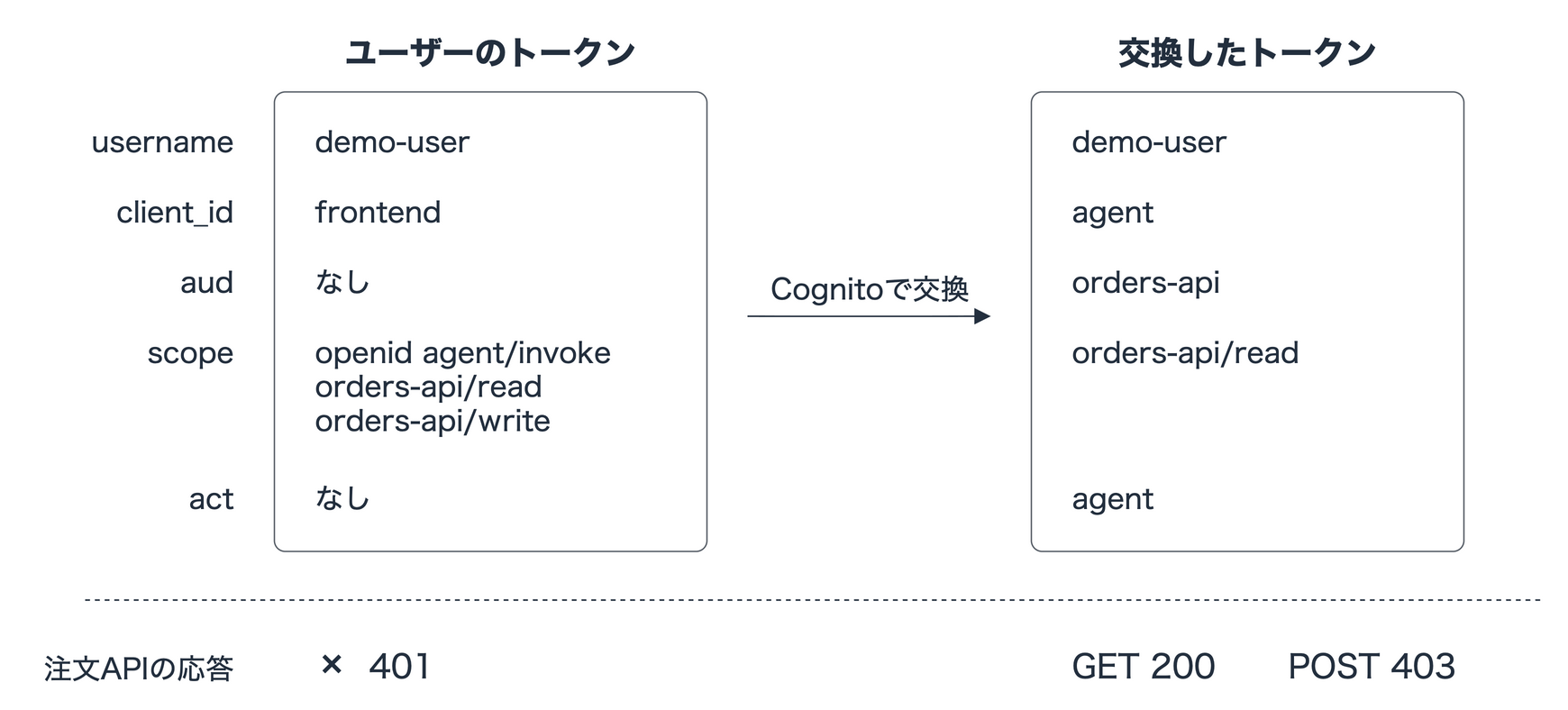
The destination is now the orders API, and the scope has been narrowed to read-only. The agent client is also included as the acting party!
Calling with this token returned 200 for fetching the list (GET), and 403 for creating an order (POST), which requires the write scope. Here is a side-by-side comparison with passing the token as is.
Execution result (GET /orders)
{"orders": [{"id": "A-1001", "item": "ノートPC", "status": "発送済み"}, ...], "caller": {"username": "demo-user", "aud": "orders-api", "scope": "orders-api/read", "act": {"sub": "<agentクライアントのID>", ...}}}
HTTP 200
I also confirmed the following.
- If you exchange without passing the agent's own token, act (who called on behalf of the user) is not included, and the orders API gets a token indistinguishable from the user calling directly
- If you request a write scope that isn't allowed for the agent client, the exchange is rejected
As expected, requesting a scope that isn't permitted gets rejected.
As a side note, with the setup in this article, the orders API will accept even a token without act.
{"orders": [...], "caller": {"username": "demo-user", "aud": "orders-api", "scope": "orders-api/read", "act": null}}
HTTP 200
That's because the API Gateway JWT authorizer used here checks things like the issuer, destination, expiration, and scope, but not act. If you want to accept only calls made on someone's behalf, you need to build it so that act is checked as well!
Leaving It to AgentCore Gateway
Let's leave steps 3 to 5, which we did manually, to AgentCore Gateway!
In AgentCore Identity, create a connection setting (OAuth provider) for exchanging tokens with Cognito. If you specify here that the agent's own token should be attached, it is obtained automatically and passed along together.
"customOauth2ProviderConfig": {
  "oauthDiscovery": {"discoveryUrl": "https://cognito-idp.us-east-1.amazonaws.com/<ユーザープールID>/.well-known/openid-configuration"},
  "clientId": "<agentクライアントのID>",
  "clientSecret": "<agentクライアントのシークレット>",
  "clientAuthenticationMethod": "CLIENT_SECRET_BASIC",
  "onBehalfOfTokenExchangeConfig": {
    "grantType": "TOKEN_EXCHANGE",
    "tokenExchangeGrantTypeConfig": {"actorTokenContent": "M2M", "actorTokenScopes": ["agent/invoke"]}
  }
}
Register the orders API as a tool in Gateway, and specify this provider and token exchange as the authentication used when calling the orders API (outbound authentication).
"oauthCredentialProvider": {
  "providerArn": "<プロバイダーのARN>",
  "scopes": ["orders-api/read"],
  "customParameters": {
    "audience": "orders-api",
    "subject_token_type": "urn:ietf:params:oauth:token-type:access_token"
  },
  "grantType": "TOKEN_EXCHANGE"
}
The values sent to Cognito are as follows. The key point was specifying the destination and token type as additional parameters.
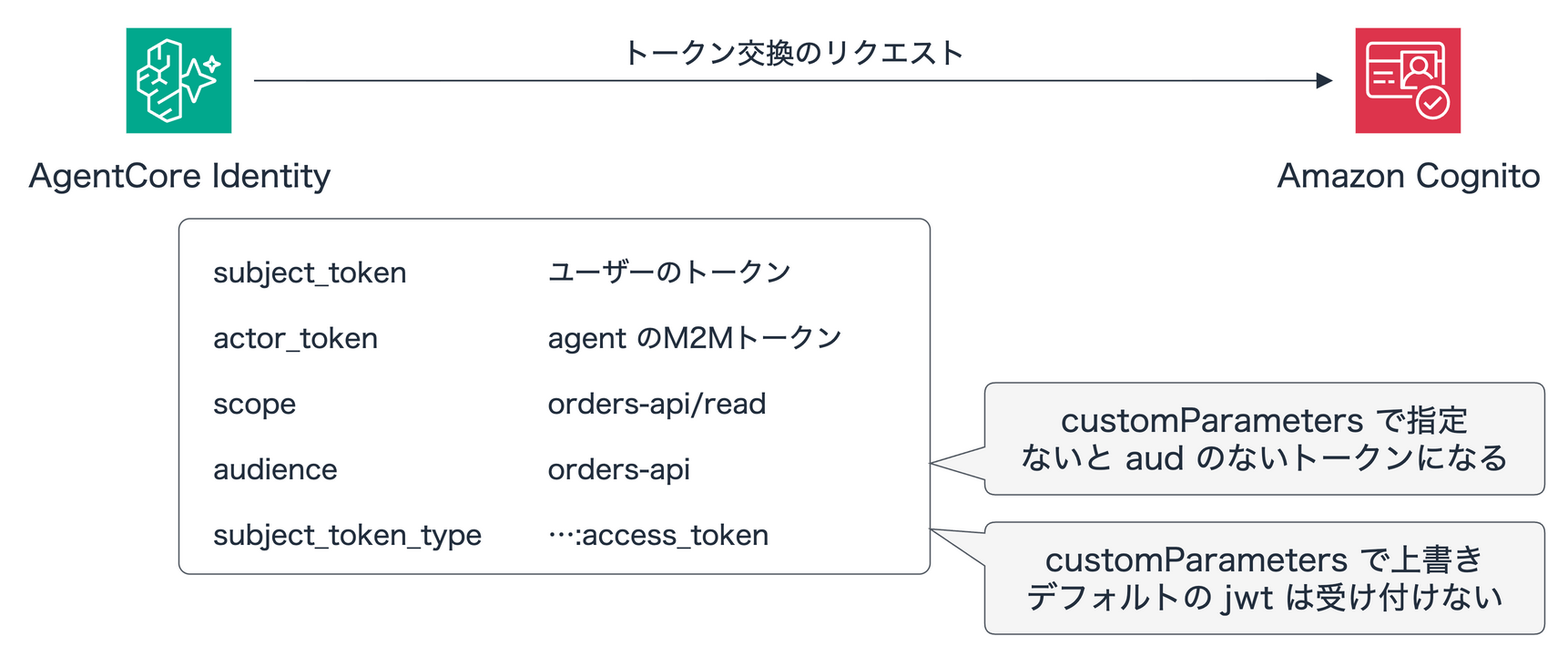
If you omit the destination (audience), a token without a destination is returned, and it gets rejected by the orders API.
Also, AgentCore Identity sends the token type (subject_token_type) as jwt by default, but Cognito doesn't accept that, so I overrode it with access_token. When sent as jwt, the response came back as an error like the one below.
{"error":"invalid_request","error_description":"Unsupported token type: urn:ietf:params:oauth:token-type:jwt"}
Script to create Gateway
Replace <注文APIのURL> in the OpenAPI definition with the orders API URL written in .env.ids.
{
  "openapi": "3.0.1",
  "info": {"title": "Orders API", "version": "1.0"},
  "servers": [{"url": "<注文APIのURL>"}],
  "paths": {
    "/orders": {
      "get": {
        "operationId": "listOrders",
        "description": "サインイン中のユーザーの注文一覧を取得する",
        "responses": {"200": {"description": "注文一覧",
          "content": {"application/json": {"schema": {"type": "object"}}}}}
      },
      "post": {
        "operationId": "createOrder",
        "description": "注文を作成する",
        "requestBody": {"required": true, "content": {"application/json": {"schema": {
          "type": "object", "properties": {"item": {"type": "string"}}, "required": ["item"]}}}},
        "responses": {"201": {"description": "作成した注文",
          "content": {"application/json": {"schema": {"type": "object"}}}}}
      }
    }
  }
}
set -euo pipefail
source .env.ids
export AWS_REGION
ACCOUNT_ID=$(aws sts get-caller-identity --query Account --output text)
DISCOVERY_URL="https://cognito-idp.${AWS_REGION}.amazonaws.com/${POOL_ID}/.well-known/openid-configuration"
AGENT_CLIENT_SECRET=$(aws cognito-idp describe-user-pool-client --user-pool-id "$POOL_ID" \
  --client-id "$AGENT_CLIENT_ID" --query UserPoolClient.ClientSecret --output text)

# Cognito とトークン交換するカスタムプロバイダー(アクターは agent クライアントの M2M トークン)
aws bedrock-agentcore-control create-oauth2-credential-provider --cli-input-json "{
  \"name\": \"cognito-obo-provider\",
  \"credentialProviderVendor\": \"CustomOauth2\",
  \"oauth2ProviderConfigInput\": {\"customOauth2ProviderConfig\": {
    \"oauthDiscovery\": {\"discoveryUrl\": \"${DISCOVERY_URL}\"},
    \"clientId\": \"${AGENT_CLIENT_ID}\",
    \"clientSecret\": \"${AGENT_CLIENT_SECRET}\",
    \"clientAuthenticationMethod\": \"CLIENT_SECRET_BASIC\",
    \"onBehalfOfTokenExchangeConfig\": {
      \"grantType\": \"TOKEN_EXCHANGE\",
      \"tokenExchangeGrantTypeConfig\": {
        \"actorTokenContent\": \"M2M\",
        \"actorTokenScopes\": [\"agent/invoke\"]
      }
    }
  }}
}" > /dev/null

PROVIDER_ARN=$(aws bedrock-agentcore-control get-oauth2-credential-provider \
  --name cognito-obo-provider --query credentialProviderArn --output text)
SECRET_ARN=$(aws bedrock-agentcore-control get-oauth2-credential-provider \
  --name cognito-obo-provider --query clientSecretArn.secretArn --output text)
BASE="arn:aws:bedrock-agentcore:${AWS_REGION}:${ACCOUNT_ID}"

# Gateway のサービスロール
aws iam create-role --role-name obo-cognito-gateway-role --assume-role-policy-document "{
  \"Version\": \"2012-10-17\",
  \"Statement\": [{\"Effect\": \"Allow\",
    \"Principal\": {\"Service\": \"bedrock-agentcore.amazonaws.com\"},
    \"Action\": \"sts:AssumeRole\",
    \"Condition\": {\"StringEquals\": {\"aws:SourceAccount\": \"${ACCOUNT_ID}\"}}}]
}" > /dev/null
aws iam put-role-policy --role-name obo-cognito-gateway-role --policy-name obo-gateway --policy-document "{
  \"Version\": \"2012-10-17\",
  \"Statement\": [
    {\"Effect\": \"Allow\",
     \"Action\": [\"bedrock-agentcore:GetWorkloadAccessToken\", \"bedrock-agentcore:GetWorkloadAccessTokenForJWT\"],
     \"Resource\": [\"${BASE}:workload-identity-directory/default\",
                    \"${BASE}:workload-identity-directory/default/workload-identity/*\"]},
    {\"Effect\": \"Allow\", \"Action\": \"bedrock-agentcore:GetResourceOauth2Token\",
     \"Resource\": [\"${BASE}:token-vault/default\",
                    \"${BASE}:token-vault/default/oauth2credentialprovider/cognito-obo-provider\",
                    \"${BASE}:workload-identity-directory/default\",
                    \"${BASE}:workload-identity-directory/default/workload-identity/*\"]},
    {\"Effect\": \"Allow\", \"Action\": \"secretsmanager:GetSecretValue\", \"Resource\": \"${SECRET_ARN}\"}
  ]
}"
sleep 10

# Gateway(frontend クライアントが発行したトークンだけ受け付ける)
GATEWAY_ID=$(aws bedrock-agentcore-control create-gateway --name obo-cognito-gateway \
  --role-arn "arn:aws:iam::${ACCOUNT_ID}:role/obo-cognito-gateway-role" \
  --protocol-type MCP --authorizer-type CUSTOM_JWT \
  --authorizer-configuration "{\"customJWTAuthorizer\":{
    \"discoveryUrl\":\"${DISCOVERY_URL}\",
    \"allowedClients\":[\"${FRONT_CLIENT_ID}\"]}}" \
  --query gatewayId --output text)

echo "PROVIDER_ARN=$PROVIDER_ARN" >> .env.ids
echo "GATEWAY_ID=$GATEWAY_ID" >> .env.ids
tail -2 .env.ids

# 注文APIをツールとして登録し、呼び出す前にトークン交換する
source .env.ids
SCHEMA=$(uv run python -c "import json;print(json.dumps(open('orders-openapi.json').read()))")
aws bedrock-agentcore-control create-gateway-target --gateway-identifier "$GATEWAY_ID" --name orders \
  --target-configuration "{\"mcp\":{\"openApiSchema\":{\"inlinePayload\":${SCHEMA}}}}" \
  --credential-provider-configurations "[{
    \"credentialProviderType\": \"OAUTH\",
    \"credentialProvider\": {\"oauthCredentialProvider\": {
      \"providerArn\": \"${PROVIDER_ARN}\",
      \"scopes\": [\"orders-api/read\"],
      \"customParameters\": {
        \"audience\": \"orders-api\",
        \"subject_token_type\": \"urn:ietf:params:oauth:token-type:access_token\"},
      \"grantType\": \"TOKEN_EXCHANGE\"}}}]" > /dev/null
Let's call a Gateway tool with the user's token attached.
bash setup_agentcore.sh
set -a && source .env.ids && set +a
GATEWAY_URL=$(aws bedrock-agentcore-control get-gateway --gateway-identifier "$GATEWAY_ID" \
  --query gatewayUrl --output text)

curl -s -X POST "$GATEWAY_URL" -H "Authorization: Bearer $USER_TOKEN" \
  -H "Content-Type: application/json" \
  -d '{"jsonrpc":"2.0","id":1,"method":"tools/call","params":{"name":"orders___listOrders","arguments":{}}}'
{
  "orders": [
    {"id": "A-1001", "item": "ノートPC", "status": "発送済み"},
    {"id": "A-1002", "item": "モニター", "status": "準備中"}
  ],
  "caller": {
    "username": "demo-user",
    "aud": "orders-api",
    "scope": "orders-api/read",
    "act": {"sub": "<agentクライアントのID>", "client_id": "<agentクライアントのID>", ...}
  }
}
The order list came back via Gateway as well! You don't even need to write any exchange code!
Supplement: Exchanging from AgentCore Runtime
I tried Gateway, but there are surely cases where you want to do the token exchange from an agent running on Runtime too...
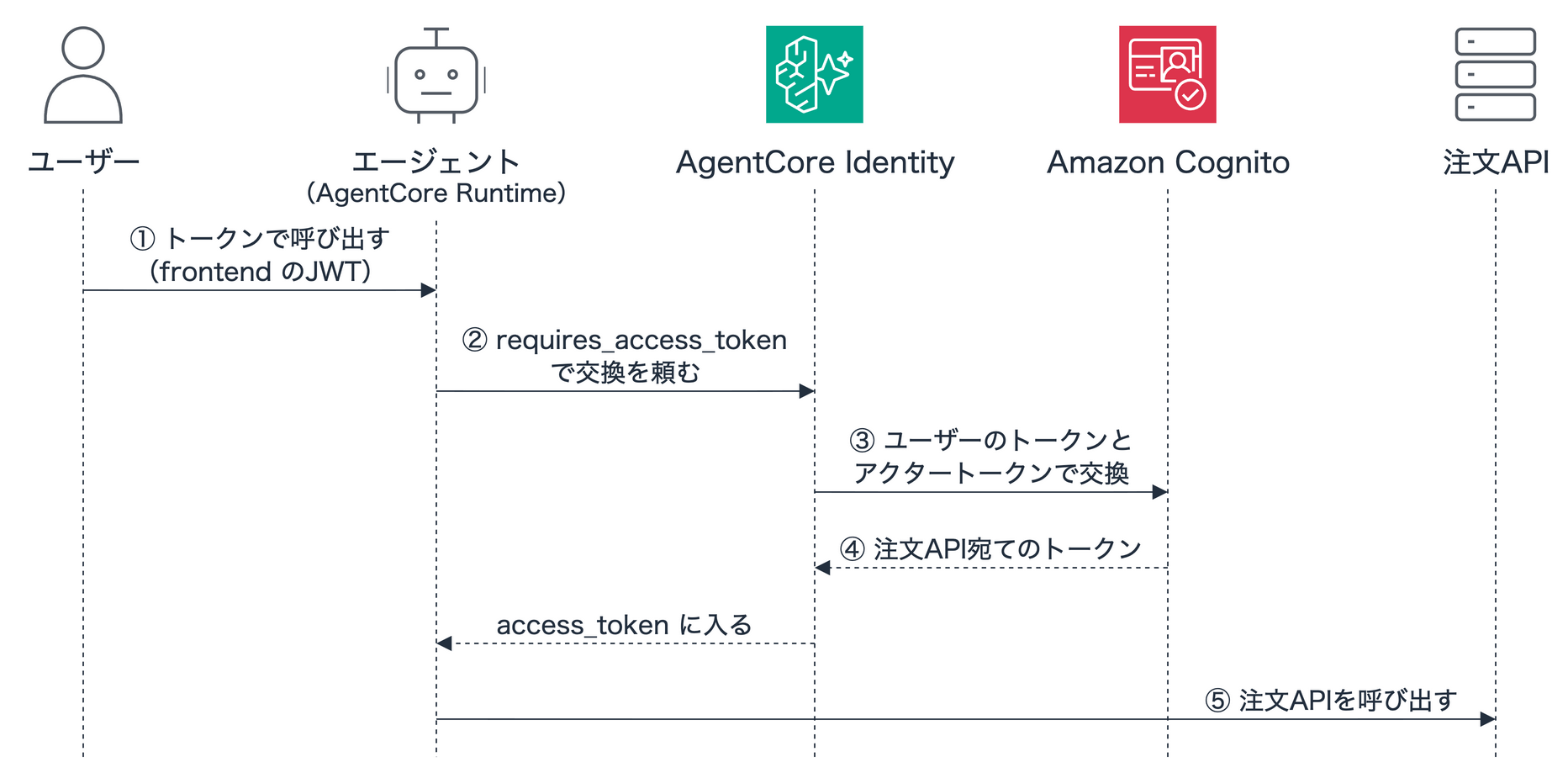
When exchanging from the agent code on Runtime, you specify the exchange method with a decorator from the AgentCore SDK!
Runtime validates the user's token (inbound authentication) and passes the token tied to that user to the code. The SDK uses it to ask AgentCore Identity to perform the exchange.
When combining with Cognito, you specify the destination and token type just as with Gateway. For the entrance, I set it to accept tokens from the frontend client.
import os

import httpx
from bedrock_agentcore.identity.auth import requires_access_token
from bedrock_agentcore.runtime import BedrockAgentCoreApp

app = BedrockAgentCoreApp()
ORDERS_API_URL = os.environ["ORDERS_API_URL"]

# Exchange the user's token for one addressed to the orders API (OBO), then call it
@requires_access_token(
    provider_name="cognito-obo-provider",
    auth_flow="ON_BEHALF_OF_TOKEN_EXCHANGE",
    scopes=["orders-api/read"],
    audiences=["orders-api"],
    custom_parameters={"subject_token_type": "urn:ietf:params:oauth:token-type:access_token"},
)
async def list_orders(*, access_token: str) -> dict:
    async with httpx.AsyncClient() as client:
        res = await client.get(f"{ORDERS_API_URL}/orders",
                               headers={"Authorization": f"Bearer {access_token}"})
        return {"status": res.status_code, "body": res.json()}

@app.entrypoint
async def invoke(payload, context):
    # To observe the behavior, call the orders API directly without going through a model
    return await list_orders()

if __name__ == "__main__":
    app.run()
If you call Runtime with the user's token attached, it reaches the orders API!
{"status": 200, "body": {"orders": [...], "caller": {"username": "demo-user", "aud": "orders-api", "scope": "orders-api/read", "act": {"sub": "<agentクライアントのID>", "client_id": "<agentクライアントのID>", ...}}}}
The decorator made it not so difficult to implement!
As with Gateway, the orders API is told that the agent is carrying out the user's request on their behalf.
Steps to create and call Runtime
I created this Runtime with the AgentCore CLI (0.28.1) and deleted the unused template files. In the configuration file (agentcore.json), I added an environment variable for the orders API URL and the IAM policy below. bedrock-agentcore is version 1.27.0.
agentcore create --project-name CognitoObo --no-agent --skip-git
cd CognitoObo
agentcore add agent --name obo_agent --type create --language Python \
  --framework Strands --model-provider Bedrock --memory none \
  --authorizer-type CUSTOM_JWT \
  --discovery-url "https://cognito-idp.${AWS_REGION}.amazonaws.com/${POOL_ID}/.well-known/openid-configuration" \
  --allowed-clients "${FRONT_CLIENT_ID}"
# Rewrite main.py, pyproject.toml, agentcore.json, and obo-policy.json, then deploy
agentcore deploy -y

RUNTIME_ARN=$(aws cloudformation describe-stacks --stack-name AgentCore-CognitoObo-default \
  --query "Stacks[0].Outputs[?contains(OutputKey,'RuntimeArn')].OutputValue" --output text)
ENCODED=$(python3 -c "import urllib.parse,sys;print(urllib.parse.quote(sys.argv[1],safe=''))" "${RUNTIME_ARN}")
curl -s -X POST \
  "https://bedrock-agentcore.us-east-1.amazonaws.com/runtimes/${ENCODED}/invocations?qualifier=DEFAULT" \
  -H "Authorization: Bearer ${USER_TOKEN}" \
  -H "Content-Type: application/json" \
  -H "X-Amzn-Bedrock-AgentCore-Runtime-Session-Id: $(uuidgen)-$(uuidgen)" \
  -d '{"prompt": "注文一覧を見せて"}'
{
  "Version": "2012-10-17",
  "Statement": [
    {"Effect": "Allow", "Action": "bedrock-agentcore:GetResourceOauth2Token",
     "Resource": ["arn:aws:bedrock-agentcore:us-east-1:<アカウントID>:token-vault/default",
                  "arn:aws:bedrock-agentcore:us-east-1:<アカウントID>:token-vault/default/oauth2credentialprovider/cognito-obo-provider",
                  "arn:aws:bedrock-agentcore:us-east-1:<アカウントID>:workload-identity-directory/default",
                  "arn:aws:bedrock-agentcore:us-east-1:<アカウントID>:workload-identity-directory/default/workload-identity/*"]},
    {"Effect": "Allow", "Action": "secretsmanager:GetSecretValue", "Resource": "<プロバイダーのシークレットのARN>"}
  ]
}
Cleanup
Delete the created resources in order, starting with Gateway. If you tried Runtime, delete the stack first.
Cleanup commands
aws cloudformation delete-stack --stack-name AgentCore-CognitoObo-default
set -a && source .env.ids && set +a

TARGET_ID=$(aws bedrock-agentcore-control list-gateway-targets --gateway-identifier "$GATEWAY_ID" \
  --query "items[0].targetId" --output text)
aws bedrock-agentcore-control delete-gateway-target --gateway-identifier "$GATEWAY_ID" --target-id "$TARGET_ID"
sleep 10
aws bedrock-agentcore-control delete-gateway --gateway-identifier "$GATEWAY_ID"
aws bedrock-agentcore-control delete-oauth2-credential-provider --name cognito-obo-provider
aws iam delete-role-policy --role-name obo-cognito-gateway-role --policy-name obo-gateway
aws iam delete-role --role-name obo-cognito-gateway-role

aws apigatewayv2 delete-api --api-id "$API_ID"
aws lambda delete-function --function-name obo-orders-api
aws iam detach-role-policy --role-name obo-orders-api-role \
  --policy-arn arn:aws:iam::aws:policy/service-role/AWSLambdaBasicExecutionRole
aws iam delete-role --role-name obo-orders-api-role

aws cognito-idp delete-user-pool-domain --user-pool-id "$POOL_ID" --domain "$DOMAIN"
aws cognito-idp delete-user-pool --user-pool-id "$POOL_ID"
Conclusion
I combined Cognito's token exchange with AgentCore Gateway and quickly tried out OBO. Being able to do token exchange with Cognito should be welcome when you want to keep least privilege in mind or prevent tokens from being reused!
I hope this article was of some help. Thank you for reading to the end!
