
Why Headless CMS is Fast: Measuring Real Performance by Delegating Search and Filtering to Contentful

This page has been translated by machine translation. View original
Introduction
Headless CMS is often said to be fast. However, explanations of what exactly is fast tend to be conceptual.
For instance, when creating article listings on a website, requirements often include adding search and filtering capabilities without sacrificing display speed. Additionally, there's often a requirement to design for future scalability as the number of articles increases. In this context, what's important is where the filtering process is executed. Besides receiving all entries on the application side and filtering them there, having "the data holder" filter and return only what's needed is another approach. The latter works well with the microservices concept in web design. The headless CMS that holds the data takes responsibility for search and filtering, while the calling side requests only what's necessary. (This is similar to leaving the WHERE clause to the database in SQL.)

The aim of this article is to use Contentful as an example to confirm the benefits of delegating filtering processes to "the data holder" with actual measurements.
What is Headless CMS
A headless CMS is a content management system that separates content management from its presentation. Content is edited in an admin interface, and web applications retrieve and display the content through APIs.
What is Contentful
Contentful is a service that provides headless CMS as SaaS. You can define Content Models in the management interface, create Entries, and publish them. Contentful's Content Delivery API (CDA) is a read-only REST API for retrieving published content. Applications retrieve JSON via HTTP and can control search and returned fields via query parameters.
Target Audience
- Those who want to understand the benefits of headless CMS based on actual measurements
- Those who want to add search and filtering to article listings but are unsure about design principles
- Those concerned about how retrieving all entries and filtering on the application side might impact performance as content grows
References
Verification Approach
In this article, we'll use the following two CDA features:
- Filtering: Field-level full-text search using
fields.title[match] - Field selection: Response field filtering using
select
To confirm the strengths of headless CMS, we'll conduct benchmarks. We'll compare the time until processing completion. Processing completion here means the time until HTTP retrieval and JSON parsing are finished, and the data is available as an array.
Comparison Targets
We'll compare two methods:
-
Method A
Retrieve all entries and filter on the application side. Retrieve 100 entries at once and useincludesjudgment ontitleon the application side. We also retrieve the unnecessarybodyfield for listing. -
Method B
Filter on the headless CMS side and retrieve only necessary fields. Usefields.title[match]for headless CMS-side search and return onlytitleandslugusingselect.
Test Data Insertion
CDA delivers published content. Therefore, we need to make sure the Entries for comparison are published.
Creating Content Type
The content type will be blogPost with the following three fields:
- title (Short text)
- slug (Short text)
- body (Long text)
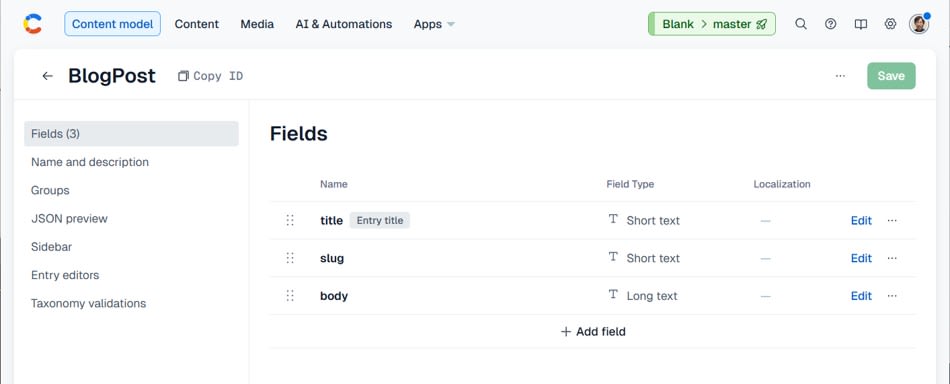
body is not used in listings. However, to make differences more noticeable, we'll make body larger in the test data.
Setup
To run TypeScript, we'll use tsx.
npm init -y
npm i contentful-management dotenv
npm i -D tsx typescript @types/node
Environment Variable Setting
Create .env.
CF_SPACE_ID=xxxxx
CF_ENV=master
CF_LOCALE=en-US

CF_MANAGEMENT_TOKEN=xxxxx
CF_CONTENT_TYPE=blogPost

CF_TOTAL=100
CF_FROM=1
CF_HIT_COUNT=50

CF_KEYWORD=NEEDLE
CF_BODY_CHARS=20000
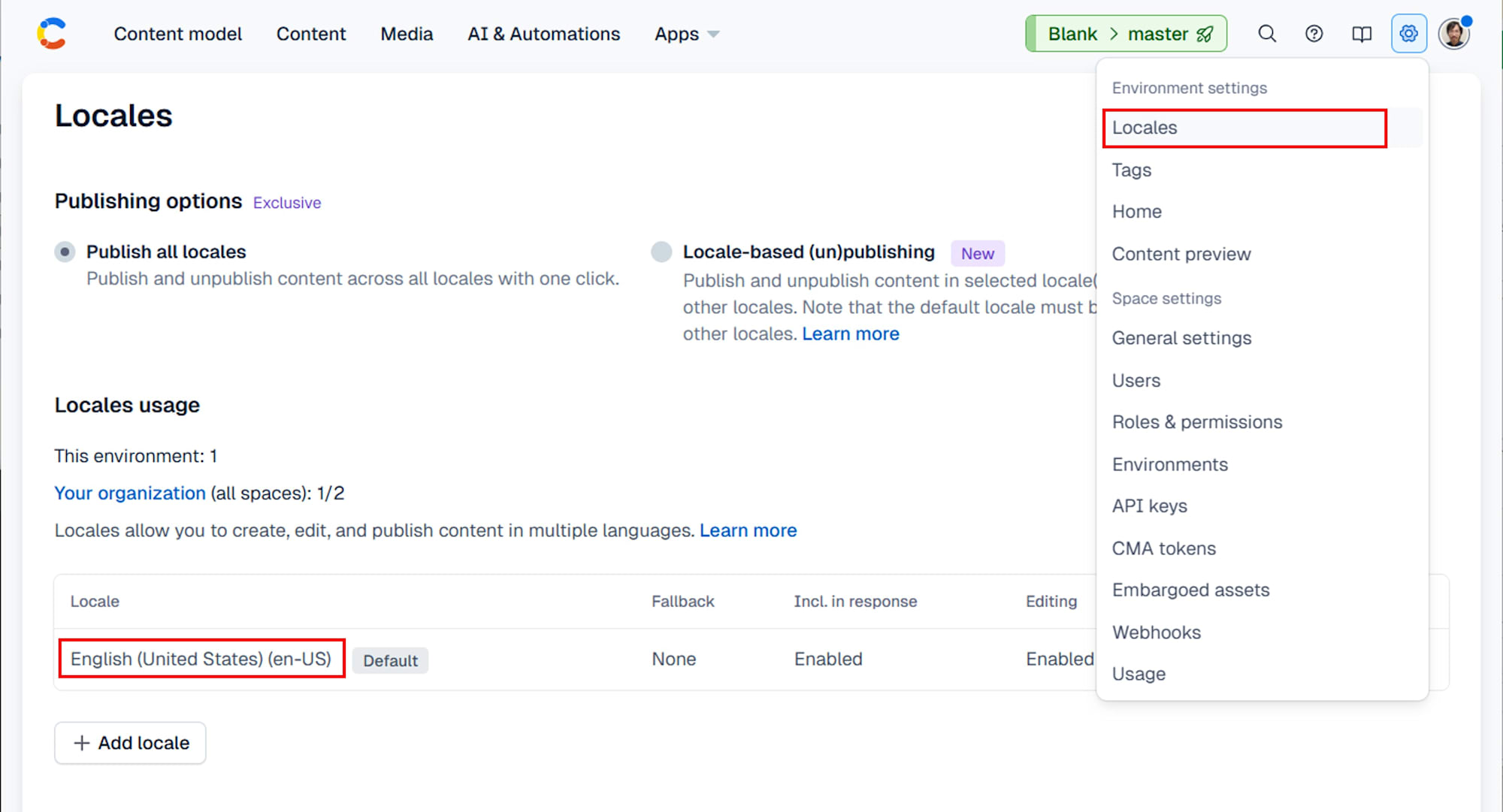
Please adjust CF_LOCALE to match your Space's Settings > Locales content.
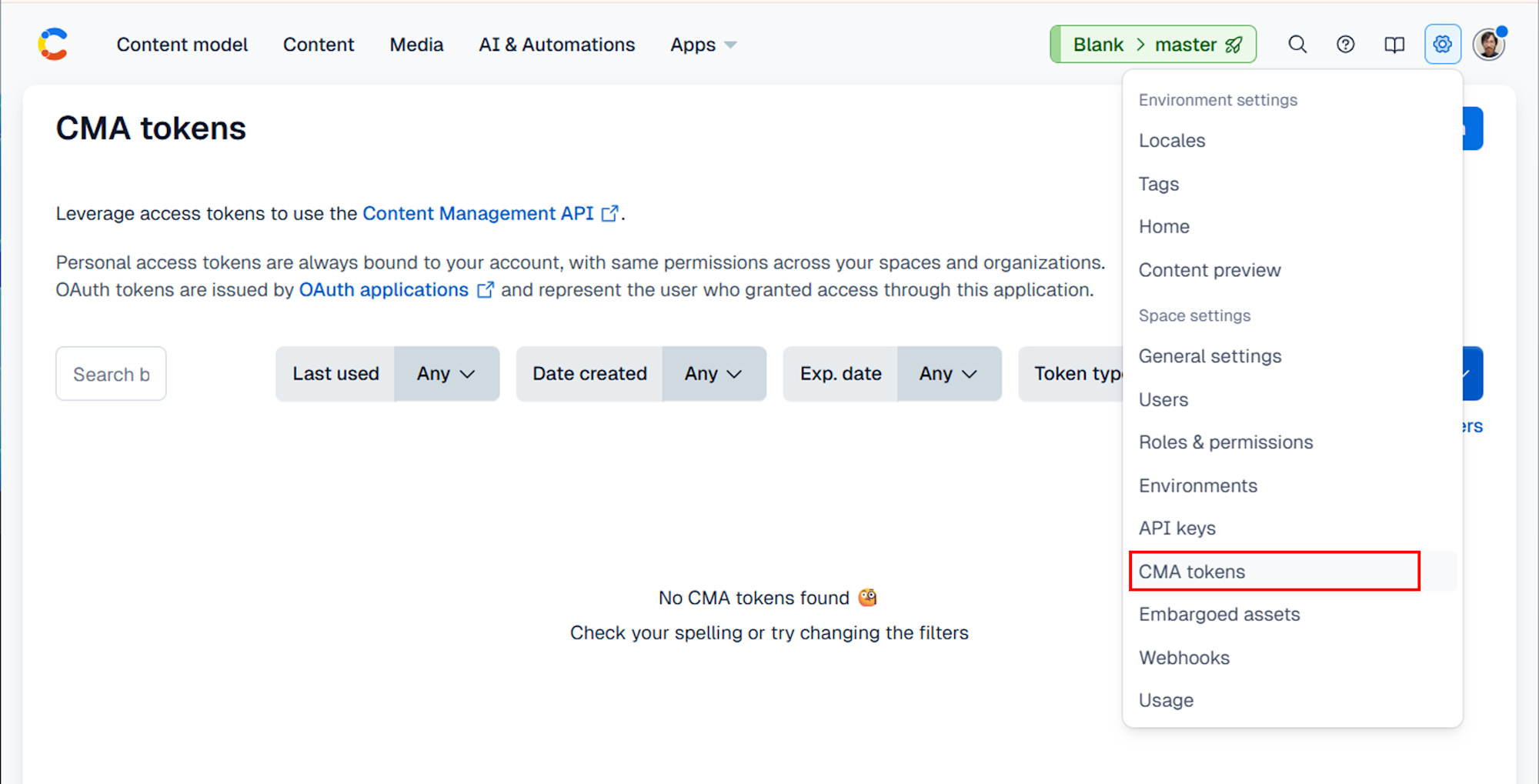
Also, create CF_MANAGEMENT_TOKEN from Space Settings > CMA tokens.
Data Insertion Script (seed.ts)
import "dotenv/config";
import { createClient } from "contentful-management";

const {
  CF_SPACE_ID,
  CF_ENV = "master",
  CF_LOCALE = "en-US",
  CF_MANAGEMENT_TOKEN,
  CF_CONTENT_TYPE = "blogPost",
  CF_TOTAL = "100",
  CF_FROM = "1",
  CF_HIT_COUNT = "50",
  CF_KEYWORD = "NEEDLE",
  CF_BODY_CHARS = "20000",
} = process.env;

if (!CF_SPACE_ID || !CF_MANAGEMENT_TOKEN) {
  throw new Error("CF_SPACE_ID and CF_MANAGEMENT_TOKEN are required");
}

const TOTAL = Number(CF_TOTAL);
const FROM = Number(CF_FROM);
const HIT_COUNT = Number(CF_HIT_COUNT);
const BODY_CHARS = Number(CF_BODY_CHARS);

const sleep = (ms: number) => new Promise((r) => setTimeout(r, ms));

function makeBody(n: number): string {
  const chunk = "Lorem ipsum dolor sit amet. ";
  let s = "";
  while (s.length < n) s += chunk;
  return s.slice(0, n);
}

async function main(): Promise<void> {
  const client = createClient({ accessToken: CF_MANAGEMENT_TOKEN });
  const space = await client.getSpace(CF_SPACE_ID);
  const env = await space.getEnvironment(CF_ENV);

  const body = makeBody(BODY_CHARS);

  for (let i = FROM; i <= TOTAL; i++) {
    const slug = `post-${String(i).padStart(4, "0")}`;

    // `fields.title[match]` is full-text search, not strict partial matching.
    // For stable hits in this test, we place the keyword at the beginning of the title.
    const title = i <= HIT_COUNT ? `${CF_KEYWORD} post ${i}` : `post ${i}`;

    const entry = await env.createEntry(CF_CONTENT_TYPE, {
      fields: {
        title: { [CF_LOCALE]: title },
        slug: { [CF_LOCALE]: slug },
        body: { [CF_LOCALE]: body },
      },
    });

    await entry.publish();

    // Wait to avoid rate limits.
    await sleep(200);
    process.stdout.write(".");
  }

  process.stdout.write("\nDone.\n");
}

main().catch((e) => {
  console.error(e);
  process.exitCode = 1;
});
Run it:
npx tsx seed.ts
....................................................................................................
Done.
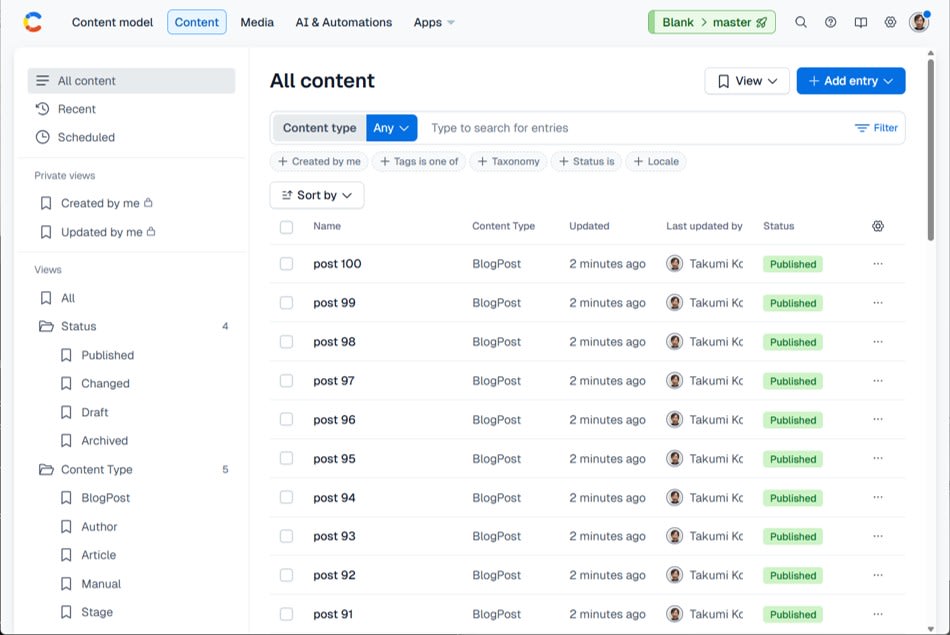
Verify that the data has been inserted in the console.
Measuring Time to Completion
We'll compare A and B under the same conditions and measure the time to completion. Although CDA has rate limits, they shouldn't be an issue with the small number of measurements we're making.
Environment Variable Setting
Add to .env:
CF_DELIVERY_TOKEN=xxxxx
CF_RUNS=5
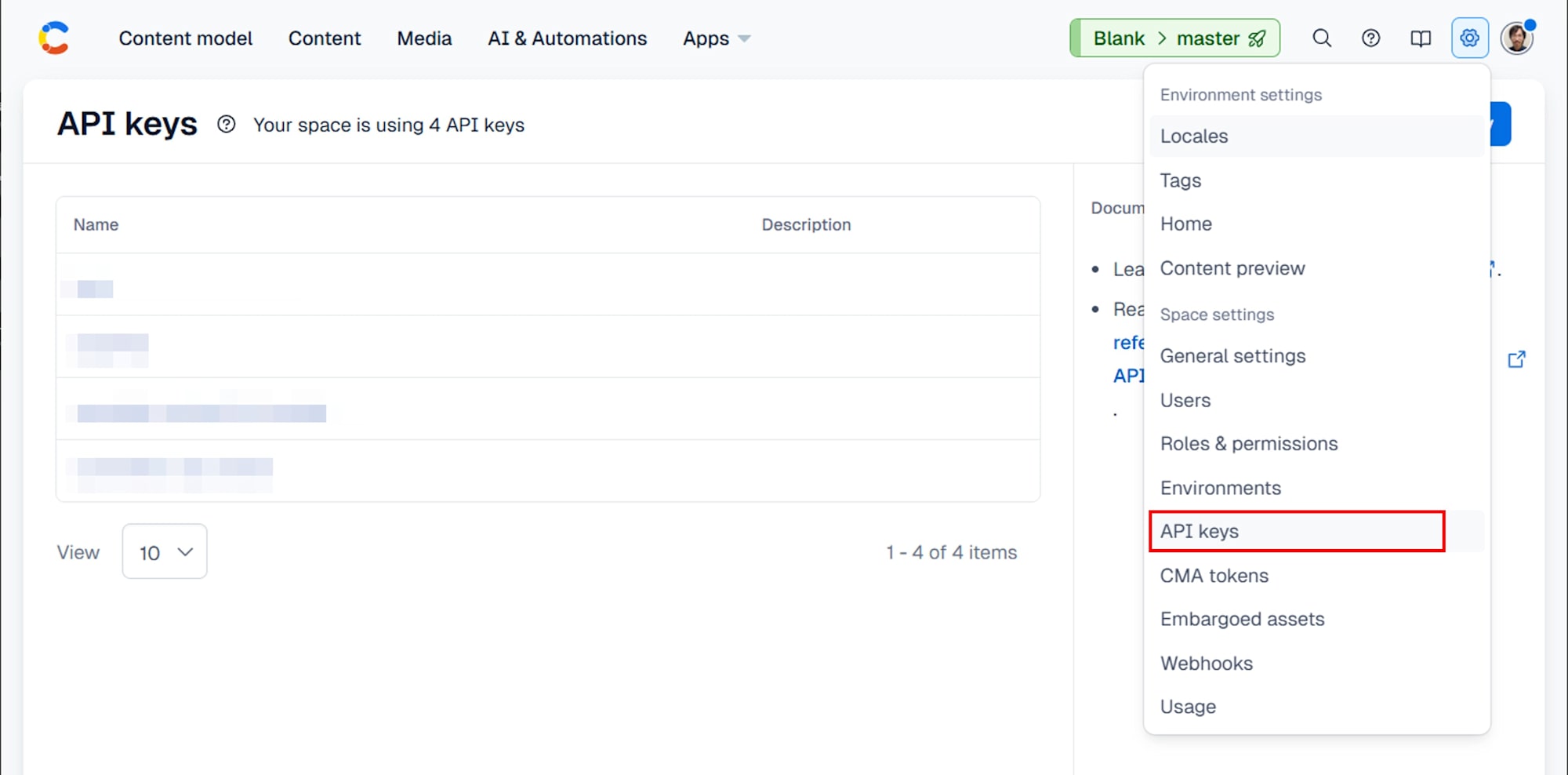
To obtain CF_DELIVERY_TOKEN, create an API key from Space Settings > API keys. Use the Content Delivery API value.
Measurement Script (bench.ts)
Since retrieving all entries may hit response size limits, we'll use pagination with skip and limit.
Add to .env:
CF_LIMIT=100
CF_PAGE_SIZE=100
Here's bench.ts:
import "dotenv/config";
import { performance } from "node:perf_hooks";

type EntryLike = {
  fields?: {
    title?: string;
    slug?: string;
  };
};

const {
  CF_SPACE_ID,
  CF_ENV = "master",
  CF_DELIVERY_TOKEN,
  CF_CONTENT_TYPE = "blogPost",
  CF_KEYWORD = "NEEDLE",
  CF_RUNS = "5",
  CF_LIMIT = "100",
  CF_PAGE_SIZE = "100",
} = process.env;

if (!CF_SPACE_ID || !CF_DELIVERY_TOKEN) {
  throw new Error("CF_SPACE_ID and CF_DELIVERY_TOKEN are required");
}

const RUNS = Number(CF_RUNS);
const LIMIT = Number(CF_LIMIT);
const PAGE_SIZE = Number(CF_PAGE_SIZE);

const baseUrl = `https://cdn.contentful.com/spaces/${CF_SPACE_ID}/environments/${CF_ENV}/entries`;
const authHeader = { Authorization: `Bearer ${CF_DELIVERY_TOKEN}` };

async function fetchJson(url: string): Promise<any> {
  const res = await fetch(url, { headers: authHeader });
  if (!res.ok) throw new Error(`HTTP ${res.status}: ${await res.text()}`);
  return res.json();
}

function urlWith(params: Record<string, string | number>): string {
  const u = new URL(baseUrl);
  for (const [k, v] of Object.entries(params)) u.searchParams.set(k, String(v));
  return u.toString();
}

function median(values: number[]): number {
  const a = [...values].sort((x, y) => x - y);
  const mid = Math.floor(a.length / 2);
  return a.length % 2 ? a[mid] : (a[mid - 1] + a[mid]) / 2;
}

async function runA(): Promise<{ ms: number; hits: number }> {
  const t0 = performance.now();

  const itemsAll: EntryLike[] = [];

  for (let skip = 0; skip < LIMIT; skip += PAGE_SIZE) {
    const limit = Math.min(PAGE_SIZE, LIMIT - skip);

    const url = urlWith({
      content_type: CF_CONTENT_TYPE!,
      limit,
      skip,
      order: "sys.createdAt",
    });

    const data = await fetchJson(url);
    const items = (data.items ?? []) as EntryLike[];
    itemsAll.push(...items);
  }

  const hits = itemsAll.filter((e) => (e.fields?.title ?? "").includes(CF_KEYWORD!)).length;

  const t1 = performance.now();
  return { ms: t1 - t0, hits };
}

async function runB(): Promise<{ ms: number; hits: number }> {
  const url = urlWith({
    content_type: CF_CONTENT_TYPE!,
    limit: LIMIT,
    "fields.title[match]": CF_KEYWORD!,
    select: "sys.id,fields.title,fields.slug",
  });

  const t0 = performance.now();
  const data = await fetchJson(url);

  const items = (data.items ?? []) as EntryLike[];
  const t1 = performance.now();

  return { ms: t1 - t0, hits: items.length };
}

async function bench(
  name: string,
  fn: () => Promise<{ ms: number; hits: number }>,
): Promise<void> {
  const times: number[] = [];
  let hits = 0;

  for (let i = 0; i < RUNS; i++) {
    const r = await fn();
    times.push(r.ms);
    hits = r.hits;
  }

  console.log(`- ${name}`);
  console.log(`  - median: ${Math.round(median(times))} ms`);
  console.log(`  - runs: ${times.map((t) => Math.round(t)).join(", ")} ms`);
  console.log(`  - hits: ${hits}`);
}

async function main(): Promise<void> {
  console.log("# Results (ms)");
  await bench("A: Retrieve all and filter on application side", runA);
  await bench("B: Filter on headless CMS side + select", runB);
}

main().catch((e) => {
  console.error(e);
  process.exitCode = 1;
});
Run it:
npx tsx bench.ts
The output was:
# Results (ms)
- A: Retrieve all and filter on application side
  - median: 28 ms
  - runs: 495, 30, 28, 28, 20 ms
  - hits: 50
- B: Filter on headless CMS side + select
  - median: 10 ms
  - runs: 295, 11, 9, 10, 9 ms
  - hits: 50
Results
Comparing the median values, B completed processing in less time than A.
| Retrieval Method | Time (ms, median) |
|---|---|
| A: Retrieve all and filter on application side | 28 |
| B: Filter on headless CMS side + select | 10 |
Based on the median values, B was about 2.8 times faster than A.
Note that for both methods, the first run has a much larger value. This is because DNS resolution, TLS handshake, and HTTP connection establishment are concentrated in the first run. In this article, we use the median value to avoid this influence.
Additional Experiment: Increasing Article Count to Observe Scaling
With only 100 articles for comparison, it's hard to determine whether the difference is coincidental or if it's a structural difference that widens as the number of articles increases. In this additional experiment, we'll increase the article count to 500 and 1000 and observe how the processing time scales. The goal is to verify with actual measurements whether A's growth approaches
Predefined Conditions
To make this observation clearer, we'll fix the hit count
Adding More Data
Assuming we already have 100 articles, we'll add more to reach 1000 articles, starting from the 101st article. Our seed.ts already allows specifying the creation range with CF_FROM and CF_TOTAL, and fixing the number of articles with keywords using CF_HIT_COUNT.
Change .env to:
CF_TOTAL=1000
CF_FROM=101
CF_HIT_COUNT=50
Run:
npx tsx seed.ts
With this procedure, articles from the 101st onward are created with titles not containing the keyword. Therefore, the hit count remains at 50.
Running Measurements with 500 and 1000 Articles
Our bench.ts reads CF_LIMIT and CF_PAGE_SIZE, with A retrieving pages to reach a total of CF_LIMIT articles. B returns only 50 articles due to fields.title[match], so increasing CF_LIMIT doesn't affect the return count.
First, measure with 500 articles:
CF_LIMIT=500
CF_PAGE_SIZE=100
npx tsx bench.ts
# Results (ms)
- A: Retrieve all and filter on application side
  - median: 146 ms
  - runs: 2126, 125, 122, 158, 146 ms
  - hits: 50
- B: Filter on headless CMS side + select
  - median: 10 ms
  - runs: 240, 10, 9, 11, 10 ms
  - hits: 50
Next, measure with 1000 articles:
CF_LIMIT=1000
CF_PAGE_SIZE=100
npx tsx bench.ts
The results were:
# Results (ms)
- A: Retrieve all and filter on application side
  - median: 225 ms
  - runs: 2460, 242, 225, 224, 215 ms
  - hits: 50
- B: Filter on headless CMS side + select
  - median: 10 ms
  - runs: 555, 12, 10, 8, 9 ms
  - hits: 50
Additional Experiment Results
Here are the results in a table and graph:
| Article Count |
A: Retrieve all and filter on application side (ms, median) | B: Filter on headless CMS side + select (ms, median) |
|---|---|---|
| 100 | 28 | 10 |
| 500 | 146 | 10 |
| 1000 | 225 | 10 |
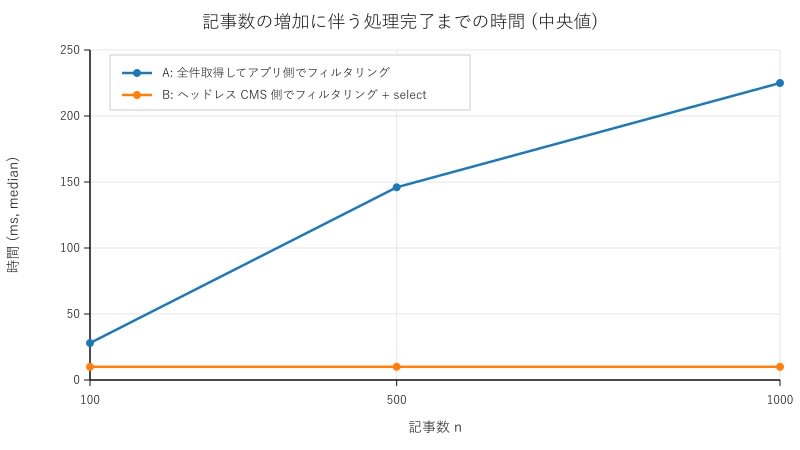
As the article count increased from 100 to 500 to 1000, the median time for A increased from 28 ms to 146 ms to 225 ms. This means that under these experimental conditions, the processing time for A increased as the article count CF_PAGE_SIZE=100, so retrieving 500 articles requires 5 HTTP requests, and retrieving 1000 articles requires 10 HTTP requests.
On the other hand, for B, even as the article count increased to 100, 500, and 1000, the median time remained around 10 ms (10 ms, 10 ms, 10 ms). This means that under these experimental conditions, the processing time for B hardly changed even as the article count
Discussion: Why Delegating to the Data Holder Tends to Be Faster
Possible Reasons for the Difference in Scaling
Several factors may explain why A's processing time increased:
First, A's data retrieval volume increases as article count
On the other hand, B has a fixed hit count select limits the returned fields to just title and slug. Under these conditions, the JSON size the application receives doesn't increase much as
Correlation with Order Notation Explanation
These experimental results are consistent with the
However, what we measured was the time to completion, which includes constant factors for networking and connection establishment. Therefore, this article doesn't claim strict proof of
Conclusion
One reason headless CMS is said to be fast is that it can delegate search and filtering processes to the data holder. In our verification, the method of retrieving all entries and filtering on the application side took longer as the article count select showed almost no increase in processing time even as article count increased. When adding search and filtering to article listings, it's safer to first consider API-side filtering and field selection.