
Trying Out Everything from Creating Semantic Views to Managing Materialization Using the dbt_semantic_view Package in dbt Projects on Snowflake

This page has been translated by machine translation. View original
I'm Kawabata.
In this article, I use the dbt package dbt_semantic_view, published by Snowflake-Labs, with dbt Projects on Snowflake. From a Snowsight Workspace, I verify creating a Semantic View, referencing it from downstream models, and managing materializations declaratively.
Overview of the dbt_semantic_view package
dbt_semantic_view is a dbt package published by Snowflake-Labs under Apache-2.0.
It adds a materialization called materialized='semantic_view'. You write everything after the TABLES clause of CREATE SEMANTIC VIEW as-is in the model's SQL file, and put ref() or source() where the table names go. dbt prepends CREATE OR REPLACE SEMANTIC VIEW <model name> and executes it. Because Snowflake SQL is passed through unchanged, you can use new clauses as they are added without waiting for a package update. There are four configs.
| config | Default | Purpose |
|---|---|---|
copy_grants |
false | Appends COPY GRANTS to the end of CREATE OR REPLACE |
create_or_alter |
false | Uses CREATE OR ALTER instead of CREATE OR REPLACE |
max_staleness |
None | Appends MAX_STALENESS = '<value>' at the end. Materializations require MAX_STALENESS, and you specify it in either the config or the SQL body, not both |
sv_materializations |
None | YAML definition of materializations. Synchronized on every run with SYSTEM$MANAGE_SEMANTIC_VIEW_MATERIALIZATIONS_FROM_YAML |
Two generic tests are also included (materialization_exists and materialization_is_active). They check whether a materialization exists and what state it is in. persist_docs is not supported.
Can it be used with dbt Projects on Snowflake?
The package consists only of Jinja macros, with no dependency on Python or other packages. Custom materializations are a standard dbt Core mechanism, so they work as-is on the dbt Core runtime managed by Snowflake. The limitations page also has no statement restricting custom materializations or packages. There are two points to note in advance.
- To fetch packages from dbt Hub with
dbt depsinside Snowflake, an External Access Integration is required. Because external access is disabled by default on trial accounts, this article places the package as a local package - On the dbt Fusion (2.x) runtime, config keys such as
create_or_alterare rejected
This article proceeds with dbt Core 1.12.3.
Prerequisites
- An account where dbt Projects on Snowflake and Semantic Views are available. No edition requirement is documented, and I confirmed this on trial accounts (Business Critical and Enterprise)
- For the role that runs dbt: CREATE SEMANTIC VIEW, ADD SEMANTIC VIEW MATERIALIZATION, and CREATE DBT PROJECT on the target schema
- For the same role: USAGE on the warehouse and read privileges on
SNOWFLAKE_SAMPLE_DATA - Semantic View materializations are a preview feature (available in all accounts). The minimum value of
MAX_STALENESSis 120 seconds
I verified this on October 29, 2026 on a trial account in the AWS Tokyo region. The behavior of the generic tests and Fusion was additionally confirmed on another trial account on November 11, 2026.
I ran dbt commands in a Snowsight Workspace, and the runtime is dbt Core 1.12.3 (dbt-snowflake 1.12.0).
Preparation
Objects on the Snowflake side
Using ACCOUNTADMIN, create the execution role, the DB and schema, and the warehouse, and grant the required privileges individually. ADD SEMANTIC VIEW MATERIALIZATION is a schema privilege for adding and dropping materializations.
USE ROLE ACCOUNTADMIN;

CREATE ROLE DBT_SV_ROLE;
GRANT ROLE DBT_SV_ROLE TO ROLE SYSADMIN;
GRANT ROLE DBT_SV_ROLE TO USER <自分のユーザー名>;

CREATE WAREHOUSE DBT_SV_WH WAREHOUSE_SIZE = XSMALL AUTO_SUSPEND = 60 INITIALLY_SUSPENDED = TRUE;
CREATE DATABASE DBT_SV_DB;
CREATE SCHEMA DBT_SV_DB.DEV;

GRANT USAGE ON WAREHOUSE DBT_SV_WH TO ROLE DBT_SV_ROLE;
GRANT USAGE ON DATABASE DBT_SV_DB TO ROLE DBT_SV_ROLE;
GRANT USAGE, CREATE TABLE, CREATE VIEW, CREATE SEMANTIC VIEW, ADD SEMANTIC VIEW MATERIALIZATION,
      CREATE DBT PROJECT, CREATE STAGE, CREATE TASK ON SCHEMA DBT_SV_DB.DEV TO ROLE DBT_SV_ROLE;
GRANT EXECUTE TASK ON ACCOUNT TO ROLE DBT_SV_ROLE;
GRANT IMPORTED PRIVILEGES ON DATABASE SNOWFLAKE_SAMPLE_DATA TO ROLE DBT_SV_ROLE;
How to place the package
To fetch packages from dbt Hub with dbt deps inside Snowflake, an External Access Integration is required. The allowed destinations are hub.getdbt.com and codeload.github.com, specified at deployment time.
On trial accounts, external access is disabled by default, and enabling it requires a request to your account representative. In my environment, I could create the network rule, but creating the External Access Integration resulted in an error.
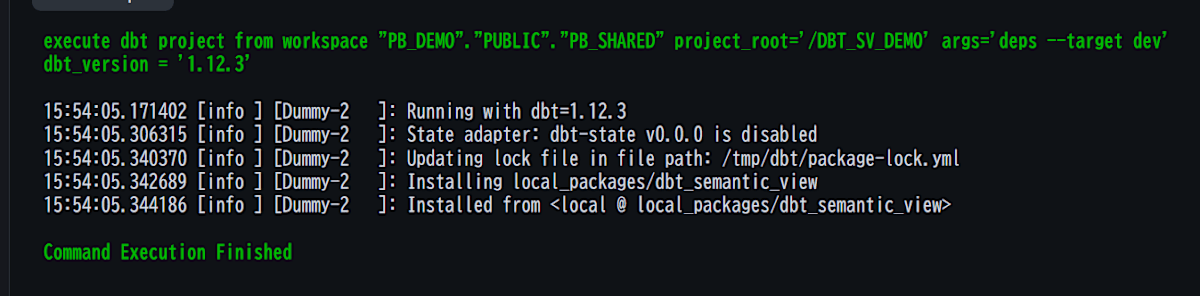
This article uses the local package approach, placing the package source in local_packages/. Since dbt deps on the Snowflake side succeeds without network access, everything is completed within the Workspace alone.
dbt project
The project placed in the Workspace has the following structure. I don't use seeds; TPCH_SF1 in SNOWFLAKE_SAMPLE_DATA is used as the source.
dbt_sv_demo/
├── dbt_project.yml
├── profiles.yml
├── packages.yml
├── local_packages/dbt_semantic_view/     # Copy only dbt_project.yml, LICENSE, and macros/ from GitHub v1.0.6
└── models/
    ├── sources.yml                       # tpch: orders / customer from SNOWFLAKE_SAMPLE_DATA.TPCH_SF1
    ├── staging/stg_orders.sql, stg_customers.sql
    ├── semantic/sv_tpch_sales.sql, schema.yml
    └── marts/revenue_by_segment_year.sql
local_packages/dbt_semantic_view/ needs only three things: dbt_project.yml, LICENSE, and macros/. integration_tests/ and docs/ are unnecessary, and the whole project fits in 18 files. packages.yml uses a local reference.
packages:
  - local: local_packages/dbt_semantic_view
In dbt Projects on Snowflake, profiles.yml is placed at the project root. Since execution happens inside Snowflake, account and user can be placeholders.
dbt_sv_demo:
  target: dev
  outputs:
    dev:
      type: snowflake
      account: "_"
      user: "_"
      role: DBT_SV_ROLE
      database: DBT_SV_DB
      schema: DEV
      warehouse: DBT_SV_WH
      threads: 4
In dbt_project.yml, staging and marts are set to +materialized: table. The staging models only align the TPCH column names.
-- models/staging/stg_orders.sql
select
    o_orderkey      as order_key,
    o_custkey       as customer_key,
    o_orderdate     as order_date,
    o_orderstatus   as order_status,
    o_orderpriority as order_priority,
    o_totalprice    as order_total
from {{ source('tpch', 'orders') }}
stg_customers.sql is similar. c_custkey becomes customer_key, c_name becomes customer_name, and c_mktsegment becomes market_segment.
Trying it out
Place the project in the Workspace and run dbt deps
Create a Workspace under Projects » Workspaces in Snowsight and place the files above. Change the dbt runtime from the account default to 1.12.3.
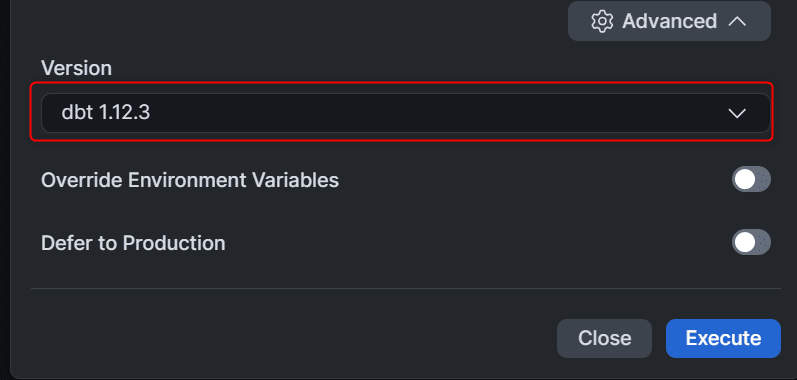
Next, run dbt deps. Since the package is in local_packages/, dbt_packages/dbt_semantic_view/ is created without using the network.
Create the Semantic View model and run dbt build
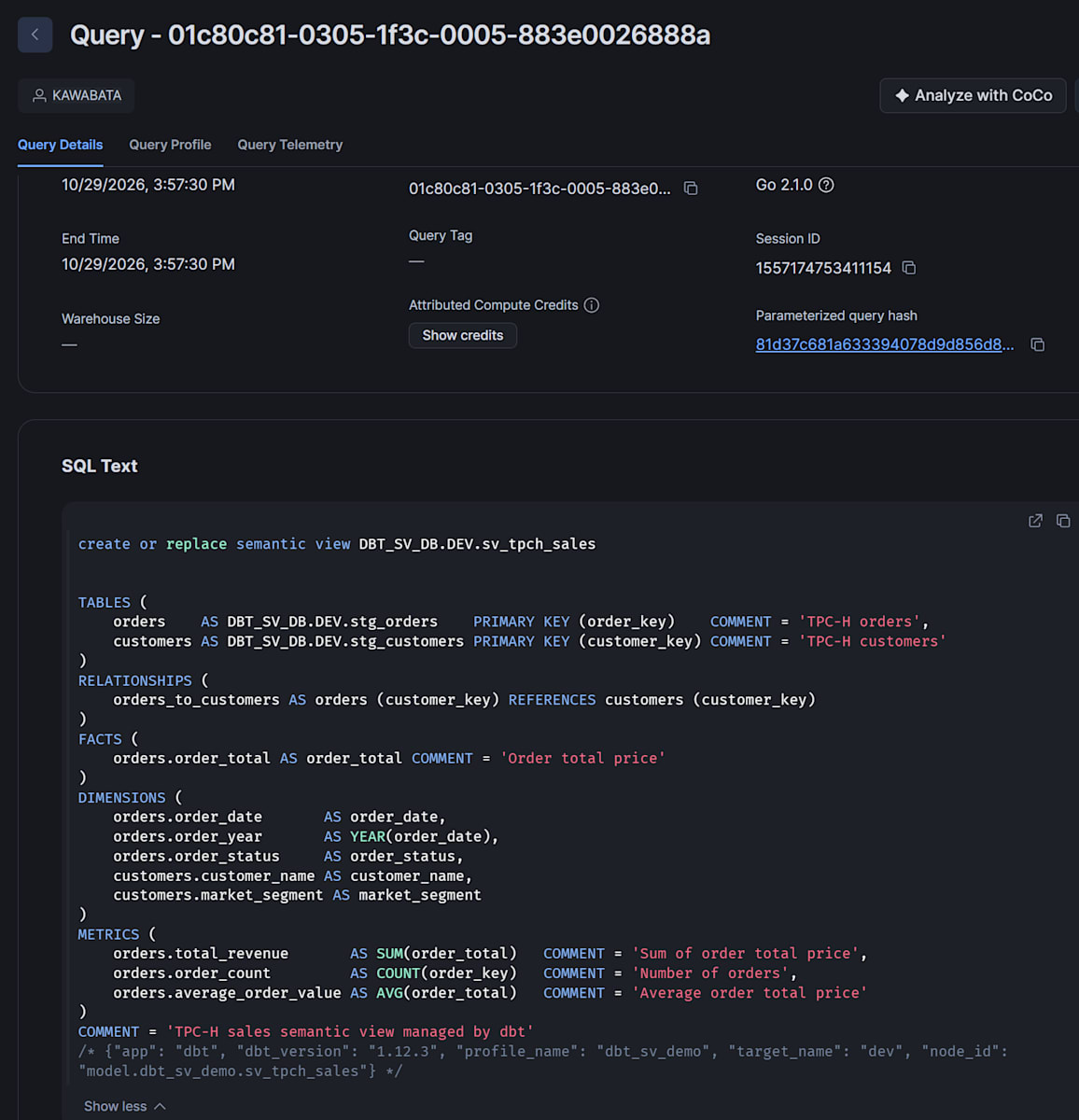
Create models/semantic/sv_tpch_sales.sql. First, here is the basic form without materializations. It uses TPCH orders and customer as logical tables and defines 5 dimensions and 3 metrics.
{{ config(materialized='semantic_view') }}

TABLES (
    orders    AS {{ ref('stg_orders') }}    PRIMARY KEY (order_key)    COMMENT = 'TPC-H orders',
    customers AS {{ ref('stg_customers') }} PRIMARY KEY (customer_key) COMMENT = 'TPC-H customers'
)
RELATIONSHIPS (
    orders_to_customers AS orders (customer_key) REFERENCES customers (customer_key)
)
FACTS (
    orders.order_total AS order_total COMMENT = 'Order total price'
)
DIMENSIONS (
    orders.order_date        AS order_date,
    orders.order_year        AS YEAR(order_date),
    orders.order_status      AS order_status,
    customers.customer_name  AS customer_name,
    customers.market_segment AS market_segment
)
METRICS (
    orders.total_revenue       AS SUM(order_total)  COMMENT = 'Sum of order total price',
    orders.order_count         AS COUNT(order_key)  COMMENT = 'Number of orders',
    orders.average_order_value AS AVG(order_total)  COMMENT = 'Average order total price'
)
COMMENT = 'TPC-H sales semantic view managed by dbt'
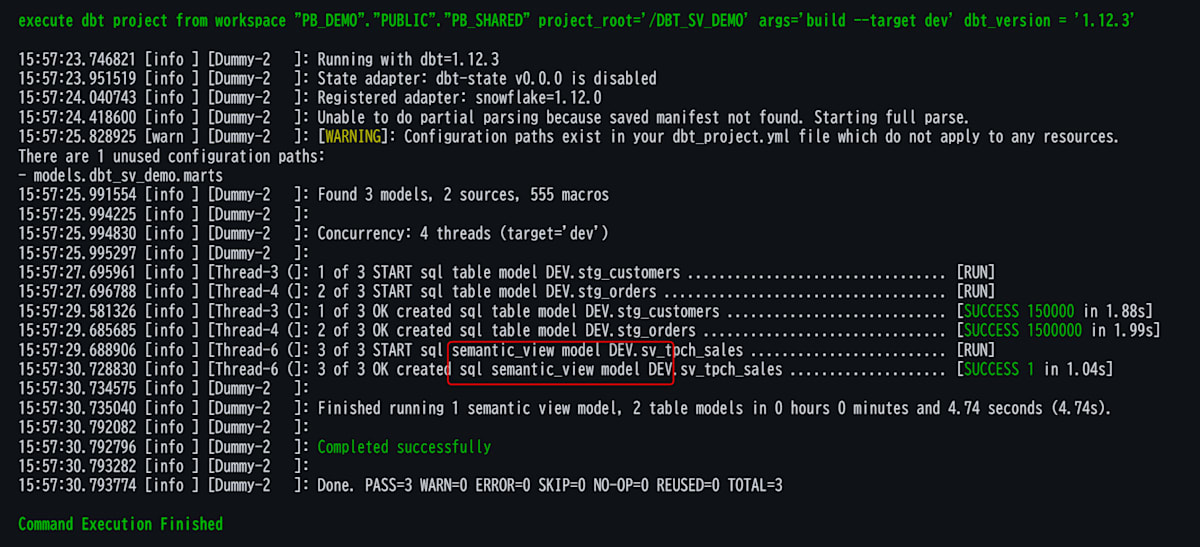
When you run dbt build, the Semantic View is created after the two staging tables. It is shown in the log as semantic_view model.
You can check the DDL that dbt issued in Query History.
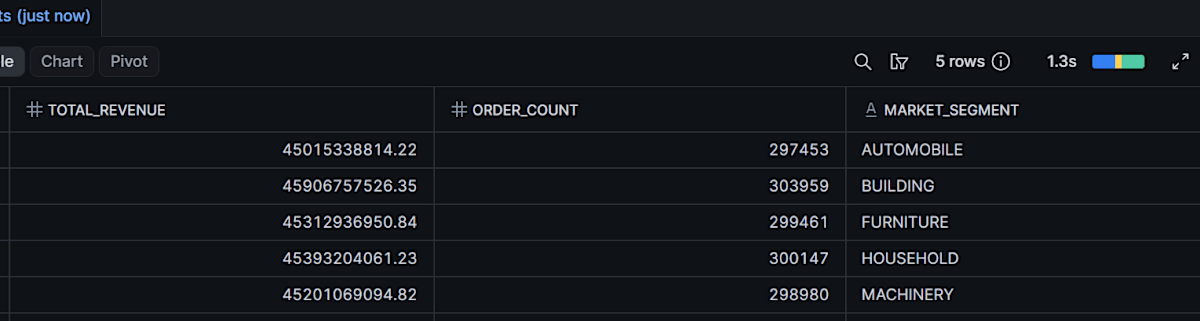
When you query the Semantic View, it returns 5 rows with revenue and counts for each of the 5 segments.
SELECT *
FROM SEMANTIC_VIEW(
    DBT_SV_DB.DEV.SV_TPCH_SALES
    METRICS    orders.total_revenue, orders.order_count
    DIMENSIONS customers.market_segment
)
ORDER BY market_segment;
Reference it from a downstream model and look at the DAG
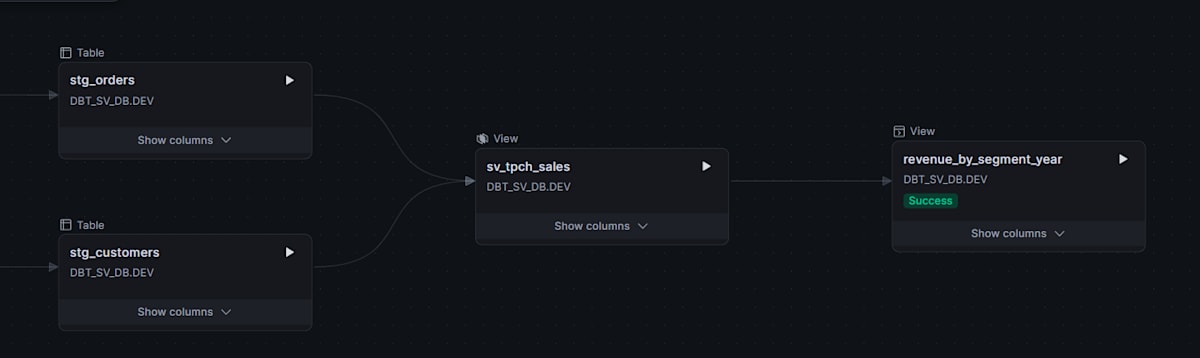
Add a downstream model that references the Semantic View with ref(). You just use ref() inside the semantic_view() function.
-- models/marts/revenue_by_segment_year.sql
select *
from semantic_view(
    {{ ref('sv_tpch_sales') }}
    metrics    orders.total_revenue, orders.order_count
    dimensions customers.market_segment, orders.order_year
)
order by market_segment, order_year
Add a materialization declaratively
Semantic View materializations became Public Preview on July 15, 2026. It is a mechanism that pre-aggregates frequently used combinations of dimensions and metrics. In plain SQL, you add them one at a time with ALTER SEMANTIC VIEW ... ADD MATERIALIZATION. With the package, you write the desired state in YAML and it is synchronized on every run.
Change the top of sv_tpch_sales.sql as follows. To take the warehouse name from the target, the YAML is built with {% set %}, and create_or_alter=true and max_staleness are specified at the same time.
{%- set sv_mats_yaml -%}
materializations:
  - name: mat_revenue_by_segment_year
    warehouse: {{ target.warehouse }}
    dimensions:
      - table: customers
        name: market_segment
      - table: orders
        name: order_year
    metrics:
      - table: orders
        name: total_revenue
      - table: orders
        name: order_count
{%- endset -%}

{{ config(
    materialized='semantic_view',
    create_or_alter=true,
    max_staleness='1 hour',
    sv_materializations=sv_mats_yaml
) }}

TABLES (
    ...(本文は変更なし)
When you run dbt run --select sv_tpch_sales, dbt issues two statements in succession.
Looking at SHOW MATERIALIZATIONS IN SEMANTIC VIEW, there is one row for MAT_REVENUE_BY_SEGMENT_YEAR.
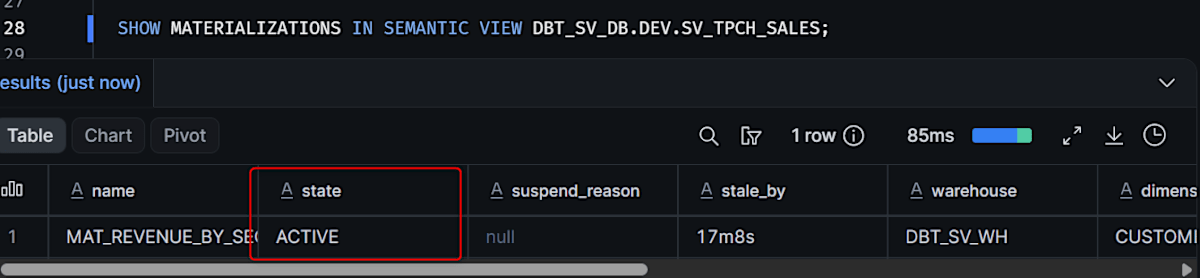
The state is ACTIVE, the warehouse is DBT_SV_WH, and the refresh_mode is FULL. According to the refresh_mode_reason column, the underlying object is a dynamic table, and AUTO was resolved to FULL because the aggregation spans two logical tables.
Differences between re-running, changing the definition, and CREATE OR REPLACE
Even when you run again with the same definition, the return value stays "Added/replaced: 1". However, no rebuild occurs. stale_by keeps increasing without interruption, and no FULL entries were added to the refresh history.
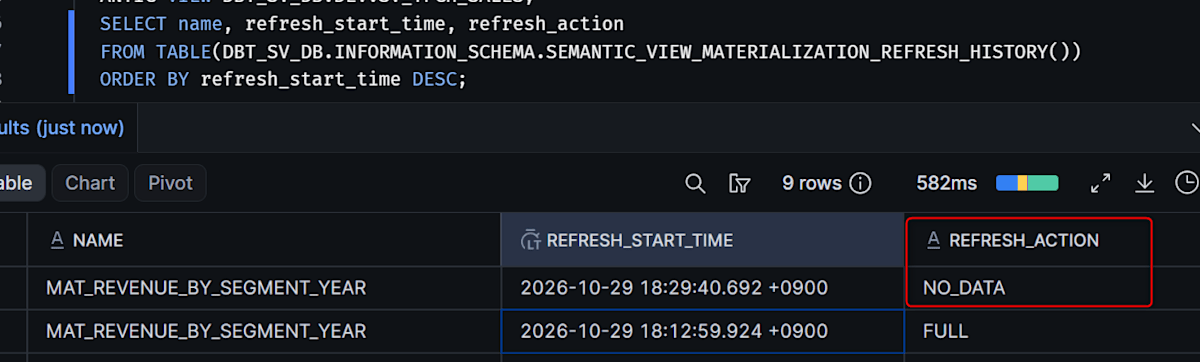
It is reasonable to read the number in the return value as the count written in the YAML, not as an indicator of whether anything changed. When I added orders.order_status to the YAML dimensions and ran, a FULL row was added to the refresh history 2 seconds after the run. stale_by also returned to 16s. Since nothing was added when I re-ran with the same definition, I can conclude it was rebuilt because of the definition change.
CREATE OR REPLACE drops the existing materialization. In this setup, the YAML synchronization right afterward recreates it, so every run incurs the compute cost of initialization (a full refresh). To avoid this, I assume create_or_alter=true.
Check the materialization state with generic tests
Write the package's bundled generic tests in models/semantic/schema.yml. The README example writes the arguments directly under the test name, but in dbt Core 1.12.3 this produces a deprecation warning, and in dbt Fusion it is an error (dbt1159). Put them under arguments:.
version: 2

models:
  - name: sv_tpch_sales
    tests:
      - dbt_semantic_view.materialization_exists:
          arguments:
            materialization_name: mat_revenue_by_segment_year
      - dbt_semantic_view.materialization_is_active:
          arguments:
            materialization_name: mat_revenue_by_segment_year
arguments: is the syntax for dbt Core 1.10.5 and later. With dbt 1.9.4, arguments is passed as an argument to the test macro, causing a compile error. The message is macro 'dbt_macro__test_materialization_exists' takes no keyword argument 'arguments'.
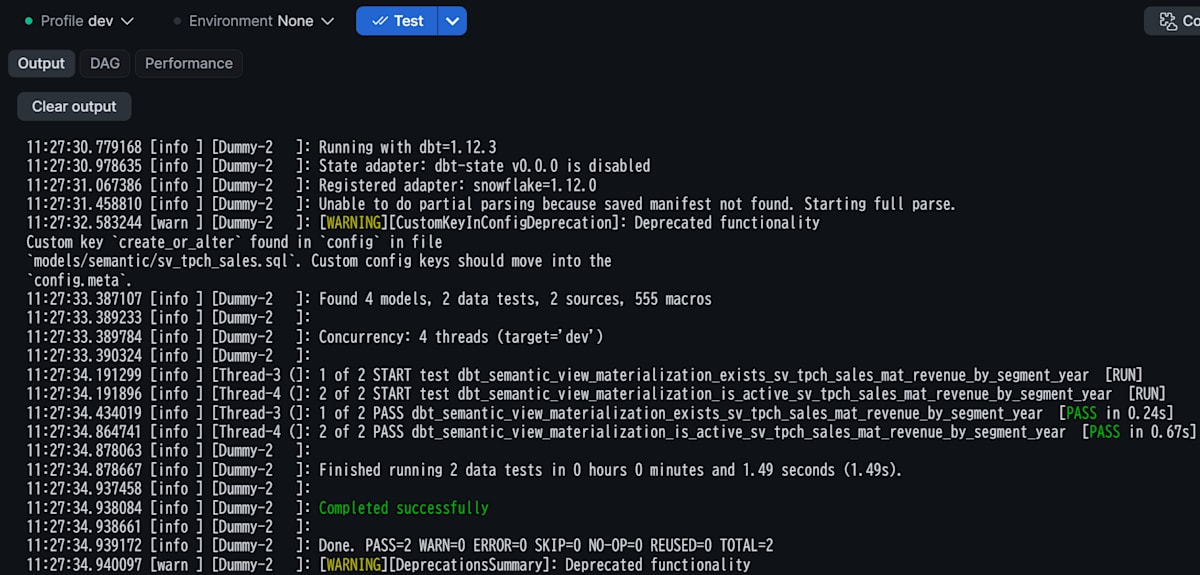
The two tests read the result of SHOW MATERIALIZATIONS. materialization_exists checks whether the name exists, and materialization_is_active checks that the state is not SUSPENDED. When you run dbt test, both PASS.
Next, I stop the materialization manually to see whether the tests detect it.
ALTER SEMANTIC VIEW DBT_SV_DB.DEV.SV_TPCH_SALES SUSPEND MATERIALIZATION MAT_REVENUE_BY_SEGMENT_YEAR;
SHOW MATERIALIZATIONS IN SEMANTIC VIEW DBT_SV_DB.DEV.SV_TPCH_SALES;
state becomes SUSPENDED, and suspend_reason becomes "The materialization was suspended by a user". When you run dbt test in this state, only materialization_is_active fails.
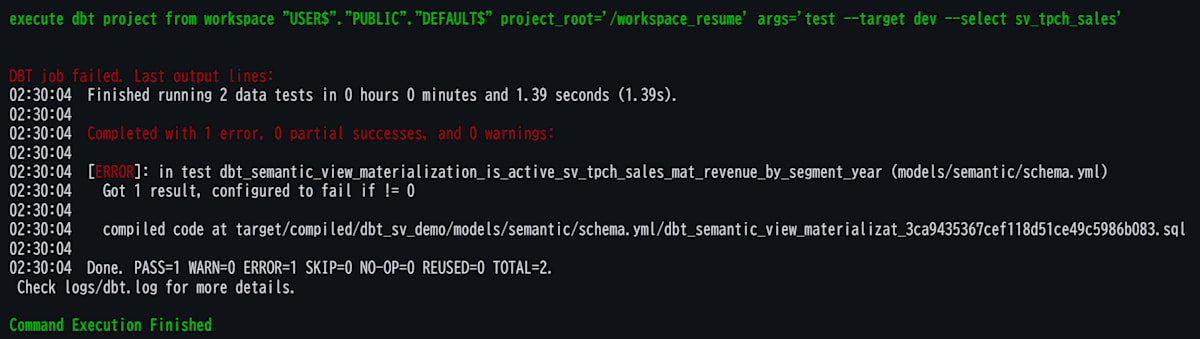
When you restore it with RESUME MATERIALIZATION, it returns to ACTIVE, and running dbt test again returns to 2 PASS. stale_by carries over the elapsed time from before the suspension, and no rebuild occurs.
ALTER SEMANTIC VIEW DBT_SV_DB.DEV.SV_TPCH_SALES RESUME MATERIALIZATION MAT_REVENUE_BY_SEGMENT_YEAR;
Running with dbt Fusion 2.0.0
dbt Projects on Snowflake also lets you choose dbt Fusion (2.x).
To state the conclusion first, you can create a Semantic View with Fusion as well. What you can't use is materialization management via create_or_alter and sv_materializations.
I run EXECUTE DBT PROJECT FROM WORKSPACE, which the Workspace execution uses internally, from a SQL file. Specify 2.0.0 with DBT_VERSION.
EXECUTE DBT PROJECT FROM WORKSPACE "USER$KAWABATA"."PUBLIC"."dbt_sv_demo"
  ARGS = 'parse'
  DBT_VERSION = '2.0.0';
The model with the materialization configs stopped at the parse stage with 2 errors. This matches what GitHub issue #34 reports.
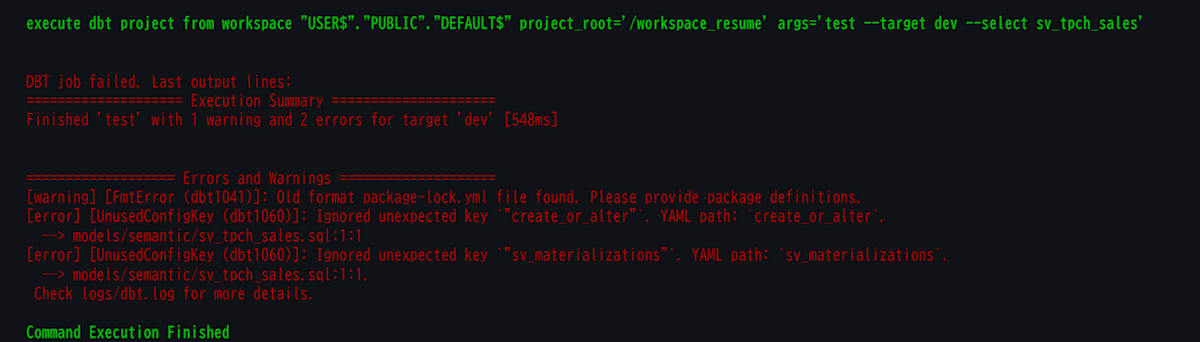
Fusion validates configs strictly and treats unknown keys as errors. In dbt Core 1.12.3, the same keys only produced a CustomKeyInConfigDeprecation warning. Because the package reads the keys with config.get(), users can't work around it by moving them to meta.
On the other hand, the basic-form model whose config is only materialized='semantic_view' ran successfully with dbt run on Fusion 2.0.0 as well. Because the body is not a SELECT statement, a SyntaxInvalid (dbt0101) warning appears, but it doesn't affect execution.
Custom instructions can also be written in the body
The package passes the body to the DDL as-is. Therefore, any clause you can write in CREATE SEMANTIC VIEW can be used as is. The same goes for custom instructions (AI_SQL_GENERATION, AI_QUESTION_CATEGORIZATION). You can also write AI_VERIFIED_QUERIES and WITH SYNONYMS.
COMMENT = 'TPC-H sales semantic view managed by dbt'
AI_SQL_GENERATION 'If no time period is specified, filter to the last 7 days.'
AI_QUESTION_CATEGORIZATION 'Reject questions about individual customers.'
Limitations and notes
This covers the behavior as of November 11, 2026, and what is reported in the package's GitHub issues.
Limitations and notes
- In dbt Fusion 2.0.0,
create_or_alterandsv_materializationsare rejected with UnusedConfigKey (dbt1060). This matches the report in issue #34, and the Fusion compatibility badge on the Hub is a mechanical check of parse. Basic-form Semantic View models also work on Fusion - External access is disabled by default on trial accounts (it can be enabled by requesting your account representative). In my environment, creating the External Access Integration failed with 509009. Either make the Hub package a local package, or run
dbt depslocally from the CLI and bundledbt_packages/ - There are reports of introspection errors after creation on dbt Core 1.9.x (issue #5). They didn't occur on 1.12.3, but the trial default is 1.9.4, so specify the version explicitly
persist_docsis not supported (stated in the README). Write descriptions in theCOMMENTclause of the DDL. The--emptyflag also can't be used (issue #11)- There is a report that
filter_clauseinsv_materializationshas no effect via the stored procedure (issue #35).refresh_modeis also ignored. If you need them, writeALTER SEMANTIC VIEW ... ADD MATERIALIZATIONin a post_hook. However, the synchronization procedure deletes materializations that are not in the YAML. For that Semantic View, don't usesv_materializationsand unify management on the post_hook side - The stored procedure's return value "Added/replaced: N" returns the number of entries in the YAML even when the definition is the same. Judge whether a rebuild occurred from
stale_byor the refresh history COPY GRANTScan't be used together withCREATE OR ALTER.CREATE OR ALTERrequires OWNERSHIP of the Semantic View and can't change tags. Write generic test arguments underarguments:- Materializations are a preview feature, and they are effective only for queries that go through the Semantic View via
SEMANTIC_VIEW()or standard SQL. They are not used for queries that issue SQL directly against the underlying physical tables, such as Cortex Analyst or Cortex Agent. While a materialization exists, you can't removeMAX_STALENESS
Conclusion
Because the dbt_semantic_view package is made only of Jinja macros, it worked as-is on dbt Core 1.12.3 in dbt Projects on Snowflake. The Semantic View and downstream models can be placed in the same DAG, and materializations can be synchronized idempotently with YAML. Creating a Semantic View also works on the Fusion runtime. The materialization management configs are stopped by validation, so if you want to use them, choosing dbt Core is the safe option for now.
I hope this article is helpful to someone!