
I Tried Implementing Supply Chain Attack Countermeasures for Developer PCs

This page has been translated by machine translation. View original
Introduction
A supply chain attack is an attack method that sneaks malicious code through developers' PCs and tools. Vectors targeting developers are increasing, including credential theft, malicious extensions, and fake packages injected into package registries.
Why Countermeasures Are Needed Now
Even though we understand that "security measures are important," it can sometimes feel like a distant problem. However, since entering 2026, well-known open source packages have been compromised one after another.
Supply Chain Attack: LiteLLM (March 2026)
The AI development framework LiteLLM was using the security scanner "Trivy" in its CI/CD pipeline. The attacker group TeamPCP first compromised Trivy and stole the PyPI publishing token on LiteLLM's GitHub Actions. On March 24, 2026, malicious versions (1.82.7, 1.82.8) were published directly to PyPI (CVE-2026-33634, CVSS 9.4).
This was an attack on a package with 95 million monthly downloads, and the most ironic aspect is that "the security scanner itself became the entry point of the attack." The very tool that CI/CD trusted became a stepping stone for credential theft.
Supply Chain Attack: Axios (March 2026)
Axios, a JavaScript HTTP client boasting 70 million weekly downloads, had its maintainer's npm account compromised by a North Korea-affiliated threat actor (Sapphire Sleet). Within a window of just 39 minutes, malicious versions (1.14.1, 0.30.4) were published, embedding a cross-platform RAT supporting macOS, Windows, and Linux (CISA Official Advisory).
Zero-Day Vulnerability: React Server Components (CVE-2025-55182, CVSS 10.0)
Unlike supply chain attacks, zero-day attacks exploit unknown vulnerabilities lurking in legitimate software itself. The React Server Components vulnerability discovered in December 2025 (CVE-2025-55182) recorded a CVSS score of 10.0 (the maximum), affecting Next.js 14.3 and later and React 19. Since applying a patch was the only mitigation with no workaround, environments configured to block package updates for extended periods may have been unable to apply this emergency patch as well. This is one of the reasons the 7-day setting was adopted in Countermeasure ⑦ of this article.
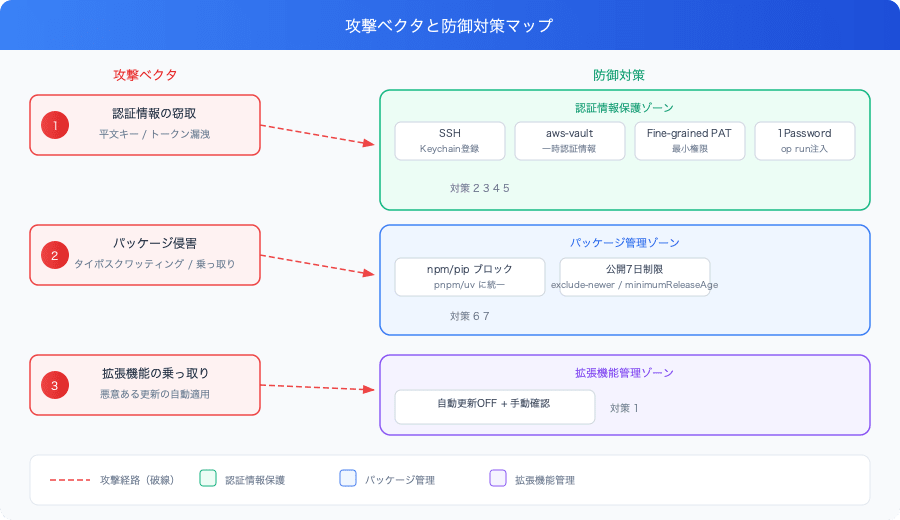
The common thread among these is that "attackers target the most trusted components." Even if you haven't written the code yourself, you can be affected through the packages you depend on or your CI/CD tools. Below, we introduce 7 countermeasures that can be implemented at the developer PC level.
Environment
- macOS Sequoia
- Shell: zsh
- Editor: VSCode
- Package managers: pnpm (Node.js), uv (Python)
- AWS authentication: aws-vault
- Password manager: 1Password
Countermeasure ①: Disable Automatic Updates for VSCode Extensions
VSCode automatically updates extensions by default. If an extension is taken over or an update containing malware is distributed, automatic updates become the shortest path to infection.
Add the following to settings.json.
{
  "extensions.autoUpdate": false
}
After configuring this, the workflow switches to manually updating after reviewing the changes before updating.
Countermeasure ②: Set a Passphrase for SSH Keys and Register Them in macOS Keychain
If an SSH key has no passphrase, it can be used immediately if your PC is stolen or lost. By setting a passphrase and registering it in macOS Keychain, you can protect it without the hassle of entering it every time.
# Set a passphrase on an existing key
ssh-keygen -p -f ~/.ssh/id_ed25519

# Register in Keychain (will be loaded automatically from now on)
ssh-add --apple-use-keychain ~/.ssh/id_ed25519
Adding the following to ~/.ssh/config will automatically add the key to the agent each time you open a new terminal.
Host *
  AddKeysToAgent yes
  UseKeychain yes
  IdentityFile ~/.ssh/id_ed25519
With this configuration, tools that reference the SSH agent, such as Node.js's ssh2 library, can use the key without re-entering the passphrase.
Countermeasure ③: Migrate AWS Credentials to aws-vault
If you store your access key ID and secret in plain text in ~/.aws/credentials, your credentials are exposed simply by someone viewing the file. Using aws-vault allows you to store credentials in macOS Keychain and issue temporary credentials only when executing commands.
# Install
brew install aws-vault

# Register credentials (stored interactively in Keychain)
aws-vault add <profile-name>

# Verify operation
aws-vault exec <profile-name> -- aws sts get-caller-identity
After migration, you can delete the plain text keys from ~/.aws/credentials. SDKs such as boto3 receive temporary credentials as environment variables by launching them via aws-vault exec.
Countermeasure ④: Authenticate GitHub CLI with Fine-grained PATs
Classic PATs tend to have broad permissions. Fine-grained PATs are issued per resource owner (personal account or organization) and allow you to restrict permissions per repository and per operation.
Issue a Fine-grained PAT from GitHub's settings screen.
- Settings → Developer settings → Personal access tokens → Fine-grained tokens
- Required permissions:
Contents(read/write),Pull requests(read/write),Workflows(read/write),Metadata(read)
# Log in with the issued token
gh auth login --with-token <<< "github_pat_xxxx"

# Verify — OK if (keyring) and github_pat_ are displayed
gh auth status
The token is stored in macOS Keychain, so it does not remain in a plain text file.
Countermeasure ⑤: Migrate Secrets from .env Files to 1Password
If you write API keys in your project's .env file, there is a risk of accidentally committing them or having them scanned by malware. Using the 1Password CLI (op), you can store secrets in a vault and inject them into processes only at command execution time.
Register Secrets in 1Password
op item create \
  --vault Employee \
  --category "API Credential" \
  --title "Contentful CMA Token" \
  "token[password]=CFPAT-xxxx"
Create a .env.1p Template
Delete the .env file and instead create a template using op:// references.
# .env.1p
CONTENTFUL_CMA_TOKEN=op://Employee/Contentful CMA Token/token
Since this file does not contain actual secrets, it is safe to commit to a repository.
Execute Commands with op run
op run --env-file .env.1p -- pnpm dev
op run --env-file .env.1p -- node script.js
op run replaces op:// references with actual values before launching the process. Secrets are not written to disk.
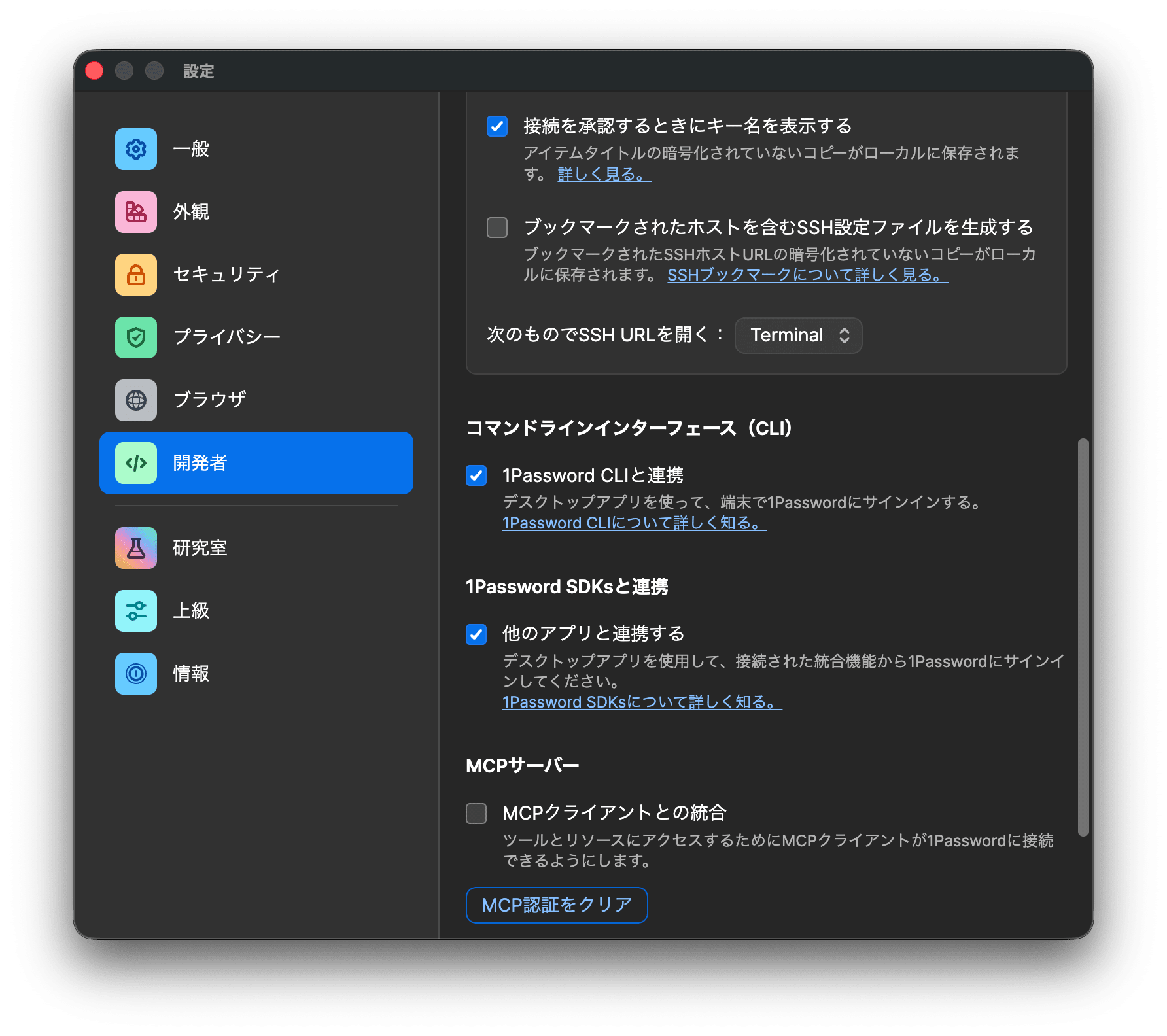
1Password CLI Desktop App Integration
Linking the 1Password app with the CLI allows a session to be established with a single Touch ID each time you open a terminal.
1Password → Settings → Developer → Enable "Integrate with 1Password CLI"
Countermeasure ⑥: Block npm/npx/pip/pip3 and Unify Under pnpm/uv
npx can execute packages over the network, making it an ideal target for typosquatting attacks. pip carries similar risks.
Add aliases to .zshrc to block their use.
alias npm='echo "npm is blocked. Use pnpm instead: pnpm install / pnpm add / pnpm run" >&2 && false'
alias npx='echo "npx is blocked. Use pnpm dlx instead: pnpm dlx <package>" >&2 && false'
alias pip='echo "pip is blocked. Use uv instead: uv add / uv run / uv sync" >&2 && false'
alias pip3='echo "pip3 is blocked. Use uv instead: uv add / uv run / uv sync" >&2 && false'
Writing error messages in English allows AI coding assistants to correctly understand the alternative commands and self-correct.
Countermeasure ⑦: Restrict Installation of Newly Published Packages
Newly published packages are most dangerous during the period before the security community has had a chance to review them.
Why 7 days?
According to PyPI's 2025 Security Report, 66% of malicious packages are detected and removed within 4 hours of publication. The vast majority of the remainder are addressed within 72 hours (3 days), and waiting 7 days practically covers almost all typosquatting packages.
On the other hand, setting the restriction too long creates different risks. For example, if set to 3 weeks, security patches for known CVEs would also be blocked for the same period. This could lead to the ironic situation of "leaving known vulnerabilities unpatched for 3 weeks in order to prevent supply chain attacks."
7 days is the sweet spot for this trade-off, and is the setting adopted in uv's official documentation and pnpm's security blog.
uv Configuration
# ~/.config/uv/uv.toml
exclude-newer = "7 days"
If you want to apply an emergency patch for a legitimate package, you can override it on a per-command basis.
uv add some-package --exclude-newer 2099-12-31 # Effectively disable the restriction
Also check the version of uv itself. CVE-2025-54368 affects v0.8.5 and below, so update to the latest version.
uv self update
pnpm Configuration
pnpm 10.16 and later supports an equivalent setting called minimumReleaseAge. Simply adding it to ~/.npmrc applies it to all projects.
# ~/.npmrc
minimum-release-age=7 days
Specific packages requiring emergency patches can be excluded with minimumReleaseAgeExclude.
# ~/.npmrc
minimum-release-age=7 days
minimum-release-age-exclude=react,react-dom
Summary
The countermeasures implemented this time are summarized as follows.
| Countermeasure | Before | After |
|---|---|---|
| VSCode extensions | Auto-update ON | Auto-update OFF (manual review) |
| SSH key | No passphrase | Passphrase + Keychain registration |
| AWS credentials | Plain text in ~/.aws/credentials |
Via aws-vault (stored in Keychain) |
| GitHub CLI token | Classic PAT / OAuth | Fine-grained PAT (stored in Keychain) |
| Project secrets | Plain text in .env file |
Stored in 1Password + injected via op run |
| npm/npx | Available | Blocked (redirect to pnpm/pnpm dlx) |
| pip/pip3 | Available | Blocked (redirect to uv) |
| uv package retrieval | No restriction | Exclude packages published within 7 days |
| pnpm package retrieval | No restriction | Exclude packages published within 7 days |
When the check script was run, multiple ✗ marks were lined up, but after implementing the countermeasures, all became ✓. Each countermeasure can be completed in just a few to a few dozen minutes.
Supply chain attacks cannot be reduced to zero risk, but simply eliminating plain text storage of credentials and narrowing down the tools you use can significantly raise the difficulty level for attackers. Run the check script regularly to prevent configuration degradation.