
Hitting the response size limit (200KB) in DevRev Workflows HTTP actions

This page has been translated by machine translation. View original
Introduction
DevRev's Workflows is a feature that allows you to build no-code automation flows by combining triggers and actions in the GUI. This time, when I tried to build a workflow to retrieve external web page content triggered by a Ticket stage change, I ran into the HTTP action's (Make HTTP requests) response size limit.
In this article, I'll share the error I encountered, three workarounds I tried, and the insights gained from them.
What is DevRev
DevRev is an enterprise AI platform for customer support and development teams. In addition to features like Ticket management and knowledge base, it provides automation mechanisms through Workflows and Snap-ins.
Target Audience
- Those considering using DevRev's Workflows feature for automation
- Those who want to build workflows in DevRev that include external API integration
- Those who want to know how to choose between Workflows and Snap-ins
References
What I Wanted to Accomplish
The workflow I wanted to build had the following flow:
The idea was to include a DevelopersIO article URL in the Ticket Description, and when the stage is changed to Resolved, automatically import the content of that article as a DevRev Article.
Setting Up Triggers and Code Execution in Workflows
First, I set up a trigger in Workflows to detect Ticket stage changes. From Settings > Workflows, I created a new workflow with the following settings:
- Trigger: Ticket Updated
- Fields to watch: Stage
- Filter:
Ticket Updated / Output > Stage > Stage > IdequalsResolved
Next, I used the Execute Code action to extract the URL from the Description. Execute Code is an action that can run Python scripts.
def run(inputs):
    import re
    description = inputs.get("description", "")
    match = re.search(r'https?://[^\s<>"{}|\\^`\[\]]+', description)
    return {"url": match.group(0) if match else ""}
I passed the Ticket Description as description in the Input Values and defined url in the Output Schema.

Note that Execute Code has an important specification: if you don't explicitly define the Output Schema, the value returned with return won't appear in the variable selector for subsequent steps. The Output Schema name and the return dictionary key must match.

By explicitly declaring the Output in the previous step, it appears in the
Insert variableselection
Hitting the 200KB Wall with the HTTP Action
With the URL extracted, the next step was to use the HTTP action to access that URL and get the HTML. The setup is simple: specify the output variable from the previous step for the URL and GET for the Method.
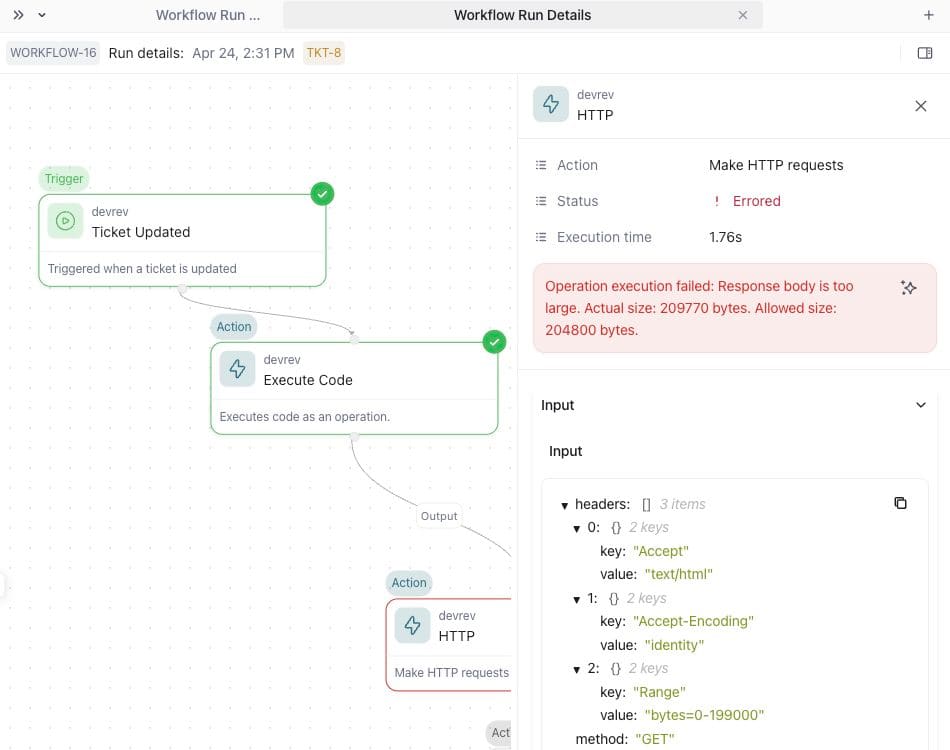
Then I encountered this error:
Operation execution failed: Response body is too large.
Actual size: 209770 bytes. Allowed size: 204800 bytes.
The HTTP action has a response body size limit of 204,800 bytes. Responses exceeding this limit are not accepted. The DevelopersIO article page was about 210KB, slightly exceeding the limit. This limit cannot be changed from the settings screen.
Results of Three Workarounds I Tried
Workaround 1: Changing Accept / Accept-Encoding Headers
I tried adding Accept: text/html and Accept-Encoding: identity to the HTTP request headers to control the response from the server.
The result didn't change. For the target URL in question, changing headers didn't reduce the response body size handled by the HTTP action to below 200KB, so it couldn't avoid the limitation.
Workaround 2: Partial Retrieval with the Range Header
I tried using the HTTP Range header to retrieve only the beginning portion of the response. Specifying Range: bytes=0-199000 requests only the first 195KB. The <title> and <article> tags should be included in the first part of the HTML.
However, the same error occurred for this target URL. At least in this case, even with the Range header specified, it was still treated as a response over 200KB in the HTTP action, so it wasn't a reliable workaround. It's possible the target server ignored the Range request and returned the full text, but I haven't identified the exact cause.
Workaround 3: Executing HTTP Requests within Execute Code
I tried a method of sending HTTP requests directly using Python's urllib.request within Execute Code instead of using the HTTP action. In theory, this shouldn't be subject to response size limits.
def run(inputs):
    import urllib.request
    url = inputs.get("url", "")
    req = urllib.request.Request(url, headers={"User-Agent": "DevRev-Workflow/1.0"})
    with urllib.request.urlopen(req, timeout=10) as resp:
        html = resp.read().decode("utf-8", errors="replace")
    # ... HTML parsing process ...
The result was that the HTTP request failed. At least in the environment I tested, I couldn't execute external HTTP requests from Execute Code. Checking the debug output, I confirmed the URL was being received correctly, but the HTTP communication itself wasn't working.
Identified Workflow Constraints
Here's a summary of the Workflows constraints identified through this investigation:
| Constraint | Details |
|---|---|
| HTTP action response size | 204,800 bytes (200KB) limit. Cannot be changed |
| Partial retrieval with Range header | No effect in this test. Also depends on server-side support |
| External communication from Execute Code | Could not execute external HTTP requests in the tested environment |
When to Use Workflows
Workflows are suitable for operations on DevRev internal objects. For example, they work well for processes like adding comments or creating another Ticket triggered by a Ticket stage change.
On the other hand, for external integrations that may exceed 200KB, such as retrieving content from external URLs, you should consider Snap-ins (function implementation with TypeScript). With Snap-ins, you can implement external HTTP requests as TypeScript functions rather than HTTP actions.
In this case, I eventually built an equivalent workflow with Snap-ins. By processing the retrieved HTML to extract just the necessary title and body before registering it with DevRev, I was able to avoid the 200KB limit of the HTTP action.
Conclusion
DevRev's Workflows allow you to easily create flows with GUI, but there are constraints for external integrations. In particular, the 200KB limit of HTTP actions was something I wouldn't have known without actually trying it. I hope this will be helpful for those considering automation in DevRev that includes external integrations.