
I tried building a local code completion environment in VS Code using DGX Spark × Continue.dev

This page has been translated by machine translation. View original
Introduction
Hello, I'm Morishige from Classmethod's Manufacturing Business Technology Department.
In my previous article, I tested running Claude Code + Ollama locally on the DGX Spark's 128GB memory. The result was "quite usable, but still a bit scary to leave unattended." Separately, I was also curious whether code completion in my editor could run locally as well.
This Playbook introduces the steps for building a local LLM code completion environment using VS Code + Continue.dev + Ollama. On top of that, there's even an article where the Continue.dev developers themselves use the DGX Spark as their main development machine, which made me think "I have to try this."
In this article, I'll introduce the steps and impressions of building a "remote-local" code completion environment by connecting from VS Code on MacBook Pro to Ollama on DGX Spark via Tailscale VPN.
Continue.dev and the Vibe Coding Playbook
What is Continue.dev?
Continue.dev is an open-source AI coding assistant that can integrate local LLMs and cloud APIs into VS Code or JetBrains IDEs. It's gaining attention as an alternative to GitHub Copilot, and lets you freely combine models of your own choosing.
There are three main features. Tab completion, which suggests candidates inline while you're writing code; Chat, which lets you ask questions about or request generation of code from a sidebar; and Edit, which lets you select code and give natural language instructions for modifications. You can achieve the same experience as GitHub Copilot using your own models.
The config.yaml mechanism assigns roles (chat, autocomplete, embed, edit, etc.) to each model, so you can use a small model focused on response speed for Tab completion and a large model focused on reasoning ability for Chat — all in a single configuration file.
NVIDIA Vibe Coding Playbook Configuration
In the Vibe Coding Playbook published by NVIDIA, a simple configuration is recommended that assigns all roles of chat / edit / autocomplete to a single gpt-oss:120b. It's a very DGX Spark-like simplicity — having 128GB of memory means you can handle everything with one large 120B model.
However, Tab completion is called with every keystroke, so response speed directly affects the feel. The Playbook also recommends response times under 500ms, and with a 120B model, there could be noticeable waits with each completion. So this time, I made an adjustment to separate Tab completion into a dedicated lightweight model.
This Setup
Based on the Playbook, I separated Tab completion to qwen2.5-coder:1.5b and adopted Qwen3-Coder-Next for Chat, which performed well in the previous Claude Code verification. It's a "remote-local" setup connecting MacBook Pro and DGX Spark via Tailscale VPN.
| Feature | Model | Parameters | Reason for Selection |
|---|---|---|---|
| Tab Completion | qwen2.5-coder:1.5b | 1.5B | Ensures response time under 500ms |
| Chat | Qwen3-Coder-Next | 80B MoE (3B active) | SWE-bench 70.6%, proven in previous article |
| Embeddings | nomic-embed-text | — | For @Codebase context |
qwen2.5-coder:1.5b is a coding-specialized model trained on 5.5 trillion tokens, supporting 92 languages. Despite being 1.5B, there are reports that it can achieve 80–90% of Codestral (22B) performance, making it a cost-effective choice for Tab completion. Qwen3-Coder-Next is an 80B MoE with only 3B active parameters. Memory consumption is approximately 51GB, and combined with the 1.5B model, it fits comfortably within 128GB.
No models are placed on the MacBook Pro side; all inference is handled by DGX Spark. The input environment on the Mac stays the same, with inference delegated to the DGX's 128GB memory.
Verification Environment
| Item | Specs |
|---|---|
| DGX Spark | 128GB LPDDR5x, GB10 (Grace Blackwell) |
| MacBook Pro | M4 32GB |
| Network | Tailscale VPN (within same network, direct connection) |
| VS Code | 1.109.2 |
| Continue.dev | v1.2.14 |
| Ollama | v0.15.5 |
Differences from the Previous Article (Claude Code)
Let me summarize the differences from the previous article.
| Item | Article 1.5 (Claude Code) | This Time (Continue.dev) |
|---|---|---|
| Tool | Claude Code (CLI) | Continue.dev (VS Code extension) |
| Operation | Prompt input in terminal | Tab completion + Chat within the editor |
| Good at | Multi-file editing, test execution, autonomous agent-like operation | Inline code completion, selected range modification, interactive code generation |
| Model relationship | One model handles all functions | Assign the optimal model for each function |
| Wait time feel | Tens of seconds to minutes (wait for completion in background) | Tab completion ideally under 1 second (affects typing rhythm) |
If Claude Code is an "issue instructions and wait" agent type, Continue.dev is a "write yourself while receiving assistance" completion type. Since the use cases are different, it's not a matter of which is better.
DGX Spark Setup
Ollama Remote Access Configuration
Ollama listens only on localhost:11434 by default. To access it from MacBook Pro via Tailscale, change OLLAMA_HOST to 0.0.0.0.
# Create systemd override file
sudo mkdir -p /etc/systemd/system/ollama.service.d
sudo tee /etc/systemd/system/ollama.service.d/override.conf <<'EOF'
[Service]
Environment="OLLAMA_HOST=0.0.0.0"
EOF

# Restart service
sudo systemctl daemon-reload
sudo systemctl restart ollama
Let's verify connectivity from MacBook Pro.
# Access via Tailscale IP
curl http://100.x.x.x:11434/api/tags
If a JSON model list is returned, it's successful.
Downloading Models
Download the three models to be used this time.
# For Tab completion (1.5B, lightweight and fast)
ollama pull qwen2.5-coder:1.5b

# For Chat (80B MoE, coding-specialized)
ollama pull qwen3-coder-next

# For Embeddings
ollama pull nomic-embed-text
Qwen3-Coder-Next is approximately 51GB, so depending on your connection speed, it may take a while. Once downloaded, combined with qwen2.5-coder:1.5b, it's about 55GB total — fits comfortably within 128GB memory.
MacBook Pro Setup
Installing Continue.dev
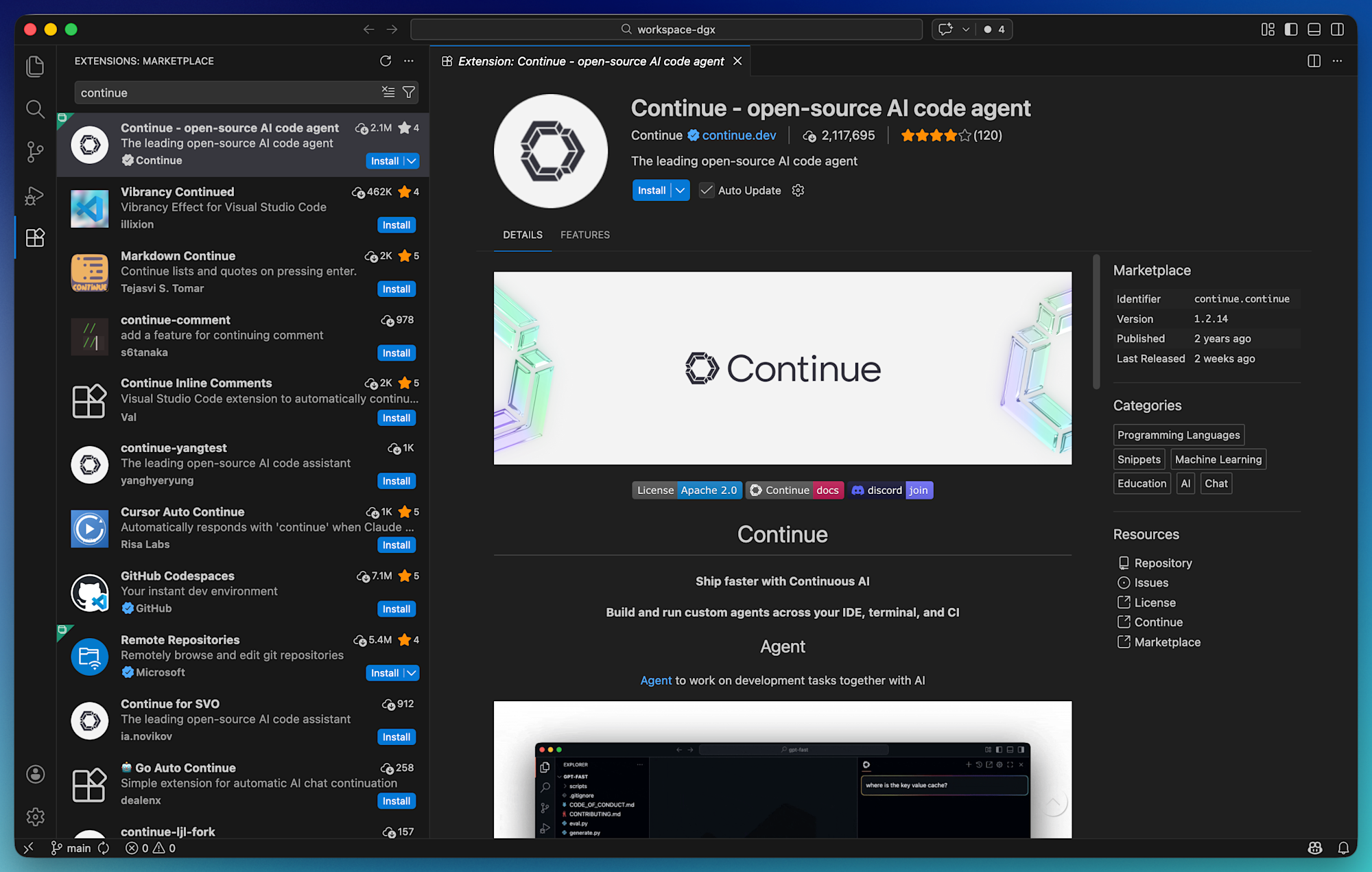
Search for "Continue" in the VS Code extension marketplace and install it.
After installation, the Continue icon appears in the sidebar.
config.yaml Configuration
The Continue.dev configuration file is ~/.continue/config.yaml. The previous config.json is deprecated and has been migrated to YAML format. Configure DGX Spark's Ollama as a remote provider as follows.
name: DGX Spark Remote
version: 0.0.1

models:
  # For Chat (80B MoE — coding-specialized)
  - name: qwen3-coder-next 80b
    provider: ollama
    model: qwen3-coder-next
    apiBase: http://100.x.x.x:11434
    capabilities:
      - tool_use
    contextLength: 65536
    roles:
      - chat
      - edit

  # For Tab completion (1.5B — prioritizing fast response)
  - name: qwen2.5-coder 1.5b
    provider: ollama
    model: qwen2.5-coder:1.5b
    apiBase: http://100.x.x.x:11434
    roles:
      - autocomplete

  # For Embeddings (used for @Codebase context)
  - name: nomic-embed-text
    provider: ollama
    model: nomic-embed-text
    apiBase: http://100.x.x.x:11434
    roles:
      - embed
Since the Tailscale IP is specified in apiBase, there's no need to run Ollama on the Mac side. The Mac's resources can be concentrated on VS Code and other apps. With roles specification, using a lightweight model for Tab completion and a large model for Chat can be done in a single configuration file. capabilities: [tool_use] is explicitly set for Qwen3-Coder-Next. Continue.dev's auto-detection doesn't recognize tool_use for Qwen3 series models, so it needs to be specified manually.
Note that as of v1.2.14, config.yaml requires top-level name and version. Also, for models with short default context lengths like gpt-oss:120b, not explicitly specifying contextLength can cause token limit errors when handling slightly longer files.
When connecting locally to DGX Spark (rather than remotely), you can also use the Hub Model Blocks shorthand notation.
models:
  - uses: ollama/gpt-oss-120b
  - uses: ollama/qwen2.5-coder-1.5b
Since this time it's a remote connection via Tailscale, apiBase is explicitly specified, but those who have a keyboard directly connected to DGX Spark will find Hub Model Blocks more convenient.
Actually Using It
For verification, I used a Todo API written with Express + TypeScript (about 100 lines). With GitHub Copilot disabled, I tested each function of Continue.dev.
import express, { Request, Response } from "express";

// --- Types ---

interface Todo {
  id: number;
  title: string;
  completed: boolean;
  createdAt: Date;
}

// --- In-memory store ---

let todos: Todo[] = [];
let nextId = 1;

// --- Helper functions ---

// Test point 1: Write "function createTodo(" and wait for Tab completion
function createTodo(title: string): Todo {
  const todo: Todo = {
    id: nextId++,
    title,
    completed: false,
    createdAt: new Date(),
  };
  todos.push(todo);
  return todo;
}

// Test point 2: Start typing "function findTodoBy" and see what it suggests
function findTodoById(id: number): Todo | undefined {
  return todos.find((todo) => todo.id === id);
}

function toggleComplete(id: number): Todo | undefined {
  const todo = findTodoById(id);
  if (todo) {
    todo.completed = !todo.completed;
  }
  return todo;
}

// Test point 3: Start typing "function deleteTodo" and let Tab complete the body
function deleteTodo(id: number): boolean {
  const index = todos.findIndex((todo) => todo.id === id);
  if (index === -1) return false;
  todos.splice(index, 1);
  return true;
}

// --- Express routes ---

const app = express();
app.use(express.json());

// Test point 4: Type "app.get" and wait — does it suggest the route pattern?
app.get("/api/todos", (_req: Request, res: Response) => {
  res.json(todos);
});

app.post("/api/todos", (req: Request, res: Response) => {
  const { title } = req.body;
  if (!title) {
    res.status(400).json({ error: "title is required" });
    return;
  }
  const todo = createTodo(title);
  res.status(201).json(todo);
});

// Test point 5: Type "app.put" and see if it generates the update route
app.put("/api/todos/:id", (req: Request, res: Response) => {
  const id = parseInt(req.params.id, 10);
  const todo = toggleComplete(id);
  if (!todo) {
    res.status(404).json({ error: "not found" });
    return;
  }
  res.json(todo);
});

app.delete("/api/todos/:id", (req: Request, res: Response) => {
  const id = parseInt(req.params.id, 10);
  const success = deleteTodo(id);
  if (!success) {
    res.status(404).json({ error: "not found" });
    return;
  }
  res.status(204).send();
});

// --- Stats endpoint ---
// Test point 6: Type "app.get("/api/stats"" and let it complete the handler

app.listen(3000, () => {
  console.log("Server running on http://localhost:3000");
});
Tab Completion Feel
Can the sub-500ms response time targeted by the Playbook be achieved even over Tailscale VPN? When selecting models, I measured FIM (Fill-in-the-Middle) benchmarks on DGX Spark.
| Model | Size | Generation Speed | Response Time | FIM Support |
|---|---|---|---|---|
| qwen2.5-coder:1.5b | 986MB | 189 tok/s | 290–360ms | OK |
| qwen2.5-coder:7b | 4.7GB | 40.5 tok/s | ~1.4 seconds | OK |
| Qwen3-Coder-Next | 51GB | 37.0 tok/s | Several seconds+ | OK |
| gpt-oss:120b | 61GB | — | — | NG |
qwen2.5-coder:7b improves completion quality, but a 1.4 second response disrupts typing tempo. Qwen3-Coder-Next is even slower. gpt-oss:120b is a reasoning model (with a structure that generates thinking tokens first), so it doesn't support FIM at all. The Playbook assigns gpt-oss to autocomplete as well, but if you actually use it, it seems better to separate Tab completion into a different model.
As a result, I adopted qwen2.5-coder:1.5b, which can stably stay under 500ms. Even adding Tailscale's direct connection (round-trip of about 10–30ms) leaves plenty of margin.
When actually writing TypeScript code, there was a slightly slower feel compared to Copilot, but not enough to disrupt typing rhythm. It's roughly the difference of changing the default autocomplete settings.
How about the quality of completion suggestions? When typing app.patch in the middle of writing an Express route handler, it looks at the existing app.delete and app.put patterns and suggests the routing signature ("/api/todos/:id", (req: Request, res: Response) => {. Function argument inference is also quite good — when I started writing function filterTodos(, it completed it with query: string): Todo[] including the type.
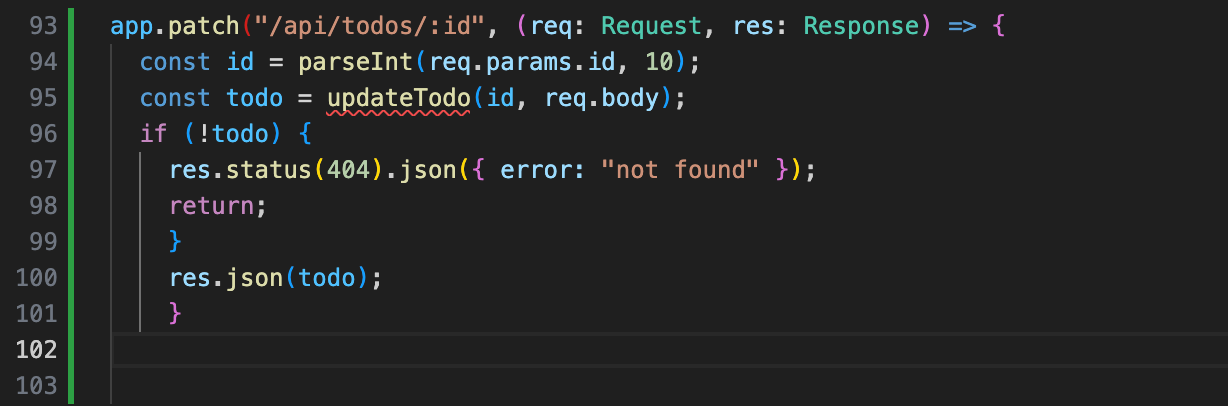
On the other hand, compared to Copilot, there is a noticeable coarseness in granularity. While Copilot carefully expands function bodies inline, qwen2.5-coder:1.5b sometimes generates code that calls non-existent functions (like getStats() or updateTodo()). It's asking too much of a 1.5B model to provide inline implementation details, so I think it's best to treat this as "hints with the expectation of writing the body yourself."
My rough impression is "Copilot from a year ago." Compared to the recent Copilot that completes almost excessively, it's more reserved, but that also means you're less likely to be interrupted by unintended completions, and there's a pleasant feeling of being able to write at your own pace.
Code Generation with Chat
For Chat, I use Qwen3-Coder-Next. This is the model that also performed well in combination with Claude Code in my previous article.
When I asked "Please add a validation middleware to this Todo API," the first token appeared within 1–2 seconds, and from there the output streamed smoothly. What was generated was a validateTodoInput function in the Express middleware pattern, with practical content including null checks, type checks, empty string checks, character length limits (255 characters), and trim processing.
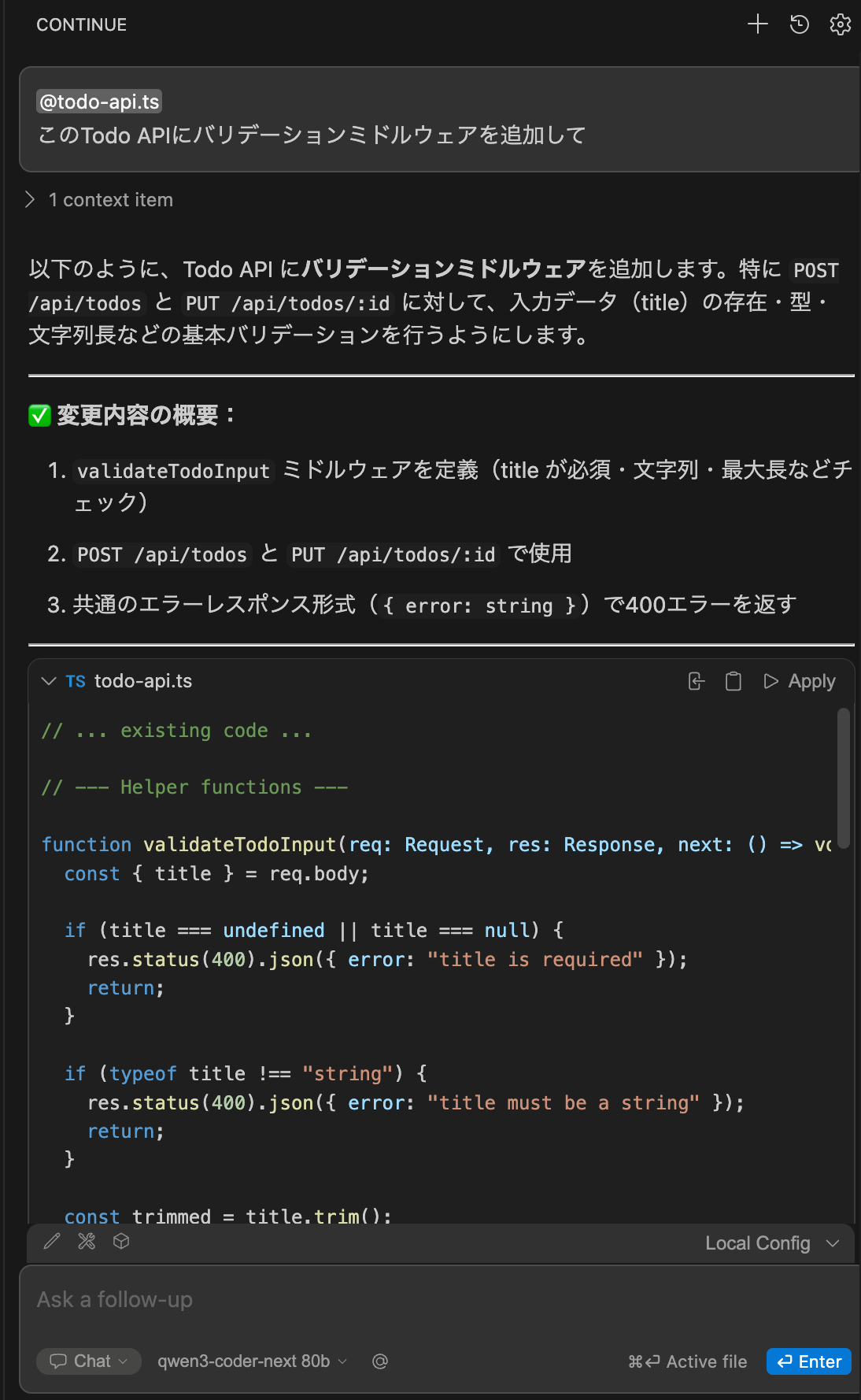
Since the original file is TypeScript, the generated code also comes out in TypeScript. It suggests a form of inserting middleware into the existing route definitions, without assuming any non-existent modules. The Chat "Insert Code" button appends to the end of the file, so integration with existing code needs to be done manually, but since the code quality is high, the effort of incorporating it is minimal.
Edit Mode and Agent Mode
Continue.dev also has an Edit mode where you select code and give natural language instructions for modifications, as well as an Agent mode that autonomously progresses tasks. When testing with Qwen3-Coder-Next and gpt-oss:120B, Edit works sometimes, but behavior is unstable — code gets broken during Apply or functions outside the instructions get rewritten. Agent mode also produces code suggestions, but often fails when reflecting changes to files.
The reason Chat is stable while Edit/Agent are unstable is that models haven't caught up with the format for diff application and tool call formatting — this is a model-side issue, not a Continue.dev problem. The same tendency appeared in the previous Claude Code verification, and it will naturally resolve as the accuracy of structured output from local LLMs improves.
How to Use Claude Code and Continue.dev Together
Claude Code (Ollama local execution) from the previous article and Continue.dev from this time. Both use local LLMs on DGX Spark, but they excel in different situations.
| Situation | Claude Code | Continue.dev |
|---|---|---|
| Want to create a new file from scratch | ○ Generate with a single prompt | △ Generate in Chat and manually incorporate |
| Want to add a few lines to existing code | △ Depends on Edit tool accuracy | ○ Smoothly with Tab completion |
| Found a bug and want to fix it | ○ Autonomously executes Read → analyze → Edit | △ Edit works but behavior is unstable |
| Want to write and run tests | ○ Consistent from file creation to test execution | × Test execution is manual in terminal |
| Refactoring | ○ Changes across multiple files | △ Edit unstable, Chat weak on context |
| Everyday coding | × Writing prompts every time is tedious | ○ Receive assistance while writing |
Since Edit/Agent may or may not work depending on the model, Tab completion and Chat are currently the main battleground for Continue.dev. Even so, I think there's a viable division of roles: use Continue.dev's Tab completion for everyday coding to maintain a good rhythm, and leave larger tasks and refactoring to Claude Code. Being able to ask quick questions from Continue.dev's Chat in the sidebar without having to switch to the terminal is also convenient.
Since both connect to Ollama on DGX Spark, the machine and models can be shared. In a review article by the Continue.dev developers, they wrote that "being able to handle development work and AI model inference on a single machine changed how we think about our workflow." It's an interesting perspective — using it as an everyday development machine rather than an inference-dedicated appliance.
Summary
With reference to NVIDIA's official Vibe Coding Playbook, I built a local code completion environment connecting from VS Code + Continue.dev on MacBook Pro to Ollama on DGX Spark via Tailscale VPN.
Tab completion had the feel of "Copilot from a year ago" and was sufficiently practical for routine coding. Response latency over Tailscale VPN was barely noticeable, comfortably meeting the under 500ms target set by the Playbook. Chat was fast thanks to Qwen3-Coder-Next and correctly generated TypeScript code. Edit and Agent work sometimes and break other times, and are still not stable.
If Claude Code is an "delegate to AI and wait" agent type, Continue.dev is a "write yourself while receiving assistance" completion type. Edit/Agent looks like it'll become usable once local LLM structured output improves a bit more, and given the pace of model evolution, I'm optimistic about the near future.
Even so, just Tab completion makes everyday coding considerably easier, so I hope this serves as a reference for those who want to try the same setup.
Reference Links
- Continue.dev Official Website
- Continue.dev Ollama Integration Guide
- NVIDIA Vibe Coding Playbook
- Continue.dev Developer's DGX Spark Review
- Previous Article: Trying Again with Local Execution of Claude Code + Ollama on DGX Spark's 128GB Memory
- Building a Remote Desktop Environment on DGX Spark (RustDesk + Tailscale)
- Ollama Official Documentation
- Qwen2.5-Coder Technical Report

