
I tried Dreambooth LoRA fine-tuning of FLUX.1 on DGX Spark

This page has been translated by machine translation. View original
Introduction
Hello, I'm Morishige from Classmethod's Manufacturing Business Technology Department.
In previous DGX Spark articles, we focused mainly on LLM inference and fine-tuning, but the 128GB unified memory isn't only beneficial for language models. This time, I tried Dreambooth LoRA fine-tuning with the image generation model FLUX.1.
FLUX.1 is a 12B parameter image generation model released by Black Forest Labs, characterized by its architecture where multiple large components work together. Since it's a model that consumes quite a bit of memory, I was curious about how well it would pair with the DGX Spark's large unified memory.
This time, I'll use the NVIDIA official DGX Spark Playbook to train a Dreambooth LoRA using photos of the DGX Spark unit itself, and try generating "scenes featuring a DGX Spark."
What is FLUX.1
FLUX.1 is an image generation model released by Black Forest Labs (the original Stable Diffusion development team). It adopts a Diffusion Transformer (DiT) architecture rather than the conventional U-Net base, and has gained attention as a model with a high balance between text instruction adherence and image quality.
Component Structure and Memory
FLUX.1 may appear to be a single "model," but in reality multiple components work together.
| Component | Role | Size (FP16) |
|---|---|---|
| DiT (Diffusion Transformer) | 12B parameter diffusion model core | ~23 GB |
| T5-XXL Text Encoder | Understanding prompt semantics | ~9.2 GB |
| CLIP Text Encoder | Bridging images and text | ~235 MB |
| VAE | Image compression and reconstruction | ~160 MB |
Loading all components simultaneously in FP16 totals over 30GB. In environments like the RTX 4090 (24GB VRAM), you can't fit everything at once, so techniques like split-loading the model between CPU and GPU or offloading unused components are necessary.
With the DGX Spark's 128GB unified memory (UMA), the CPU and GPU share the same memory space, so such splitting is unnecessary. Even loading all components simultaneously only uses around 30GB, leaving nearly 100GB to spare.
Why 128GB UMA Makes a Difference
According to the NVIDIA official blog, the DGX Spark can generate 1K images at 2.6 seconds/image using FLUX.1 (12B, FP4 precision). However, since this Playbook trains and infers in BF16 precision, the conditions differ from FP4. I'll address how this difference affects the actual measured values in the verification results later.
Setup
Requesting Access to HuggingFace Gated Models
FLUX.1-dev is a gated model, so you need to request access in advance.
- Visit the FLUX.1-dev HuggingFace page
- Agree to the terms of use and request access
- Create a Fine-grained Access Token in the HuggingFace settings
- Specify
black-forest-labs/FLUX.1-devas the target repository - Check "Read access to contents of selected repos"
- Specify
Cloning the Playbook and Downloading the Model
git clone https://github.com/NVIDIA/dgx-spark-playbooks.git
cd dgx-spark-playbooks/nvidia/flux-finetuning/assets
Downloading the model takes about 30–45 minutes.
# Set HuggingFace token
export HF_TOKEN=<your-token>

# Download model
sh download.sh
Preparing Training Data
This time, I'll train the model with the "DGX Spark unit" as the concept. Using photos of the DGX Spark as training data is a somewhat meta setup.
What I Was Mindful of When Shooting
The recommended number of images is 5–10 per concept. I took 9 photos this time. I shot from various angles—front, diagonal, and top-down—and varied the lighting between a desk lamp and natural light. I also switched between backgrounds such as on a desk, inside a shelf, and a solid-color background, making sure the subject was clearly visible.
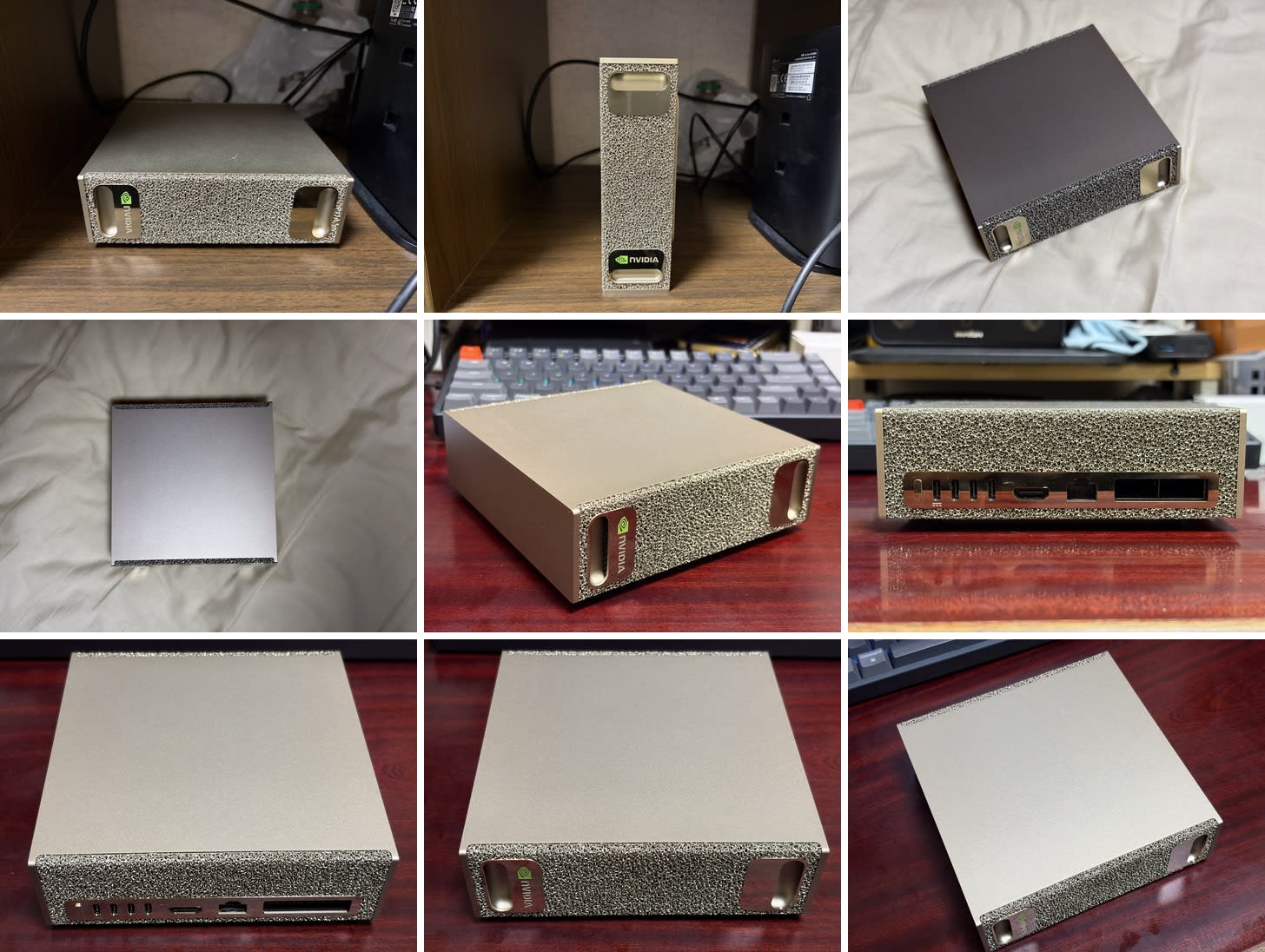
Dataset Configuration
Place the captured images in flux_data/sparkgpu/ and define the concept in data.toml.
[general]
shuffle_caption = false
keep_tokens = 2

[[datasets]]
resolution = 1024
batch_size = 1

    [[datasets.subsets]]
    image_dir = "flux_data/sparkgpu"
    class_tokens = "sparkgpu gpu"
    num_repeats = 2
    is_reg = false
    flip_aug = true
The sparkgpu in class_tokens becomes the trigger word. By including it in the prompt during inference, such as "a photo of sparkgpu gpu on a desk," the learned characteristics of the DGX Spark are reflected.
Running Dreambooth LoRA Training
The Playbook includes a Docker image and launch script for training.
sh launch_train.sh
Training Parameters
The default settings in the Playbook are optimized for the DGX Spark's unified memory.
| Parameter | Value | Notes |
|---|---|---|
| LoRA Rank | 256 | Larger than typical settings (8–64) |
| Optimizer | Prodigy | Adaptive learning rate |
| LR Scheduler | cosine_with_restarts | Cosine decay |
| Resolution | 1024x1024 | FLUX.1's native resolution |
| Mixed Precision | bf16 | Optimized for DGX Spark's Blackwell GPU |
| Max Epochs | 100 | About 3.4 hours in actual measurement |
| Save Interval | 25 epochs | 4 checkpoints are saved |
The LoRA Rank of 256 stands out. While it's typically set between 8–64, the 128GB unified memory means there's no need to worry about memory when setting a high rank. The idea is that a higher rank increases the expressiveness of the LoRA adapter, allowing it to capture the concept's features more finely even with a small amount of training data.
Actual Performance
I checked resource usage during training with nvidia-smi and free.
| Item | Value |
|---|---|
| Training time | ~3.4 hours (500 steps) |
| GPU memory usage | ~71 GB |
| System memory usage | ~96 GB / 121 GB |
| GPU utilization (during training) | 96% |
| GPU temperature (during training) | 79°C |
| Power consumption (during training) | 79W |
| Checkpoint size | 4.8 GB each (Rank 256) |
Training time was about 3.4 hours. Since the initial compilation with torch_compile took about 30 minutes, the actual training took about 3 hours. Pre-resizing the training images to 1536px (long side) also seems to have reduced preprocessing overhead.
What's interesting is how memory was used. System memory reached 96GB during training. This is the result of all data needed for training—the model itself, LoRA parameters, optimizer state, etc.—being loaded into memory simultaneously. This is a configuration that only works with the 128GB unified memory, and wouldn't be achievable with the 24GB VRAM of an RTX 4090.
Generating Images
Once training is complete, checkpoints in .safetensors format are saved to models/loras/. Let's first check the training results in ComfyUI.
Launching ComfyUI
sh launch_comfyui.sh
Access http://localhost:8188 in a browser to open the ComfyUI interface. For remote access, adding --listen 0.0.0.0 to the launch command in launch_comfyui.sh allows access via the DGX Spark's IP address.
Loading LoRA and Generating
Load the finetuned_flux.json workflow included with the Playbook, and select the trained .safetensors in the "Load LoRA" node.
Include the trigger word sparkgpu gpu in the prompt to generate.
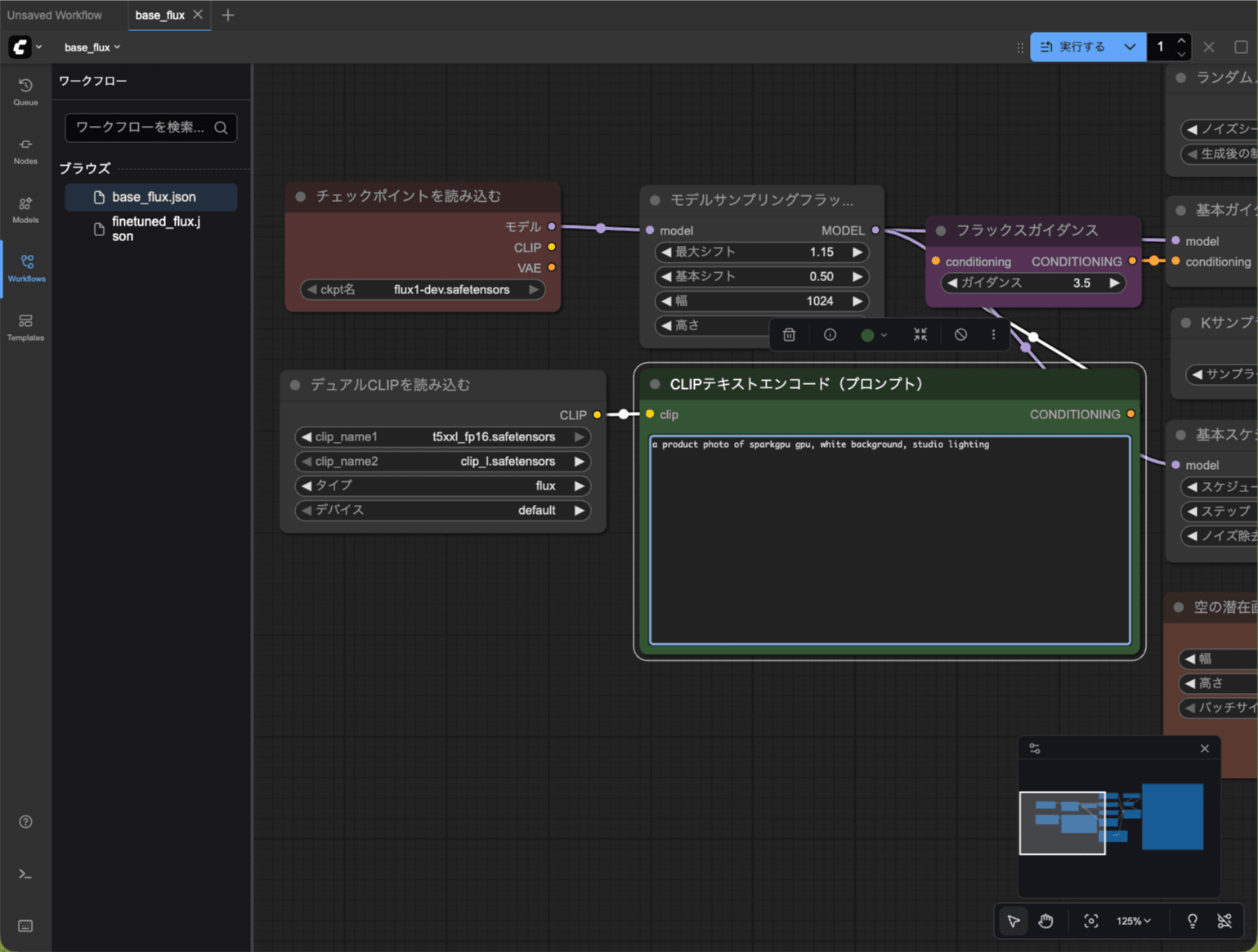
Generation Results
I tried several prompts. The first run takes time to load the model, but from the second run onward it stabilizes at about 100 seconds.
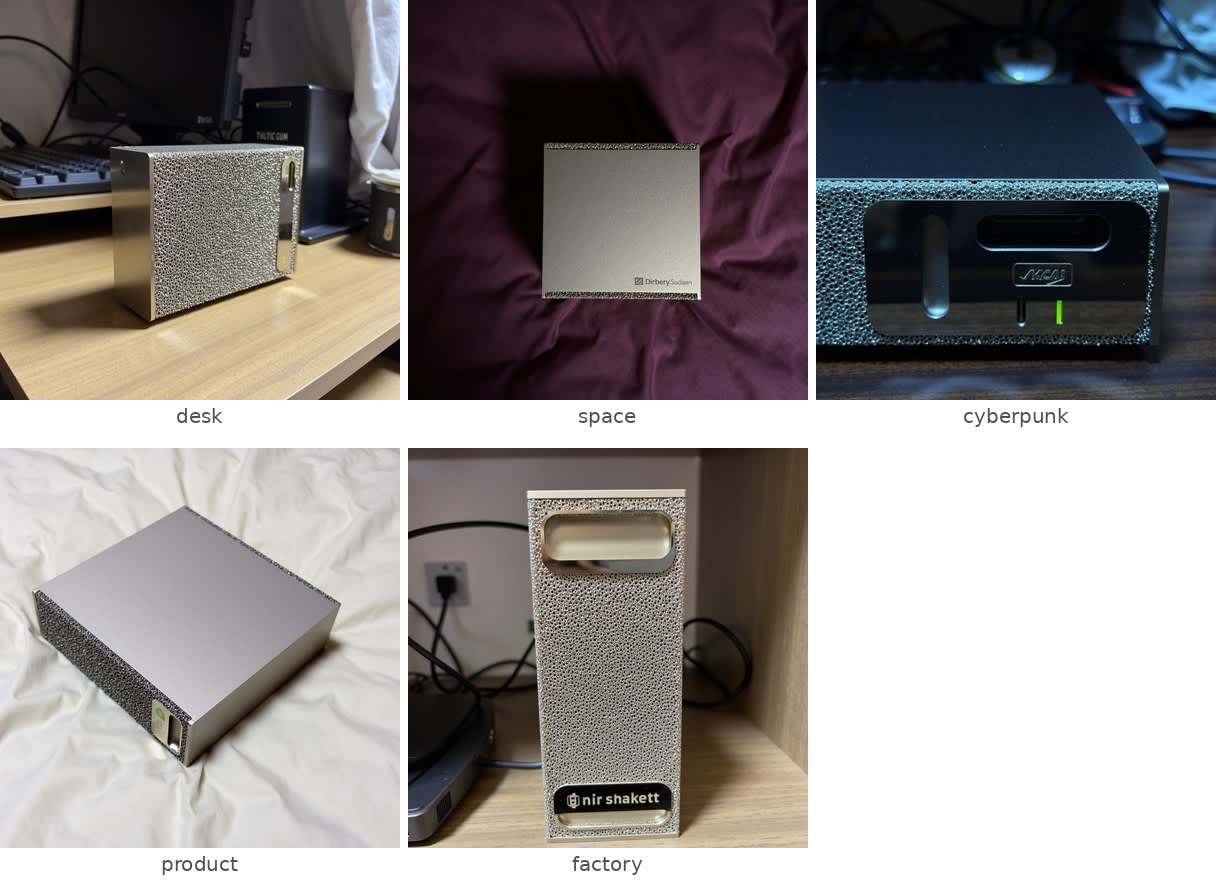
Something that looks like a DGX Spark came out!
| Prompt | Generation time |
|---|---|
a photo of sparkgpu gpu on a wooden desk, morning light, minimalist office |
~315 seconds (first run, including model load) |
sparkgpu gpu floating in space, stars background, cinematic lighting |
~100 seconds |
sparkgpu gpu in a cyberpunk city, neon lights, rain |
~100 seconds |
a product photo of sparkgpu gpu, white background, studio lighting |
~105 seconds |
sparkgpu gpu on a factory floor, industrial setting |
~100 seconds |
The first ~5 minutes is mostly model loading time. It takes that long to load FLUX.1's DiT (23GB), T5-XXL (9.2GB), and LoRA (4.8GB) into memory. From the second run onward, the model stays in memory, so generation takes about 100 seconds.
The official blog's "2.6 seconds/image" is for FP4 precision, but since this Playbook uses BF16 precision, there's about a 40x difference. The tradeoff between quality and speed is clearly visible.
Comparison: With and Without LoRA
I also generated with the same prompt without LoRA (using the base_flux.json workflow).
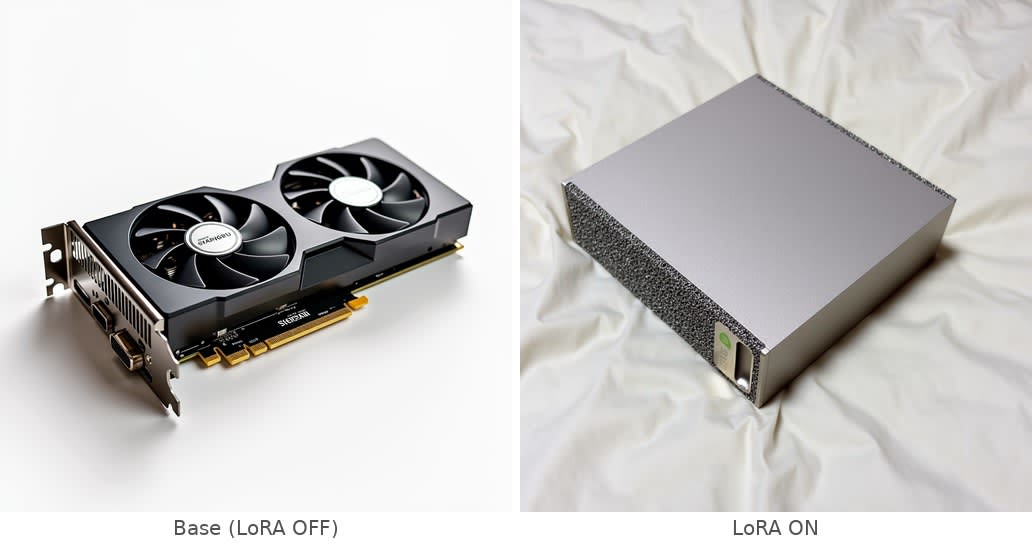
Without LoRA, since there's no concept corresponding to the word sparkgpu, a generic graphics card was generated. With LoRA, the DGX Spark's distinctive mesh front panel and boxy form factor are reflected, and even in unrealistic settings like outer space or a cyberpunk cityscape, something "resembling it" comes out. In the product photo (white background) in particular, the texture of the top panel and the mesh pattern were reproduced with high accuracy. This confirms that Dreambooth LoRA was able to capture the concept's features reliably even with a small training dataset (9 images).
ComfyUI Workflow
In ComfyUI, the trained LoRA is integrated into the workflow for use. LoRA strength can be adjusted from 0.0 to 1.0, and multiple LoRAs can be stacked and applied. The trained .safetensors file can be copied directly to other ComfyUI environments, making it convenient to work with.
Comparison with LLM Fine-Tuning
Having tried both LLM and image generation model fine-tuning on the same DGX Spark, the differences in how the 128GB unified memory is used become apparent.
| Aspect | LLM FT (Nemotron 9B) | Image Generation FT (FLUX.1) |
|---|---|---|
| Model size | ~18 GB (BF16) | ~30 GB (DiT + T5 + CLIP + VAE) |
| Memory usage | Model + optimizer state | Simultaneous loading of multiple components |
| UMA benefit | Can handle large models without quantization | No split-loading or offloading needed |
| Training time | Several hours (data-dependent) | ~3.4 hours (BF16, 100 epochs) |
| Training memory | ~60 GB | ~96 GB |
| Training data | Thousands of text samples | 9 images |
| Inference speed | Several tokens/second | ~100 seconds/image (BF16) |
| Output format | LoRA (.safetensors) | LoRA (.safetensors, 4.8 GB each) |
Image generation FT consumes more memory because FLUX.1 needs to load multiple large components simultaneously. Seeing it reach 96GB during training shows that the 128GB unified memory isn't barely sufficient—it's at a level where it can be used with comfortable headroom.
Summary
Using the DGX Spark's FLUX.1 Dreambooth LoRA Playbook, I fine-tuned an image generation model using photos of the DGX Spark unit itself.
Simply running the Playbook scripts in order covers everything from model download to training and inference in ComfyUI. The process itself had no confusing steps. BF16 precision inference takes about 100 seconds/image, which is slower compared to the official FP4 value (2.6 seconds/image), but it's best understood as a quality-speed tradeoff.
The moment I felt the 128GB unified memory benefit most was seeing memory usage reach 96GB during training. While the LLM fine-tuning highlighted "being able to handle large models without quantization" as the UMA advantage, image generation showed a different angle of benefit: "being able to load multiple large components all at once."
Verification Environment
| Item | Specification |
|---|---|
| DGX Spark | 128GB LPDDR5x, GB10 (Grace Blackwell) |
| Playbook | FLUX.1 Dreambooth LoRA Fine-tuning |
| Base model | FLUX.1-dev (12B) |
| Training method | Dreambooth LoRA (Rank 256) |
| Inference environment | ComfyUI |
| Docker base image | nvcr.io/nvidia/pytorch:25.09-py3 |
| Training script | kohya-ss/sd-scripts (sd3 branch) |

