
What Can You Do with DGX Spark? I Organized the Official Playbook

This page has been translated by machine translation. View original
Introduction
Hello, I'm Morishige from Classmethod's Manufacturing Business Technology Department.
I've been writing a DGX Spark series, from the unboxing to running Claude Code locally, but I still don't really understand "what can you actually do with a DGX Spark?" (It's completely a case of having a treasure and not using it...)
Actually, NVIDIA has officially published a collection of over 30 guides called "DGX Spark Playbooks."
So I organized all the Playbooks into categories and created my own catalog. I hope it serves as a helpful guide to understanding the big picture.
What Are Playbooks?
DGX Spark Playbooks are a collection of step-by-step guides published by NVIDIA in their official GitHub repository. They cover a wide range of topics, from inference engines to fine-tuning and robotics simulation.
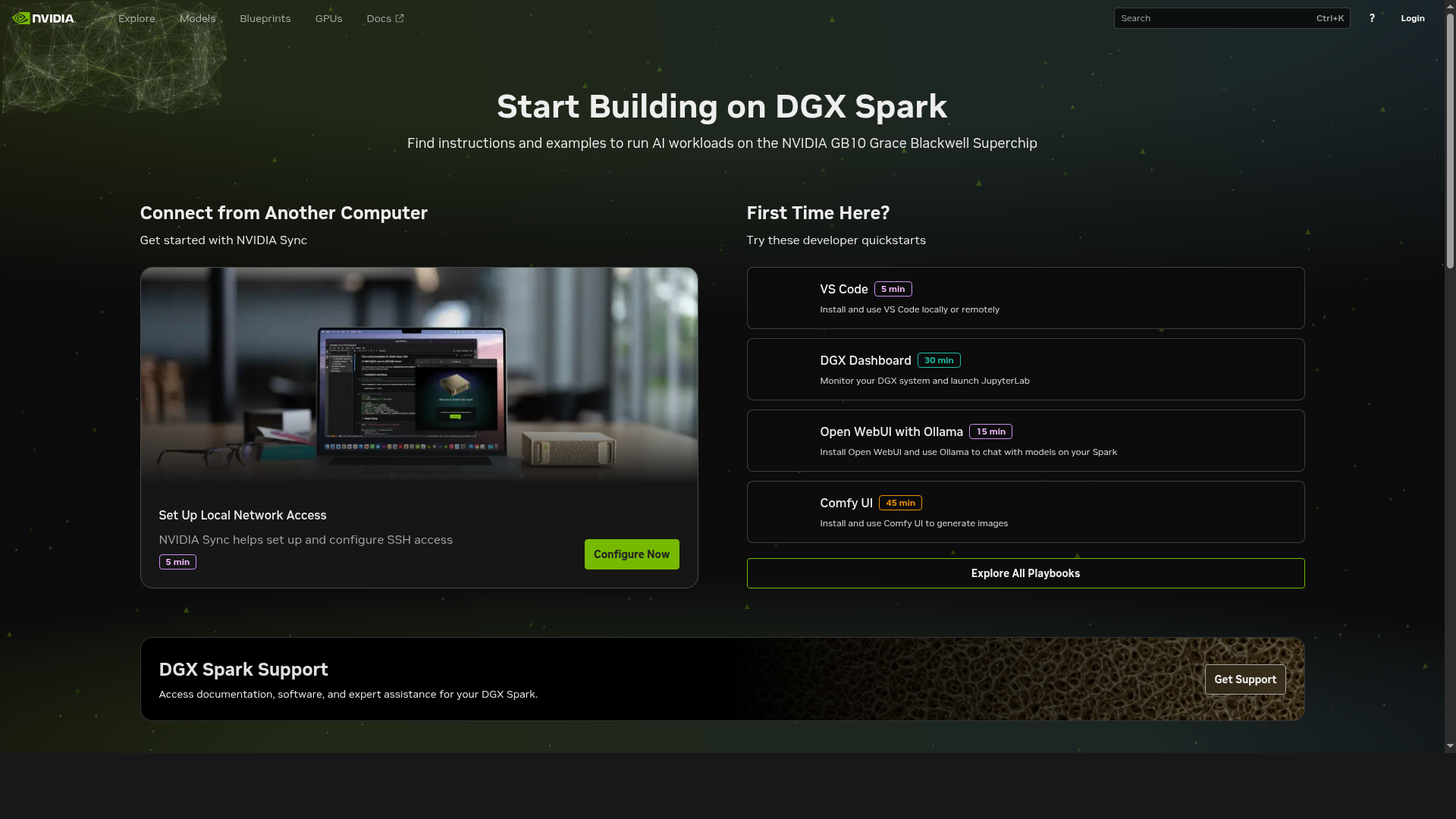
They are published under the Apache-2.0 license and accept contributions from the community. Most Playbooks are configured to use NGC containers or Docker, so the barrier to setting up an environment is relatively low. You can access each Playbook from the official documentation site build.nvidia.com/spark.
DGX Spark was announced at CES 2025, and the Playbooks started being published around the time of its release in October 2025. Since then, at CES 2026, a maximum 2.6x speedup using NVFP4 quantization and speculative decoding was announced, and the Playbooks have been expanded to over 30.
Category-by-Category Catalog
I'll introduce all the Playbooks confirmed as of February 2026, organized into 6 categories. The estimated time is based on information from the official site. Difficulty levels are the author's subjective assessment. The stability level (Stable / Beta / Experimental) of each Playbook is summarized in the "Stability Map" section below.
Inference Engines
This is the most well-developed category for DGX Spark. As I felt when I actually ran Ollama in the unboxing article, being able to run gpt-oss:120b-class models with 128GB of unified memory is truly powerful. With prefill at 282 tok/s and decode at 39 tok/s, the experience feels about as fast as reading speed.
| Playbook | Difficulty | Time Required | Summary |
|---|---|---|---|
| Ollama | Beginner | 10-15 min | Highly stable. Developer's first choice |
| Open WebUI with Ollama | Beginner | 10-15 min | Instant chat from browser. Ideal for onboarding |
| TRT-LLM for Inference | Intermediate | 45-60 min | Low-latency focused. NVFP4 quantization for 8B to 120B |
| vLLM for Inference | Intermediate | 30 min | For high-throughput and batch inference |
| SGLang for Inference | Intermediate | 30-45 min | Frontend language integration. Awaiting full SM121 support |
| NIM on Spark | Beginner | 15-30 min | Select from NGC catalog and deploy |
| Speculative Decoding | Intermediate | 30-45 min | EAGLE-3 speeds up gpt-oss:120B by 2-3x |
| Nemotron-3-Nano with llama.cpp | Beginner-Int. | 30 min | Run Nemotron 3 Nano 30B-A3B with llama.cpp |
Ollama is recommended as the developer's first choice for its ease of setup and stability.
TRT-LLM and vLLM have official NGC containers available and support a wide range of models. On the other hand, SGLang's support for the SM121 architecture is not yet complete, placing it in a Beta position.
Fine-tuning
This is the area where DGX Spark's 128GB memory really shines. Connect two units via ConnectX-7 to get a 256GB configuration, bringing 70B model QLoRA fine-tuning within reach.
| Playbook | Difficulty | Time Required | Summary |
|---|---|---|---|
| LLaMA Factory | Beginner-Int. | 30-60 min | Rapid experimentation with WebUI. Ideal for beginners |
| Fine-tune with PyTorch | Int.-Advanced | 1 hour | 70B QLoRA with FSDP+LoRA on 2 Sparks |
| Fine-tune with NeMo | Advanced | 45-90 min | Production-scale distributed training |
| Unsloth on DGX Spark | Intermediate | 30-60 min | 2x faster, memory-efficient |
| FLUX.1 Dreambooth LoRA | Intermediate | 30 min + 1-2h train | Image generation model FT. Custom container |
| Vision-Language Model FT | Intermediate | 15-20 min + 1-2h train | Supports Qwen2.5-VL, InternVL3 |
If you want to get started easily, LLaMA Factory is recommended. You can switch between SFT/LoRA/QLoRA/RLHF from the WebUI, making it well-suited for getting started with fine-tuning. If you want to get serious, trying 70B QLoRA with a two-unit PyTorch FT configuration sounds exciting.
Infrastructure & Connectivity
This is the group of Playbooks for getting DGX Spark into a "usable state." I think this category contains many things you'll set up first, like remote access and building a development environment with VS Code.
| Playbook | Difficulty | Time Required | Summary |
|---|---|---|---|
| Set Up Local Network Access | Beginner | 5 min | Local network configuration |
| Set up Tailscale | Beginner | 15-30 min | Secure remote access via VPN |
| DGX Dashboard | Beginner | 15-30 min | System monitoring and JupyterLab launch |
| VS Code | Beginner | 5 min | Remote development environment |
| Vibe Coding in VS Code | Beginner | 15-30 min | Continue.dev, Nsight CUDA Copilot |
| Connect Two Sparks | Intermediate | 1 hour | Connect 2 units at 200Gbps with ConnectX-7 |
| NCCL for Two Sparks | Intermediate | 30 min | Communication setup for distributed training |
Having Tailscale installed makes it easy to SSH in from anywhere, which is quite convenient. The Vibe Coding Playbook introduces Continue.dev and Nsight CUDA Copilot, allowing you to build a code completion environment using a local LLM.
Multimodal
There are only three, but they are a collection of visually impressive Playbooks.
| Playbook | Difficulty | Time Required | Summary |
|---|---|---|---|
| ComfyUI | Beginner | 30-45 min | Stable Diffusion execution environment |
| Live VLM WebUI | Beginner-Int. | 20 min | Webcam → VLM real-time analysis |
| Multi-modal Inference | Intermediate | 1 hour | Multimodal inference pipeline |
Live VLM WebUI is one of the Playbooks I'm personally curious about. It can analyze webcam footage in real-time with a VLM (Gemma 3 or Llama Vision) and display the results in a browser. Since it visualizes "what the AI is seeing," it has a big impact as a demonstration.
Applied Applications
These are Playbooks for building applications leveraging LLMs, from RAG to knowledge graphs and video analysis.
| Playbook | Difficulty | Time Required | Summary |
|---|---|---|---|
| RAG in AI Workbench | Beginner | 30-45 min | Introduction to retrieval-augmented generation |
| NVFP4 Quantization | Int.-Advanced | 45-90 min | NVFP4 quantization with TensorRT ModelOpt |
| Text to Knowledge Graph | Intermediate | 30 min | Visualization with Ollama + ArangoDB + Three.js |
| Video Search & Summarization | Int.-Advanced | 30-45 min | Integrated VLM+LLM+RAG video analysis |
| Multi-Agent Chatbot | Intermediate | 1 hour | Multi-agent system |
Text to Knowledge Graph uses Ollama to extract triples (subject-predicate-object) from unstructured text, then interactively visualizes them with ArangoDB+Three.js. With 128GB of memory, you can achieve high-precision triple extraction with a 70B model, making it a use case where DGX Spark's unified memory really comes into play.
Other (Robotics, Data Science, Domain-Specific)
This is a category of niche but interesting Playbooks.
| Playbook | Difficulty | Time Required | Summary |
|---|---|---|---|
| Isaac Sim / Isaac Lab | Int.-Advanced | 30 min + 10-15 min build | GPU-accelerated physics simulation & reinforcement learning |
| CUDA-X Data Science | Beginner | 20-30 min | GPU acceleration with RAPIDS, cuML, cuDF |
| Optimized JAX | Intermediate | 2-3 hours | JAX development environment optimization |
| Single-cell RNA Sequencing | Advanced | 15 min | Genomics workflow |
| Quantitative Portfolio Optimization | Advanced | 20 min | Financial quantitative analysis |
Isaac Sim / Isaac Lab is a notable Playbook for robotics developers. It integrates PhysX-based GPU-accelerated physics simulation with an RL (reinforcement learning) framework, with over 30 preset learning environments for robots such as ANYmal, Unitree Go2, and Franka Panda. A Sim2Real workflow of simulating on DGX Spark → deploying on Jetson for real hardware is starting to take shape. The community has also reported success stories of Sim2Real transfer, including the Disney BDX droid, low-cost autonomous racing, and quadruped robots opening doors, making the direction quite exciting.
The domain-specific Playbooks (genomics, finance) are quite specialized in content and have a limited target audience. However, it's interesting that they demonstrate the potential for DGX Spark to be used in such specialized fields.
Stability Map
From here is largely within the scope of my own interpretation, but I've classified all Playbooks into 3 levels of stability.
| Stability | Definition | Examples |
|---|---|---|
| Stable | Official NGC container provided, verified with multiple models, rich troubleshooting | Ollama, TRT-LLM, vLLM, PyTorch FT, NeMo FT, LLaMA Factory |
| Beta | Works but marked "Beta," or DGX Spark-specific caveats remain | NIM, SGLang, Speculative Decoding, NVFP4, Live VLM WebUI, Nemotron-3-Nano |
| Experimental | Uses custom containers, verified only with specific models | FLUX FT, VLM FT, Multi-Agent, Isaac Sim, Knowledge Graph |
SM121 Architecture Challenges
The GB10 chip in DGX Spark adopts a new architecture called SM121, and the software side hasn't fully caught up yet.
- Triton (GPU compiler) does not yet support SM121
- Reports of CUDA errors in some FP8 quantization kernels (BF16 recommended for fine-tuning)
- Full SM121 support for SGLang and vLLM is still a work in progress
NVIDIA also announced a 2.6x performance improvement over FP8 using NVFP4 + speculative decoding at CES 2026, and community-based support is also active. However, for now, I think it's prudent to "start with Stable options and gradually expand your scope."
Specifically, inference with vLLM/SGLang and fine-tuning with FP8 are the areas most likely to run into SM121 issues. Inference with Ollama and fine-tuning with BF16 operate stably.
Where to Start
I think it's hard to decide which of the 30+ Playbooks to try, so I'll suggest a recommended path organized into 3 levels.
Start Here (within 30 minutes)
Set up Ollama + Open WebUI. You can pull gpt-oss:20b and reach a state where you can chat from a browser in 10-15 minutes. Please refer to the unboxing article mentioned earlier for detailed steps.
Going a Bit Deeper
From here, there are two directions.
If you want to pursue inference speed, the TRT-LLM Playbook is recommended. You can experience the speed difference compared to Ollama, and using NVFP4 quantization, figures of around 5.39 tok/s for Llama 3.3 70B have been reported by the community.
If you're interested in fine-tuning, LLaMA Factory is an easy place to start. You can adjust parameters from the WebUI and try SFT/LoRA/QLoRA with your own dataset.
For Serious Use
This is a 256GB configuration connecting two DGX Sparks via ConnectX-7. With this configuration, the following workloads become possible:
- 70B QLoRA fine-tuning (FSDP+LoRA, PyTorch FT Playbook)
- Qwen3-235B-A22B inference with NVFP4 (approximately 11.73 tok/s reported by the community)
- 2-3x speedup with EAGLE-3 speculative decoding
I haven't been able to try this area myself yet, so I'll report back once I actually do.
Summary
I organized the overall picture of DGX Spark Playbooks by category. While there are still challenges with the software maturity of the SM121 architecture, you can use it stably by starting with Stable Playbooks like Ollama and TRT-LLM, and fine-tuning with BF16 is also practical. The ecosystem continues to expand, with NVFP4 optimizations and the addition of Nemotron 3 Nano announced at CES 2026.
I recommend first experiencing the benefits of 128GB memory with Ollama + Open WebUI, then branching out in the direction that interests you. I hope this article serves as a helpful reference for choosing Playbooks.
DGX Spark Series?
| # | Title |
|---|---|
| Article 1 | DGX Spark Has Arrived |
| Article 1.5 | Re-challenging Local Execution of Claude Code with DGX Spark's 128GB Memory |
| Bonus | What Can You Do with DGX Spark? Organizing the Official Playbooks (this article) |
Reference Links
Official Resources
- DGX Spark Playbooks GitHub
- DGX Spark Playbooks Documentation
- DGX Spark Developer Forum
- DGX Spark Release Notes
- Isaac Sim / Isaac Lab
Related Technical Articles
- New Software and Model Optimizations Supercharge DGX Spark (CES 2026)
- Level1Techs DGX Spark Review
- Simon Willison DGX Spark Review

