I tried running SAM 3.1 on DGX Spark for zero-shot object detection

This page has been translated by machine translation. View original
Introduction
Hello, I'm Morishige from Classmethod's Manufacturing Business Technology Division.
When it comes to object detection, YOLO is the standard choice, but using YOLO requires collecting training data, annotating it, and running dozens of epochs. Many people have probably felt that "the preparation is too heavy just for a quick test."
SAM 3.1, introduced in this article, is the latest version of Meta's Segment Anything series. By simply specifying what you want to detect using text prompts like "hard hat" or "safety vest," it returns BBoxes (bounding boxes) and segmentation masks without any training data. In version 3.1, released in March 2026, multi-object tracking in videos has also been accelerated by up to 7x.
This article presents the results of running SAM 3.1 on a DGX Spark (ARM64) and testing zero-shot detection across 5 different scenes. In the latter half, we also briefly verify video tracking speed.
What is SAM 3.1
SAM 3 (Segment Anything Model 3) is Meta's third-generation segmentation model released in November 2025, officially named "Segment Anything with Concepts" (arXiv:2511.16719). With 848M parameters, it is available on GitHub.
SAM 3.1, released on March 25, 2026, is an update that adds Object Multiplexing to SAM 3. Multi-object video tracking has been accelerated by up to 7x (processing 16 objects in a single forward pass, 32 FPS on H100), and the accuracy and API are equivalent to SAM 3, making it a drop-in replacement. Since the image detection API and checkpoints are shared with SAM 3, the image detection results in this article are the same for both.
The license is neither Apache 2.0 nor MIT, but Meta's own "SAM License." Commercial use is generally permitted, but use in security-related fields such as military and nuclear industries is explicitly prohibited. Please check the full LICENSE text when considering production deployment.
The scale of training data is also impressive, with training performed on the large-scale SA-Co dataset consisting of millions of images and tens of thousands of videos. On the LVIS benchmark, it records a zero-shot AP of 47.0.
Evolution of the SAM Series
Here is a brief summary of the evolution from SAM to SAM 3.
| Generation | Release | Main Input | Output | Features |
|---|---|---|---|---|
| SAM | 2023 | Points or boxes | Masks | Images only |
| SAM 2 | 2024 | Points or boxes | Masks | Video support (frame-to-frame tracking) |
| SAM 3 | 2025 | Text (concept prompts) or image samples | Masks + BBox + scores | Zero-shot detection, video tracking |
SAM and SAM 2 were models that performed segmentation by specifying a location, such as "click this point" or "crop inside this rectangle." To detect using text prompts, an external pipeline was required, such as Grounded-SAM-2, which detects BBoxes with GroundingDINO before passing them to SAM 2.
SAM 3, on the other hand, natively supports text prompts. Simply passing text like "hard hat" detects the corresponding objects in the image. Meta defined this as a new task called Promptable Concept Segmentation (PCS): comprehensively detecting and segmenting all instances matching a specified concept in images or videos. You can think of it as integrating the multi-stage pipeline of GroundingDINO + SAM 2 into a single model.
Internally, a DETR-based detector and a SAM 2-derived tracker share a single backbone, enabling both image detection and video tracking within a single model.
Differences from YOLO
A natural question here is how it differs from YOLO. There are other models capable of text-prompt-based object detection, such as GroundingDINO and YOLO-World, but SAM 3's strength lies in completing everything from text to BBox + mask + video tracking within a single model. Here we compare it with the representative YOLO.
| Aspect | YOLO (v8m, etc.) | SAM 3 |
|---|---|---|
| Design philosophy | Closed-set (fixed classes) | Open vocabulary (zero-shot) |
| Training data | Required (annotation + training) | Not required (text prompts) |
| Changing detection classes | Requires retraining | Just change the prompt |
| Inference speed | Fast (53fps @Jetson FP16) | 1-2 seconds/image @DGX Spark |
| Output | BBox | BBox + pixel-level mask + score |
| Mask boundary quality | Accuracy varies greatly with IoU threshold | ~12x more stable (robust to threshold changes) |
| Edge inference | Possible (Jetson, a few MB~) | Difficult (848M parameters, 3.3 GiB VRAM) |
| Accuracy (zero-shot vs FT) | F1 68-72% with fine-tuning | F1 59.8% zero-shot |
According to a comparative study on an apple counting dataset (arXiv:2512.11884), fine-tuned YOLO11 achieves F1 68-72% while zero-shot SAM3 achieves 59.8%, with YOLO coming out ahead. However, SAM3's mask boundary quality is approximately 12x more stable, with SAM3 dropping only 4 points when the IoU threshold is changed, compared to a 48-50 point drop for YOLO.
This is not a matter of which is better—they have fundamentally different design philosophies. Think of YOLO as a "fast, lightweight specialist" and SAM 3 as a "knowledgeable but heavy generalist." YOLO excels when training data is available and high-speed real-time detection is needed, while SAM 3 is suited for situations like "just trying it out first," "handling unknown classes," or "needing pixel-accurate masks."
Verification Environment
| Item | Value |
|---|---|
| Hardware | NVIDIA DGX Spark |
| GPU | NVIDIA GB10 (Grace Blackwell, 128GB unified memory) |
| OS | Ubuntu 22.04 (ARM64/SBSA) |
| CUDA | 12.8 |
| Container | NGC PyTorch 26.03 (nvcr.io/nvidia/pytorch:26.03-py3) |
| SAM3 | facebookresearch/sam3 (pip install) |
| VRAM usage | ~3.3 GiB |
Running SAM 3.1 on DGX Spark
Dockerfile
Here is the Dockerfile for setting up the SAM 3.1 API server.
FROM nvcr.io/nvidia/pytorch:26.03-py3

# Required for SAM 3.1 video tracking (not needed for image detection only)
RUN pip install --no-cache-dir flash-attn \
    --index-url https://pypi.jetson-ai-lab.dev/sbsa/cu128

RUN pip install --no-cache-dir \
    einops psutil pycocotools fastapi uvicorn[standard] \
    && pip install --no-cache-dir git+https://github.com/facebookresearch/sam3.git

COPY server.py /app/server.py
WORKDIR /app

EXPOSE 8105
CMD ["python", "server.py"]
This uses NGC PyTorch 26.03 as the base and installs SAM 3 and FastAPI. flash-attn is required for SAM 3.1's video tracking (Multiplex Video Predictor), so it is installed from the Jetson AI Lab ARM64 wheel. It can be omitted if only image detection is needed.
There is an issue reported in the SAM 3 repository about no ARM64 wheel for the decord package, but since decord is an optional dependency for video decoding, pip install itself proceeds without issues.
DGX Spark-specific dtype Patches
Now for the main point. Running SAM 3 on the DGX Spark's GB10 GPU required two monkey patches.
import torch.nn.functional as F

# F.linear: cast input tensor to match the dtype of weight
_orig_linear = F.linear
def _safe_linear(input, weight, bias=None):
    return _orig_linear(input.to(weight.dtype), weight, bias)
F.linear = _safe_linear

# F.scaled_dot_product_attention: cast output back to query's dtype
_orig_sdpa = F.scaled_dot_product_attention
def _safe_sdpa(q, k, v, *a, **kw):
    return _orig_sdpa(q, k, v, *a, **kw).to(q.dtype)
F.scaled_dot_product_attention = _safe_sdpa
Without the patches, an error like RuntimeError: expected scalar type BFloat16 but found Float occurs. The DGX Spark's GB10 appears to behave differently from x86 environments in terms of mixed precision, and there were cases where the input and weight dtypes of F.linear did not match. Similarly, the output dtype of scaled_dot_product_attention needs to be aligned to match the query side.
Applying these two patches before the from sam3... imports resolves the issue. Since I've encountered similar dtype mismatches when running other new models on DGX Spark (as was also the case with Cosmos-Reason2-8B), it might be worth remembering this as standard practice when running PyTorch models in ARM64 environments for the time being.
API Server
The detection API was built with FastAPI.
from sam3.model_builder import build_sam3_image_model
from sam3.model.sam3_image_processor import Sam3Processor

# Load model (only once at startup)
model = build_sam3_image_model()
processor = Sam3Processor(model)

# Detection with text prompt
state = processor.set_image(img)
output = processor.set_text_prompt(state=state, prompt="hard hat")
# output: {masks, scores, boxes}
Load an image with set_image, then retrieve detection results for each prompt using set_text_prompt. Pass multiple prompts in sequence, filter by score threshold, and you're done.
The server can be quickly started with docker run.
docker build -t sam3-api .
docker run --gpus all -p 8105:8105 \
  -e HF_TOKEN=$HF_TOKEN \
  -v hf-cache:/root/.cache/huggingface \
  sam3-api
Since the SAM3 model is published in a gated HuggingFace repository, you need to submit an access request at facebook/sam3 in advance and set your token in the HF_TOKEN environment variable. Mounting the hf-cache volume allows you to skip re-downloading the model on subsequent startups.
You can check VRAM usage via the /health endpoint.
curl http://localhost:8105/health
# {"status":"ok","model":"sam3","vram_gib":3.3}
3.3 GiB is extremely lightweight relative to the DGX Spark's 128GB unified memory. There is plenty of room to co-locate it with other models (VLMs or LLMs).
Testing Detection Across 5 Scenarios
To see how far SAM 3.1's zero-shot detection could go, we tested it across 5 completely different domains. The same model and the same API server were used—only the prompts were changed.
Scenario 1: PPE Detection at a Construction Site
Prompt: hard hat, safety vest, safety glasses, person
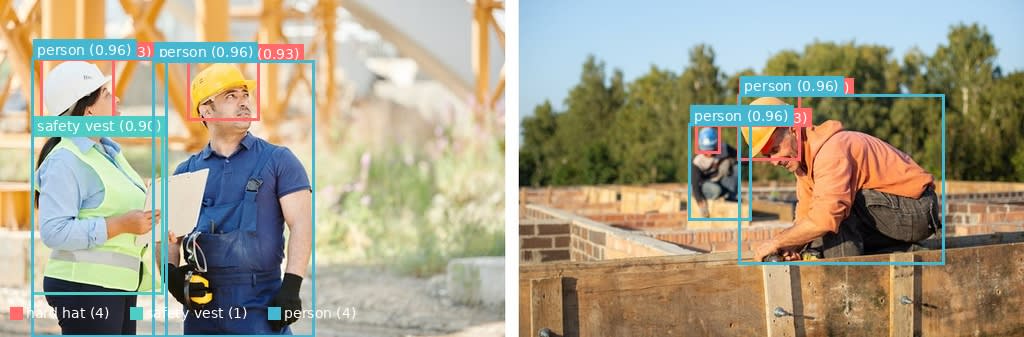
BBox detection result. 4 helmets, 1 safety vest, and 4 people detected
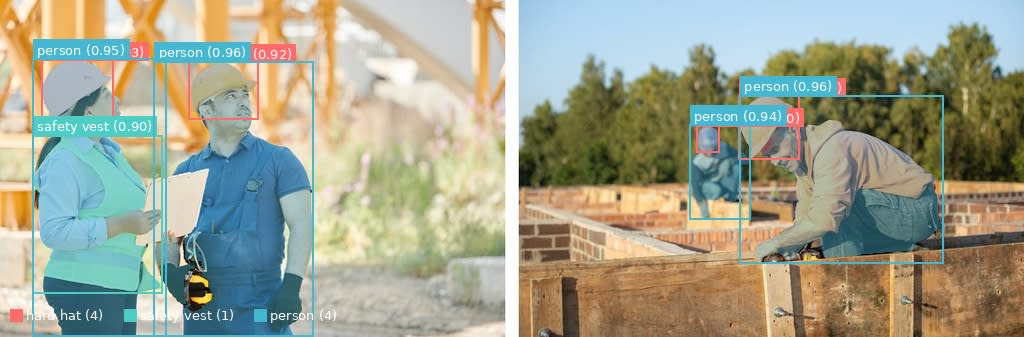
Color-coded segmentation masks. Object outlines are separated at the pixel level
We tested this using a construction site image (sourced from Pexels) that was also used in our previous VSS series article.
| Prompt | Detections | Top Score |
|---|---|---|
| hard hat | 4 | 0.929 |
| safety vest | 1 | 0.903 |
| person | 4 | 0.959 |
Inference time was 1,840ms. Helmets and safety vests were detected without any training. Safety glasses were not detected at a threshold of 0.5, but since the glasses appear small in the image, this seems like a reasonable result.
Scenario 2: Warehouse / Logistics
Prompt: forklift, person, pallet, safety vest, box
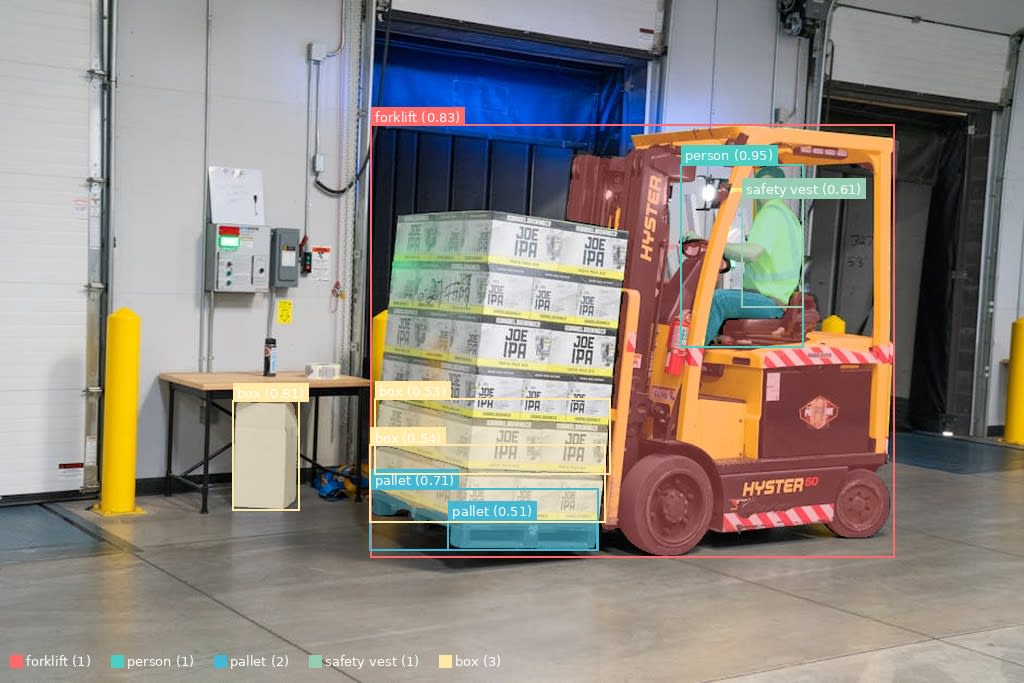
Forklifts, pallets, cargo, and workers are each color-coded
Simply changing the prompt allows adaptation to a different scene in manufacturing.
| Prompt | Detections | Top Score |
|---|---|---|
| forklift | 1 | 0.831 |
| person | 1 | 0.949 |
| pallet | 2 | 0.708 |
| safety vest | 1 | 0.612 |
| box | 3 | 0.808 |
Inference time: 773ms. It's convenient that even specialized machinery like forklifts can be detected with just a text prompt.
Scenario 3: Office Desk Area
Prompt: laptop, coffee cup, phone, keyboard

Laptop, coffee cup, smartphone, and keyboard are color-coded
This is a completely different domain from PPE.
| Prompt | Detections | Top Score |
|---|---|---|
| laptop | 1 | 0.982 |
| coffee cup | 1 | 0.840 |
| phone | 1 | 0.961 |
| keyboard | 1 | 0.958 |
Inference time: 688ms. Scores for the laptop (0.982) and smartphone (0.961) were very high, and detection accuracy for everyday items was stable.
Scenario 4: Street Scene / Traffic
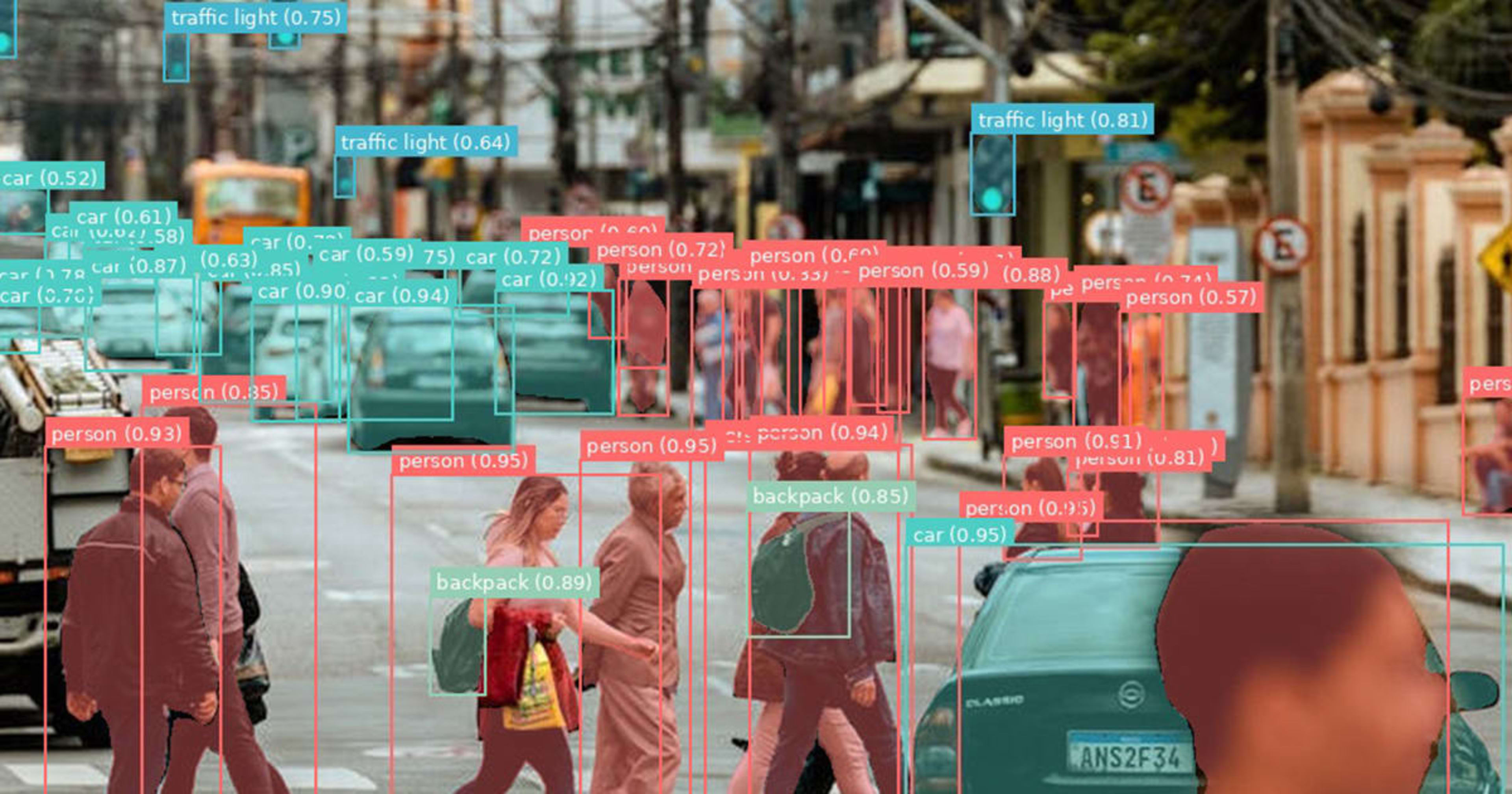
Prompt: person, car, traffic light, backpack
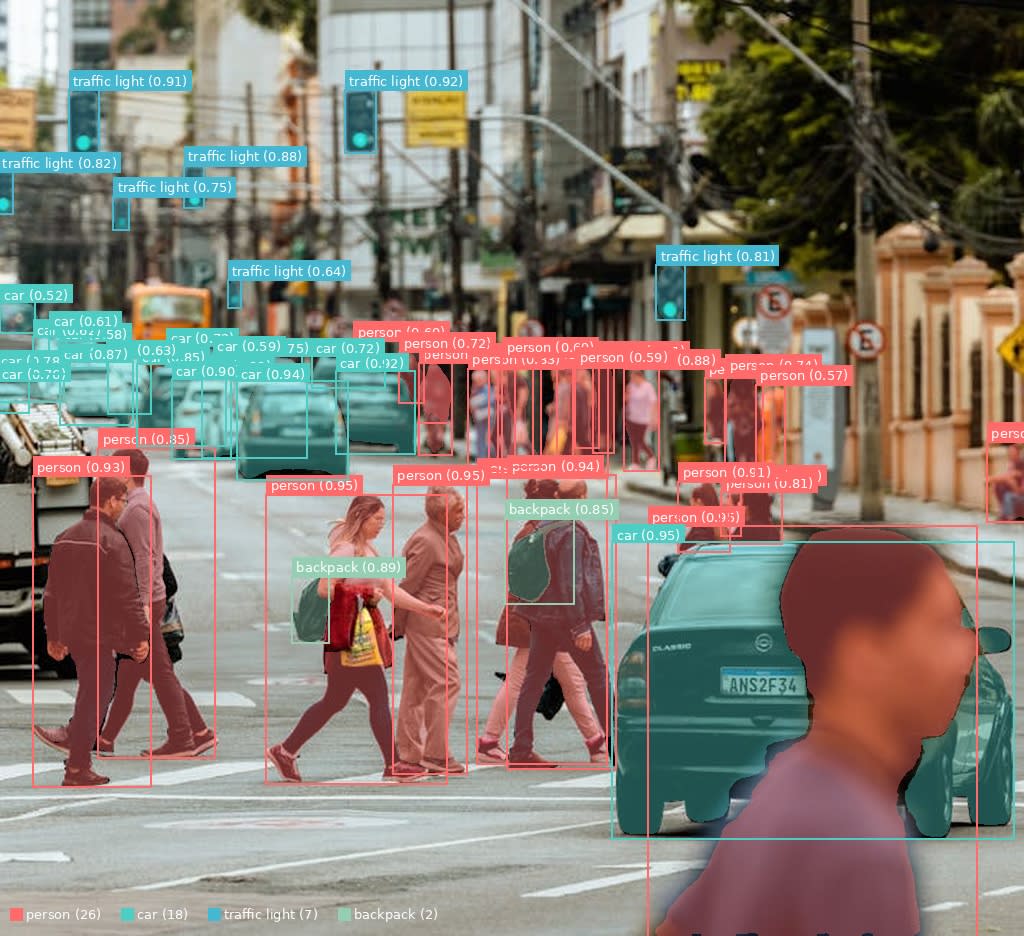
26 pedestrians crossing at a crosswalk, 18 cars, and 7 traffic lights detected all at once
We applied SAM 3.1 to a crowded scene in the context of autonomous driving or surveillance.
| Prompt | Detections | Top Score |
|---|---|---|
| person | 26 | 0.954 |
| car | 18 | 0.955 |
| traffic light | 7 | 0.923 |
| backpack | 2 | 0.886 |
Inference time: 706ms. The batch detection of 26 pedestrians and 18 cars is impressive. With fixed-class YOLO, additional detections like "backpack" would require retraining, but with SAM 3.1, it's as simple as adding it to the prompt.
Scenario 5: Supermarket Produce Section
Prompt: banana, apple, melon, price tag, strawberry
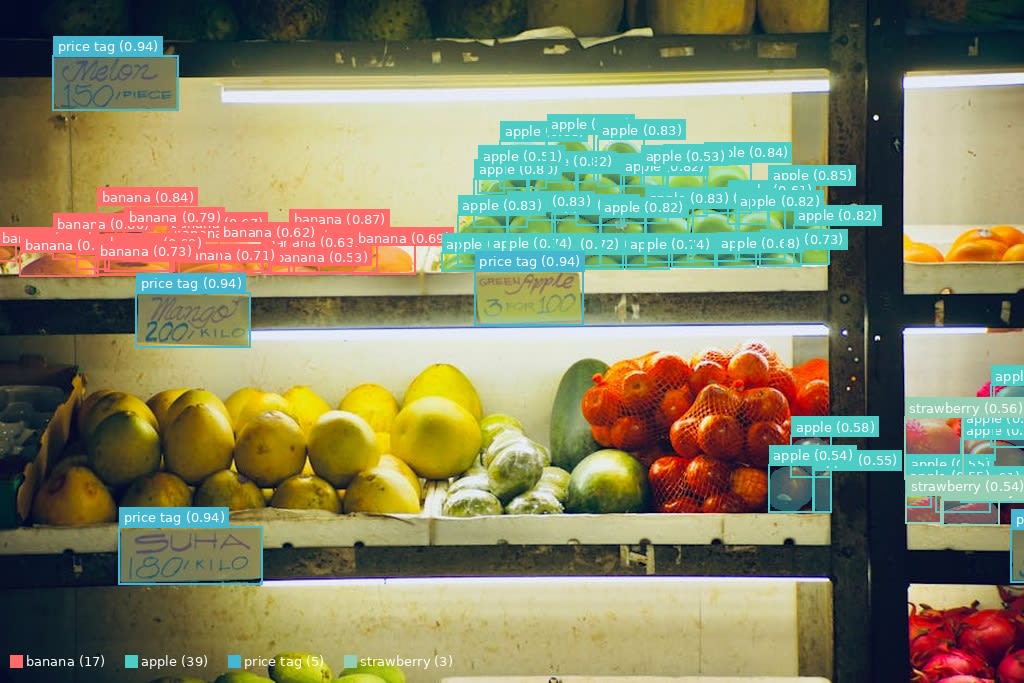
17 bananas, 39 apples, and 5 price tags color-coded by prompt
Finally, we tested in the retail domain. We tried to see how many small fruits lined up in large quantities could be detected.
| Prompt | Detections | Top Score |
|---|---|---|
| banana | 17 | 0.874 |
| apple | 39 | 0.851 |
| price tag | 5 | 0.945 |
| strawberry | 3 | 0.565 |
Inference time: 702ms. Detecting 39 apples individually was surprising. Price tags were also detected with a high score of 0.945. The lower score for strawberries is likely because they were hard to see through the netting.
Across all 5 scenarios, detection was possible simply by changing the prompts. The flexibility to handle everything from construction sites to city streets and supermarket produce sections without retraining the model is the strength of zero-shot detection.
Performance Measurements
VRAM Usage
| State | VRAM |
|---|---|
| After model load | 3.3 GiB |
| During detection (peak) | ~3.9 GiB |
This is about 3% of the DGX Spark's 128GB unified memory. It can easily co-exist with VLMs (approximately 17 GiB for Cosmos-Reason2-8B) or LLMs (approximately 17 GiB for Nemotron-Nano-9B-v2).
Inference Speed
Here is a summary of the measured results for the 5 scenarios.
| Scenario | Number of Prompts | Inference Time |
|---|---|---|
| Construction PPE | 4 | 1,840ms |
| Warehouse / Logistics | 6 | 773ms |
| Office | 5 | 688ms |
| Street / Traffic | 5 | 706ms |
| Supermarket Produce | 5 | 702ms |
The first run (PPE) is slow at 1,840ms because the image embedding computation in set_image includes warmup. From the second run onward, it stabilizes at around 700ms.
Compared to YOLO's 53fps (Jetson FP16), this is considerably slower, but for use cases like "analyzing recorded footage or archived images" rather than real-time detection, returning results in under one second is sufficiently practical.
Changes in Detection Count by Threshold
We compared how the number of detections changes by varying score_threshold between 0.3, 0.5, and 0.7 on the same image.
Warehouse scene (forklift, person, pallet, safety vest, box, hard hat)
| Threshold | Detected Prompts | Detected Instances | Change |
|---|---|---|---|
| 0.3 | 5 | 8 | Also picks up safety vest and pallet |
| 0.5 | 5 | 8 | Same as 0.3 (original scores are already high) |
| 0.7 | 4 | 4 | safety vest drops out, pallet and box decrease |
Street scene (person, car, traffic light, backpack, crosswalk)
| Threshold | Detected Prompts | Detected Instances | Change |
|---|---|---|---|
| 0.3 | 5 | 56 | All prompts including crosswalk detected |
| 0.5 | 5 | 56 | Same as 0.3 |
| 0.7 | 4 | 35 | crosswalk drops out, person 26→15, car 18→12 |
A threshold of 0.5 was the most balanced setting. At 0.7, lower-scoring prompts (crosswalk 0.68, safety vest 0.61) begin to drop out. Lowering to 0.3 did not significantly increase false positives in the images tested here, but since false positives may increase with dense images, it is best to adjust according to the use case.
How to Distinguish Between YOLO and SAM 3.1
In actual pipelines, YOLO and SAM 3.1 are not mutually exclusive—they can be used in combination. For example, a YOLO on the edge could detect people in real time, while a SAM 3.1 on the server side reinforces protective equipment detection in a zero-shot manner. We plan to build and verify such a combined pipeline in a future article.
Bonus: Testing SAM 3.1 Video Tracking
Since we had the opportunity, we also tested video tracking using Object Multiplexing, the flagship feature of SAM 3.1. Using a video of a busy street with over 80 pedestrians (sourced from Pexels, 30 frames), we compared the speed between image mode (independent detection per frame) and video mode (Multiplex Video Predictor).
To run it on DGX Spark, in addition to the flash-attn installed in the Dockerfile, module name shims and an SDPA fallback were required (see the scripts in the GitHub repository for details).
Speed Comparison
| Mode | Processing Method | FPS | Total Time (30 frames) |
|---|---|---|---|
| Image mode | Independent detection per frame | 1.22 | 24.5s |
| Video mode (SAM 3.1 Multiplex) | Batch processing with shared memory | 1.52 | 19.7s |
On DGX Spark, the speed improvement was 1.2x. This falls short of the 7x speed improvement Meta reports on H100, primarily because flash-attn does not natively support the DGX Spark's SM121, causing fallback to SDPA. Since the Object Multiplexing algorithm itself is working correctly, further speedups can be expected depending on future support status.
Summary
We confirmed that SAM 3.1 can be run on DGX Spark and that object detection is possible using only text prompts.
My impression from trying it is that it's genuinely convenient to be able to "just try detecting something" without preparing training data like you would with YOLO. The flexibility to handle everything from PPE to office supplies and food items simply by changing prompts makes it well-suited for exploratory analysis and prototyping.
On the other hand, inference speed is over 30x slower than YOLO's 53fps at 700ms/image, and as a zero-shot approach, it doesn't achieve the accuracy of a dedicated trained model. In situations requiring real-time detection, YOLO still has the upper hand.
In actual production environments, an approach gaining attention for its cost-effectiveness is using SAM 3.1 to generate large amounts of labeling data, then distilling and deploying a lightweight YOLO model trained on that data. Since DGX Spark's 128GB unified memory can handle SAM 3.1-based labeling with plenty of headroom, it seems like a good fit for this kind of "distill knowledge from a heavy model into a lighter model" workflow.
The container image and detection scripts for SAM 3.1 are published in the GitHub repository.

