
I tried running a video search AI agent on DGX Spark (VSS Agent)

This page has been translated by machine translation. View original
Introduction
Hello, I'm Morishige from Classmethod's Manufacturing Business Technology Department.
In a previous article, I used Live VLM WebUI to try real-time analysis of camera footage. The experience of having "what is currently in view" verbalized in 1-2 seconds was interesting, but in actual business settings, isn't the need to "search for specific scenes from past footage" more common?
This time, I ran NVIDIA's AI Blueprint "VSS (Video Search and Summarization) Agent" on DGX Spark. It's a video search AI agent that takes recorded footage, and when you ask in natural language "where is the scene with a person in red clothes?", it finds the relevant section.
If Live VLM WebUI is a tool that "verbalizes camera footage in real time right in front of you," VSS is a tool that "searches and summarizes accumulated footage after the fact." This time, I ran both real-time analysis and accumulated video search locally on DGX Spark.
What is VSS Agent?
VSS (Video Search and Summarization) Agent is a video AI Blueprint based on the NVIDIA Metropolis platform. When you upload a video, it automatically generates captions using a VLM and stores them in a vector database and graph database. You can then search the video content with natural language or generate summaries.
What it can do
Once a video is uploaded, you can use natural language questions like "What is happening in this scene?" or text searches like "A scene where a person wearing a red hat is walking." It also supports full video summary generation, audio transcription (multi-language support), and action recognition (detection of specific actions).
Architecture
Behind VSS, multiple AI models and databases work together.
Cosmos-Reason2-8B (NVIDIA's latest video understanding model, based on Qwen3-VL) is used as the VLM, and the LLM can be flexibly swapped via OpenAI-compatible API (default is Llama 3.1 8B). For search, a combination of Milvus (vector DB) and Neo4j (graph DB) called CA-RAG (Context-Aware RAG) is used, which is notable for its ability to perform searches that consider spatiotemporal relationships.
Two Modes
VSS has two deployment modes.
| Mode | VLM | LLM | DB | Use Case |
|---|---|---|---|---|
| Event Reviewer | Cosmos-Reason2-8B (local) | Not used | Not used | CV pipeline alert verification |
| Standard VSS | Cosmos-Reason2-8B (local) | Llama 3.1 8B (local) | Milvus + Neo4j | Full-featured video search & summary |
Event Reviewer is a lightweight mode for "verifying alerts generated by a CV pipeline (object detection, etc.) with a VLM." Standard VSS has full functionality, with video search, summarization, and Q&A all available. This time I focused on Standard VSS for verification.
Setup
Prerequisites
| Item | Requirement |
|---|---|
| DGX OS | 7.2.3 or higher |
| GPU Driver | 580.95.05 or higher |
| NGC API Key | For NVIDIA Container Registry access |
| HuggingFace Token | For Cosmos-Reason2-8B access |
| Storage | 10GB or more free space in /tmp/ |
Environment Setup
Clone the VSS GitHub repository and deploy it with a single GPU configuration for DGX Spark.
git clone https://github.com/NVIDIA-AI-Blueprints/video-search-and-summarization.git
cd video-search-and-summarization
On DGX Spark (ARM64), the IS_SBSA=1 flag is required.
# Run cache cleaner (recommended for ARM environments)
sudo sh deploy/scripts/sys_cache_cleaner.sh

# NGC login
docker login nvcr.io
The NGC API Key can be obtained from the NGC setup page. The HuggingFace Token is available from Settings.
export NGC_API_KEY="your-ngc-api-key"
export HF_TOKEN="your-hf-token"
Starting NIM Containers
VSS uses three NIM containers: LLM, Embedding, and Reranker. The official documentation describes a procedure for starting all three with NIM, but this time I replaced only the LLM with Ollama.
The LLM portion of VSS simply calls an OpenAI-compatible API, so it can work with inference servers other than NIM by swapping the endpoint. Since Ollama natively provides an OpenAI-compatible API (/v1/chat/completions), you only need to change the base_url in config.yaml.
# Prepare Llama 3.1 8B with Ollama
ollama pull llama3.1:8b
Embedding and Reranker are started as NIM. These two are compact at about 3GB each and don't cause memory issues.
export LOCAL_NIM_CACHE=/tmp/nim-cache
mkdir -p $LOCAL_NIM_CACHE

# Embedding NIM (supports 26 languages, including Japanese)
docker run -d --name vss-embedding-nim \
  -u $(id -u) --gpus '"device=0"' --shm-size=16GB \
  -e NGC_API_KEY=$NGC_API_KEY \
  -v "$LOCAL_NIM_CACHE:/opt/nim/.cache" \
  -p 8006:8000 \
  nvcr.io/nim/nvidia/llama-3.2-nv-embedqa-1b-v2:1.9.0

# Reranker NIM (supports 26 languages, including Japanese)
docker run -d --name vss-reranker-nim \
  -u $(id -u) --gpus '"device=0"' --shm-size=16GB \
  -e NGC_API_KEY=$NGC_API_KEY \
  -v "$LOCAL_NIM_CACHE:/opt/nim/.cache" \
  -p 8005:8000 \
  nvcr.io/nim/nvidia/llama-3.2-nv-rerankqa-1b-v2:1.7.0
The first startup of NIM containers involves model downloads, so it takes considerable time. Monitor the progress with docker logs -f vss-embedding-nim while waiting.
Pointing the LLM Endpoint to Ollama in config.yaml
In the VSS configuration file config.yaml, point the LLM endpoint to Ollama. The three places to change are chat_llm, summarization_llm, and notification_llm.
chat_llm:
  type: llm
  params:
    model: llama3.1:8b
    base_url: 'http://host.docker.internal:11434/v1' # Ollama
    max_tokens: 2048
    temperature: 0.2
    top_p: 0.7
host.docker.internal is a DNS name for accessing services on the host side from within a Docker container. Since Ollama listens on port 11434 on the host side, VSS containers can connect using this URL.
Deploying the VSS Core
After confirming that the Embedding/Reranker NIMs return ready and the LLM responds in Ollama, start the VSS core.
cd deploy/docker/local_deployment_single_gpu

# Set NGC_API_KEY and HF_TOKEN in .env
source .env

# ARM64 flag (required for DGX Spark)
export IS_SBSA=1

docker compose up -d
The key point for DGX Spark (ARM64) is that the VSS core image name gets a -sbsa suffix. Setting IS_SBSA=1 causes vss-engine:2.4.1-sbsa to be selected in compose.yaml.
On the first startup, the Cosmos-Reason2-8B (VLM) download will run. Since it's a gated model on HuggingFace, you need to agree to the license on the Cosmos-Reason2-8B page in advance.
Once startup is complete, access http://<DGX Spark IP>:9100 in your browser.
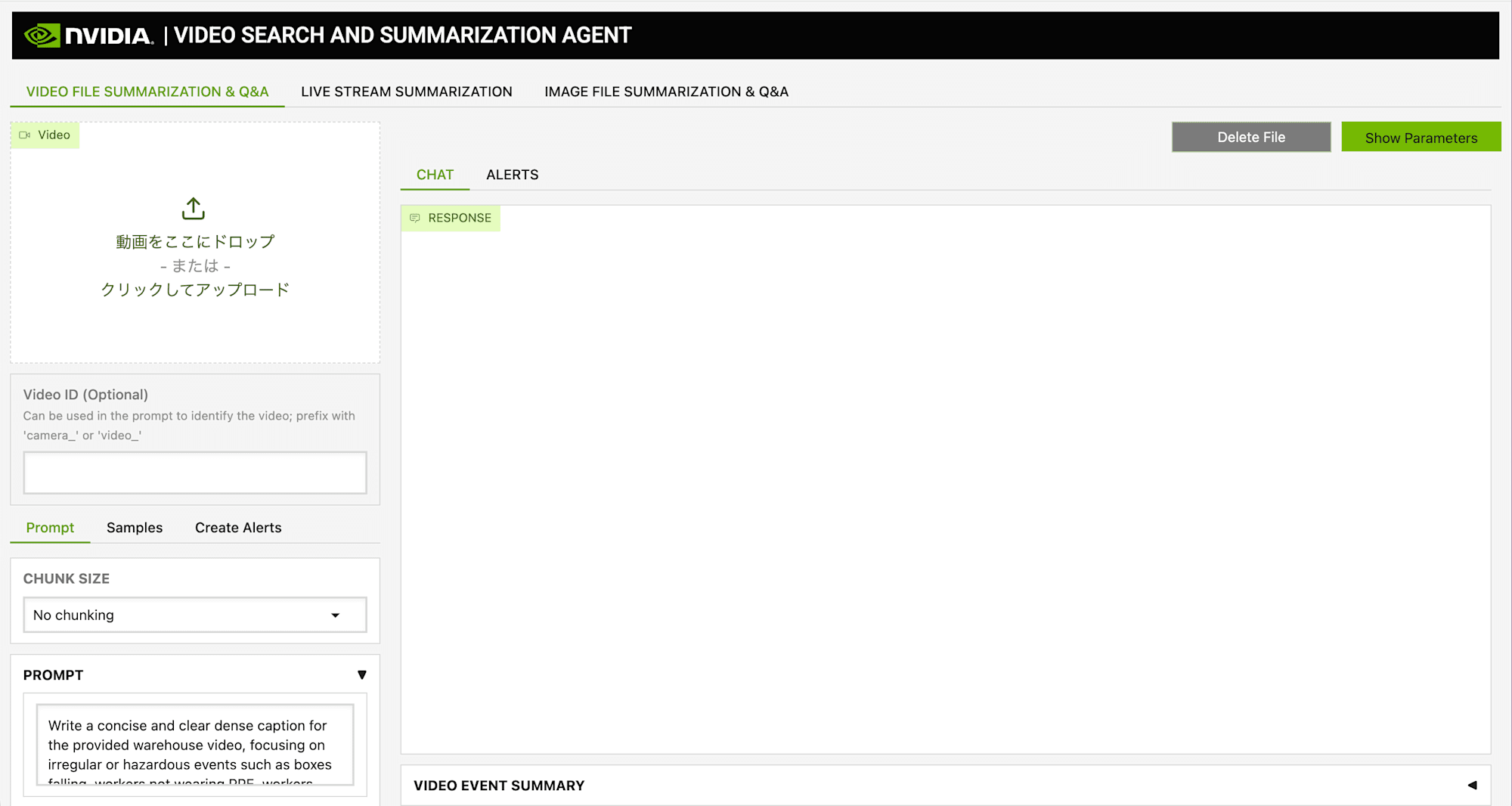
Running with the Default Configuration (Llama 3.1 8B)
Uploading Sample Video
First, use the sample video included in the VSS repository (warehouse surveillance footage warehouse.mp4) to verify the overall flow. When you upload an mp4 file from the "FILE SUMMARIZATION" tab in the Web UI, Cosmos-Reason2-8B (VLM) automatically generates captions (text descriptions) for each frame and stores them in Milvus and Neo4j as GraphRAG.
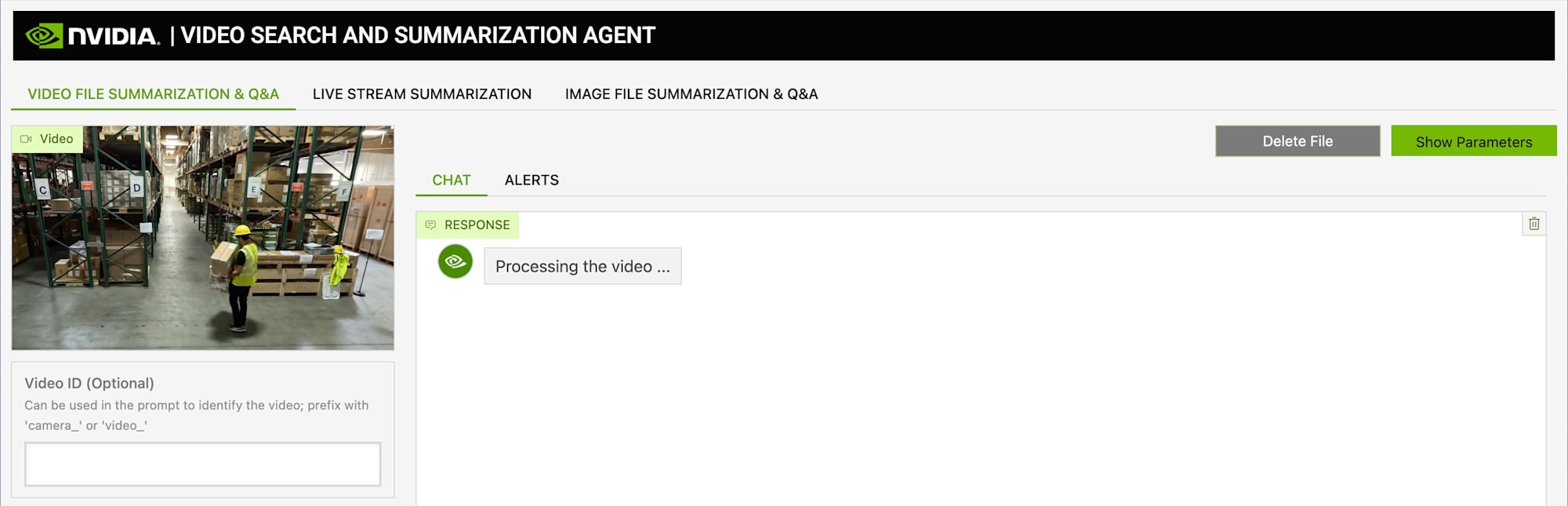
Generating a Summary
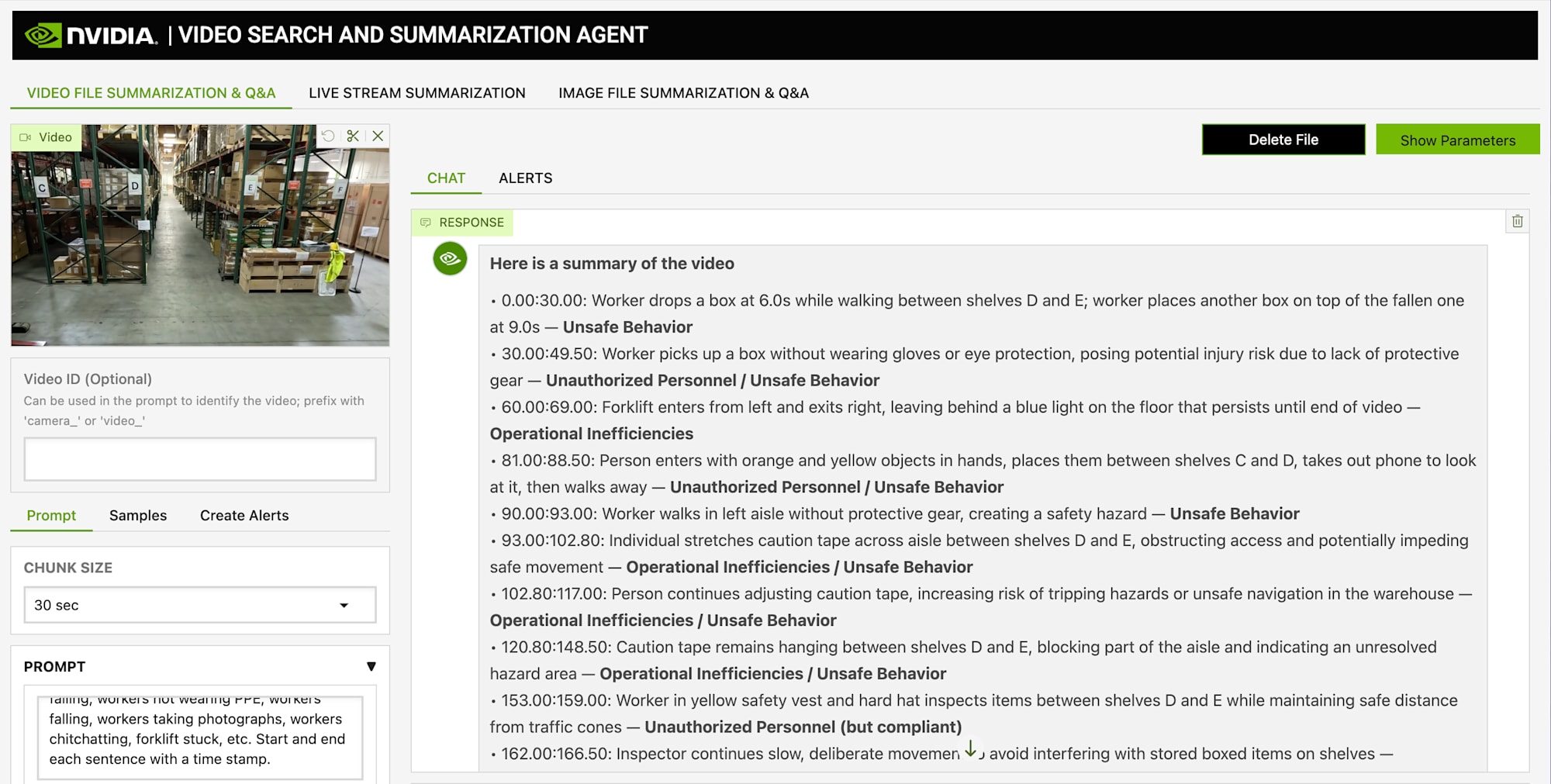
After the upload is complete, press the "Summarize" button. The VLM generates captions in chunk units, and then the LLM (Llama 3.1 8B) summarizes and aggregates them. For the warehouse footage, processing completed in 113 seconds.
The generated summary was organized into four categories.
- Unsafe Behavior — Unstable working postures on ladders, no safety harness worn
- Operational Inefficiencies — Wait times between workers
- Potential Equipment Damage — Insufficient safety checks around forklifts
- Unauthorized Personnel — Entry without protective equipment
Since the default prompt is configured for warehouse surveillance, it summarizes well from a safety management perspective.
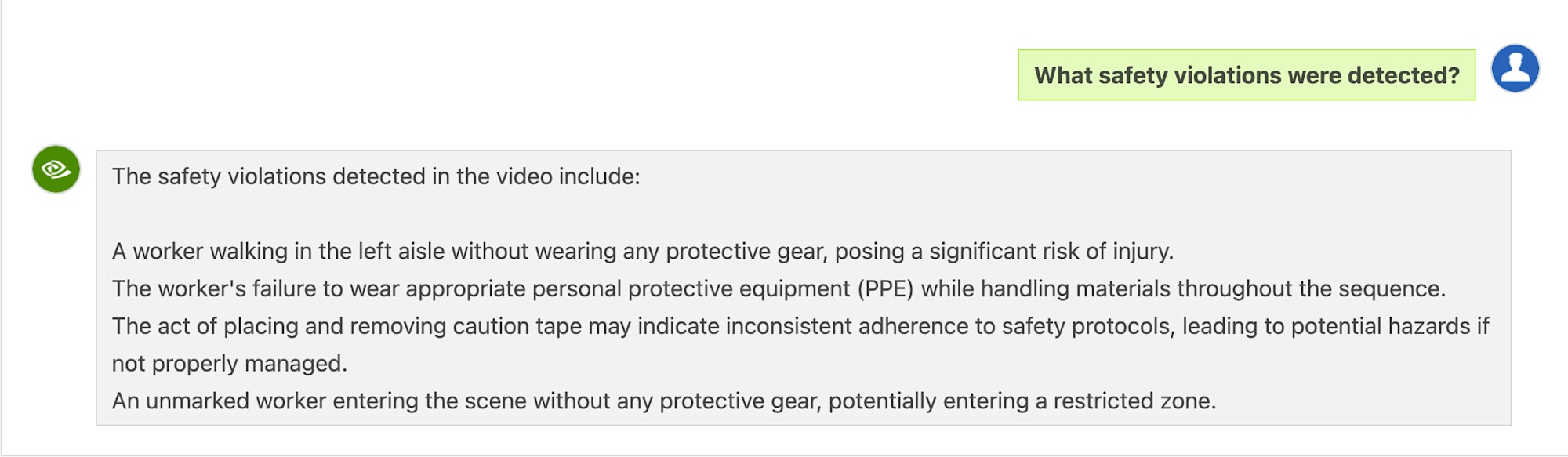
Asking Questions in English
In addition to summaries, you can ask questions about the video content in chat format.
Q: "What safety violations were detected?"
Based on the English captions generated by the VLM and GraphRAG search results, the LLM returns answers. The content was consistent with the summary, including PPE non-compliance on ladders and insufficient safety checks around forklifts.
Asking Questions in Japanese
I also tried asking questions in Japanese about the same footage.
Q: "この動画で確認された安全上の問題は何ですか?" (What safety issues were identified in this video?)
Llama 3.1 8B does respond in Japanese. However, it was limited to basic points such as "unstable work posture on a ladder" and "not wearing protective equipment," and the information content was less compared to the English response. Since VLM captions are generated in English, there is a gap with Japanese queries.
Trying Japanese Search with Nemotron 9B
This is what I wanted to try most in this article. The default VSS configuration is English-centric, but DGX Spark has the Japanese LLM that was verified in the Nemotron series article. How much more usable would Japanese video search become if the LLM were swapped?
Rewriting config.yaml
Since Nemotron 9B-v2-Japanese is already running in Ollama, just changing the model name in config.yaml is enough. Rewrite the three places: chat_llm, summarization_llm, and notification_llm.
 chat_llm:
   type: llm
   params:
-    model: llama3.1:8b
+    model: nemotron-9b-jp-nothink
     base_url: "http://host.docker.internal:11434/v1"
After saving config.yaml, restart the VSS via-server container. There's no need to re-upload the video (the GraphRAG data remains intact).
Comparison with Warehouse Footage
Running Summarize on the same warehouse.mp4 showed a clear difference in results.
| Item | Llama 3.1 8B | Nemotron 9B-v2-Japanese |
|---|---|---|
| Processing time | 113 seconds | 316 seconds |
| Detected event count | 4 categories (broad categories) | 14 items (with individual timestamps) |
| Output language | English | English (because captions are in English) |
| Level of detail | Category name + overview | Specific description of each event |
While Llama 3.1 8B's output was a category-level overview such as "Unsafe Behavior" and "Operational Inefficiencies," Nemotron 9B individually listed each event with timestamps and specific situations, such as "0:08-0:10: Worker in an unstable posture working on a ladder." Processing time is about 3 times longer, but there was a considerable difference in information granularity.
The difference in Japanese Q&A was even more pronounced.
Q: "この動画で確認された安全上の問題は何ですか?" (What safety issues were identified in this video?)
| Aspect | Llama 3.1 8B | Nemotron 9B |
|---|---|---|
| Response language | Japanese (awkward) | Japanese (natural) |
| Number of issues | 2-3 items | 4 or more items |
| Terminology | PPE (in English) | Personal protective equipment (translated) |
| Specificity | "Work on a ladder" | "Working at height on a ladder without safety harness" |
Trying with Free Stock Video
Using only warehouse footage leaves the possibility that "it just happened to be a good match," so I also tried with free stock footage downloaded from Pexels.
Intersection Footage
When I uploaded footage of a busy intersection (38 seconds), the initial result was "no abnormalities detected." The cause was the prompt. With the default warehouse-oriented prompt, it looks for "abnormal behavior inside a warehouse," so nothing matches traffic footage.
In the VSS Web UI, you can edit three types of prompts when running Summarize.
| Prompt | Role | Customization example (traffic monitoring) |
|---|---|---|
| PROMPT | What the VLM looks for in each frame | Focus on traffic violations, signal ignoring, pedestrian dashing |
| CAPTION SUMMARIZATION PROMPT | Rules for describing detected events | Describe violations in start_time:end_time format |
| SUMMARY AGGREGATION PROMPT | Category classification of events | Classify into Traffic Violations, Near-Miss Incidents, etc. |
"What counts as abnormal" is defined through these three levels of prompts, so it can be customized to match the industry or monitoring target.

After rewriting the prompts for traffic monitoring, traffic violations such as signal ignoring and lane departure were properly detected. Processing time was 178 seconds.
VLM caption generation describes footage fairly generally, but at the LLM summarization/aggregation stage, if the prompt doesn't fit the domain, you can end up with "zero detections." The interesting thing about VSS is that you can extract different insights from the same footage depending on the prompts.
Motorcycle Factory Footage
For manufacturing line footage (70 seconds), I verified after adjusting the prompts for factory settings.
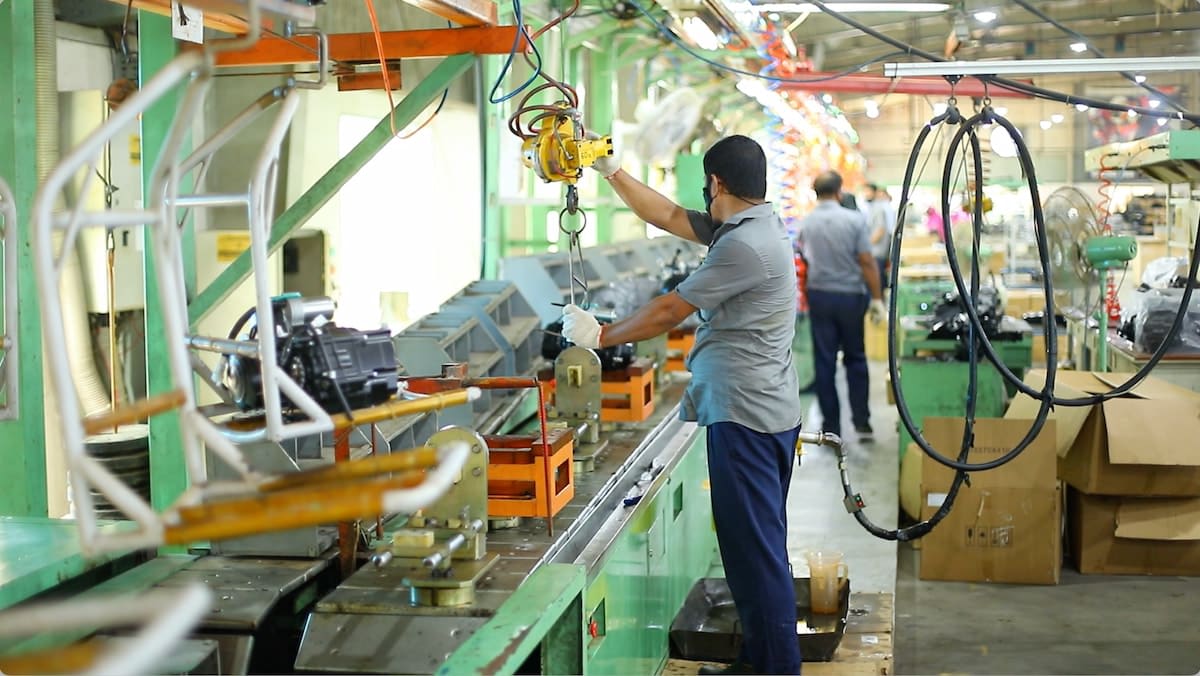
| Category | Detections | Main findings |
|---|---|---|
| Production Operations | 10 items | Crane operation, precision parts adjustment, team coordination |
| Safety Concerns | 1 item | Worker without gloves or safety goggles |
| Quality Control | 1 item | Lack of visual inspection during crane placement |
| Equipment Status | 0 items | No abnormalities |
Processing time was 648 seconds (about 10 minutes for 70 seconds of footage). The summary aggregation takes longer because there are more chunks.
When asked in Japanese Q&A "Are there any concerns from a quality control perspective?", Nemotron 9B responded as follows:
It has been confirmed that no visual inspection is performed after engine parts are placed on the conveyor belt. (...) The lack of an automated quality control system is inferred from the fact that no visible sensors are installed on the conveyor belt for real-time monitoring.
It provided specific observations such as the lack of visual inspection and absence of sensors, using terminology appropriate to the manufacturing context. This is where Nemotron 9B's Japanese language capability shines.
On the other hand, for generic questions like "What kind of work are the workers doing?", responses sometimes came back in English. Since VLM captions are stored in English, the LLM's output language fluctuates depending on the ratio of search results. Stabilization would be achievable by also making the VLM captions Japanese, but the quality of Japanese captions from Cosmos-Reason2-8B is a topic for future verification.
Comparison with Live VLM WebUI
As video AI tools running on the same DGX Spark, let me compare Live VLM WebUI and VSS.
| Comparison axis | Live VLM WebUI | VSS Agent |
|---|---|---|
| Use case | Verbalization of real-time footage | Search and summarization of accumulated footage |
| Processing target | Live camera footage | Recorded files such as mp4 |
| Response | 1-4 seconds | Batch processing (non-real-time) |
| VLM | gemma3:4b / llama3.2-vision:11b | Cosmos-Reason2-8B |
| LLM | Not required | Llama 3.1 8B |
| Database | Not required | Milvus + Neo4j |
| Setup | One line: uv tool install |
Docker Compose, 30-45 minutes |
| Search function | None | Text-based video scene search |
| GPU memory | 2-8GB (model dependent) | VLM ~37GB + LLM 18GB + NIM 6GB |
A natural combination would be "real-time monitoring with Live VLM WebUI while accumulating recordings in VSS for later searching." Live VLM WebUI is for when you want to instantly know "what is happening now," while VSS is for when you want to "find specific scenes from past footage." However, running both simultaneously on DGX Spark's 128GB unified memory is quite tight, so switching between them based on use case is the practical approach.
Thinking About Use Cases
With a video AI agent running locally on DGX Spark, video analysis becomes possible even in environments with strict privacy or network requirements.
In the motorcycle factory footage verification, actual findings such as "no safety goggles worn," "lack of visual inspection," and "absence of a real-time monitoring system" were obtained. Using VSS to accumulate factory camera footage and searching in Japanese for "deviations from work procedures" or "not wearing safety equipment" seems sufficiently practical. Even in locations where footage cannot be sent outside, placing DGX Spark beside the production line allows for local operation.
Beyond manufacturing lines, it seems applicable to a wide range of situations where "searching accumulated footage with natural language" is desired, such as meeting recording searches (combined with audio transcription) and store security camera analysis.
Bonus: Testing the Live Stream Feature Without a Camera
So far I've been testing video search via file uploads, but VSS has another feature called "LIVE STREAM SUMMARIZATION." When connected to an RTSP stream, it splits the footage into real-time chunks and generates captions and summaries.
Don't worry if you don't have a surveillance camera RTSP stream. By pseudo-broadcasting recorded footage as RTSP, you can test it entirely on DGX Spark. Here I used MediaMTX (a lightweight RTSP server) and FFmpeg to loop-broadcast the same warehouse.mp4 as before.
Setup
Start MediaMTX with Docker and broadcast the file as RTSP using FFmpeg.
# Start MediaMTX (RTSP server)
docker run --rm -d --name mediamtx --network host bluenviron/mediamtx:latest

# Loop-broadcast warehouse.mp4 at real-time speed
ffmpeg -re -stream_loop -1 \
  -i ~/videos/vss-test/warehouse.mp4 \
  -c copy \
  -f rtsp rtsp://localhost:8554/warehouse
-re is a flag to read at real-time speed. Without this, it would send at full speed and wouldn't work as a live stream. Using -c copy for H.264 passthrough without transcoding keeps CPU load near zero.
Register the stream with the VSS API.
curl -X POST http://localhost:8100/live-stream \
  -H "Content-Type: application/json" \
  -d '{
    "liveStreamUrl": "rtsp://host.docker.internal:8554/warehouse",
    "description": "Warehouse Safety Monitoring RTSP Loop",
    "camera_id": "camera_1"
  }'
host.docker.internal is the DNS name for reaching the host-side MediaMTX from within the VSS container.
Live Stream Processing
After registering the stream, calling the /summarize API starts the VLM (Cosmos-Reason2-8B) generating captions in 10-second chunks. Once 30 seconds worth of chunks have accumulated, the summaries are aggregated.
Looking at the actual logs, captions were generated per chunk like this:
Chunk 6: "Between the timestamps 68.8 and 70.8, an individual wearing safety gear exits through the restricted zone marked by caution tape without authorization."
Chunk 11: "Between 114.8s and 120.9s, a person is carrying two boxes but drops one while walking through the aisle, posing a safety hazard due to potential injury from falling objects."
In the summary every 30 seconds, these chunks are aggregated into category-based reports like "Worker is not wearing any safety equipment and is handling materials without proper protective gear." Although it's the same footage as the file upload version, what's distinctive about the live stream is that NTP timestamps are attached.
Differences from File Upload
Processing the same warehouse.mp4 using two methods makes the differences in processing model clearly visible.
| Comparison item | File upload | Live stream |
|---|---|---|
| Processing method | Batch ingestion | Sequential 10-second chunk processing |
| Timestamp | In-video timecode | NTP |
| Summary timing | After processing is complete | Incremental every 30 seconds |
| Q&A response time | 7-19 seconds | 500+ seconds (VLM prioritizes chunk processing) |
| Q&A tense | Past tense (what happened) | Present tense (what is happening now) |
| Use case | Post-analysis of recordings | Real-time monitoring |
The large difference in Q&A response time was because the VLM is always running chunk processing during live streaming. Since the configuration shares VLM resources between Q&A and streaming, Q&A gets pushed to the back of the queue while streaming. With file uploads, since the VLM resources are freed after ingestion is complete, Q&A was returning in about 10-20 seconds.
In practical terms, for live streams the main use case will likely be "automated summary + alert generation." Real-time Q&A during live streaming would require measures such as adding a GPU dedicated to the VLM, or widening the intervals between chunk processing.
Summary
I deployed the VSS Agent on DGX Spark and tested everything from recorded video search and summarization, to swapping the LLM to Japanese, to the live stream feature. DGX Spark's 128GB unified memory doesn't provide a lot of headroom, so I saved about 40GB of memory by switching the LLM from NIM to Ollama. Thanks to VSS's design of standardizing on the OpenAI-compatible API, this switch only required changing base_url in config.yaml.
It was a gain to find that simply swapping the LLM to Nemotron 9B-v2-Japanese visibly improved both the granularity of summaries and the quality of Japanese Q&A. On the other hand, prompt domain adaptation also greatly affects detection accuracy. Processing intersection footage with the default warehouse-oriented prompt results in "no detections," but simply rewriting it for traffic monitoring enables violation detection. Since VLM captions remain in English, the response language fluctuates depending on the type of question - this is a future challenge to address alongside making the VLM side Japanese.
While the previous Live VLM WebUI was a tool that "verbalizes what is currently in view" in real time, VSS filled the piece of "searching stored footage with text." The fact that both run locally on the same DGX Spark seems particularly valuable in settings where footage cannot be sent outside.
Verification Environment for This Article
| Item | Specifications |
|---|---|
| DGX Spark | 128GB LPDDR5x, GB10 (Grace Blackwell) |
| DGX OS | 7.2.3 |
| GPU Driver | 580.126.09 |
| CUDA | 13.0 |
| VSS Agent | 2.4.1 |
| VLM | Cosmos-Reason2-8B |
| LLM (default) | Llama 3.1 8B (Ollama) |
| LLM (Japanese) | Nemotron 9B-v2-Japanese (Ollama) |
| Embedding | Llama 3.2 NV-EmbedQA 1B v2 |
| Reranker | Llama 3.2 NV-RerankQA 1B v2 |
| Database | Milvus v2.6.5 + Neo4j 5.26 |

