
I tried real-time monitoring of video with VSS Event Reviewer

This page has been translated by machine translation. View original
Introduction
Hello, I'm Morishige from Classmethod's Manufacturing Business Technology Department.
In a previous article, I deployed Standard VSS of VSS (Video Search and Summarization) on DGX Spark and tried searching stored footage and Japanese Q&A. Last time, I had an early access experience with the microservice architecture using the Warehouse Blueprint of 3.0.0 EA.
This time, I used "Event Reviewer," another deployment mode of VSS 2.4.1 GA, to build a real-time monitoring environment for camera footage. If Standard VSS is a tool for "searching recorded footage after the fact," Event Reviewer is a tool for "automatically verifying detection events happening right now."

Object detection via GroundingDINO detects cardboard boxes on a conveyor belt, and a VLM (Cosmos-Reason2-8B) looks at the footage to determine "Is there damage to the box?" This two-stage approach combining CV + VLM runs on a single DGX Spark.
What is Event Reviewer?
Differences from Standard VSS
VSS has two deployment modes: Standard VSS and Event Reviewer. Standard VSS, which was used in the previous article, uploads footage, generates captions with a VLM, indexes them in a vector DB and graph DB, and makes them searchable later using natural language.
Event Reviewer has a different concept. A CV pipeline (object detection model) detects "something" as an event trigger, and a VLM reviews a short video clip to determine "Is this really the case?" In other words, it's a mechanism where the VLM double-checks the CV detection results.
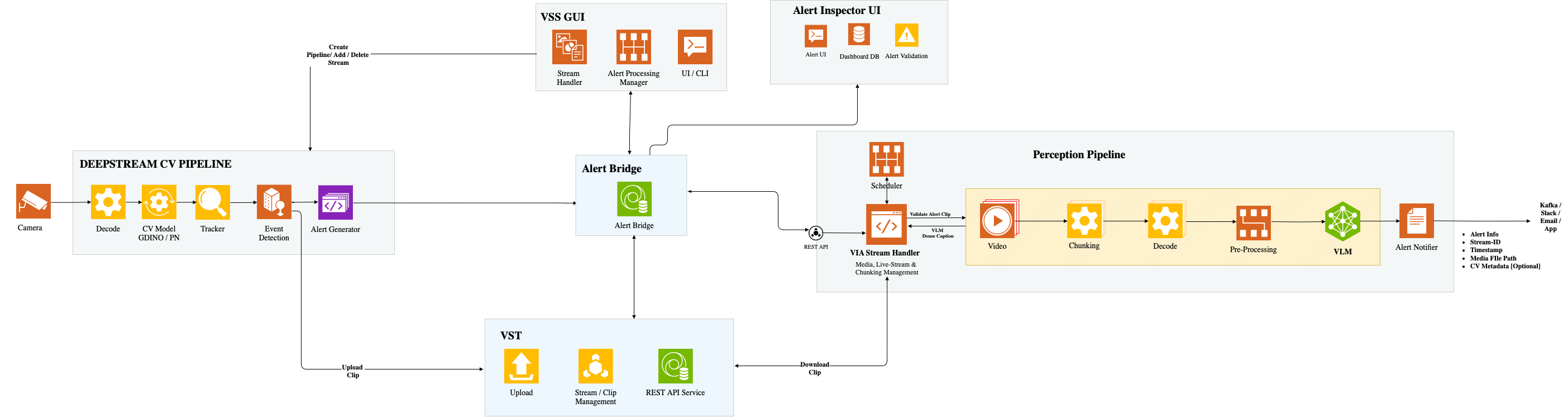
Source: VSS Blueprint Architecture — NVIDIA Documentation
Looking at the official architecture diagram, you can see the flow from left to right: CV Pipeline Manager UI → CV Pipeline (GroundingDINO, etc.) → Alert Bridge → VLM → Alert Inspector UI. Video Storage Toolkit (VST) handles clip storage, and the components are connected via REST API and Redis Streams.
Imagining a manufacturing site, here's how they're used:
Standard VSS is a post-analysis type. It's suited for use cases like searching a week's worth of manufacturing line footage for "scenes where products fell" to analyze the cause. It requires a full stack of VLM plus LLM and RAG, resulting in a larger number of containers.
Event Reviewer is a real-time monitoring type. When a cardboard box on a conveyor belt is detected, the VLM reviews the footage to determine "Is there damage?" It can also be used for worker safety equipment checks. RAG is not required, and it runs on VLM alone, making it lightweight.
| Item | Standard VSS (verified in V1) | Event Reviewer (this time) |
|---|---|---|
| Use case | Searching and Q&A of stored footage | Real-time event verification |
| Processing method | Batch (upload → index → search) | Event-driven (detection → clip → VLM judgment) |
| Model configuration | VLM + LLM + Embedding + Reranker + RAG | CV (GroundingDINO) + VLM only |
| Main UI | Standard VSS Web UI (:9100) | Alert Inspector UI (:7860) + CV UI (:7862) |
| Load on DGX Spark | High (memory 95GB or more) | Low (GPU usage 1-37%) |
Component Configuration
Event Reviewer consists of two Docker Compose setups.
The Event Reviewer core (deploy/docker/event_reviewer/) has 6 services. The central components are via-server (VLM inference), Alert Bridge (event ingestion and VLM routing), and Alert Inspector UI (review screen). The remaining storage-ms (Video Storage Toolkit) handles clip storage, Redis serves as the event bus, and api-gateway handles Nginx reverse proxy.
The CV pipeline (examples/cv-event-detector/) has 2 services: nv-cv-event-detector handles object detection and clip generation with GroundingDINO, and cv-ui provides the operation screen for detection settings.
That's a total of 8 containers. Considering that the previous 3.0.0 EA (Warehouse Blueprint) had 42 containers, this is quite compact.
The overall data flow is shown in the diagram below.
What the Blueprint provides goes up to the green and blue sections. The red external integrations are designed to be implemented independently by reading from Redis Streams or WebSocket.
Deploying Event Reviewer on DGX Spark
Prerequisites
| Item | Requirement |
|---|---|
| DGX OS | 7.2.3 or higher |
| GPU Driver | 580.95.05 or higher |
| NGC API Key | For NGC container registry access |
| HuggingFace Token | For Cosmos-Reason2-8B access |
| Storage | 10GB or more free space in /tmp/ |
VSS is an NVIDIA AI Blueprint published as open source on GitHub. First, clone the repository.
git clone https://github.com/NVIDIA-AI-Blueprints/video-search-and-summarization.git
cd video-search-and-summarization
Starting Event Reviewer
The deployment path for Event Reviewer is separate from Standard VSS and is located in deploy/docker/event_reviewer/.
cd deploy/docker/event_reviewer

# Start cache cleaner (recommended for ARM environment of DGX Spark)
sudo sh ../scripts/sys_cache_cleaner.sh &

# Create Docker network (shared with CV pipeline)
docker network create vss-shared-network

# Clear VST volume
rm -rf vst/vst_volume/*

# Start (IS_SBSA=1 is required for DGX Spark)
IS_SBSA=1 ALERT_REVIEW_MEDIA_BASE_DIR=/tmp/alert-media-dir docker compose up -d
IS_SBSA=1 is the same flag as in the previous articles that switches the container image suffix to -sbsa for DGX Spark (ARM64 / SBSA). ALERT_REVIEW_MEDIA_BASE_DIR is the save destination for clips generated by the CV pipeline, and is a shared directory mounted by both Event Reviewer and the CV pipeline.
One thing to note here: via-server takes time to download Cosmos-Reason2-8B (approximately 17GB) and load vLLM, so the first time it may take several minutes until the healthcheck passes. Since alert-bridge and alert-inspector-ui depend on via-server's health, running docker compose up -d while via-server is unhealthy sometimes caused it to stop at Created.
# Wait for via-server to start
docker compose logs -f via-server | grep -i "health\|ready"

# Run up again once healthy (alert-bridge and UI will start)
IS_SBSA=1 ALERT_REVIEW_MEDIA_BASE_DIR=/tmp/alert-media-dir docker compose up -d
From the second time onward, the model is cached in the Docker volume (event_reviewer_via-hf-cache), so it takes about 80 seconds until vLLM loading is complete.
Once all services are running, let's verify.
docker compose ps
It's OK if all 6 services show running (healthy).
Accessing the Alert Inspector UI
Open http://<DGX Spark IP>:7860 in your browser to access the Alert Inspector UI.
It's a Gradio-based UI that integrates an alert table list, video preview, and chat functionality with the VLM. At this point, since the CV pipeline hasn't been started yet, alerts are empty.
Enabling Object Detection with the CV Pipeline
What is GroundingDINO?
Event Reviewer core has the CV pipeline disabled by default (DISABLE_CV_PIPELINE=true). The CV pipeline starts independently in a separate directory examples/cv-event-detector/.
This sample pipeline uses GroundingDINO (swin_tiny) as an open-vocabulary object detection model. "Open vocabulary" means it can detect any object using text prompts, without being limited to a predefined class list (person, car, dog...). Write "cardboard box ." and it detects cardboard boxes; write "Person . Hard hat ." and it detects people and helmets.
Starting the CV Pipeline
cd ~/video-search-and-summarization/examples/cv-event-detector

IS_SBSA=1 ALERT_REVIEW_MEDIA_BASE_DIR=/tmp/alert-media-dir docker compose up -d
The nv-cv-event-detector container converts the GroundingDINO ONNX model to a TensorRT FP16 engine on the first startup. In the ARM SBSA environment it falls back to strongly typed mode, but there are no operational issues.
Once startup is complete, access the CV UI.
Processing Video with CV UI
Open http://<DGX Spark IP>:7862 to see the Computer Vision Pipeline Manager (CV UI).
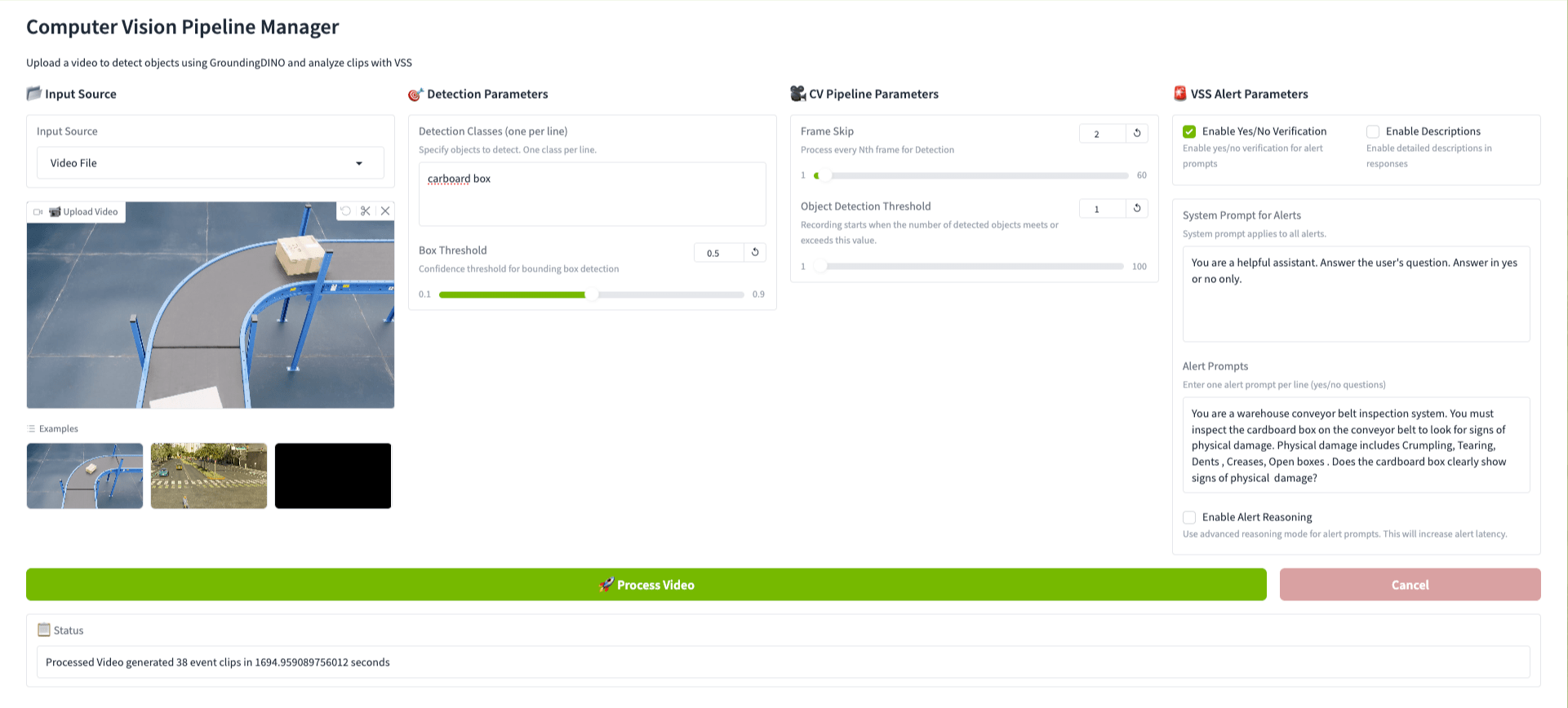
This time, instead of the warehouse footage used in V1/V2, I'm using the conveyor belt inspection footage included in the samples (conveyor_belt_inspection_sdg_1080p.mp4). It's a 1080p 30fps video created with NVIDIA's Synthetic Data Generation tool (SDG), showing cardboard boxes flowing along a blue-framed belt conveyor.
I configured the CV UI as follows.
In Detection Parameters, specify cardboard box as the detection class. GroundingDINO detects cardboard boxes on the belt conveyor, and when the detection count exceeds the Object Detection Threshold, an event clip is generated.
In VSS Alert Parameters, turn on Enable Yes/No Verification and set the inspection prompt in Alert Prompts.
You are a warehouse conveyor belt inspection system. You must inspect the
cardboard box on the conveyor belt to look for signs of physical damage.
Physical damage includes Crumpling, Tearing, Dents, Creases, Open boxes.
Does the cardboard box clearly show signs of physical damage?
Pressing "Process Video" causes GroundingDINO to analyze the footage and generate event clips. 38 event clips were generated from the 82-second conveyor belt footage (processing time was about 28 minutes). The generated clips are automatically sent to the Alert Bridge, and the VLM (Cosmos-Reason2-8B) judges one by one "Does the cardboard box have damage?"
Verifying Results in Alert Inspector UI
Returning to the Alert Inspector UI, the VLM verification results are displayed in the table.
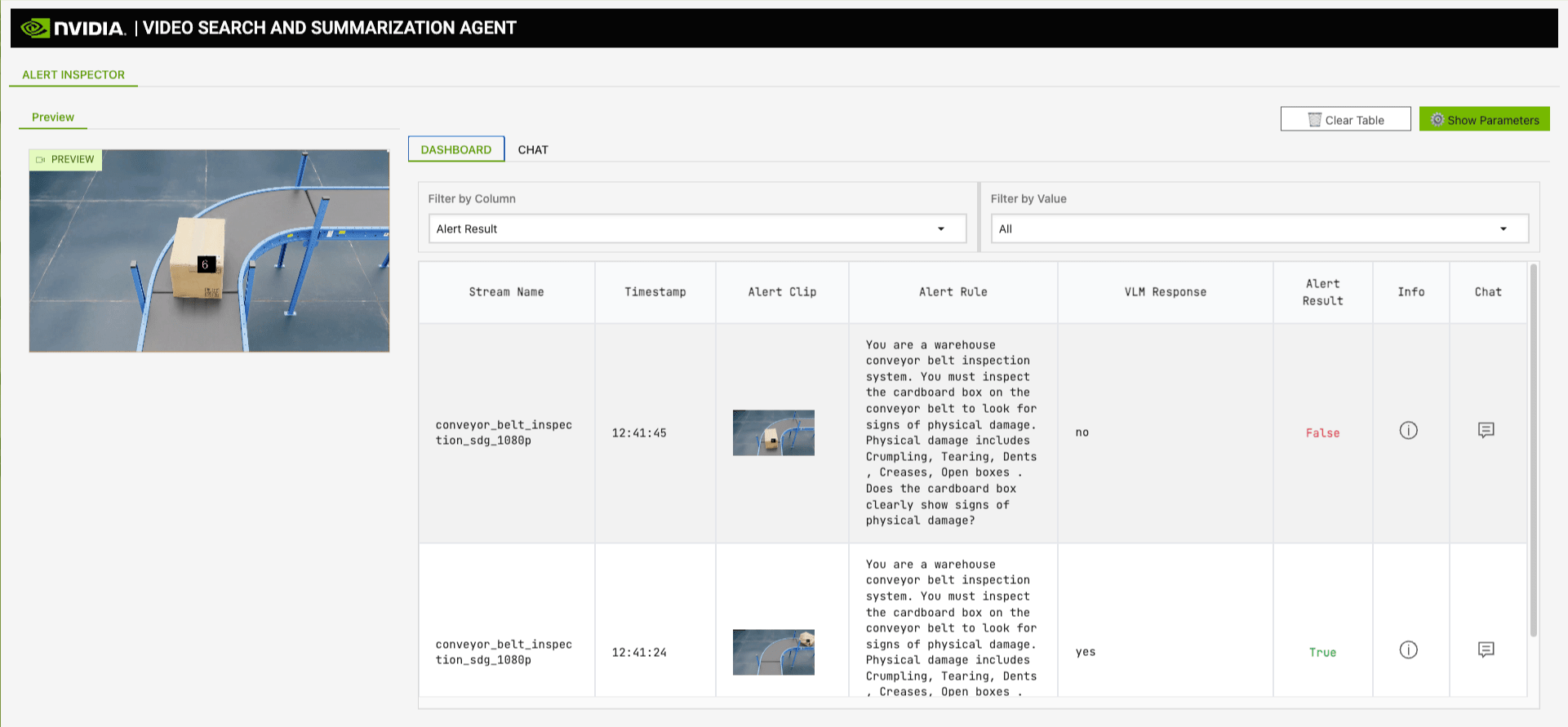
Looking at the results, the VLM distinguishes between damaged and undamaged boxes respectively. If the VLM Response is "Yes," the cardboard box has physical damage (Alert Result: True); if "No," there's no damage (Alert Result: False). The intended operation is to notify administrators only of True alerts.
Asking Questions About Footage with the Chat Feature
The Alert Inspector UI also has a built-in chat feature. With a video selected, enter a question and Cosmos-Reason2-8B will analyze the video content and respond.
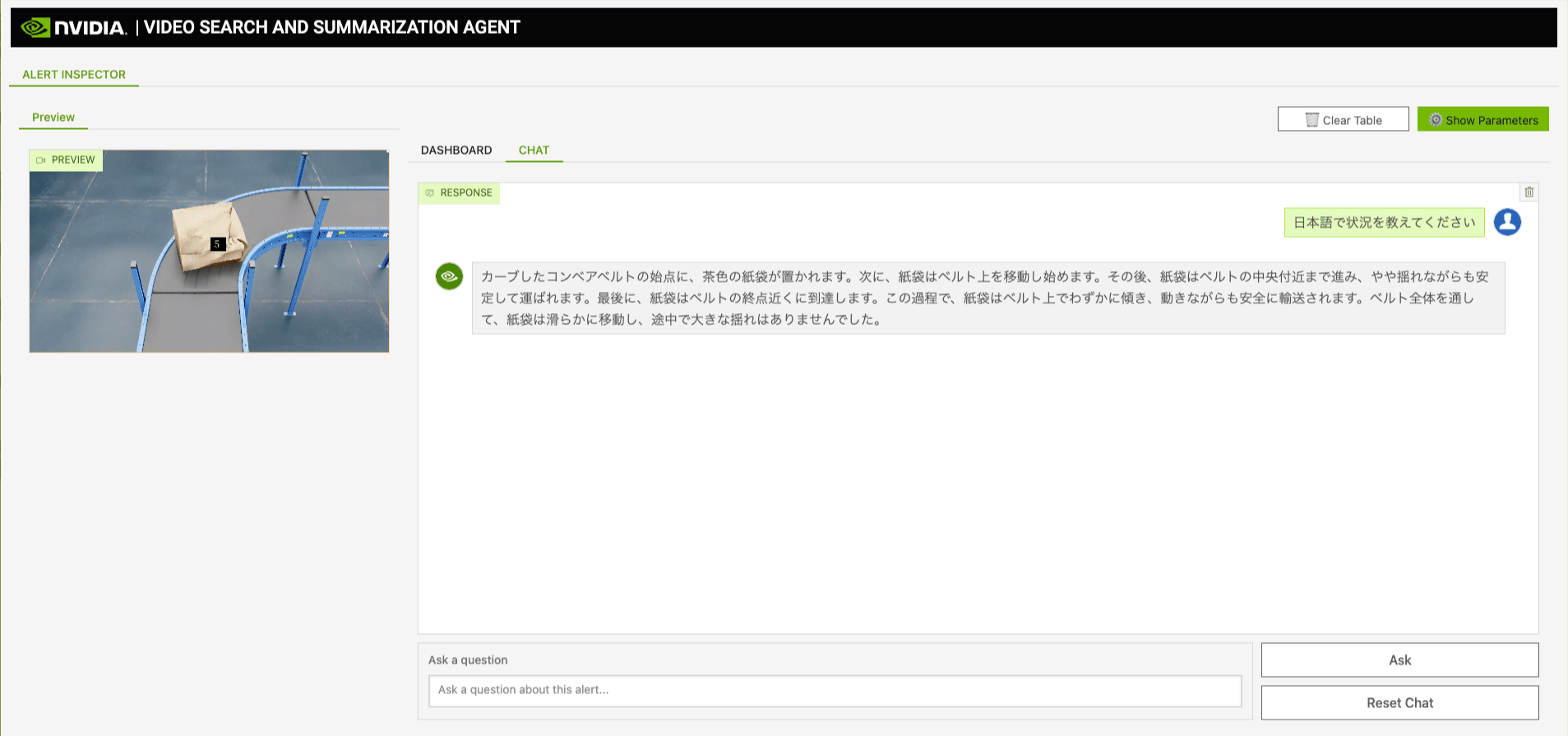
It also supports questions in Japanese. When I entered "Please tell me the situation in Japanese," it explained the video situation chronologically: "A brown paper bag is placed at the starting point of the curved conveyor belt. Next, the paper bag begins to move along the belt." The expression "paper bag" instead of cardboard box may be due to how the synthetic footage looks, but the movement of the object on the belt is accurately captured. While alert verification is a Yes/No judgment in English, the chat responds even when questions are asked in Japanese.
Switching to RTSP Live Stream
Setting Up an RTSP Server with MediaMTX
So far we've been doing file processing with sample footage, but let's switch to an RTSP live stream assuming actual operation.
This time, instead of a camera, I'll use MediaMTX and ffmpeg to distribute the sample footage as an RTSP stream.
# Start MediaMTX RTSP server
docker run --rm -d --name mediamtx -p 8554:8554 bluenviron/mediamtx:latest

# Distribute conveyor belt footage as RTSP stream with loop playback
ffmpeg -re -stream_loop -1 -i conveyor_belt_inspection_sdg_1080p.mp4 \
  -c copy -f rtsp rtsp://localhost:8554/conveyor
-stream_loop -1 for infinite loop, -re for real-time rate distribution. This continuously distributes an RTSP stream to rtsp://<host-ip>:8554/conveyor.
Real-Time Detection with Live Footage
Specifying the RTSP URL in the CV UI starts real-time processing of live footage. It captures footage at the default 10-second interval, and the full flow of GroundingDINO detection → clip generation → Alert Bridge submission → VLM verification runs continuously.
Unlike file processing, with live streams, detection events occur continuously. Reloading the Alert Inspector UI shows new alerts being added one after another.
Checking Resource Usage
I checked the resource usage of DGX Spark while Event Reviewer + CV pipeline was running.
| Item | Previous (3.0.0 EA) | This time (2.4.1 Event Reviewer) |
|---|---|---|
| Container count | 42 | 8 (Event Reviewer 6 + CV 2) |
| GPU Memory | 84GB / 128GB (66%) | 45GB / 128GB (35%) |
| GPU Usage | High load | 1 - 37% |
| GPU Temperature | — | 49°C |
| GPU Power Consumption | — | 25W |
In the previous 3.0.0 EA, 42 containers consumed 84GB out of 128GB, putting DGX Spark in a fairly tight state. This time's Event Reviewer operates with 8 containers, low GPU usage, and plenty of headroom.
This is because Event Reviewer doesn't use the RAG stack (LLM, Embedding, Reranker, Milvus, Neo4j, etc.). With just one VLM and one CV model, resource consumption is dramatically lower. Chat response times were also comfortable, feeling like a few seconds.
Details of the Alert Bridge API
So far we've been looking at the flow through the CV UI, but Alert Bridge also provides a REST API. This API is intended for use cases where alerts are sent from custom detection systems or external IoT sensors.
Alert Submission API
Send alerts as JSON to POST http://localhost:9080/api/v1/alerts.
{
  "id": "550e8400-e29b-41d4-a716-446655440000",
  "@timestamp": "2026-03-08T19:50:00Z",
  "sensor_id": "conveyor-cam-1",
  "video_path": "/tmp/alert-media-dir/clip.mp4",
  "alert": {
    "type": "package_damage",
    "description": "Cardboard box with potential damage detected",
    "severity": "medium",
    "status": "REVIEW_PENDING"
  },
  "event": {
    "type": "object_detection",
    "description": "Cardboard box detected on conveyor belt"
  },
  "vss_params": {
    "num_frames_per_chunk": 8,
    "vlm_params": {
      "prompt": "Does the cardboard box clearly show signs of physical damage such as crumpling, tearing, dents, creases, or being open? Answer Yes or No.",
      "system_prompt": "You are a warehouse conveyor belt inspection system.",
      "max_tokens": 200,
      "temperature": 0.3
    }
  }
}
API Pitfalls
When I actually tried calling the API, I found several validation rules not explicitly stated in the documentation. I'll summarize them for anyone who might fall into the same traps.
| Pitfall | Cause | Solution |
|---|---|---|
Validation error for id |
via-server requires UUID format | Send in UUID v4 format |
alert.severity and alert.status are required |
Not documented | Specify high/medium/low for severity, REVIEW_PENDING for status |
"Extra inputs not permitted" for event.confidence |
via-server schema is strict | Don't include confidence in the event object |
| VLM cannot retrieve prompt | Must be nested as vss_params.vlm_params.prompt, not vss_params.prompt |
Put it inside vlm_params as shown in the JSON above |
The last one about prompt nesting was particularly confusing. Writing prompt directly under vss_params treats it as null and falls back to the default prompt (defined in alert_request_defaults.yaml). To use a custom prompt, specify it in vlm_params.prompt.
Prompt Management API
Alert Bridge also has an API for pre-registering and managing prompts.
# Register prompt for each alert type
curl -X POST http://localhost:9080/api/v1/prompts \
  -H "Content-Type: application/json" \
  -d '{
    "alert_type": "package_damage",
    "prompt": "Does the cardboard box clearly show signs of physical damage? Answer Yes or No.",
    "system_prompt": "You are a warehouse conveyor belt inspection system."
  }'
The prompt priority is "in-request > registered prompt > default settings." For an inspection line, it would be practical to pre-register verification prompts for each alert type, such as cardboard box damage, missing labels, and orientation abnormalities.
Verification Result Output and External Integration
What's interesting here is "How do you notify external systems of VLM verification results?"
Looking at Alert Bridge's config.yaml, the output destination for VLM verification results is Redis Streams.
redis_sink:
  streams:
    enhanced_anomaly_stream: 'alert-bridge-enhanced-stream'
    incidents_stream: 'alert-bridge-incidents-stream'
When the VLM completes a judgment, the results are written to alert-bridge-enhanced-stream and alert-bridge-incidents-stream. WebSocket (ws://localhost:9080/ws/alerts) can also be used for real-time reception. The Alert Inspector UI internally uses this WebSocket to update its screen.
On the other hand, "notifications to external services" such as Slack notifications, email alerts, and PagerDuty integration are not included in the Blueprint. You can either read from Redis Streams and implement it yourself, or switch the sinkType in config.yaml to kafka and connect to various SaaS services via Kafka Connect.
The Standard VSS side has a notification_tool callback endpoint mechanism, but it's not used in Event Reviewer. The Blueprint provides up to "detection → VLM verification → stream output of results," leaving subsequent actions (notifications, ticket creation, automatic line stoppage, etc.) up to the user. On the other hand, since it outputs via standard interfaces like Redis Streams and WebSocket, I think there's high flexibility for integrating into existing systems.
Summary
I deployed Event Reviewer of VSS 2.4.1 GA on DGX Spark and ran a real-time monitoring pipeline from object detection with GroundingDINO to VLM verification.
If Standard VSS is a tool for "searching stored footage after the fact," Event Reviewer is a tool for "VLM verifying CV detection events in real time." Being lightweight without the RAG stack, it operates with room to spare on a single DGX Spark with 8 containers and GPU usage of 1-37%. Compared to the 42-container configuration of 3.0.0 EA, this lightness is quietly appreciated.
GroundingDINO's open-vocabulary detection is also quite useful, allowing you to flexibly switch detection targets just by changing the text prompt. Unlike models with fixed classes, being able to accommodate requests like "I want to inspect this product's appearance today" without retraining is a significant advantage at the PoC stage.
What I personally liked was the Alert Bridge API design. Alerts can be submitted from external sources via REST API, and the prompt management API allows you to customize verification content for each alert type. The Blueprint is designed not as a "finished product to use as-is" but as a "starting point for customization," with a structure that's easy to integrate into unique use cases.
Next time, I'd like to dig deeper into manufacturing use cases based on this Event Reviewer. Things like separating the CV pipeline to a Jetson Orin Nano Super to build an edge-server configuration, and testing how much inspection accuracy can be improved with domain-specific prompt design. This would be verification to bring the Blueprint closer to real-world operation by using it as a "starting point for customization."

