![For skills that are only executed manually (slash commands), I want to add the disable-model-invocation setting [Claude Code]](https://images.ctfassets.net/ct0aopd36mqt/3KBTm8tdpO9RJJuaVvVzod/a9964bb03097b448b2327edc6920bf9f/Claude.png?w=3840&fm=webp)
For skills that are only executed manually (slash commands), I want to add the disable-model-invocation setting [Claude Code]

This page has been translated by machine translation. View original
The content is exactly as the title suggests.
Claude Code skills (slash commands, hereafter simply called "skills") can have frontmatter settings. Frontmatter defines the behavior such as skill name, description, usable tools, and invocation control.
One of the frontmatter fields is disable-model-invocation. When set to true, it prevents Claude from automatically loading this skill.
For manual execution (or workflows where you want to control timing), add disable-model-invocation: true. This also saves context.
---
name: deploy
description: Deploy the application to production
disable-model-invocation: true
---

# Example Skill
...
...That's the main point, but I'll explain the background knowledge and actual test results below!
Prerequisites
What are Skills
Claude Code skills are mechanisms to extend Claude's functionality. You write instructions in a SKILL.md file to add to Claude's toolkit. Claude can automatically load skills when relevant to the conversation, or you can call them directly with /skill-name.
Skills are placed in .claude/skills. The storage location determines the scope (range of application).
| Location | Path | Applies to |
|---|---|---|
| Personal skills | ~/.claude/skills/<skill-name>/SKILL.md |
All projects |
| Project skills | .claude/skills/<skill-name>/SKILL.md |
This project only |
The skill directory can contain reference files and scripts in addition to SKILL.md, which Claude can reference (execute).
What are Slash Commands
Claude Code slash commands are commands that control Claude's behavior during interactive sessions. There are built-in commands like /help and /clear, as well as user-defined custom commands.
Custom slash commands can define frequently used prompts as Markdown files.
| Command Type | Storage Location | Applies to |
|---|---|---|
| Project commands | .claude/commands/ |
Shared with team |
| Personal commands | ~/.claude/commands/ |
All projects |
Note that custom slash commands have been merged into skills. While they can still be used as before, they actually operate as skills.
Manually Running Skills
You can directly call a skill (slash command) with /skill-name. You can also pass arguments (e.g., /fix-issue 123).
Frontmatter
You can write frontmatter at the beginning of skill files. Frontmatter is in YAML format and defines the behavior such as skill name, description, usable tools, and invocation control.
The main configuration items are as follows:
| Field | Description |
|---|---|
name |
Skill name (directory name if omitted) |
description |
Skill description (used by Claude for automatic loading decisions) |
allowed-tools |
List of permitted tools |
model |
Model to use (e.g., claude-sonnet-4-20250514) |
disable-model-invocation |
Disable automatic loading when true (manual execution only) |
For details, see the Frontmatter Reference.
About the disable-model-invocation Field
disable-model-invocation is a frontmatter setting that controls automatic loading of skills.
By default, Claude automatically loads skills (their descriptions) related to the conversation. Setting disable-model-invocation: true disables this automatic loading.
For manual-execution-only skills (such as deploy, release, etc.), enabling this setting prevents execution at unintended times. It also has the benefit of reducing unnecessary context consumption.
Checking the Effect of disable-model-invocation Setting
To verify the effect, I placed the following four skills/commands:
| Name | Type | disable-model-invocation | Location |
|---|---|---|---|
| test1-command-default | Command | None (default) | .claude/commands/test1-command-default.md |
| test2-command-manual | Command | true |
.claude/commands/test2-command-manual.md |
| test3-skill-default | Skill | None (default) | .claude/skills/test3-skill-default/SKILL.md |
| test4-skill-manual | Skill | true |
.claude/skills/test4-skill-manual/SKILL.md |
You can check loaded context with the /context command. When executed, it shows that items with disable-model-invocation: true are not loaded.
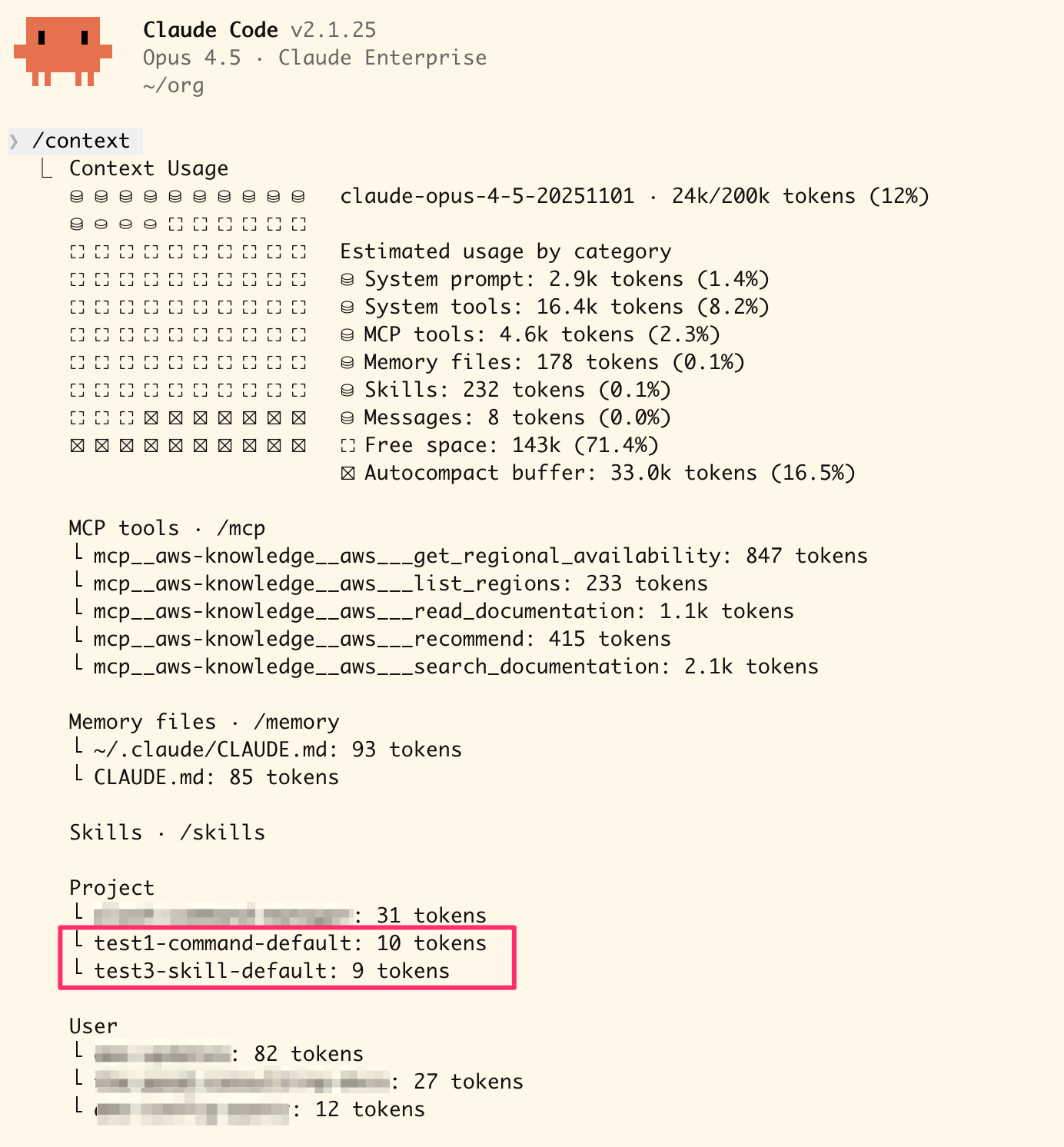
/context command execution result
On the other hand, all skills/commands appear in the suggestions for manual execution.
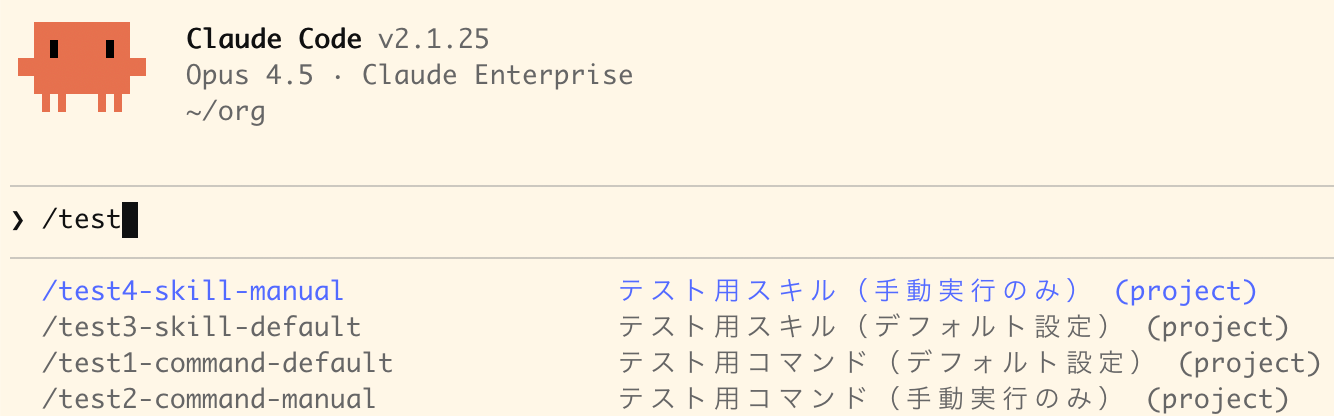
Skill suggestion list for manual execution
Conclusion
That concludes this blog introducing the disable-model-invocation setting. For skills intended for manual execution only, set disable-model-invocation: true. This prevents unintended automatic loading and saves context.
By the way, the reason I wrote this blog was because I noticed that a large number of slash commands had been loaded into my context without me realizing it.
I hope this information is helpful.