
I tried making it possible to execute Discord custom commands using voice input with Amazon Transcribe

This page has been translated by machine translation. View original
Introduction
By implementing slash commands in Discord Bot, you can perform various operations via text input. However, when operating from a smartphone, selecting commands and entering parameters can become cumbersome.
What if you could execute commands just by entering a specific voice channel and speaking? Wouldn't that make it more convenient to use? With this in mind, I built a system that executes custom commands from voice input by combining Amazon Transcribe's speech recognition and natural language structuring with Claude on Amazon Bedrock.
What is Amazon Transcribe?
Amazon Transcribe is an automatic speech recognition (ASR) service provided by AWS. When you input an audio file, it is converted to text using machine learning models. It supports more than 100 languages, including Japanese (ja-JP).
Verification Environment
- Node.js 22 / TypeScript
- discord.js v14 / @discordjs/voice
- AWS Lambda (Node.js 22 runtime)
- Amazon Transcribe
- Amazon Bedrock (Claude Sonnet 4.5)
- AWS CDK (TypeScript)
Target Audience
- Those who have implemented slash commands for Discord Bot
- Those interested in practical use cases for Amazon Transcribe or Amazon Bedrock
- Those considering UX improvements through voice input operations
References
- Amazon Transcribe — AWS
- Amazon Bedrock — AWS
- Amazon Bedrock now supports cross-region inference in Japan region — AWS Blog
- @discordjs/voice — GitHub
Architecture
The overall process flow is as follows:
There are three major phases:
- Bot captures audio and saves it as a WAV file to S3
- Run the Transcribe and Amazon Bedrock pipeline on Lambda to get structured data
- Post results to Discord and execute commands after user confirmation
I'll explain each phase in order below.
Voice Capture: @discordjs/voice
To capture voice in Discord Bot's voice channel, we use @discordjs/voice.
The Bot monitors users entering and exiting, and automatically joins when a human user enters a voice channel. Once the connection is established, it detects the start of speech with the receiver.speaking event and subscribes to each user's voice stream.
const audioStream = receiver.subscribe(userId, {
    end: {
        behavior: EndBehaviorType.AfterSilence,
        duration: 1500, // Recording ends after 1.5 seconds of silence
    },
});
Discord voice is encoded with the Opus codec. We decode it to PCM with @discordjs/opus, add a WAV header after the speech ends, and upload it to S3.
Amazon Transcribe: Converting Voice to Text
We transcribe the WAV file stored in S3 with Amazon Transcribe. The process flow consists of 3 steps: job creation, polling, and result retrieval.
// 1. Create job
await transcribeClient.send(
    new StartTranscriptionJobCommand({
        TranscriptionJobName: jobName,
        LanguageCode: 'ja-JP',
        MediaFormat: 'wav',
        Media: { MediaFileUri: `s3://${bucket}/${s3Key}` },
        OutputBucketName: bucket,
        OutputKey: `transcribe-output/${jobName}.json`,
    }),
);

// 2. Polling (1-second interval, maximum 60 times)
for (let i = 0; i < 60; i++) {
    await sleep(1000);
    const { TranscriptionJob: job } = await transcribeClient.send(
        new GetTranscriptionJobCommand({ TranscriptionJobName: jobName }),
    );
    if (job?.TranscriptionJobStatus === 'COMPLETED') break;
    if (job?.TranscriptionJobStatus === 'FAILED') throw new Error('Transcription failed');
}

// 3. Get and parse the result JSON from S3
const result = await s3Client.send(
    new GetObjectCommand({ Bucket: bucket, Key: outputKey }),
);
const body = await result.Body?.transformToString();
const parsed = JSON.parse(body!) as {
    results: { transcripts: { transcript: string }[] };
};
const transcript = parsed.results.transcripts[0].transcript;
Specifying LanguageCode: 'ja-JP' ensures that the Japanese speech recognition model is used. For short utterances (a few seconds), transcription typically completes in about 10-20 seconds.
Amazon Bedrock (Claude): Converting Text to Structured Data
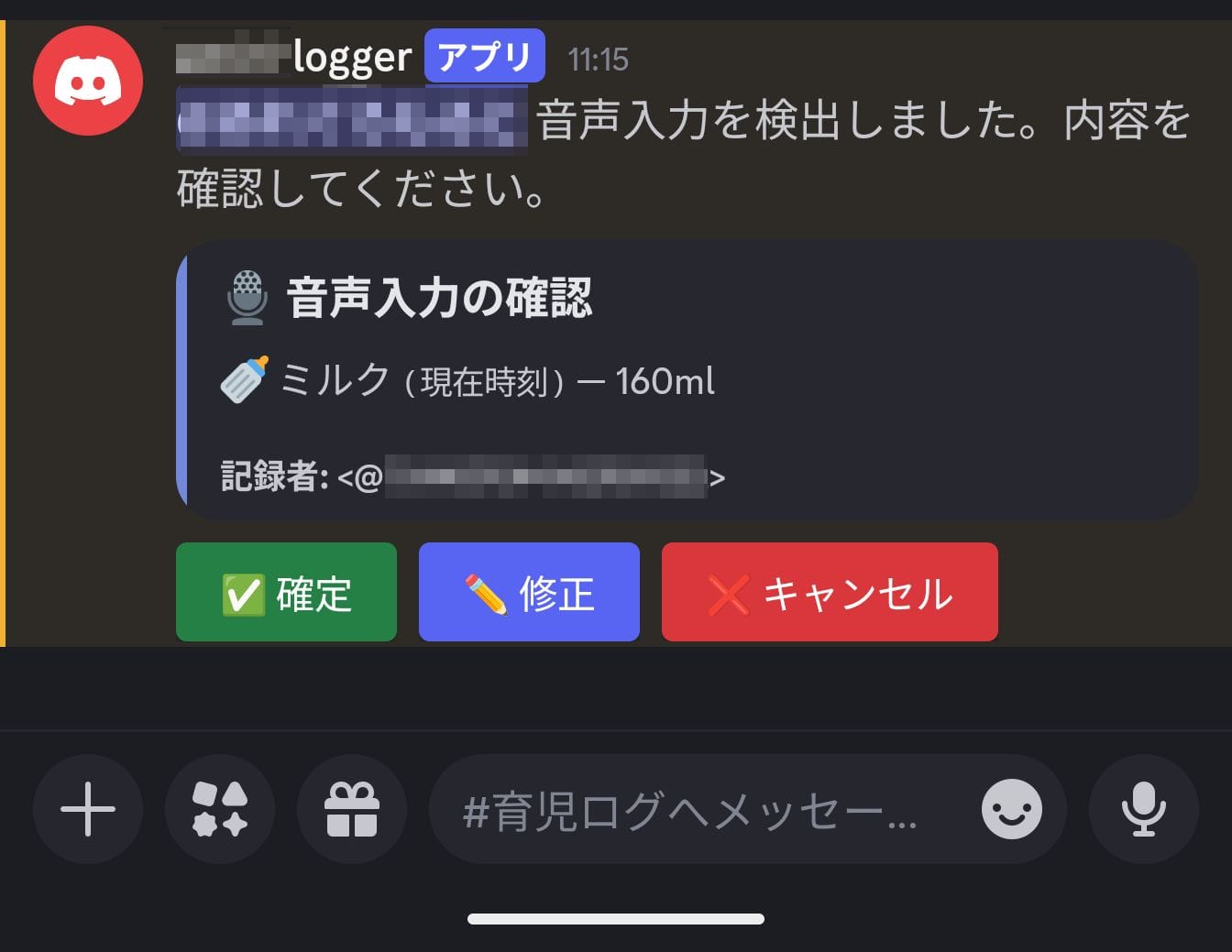
What Transcribe provides is natural language text. Text like "Drank 160 milk" cannot be used as a command directly. It needs to be converted into structured data like { eventType: "milk", details: { amount: 160 } }.
This is where we use Claude on Amazon Bedrock. For this project, I used the model jp.anthropic.claude-sonnet-4-5-20250929-v1:0 which supports cross-region inference in the Japan region.
const response = await bedrockClient.send(
    new InvokeModelCommand({
        modelId: 'jp.anthropic.claude-sonnet-4-5-20250929-v1:0',
        contentType: 'application/json',
        accept: 'application/json',
        body: JSON.stringify({
            anthropic_version: 'bedrock-2023-05-31',
            max_tokens: 1024,
            system: systemPrompt,
            messages: [{ role: 'user', content: transcript }],
        }),
    }),
);
In the system prompt, define the types of commands and parameter types to be supported.
System Prompt Example
You are a voice input command assistant.
Extract structured data corresponding to the following command types from the user's speech text.

## Supported Commands
- milk: Milk — { amount: number (ml) }
- meal: Baby food — { menu: string, memo?: string }
- sleep: Sleep — {}
- wake: Wake up — {}

## Rules
- Multiple commands can be extracted from a single utterance
- If time is explicitly mentioned, include it in the "time" field in "HH:MM" format
- If time is unknown, set time to null
- Return only a JSON array (no explanatory text needed)
For example, given the input "Drank 160ml of milk at 10:30, and then had baby food as well," it returns JSON like this:
[
  { "eventType": "milk", "time": "10:30", "details": { "amount": 160 } },
  { "eventType": "meal", "time": null, "details": { "menu": "Baby food" } }
]
Being able to extract multiple commands from a single utterance is a major advantage of using LLMs. Rule-based parsers tend to struggle with complex utterances, but Claude can appropriately understand the nuances of natural language and split accordingly.
Note that Claude's response may include explanatory text, so we extract only the JSON array portion using the regular expression /\[[\s\S]*\]/.
User Confirmation Flow
Neither speech recognition nor LLMs are 100% accurate. It's important to include a UI that asks users for confirmation rather than finalizing the structured results directly.
When Lambda completes structuring, it posts a confirmation message using Discord's button components. Users can check the content and choose from three actions:
- Confirm: Execute the structured content as a command as is
- Modify: Directly edit the JSON in a modal before execution
- Cancel: Abort the process
Misrecognition of numbers (like milk quantity) can be particularly troublesome if recorded directly. Having a confirmation step allows errors to be corrected before execution.
Actual Usage Experience
Variation in Processing Time
The time from speaking to when the confirmation message is posted varies, taking about 10 seconds at the shortest and up to about 1 minute at the longest. Polling for Transcribe job completion is the main cause.
The current implementation has no UI to indicate that processing is ongoing, making it difficult for users to determine if anything is happening. Improvements could include posting a "Processing..." message immediately after speech, and replacing it when complete. Also, configuring Transcribe job completion notifications via EventBridge or SNS could reduce Lambda execution time due to polling.
Speech Recognition Accuracy
Transcribe's Japanese recognition accuracy was quite good. It correctly recognizes specialized vocabulary like "nanmeshi (soft rice)".
However, speech content was sometimes automatically normalized into bracketed expressions. For example, if you say "simmered dish, lotus root, carrot," Transcribe's output might be formatted as "simmered dish (lotus root, carrot)." In this case, the bracketed string is included as-is in Claude's structured results.
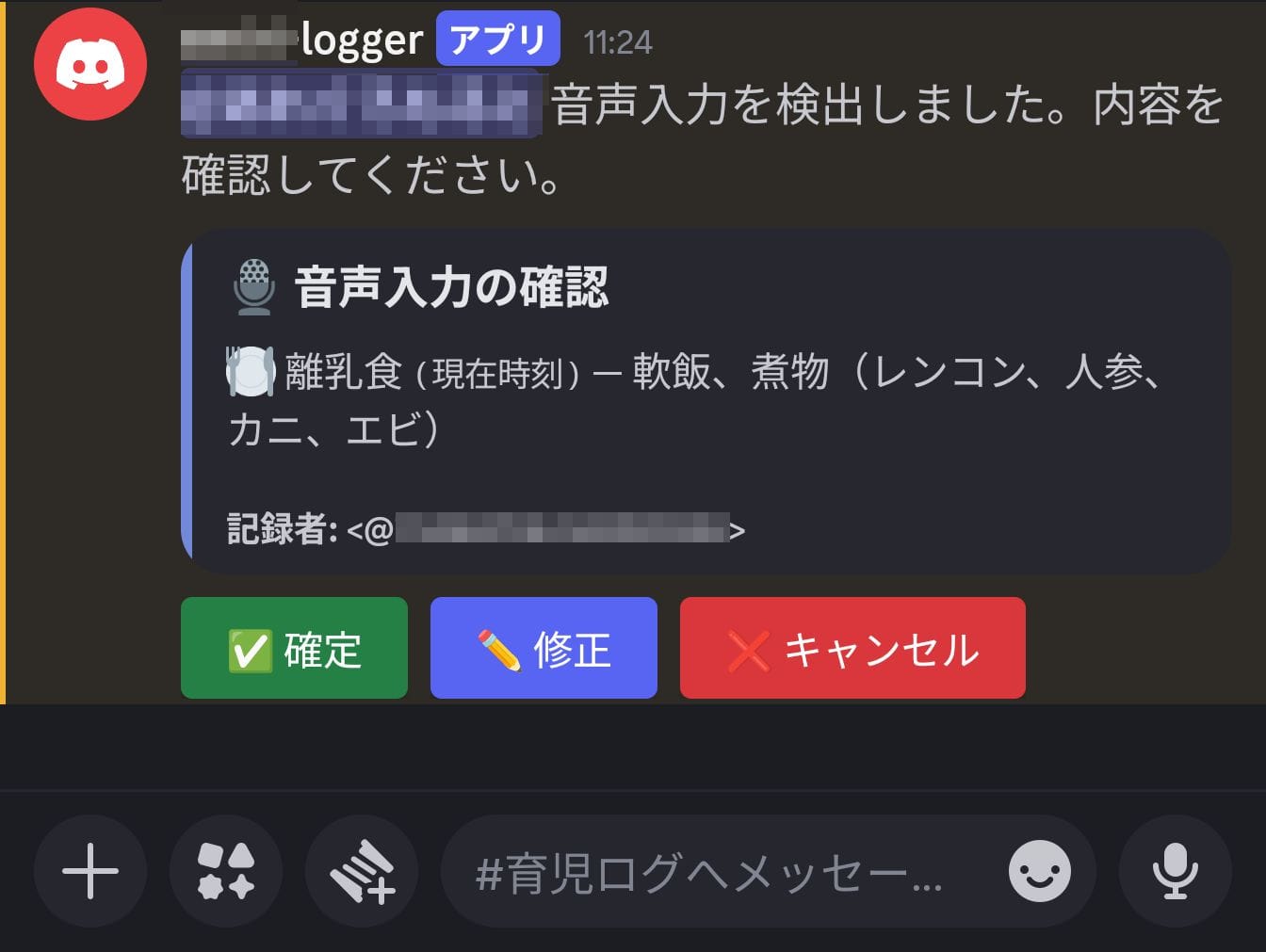
Nevertheless, thanks to the confirmation flow mentioned earlier, minor errors are not fatal. You can easily fix the relevant parts with the modify button, which is more convenient than manually entering the command from scratch.
Summary
By combining Amazon Transcribe and Amazon Bedrock, I built a system that converts speech in Discord voice channels into custom command execution. By placing an LLM between speech recognition and structuring, the types of commands and parameters to extract can be extended simply by changing the system prompt.
While this example focused on recording parenting logs, the same approach can be applied to any situation requiring routine data entry.