
I Tried Checking How the CORTEX_USER and CORTEX_AGENT_USER Database Roles Control the Display of CoCo in Snowsight

This page has been translated by machine translation. View original
I'm Suzuki from the Data Business Division.
Starting the week of October 19, 2026, the following change to how CoCo in Snowsight usage is controlled began to be applied to accounts. Once applied, whether CoCo in Snowsight is displayed and usable is controlled not by the SNOWFLAKE.COPILOT_USER database role, but by the CORTEX_USER and CORTEX_AGENT_USER database roles and by account parameters for limiting the number of credits each user can consume.
CoCo is handy, but its icon is displayed in Snowsight by default, so there may be cases where you want to show it only to some users. Previously, removing the SNOWFLAKE.COPILOT_USER database role from a user's roles (including inherited roles) made CoCo disappear from Snowsight. I wondered how to do this going forward, so I looked into it and confirmed behavior that matches the post-change specification.
How CoCo usage restrictions work
Currently, you can restrict it in the following two ways.
Database roles
According to the guide at the top, the following database roles are provided for CoCo usage.
SNOWFLAKE.CORTEX_USERSNOWFLAKE.CORTEX_AGENT_USER
The SNOWFLAKE.CORTEX_USER database role is used to grant access to Snowflake Cortex features. It is granted to the PUBLIC role by default.
SNOWFLAKE.CORTEX_AGENT_USER allows access to the Snowflake Cortex Agent API. As far as I checked, in terms of privileges it was a subset of the SNOWFLAKE.CORTEX_USER database role.
The database roles are explained below. There are several other Cortex AI-related database roles, but the two above are considered to be the ones relevant to controlling the display of CoCo in Snowsight.
Account parameters
By setting a credit value for the following parameters, you can control the behavior when the limit is exceeded.
CORTEX_CODE_CLI_DAILY_EST_CREDIT_LIMIT_PER_USER: CoCo CLICORTEX_CODE_DESKTOP_DAILY_EST_CREDIT_LIMIT_PER_USER: CoCo DesktopCORTEX_CODE_SNOWSIGHT_DAILY_EST_CREDIT_LIMIT_PER_USER: CoCo in Snowsight
These parameters do not affect what is displayed on the Snowsight screen; instead, they make CoCo return an error when the limit is exceeded.
Trying it out
1. Checking the existing environment
First, I checked the list of Cortex-related privileges granted to the PUBLIC role to see whether the change mentioned at the top seemed to have been applied.
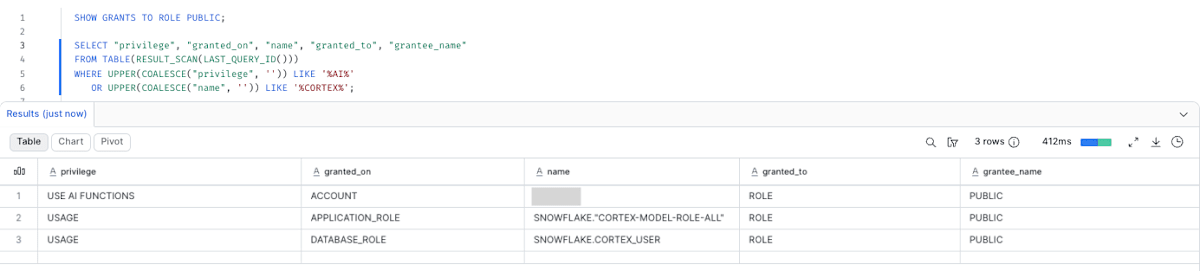
I haven't changed any AI-feature-related privilege settings on this account, but since only the SNOWFLAKE.CORTEX_USER database role is already granted to the PUBLIC role, I concluded that the change introduced at the beginning has been applied.
Note that USE AI FUNCTIONS is an account-level privilege for using AI functions, and SNOWFLAKE."CORTEX-MODEL-ROLE-ALL" specifies the models available in the account.
For this verification, I first revoked the SNOWFLAKE.CORTEX_USER database role and USE AI FUNCTIONS from the PUBLIC role. For checking purposes, I granted them directly to SYSADMIN.
-- Revoked with reference to the following guide
-- https://docs.snowflake.com/en/user-guide/snowflake-cortex/aisql-privileges-and-access#cortex_user-database-role
REVOKE USE AI FUNCTIONS ON ACCOUNT
  FROM ROLE PUBLIC;

REVOKE DATABASE ROLE SNOWFLAKE.CORTEX_USER
  FROM ROLE PUBLIC;

REVOKE IMPORTED PRIVILEGES ON DATABASE SNOWFLAKE
  FROM ROLE PUBLIC;

-- Grant to SYSADMIN for verification
GRANT USE AI FUNCTIONS ON ACCOUNT TO ROLE SYSADMIN;

GRANT DATABASE ROLE SNOWFLAKE.CORTEX_USER
  TO ROLE SYSADMIN;
In this state, CoCo in Snowsight was displayed and usable with SYSADMIN.
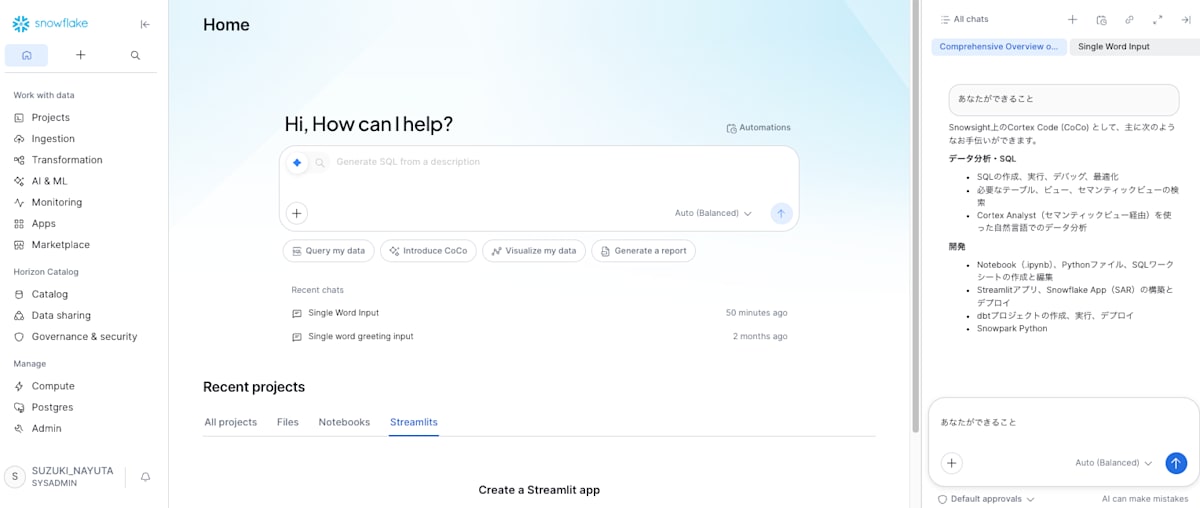
2. Checking with the SNOWFLAKE.CORTEX_USER database role
Next, I created a role for verification and confirmed that granting SNOWFLAKE.CORTEX_USER makes CoCo in Snowsight displayed and usable.
First, I created a user and role for verification.
USE ROLE USERADMIN;

CREATE ROLE COCO_SNOWSIGHT_TEST_ROLE;

CREATE USER COCO_SNOWSIGHT_TEST_USER
  PASSWORD = '<パスワード>'
  MUST_CHANGE_PASSWORD = TRUE
  DEFAULT_ROLE = COCO_SNOWSIGHT_TEST_ROLE;

GRANT ROLE COCO_SNOWSIGHT_TEST_ROLE TO USER COCO_SNOWSIGHT_TEST_USER;
At this point, COCO_SNOWSIGHT_TEST_USER does not have the privilege to display CoCo in Snowsight.
When I logged in to Snowsight as this user, CoCo was indeed not displayed.
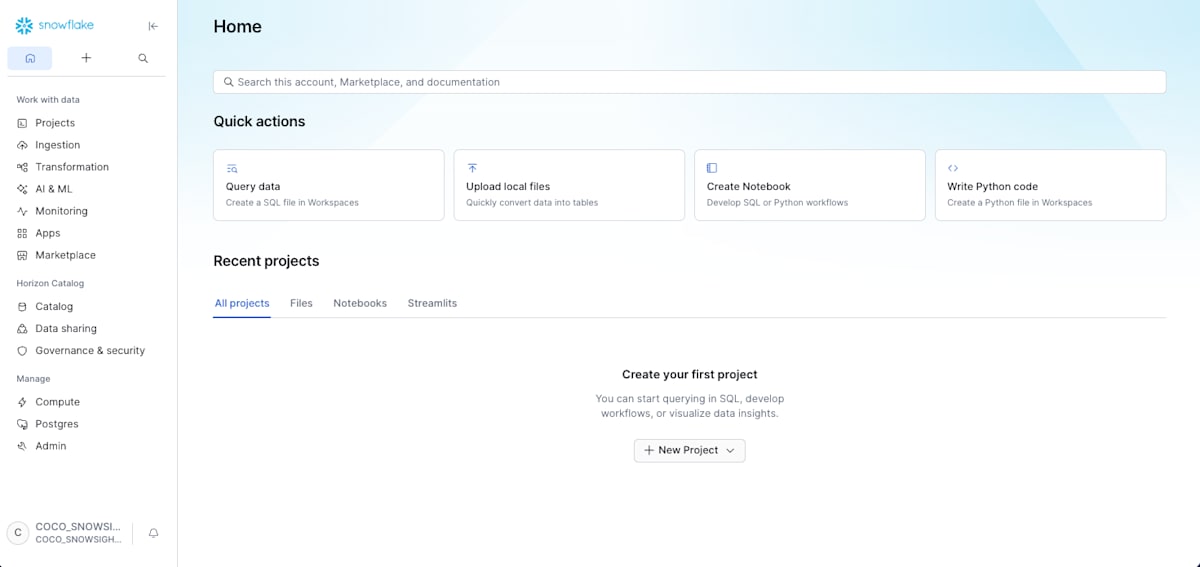
Then I tried granting the SNOWFLAKE.CORTEX_USER database role to COCO_SNOWSIGHT_TEST_ROLE.
GRANT DATABASE ROLE SNOWFLAKE.CORTEX_USER
  TO ROLE COCO_SNOWSIGHT_TEST_ROLE;
After the grant, when I logged in to Snowsight as the user, CoCo was indeed displayed.

3. Checking with the SNOWFLAKE.CORTEX_AGENT_USER database role
Next, I also checked with the SNOWFLAKE.CORTEX_AGENT_USER database role.
I revoked the SNOWFLAKE.CORTEX_USER database role from COCO_SNOWSIGHT_TEST_ROLE and granted the SNOWFLAKE.CORTEX_AGENT_USER database role instead.
REVOKE DATABASE ROLE SNOWFLAKE.CORTEX_USER
  FROM ROLE COCO_SNOWSIGHT_TEST_ROLE;

REVOKE IMPORTED PRIVILEGES ON DATABASE SNOWFLAKE
  FROM ROLE COCO_SNOWSIGHT_TEST_ROLE;

GRANT DATABASE ROLE SNOWFLAKE.CORTEX_AGENT_USER
  TO ROLE COCO_SNOWSIGHT_TEST_ROLE;
When I logged in to Snowsight as the user again, CoCo was displayed.
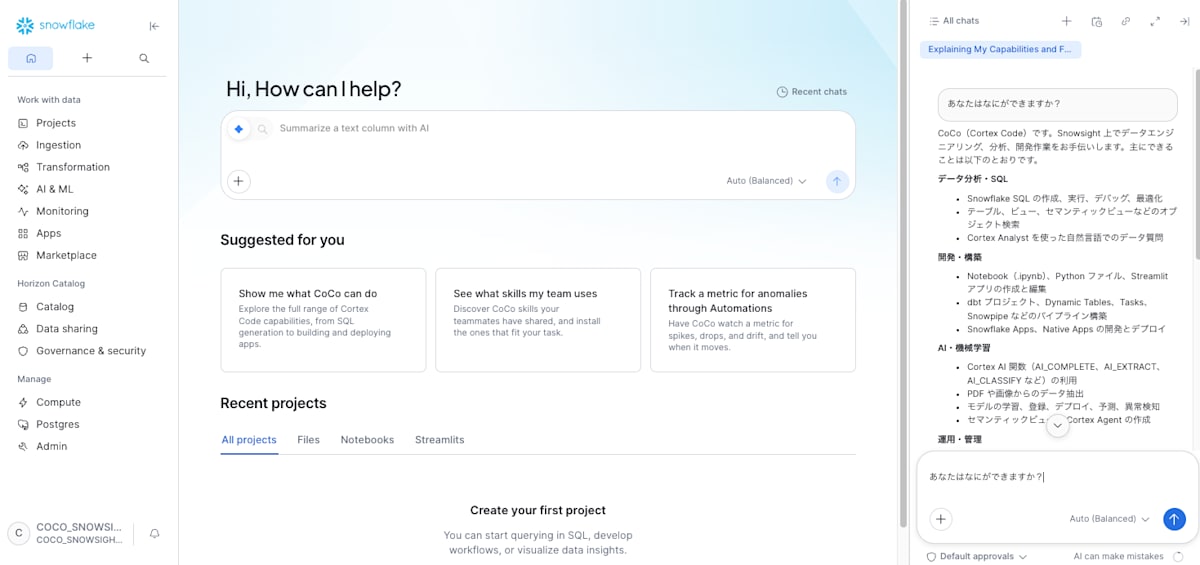
4. Setting the account parameter to 0
With CoCo displayed, I also tried setting CORTEX_CODE_SNOWSIGHT_DAILY_EST_CREDIT_LIMIT_PER_USER to 0.
I granted SNOWFLAKE.CORTEX_USER in place of SNOWFLAKE.CORTEX_AGENT_USER and set CORTEX_CODE_SNOWSIGHT_DAILY_EST_CREDIT_LIMIT_PER_USER to 0.
This is equivalent to the default state with only the account parameter set to 0.
REVOKE DATABASE ROLE SNOWFLAKE.CORTEX_AGENT_USER
  FROM ROLE COCO_SNOWSIGHT_TEST_ROLE;

REVOKE IMPORTED PRIVILEGES ON DATABASE SNOWFLAKE
  FROM ROLE COCO_SNOWSIGHT_TEST_ROLE;

GRANT DATABASE ROLE SNOWFLAKE.CORTEX_USER
  TO ROLE COCO_SNOWSIGHT_TEST_ROLE;

ALTER USER COCO_SNOWSIGHT_TEST_USER SET CORTEX_CODE_SNOWSIGHT_DAILY_EST_CREDIT_LIMIT_PER_USER = 0;
In this state, CoCo is displayed in Snowsight, but an error is returned when it tries to respond.
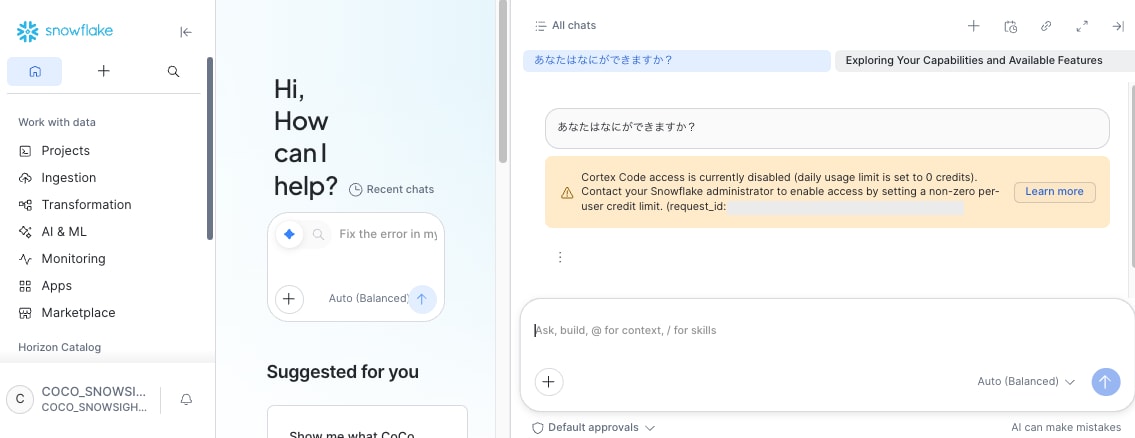
This shows that if you don't want it displayed to users in the first place, you need to revoke the privileges from their roles.
Finally
Because the roles used to control CoCo in Snowsight usage are changing, I checked the new approach and a concrete way to implement showing it to only some users.
I hope this is helpful.