Trying out DuckDB 1.4's Iceberg Write Functionality with AWS Lambda

This page has been translated by machine translation. View original
Introduction
I am kasama from the Data Business Division. This time I tried the newly supported Iceberg write feature in DuckDB 1.4.0 using AWS Lambda.
DuckDB 1.4.0 added the ability to write to Iceberg tables, and 1.4.2 implemented DELETE and UPDATE functionality using the merge-on-read method. As of November 30, 2025, the copy-on-write method is not yet supported. Also, DELETE/UPDATE operations to partitioned Iceberg tables are not supported.
Traditionally, libraries like PyIceberg were required to write data to Iceberg tables, but with DuckDB's support, implementation can be done with a simpler configuration.
The following article is helpful for understanding the difference between CoW (Copy-on-Write) and MoR (Merge-on-Read). For Athena, MoR is the default. Since we'll be creating Iceberg tables with Athena in this case, we'll use the MoR format.
Overview
The architecture we'll implement is as follows:
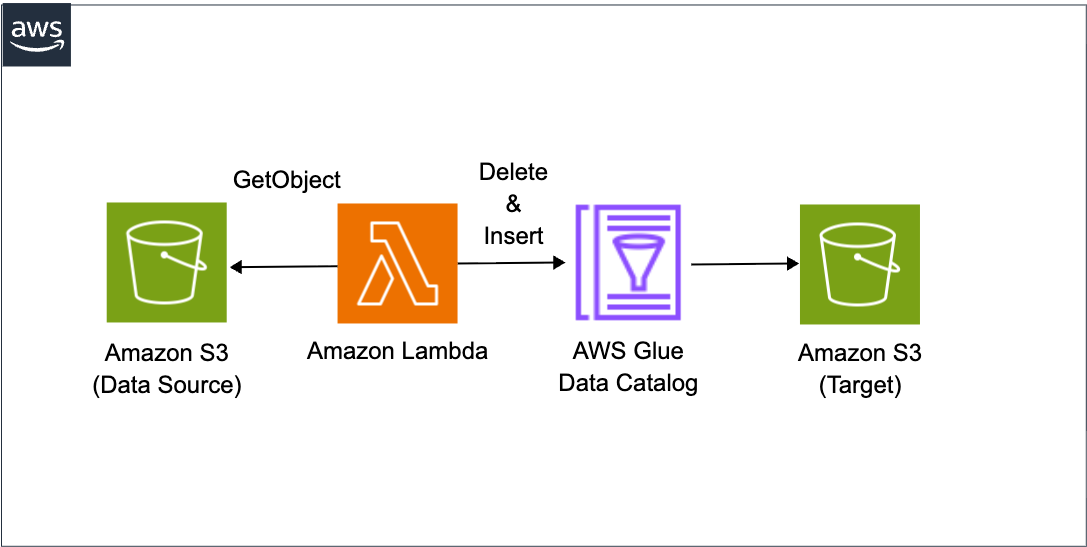
We'll deploy DuckDB using a Lambda Layer, connect to the Glue Catalog using DuckDB's Iceberg extension. We'll write CSV data from S3 to an Iceberg table using a Delete Insert pattern to ensure idempotency.
Implementation
The source code implementation is as follows:
62_duckdb_iceberg_lambda_py
├── README.md
├── cdk
│   ├── bin
│   │   └── app.ts
│   ├── cdk.json
│   ├── layers
│   │   └── requirements.txt
│   ├── lib
│   │   ├── main-stack.ts
│   │   └── parameter.ts
│   ├── package-lock.json
│   ├── package.json
│   └── tsconfig.json
├── resources
│   ├── data
│   │   ├── sample_data_2025-11-18.csv
│   │   ├── sample_data_2025-11-19.csv
│   │   └── sample_data_2025-11-20.csv
│   └── lambda
│       └── iceberg_copy.py
└── sql
    └── create_iceberg_tables.sql
#!/usr/bin/env node
import * as cdk from "aws-cdk-lib";
import { MainStack } from "../lib/main-stack";
import { devParameter } from "../lib/parameter";

const app = new cdk.App();

new MainStack(app, `${devParameter.projectName}-stack`, {
  env: devParameter.env,
  description: "Iceberg data copy using Lambda and DuckDB",
  parameter: devParameter,
});
This is the CDK entry point. It loads settings from the parameter file and instantiates MainStack.
import type { Environment } from "aws-cdk-lib";

export interface AppParameter {
  env?: Environment;
  envName: string;
  projectName: string;
}

export const devParameter: AppParameter = {
  envName: "dev",
  projectName: "my-iceberg-duckdb-lambda",
  env: {
    account: process.env.CDK_DEFAULT_ACCOUNT,
    region: process.env.CDK_DEFAULT_REGION,
  },
};
This defines the project settings. projectName is used as a prefix for S3 bucket names and Lambda function names, so be sure to change it before deployment.
import * as path from "node:path";
import { PythonLayerVersion } from "@aws-cdk/aws-lambda-python-alpha";
import * as cdk from "aws-cdk-lib";
import * as iam from "aws-cdk-lib/aws-iam";
import * as lambda from "aws-cdk-lib/aws-lambda";
import * as s3 from "aws-cdk-lib/aws-s3";
import * as s3deploy from "aws-cdk-lib/aws-s3-deployment";
import type { Construct } from "constructs";
import type { AppParameter } from "./parameter";

interface MainStackProps extends cdk.StackProps {
  parameter: AppParameter;
}

export class MainStack extends cdk.Stack {
  constructor(scope: Construct, id: string, props: MainStackProps) {
    super(scope, id, props);

    const { parameter } = props;

    // Building resource names
    const sourceBucketName = `${parameter.projectName}-${parameter.envName}-source`;
    const targetBucketName = `${parameter.projectName}-${parameter.envName}-target`;
    const targetDatabase = `${parameter.projectName.replace(/-/g, "_")}_${parameter.envName}`;

    // ========================================
    // S3 Bucket: Create source bucket
    // ========================================
    const sourceBucket = new s3.Bucket(this, "SourceBucket", {
      bucketName: sourceBucketName,
      encryption: s3.BucketEncryption.S3_MANAGED,
      blockPublicAccess: s3.BlockPublicAccess.BLOCK_ALL,
      removalPolicy: cdk.RemovalPolicy.DESTROY,
      autoDeleteObjects: true,
    });

    // Upload sample CSV files
    new s3deploy.BucketDeployment(this, "DeploySourceData", {
      sources: [
        s3deploy.Source.asset(path.join(__dirname, "../../resources/data")),
      ],
      destinationBucket: sourceBucket,
      destinationKeyPrefix: "data/sales_data",
    });

    // ========================================
    // S3 Bucket: Create target bucket
    // ========================================
    const targetBucket = new s3.Bucket(this, "TargetBucket", {
      bucketName: targetBucketName,
      encryption: s3.BucketEncryption.S3_MANAGED,
      blockPublicAccess: s3.BlockPublicAccess.BLOCK_ALL,
      versioned: true,
      lifecycleRules: [
        {
          id: "DeleteOldVersions",
          noncurrentVersionExpiration: cdk.Duration.days(30),
        },
      ],
      removalPolicy: cdk.RemovalPolicy.DESTROY,
      autoDeleteObjects: true,
    });

    // ========================================
    // IAM Role: For Lambda function
    // ========================================
    const lambdaRole = new iam.Role(this, "LambdaRole", {
      roleName: `${parameter.projectName}-${parameter.envName}-lambda-role`,
      assumedBy: new iam.ServicePrincipal("lambda.amazonaws.com"),
      managedPolicies: [
        iam.ManagedPolicy.fromAwsManagedPolicyName(
          "service-role/AWSLambdaBasicExecutionRole",
        ),
      ],
    });

    // Glue Catalog write permissions (minimal)
    lambdaRole.addToPolicy(
      new iam.PolicyStatement({
        effect: iam.Effect.ALLOW,
        actions: [
          "glue:GetCatalog",
          "glue:GetDatabase",
          "glue:GetTable",
          "glue:UpdateTable",
        ],
        resources: [
          `arn:aws:glue:${this.region}:${this.account}:catalog`,
          `arn:aws:glue:${this.region}:${this.account}:database/${targetDatabase}`,
          `arn:aws:glue:${this.region}:${this.account}:table/${targetDatabase}/*`,
        ],
      }),
    );

    // S3 read permissions (source bucket)
    sourceBucket.grantRead(lambdaRole);

    // S3 read/write permissions (target bucket)
    targetBucket.grantReadWrite(lambdaRole);

    // STS permissions (for account ID retrieval)
    lambdaRole.addToPolicy(
      new iam.PolicyStatement({
        effect: iam.Effect.ALLOW,
        actions: ["sts:GetCallerIdentity"],
        resources: ["*"],
      }),
    );

    // ========================================
    // Lambda Layer: DuckDB
    // ========================================
    const duckdbLayer = new PythonLayerVersion(this, "DuckdbLayer", {
      entry: path.join(__dirname, "../layers"),
      compatibleRuntimes: [lambda.Runtime.PYTHON_3_13],
      compatibleArchitectures: [lambda.Architecture.ARM_64],
      bundling: {
        assetHashType: cdk.AssetHashType.SOURCE,
        outputPathSuffix: "python",
      },
    });

    // ========================================
    // Lambda Function
    // ========================================
    new lambda.Function(this, "IcebergCopyFunction", {
      functionName: `${parameter.projectName}-${parameter.envName}-function`,
      runtime: lambda.Runtime.PYTHON_3_13,
      code: lambda.Code.fromAsset(
        path.join(__dirname, "../../resources/lambda"),
      ),
      handler: "iceberg_copy.lambda_handler",
      role: lambdaRole,
      layers: [duckdbLayer],
      architecture: lambda.Architecture.ARM_64,
      timeout: cdk.Duration.minutes(5),
      memorySize: 3008,
      environment: {
        SOURCE_BUCKET: sourceBucketName,
        SOURCE_PREFIX: "data/sales_data",
        TARGET_DATABASE: targetDatabase,
        TARGET_TABLE: "sales_data_iceberg",
      },
    });
  }
}
duckdb==1.4.2
pyarrow==19.0.0
This stack creates the following resources:
It creates Source Bucket and Target Bucket, and automatically uploads sample CSV data. The IAM role follows the principle of least privilege, granting only necessary permissions. The Lambda Layer includes DuckDB 1.4.2 and PyArrow 19.0.0. Using PythonLayerVersion, packages are automatically built from requirements.txt to create the Layer. The Lambda function is configured with Python 3.13 runtime and ARM64 architecture, with sufficient memory allocated for DuckDB processing.
import json
import os

import boto3
import duckdb

def lambda_handler(event, _context):
    """
    Lambda handler for cross-account Iceberg data copy using DuckDB
    """
    # Get parameters (from environment variables)
    source_bucket = os.environ["SOURCE_BUCKET"]
    source_prefix = os.environ["SOURCE_PREFIX"]
    target_database = os.environ["TARGET_DATABASE"]
    target_table = os.environ["TARGET_TABLE"]

    # Get parameters (from runtime input)
    target_date = event["TARGET_DATE"]

    print("Lambda started")
    print(f"Target: {target_database}.{target_table} (date={target_date})")

    try:
        # Initialize DuckDB
        con = duckdb.connect(":memory:")
        con.execute("SET home_directory='/tmp';")
        con.execute("SET extension_directory='/tmp/duckdb_extensions';")
        print("DuckDB initialization complete")

        # Set AWS authentication credentials
        con.execute("""
            CREATE SECRET (
                TYPE S3,
                PROVIDER CREDENTIAL_CHAIN
            );
        """)
        print("S3 SECRET creation complete")

        # Read S3 data
        source_path = (
            f"s3://{source_bucket}/{source_prefix}/sample_data_{target_date}.csv"
        )
        print(f"Reading: {source_path}")

        # Read CSV and add updated_at column
        query = f"""
            SELECT
                *,
                CURRENT_TIMESTAMP AS updated_at
            FROM read_csv_auto('{source_path}')
        """
        df = con.execute(query).fetch_arrow_table()
        row_count = len(df)
        print(f"Rows read: {row_count:,}")

        if row_count == 0:
            print("No data found")
            con.close()
            return {
                "statusCode": 200,
                "body": json.dumps({"message": "No data found", "rows_inserted": 0}),
            }

        # Connect to Glue catalog (using account ID)
        account_id = boto3.client("sts").get_caller_identity()["Account"]
        con.execute(
            f"""
            ATTACH '{account_id}' AS glue_catalog (
                TYPE iceberg,
                ENDPOINT_TYPE 'glue'
            );
        """
        )
        print(f"Glue catalog connection complete: Account={account_id}")

        # Process for Iceberg table
        table_identifier = f"glue_catalog.{target_database}.{target_table}"

        # Delete existing data (to prevent duplicates)
        delete_query = f"DELETE FROM {table_identifier} WHERE date = '{target_date}'"
        print(f"Deleting existing data for date={target_date}...")
        con.execute(delete_query)
        print("DELETE complete")

        # Insert data
        print(f"Inserting into {table_identifier}...")
        con.execute(f"INSERT INTO {table_identifier} SELECT * FROM df")
        print("INSERT complete")

        con.close()

        print(f"Lambda completed: {row_count:,} rows inserted")

        return {
            "statusCode": 200,
            "body": json.dumps(
                {
                    "message": "Data copy completed successfully",
                    "rows_inserted": row_count,
                    "target_table": f"{target_database}.{target_table}",
                    "target_date": target_date,
                }
            ),
        }

    except Exception as e:
        error_message = f"Lambda failed: {str(e)}"
        print(error_message)
        raise
In the Lambda function implementation, we're leveraging DuckDB's Iceberg extension. For reading CSV from S3, we use the read_csv_auto function. This function automatically infers the schema, so there's no need to explicitly define columns. We add an updated_at column using CURRENT_TIMESTAMP to verify that records were actually deleted. For connecting to the Glue Catalog, we use the ATTACH statement with TYPE iceberg and ENDPOINT_TYPE glue. For data writing, we adopt the Delete Insert pattern. First, we delete existing data for the relevant date with Delete, then add new data with Insert. This method ensures idempotency, preventing data duplication even if the Lambda function is executed multiple times.
I referenced the official documentation for the Glue Catalog Iceberg attach method.
There's no explicit extension installation specification such as INSTALL iceberg; because DuckDB automatically loads extension features. As documented in Autoloading Extensions, it has an automatic loading mechanism that installs and loads core extensions as soon as they are used in queries.
Deployment
Install dependencies in the directory containing package.json.
cd cdk
npm install
Next, in the directory containing cdk.json, execute the process of synthesizing the code of resources defined in CDK into AWS CloudFormation templates.
npx cdk synth --profile <YOUR_AWS_PROFILE>
Run the deployment command in the same directory with cdk.json. The --all option deploys all stacks included in the CDK application. The --require-approval never option skips the approval dialog for security-sensitive changes or IAM resource changes. While convenient for testing purposes, use with caution in production environments.
npx cdk deploy --all --require-approval never --profile <YOUR_AWS_PROFILE>
After deployment is complete, run the following DDL in Athena to create the Glue Database and Iceberg table. Edit the file and replace placeholders with actual values.
CREATE DATABASE IF NOT EXISTS my_iceberg_duckdb_lambda_dev;

CREATE TABLE my_iceberg_duckdb_lambda_dev.sales_data_iceberg (
    id STRING,
    date DATE,
    sales_amount DOUBLE,
    quantity BIGINT,
    region STRING,
    updated_at TIMESTAMP
)
LOCATION 's3://my-iceberg-duckdb-lambda-dev-target/iceberg/sales_data_iceberg/'
TBLPROPERTIES (
    'table_type' = 'ICEBERG',
    'format' = 'parquet',
    'write_compression' = 'snappy'
);
Post-Deployment Verification
Verify that the stack was deployed successfully in the CloudFormation console.
Test run with the following JSON from the Lambda console's test tab:
{"TARGET_DATE": "2025-11-19"}
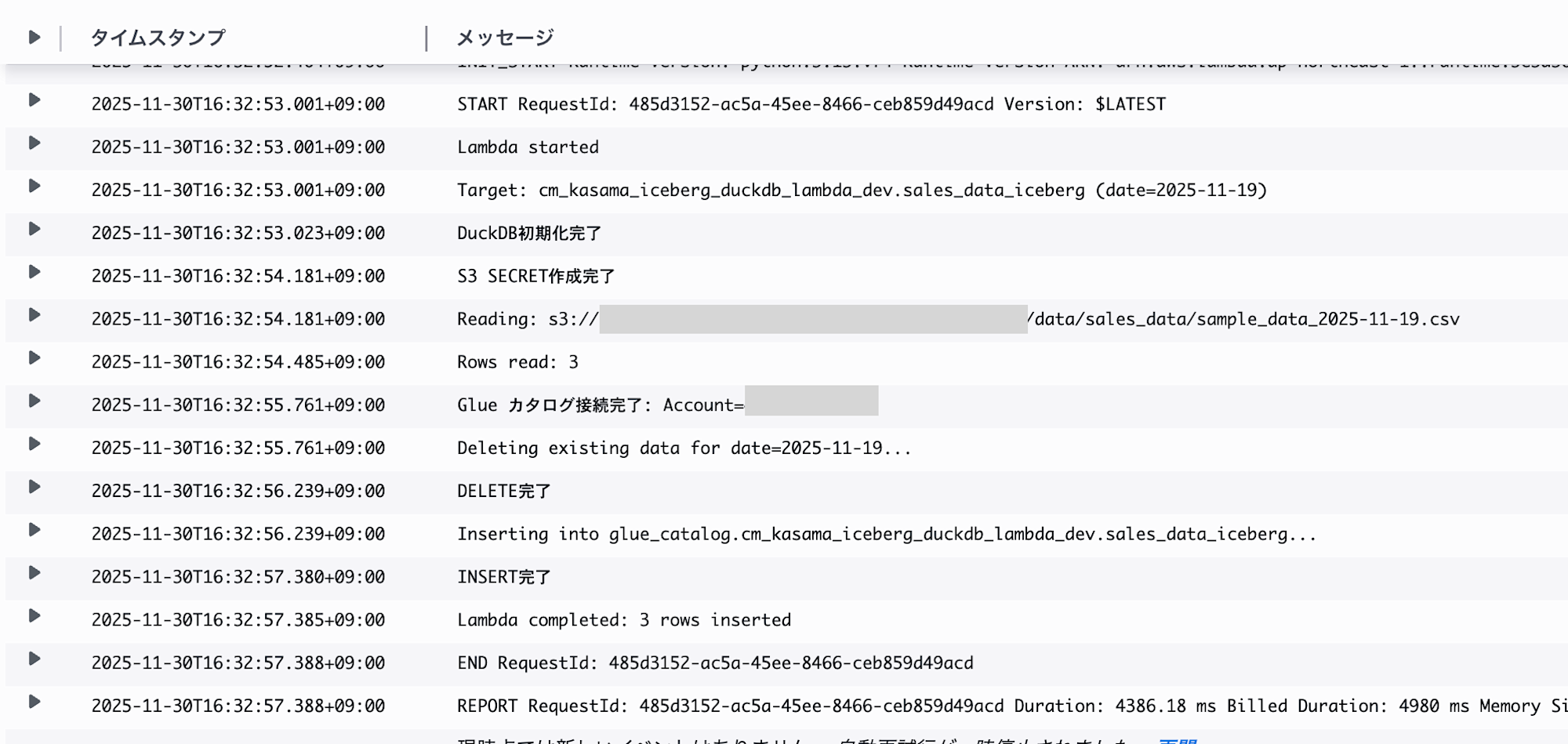
I confirmed from the logs that the process completed successfully.

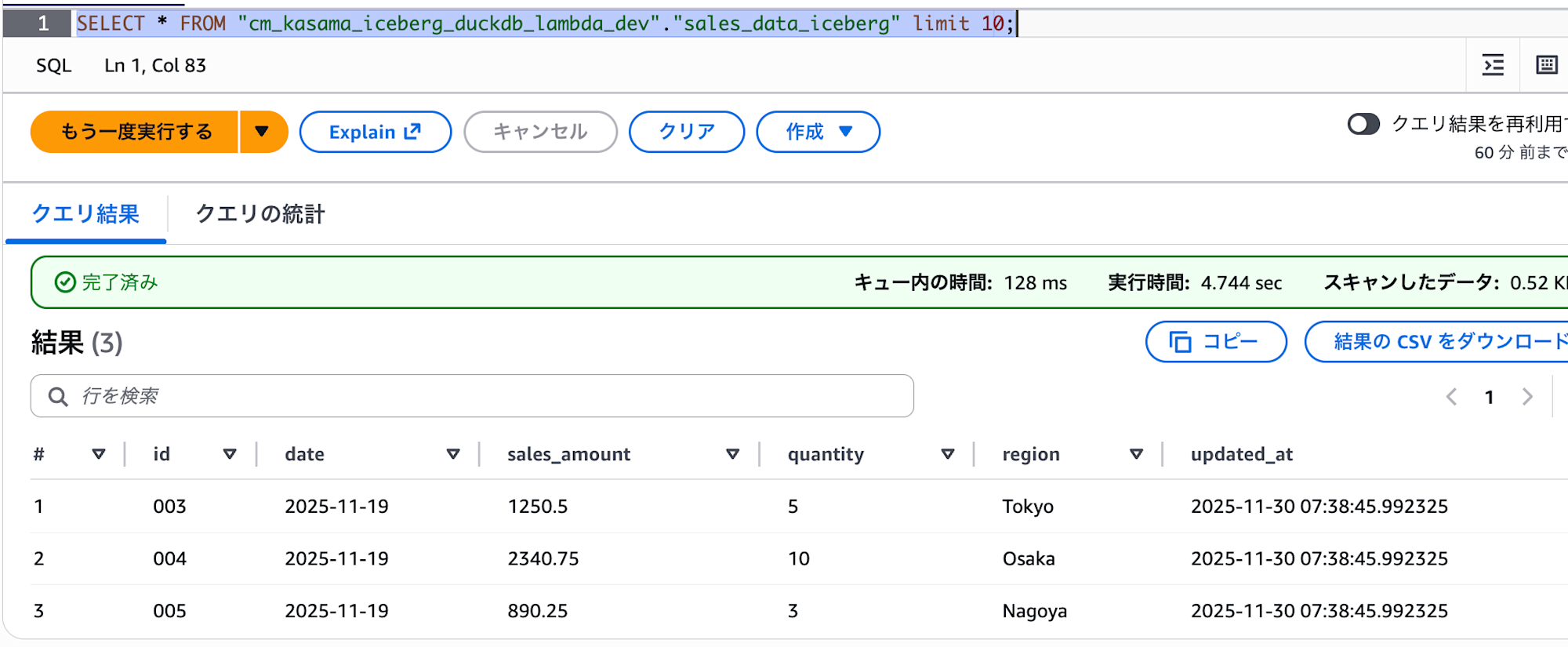
We can confirm that data was successfully written in Athena.
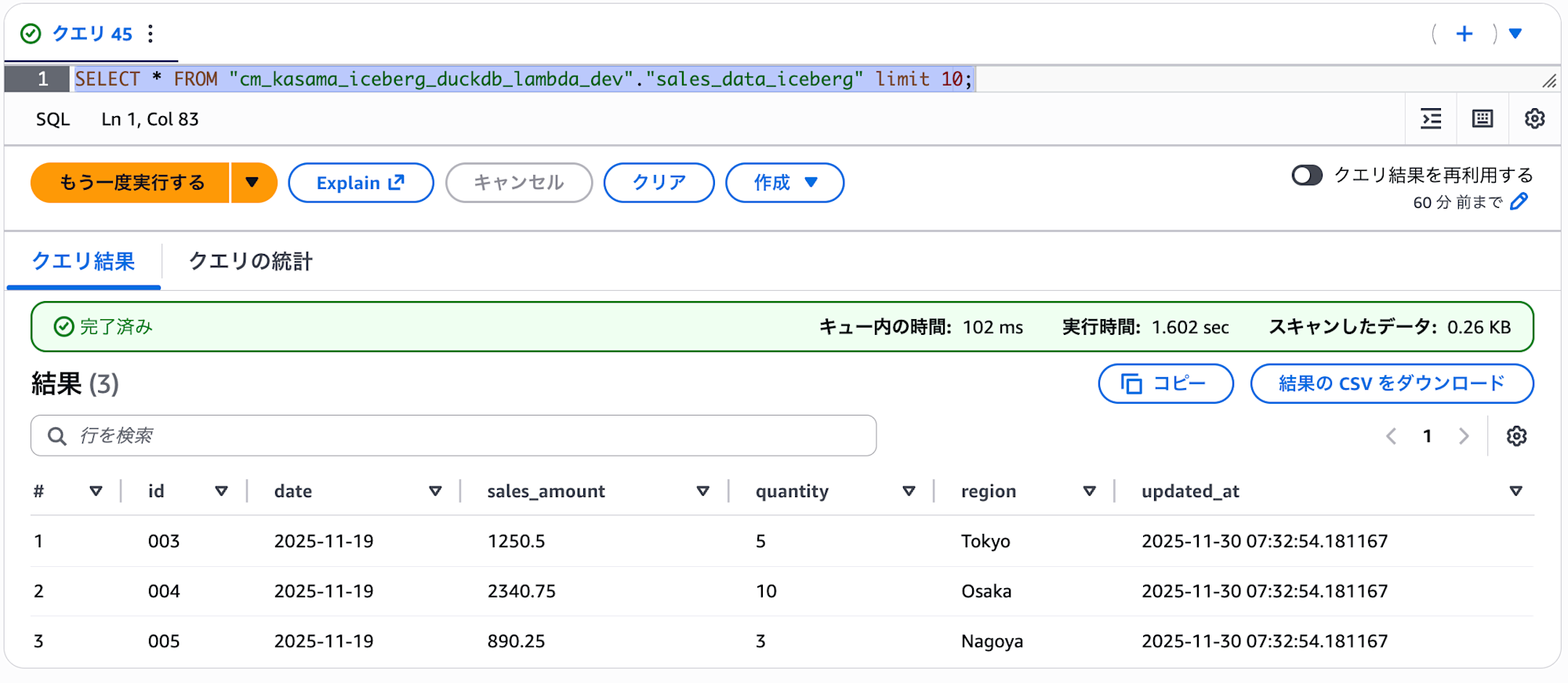
To validate the Delete operation, I ran Lambda again with the same arguments.
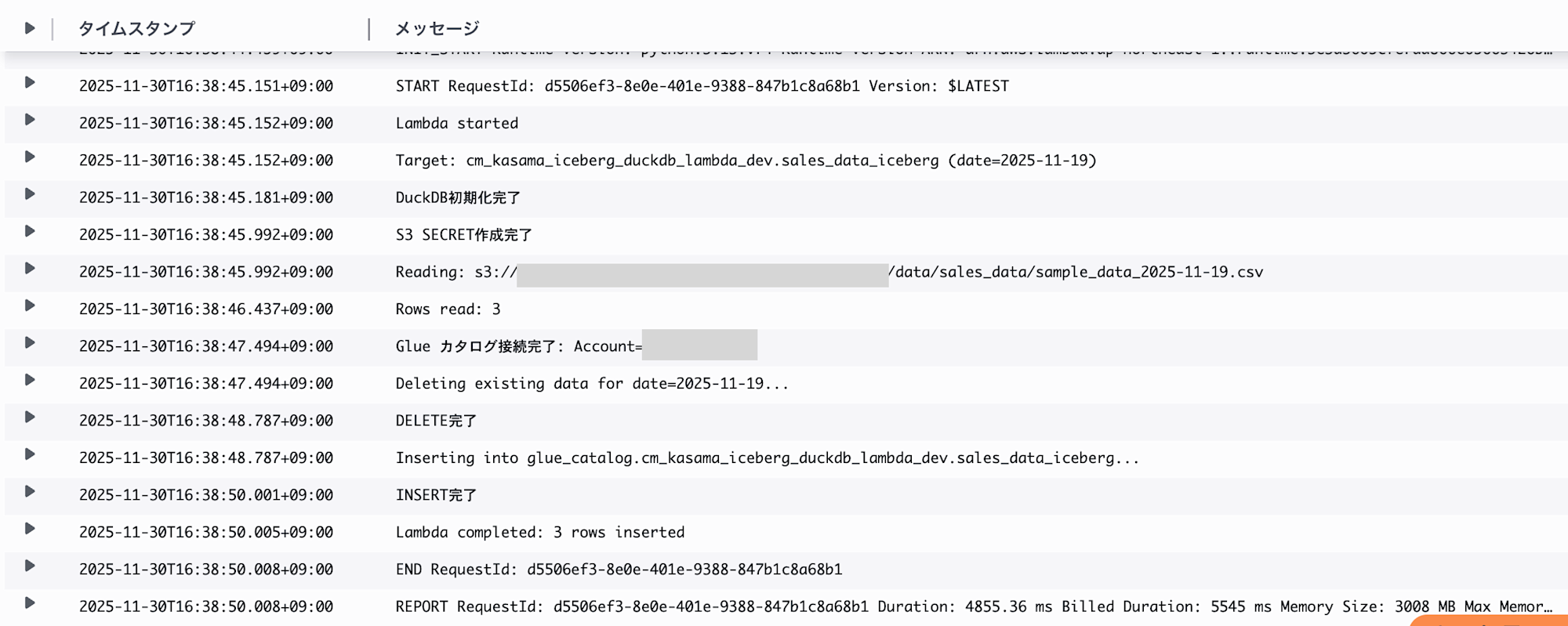
We can confirm that the update_at column has been updated from 07:32 to 07:38, showing that the data was deleted and then inserted again.
Conclusion
I've confirmed that DuckDB 1.4.2's Iceberg write functionality allows for efficient handling of Iceberg data in Lambda. Traditionally, libraries like PyIceberg were required, but now we can implement with just DuckDB in an SQL-like manner, making processing much simpler. This looks like a promising option for writing to Iceberg tables in the future.