![[Update] You can now restrict the instance types that can be launched with Amazon EC2 AMIs](https://images.ctfassets.net/ct0aopd36mqt/wp-thumbnail-bac3d29aa65f45576f73094798087ee5/039ad6f8a7d8f18da47986d21c447f48/amazon-ec2?w=3840&fm=webp)
[Update] You can now restrict the instance types that can be launched with Amazon EC2 AMIs

This page has been translated by machine translation. View original
Introduction
Hello everyone, this is Akaike.
Have you ever accidentally launched an EC2 instance with a larger instance type than intended, resulting in unexpected costs? I have...
And there was an update recently that seems capable of preventing such unfortunate events.
So this time, I'll introduce the update that allows you to specify which instance types can and cannot be launched from an EC2 AMI.
Overview of the Update
With this update, Amazon EC2 AMI owners can now explicitly specify the instance types compatible with their AMI.
There are three patterns for specifying this:
- Specify supported instance types
- Specify unsupported instance types
- Specify a combination of both
This feature is available in all regions at no additional cost.
Also, unless explicitly configured in the AMI, all instance types can still be launched as before, so there is no impact on existing AMIs or workflows.
Added Attributes
With this update, an attribute called InstanceTypeSpecification has been added to AMIs.
This attribute consists of the following two lists:
SupportedInstanceTypes: Instance types that this AMI supports for launchUnsupportedInstanceTypes: Instance types that this AMI does not support for launch
Amazon EC2 determines whether an instance type is allowed at launch time using the following logic:
| Configuration State | Launch Behavior |
|---|---|
InstanceTypeSpecification not set (default) |
All instance types can be launched |
Only SupportedInstanceTypes set |
Only the specified instance types can be launched. All others are blocked |
Only UnsupportedInstanceTypes set |
All instance types except the specified ones can be launched |
| Both set | Only instance types included in SupportedInstanceTypes and not included in UnsupportedInstanceTypes can be launched |
Bulk Specification Using Wildcards
Both SupportedInstanceTypes and UnsupportedInstanceTypes support wildcard specification using *.
This allows you to specify by instance family or size in bulk.
| Pattern | Matching Instance Types |
|---|---|
t3.* |
All sizes of the t3 family (t3.micro, t3.small, t3.large, etc.) |
p4d.* |
All sizes of the p4d family |
*xlarge |
xlarge and larger sizes across all families |
*.12xlarge |
12xlarge size across all families |
Considerations
This setting does not affect already running instances and is only applied to new launch requests.
Also, when copying an AMI with CopyImage, the InstanceTypeSpecification is carried over to the copied AMI.
There are a few other considerations, so please check the documentation for details.
Potential Use Cases
There seem to be various use cases, but here are some that come to mind immediately:
- Allow only smaller instance types to save costs in development environments
- Prohibit launching instance types outside the guaranteed operating range for AMIs shared on the Marketplace or internally
- Prevent AMIs built with GPU drivers and CUDA from being accidentally launched on non-GPU instance families
- Limit AMIs built for Graviton (arm64) to supported instance types
- Disable a specific family for AMIs that have bugs with that particular family
Trying It Out
From here, I'll run some tests to verify the actual behavior.
1. Prepare a Test AMI
First, launch a test instance and create an AMI from it.
# Launch a test instance
INSTANCE_ID=$(aws ec2 run-instances \
    --image-id resolve:ssm:/aws/service/ami-amazon-linux-latest/al2023-ami-kernel-default-x86_64 \
    --instance-type t3.micro \
    --query 'Instances[0].InstanceId' \
    --output text)

# Wait for the instance to finish launching
aws ec2 wait instance-running --instance-ids $INSTANCE_ID

# Create an AMI from the instance
AMI_ID=$(aws ec2 create-image \
    --instance-id $INSTANCE_ID \
    --name "verify-allowed-instance-types-$(date +%s)" \
    --no-reboot \
    --query 'ImageId' \
    --output text)

# Wait until the AMI becomes available
aws ec2 wait image-available --image-ids $AMI_ID
At this point, InstanceTypeSpecification is not set, so it does not exist as a parameter.
aws ec2 describe-images \
    --image-ids $AMI_ID
{
    "Images": [
        {
            "PlatformDetails": "Linux/UNIX",
            "UsageOperation": "RunInstances",
            "BlockDeviceMappings": [
                {
                    "Ebs": {
                        "DeleteOnTermination": true,
                        "Iops": 3000,
                        "SnapshotId": "snap-XXXXXXXXXXXXXXXXX",
                        "VolumeSize": 8,
                        "VolumeType": "gp3",
                        "Throughput": 125,
                        "Encrypted": false
                    },
                    "DeviceName": "/dev/xvda"
                }
            ],
            "EnaSupport": true,
            "Hypervisor": "xen",
            "Name": "verify-allowed-instance-types-1788611782",
            "RootDeviceName": "/dev/xvda",
            "RootDeviceType": "ebs",
            "SriovNetSupport": "simple",
            "VirtualizationType": "hvm",
            "BootMode": "uefi-preferred",
            "ImdsSupport": "v2.0",
            "SourceInstanceId": "i-XXXXXXXXXXXXXXXXX",
            "DeregistrationProtection": "disabled",
            "SourceImageId": "ami-XXXXXXXXXXXXXXXXX",
            "SourceImageRegion": "ap-northeast-1",
            "FreeTierEligible": true,
            "ImageId": "ami-XXXXXXXXXXXXXXXXX",
            "ImageLocation": "XXXXXXXXXXXX/verify-allowed-instance-types-1788611782",
            "State": "pending",
            "OwnerId": "XXXXXXXXXXXX",
            "CreationDate": "2026-09-05T12:36:23.000Z",
            "Public": false,
            "Architecture": "x86_64",
            "ImageType": "machine"
        }
    ]
}
2. Restrict the Launchable Instance Types
Use the AWS CLI replace-image-instance-type-specification command for configuration.
Here, I'll try setting it to allow only the t3 family.
aws ec2 replace-image-instance-type-specification \
    --image-id $AMI_ID \
    --instance-type-specification '{"SupportedInstanceTypes": ["t3.*"]}'
{
    "ReturnValue": true
}
Note that this command replaces the entire specified content.
Even if you want to add or remove just one instance type, you need to pass the complete updated list each time.
Also, running the command without specifying --instance-type-specification will remove the configured restrictions and return the AMI to a state where all instance types can be launched.
3. Verify the Configuration
Confirm that InstanceTypeSpecification is reflected in the describe-images output.
aws ec2 describe-images \
    --image-ids $AMI_ID \
    --query 'Images[0].InstanceTypeSpecification'
{
    "SupportedInstanceTypes": [
        {
            "InstanceType": "t3.*"
        }
    ]
}
4. Try Launching with a Non-Permitted Instance Type
Try launching with a type outside the t3 family, for example m6.large.
aws ec2 run-instances \
    --image-id $AMI_ID \
    --instance-type m6i.large
Since it is a non-permitted instance type, the launch is blocked with an InvalidParameterCombination error.
aws: [ERROR]: An error occurred (InvalidParameterCombination) when calling the RunInstances operation: This AMI does not support the specified instance type. Check DescribeImages for InstanceTypeSpecification, and try again.
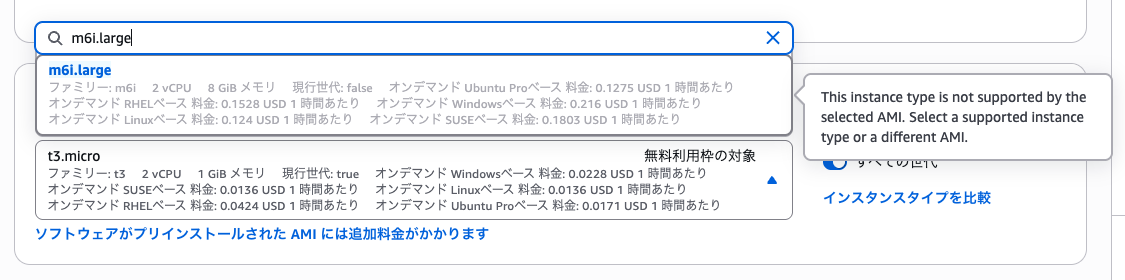
By the way, when trying the same thing from the management console, unsupported instance types were not selectable in the first place.
That's a nice touch.
5. Try Launching with a Permitted Instance Type
Of course, if you use a specified instance type, it launches without any issues.
INSTANCE_ID_2=$(aws ec2 run-instances \
    --image-id $AMI_ID \
    --instance-type t3.small \
    --query 'Instances[0].InstanceId' \
    --output text)
Conclusion
That wraps up the introduction of the update that allows you to restrict launchable instance types per AMI in Amazon EC2.
Being able to block from the AMI settings what users could previously specify freely on their end is a welcome update.
I think this feature will be particularly useful for those who distribute and manage AMIs internally, or for companies that offer their own AMIs on the Marketplace.
