
I Tried Setting Up Two-Stage Automatic Recovery for Nginx Using EC2 Application Status Checks and Step Functions

This page has been translated by machine translation. View original
Introduction
In August 2026, EC2 gained application status checks. This feature sends HTTP requests from inside the VPC to the monitored instance and judges the state of the application layer from the response.
An earlier article covered a setup that uses Step Functions to Stop/Start EC2 when an Instance Status Check fails.
In this article, I leave the Nginx HTTP response check to this feature and build a mechanism where Step Functions recovers in two stages when an anomaly is detected. Stage 1 restarts Nginx via SSM, and stage 2 does an EC2 Stop/Start. I built it without Lambda functions, using only AWS SDK integrations and JSONata.
What I verified
I explain in this order: the configuration, the time until monitoring starts, stopping Nginx, and the case where the restart fails.
Configuration
Application status checks were released in August 2026. The creation of checks, status transitions, and how managed ENIs work are covered in a separate article.
An HTTP GET is sent to the monitored instance, and when the check fails it is recorded in the CloudWatch metric StatusCheckFailed_Application. A Step Functions execution starts via a CloudWatch alarm and EventBridge. The state machine first restarts Nginx via SSM, does an EC2 Stop/Start only if that fails, and notifies the result to SNS.
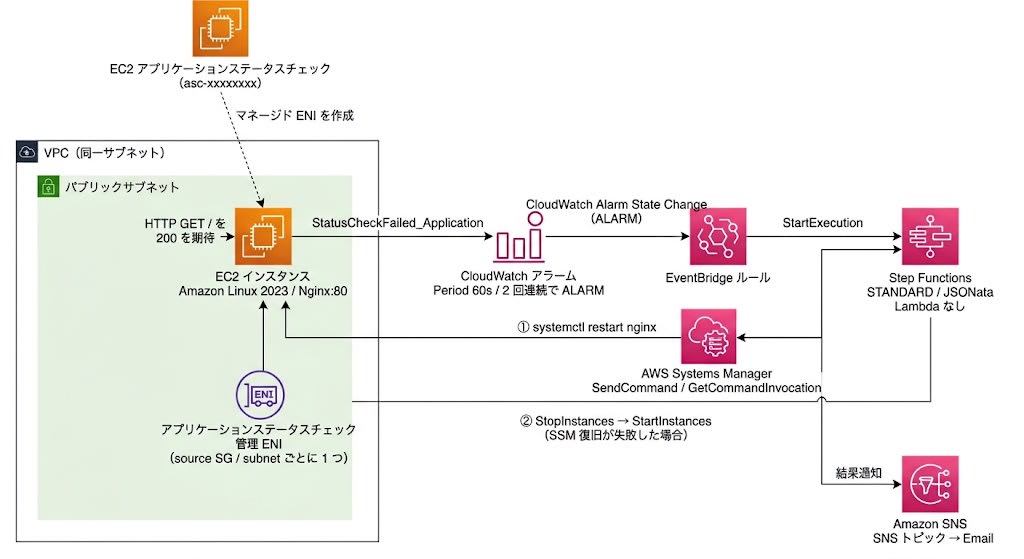
I put the test environment into a single CloudFormation template. It creates an EC2 instance, an application status check, a CloudWatch alarm, an SNS topic with an email subscription, an EventBridge rule, a 36-state Step Functions state machine, a CloudWatch Logs log group, and the IAM roles and security groups they need. The EC2 instance is an Amazon Linux 2023 ARM64 t4g.nano, and Nginx is installed via UserData.
Here are the key points of the template, with the corresponding definitions.
Source and destination of the health check
Specify the source and destination of the health check with HealthCheckPaths. For the source, specify the subnet and security group where the managed ENI is placed; for the destination, the subnet and security group of the monitored instance. A subnet must be specified in both Source and Destinations.
HealthCheckPaths:
  - Source:
      SecurityGroupId: !GetAtt AppStatusCheckSourceSG.GroupId
      SubnetId: !Ref SubnetId
    Destinations:
      - SecurityGroupId: !GetAtt EC2SecurityGroup.GroupId
        SubnetId: !Ref SubnetId
Specifying the security group ID
Get the security group ID with !GetAtt <LogicalID>.GroupId.
SecurityGroupId: !GetAtt AppStatusCheckSourceSG.GroupId
Inbound rule on the destination side
The security group of the destination instance allows port 80 from the source security group.
EC2SecurityGroupIngress:
  Type: AWS::EC2::SecurityGroupIngress
  Properties:
    GroupId: !Ref EC2SecurityGroup
    IpProtocol: tcp
    FromPort: 80
    ToPort: 80
    SourceSecurityGroupId: !GetAtt AppStatusCheckSourceSG.GroupId
Outputting the application status check ID
!Ref ApplicationStatusCheck returns an ARN. Where the ID is needed, use !GetAtt ApplicationStatusCheck.ApplicationStatusCheckId. This template outputs the ID used in the association command to Outputs.
ApplicationStatusCheckId:
  Value: !GetAtt ApplicationStatusCheck.ApplicationStatusCheckId
Timeout for the whole state machine
I set TimeoutSeconds on the state machine, to 1800 seconds here. It aborts the execution if the Stop/Start completion-wait loop keeps running unexpectedly.
"TimeoutSeconds": 1800,
Recovery uses SSM Run Command, so the subnet where EC2 is placed must be able to reach the SSM endpoints. Installing Nginx via UserData also requires reachability to the repository. Prepare one of these: a public subnet with a public IP, a NAT gateway, or VPC endpoints for SSM.
If you omit the source, an AWS managed network path is used and AWS chooses the source. In that case, the return value of describe-application-status-checks does not include a source security group. The destination-side permission must then be written as a CIDR rather than a security group.
The full template and deployment steps are at the end of the article.
After deployment, approve the SNS subscription confirmation email that arrives at the notification address.
Next, associate the application status check with the instance. The check itself can be created with AWS::EC2::ApplicationStatusCheck. There is no resource type for associating it with an instance, so the association is done through the API. The association target can be specified by either instance ID or tag. Here I used the aws:cloudformation:stack-id tag that CloudFormation attaches automatically. Its value is the stack ARN, which contains a UUID, so even if you recreate a stack with the same name, the old association never matches the new instance.
STACK_ID=$(aws cloudformation describe-stacks \
  --stack-name ec2-app-recovery-test \
  --query 'Stacks[0].StackId' \
  --output text --region ap-northeast-1)

ASC_ID=$(aws cloudformation describe-stacks \
  --stack-name ec2-app-recovery-test \
  --query 'Stacks[0].Outputs[?OutputKey==`ApplicationStatusCheckId`].OutputValue' \
  --output text --region ap-northeast-1)

aws ec2 associate-application-status-check \
  --application-status-check-id $ASC_ID \
  --target-tag-associations Key=aws:cloudformation:stack-id,Value=$STACK_ID \
  --region ap-northeast-1
The response returned the association type as EC2TAG.
{
    "SuccessfulResults": [
        {
            "ApplicationStatusCheckId": "asc-xxxxxxxx",
            "AssociationType": "EC2TAG",
            "AssociationValue": "aws:cloudformation:stack-id=arn:aws:cloudformation:ap-northeast-1:xxxxxxxxxxxx:stack/ec2-app-recovery-test/xxxxxxxx-xxxx-xxxx-xxxx-xxxxxxxxxxxx"
        }
    ],
    "UnsuccessfulResults": []
}
When I fetched the list, the same association was registered as a tag.
{
    "Associations": [
        {
            "ApplicationStatusCheckId": "asc-xxxxxxxx",
            "AssociationType": "tag",
            "Key": "aws:cloudformation:stack-id",
            "Value": "arn:aws:cloudformation:ap-northeast-1:xxxxxxxxxxxx:stack/ec2-app-recovery-test/xxxxxxxx-xxxx-xxxx-xxxx-xxxxxxxxxxxx"
        }
    ]
}
Start of monitoring
The application status check started as initializing and changed to ok after about 5 minutes. Times are JST.
| Time | Overall status |
|---|---|
| 08:03:55 | initializing |
| 08:09:00 | ok |
This wait is due to the initialization grace period. The default of InitializationGracePeriodSeconds is 300 seconds, and the valid range is 1 to 600 seconds. The timeline above was measured with the default 300 seconds. After the verification, I changed the initialization grace period to 60 seconds, and the template shown here specifies 60 seconds. The settings after the change are as follows, in order: initialization grace period, timeout, failure threshold, success threshold, and check interval.
$ aws ec2 describe-application-status-checks --application-status-check-ids asc-xxxxxxxx \
    --query 'ApplicationStatusChecks[].[InitializationGracePeriodSeconds,Timeout,FailureThreshold,SuccessThreshold,Interval]'
60  6  2  2  60
The check interval is fixed at 60 seconds and cannot be changed (the Default settings table in the user guide says Check interval | 60 seconds (fixed; not configurable)). The only valid value for Interval in CloudFormation is also 60.
I checked the response in the healthy state.
{
    "ApplicationStatuses": {
        "Instances": [
            {
                "InstanceId": "i-xxxxxxxxxxxxxxxxx1",
                "AvailabilityZone": "apne1-az4",
                "ApplicationStatus": {
                    "Status": "ok",
                    "StatusTimeStamp": "2026-09-04T23:11:55.674000+00:00",
                    "StatusSince": "2026-09-04T23:09:00+00:00",
                    "Details": [
                        {
                            "ApplicationStatusCheckId": "asc-xxxxxxxx",
                            "CheckUpdateTime": "2026-09-04T23:11:55.674000+00:00",
                            "Aggregation": "included",
                            "Status": "passed",
                            "StatusTimeStamp": "2026-09-04T23:11:55.674000+00:00",
                            "StatusSince": "2026-09-04T23:09:00+00:00",
                            "Reason": {
                                "Code": "ResponseCodeMatched",
                                "StatusCode": 200,
                                "Protocol": "HTTP"
                            }
                        }
                    ]
                }
            }
        ]
    }
}
The overall status was ok, the individual check result was passed, and the reason code was ResponseCodeMatched, indicating the response code matched. I replaced the instance after this, so later verifications use a different instance ID.
Stopping Nginx
To exercise the stage 1 recovery, I stopped Nginx with SSM Run Command.
aws ssm send-command \
  --instance-ids i-xxxxxxxxxxxxxxxxx2 \
  --document-name "AWS-RunShellScript" \
  --parameters 'commands=["sudo systemctl stop nginx"]' \
  --region ap-northeast-1
The application status changed to impaired.
{
    "ApplicationStatuses": {
        "Instances": [
            {
                "InstanceId": "i-xxxxxxxxxxxxxxxxx2",
                "AvailabilityZone": "apne1-az4",
                "ApplicationStatus": {
                    "Status": "impaired",
                    "StatusTimeStamp": "2026-09-04T23:28:07.456000+00:00",
                    "StatusSince": "2026-09-04T23:29:00+00:00",
                    "Details": [
                        {
                            "ApplicationStatusCheckId": "asc-xxxxxxxx",
                            "CheckUpdateTime": "2026-09-04T23:28:07.456000+00:00",
                            "Aggregation": "included",
                            "Status": "failed",
                            "StatusTimeStamp": "2026-09-04T23:28:07.456000+00:00",
                            "StatusSince": "2026-09-04T23:29:00+00:00",
                            "Reason": {
                                "Code": "ConnectionRefused",
                                "StatusCode": 0
                            }
                        }
                    ]
                }
            }
        ]
    }
}
The state with no listening process appeared as the reason code ConnectionRefused.
In the Step Functions execution started by the alarm, 15 states were executed and the history had 53 events.
08:30:20.034 Init
08:30:20.034 CheckNginxInit
08:30:20.166 WaitCheckInit
08:30:25.218 GetCheckInitResult
08:30:25.433 EvalInitStatus
08:30:25.433 SSMRestart
08:30:25.576 WaitSSM
08:30:35.632 CheckSSM
08:30:35.743 EvalSSM
08:30:35.743 WaitAfterRestart
08:30:45.785 CheckNginxAfterRestart
08:30:45.939 WaitCheckAfterRestart
08:30:50.996 GetCheckAfterRestartResult
08:30:51.138 EvalStage1
08:30:51.138 NotifyStage1OK
Recovery was confirmed by running systemctl is-active nginx via SSM, and it ended at NotifyStage1OK. The execution graph also shows that only stage 1 states were passed through.
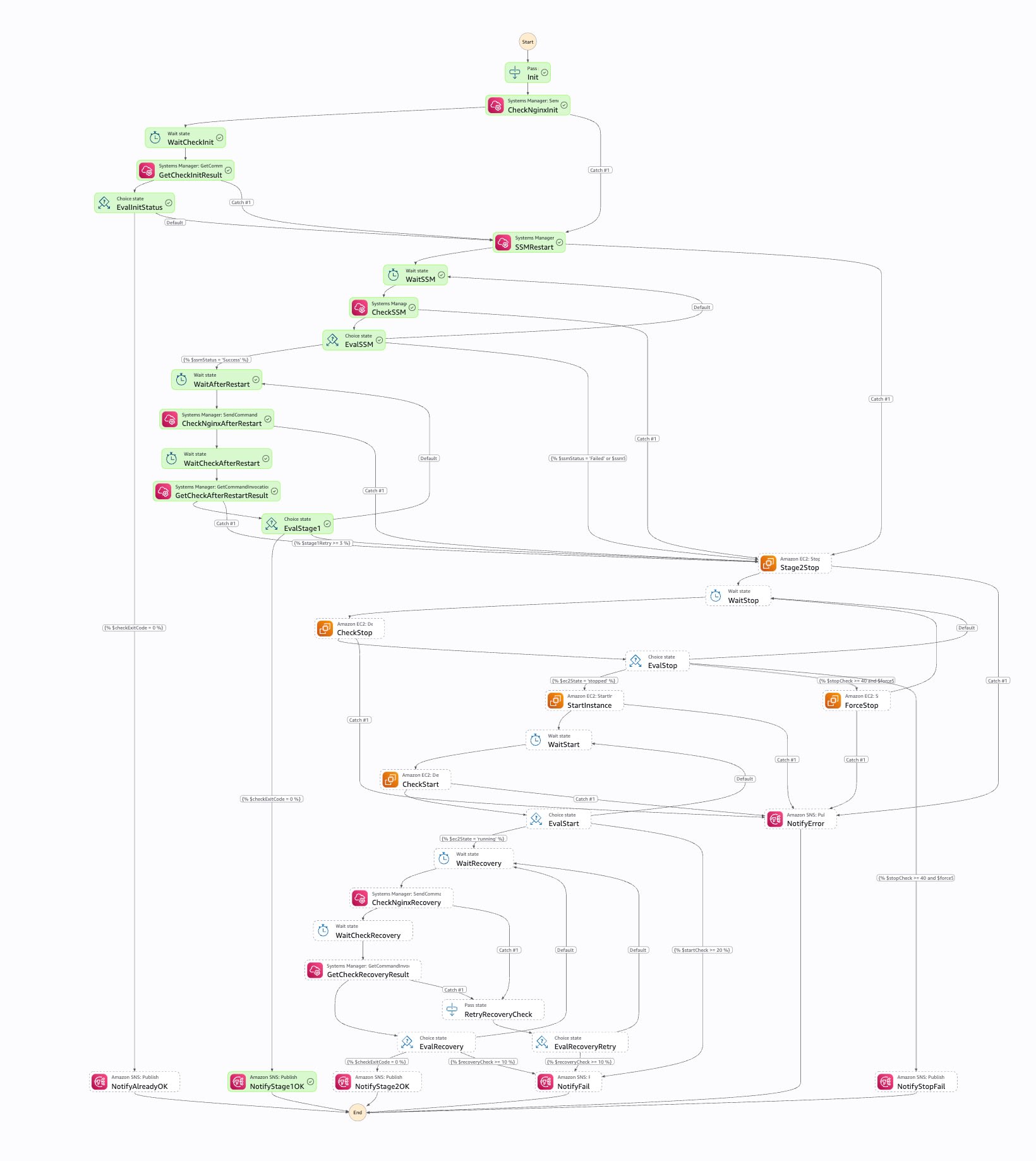
From fault injection to recovery completion took 4 minutes 27 seconds.
| Time | Event |
|---|---|
| 08:26:24 | Stopped Nginx via SSM |
| 08:29:00 | Application status became impaired (ConnectionRefused) |
| 08:30:19 | CloudWatch alarm went from OK to ALARM |
| 08:30:20 | Step Functions execution started |
| 08:30:51 | Ended at NotifyStage1OK (execution time 31 seconds) |
| 08:32:19 | Alarm went from ALARM to OK |
The breakdown shows detection took about 2.5 minutes, and from the alarm transition to recovery completion took under 1 minute.
A state where the SSM restart fails
To exercise the stage 2 recovery, I stopped Nginx and had a process that accepts connections but returns no response occupy port 80. In this state Nginx cannot start, so the SSM restart fails. The process is not persisted, so it disappears after Stop/Start.
Parameter file that occupies port 80
{
  "commands": [
    "sudo systemctl stop nginx",
    "printf '%s\\n' 'import socket' 's=socket.socket()' 's.setsockopt(socket.SOL_SOCKET,socket.SO_REUSEADDR,1)' 's.bind((\"0.0.0.0\",80))' 's.listen(5)' 'while True:' '    c,a=s.accept()' | sudo tee /tmp/hog.py",
    "sudo setsid nohup python3 /tmp/hog.py >/tmp/hog.log 2>&1 < /dev/null &",
    "sleep 3",
    "sudo ss -ltnp | grep ':80' || echo 'NOT LISTENING'",
    "systemctl is-active nginx || true"
  ]
}
I saved the parameters above as port80-hog-params.json and passed them to Run Command.
aws ssm send-command \
  --instance-ids i-xxxxxxxxxxxxxxxxx2 \
  --document-name "AWS-RunShellScript" \
  --parameters file://port80-hog-params.json \
  --region ap-northeast-1
This is the tail of the standard output. Port 80 is held by python3, and Nginx is stopped.
LISTEN 0      5            0.0.0.0:80        0.0.0.0:*    users:(("python3",pid=26438,fd=3))
inactive
The application status was impaired, same as in the previous section, but the reason code was different. A TCP connection is established but no HTTP response comes back, so it was ResponseTimeout, not ConnectionRefused.
{
    "ApplicationStatuses": {
        "Instances": [
            {
                "InstanceId": "i-xxxxxxxxxxxxxxxxx2",
                "AvailabilityZone": "apne1-az4",
                "ApplicationStatus": {
                    "Status": "impaired",
                    "StatusTimeStamp": "2026-09-04T23:35:09.514000+00:00",
                    "StatusSince": "2026-09-04T23:36:00+00:00",
                    "Details": [
                        {
                            "ApplicationStatusCheckId": "asc-xxxxxxxx",
                            "CheckUpdateTime": "2026-09-04T23:35:09.514000+00:00",
                            "Aggregation": "included",
                            "Status": "failed",
                            "StatusTimeStamp": "2026-09-04T23:35:09.514000+00:00",
                            "StatusSince": "2026-09-04T23:36:00+00:00",
                            "Reason": {
                                "Code": "ResponseTimeout",
                                "StatusCode": 0
                            }
                        }
                    ]
                }
            }
        ]
    }
}
In this execution, 23 states were executed and the history had 81 events.
08:37:20.068 Init
08:37:20.068 CheckNginxInit
08:37:20.245 WaitCheckInit
08:37:25.296 GetCheckInitResult
08:37:25.484 EvalInitStatus
08:37:25.484 SSMRestart
08:37:25.640 WaitSSM
08:37:35.733 CheckSSM
08:37:35.869 EvalSSM
08:37:35.869 Stage2Stop
08:37:36.401 WaitStop
08:37:51.455 CheckStop
08:37:51.694 EvalStop
08:37:51.694 StartInstance
08:37:52.743 WaitStart
08:38:07.798 CheckStart
08:38:08.067 EvalStart
08:38:08.067 WaitRecovery
08:38:38.117 CheckNginxRecovery
08:38:38.270 WaitCheckRecovery
08:38:43.320 GetCheckRecoveryResult
08:38:43.480 EvalRecovery
08:38:43.480 NotifyStage2OK
The SSM command status obtained by CheckSSM was Failed, so EvalSSM branched to Stage2Stop. After that, it went through stop confirmation, start, and recovery confirmation, and completed at NotifyStage2OK.
I also checked the state on the instance. The boot time was updated to the Stop/Start time, the process that had occupied port 80 was gone, and Nginx was listening again.
$ uptime -s
2026-09-04 23:37:59

$ systemctl is-active nginx
active

$ ss -ltnp | grep :80
LISTEN 0      511          0.0.0.0:80        0.0.0.0:*    users:(("nginx",pid=1978,fd=6),("nginx",pid=1976,fd=6),("nginx",pid=1975,fd=6))
LISTEN 0      511             [::]:80           [::]:*    users:(("nginx",pid=1978,fd=7),("nginx",pid=1976,fd=7),("nginx",pid=1975,fd=7))

$ pgrep -af hog.py || echo NOHOG
NOHOG
From fault injection to recovery completion took 5 minutes 29 seconds.
| Time | Event |
|---|---|
| 08:33:14 | Stopped Nginx and occupied port 80 |
| 08:36:00 | Application status became impaired (ResponseTimeout) |
| 08:37:19 | CloudWatch alarm went from OK to ALARM |
| 08:37:20 | Step Functions execution started |
| 08:37:35 | SSM restart command became Failed, branched to Stage2Stop |
| 08:37:51 | Confirmed stop and started |
| 08:38:43 | Ended at NotifyStage2OK (execution time 83 seconds) |
The difference from the execution that ended at stage 1 is just the Stop/Start and its completion wait.
Following instance replacement
I checked whether monitoring continues when an instance is replaced, when the association is made by tag. Changing the logical ID of the EC2 instance and running update-stack replaces the instance. I did not re-run the association API.
| Item | Result |
|---|---|
| Instance before replacement | terminated |
| Instance after replacement | running |
| Associations | Only one, tag (aws:cloudformation:stack-id) |
| Application status of the new instance right after replacement | initializing (then ok) |
This is the application status of the instance after replacement.
{
    "ApplicationStatuses": {
        "Instances": [
            {
                "InstanceId": "i-xxxxxxxxxxxxxxxxx2",
                "AvailabilityZone": "apne1-az2",
                "ApplicationStatus": {
                    "Status": "ok",
                    "StatusTimeStamp": "2026-09-05T08:00:29.426000+00:00",
                    "StatusSince": "2026-09-05T08:01:00+00:00",
                    "Details": [
                        {
                            "ApplicationStatusCheckId": "asc-xxxxxxxx",
                            "CheckUpdateTime": "2026-09-05T08:00:29.426000+00:00",
                            "Aggregation": "included",
                            "Status": "passed",
                            "StatusTimeStamp": "2026-09-05T08:00:29.426000+00:00",
                            "StatusSince": "2026-09-05T08:01:00+00:00",
                            "Reason": {
                                "Code": "ResponseCodeMatched",
                                "StatusCode": 200,
                                "Protocol": "HTTP"
                            }
                        }
                    ]
                }
            }
        ]
    }
}
Monitoring continued without any association operation.
Running costs
The billed item is the managed ENI, at 0.01 USD per hour per Availability Zone. The Pricing section of the user guide states the following:
An hourly charge of $0.01 for each managed elastic network interface (ENI), per Availability Zone.
Standard Amazon CloudWatch pricing applies to application status check metrics.
The source is Application status checks in the EC2 user guide (referenced 2026-09-05). One managed ENI is created per combination of "source subnet × security group" and does not scale with the number of instances. The user guide explains that if 200 instances fit in 2 subnets and 1 security group there are 2 ENIs, and with the same 200 instances using 3 security groups there are at most 6. One ENI for 730 hours is 7.30 USD per month.
While this setup keeps running, you are charged for the managed ENI, the alarm, and the Step Functions state transitions when a failure occurs. The health check is run by the EC2 feature, so nothing runs (or is billed) in the healthy state.
| Item | Unit price | Free tier |
|---|---|---|
| Managed ENI | 0.01 USD / hour / ENI | None |
| Step Functions Standard state transitions | 0.000025 USD / transition | 4,000 transitions per month |
| CloudWatch metric alarms | 0.10 USD / alarm metric month | 10 alarm metrics per month |
| CloudWatch Logs Vended Logs ingestion (CloudWatch Logs destination) | 0.50 USD / GB (0–10 TB) | 5 GB per month |
The unit prices for state transitions and logs are values from the examples on the AWS Step Functions pricing page and the Amazon CloudWatch pricing page. All the examples are for US East, referenced on 2026-09-05. The free tier of 4,000 state transitions per month does not expire even after the 12-month AWS Free Tier period ends.
With a single ENI, 7.30 USD per month is fixed, and the alarm is 0 USD if free tier remains. Even if recovery occurs several times a month, each execution has 15–23 transitions, so it fits within the free tier. Adding monitored instances does not change the ENI cost, but creating an alarm per instance adds to it.
If you build the health check yourself with a scheduled Step Functions execution, billing depends on the number of state transitions. With 5 transitions per execution, a 1-minute interval is 216,000 transitions per month, 5.30 USD, and a 10-minute interval is 21,600 transitions per month, 0.44 USD. A longer interval cuts the cost, but you need protection against concurrent executions when the scheduled run and a recovery run overlap, and healthy-state records also mix into the execution history. I decided to leave the health check mechanism to application status checks.
I output the log group with Level: ALL and IncludeExecutionData: true.
| Execution | States executed | Log events | Ingested bytes |
|---|---|---|---|
| Execution where Nginx had already recovered | 8 | 23 | 27,090 |
| Execution recovered in Stage 1 | 15 | 53 | 58,294 |
| Execution recovered in Stage 2 | 23 | 81 | 122,171 |
Only recovery events remain in the execution history and log group, so at this scale it fits within the Vended Logs free tier.
Cleanup
When tearing down, first remove the tag association and then delete the stack.
aws ec2 disassociate-application-status-check \
  --application-status-check-id $ASC_ID \
  --target-tag-associations Key=aws:cloudformation:stack-id,Value=$STACK_ID \
  --region ap-northeast-1

aws cloudformation delete-stack \
  --stack-name ec2-app-recovery-test \
  --region ap-northeast-1
The EC2 instance, application status check, and state machine were deleted, but deleting the security group failed with DependencyViolation. This is because the managed ENI is using the security group.
An error occurred (DependencyViolation) when calling the DeleteSecurityGroup operation:
resource sg-xxxxxxxxxxxxxxxxx has a dependent object
Even after deleting the application status check, deletion of the managed ENI is asynchronous and takes time. This time it was still DependencyViolation when I retried 11 minutes after the stack deletion, and the stack went to DELETE_FAILED. About 4 hours later I could delete the security group, and after running delete-stack the stack deletion completed.
If you want to delete a stack in DELETE_FAILED first, delete it while retaining the security group. After the ENI is gone, delete the security group manually.
aws cloudformation delete-stack \
  --stack-name ec2-app-recovery-test \
  --retain-resources AppStatusCheckSourceSG \
  --region ap-northeast-1
Summary
I was able to build a multi-stage recovery scenario with Step Functions. Stage 1 tries restarting Nginx via SSM, and only if that does not restore it does it move on to the EC2 Stop/Start. Whether the app is responding is left to the EC2 feature, so I wrote neither a health check implementation nor a Lambda function.
Combined with SSM, steps other than the recovery itself can also go into the same state machine. Additional investigation after receiving an alert, fault isolation based on the collected information, and application restarts can all be automated.
In stateful environments where recovery by replacing instances with EC2 Auto Scaling is hard, and where application failures are recovered by restarting a service, try this as one means of automation.
References
Deployment
I specified EXPRESS as the CloudFormation deployment mode.
aws cloudformation create-stack \
  --stack-name ec2-app-recovery-test \
  --template-body file://ec2-app-recovery-test.yaml \
  --parameters \
    ParameterKey=NotificationEmail,ParameterValue=alerts@example.com \
    ParameterKey=VpcId,ParameterValue=vpc-xxxxxxxxxxxxxxxxx \
    ParameterKey=SubnetId,ParameterValue=subnet-xxxxxxxxxxxxxxxxx \
  --capabilities CAPABILITY_IAM \
  --deployment-config '{"Mode": "EXPRESS"}' \
  --region ap-northeast-1

aws cloudformation wait stack-create-complete \
  --stack-name ec2-app-recovery-test \
  --region ap-northeast-1
Full template
Full CloudFormation template
AWSTemplateFormatVersion: '2010-09-09'
Description: 'EC2 Nginx + Application Status Check + Step Functions 2-Stage Recovery'
Parameters:
NotificationEmail:
Type: String
InstanceType:
Type: String
Default: t4g.nano
LatestAmiId:
Type: AWS::SSM::Parameter::Value<AWS::EC2::Image::Id>
Default: /aws/service/ami-amazon-linux-latest/al2023-ami-kernel-default-arm64
LogRetentionDays:
Type: Number
Default: 7
VpcId:
Type: AWS::EC2::VPC::Id
Description: VPC ID
SubnetId:
Type: AWS::EC2::Subnet::Id
Description: Subnet ID for EC2 and Application Status Check
Resources:
EC2SecurityGroup:
Type: AWS::EC2::SecurityGroup
Properties:
GroupDescription: !Sub ${AWS::StackName} - EC2 SG
VpcId: !Ref VpcId
Tags:
- Key: Name
Value: !Sub ${AWS::StackName}-ec2-sg
AppStatusCheckSourceSG:
Type: AWS::EC2::SecurityGroup
Properties:
GroupDescription: !Sub ${AWS::StackName} - Source SG for the application status check ENI
VpcId: !Ref VpcId
Tags:
- Key: Name
Value: !Sub ${AWS::StackName}-asc-sg
EC2SecurityGroupIngress:
Type: AWS::EC2::SecurityGroupIngress
Properties:
GroupId: !Ref EC2SecurityGroup
IpProtocol: tcp
FromPort: 80
ToPort: 80
SourceSecurityGroupId: !GetAtt AppStatusCheckSourceSG.GroupId
Description: Application status check from the managed ENI
EC2Role:
Type: AWS::IAM::Role
Properties:
AssumeRolePolicyDocument:
Version: '2012-10-17'
Statement:
- Effect: Allow
Principal:
Service: ec2.amazonaws.com
Action: sts:AssumeRole
ManagedPolicyArns:
- arn:aws:iam::aws:policy/AmazonSSMManagedInstanceCore
EC2InstanceProfile:
Type: AWS::IAM::InstanceProfile
Properties:
Roles:
- !Ref EC2Role
NginxEC2Instance:
Type: AWS::EC2::Instance
Properties:
InstanceType: !Ref InstanceType
ImageId: !Ref LatestAmiId
IamInstanceProfile: !Ref EC2InstanceProfile
SubnetId: !Ref SubnetId
SecurityGroupIds:
- !Ref EC2SecurityGroup
UserData:
Fn::Base64: |
#!/bin/bash
dnf install -y nginx
echo ok > /usr/share/nginx/html/health
systemctl enable nginx
systemctl start nginx
Tags:
- Key: Name
Value: !Sub ${AWS::StackName}-nginx
ApplicationStatusCheck:
Type: AWS::EC2::ApplicationStatusCheck
Properties:
Protocol: http
Port: 80
Path: /
StatusCodeMatcher: '200'
InitializationGracePeriodSeconds: 60
HealthCheckPaths:
- Source:
SecurityGroupId: !GetAtt AppStatusCheckSourceSG.GroupId
SubnetId: !Ref SubnetId
Destinations:
- SecurityGroupId: !GetAtt EC2SecurityGroup.GroupId
SubnetId: !Ref SubnetId
Tags:
- Key: Name
Value: !Sub ${AWS::StackName}-asc
AppStatusCheckAlarm:
Type: AWS::CloudWatch::Alarm
Properties:
AlarmName: !Sub ${AWS::StackName}-StatusCheckFailed-App
Namespace: AWS/EC2
MetricName: StatusCheckFailed_Application
Dimensions:
- Name: InstanceId
Value: !Ref NginxEC2Instance
Statistic: Maximum
Period: 60
EvaluationPeriods: 2
Threshold: 1
ComparisonOperator: GreaterThanOrEqualToThreshold
TreatMissingData: missing
AlertTopic:
Type: AWS::SNS::Topic
EmailSubscription:
Type: AWS::SNS::Subscription
Properties:
TopicArn: !Ref AlertTopic
Protocol: email
Endpoint: !Ref NotificationEmail
EventBridgeRole:
Type: AWS::IAM::Role
Properties:
AssumeRolePolicyDocument:
Version: '2012-10-17'
Statement:
- Effect: Allow
Principal:
Service: events.amazonaws.com
Action: sts:AssumeRole
Policies:
- PolicyName: InvokeStepFunctions
PolicyDocument:
Version: '2012-10-17'
Statement:
- Effect: Allow
Action: states:StartExecution
Resource: !GetAtt RecoveryStateMachine.Arn
RecoveryTriggerRule:
Type: AWS::Events::Rule
Properties:
EventPattern:
source:
- aws.cloudwatch
detail-type:
- CloudWatch Alarm State Change
detail:
alarmName:
- !Ref AppStatusCheckAlarm
state:
value:
- ALARM
State: ENABLED
Targets:
- Arn: !GetAtt RecoveryStateMachine.Arn
RoleArn: !GetAtt EventBridgeRole.Arn
Id: RecoveryStateMachineTarget
StepFunctionsRole:
Type: AWS::IAM::Role
Properties:
AssumeRolePolicyDocument:
Version: '2012-10-17'
Statement:
- Effect: Allow
Principal:
Service: states.amazonaws.com
Action: sts:AssumeRole
Policies:
- PolicyName: EC2AndSSM
PolicyDocument:
Version: '2012-10-17'
Statement:
- Effect: Allow
Action:
- ec2:StopInstances
- ec2:StartInstances
Resource: !Sub arn:aws:ec2:${AWS::Region}:${AWS::AccountId}:instance/${NginxEC2Instance}
- Effect: Allow
Action:
- ec2:DescribeInstances
Resource: '*'
- Effect: Allow
Action: ssm:SendCommand
Resource:
- !Sub arn:aws:ssm:${AWS::Region}::document/AWS-RunShellScript
- !Sub arn:aws:ec2:${AWS::Region}:${AWS::AccountId}:instance/${NginxEC2Instance}
- Effect: Allow
Action: ssm:GetCommandInvocation
Resource: '*'
- Effect: Allow
Action: sns:Publish
Resource: !Ref AlertTopic
- PolicyName: CloudWatchLogs
PolicyDocument:
Version: '2012-10-17'
Statement:
- Effect: Allow
Action:
- logs:CreateLogDelivery
- logs:GetLogDelivery
- logs:UpdateLogDelivery
- logs:DeleteLogDelivery
- logs:ListLogDeliveries
- logs:PutLogEvents
- logs:PutResourcePolicy
- logs:DescribeResourcePolicies
- logs:DescribeLogGroups
Resource: '*'
StepFunctionsLogGroup:
Type: AWS::Logs::LogGroup
Properties:
LogGroupName: !Sub /aws/vendedlogs/states/${AWS::StackName}
RetentionInDays: !Ref LogRetentionDays
RecoveryStateMachine:
Type: AWS::StepFunctions::StateMachine
Properties:
StateMachineType: STANDARD
RoleArn: !GetAtt StepFunctionsRole.Arn
LoggingConfiguration:
Level: ALL
IncludeExecutionData: true
Destinations:
- CloudWatchLogsLogGroup:
LogGroupArn: !GetAtt StepFunctionsLogGroup.Arn
DefinitionSubstitutions:
InstanceId: !Ref NginxEC2Instance
SnsTopicArn: !Ref AlertTopic
DefinitionString: |
{
"Comment": "2-Stage Recovery: SSM restart -> EC2 Stop/Start",
"QueryLanguage": "JSONata",
"TimeoutSeconds": 1800,
"StartAt": "Init",
"States": {
"Init": {
"Type": "Pass",
"Assign": {
"stage1Retry": 0,
"stopCheck": 0,
"startCheck": 0,
"recoveryCheck": 0,
"forceStop": false
},
"Next": "CheckNginxInit"
},
"CheckNginxInit": {
"Type": "Task",
"Resource": "arn:aws:states:::aws-sdk:ssm:sendCommand",
"Arguments": {
"InstanceIds": ["${InstanceId}"],
"DocumentName": "AWS-RunShellScript",
"Parameters": {"commands": ["systemctl is-active nginx"]},
"TimeoutSeconds": 30
},
"Assign": {"checkCmdId": "{% $states.result.Command.CommandId %}"},
"Next": "WaitCheckInit",
"Catch": [{"ErrorEquals": ["States.ALL"], "Next": "SSMRestart"}]
},
"WaitCheckInit": {
"Type": "Wait",
"Seconds": 5,
"Next": "GetCheckInitResult"
},
"GetCheckInitResult": {
"Type": "Task",
"Resource": "arn:aws:states:::aws-sdk:ssm:getCommandInvocation",
"Arguments": {"CommandId": "{% $checkCmdId %}", "InstanceId": "${InstanceId}"},
"Assign": {
"nginxStatus": "{% $states.result.StandardOutputContent %}",
"checkExitCode": "{% $states.result.ResponseCode %}"
},
"Next": "EvalInitStatus",
"Catch": [{"ErrorEquals": ["States.ALL"], "Next": "SSMRestart"}]
},
"EvalInitStatus": {
"Type": "Choice",
"Choices": [{"Condition": "{% $checkExitCode = 0 %}", "Next": "NotifyAlreadyOK"}],
"Default": "SSMRestart"
},
"SSMRestart": {
"Type": "Task",
"Resource": "arn:aws:states:::aws-sdk:ssm:sendCommand",
"Arguments": {
"InstanceIds": ["${InstanceId}"],
"DocumentName": "AWS-RunShellScript",
"Parameters": {"commands": ["sudo systemctl restart nginx"]},
"TimeoutSeconds": 60
},
"Assign": {"cmdId": "{% $states.result.Command.CommandId %}"},
"Next": "WaitSSM",
"Catch": [{"ErrorEquals": ["States.ALL"], "Next": "Stage2Stop"}]
},
"WaitSSM": {
"Type": "Wait",
"Seconds": 10,
"Next": "CheckSSM"
},
"CheckSSM": {
"Type": "Task",
"Resource": "arn:aws:states:::aws-sdk:ssm:getCommandInvocation",
"Arguments": {"CommandId": "{% $cmdId %}", "InstanceId": "${InstanceId}"},
"Assign": {"ssmStatus": "{% $states.result.Status %}"},
"Next": "EvalSSM",
"Catch": [{"ErrorEquals": ["States.ALL"], "Next": "Stage2Stop"}]
},
"EvalSSM": {
"Type": "Choice",
"Choices": [
{"Condition": "{% $ssmStatus = 'Success' %}", "Next": "WaitAfterRestart"},
{"Condition": "{% $ssmStatus = 'Failed' or $ssmStatus = 'TimedOut' %}", "Next": "Stage2Stop"}
],
"Default": "WaitSSM"
},
"WaitAfterRestart": {
"Type": "Wait",
"Seconds": 10,
"Next": "CheckNginxAfterRestart"
},
"CheckNginxAfterRestart": {
"Type": "Task",
"Resource": "arn:aws:states:::aws-sdk:ssm:sendCommand",
"Arguments": {
"InstanceIds": ["${InstanceId}"],
"DocumentName": "AWS-RunShellScript",
"Parameters": {"commands": ["systemctl is-active nginx"]},
"TimeoutSeconds": 30
},
"Assign": {"checkCmdId": "{% $states.result.Command.CommandId %}"},
"Next": "WaitCheckAfterRestart",
"Catch": [{"ErrorEquals": ["States.ALL"], "Next": "Stage2Stop"}]
},
"WaitCheckAfterRestart": {
"Type": "Wait",
"Seconds": 5,
"Next": "GetCheckAfterRestartResult"
},
"GetCheckAfterRestartResult": {
"Type": "Task",
"Resource": "arn:aws:states:::aws-sdk:ssm:getCommandInvocation",
"Arguments": {"CommandId": "{% $checkCmdId %}", "InstanceId": "${InstanceId}"},
"Assign": {
"checkExitCode": "{% $states.result.ResponseCode %}",
"stage1Retry": "{% $stage1Retry + 1 %}"
},
"Next": "EvalStage1",
"Catch": [{"ErrorEquals": ["States.ALL"], "Next": "Stage2Stop"}]
},
"EvalStage1": {
"Type": "Choice",
"Choices": [
{"Condition": "{% $checkExitCode = 0 %}", "Next": "NotifyStage1OK"},
{"Condition": "{% $stage1Retry >= 3 %}", "Next": "Stage2Stop"}
],
"Default": "WaitAfterRestart"
},
"Stage2Stop": {
"Type": "Task",
"Resource": "arn:aws:states:::aws-sdk:ec2:stopInstances",
"Arguments": {"InstanceIds": ["${InstanceId}"], "Force": false},
"Assign": {"stopCheck": 0},
"Next": "WaitStop",
"Catch": [{"ErrorEquals": ["States.ALL"], "Next": "NotifyError"}]
},
"ForceStop": {
"Type": "Task",
"Resource": "arn:aws:states:::aws-sdk:ec2:stopInstances",
"Arguments": {"InstanceIds": ["${InstanceId}"], "Force": true},
"Assign": {"forceStop": true, "stopCheck": 0},
"Next": "WaitStop",
"Catch": [{"ErrorEquals": ["States.ALL"], "Next": "NotifyError"}]
},
"WaitStop": {
"Type": "Wait",
"Seconds": 15,
"Next": "CheckStop"
},
"CheckStop": {
"Type": "Task",
"Resource": "arn:aws:states:::aws-sdk:ec2:describeInstances",
"Arguments": {"InstanceIds": ["${InstanceId}"]},
"Assign": {
"ec2State": "{% $states.result.Reservations[0].Instances[0].State.Name %}",
"stopCheck": "{% $stopCheck + 1 %}"
},
"Next": "EvalStop",
"Catch": [{"ErrorEquals": ["States.ALL"], "Next": "NotifyError"}]
},
"EvalStop": {
"Type": "Choice",
"Choices": [
{"Condition": "{% $ec2State = 'stopped' %}", "Next": "StartInstance"},
{"Condition": "{% $stopCheck >= 40 and $forceStop = false %}", "Next": "ForceStop"},
{"Condition": "{% $stopCheck >= 40 and $forceStop = true %}", "Next": "NotifyStopFail"}
],
"Default": "WaitStop"
},
"StartInstance": {
"Type": "Task",
"Resource": "arn:aws:states:::aws-sdk:ec2:startInstances",
"Arguments": {"InstanceIds": ["${InstanceId}"]},
"Assign": {"startCheck": 0},
"Next": "WaitStart",
"Catch": [{"ErrorEquals": ["States.ALL"], "Next": "NotifyError"}]
},
"WaitStart": {
"Type": "Wait",
"Seconds": 15,
"Next": "CheckStart"
},
"CheckStart": {
"Type": "Task",
"Resource": "arn:aws:states:::aws-sdk:ec2:describeInstances",
"Arguments": {"InstanceIds": ["${InstanceId}"]},
"Assign": {
"ec2State": "{% $states.result.Reservations[0].Instances[0].State.Name %}",
"startCheck": "{% $startCheck + 1 %}"
},
"Next": "EvalStart",
"Catch": [{"ErrorEquals": ["States.ALL"], "Next": "NotifyError"}]
},
"EvalStart": {
"Type": "Choice",
"Choices": [
{"Condition": "{% $ec2State = 'running' %}", "Next": "WaitRecovery"},
{"Condition": "{% $startCheck >= 20 %}", "Next": "NotifyFail"}
],
"Default": "WaitStart"
},
"WaitRecovery": {
"Type": "Wait",
"Seconds": 30,
"Next": "CheckNginxRecovery"
},
"CheckNginxRecovery": {
"Type": "Task",
"Resource": "arn:aws:states:::aws-sdk:ssm:sendCommand",
"Arguments": {
"InstanceIds": ["${InstanceId}"],
"DocumentName": "AWS-RunShellScript",
"Parameters": {"commands": ["systemctl is-active nginx"]},
"TimeoutSeconds": 30
},
"Assign": {"checkCmdId": "{% $states.result.Command.CommandId %}"},
"Next": "WaitCheckRecovery",
"Catch": [{"ErrorEquals": ["States.ALL"], "Next": "RetryRecoveryCheck"}]
},
"WaitCheckRecovery": {
"Type": "Wait",
"Seconds": 5,
"Next": "GetCheckRecoveryResult"
},
"GetCheckRecoveryResult": {
"Type": "Task",
"Resource": "arn:aws:states:::aws-sdk:ssm:getCommandInvocation",
"Arguments": {"CommandId": "{% $checkCmdId %}", "InstanceId": "${InstanceId}"},
"Assign": {
"checkExitCode": "{% $states.result.ResponseCode %}",
"recoveryCheck": "{% $recoveryCheck + 1 %}"
},
"Next": "EvalRecovery",
"Catch": [{"ErrorEquals": ["States.ALL"], "Next": "RetryRecoveryCheck"}]
},
"RetryRecoveryCheck": {
"Type": "Pass",
"Assign": {"recoveryCheck": "{% $recoveryCheck + 1 %}"},
"Next": "EvalRecoveryRetry"
},
"EvalRecoveryRetry": {
"Type": "Choice",
"Choices": [{"Condition": "{% $recoveryCheck >= 10 %}", "Next": "NotifyFail"}],
"Default": "WaitRecovery"
},
"EvalRecovery": {
"Type": "Choice",
"Choices": [
{"Condition": "{% $checkExitCode = 0 %}", "Next": "NotifyStage2OK"},
{"Condition": "{% $recoveryCheck >= 10 %}", "Next": "NotifyFail"}
],
"Default": "WaitRecovery"
},
"NotifyStage1OK": {
"Type": "Task",
"Resource": "arn:aws:states:::aws-sdk:sns:publish",
"Arguments": {
"TopicArn": "${SnsTopicArn}",
"Subject": "[OK] Nginx復旧 (SSM restart)",
"Message": "{% 'SSM restart で復旧しました。\\nInstanceId: ${InstanceId}\\nRetry: ' & $string($stage1Retry) & '\\nExecutionId: ' & $states.context.Execution.Id %}"
},
"End": true
},
"NotifyStage2OK": {
"Type": "Task",
"Resource": "arn:aws:states:::aws-sdk:sns:publish",
"Arguments": {
"TopicArn": "${SnsTopicArn}",
"Subject": "[OK] EC2復旧 (Stop/Start)",
"Message": "{% 'EC2 Stop/Start で復旧しました。\\nInstanceId: ${InstanceId}\\nRecoveryCheck: ' & $string($recoveryCheck) & '\\nExecutionId: ' & $states.context.Execution.Id %}"
},
"End": true
},
"NotifyAlreadyOK": {
"Type": "Task",
"Resource": "arn:aws:states:::aws-sdk:sns:publish",
"Arguments": {
"TopicArn": "${SnsTopicArn}",
"Subject": "[INFO] 自然復旧",
"Message": "{% 'Nginxは既に正常です。\\nInstanceId: ${InstanceId}\\nExecutionId: ' & $states.context.Execution.Id %}"
},
"End": true
},
"NotifyFail": {
"Type": "Task",
"Resource": "arn:aws:states:::aws-sdk:sns:publish",
"Arguments": {
"TopicArn": "${SnsTopicArn}",
"Subject": "[CRITICAL] 復旧失敗",
"Message": "{% '自動復旧に失敗しました。手動確認が必要です。\\nInstanceId: ${InstanceId}\\nExecutionId: ' & $states.context.Execution.Id %}"
},
"End": true
},
"NotifyStopFail": {
"Type": "Task",
"Resource": "arn:aws:states:::aws-sdk:sns:publish",
"Arguments": {
"TopicArn": "${SnsTopicArn}",
"Subject": "[CRITICAL] EC2停止失敗",
"Message": "{% 'EC2の停止に失敗しました。\\nInstanceId: ${InstanceId}\\nExecutionId: ' & $states.context.Execution.Id %}"
},
"End": true
},
"NotifyError": {
"Type": "Task",
"Resource": "arn:aws:states:::aws-sdk:sns:publish",
"Arguments": {
"TopicArn": "${SnsTopicArn}",
"Subject": "[ERROR] 予期せぬエラー",
"Message": "{% 'エラーが発生しました。\\nInstanceId: ${InstanceId}\\nExecutionId: ' & $states.context.Execution.Id %}"
},
"End": true
}
}
}
Outputs:
InstanceId:
Value: !Ref NginxEC2Instance
ApplicationStatusCheckId:
Value: !GetAtt ApplicationStatusCheck.ApplicationStatusCheckId
AppStatusCheckSourceSGId:
Value: !Ref AppStatusCheckSourceSG
SNSTopicArn:
Value: !Ref AlertTopic
StateMachineArn:
Value: !GetAtt RecoveryStateMachine.Arn
StepFunctionsLogGroupName:
Value: !Ref StepFunctionsLogGroup
