I tried automating EOL management of software installed on EC2 using SSM Inventory

This page has been translated by machine translation. View original
Hello. I'm Ogata from the Operations Innovation Department.
When I was previously in charge of operating and maintaining Azure infrastructure, I used to manually manage the EoL (End of Life) of software installed on VMs using an Excel ledger with the following procedure:
- Log in to the server and check the version
- Write the version on a paper note
- Transfer it to the Excel ledger
- Cross-reference it with the EoL date
I felt the following challenges with this procedure:
- Applications and approvals and other procedures arise every time an inventory is taken
- Since entries are manual, the ledger diverges from reality due to missed updates or input errors
- There is no notification mechanism, so EoL is overlooked unless someone who checks the ledger notices it
- Work concentrates on specific people who update the ledger (in practice, it had become personalized)
So this time, I turned this inventory-taking and deadline-checking into an automated system. I collect Node.js on EC2 using SSM Inventory, one of the features of AWS Systems Manager, determine the EoL date using the endoflife.date API, and create a GitHub Issue for anything that has reached (or is about to reach) EoL. When the version is upgraded, the Issue is automatically closed on the next execution.
Note that what was automated is only "detection" and "tracking via Issues" — the version upgrade itself is performed by humans.
Overall Picture of the System I Built This Time
Here is the configuration of the system I built this time.
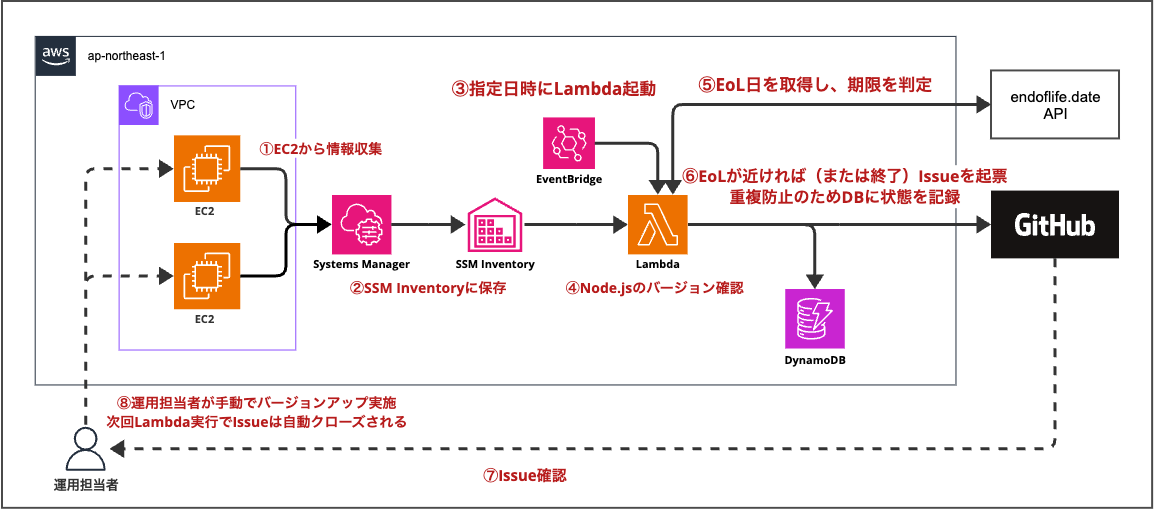
The version of Node.js on EC2 is collected by SSM Inventory, and Lambda is launched daily by EventBridge Scheduler to check it. If anything has reached or is about to reach EoL, a GitHub Issue is created.
Processing Flow
The processing flow is as follows. The numbers correspond to the numbers in the configuration diagram.
- Systems Manager's State Manager collects information about installed software from EC2.
- The collected information is saved to SSM Inventory.
- EventBridge Scheduler launches Lambda at the specified date and time.
- Lambda checks the Node.js version from SSM Inventory.
- Lambda retrieves the EoL date from the endoflife.date API and determines the deadline.
- Items that are approaching EoL or have expired are filed as GitHub Issues. The filing status is recorded in DynamoDB to prevent duplicate filings.
- The operations staff checks the Issues.
- The operations staff performs the version upgrade. When the next Lambda execution determines that the item is no longer subject to EoL, the Issue is automatically closed.
Determination Rules
The conditions for filing an Issue are as follows:
- EoL has already been reached
- EoL is within 90 days
The conditions were based on our previous practice of checking approximately 90 days before EoL.
This is configurable via Lambda environment variables so it can be adjusted to suit the environment and the time required for updates.
Verification Environment
I will explain only the key points of the configuration.
EC2
Since I had previously experienced Node.js installed via nvm not being picked up by Inventory,
I prepared two EC2 instances with different methods of installing Node.js for verification.
| Name | OS | Node.js Installation Method | Version |
|---|---|---|---|
| web-old | Amazon Linux 2023 | dnf | v20.20.2 |
| web-nvm | Amazon Linux 2023 | nvm | v20.20.2 |
Both were installed as follows:
# web-old (dnf)
sudo dnf install -y nodejs20
# web-nvm (nvm)
curl -o- https://raw.githubusercontent.com/nvm-sh/nvm/v0.40.3/install.sh | bash
source ~/.nvm/nvm.sh
nvm install 20
According to endoflife.date, Node.js 20 reaches end of security support on April 30, 2026.
Therefore, it was used as a verification target for the "already EoL" case in this verification.
Network and Permissions
- Placed in a public subnet with a public IP assigned. No NAT gateway or VPC endpoints were created; SSM Agent connects directly to public endpoints, making it a cost-effective configuration
- All inbound rules in the security group have been deleted. Connections to EC2 were made using SSM Session Manager
- EC2 instances are assigned an IAM role with the
AmazonSSMManagedInstanceCorepolicy to make them managed instances of SSM
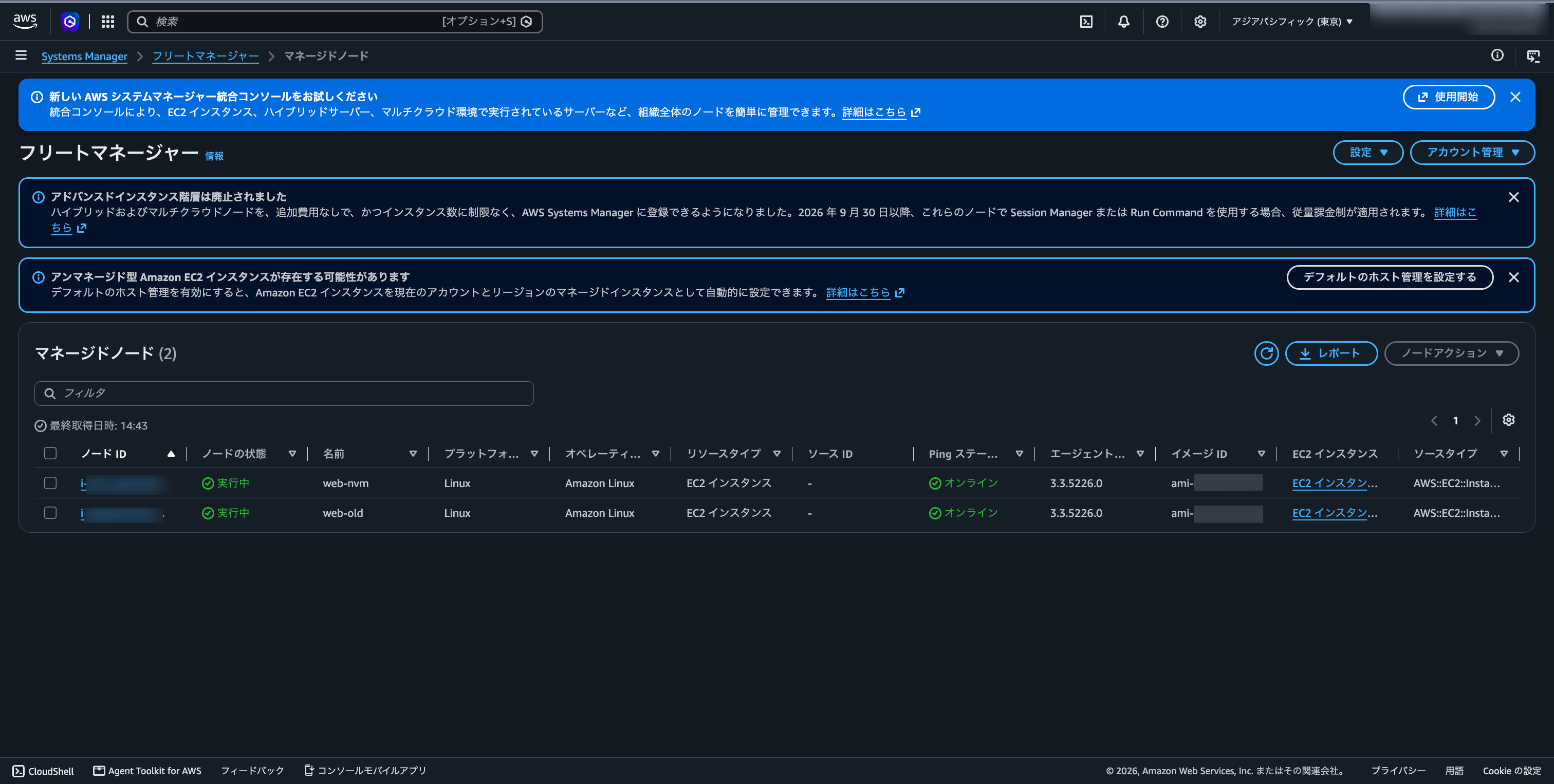
I confirmed that both instances show as "Online" in SSM Fleet Manager.
Created Resources
Here is a list of resources created in this verification.
| Type | Name | Purpose |
|---|---|---|
| EC2 | web-old / web-nvm | Verification targets |
| IAM Role | eol-ec2-role / eol-lambda-role | For EC2 / For Lambda |
| State Manager | eol-gather-inventory | Inventory collection |
| State Manager | eol-nvm-custom-inventory | Described in the "Supplementing nvm version with Custom Inventory" section |
| Systems Manager Parameter Store | /eol-tracker/github-token | GitHub token (SecureString) |
| DynamoDB | eol-tracker | Issue filing status |
| Lambda | eol-tracker | EoL determination and Issue filing (Python 3.14) |
| EventBridge Scheduler | eol-tracker-daily | Scheduled Lambda execution |
| GitHub Repository | eol-tracker (Private) | Issue filing destination |
All resources are in the Tokyo region (ap-northeast-1).
Node.js Installed via nvm Was Not Picked Up by SSM Inventory
I verified whether SSM Inventory could collect Node.js on EC2 for the two instances prepared this time.
The conclusion was that it was picked up via dnf but did not appear in the list via nvm.
Inventory Collection Settings
The Inventory collection was configured using a State Manager association.
| Item | Value |
|---|---|
| Document | AWS-GatherSoftwareInventory |
| Applications | Enabled |
| Custom Inventory | Enabled |
| Target | web-old, web-nvm |
| Schedule | Every 30 minutes |
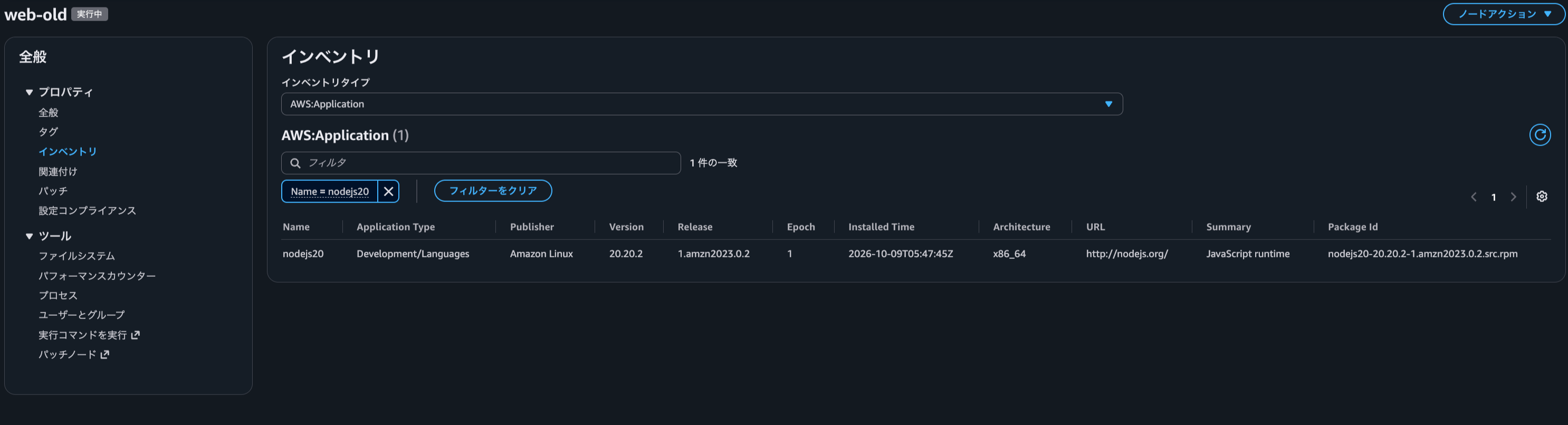
After collection is complete, you can check AWS:Application in the "Inventory" tab for each instance in Fleet Manager. Look for the one named nodejs20.
Node.js Installed via dnf (web-old)
On web-old, nodejs20 was displayed.
Node.js Installed via nvm (web-nvm)
On the other hand, on web-nvm, nothing was displayed even with the same filter conditions.
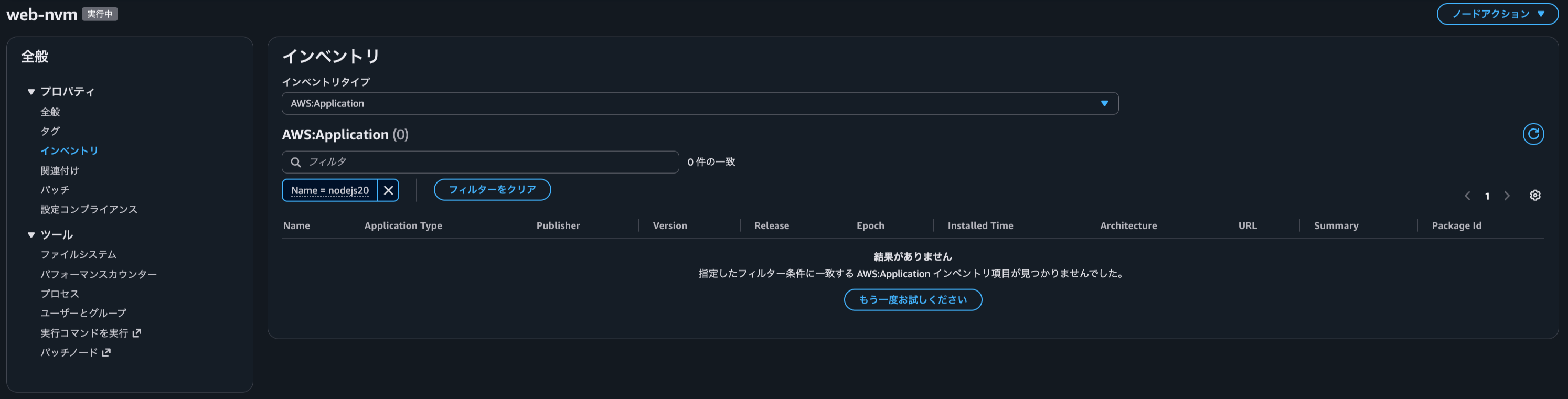
The Inventory of web-nvm had nearly 500 other applications collected.
The collection itself was working, and only Node.js was not included.
Why It Doesn't Appear
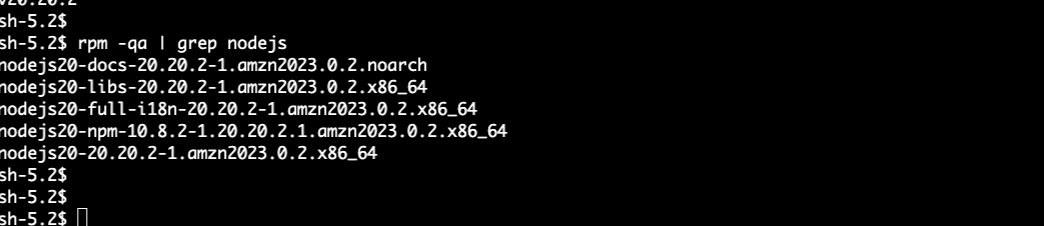
I checked the SSM Agent source code published on GitHub. Looking at the Linux processing (dataProvider_unix.go), I can see that it retrieves the application list using package management commands such as dpkg-query and rpm -qa.
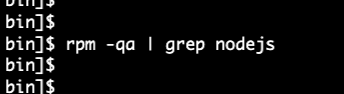
When I actually checked rpm on web-nvm, Node.js was not displayed.
It is thought that because it does not appear in the rpm list, it was also not collected by Inventory.
rpm check result on web-old ↓
rpm check result on web-nvm ↓
The next section addresses this detection gap.
Supplementing the nvm Version with Custom Inventory
The nvm version of Node.js that does not appear in the standard Inventory is supplemented with Custom Inventory.
What Is Custom Inventory
When SSM Agent finds a JSON file placed in a specified directory, it collects the contents as Custom Inventory.
- Placement location (Linux):
/var/lib/amazon/ssm/<instance-ID>/inventory/custom - Required keys:
SchemaVersion,TypeName,Content TypeNamemust start withCustom:
For details, please refer to the AWS documentation.
In other words, if we investigate the Node.js installed via nvm ourselves and output this JSON, we can include it in Inventory.
Script to Investigate the nvm Version of Node.js
nvm creates directories for each version under ~/.nvm/versions/node/. We search for these and output the JSON.
# Search for versions under ~/.nvm/versions/node/
for d in /home/*/.nvm/versions/node/v* /root/.nvm/versions/node/v*; do
  [ -d "$d" ] || continue
  VER=$(basename "$d" | sed 's/^v//')   # v20.20.2 → 20.20.2
  ITEM="{\"Name\":\"nodejs\",\"Version\":\"${VER}\",\"InstallPath\":\"${d}\"}"
  ITEMS="${ITEMS:+${ITEMS},}${ITEM}"
done

# Output as JSON for SSM to collect
echo "{\"SchemaVersion\":\"1.0\",\"TypeName\":\"Custom:NodeJS\",\"Content\":[${ITEMS}]}" > "${DIR}/NodeJS.json"
${DIR} is the placement directory explained above (the instance ID is retrieved from instance metadata).
This script is executed against web-nvm every 30 minutes via a State Manager association (AWS-RunShellScript). Even if the version is changed via nvm, the JSON will be updated on the next execution.
Result
The following JSON was output as a result of running the script:
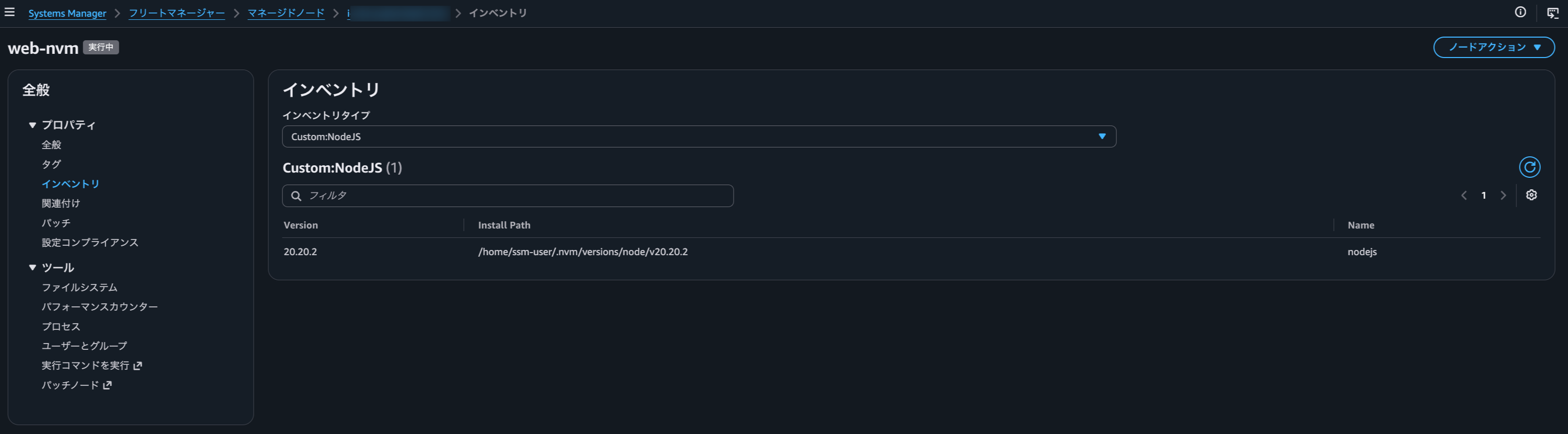
{"SchemaVersion":"1.0","TypeName":"Custom:NodeJS","Content":[{"Name":"nodejs","Version":"20.20.2","InstallPath":"/home/ssm-user/.nvm/versions/node/v20.20.2"}]}
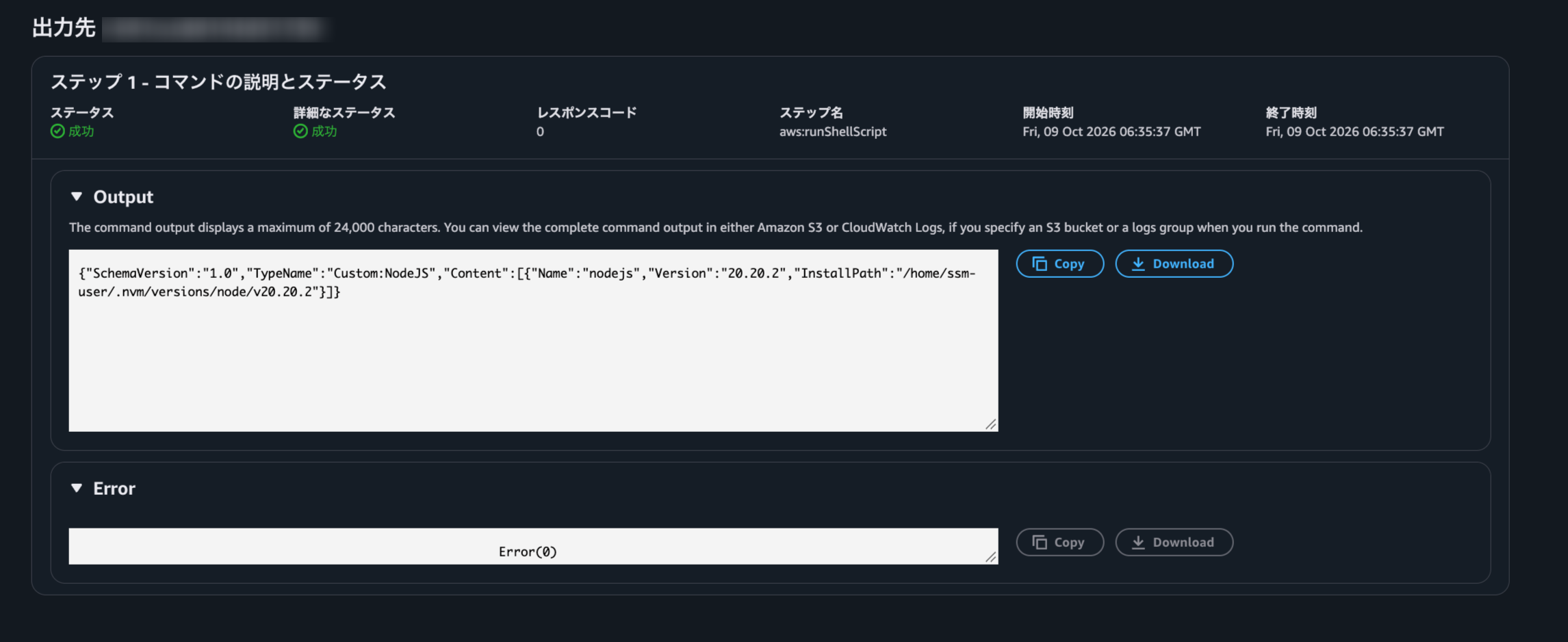
This JSON is incorporated into SSM Inventory through the Inventory collection with Custom Inventory enabled. If you want to check without waiting for the next collection, run the collection association (eol-gather-inventory) with "Apply now".
When the inventory type is switched to Custom:NodeJS in Fleet Manager, the nvm version of Node.js was displayed.
EoL Determination and Issue Filing
I implemented the process of determining EoL from the Node.js versions collected by Inventory and filing Issues in Lambda (Python).
What Is endoflife.date
endoflife.date is a free service that compiles EoL dates for various software and also provides an API.
- The list of supported products can be checked on the top page. In addition to Node.js and Python, it also includes AWS-related products such as Amazon Corretto and Amazon EKS
- The API specification is summarized in the documentation
This time, I used the following API to retrieve the EoL date for each major version of Node.js:
res = http("GET", "https://endoflife.date/api/v1/products/nodejs")
return {r["name"]: r["eolFrom"] for r in res["result"]["releases"] if r["eolFrom"]}
# {"20": "2026-04-30", "22": "2027-04-30", ...}
Lambda Processing
The Lambda processing has three main parts:
1. Detect Node.js
Search for Node.js across all instances managed by SSM. The dnf version is retrieved from AWS:Application, and the nvm version is retrieved from Custom:NodeJS described in the "Supplementing the nvm Version with Custom Inventory" section.
# Target only nodejs / nodejs20 / nodejs22 (exclude nodejs20-npm, etc.)
PKG_RE = re.compile(r"^nodejs\d*$")
The detected results are stored with <instance-ID>#nodejs#<major-number> as the key, holding the version and installation method (dnf / nvm).
2. Determine EoL
Compare the EoL date of the major version with today's date.
days = (date.fromisoformat(eol) - today).days
if days <= THRESHOLD:  # 90 days. If EoL has passed, days is negative
    at_risk[key] = {...}
3. File Issues
File the affected items as GitHub Issues.
Rather than just filing and finishing, the system also tracks the response status through opening and closing Issues. I used GitHub this time because I'm familiar with it, but I'm thinking of trying Amazon SNS email notifications and Slack notifications in the future when bringing it closer to actual production use.
To avoid filing the same content every day, the status is recorded in DynamoDB to prevent duplicates.
item = table.get_item(Key={"pk": key}).get("Item")
if item and item["status"] == "OPEN":
    continue  # If already filed, do nothing
After filing, save to DynamoDB as status: OPEN along with the Issue number and EoL date.
The GitHub token is stored in Parameter Store (SecureString) and retrieved at Lambda execution time. The token was given only the permission to read and write Issues on the target repository.
Running It Manually
I ran Lambda manually.
{
  "at_risk": ["i-xxxx#nodejs#20", "i-yyyy#nodejs#20"],
  "opened": ["i-xxxx#nodejs#20", "i-yyyy#nodejs#20"],
  "closed": []
}
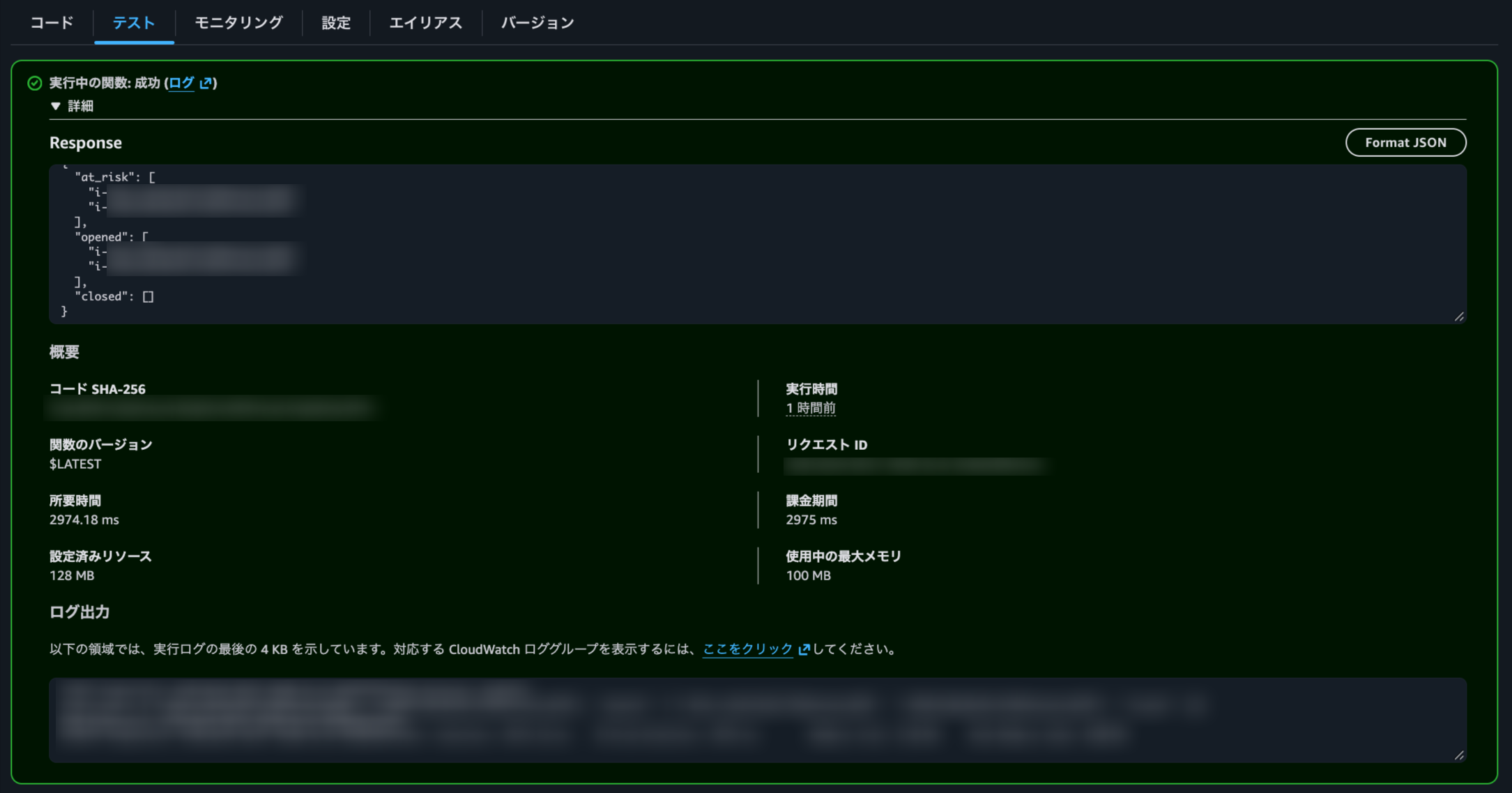
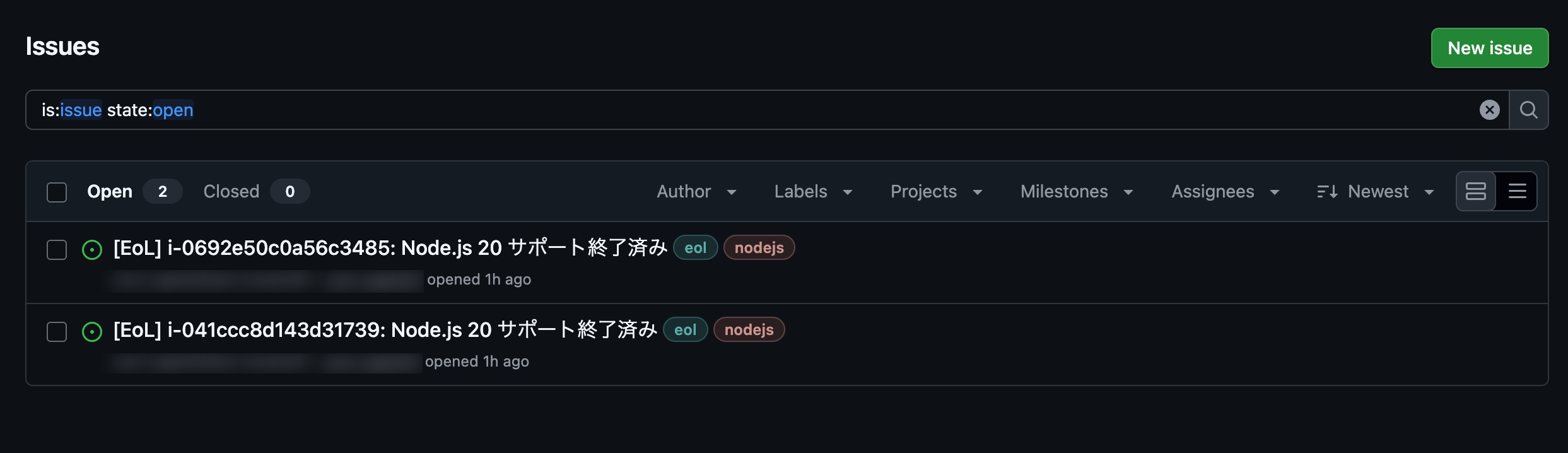
Both web-old (dnf) and web-nvm (nvm) detected Node.js 20 as EoL, and 2 Issues were filed.
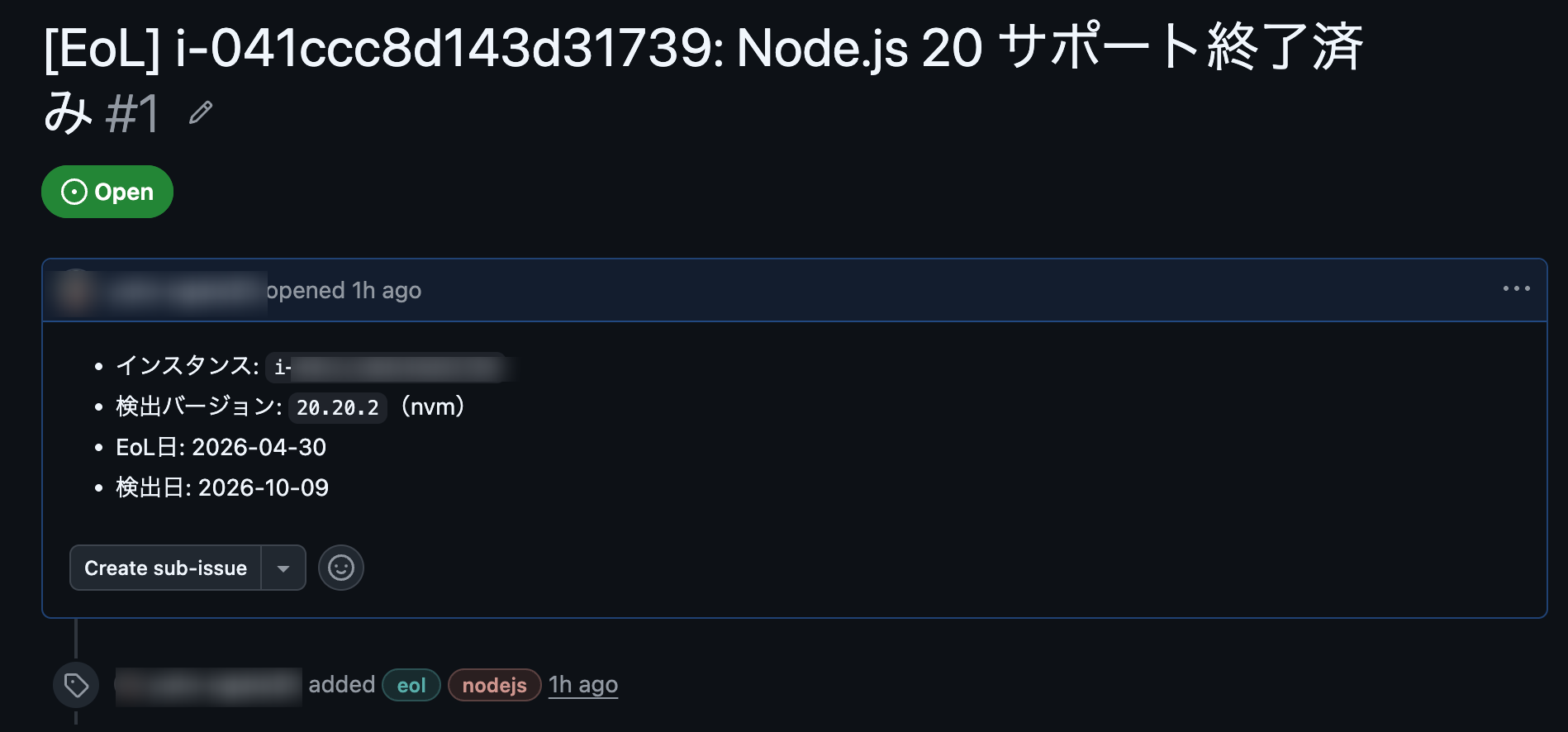
The Issues include the instance ID, detected version (dnf / nvm), EoL date, and detection date. The web-nvm Issue also shows nvm, confirming that the information supplemented by Custom Inventory is being used.
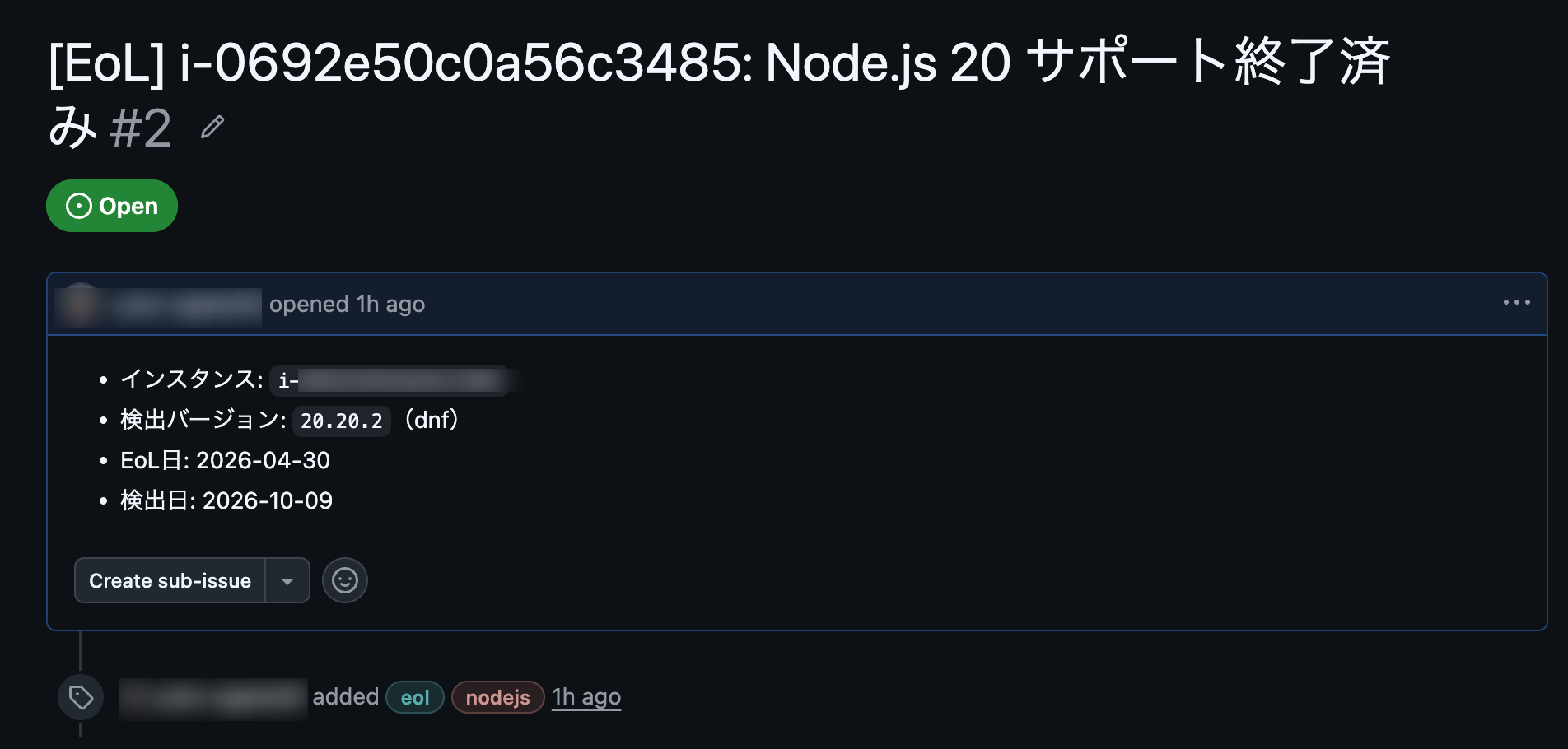
Running Lambda again did not create additional Issues. With opened being empty, I confirmed that duplicate Issues are not filed.
Running on a Schedule
Up to this point, Lambda was run manually. I will now enable scheduled execution using EventBridge Scheduler.
Schedule Settings
I created a schedule in EventBridge Scheduler to invoke Lambda.
| Item | Value |
|---|---|
| Schedule pattern | Recurring schedule (cron-based) |
| Timezone | Asia/Tokyo |
| Target | AWS Lambda Invoke (eol-tracker) |
| Payload | {} |
| Execution role | Create a new role for this schedule |
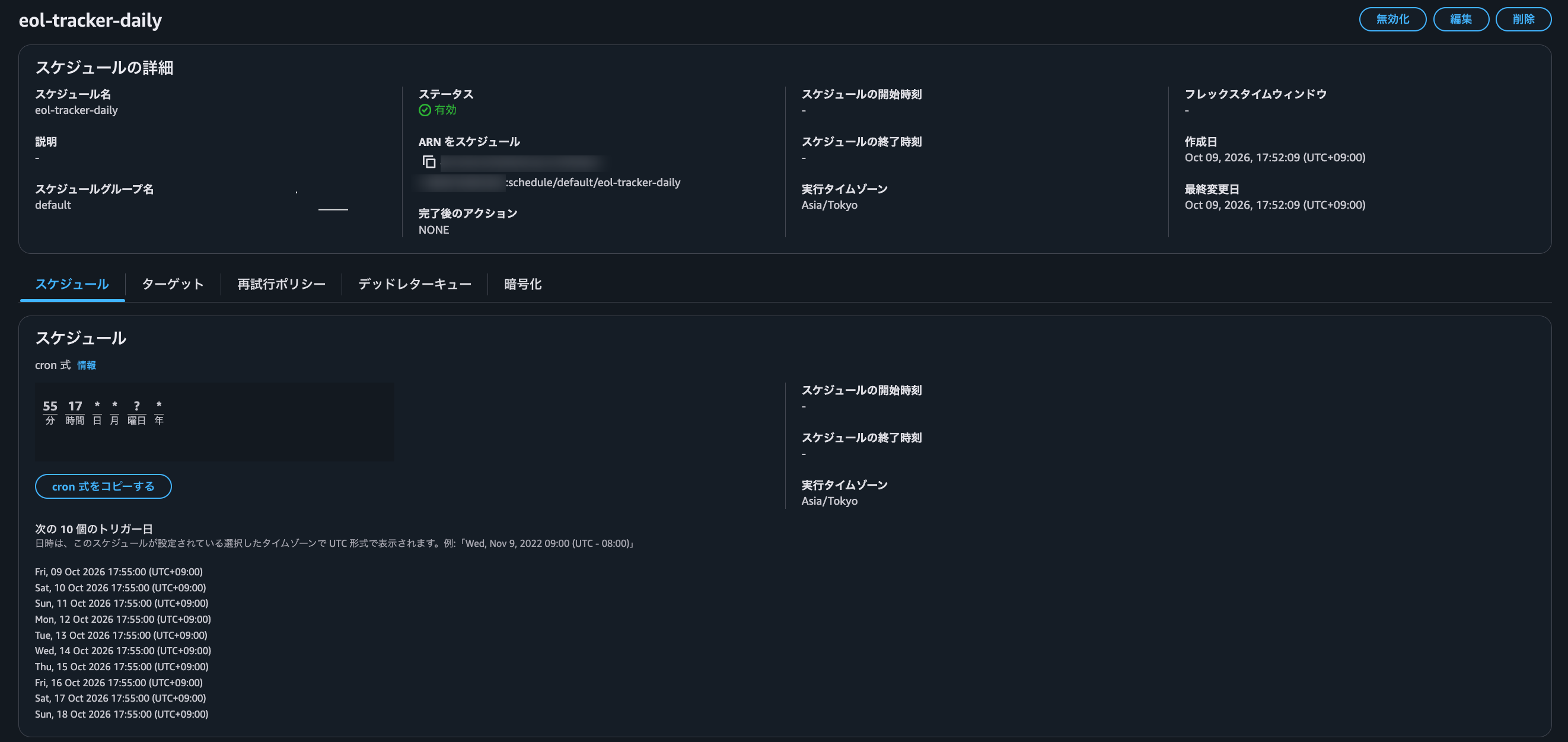
In actual operations, it will run "at a fixed time every day". For this verification, I set the cron to execute approximately 5 minutes after creation.
Confirming That It Was Launched from Scheduler
After the set time, a new log stream was created in the Lambda log group (/aws/lambda/eol-tracker).
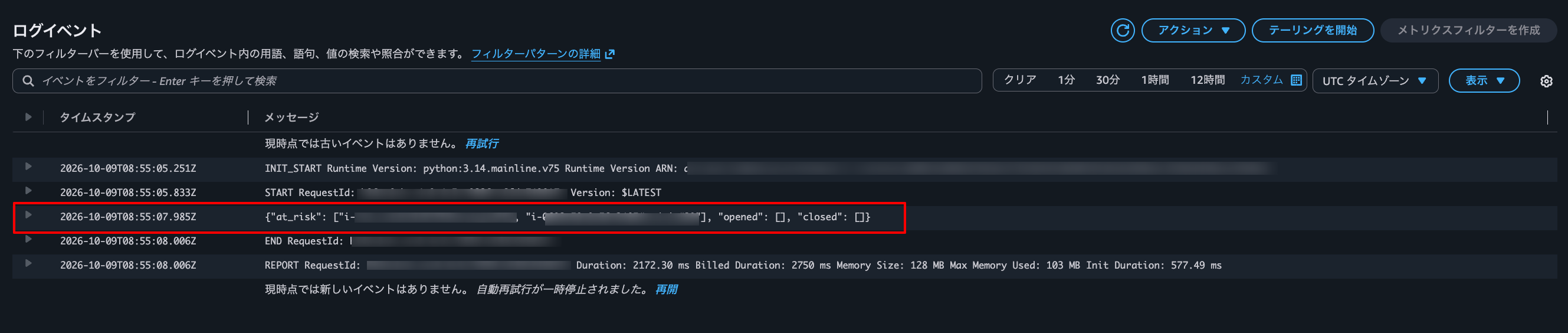
The log output was as follows:
{"at_risk": ["i-xxxx#nodejs#20", "i-yyyy#nodejs#20"], "opened": [], "closed": []}
Since opened is empty, already-filed Issues were not filed again as duplicates. This is the same behavior as when running manually twice.
This confirmed scheduled execution from Scheduler.
Issues Are Automatically Closed When the Version Is Upgraded
Finally, I verify that Issues are automatically closed when the Node.js version is upgraded. The version upgrade in this section is performed manually by a person.
Upgrading dnf Version (web-old) to Node.js 22
According to endoflife.date, Node.js 22 reaches EoL on April 30, 2027. Since this is beyond the 90-day threshold, it will not be a target for filing.
On web-old, install Node.js 22 and remove version 20.
sudo dnf install -y nodejs22
sudo dnf remove -y nodejs20
$ node --version
v22.23.2

$ rpm -qa | grep nodejs
nodejs22-docs-22.23.2-1.amzn2023.0.3.noarch
nodejs22-libs-22.23.2-1.amzn2023.0.3.x86_64
nodejs22-full-i18n-22.23.2-1.amzn2023.0.3.x86_64
nodejs22-npm-10.9.8-1.22.23.2.1.amzn2023.0.3.x86_64
nodejs22-22.23.2-1.amzn2023.0.3.x86_64
Issues Are Automatically Closed
Run the Inventory collection and then run Lambda.
- Run
eol-gather-inventorywith "Apply now" to update Inventory - Run Lambda
The Issue for web-old was automatically commented on and closed.
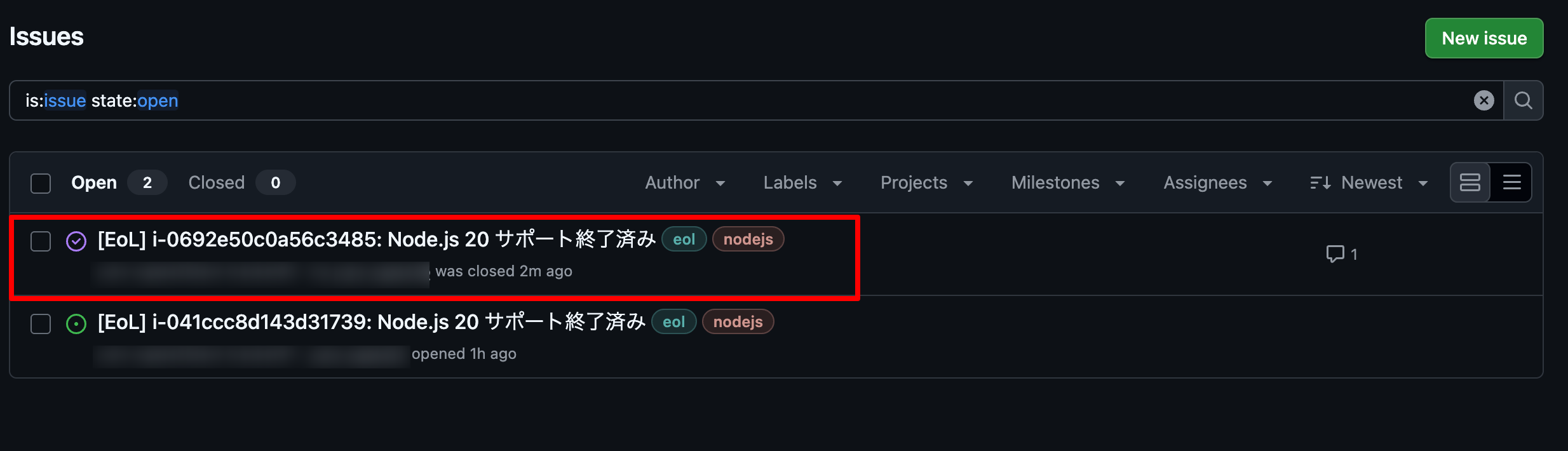
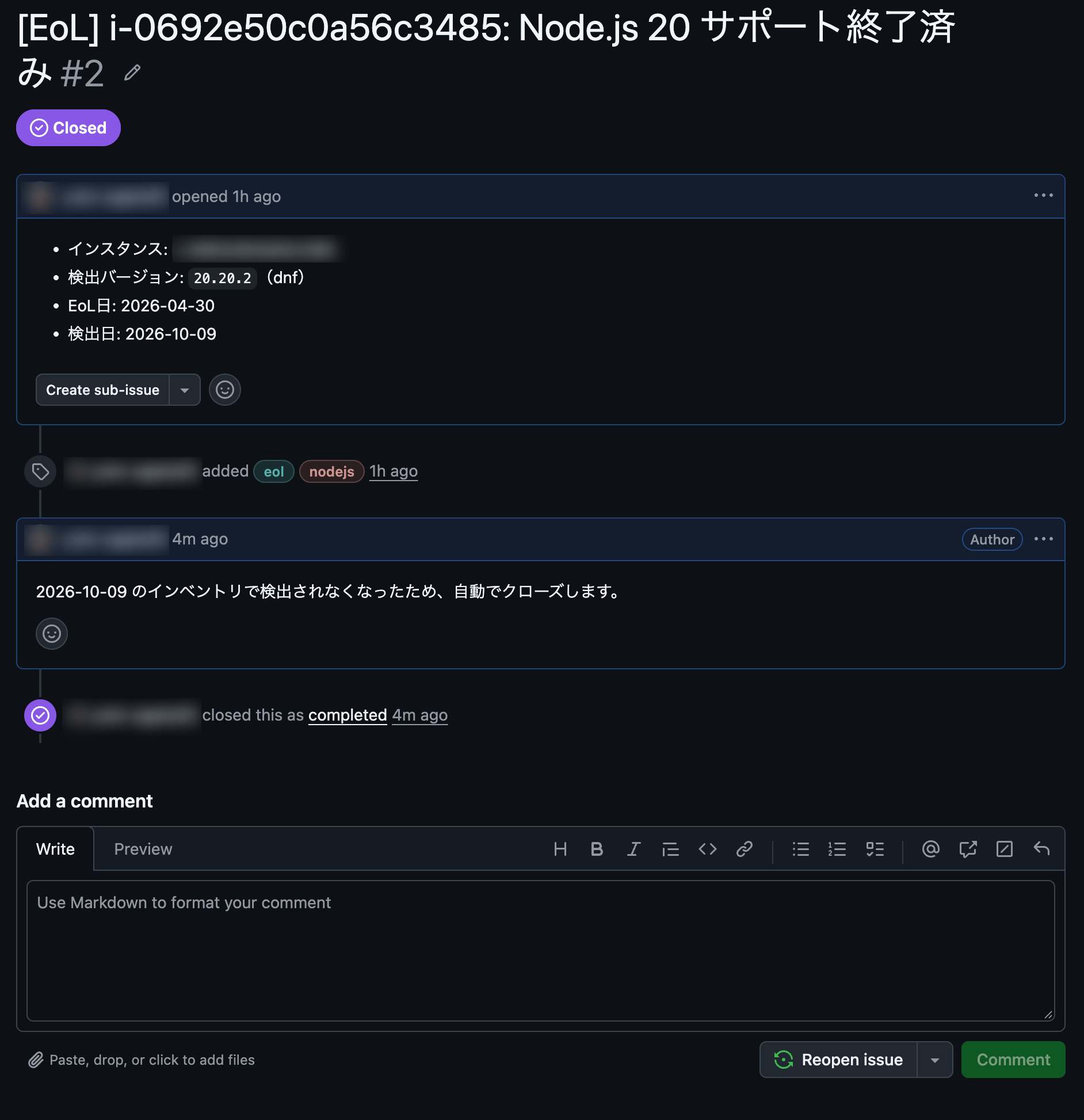
The comment content is: "Since this was no longer detected in the inventory as of (date), it will be automatically closed." The Issue for web-nvm remains open because it is still on Node.js 20.
The nvm Version (web-nvm) Closes the Same Way
Switch web-nvm to Node.js 22 using nvm as well.
nvm install 22
nvm alias default 22
nvm uninstall 20
The Custom Inventory script rewrites the JSON every 30 minutes. To apply it immediately, I executed the following steps in order:
- Run
eol-nvm-custom-inventorywith "Apply now" (update the JSON) - Run
eol-gather-inventorywith "Apply now" (incorporate into Inventory) - Run Lambda
If these steps are done in reverse order, there is a possibility that the old JSON will be incorporated.
After running Lambda, the Issue for web-nvm was also closed.
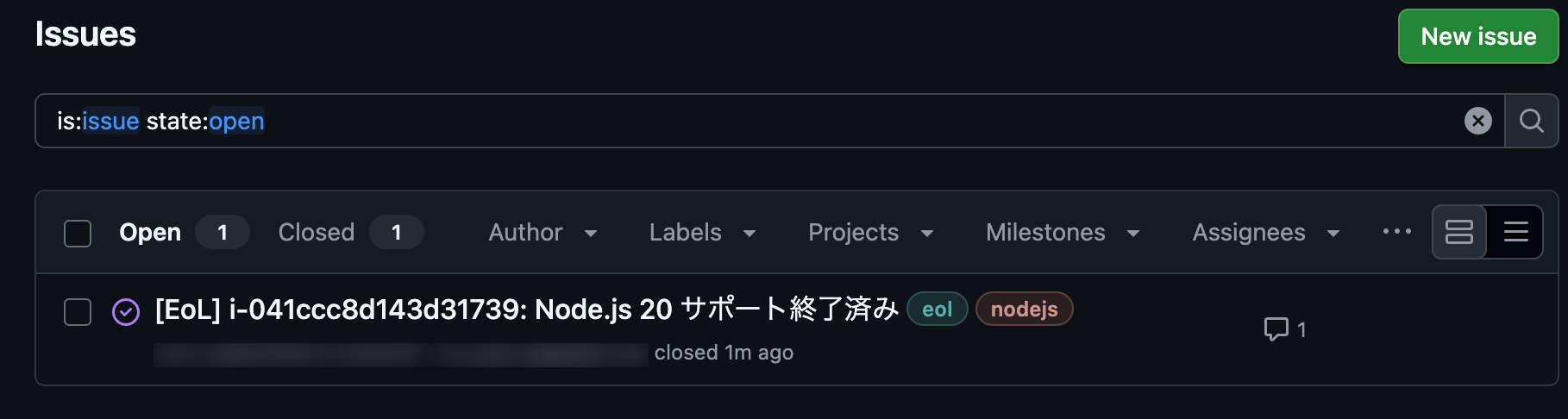
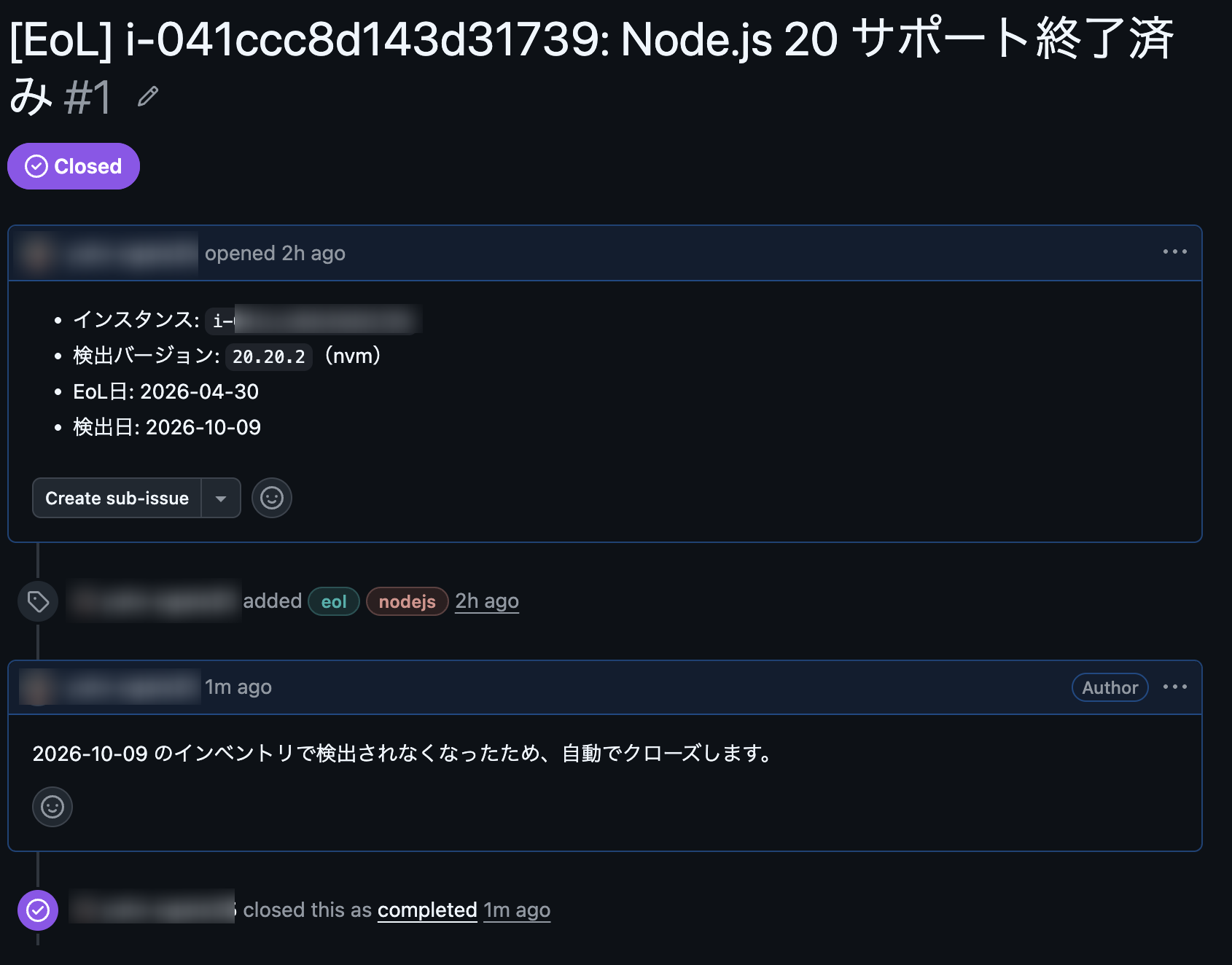
What Changes Compared to Manual Management
Here is a summary of what changes with this system compared to the manual management with an Excel ledger mentioned at the beginning.
| Perspective | Manual Management (Excel Ledger) | This System | This Verification |
|---|---|---|---|
| Inventory | Log in to the server, check the version, and transfer it to the ledger | SSM Inventory collects automatically. No login or transcription required | Confirmed (nvm version requires supplementation) |
| Discrepancy between ledger and reality | Manual entry leads to discrepancies due to missed updates or input errors | Collected from actual machines, so it reflects reality | Considered |
| Understanding EoL | The person in charge checks the EoL date and cross-references it with the ledger | Automatically determined by endoflife.date, and an Issue is filed when it approaches | Confirmed |
| Oversights | If the person checking the ledger doesn't notice, the deadline passes | Items meeting the conditions are filed as Issues | Confirmed (see the next section for the scope of detection) |
| Tracking response status | Recorded separately in the ledger | Issues show whether they are open or closed. Automatically closed upon upgrade | Confirmed |
| Personalization | Work concentrates on the person who updates the ledger | No dependency on specific individuals since the system runs automatically | Considered |
Caveats and Limitations
Here is a summary of potential caveats from this verification, along with proposed countermeasures.
※ Proposed countermeasures are written to the right of "→", but these are ideas that have not yet been tested.
-
Installation methods other than nvm may not be detected. Node.js inside containers will not be detected.
→ Cases where detection fails due to installation method should be addressable by expanding the search paths in the script. Containers would require a separate mechanism such as image scanning. -
Versions with undetermined EoL dates will not be subject to determination. Versions without an EoL date registered in endoflife.date will not result in filed Issues.
→ Notifying with a separate label for "EoL date undetermined" might help prevent oversights. -
Inventory updates are delayed by the collection interval (30 minutes in this case). Issues will not close immediately after a version upgrade.
→ Either shorten the collection interval, or include "run collection" in the version upgrade procedure. -
endoflife.date is an external service. It is subject to the impact of outages or API specification changes.
→ Add a mechanism to send a notification when retrieval fails. -
The handling of Issues when an instance is deleted has not been verified. When it disappears from Inventory, it may be judged as "no longer detected" and the Issue may be closed. There is no way to distinguish between "the response was completed" and "the instance no longer exists."
→ When closing, check whether the instance exists and differentiate the reason for closing in the comment.
Summary
This time, I built a system to detect and track the EoL of software installed on EC2 using SSM Inventory, Lambda, endoflife.date, and GitHub Issues. Through the implementation, I learned the following:
- The manual tasks of inventory-taking, deadline checking, and response status tracking could be replaced with a combination of AWS services and a small amount of code.
- SSM Inventory collects items registered with package management. Node.js installed via nvm was not picked up and needed to be supplemented with Custom Inventory.
- By connecting Issue filing through to automatic closure after a version upgrade, you can see what needs attention and what has been addressed without having to check the ledger manually.
I hope this article serves as a reference for EoL management!
