How to Choose a Connection Method for EC2: A Comparison of Session Manager and EC2 Instance Connect

This page has been translated by machine translation. View original
Hello, I'm Simon from the Consulting Department.
Have you ever wanted to choose a connection method for EC2 with a clear rationale? I have.
The most common EC2 connection methods are Amazon EC2 Instance Connect and Session Manager. Whichever you choose, the experience of opening a shell in a browser, sending commands, and viewing results is nearly the same. However, they differ in the logs they retain, the preparation required beforehand, and the costs involved.
This article compares three connection paths for Linux instances: Session Manager, EC2 Instance Connect Endpoint (hereafter, EIC Endpoint), and EC2 Instance Connect via public IP.
Conclusion
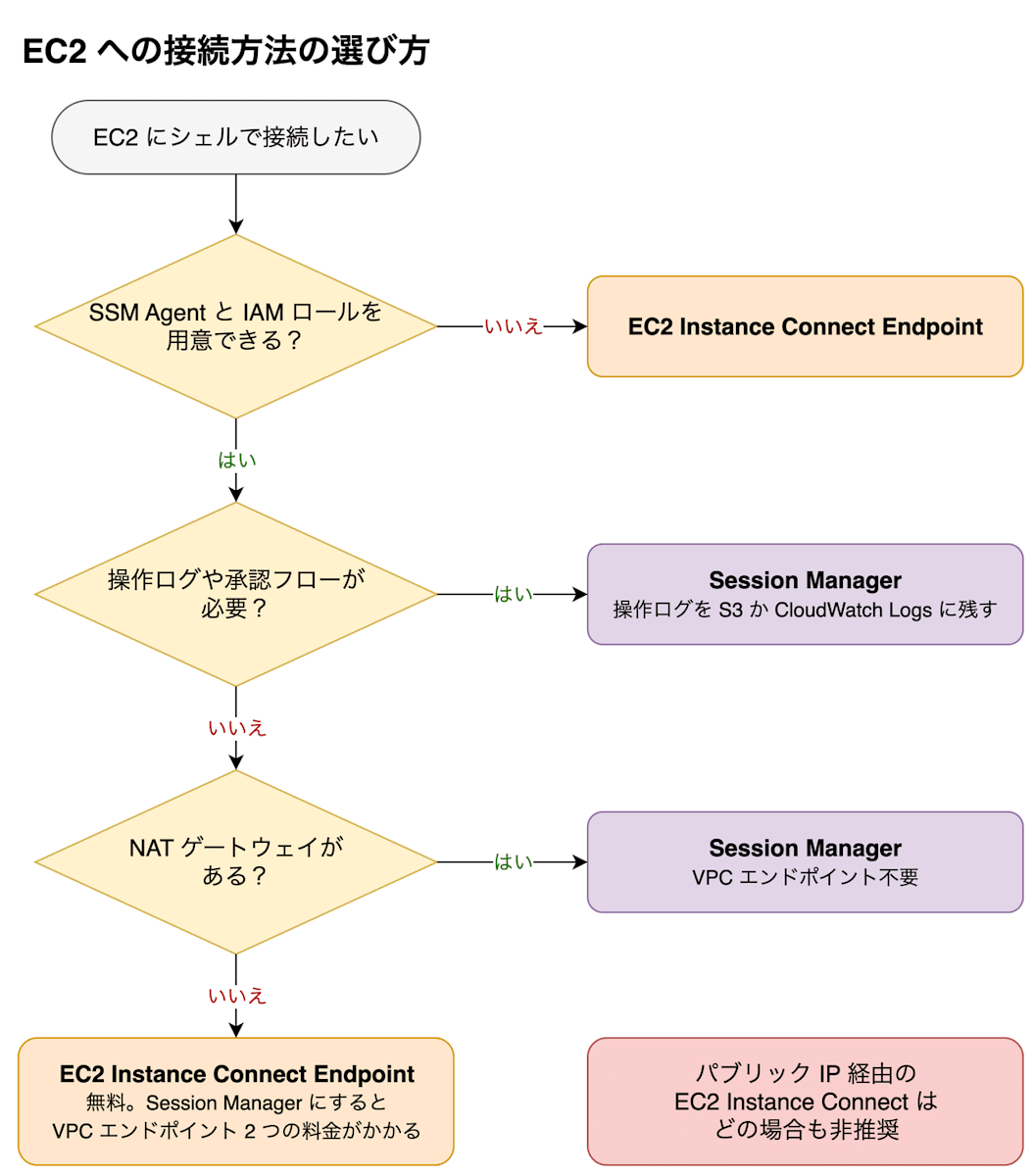
- Use Session Manager as your default. You can connect without opening inbound ports on the instance and can retain logs of input commands and their output (operation logs)
- If you cannot prepare an SSM Agent or IAM role on the instance, use EIC Endpoint
- In private subnets without a NAT gateway where operation logs are not needed, choose EIC Endpoint on cost grounds. EIC Endpoint is free, while Session Manager incurs hourly charges for 2 VPC endpoints × number of AZs. However, EIC Endpoint is limited to 20 simultaneous connections. If this limit is not sufficient, choose Session Manager
- SSH tools such as scp and VS Code Remote SSH can be used with nearly identical SSH configurations on either path. The configuration difference is not a reason to choose one over the other
- EC2 Instance Connect via public IP is not recommended because sshd before login is exposed to the internet
| Criteria | Session Manager | EC2 Instance Connect Endpoint | (Reference) EC2 Instance Connect (via public IP) |
|---|---|---|---|
| Operation logs | Can be stored in Amazon S3 or Amazon CloudWatch Logs. Approval workflows can also be added (paid) | Not retained | Not retained |
| SSH tools | Can be used with ProxyCommand configuration and a key pair. Operation logs are not retained | Same as left. Large transfers are throttled | Can be used as normal SSH |
| Instance preparation | SSM Agent and IAM role | Allow port 22 from EIC Endpoint. If using disposable keys, also the EC2 Instance Connect package | EC2 Instance Connect package, public IP, allow port 22 from the internet |
| Surrounding preparation | 2 VPC endpoints if no NAT gateway | 1 EIC Endpoint | Internet gateway |
| Number of concurrent users | Session start limited to 3 times per second | Up to 20 simultaneous connections per EIC Endpoint | No AWS-side limit |
| Cost | Hourly charge for 2 VPC endpoints × number of AZs if no NAT gateway | Free | Hourly charge for public IPv4 address |
How the Three Connection Paths Work
Session Manager
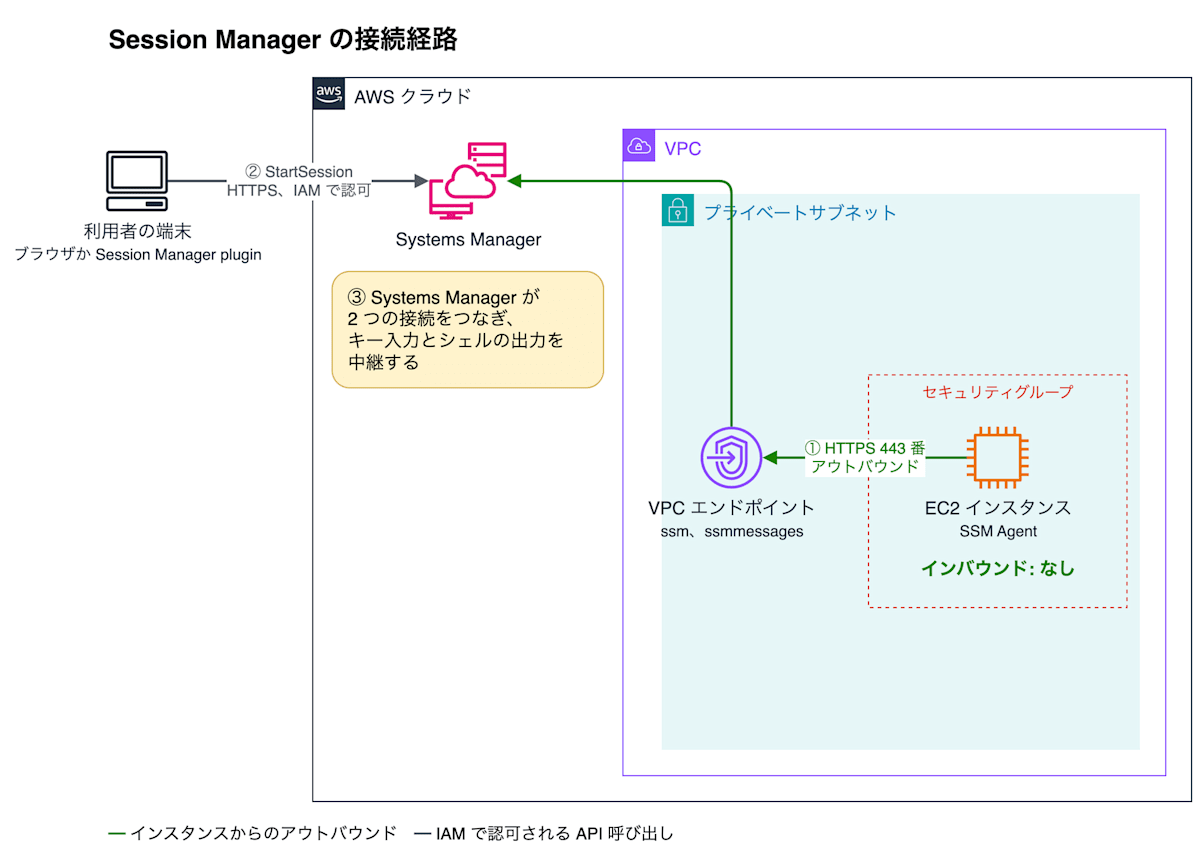
The SSM Agent establishes an outbound connection to Systems Manager when the instance starts, and waits for instructions over that connection.
When a user receives IAM authorization and starts a session, Systems Manager notifies the agent to start the session through this connection. The agent then establishes an additional outbound connection to Systems Manager for the session. The user's terminal (browser or Session Manager plugin) also connects to Systems Manager via HTTPS.
Systems Manager relays the user's keystrokes to the agent and the shell output back to the user. Because the agent inside the instance initiates the connection and retrieves the relayed information, there is no inbound connection to the instance, and no inbound rules are needed in the security group. The shell session does not use sshd either.
EC2 Instance Connect Endpoint
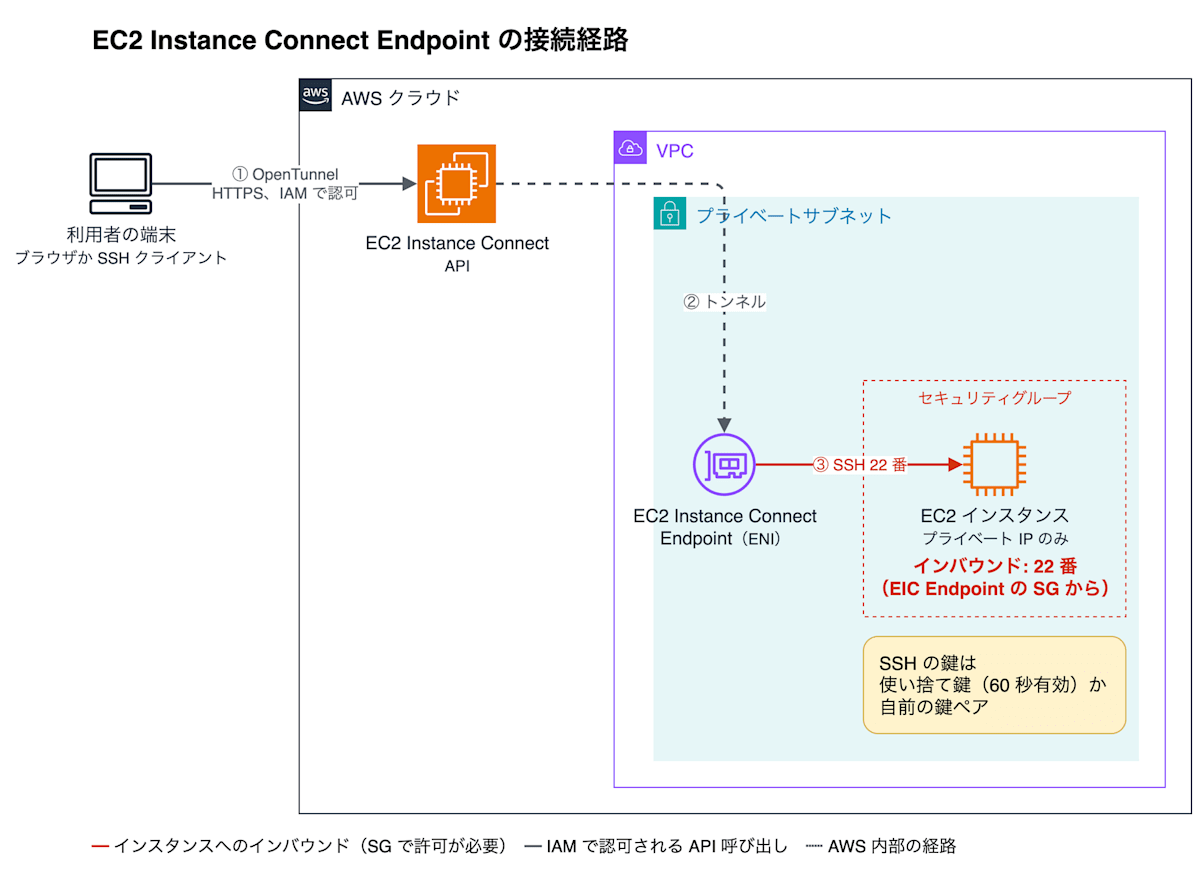
When a user initiates a connection and receives IAM authorization, a tunnel is established through the AWS network to the ENI of the EIC Endpoint inside the VPC. SSH travels through this tunnel and reaches port 22 of the instance's private IP from the ENI.
When connecting via the console or the AWS CLI command aws ec2-instance-connect ssh, a disposable key pair is automatically created and the public key is sent to the instance. This public key is placed in the instance metadata (IMDS) for only 60 seconds, and sshd retrieves and verifies the key from there during login. IMDS is an information gateway accessible only from within the instance and does not traverse the VPC network. You can also use your own key pair instead of a disposable key.
Because traffic goes through a tunnel, no public IP or internet gateway is required. Port 22 on the instance is configured to accept connections only from the EIC Endpoint's security group.
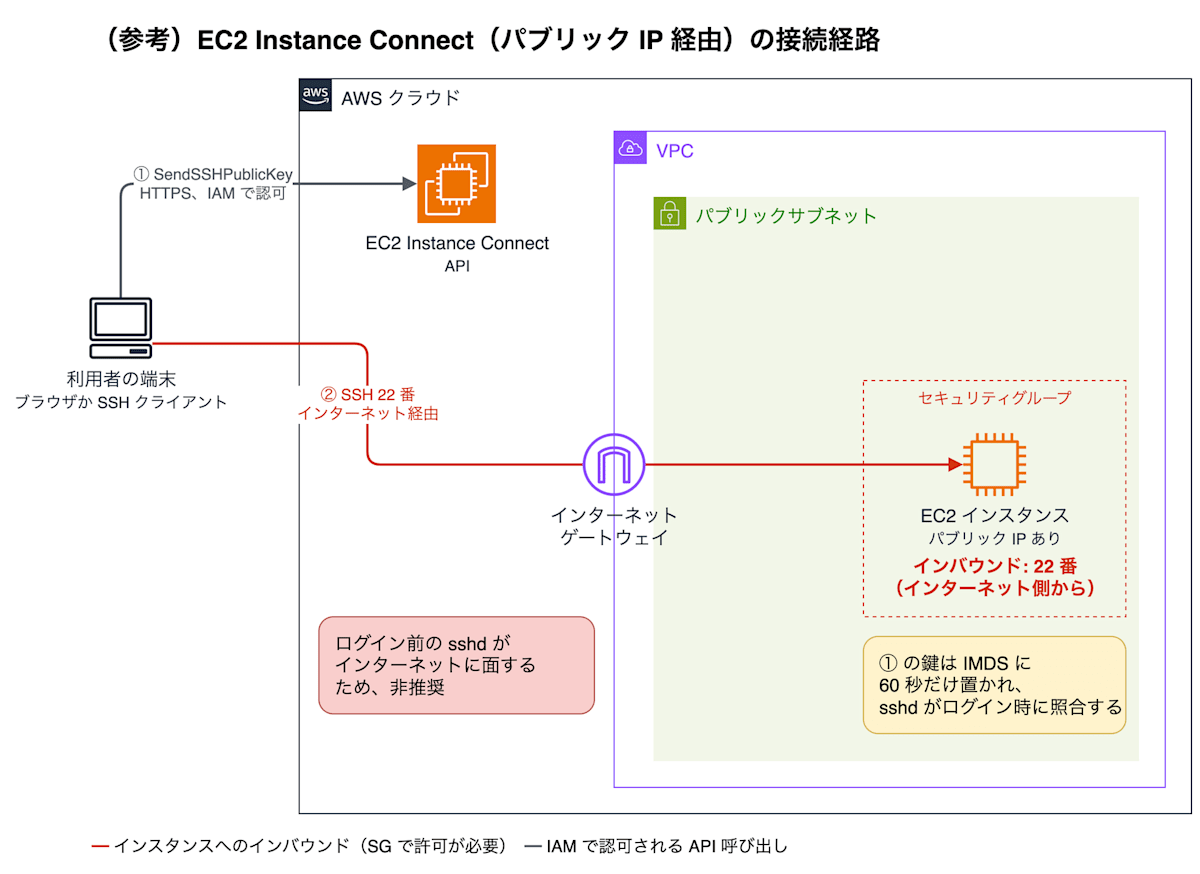
(Reference) EC2 Instance Connect (via public IP)
The mechanism of placing a disposable key in IMDS is the same as with EIC Endpoint. The difference is the SSH path: it goes through an internet gateway and arrives directly at port 22 of the instance's public IP.
This path is not recommended because sshd before login is reachable from the internet. If sshd itself has a vulnerability, an attack can occur before IAM authorization or the disposable key comes into play. A vulnerability disclosed in July 2024 called regreSSHion (CVE-2024-6387) was one where remote code execution without authentication was possible on sshd in some Linux distributions.
You can restrict the source to the managed prefix list for the EC2 Instance Connect service using a security group. Even so, the public IP and port 22 listener remain, and the instance is one security group setting away from being exposed to the internet. Also, this prefix list only permits connections from the browser console. When using the CLI or a local SSH client, you need to open port 22 to your own IP address as well, and the range of permitted sources tends to expand over time in operations. Using EIC Endpoint allows you to get the same SSH experience without exposing it to the internet.
Differences by Criteria
Is it necessary to retain operation logs?
If operation logs are required, choose Session Manager. Of the three paths, only Session Manager can retain both the input commands and their output.
For all paths, what is recorded in AWS CloudTrail is only the API call made when the connection was initiated.
Session Manager operation logs can be configured to be sent to S3 or CloudWatch Logs.
However, even with Session Manager, port forwarding sessions and sessions that relay SSH do not retain operation logs. Work for which you want to retain operation logs should be done in shell sessions without using SSH.
If an approval workflow is needed in addition to operation logs, you can use Systems Manager's just-in-time node access (paid). Only Session Manager allows you to add a request and approval step before connecting.
(Reference) With EC2 Instance Connect via public IP as well, only the API call for sending the public key is recorded in CloudTrail; what was done inside the SSH session is not retained on the AWS side.
Do you want to use SSH tools?
Tools such as scp, rsync, and VS Code Remote SSH can be used with nearly identical configurations on both Session Manager and EIC Endpoint, so you do not need to choose a path based on whether you use SSH tools. However, since EIC Endpoint is intended for administrative traffic and throttles large transfers, it is not suitable for transferring large files.
To use SSH tools from your local machine, write one of the following configurations in ~/.ssh/config on your terminal. Both specify the instance ID as the hostname; the only difference is a single ProxyCommand line.
Host i-*
    User ec2-user
    IdentityFile ~/.ssh/my-key-pair.pem
    ProxyCommand sh -c "aws ssm start-session --target %h --document-name AWS-StartSSHSession --parameters 'portNumber=%p'"
Host i-*
    User ec2-user
    IdentityFile ~/.ssh/my-key-pair.pem
    ProxyCommand aws ec2-instance-connect open-tunnel --instance-id %h
Because you connect via SSH, sshd on the instance is used for both paths. Even with Session Manager, unlike shell sessions, sshd needs to be running. Still, because the agent inside the instance connects to sshd, no inbound rules are required.
Both configurations authenticate using your own key pair specified in IdentityFile. Therefore, managing the distribution, rotation, and revocation of keys becomes the responsibility of those operating the instance. However, since whether a connection is permitted is controlled by IAM for both paths, a leaked key alone is not sufficient to connect.
For both paths, operations performed inside SSH are not retained in operation logs. Because SSH encrypts the content, Session Manager cannot see the content either.
(Reference) EC2 Instance Connect via public IP can be used directly as normal SSH.
What can be prepared in advance?
If you can prepare an SSM Agent and IAM role on the instance, choose Session Manager; if not, choose EIC Endpoint. The major difference in surrounding preparation is that Session Manager alone requires 2 VPC endpoints when there is no NAT gateway.
Instance preparation:
| Aspect | Session Manager | EC2 Instance Connect Endpoint | (Reference) EC2 Instance Connect (via public IP) |
|---|---|---|---|
| Software | SSM Agent (pre-installed on most recent major AMIs) | EC2 Instance Connect package (if using disposable keys; pre-installed on most recent major AMIs) | EC2 Instance Connect package |
| IAM role | Instance profile or DHMC | Not required | Not required |
| Public IP | Not required | Not required | Required |
| Security group | No inbound. Outbound port 443 | Allow port 22 from EIC Endpoint's security group | Allow port 22 from the internet |
Surrounding preparation:
| Aspect | Session Manager | EC2 Instance Connect Endpoint | (Reference) EC2 Instance Connect (via public IP) |
|---|---|---|---|
| What to create in the VPC | 2 VPC endpoints if no NAT gateway | 1 EIC Endpoint | Internet gateway |
| Its security group | VPC endpoint allows port 443 from the instance | EIC Endpoint allows port 22 to the instance | None |
Default Host Management Configuration (DHMC), listed in the IAM role row of the table, is a setting that, once configured at the account and region level, enables Systems Manager features without an instance profile. Even in environments where an IAM role cannot be attached to each instance, you can still choose Session Manager by using DHMC.
Preparation on the operator's side:
Local tools when using from the CLI
- Session Manager: AWS CLI v2 and Session Manager plugin
- EIC Endpoint: AWS CLI v2
- (Reference) EC2 Instance Connect (via public IP): AWS CLI v2
Items that can be restricted in the IAM policy for the person connecting
- Session Manager: target instance, session document, login user on the OS (Run As)
- EIC Endpoint: destination port, destination private IP, connection duration
- (Reference) EC2 Instance Connect (via public IP): target instance, login user on the OS
How many people will use it simultaneously?
If your usage exceeds the EIC Endpoint limit of 20 simultaneous connections, choose Session Manager.
Only one EIC Endpoint can be created per VPC, so all connections to instances within the VPC share a single EIC Endpoint. Simultaneous connections are limited to 20 per EIC Endpoint and cannot be increased. The limit can be reached when used by a team. The Session Manager quota relevant to the number of concurrent users is the rate of session start requests (3 per second).
(Reference) With EC2 Instance Connect via public IP, there is no AWS-side limit on the number of simultaneous users.
How much do you want to reduce costs?
EIC Endpoint can be used at no additional charge. Session Manager is also free for EC2, but in private subnets without a NAT gateway, hourly charges for VPC endpoints apply. If there is a NAT gateway, no new resources need to be created and cost does not factor into the decision.
To use Session Manager in a private subnet without a NAT gateway, you create two interface-type VPC endpoints: ssm and ssmmessages. Charges apply per AZ where the VPC endpoint is placed. In ap-northeast-1, one VPC endpoint in one AZ costs 0.014 USD per hour; placing two in two AZs amounts to 40.88 USD per month (730 hours) (as of October 2026).
(Reference) With EC2 Instance Connect via public IP, charges for the public IPv4 address apply. In ap-northeast-1, the rate is 0.005 USD per hour, amounting to 3.65 USD per month (as of October 2026).
Summary
- Use Session Manager as your default. You can connect without opening inbound ports and can retain operation logs
- When you cannot prepare an SSM Agent or IAM role, or when there is no NAT gateway and operation logs are not needed, use EIC Endpoint. EIC Endpoint is free but has a limit of 20 simultaneous connections
- EC2 Instance Connect via public IP is not recommended
References
How it works and connection methods:
- Overview of EC2 Instance Connect Endpoint
- Connecting using EC2 Instance Connect Endpoint
- SSH connections through Session Manager
- Session Manager operation logs (session logging)
- Default Host Management Configuration
- Installing the Session Manager plugin
- VPC endpoints required for Session Manager
IAM policies and quotas:
- IAM permissions for EC2 Instance Connect Endpoint
- Quick-start policies for Session Manager
- EC2 Instance Connect Endpoint quotas
Pricing:
Vulnerabilities:
