I Tried Building an ECS Express Mode Environment in a VPC Without Public Subnets

This page has been translated by machine translation. View original
With the release of Regional NAT Gateway in November 2025, it has become possible to use a NAT Gateway for internet communication from within a VPC, even in a VPC without public subnets.
This time, I had the opportunity to build an ECS Express Mode environment, released around the same time, on a VPC that has no public subnets and only private subnets with IPv6 enabled. By combining it with CloudFront's VPC origin support, I verified an implementation of a web delivery platform that does not depend on public subnets.
This configuration uses an Internal ALB (managed by Express Mode) and CloudFront VPC Origin to achieve a secure container environment without public IP addresses. This article introduces the CloudFormation templates used for the build and the results of operation checks in the AWS environment.
Preparing the Test Image
As the application for verification, I prepared a simple server using Node.js 22. It implements features such as checking the client's source IP address and health checks. I ran the following script in CloudShell and completed the registration to ECR.
Test Image Creation Script
#!/bin/bash
# CloudShell用ECRテストイメージ作成スクリプト
# ECS Express Mode Test Application

set -e

# 設定値
ACCOUNT_ID=$(aws sts get-caller-identity --query Account --output text)
REGION=${AWS_REGION:-$(aws configure get region 2>/dev/null || echo "ap-northeast-1")}
REPO_NAME="ecs-express-test"
IMAGE_TAG="latest"

echo "=== ECS Express Mode Test Image Setup ==="
echo "Account ID: $ACCOUNT_ID"
echo "Region: $REGION"
echo "Repository: $REPO_NAME"
echo ""

# Docker確認
echo "Docker environment check..."
docker --version
echo ""

# 1. ECRリポジトリ作成
echo "Creating ECR repository..."
aws ecr create-repository \
  --repository-name $REPO_NAME \
  --region $REGION \
  --image-scanning-configuration scanOnPush=true \
  --no-cli-pager 2>/dev/null || echo "Repository already exists"

# 2. テストアプリケーション作成
echo "Creating test application..."
mkdir -p test-app
cd test-app

# package.json作成
cat > package.json << 'EOF'
{
  "name": "ecs-express-test",
  "version": "1.0.0",
  "description": "ECS Test Application (node22)",
  "main": "app.js",
  "scripts": {
    "start": "node app.js"
  }
}
EOF

# app.js作成
cat > app.js << 'EOF'
const http = require('http');
const https = require('https');
const url = require('url');

const port = 3000;

// IPアドレス取得関数(修正版)
function getExternalIP(callback) {
  const options = {
    hostname: 'api64.ipify.org',
    path: '?format=json',
    method: 'GET',
    timeout: 5000
  };

  // コールバックの二重呼び出し防止用フラグ
  let isCalled = false;
  const done = (err, res) => {
    if (isCalled) return;
    isCalled = true;
    callback(err, res);
  };

  const req = https.request(options, (res) => {
    let data = '';
    res.on('data', (chunk) => {
      data += chunk;
    });
    res.on('end', () => {
      try {
        const result = JSON.parse(data);
        done(null, result);
      } catch (error) {
        // ここで生データもログに出しておくとデバッグしやすい
        console.error("Parse Error Data:", data);
        done(error, null);
      }
    });
  });

  req.on('error', (error) => {
    done(error, null);
  });

  req.on('timeout', () => {
    req.destroy();
    done(new Error('Request timeout'), null);
  });

  req.end();
}

const server = http.createServer((req, res) => {
  const parsedUrl = url.parse(req.url, true);

  if (parsedUrl.pathname === '/') {
    res.setHeader('Content-Type', 'application/json');
    res.writeHead(200);
    res.end(JSON.stringify({
      message: 'ECS Test Application (node22)',
      timestamp: new Date().toISOString(),
      hostname: require('os').hostname(),
      environment: process.env.NODE_ENV || 'development',
      version: '1.0.0'
    }, null, 2));
  } else if (parsedUrl.pathname === '/api/health/') {
    res.setHeader('Content-Type', 'application/json');
    res.writeHead(200);
    res.end(JSON.stringify({
      status: 'healthy',
      uptime: process.uptime(),
      memory: process.memoryUsage(),
      timestamp: new Date().toISOString()
    }, null, 2));
  } else if (parsedUrl.pathname === '/api/ipify/') {
    res.setHeader('Content-Type', 'application/json');
    getExternalIP((error, result) => {
      if (error) {
        res.writeHead(500);
        res.end(JSON.stringify({
          error: 'Failed to get external IP',
          message: error.message,
          timestamp: new Date().toISOString()
        }, null, 2));
      } else {
        res.writeHead(200);
        res.end(JSON.stringify({
          ...result,
          timestamp: new Date().toISOString(),
          source: 'api64.ipify.org',
          note: 'ECS Node External IP Address'
        }, null, 2));
      }
    });
  } else if (parsedUrl.pathname === '/robots.txt') {
    res.setHeader('Content-Type', 'text/plain');
    res.writeHead(200);
    res.end('User-agent: *\nDisallow: /');
  } else {
    res.setHeader('Content-Type', 'application/json');
    res.writeHead(404);
    res.end(JSON.stringify({ error: 'Not Found' }));
  }
});

server.listen(port, '0.0.0.0', () => {
  console.log(`ECS Test Application (node22) listening on port ${port}`);
  console.log(`Health check: http://localhost:${port}/api/health/`);
  console.log(`Robots.txt: http://localhost:${port}/robots.txt`);
  console.log(`IP check: http://localhost:${port}/api/ipify/`);
});
EOF

# Dockerfile作成
cat > Dockerfile << 'EOF'
FROM node:22-alpine

# メタデータ
LABEL maintainer="ECS Express Mode Test"
LABEL description="ECS Test Application (node22) with ECS Exec support"

# ECS Exec用の必要なツールをインストール
RUN apk add --no-cache \
    curl \
    ca-certificates \
    bash \
    procps

# アプリケーションディレクトリ作成
WORKDIR /app

# package.jsonをコピーして依存関係をインストール(キャッシュ効率化)
COPY package.json .
# 現在は依存関係なしのため npm install 不要
# RUN npm ci --only=production

# アプリケーションコードをコピー
COPY app.js .

# 非rootユーザーで実行
RUN addgroup -g 1001 -S nodejs
RUN adduser -S nodejs -u 1001
USER nodejs

# ポート3000を公開
EXPOSE 3000

# ヘルスチェック追加
HEALTHCHECK --interval=30s --timeout=3s --start-period=5s --retries=3 \
  CMD curl -f http://localhost:3000/api/health/ || exit 1

# アプリケーション実行
CMD ["npm", "start"]
EOF

# 3. ECR認証
echo "ECR authentication..."
aws ecr get-login-password --region $REGION 2>/dev/null | \
docker login --username AWS --password-stdin \
$ACCOUNT_ID.dkr.ecr.$REGION.amazonaws.com >/dev/null 2>&1

if [ $? -eq 0 ]; then
  echo "ECR authentication successful"
else
  echo "ECR authentication failed"
  exit 1
fi

# 4. Dockerイメージビルド
echo "Building Docker image..."
docker build -t $REPO_NAME:$IMAGE_TAG .

# 5. イメージタグ付け
echo "Tagging image..."
docker tag $REPO_NAME:$IMAGE_TAG \
$ACCOUNT_ID.dkr.ecr.$REGION.amazonaws.com/$REPO_NAME:$IMAGE_TAG

# 6. ECRにプッシュ
echo "Pushing to ECR..."
docker push $ACCOUNT_ID.dkr.ecr.$REGION.amazonaws.com/$REPO_NAME:$IMAGE_TAG

# 7. イメージ情報確認
echo "Checking image information..."
aws ecr describe-images \
  --repository-name $REPO_NAME \
  --region $REGION \
  --query 'imageDetails[0].[imageTags[0],imageSizeInBytes,imagePushedAt]' \
  --output table
AWS Configuration
VPC
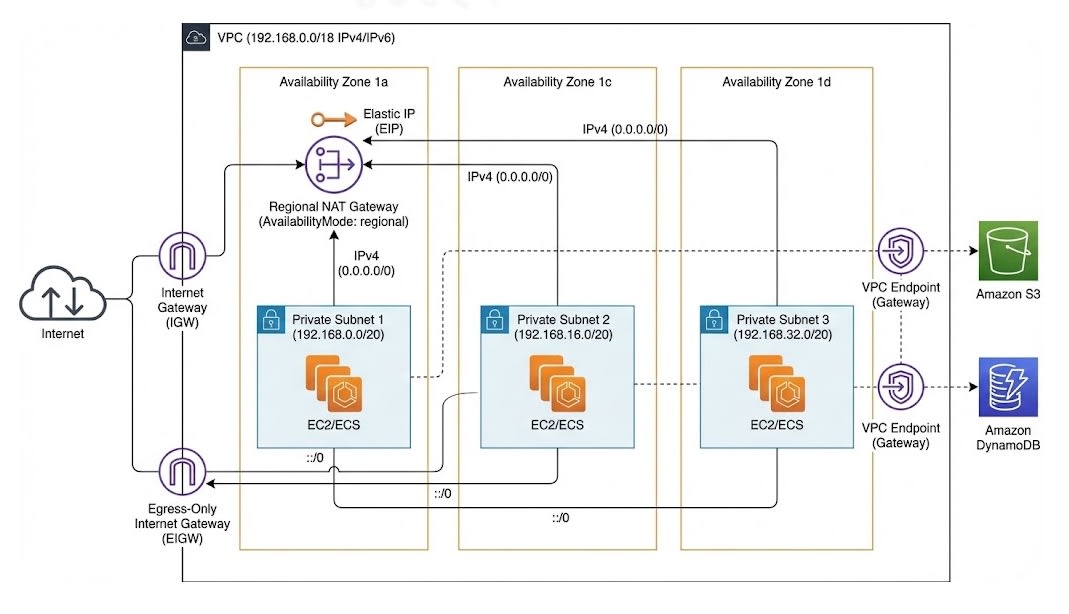
First, I created the foundational VPC.
-
Public-subnetless: It consists only of private subnets that do not accept direct ingress traffic from the internet.
-
Regional NAT Gateway: Normally, a NAT Gateway is placed in each AZ for redundancy, but from the perspective of cost optimization and IPv6 utilization, I placed it in Regional mode in only one AZ (AZ-a). By specifying
AvailabilityMode: regionaland explicitly specifying the AZ to use, I achieved single-AZ usage. -
IPv6 support: I placed an Egress-Only Internet Gateway to enable IPv6 communication.
VPC Creation Template
AWSTemplateFormatVersion: '2010-09-09'
Description: 'ECS Express Mode Test VPC - Complete private VPC with Regional NAT Gateway'

Parameters:
  ProjectName:
    Type: String
    Default: 'ecs-express-vpc'
    Description: 'ECS Express Mode Test VPC - Project name prefix for AWS resources'

Resources:
  # VPC
  VPC:
    Type: AWS::EC2::VPC
    Properties:
      CidrBlock: '192.168.0.0/18'
      EnableDnsHostnames: true
      EnableDnsSupport: true
      Tags:
        - Key: Name
          Value: !Ref ProjectName

  # IPv6 CIDR Block
  IPv6CidrBlock:
    Type: AWS::EC2::VPCCidrBlock
    Properties:
      VpcId: !Ref VPC
      AmazonProvidedIpv6CidrBlock: true

  # プライベートサブネット
  PrivateSubnet1:
    Type: AWS::EC2::Subnet
    DependsOn: IPv6CidrBlock
    Properties:
      VpcId: !Ref VPC
      CidrBlock: '192.168.0.0/20'
      AvailabilityZone: !Select [0, !GetAZs '']
      Ipv6CidrBlock: !Select [0, !Cidr [!Select [0, !GetAtt VPC.Ipv6CidrBlocks], 3, 64]]
      AssignIpv6AddressOnCreation: true
      Tags:
        - Key: Name
          Value: !Sub '${ProjectName}-private-subnet-1a'

  PrivateSubnet2:
    Type: AWS::EC2::Subnet
    DependsOn: IPv6CidrBlock
    Properties:
      VpcId: !Ref VPC
      CidrBlock: '192.168.16.0/20'
      AvailabilityZone: !Select [1, !GetAZs '']
      Ipv6CidrBlock: !Select [1, !Cidr [!Select [0, !GetAtt VPC.Ipv6CidrBlocks], 3, 64]]
      AssignIpv6AddressOnCreation: true
      Tags:
        - Key: Name
          Value: !Sub '${ProjectName}-private-subnet-1c'

  PrivateSubnet3:
    Type: AWS::EC2::Subnet
    DependsOn: IPv6CidrBlock
    Properties:
      VpcId: !Ref VPC
      CidrBlock: '192.168.32.0/20'
      AvailabilityZone: !Select [2, !GetAZs '']
      Ipv6CidrBlock: !Select [2, !Cidr [!Select [0, !GetAtt VPC.Ipv6CidrBlocks], 3, 64]]
      AssignIpv6AddressOnCreation: true
      Tags:
        - Key: Name
          Value: !Sub '${ProjectName}-private-subnet-1d'

  # Internet Gateway (Regional NAT Gateway用)
  InternetGateway:
    Type: AWS::EC2::InternetGateway
    Properties:
      Tags:
        - Key: Name
          Value: !Sub '${ProjectName}-igw'

  # Internet Gateway Attachment
  InternetGatewayAttachment:
    Type: AWS::EC2::VPCGatewayAttachment
    Properties:
      VpcId: !Ref VPC
      InternetGatewayId: !Ref InternetGateway

  # Egress-Only Internet Gateway
  EgressOnlyIGW:
    Type: AWS::EC2::EgressOnlyInternetGateway
    Properties:
      VpcId: !Ref VPC

  # Regional NAT Gateway用 Elastic IP
  NATGatewayEIP:
    Type: AWS::EC2::EIP
    Properties:
      Domain: vpc
      Tags:
        - Key: Name
          Value: !Sub '${ProjectName}-nat-eip'

  # Regional NAT Gateway
  RegionalNATGateway:
    Type: AWS::EC2::NatGateway
    Properties:
      AvailabilityMode: regional
      ConnectivityType: public
      VpcId: !Ref VPC
      AvailabilityZoneAddresses:
        - AvailabilityZone: !Select [0, !GetAZs '']
          AllocationIds:
            - !GetAtt NATGatewayEIP.AllocationId
      Tags:
        - Key: Name
          Value: !Sub '${ProjectName}-regional-nat-gw'

  # プライベートルートテーブル
  PrivateRouteTable:
    Type: AWS::EC2::RouteTable
    Properties:
      VpcId: !Ref VPC
      Tags:
        - Key: Name
          Value: !Sub '${ProjectName}-private-rt'

  # IPv4 NAT Gateway ルート
  PrivateRouteIPv4:
    Type: AWS::EC2::Route
    Properties:
      RouteTableId: !Ref PrivateRouteTable
      DestinationCidrBlock: '0.0.0.0/0'
      NatGatewayId: !Ref RegionalNATGateway

  # IPv6 Egress-Only ルート
  PrivateRouteIPv6:
    Type: AWS::EC2::Route
    Properties:
      RouteTableId: !Ref PrivateRouteTable
      DestinationIpv6CidrBlock: '::/0'
      EgressOnlyInternetGatewayId: !Ref EgressOnlyIGW

  # サブネット関連付け
  PrivateSubnet1Association:
    Type: AWS::EC2::SubnetRouteTableAssociation
    Properties:
      SubnetId: !Ref PrivateSubnet1
      RouteTableId: !Ref PrivateRouteTable

  PrivateSubnet2Association:
    Type: AWS::EC2::SubnetRouteTableAssociation
    Properties:
      SubnetId: !Ref PrivateSubnet2
      RouteTableId: !Ref PrivateRouteTable

  PrivateSubnet3Association:
    Type: AWS::EC2::SubnetRouteTableAssociation
    Properties:
      SubnetId: !Ref PrivateSubnet3
      RouteTableId: !Ref PrivateRouteTable

  # VPCエンドポイント - S3
  S3Endpoint:
    Type: AWS::EC2::VPCEndpoint
    Properties:
      VpcId: !Ref VPC
      ServiceName: !Sub 'com.amazonaws.${AWS::Region}.s3'
      VpcEndpointType: Gateway
      RouteTableIds:
        - !Ref PrivateRouteTable

  # VPCエンドポイント - DynamoDB
  DynamoDBEndpoint:
    Type: AWS::EC2::VPCEndpoint
    Properties:
      VpcId: !Ref VPC
      ServiceName: !Sub 'com.amazonaws.${AWS::Region}.dynamodb'
      VpcEndpointType: Gateway
      RouteTableIds:
        - !Ref PrivateRouteTable

Outputs:
  VPCId:
    Description: 'VPC ID'
    Value: !Ref VPC
    Export:
      Name: !Sub '${ProjectName}-vpc-id'

  PrivateSubnet1Id:
    Description: 'Private Subnet 1 ID'
    Value: !Ref PrivateSubnet1
    Export:
      Name: !Sub '${ProjectName}-private-subnet-1-id'

  PrivateSubnet2Id:
    Description: 'Private Subnet 2 ID'
    Value: !Ref PrivateSubnet2
    Export:
      Name: !Sub '${ProjectName}-private-subnet-2-id'

  PrivateSubnet3Id:
    Description: 'Private Subnet 3 ID'
    Value: !Ref PrivateSubnet3
    Export:
      Name: !Sub '${ProjectName}-private-subnet-3-id'

  RegionalNATGatewayId:
    Description: 'Regional NAT Gateway ID'
    Value: !Ref RegionalNATGateway
    Export:
      Name: !Sub '${ProjectName}-regional-nat-gw-id'
ECS and CloudFront
-
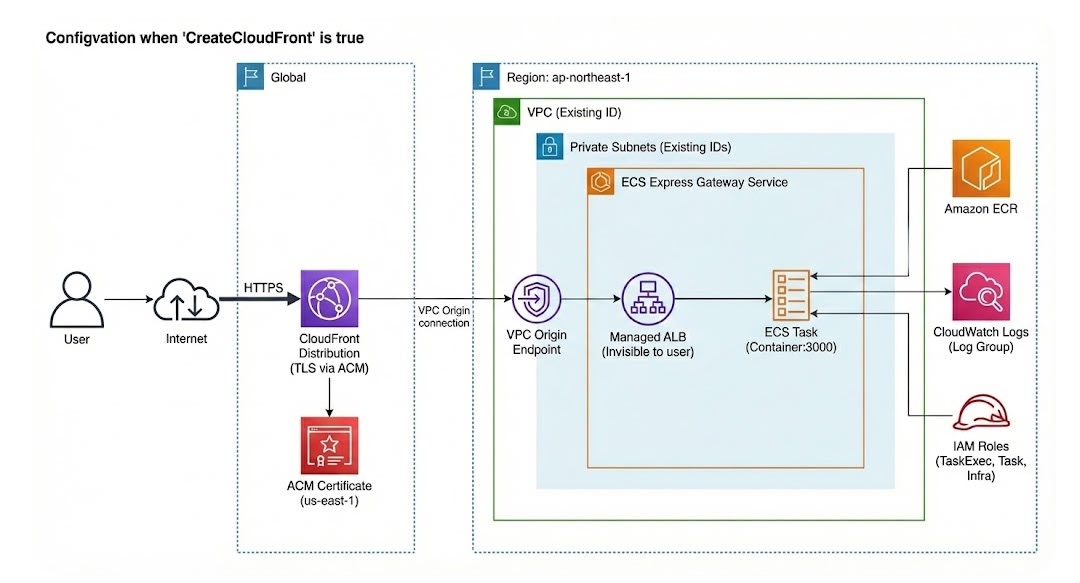
Express Mode: AWS::ECS::ExpressGatewayServiceresource was used to create the Express service. -
Internal ALB: By specifying private subnets, an Internal ALB was automatically provisioned by Express Mode.
-
CloudFront VPC Origin: To enable connections from CloudFront to the Internal ALB, I created a VPC Origin (AWS::CloudFront::VpcOrigin). The load balancer ARN of Express Mode is specified as the target.
Template for Creating the Initial ECS and CloudFront
AWSTemplateFormatVersion: '2010-09-09'
Description: 'ECS Express Mode Service - CloudFormation equivalent of CLI creation'

Parameters:
  ServiceName:
    Type: String
    Default: 'ecs-express-initial'
    Description: 'Service name for resources'

  ContainerImage:
    Type: String
    Default: '****.dkr.ecr.ap-northeast-1.amazonaws.com/ecs-express-test:latest'
    Description: 'Container image URI'

  VPCId:
    Type: AWS::EC2::VPC::Id
    Default: 'vpc-****'
    Description: 'VPC ID for the ECS service'

  PrivateSubnets:
    Type: List<AWS::EC2::Subnet::Id>
    Default: 'subnet-****,subnet-****,subnet-****'
    Description: 'Private subnet IDs (comma-separated)'

  CreateCloudFront:
    Type: String
    Default: 'false'
    AllowedValues: ['true', 'false']
    Description: 'Create CloudFront Distribution (true/false)'

Conditions:
  ShouldCreateCloudFront: !Equals [!Ref CreateCloudFront, 'true']

Resources:
  # CloudWatch Log Group
  ECSLogGroup:
    Type: AWS::Logs::LogGroup
    Properties:
      LogGroupName: !Sub '/aws/ecs/default/${ServiceName}-service'
      RetentionInDays: 14

  # IAM Role for ECS Task Execution
  ECSTaskExecutionRole:
    Type: AWS::IAM::Role
    Properties:
      RoleName: !Sub '${ServiceName}-task-execution-role'
      AssumeRolePolicyDocument:
        Version: '2012-10-17'
        Statement:
          - Effect: Allow
            Principal:
              Service: ecs-tasks.amazonaws.com
            Action: sts:AssumeRole
      ManagedPolicyArns:
        - arn:aws:iam::aws:policy/service-role/AmazonECSTaskExecutionRolePolicy

  # IAM Role for Task (SSM permissions for ECS Exec)
  ECSTaskRole:
    Type: AWS::IAM::Role
    Properties:
      RoleName: !Sub '${ServiceName}-task-role'
      AssumeRolePolicyDocument:
        Version: '2012-10-17'
        Statement:
          - Effect: Allow
            Principal:
              Service: ecs-tasks.amazonaws.com
            Action: sts:AssumeRole
      Policies:
        - PolicyName: ECSExecPolicy
          PolicyDocument:
            Version: '2012-10-17'
            Statement:
              - Effect: Allow
                Action:
                  - ssmmessages:CreateControlChannel
                  - ssmmessages:CreateDataChannel
                  - ssmmessages:OpenControlChannel
                  - ssmmessages:OpenDataChannel
                Resource: "*"

  # IAM Role for ECS Infrastructure with additional permissions
  ECSInfrastructureRole:
    Type: AWS::IAM::Role
    Properties:
      RoleName: !Sub '${ServiceName}-infrastructure-role'
      AssumeRolePolicyDocument:
        Version: '2012-10-17'
        Statement:
          - Effect: Allow
            Principal:
              Service: ecs.amazonaws.com
            Action: sts:AssumeRole
      ManagedPolicyArns:
        - arn:aws:iam::aws:policy/service-role/AmazonECSInfrastructureRoleforExpressGatewayServices
      Policies:
        - PolicyName: AdditionalAutoScalingPermissions
          PolicyDocument:
            Version: '2012-10-17'
            Statement:
              - Effect: Allow
                Action:
                  - application-autoscaling:DeregisterScalableTarget
                  - application-autoscaling:DeleteScalingPolicy
                  - application-autoscaling:DescribeScalableTargets
                  - application-autoscaling:DescribeScalingPolicies
                Resource: '*'

  # ECS Express Mode Service
  ExpressModeService:
    Type: AWS::ECS::ExpressGatewayService
    DependsOn: ECSLogGroup
    Properties:
      ServiceName: !Sub '${ServiceName}-service'
      Cluster: 'default'
      ExecutionRoleArn: !GetAtt ECSTaskExecutionRole.Arn
      InfrastructureRoleArn: !GetAtt ECSInfrastructureRole.Arn
      TaskRoleArn: !GetAtt ECSTaskRole.Arn

      # Primary Container Configuration
      PrimaryContainer:
        Image: !Ref ContainerImage
        ContainerPort: 3000
        AwsLogsConfiguration:
          LogGroup: !Sub '/aws/ecs/default/${ServiceName}-service'
          LogStreamPrefix: 'ecs'

      # Network Configuration
      NetworkConfiguration:
        Subnets: !Ref PrivateSubnets

      # Resource Allocation
      Cpu: '1024'
      Memory: '2048'

      # Health Check
      HealthCheckPath: '/api/health/'

      # Auto Scaling Configuration
      ScalingTarget:
        MinTaskCount: 1
        MaxTaskCount: 3
        AutoScalingMetric: 'AVERAGE_CPU'
        AutoScalingTargetValue: 60

      # Tags
      Tags:
        - Key: Name
          Value: !Sub '${ServiceName}-express-service'
        - Key: Environment
          Value: 'development'
        - Key: Project
          Value: !Ref ServiceName

  # CloudFront VPC Origin for Express Mode ALB
  ExpressModeVpcOrigin:
    Type: AWS::CloudFront::VpcOrigin
    Properties:
      VpcOriginEndpointConfig:
        Name: !Sub '${ServiceName}-initial-origin'
        Arn: !GetAtt ExpressModeService.ECSManagedResourceArns.IngressPath.LoadBalancerArn
        HTTPPort: 80
        HTTPSPort: 443
        OriginProtocolPolicy: 'https-only'

  # CloudFront Distribution
  CloudFrontDistribution:
    Type: AWS::CloudFront::Distribution
    Condition: ShouldCreateCloudFront
    Properties:
      DistributionConfig:
        Comment: !Sub 'CloudFront for ${ServiceName} - ${ExpressModeService.Endpoint}'
        Enabled: true
        HttpVersion: http2and3
        IPV6Enabled: true

        # Custom Domain Configuration
        Aliases:
          - !Sub '${ServiceName}.developers.io'

        ViewerCertificate:
          AcmCertificateArn: 'arn:aws:acm:us-east-1:****:certificate/9bfb09c0-88aa-48e9-8685-5a176271dc91'
          SslSupportMethod: sni-only
          MinimumProtocolVersion: TLSv1.2_2021

        # VPC Origin Configuration
        Origins:
          - Id: VPCOrigin
            DomainName: !GetAtt ExpressModeService.Endpoint
            VpcOriginConfig:
              VpcOriginId: !Ref ExpressModeVpcOrigin

        # Default Cache Behavior
        DefaultCacheBehavior:
          TargetOriginId: VPCOrigin
          ViewerProtocolPolicy: https-only
          Compress: true

          # Cache Settings
          MinTTL: 0
          DefaultTTL: 60
          MaxTTL: 120
          ForwardedValues:
            QueryString: true
            Cookies:
              Forward: none

      Tags:
        - Key: Name
          Value: !Sub '${AWS::StackName}-distribution'

Outputs:
  ServiceEndpoint:
    Description: 'ECS Express Mode Service Endpoint'
    Value: !GetAtt ExpressModeService.Endpoint
    Export:
      Name: !Sub '${AWS::StackName}-ServiceEndpoint'

  TaskExecutionRoleArn:
    Description: 'ECS Task Execution Role ARN'
    Value: !GetAtt ECSTaskExecutionRole.Arn
    Export:
      Name: !Sub '${AWS::StackName}-TaskExecutionRoleArn'

  InfrastructureRoleArn:
    Description: 'ECS Infrastructure Role ARN'
    Value: !GetAtt ECSInfrastructureRole.Arn
    Export:
      Name: !Sub '${AWS::StackName}-InfrastructureRoleArn'

  TaskRoleArn:
    Description: 'ECS Task Role ARN'
    Value: !GetAtt ECSTaskRole.Arn
    Export:
      Name: !Sub '${AWS::StackName}-TaskRoleArn'

  PrivateSubnets:
    Description: 'Private Subnet IDs'
    Value: !Join [',', !Ref PrivateSubnets]
    Export:
      Name: !Sub '${AWS::StackName}-PrivateSubnets'

  VPCOriginArn:
    Description: 'CloudFront VPC Origin ARN'
    Value: !Ref ExpressModeVpcOrigin
    Export:
      Name: !Sub '${AWS::StackName}-VPCOriginArn'

  VPCId:
    Description: 'VPC ID'
    Value: !Ref VPCId
    Export:
      Name: !Sub '${AWS::StackName}-VPCId'

  CloudFrontDistributionId:
    Condition: ShouldCreateCloudFront
    Description: 'CloudFront Distribution ID'
    Value: !Ref CloudFrontDistribution

  CloudFrontDomainName:
    Condition: ShouldCreateCloudFront
    Description: 'CloudFront Distribution Domain Name'
    Value: !GetAtt CloudFrontDistribution.DomainName

  CloudFrontURL:
    Condition: ShouldCreateCloudFront
    Description: 'CloudFront Distribution URL'
    Value: !Sub 'https://${CloudFrontDistribution.DomainName}'

  CustomDomainURL:
    Description: 'Custom Domain URL'
    Value: !Sub 'https://${ServiceName}.developers.io'
Adding an Express Service
-
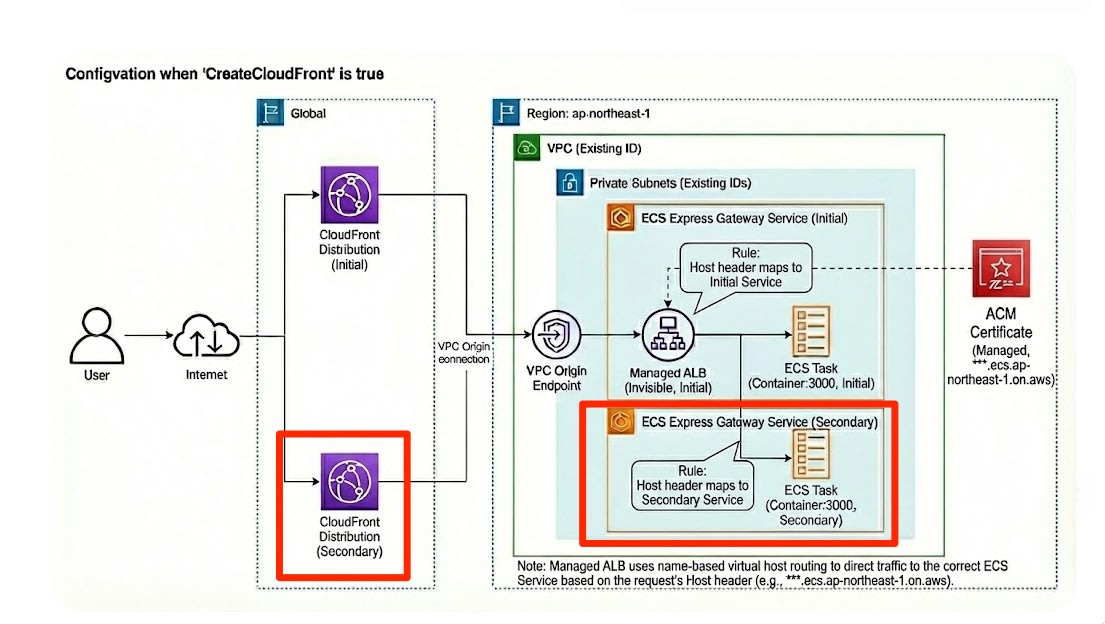
Sharing the ELB: When adding an Express service, specifying the same subnets as the first service results in the existing ALB being shared.
-
Routing: While reusing the CloudFront origin settings, I set the application URL issued for each Express service (de-***.ecs.<region>.on.aws) as the target.
Template for Adding an Express Service
AWSTemplateFormatVersion: '2010-09-09'
Description: 'ECS Express Mode Secondary Service - References initial template resources'

Parameters:
  ServiceName:
    Type: String
    Default: 'ecs-express-secondary'
    Description: 'Service name for resources'

  InitialStackName:
    Type: String
    Default: 'ecs-express-initial'
    Description: 'Initial stack name to reference VPC and IAM roles'

  ContainerImage:
    Type: String
    Default: '****.dkr.ecr.ap-northeast-1.amazonaws.com/ecs-express-test:latest'
    Description: 'Container image URI'

  ContainerPort:
    Type: Number
    Default: 3000
    Description: 'Container port number'

  CreateCloudFront:
    Type: String
    Default: 'false'
    AllowedValues: ['true', 'false']
    Description: 'Create CloudFront Distribution (true/false)'

Conditions:
  ShouldCreateCloudFront: !Equals [!Ref CreateCloudFront, 'true']

Resources:
  # CloudWatch Log Group
  ECSLogGroup:
    Type: AWS::Logs::LogGroup
    Properties:
      LogGroupName: !Sub '/aws/ecs/default/${ServiceName}-service'
      RetentionInDays: 14

  # ECS Express Mode Service
  ExpressModeService:
    Type: AWS::ECS::ExpressGatewayService
    DependsOn: ECSLogGroup
    Properties:
      ServiceName: !Sub '${ServiceName}-service'
      Cluster: 'default'
      ExecutionRoleArn:
        Fn::ImportValue: !Sub '${InitialStackName}-TaskExecutionRoleArn'
      InfrastructureRoleArn:
        Fn::ImportValue: !Sub '${InitialStackName}-InfrastructureRoleArn'
      TaskRoleArn:
        Fn::ImportValue: !Sub '${InitialStackName}-TaskRoleArn'

      # Primary Container Configuration
      PrimaryContainer:
        Image: !Ref ContainerImage
        ContainerPort: !Ref ContainerPort
        AwsLogsConfiguration:
          LogGroup: !Sub '/aws/ecs/default/${ServiceName}-service'
          LogStreamPrefix: 'ecs'

      # Network Configuration
      NetworkConfiguration:
        Subnets:
          Fn::Split:
            - ','
            - Fn::ImportValue: !Sub '${InitialStackName}-PrivateSubnets'

      # Resource Allocation
      Cpu: '1024'
      Memory: '2048'

      # Health Check
      HealthCheckPath: '/'

      # Auto Scaling Configuration
      ScalingTarget:
        MinTaskCount: 1
        MaxTaskCount: 20
        AutoScalingMetric: 'AVERAGE_CPU'
        AutoScalingTargetValue: 60

      # Tags
      Tags:
        - Key: Name
          Value: !Sub '${ServiceName}-express-service'
        - Key: Environment
          Value: 'development'
        - Key: Project
          Value: !Ref ServiceName

  # CloudFront Distribution
  CloudFrontDistribution:
    Type: AWS::CloudFront::Distribution
    Condition: ShouldCreateCloudFront
    Properties:
      DistributionConfig:
        Comment: !Sub 'CloudFront for ${ServiceName} - ${ExpressModeService.Endpoint}'
        Enabled: true
        HttpVersion: http2and3
        IPV6Enabled: true

        # VPC Origin Configuration
        Origins:
          - Id: VPCOrigin
            DomainName: !GetAtt ExpressModeService.Endpoint
            VpcOriginConfig:
              VpcOriginId:
                Fn::ImportValue: !Sub '${InitialStackName}-VPCOriginArn'

        # Default Cache Behavior
        DefaultCacheBehavior:
          TargetOriginId: VPCOrigin
          ViewerProtocolPolicy: https-only
          Compress: true

          # Cache Settings
          MinTTL: 0
          DefaultTTL: 60
          MaxTTL: 120
          ForwardedValues:
            QueryString: true
            Cookies:
              Forward: none

      Tags:
        - Key: Name
          Value: !Sub '${AWS::StackName}-distribution'

Outputs:
  ServiceEndpoint:
    Description: 'ECS Express Mode Service Endpoint'
    Value: !GetAtt ExpressModeService.Endpoint

  CloudFrontDistributionId:
    Condition: ShouldCreateCloudFront
    Description: 'CloudFront Distribution ID'
    Value: !Ref CloudFrontDistribution

  CloudFrontDomainName:
    Condition: ShouldCreateCloudFront
    Description: 'CloudFront Distribution Domain Name'
    Value: !GetAtt CloudFrontDistribution.DomainName

  CloudFrontURL:
    Condition: ShouldCreateCloudFront
    Description: 'CloudFront Distribution URL'
    Value: !Sub 'https://${CloudFrontDistribution.DomainName}'
Connectivity Check
For the built environment, I performed connectivity checks from both outside (via CloudFront) and inside (CloudShell within the VPC).
1. Access via CloudFront
I ran curl against the CloudFront domain.
! curl  https://***.cloudfront.net -v
<略>
> GET / HTTP/2
> Host: ***.cloudfront.net
> User-Agent: curl/8.7.1
> Accept: */*
<略>
< via: 1.1 xxxx.cloudfront.net (CloudFront)
<略>
<
{
  "message": "ECS Test Application (node22)",
  "timestamp": "2025-12-14T06:22:24.744Z",
  "hostname": "ip-192-168-**-**.ap-northeast-1.compute.internal",
  "environment": "development",
  "version": "1.0.0"
* Connection #0 to host ***.cloudfront.net left intact
}
The response header contains via: ... (CloudFront), confirming that the response from the application on ECS was returned properly via CloudFront.
2. Access from Inside the VPC (CloudShell)
From CloudShell placed inside the VPC, I made a request directly to the application URL of the Express service.
$ curl  https://**-**.ecs.ap-northeast-1.on.aws  -v
<略>
> GET / HTTP/2
> Host: **-**.ecs.ap-northeast-1.on.aws
> User-Agent: curl/8.11.1
> Accept: */*
>
* Request completely sent off
< HTTP/2 200
< date: Sun, 14 Dec 2025 06:31:42 GMT
< content-type: application/json
<
{
  "message": "ECS Test Application (node22)",
  "timestamp": "2025-12-14T06:31:42.650Z",
  "hostname": "ip-192-168-**-**.ap-northeast-1.compute.internal",
  "environment": "development",
  "version": "1.0.0"
* Connection #0 to host **-**.ecs.ap-northeast-1.on.aws left intact
}
I confirmed that a response was obtained properly via the Internal ALB.
Summary
Through this verification, I confirmed that combining ECS Express Mode and Regional NAT Gateway makes it possible to achieve a reasonable and highly cost-efficient configuration in terms of both operational burden and cost.
Operationally, by using the application URLs issued by Express Mode, a single Internal ALB can be simply shared among multiple services without complex settings such as traditional path-based routing.
In terms of cost, in addition to sharing the ELB, using Internal mode, which incurs no IPv4 public IP address charges, minimizes ELB-related costs. Furthermore, by consolidating the NAT Gateway into a single AZ in regional mode, I judged that, although there is a trade-off with availability design, maintenance costs can be significantly reduced compared to a standard multi-AZ deployment.
In addition, the architecture that limits the external exposure point to CloudFront only by using CloudFront VPC Origin is also excellent in that security measures with AWS WAF can be managed centrally. If you aim to reduce IPv4 address-related costs and VPC endpoint maintenance fees, please try the configuration introduced here.
