[Update] Kubernetes Gateway API Is Now Available in Amazon EKS Auto Mode

This page has been translated by machine translation. View original
Introduction
Hello everyone, this is Akaike.
Have you ever wanted to use the Gateway API with EKS Auto Mode, but didn't want to install and operate the AWS Load Balancer Controller just for that...? I have.
And recently, there was an update that adds Kubernetes Gateway API support to EKS Auto Mode.
Apparently, with this update, you can use the Kubernetes Gateway API just by enabling a setting on the EKS side.
So in this post, I'll summarize the results of enabling the Gateway API on an EKS Auto Mode cluster and trying out various features.
Update Overview
Until now, to use the Gateway API on an Auto Mode cluster, you had to install a controller such as the AWS Load Balancer Controller yourself and handle operations such as version upgrades yourself.
With this update, Auto Mode now provides a controller for the Gateway API. By enabling the Gateway API in the cluster settings, Auto Mode creates ALBs and NLBs just by creating a Gateway or HTTPRoute.
- Main features
- Supports HTTP and gRPC routing, cross-Namespace routing, weighted routing, header-based routing, and automatic discovery of ACM certificates
- Can coexist with existing Ingress and Service (
type: LoadBalancer)
- How to configure
- Setting the cluster's
gatewayApi.crds.managedtotrue(Managed) makes AWS install and manage the Gateway API CRDs - AWS-specific settings such as the scheme are configured with the same extension resources as the AWS Load Balancer Controller (such as
LoadBalancerConfiguration)
- Setting the cluster's
- Cost
- No additional charge (you pay for the load balancers that are created)
Test Environment
- Kubernetes version: 1.37
- Cluster: Created from the management console with custom configuration, with EKS Auto Mode enabled
- Cluster IAM role: The 5 standard managed policies for Auto Mode attached
AmazonEKSClusterPolicy,AmazonEKSComputePolicy,AmazonEKSBlockStoragePolicy,AmazonEKSLoadBalancingPolicy,AmazonEKSNetworkingPolicy
AWS Architecture
The architecture on AWS is as follows.
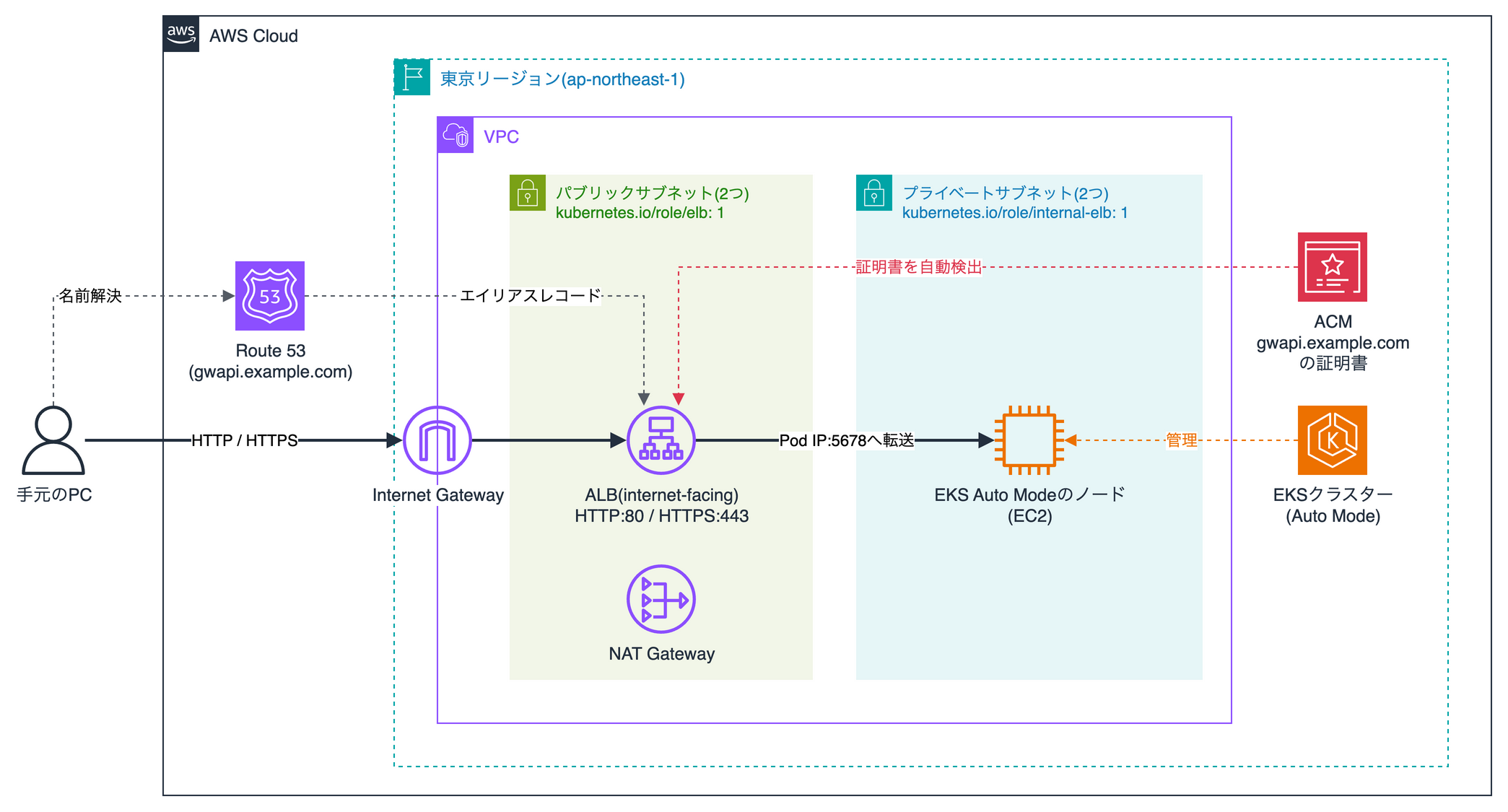
The tags on the subnets in the diagram are used by EKS Auto Mode to choose the subnets in which to place load balancers.
Internet-facing ALBs are created in subnets tagged with kubernetes.io/role/elb: 1, and internal ALBs are created in subnets tagged with kubernetes.io/role/internal-elb: 1.
EKS Cluster Architecture
Next is the architecture inside the EKS cluster.
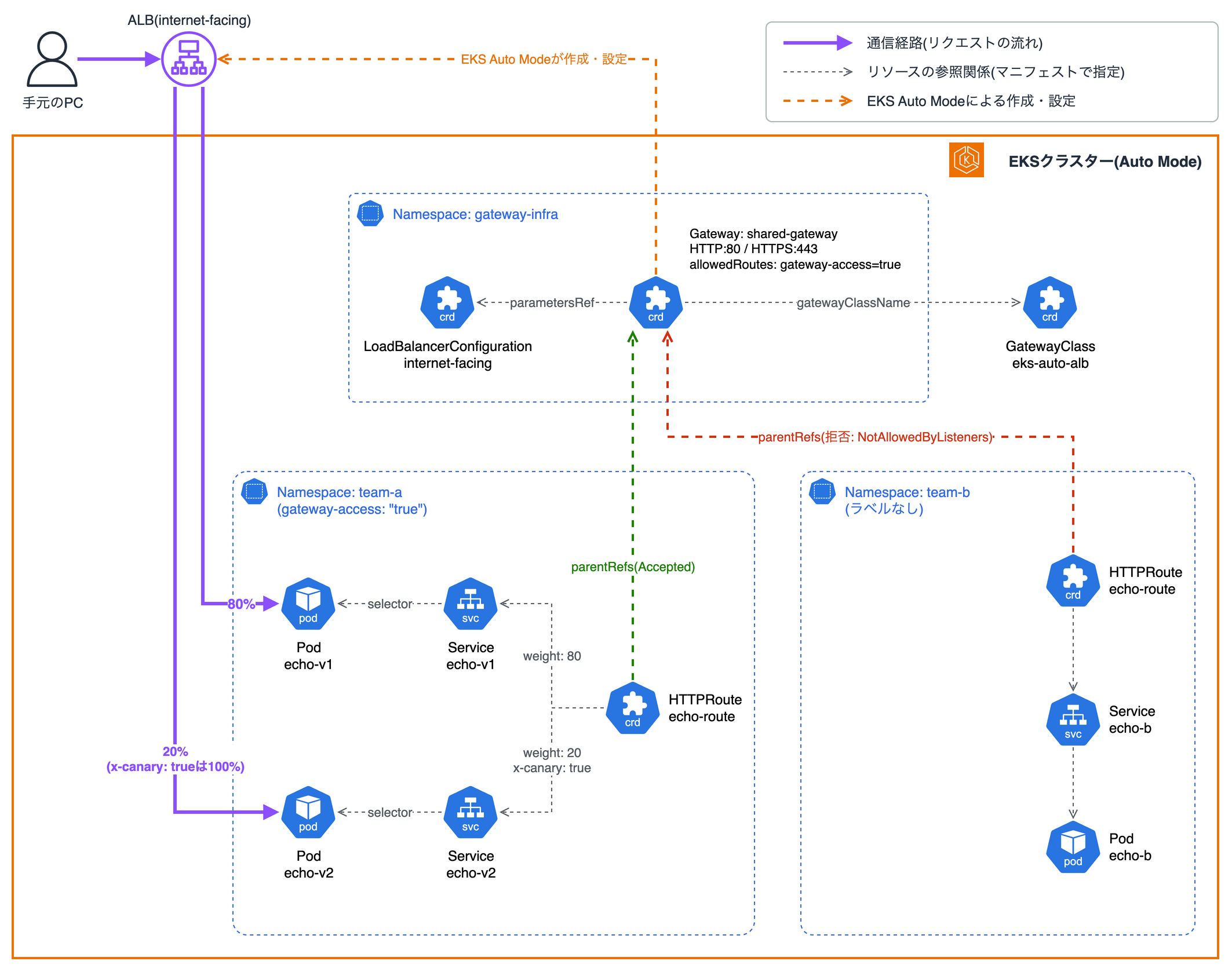
The Gateway is placed in the gateway-infra Namespace for shared infrastructure, and each app creates its HTTPRoute in its own app Namespace.
Also, only the team-a Namespace gets the label gateway-access: "true", which restricts the Namespaces that can attach routes to the Gateway.
For the sample apps, I use hashicorp/http-echo, which simply returns a fixed string, and place echo-v1 and echo-v2 in team-a and echo-b in team-b.
Trying It Out (Up to Creating the Gateway)
First, I'll create an Auto Mode cluster with the Gateway API enabled and confirm that an ALB gets created.
Creating the Cluster
From the management console, create a cluster with EKS Auto Mode enabled using custom configuration.
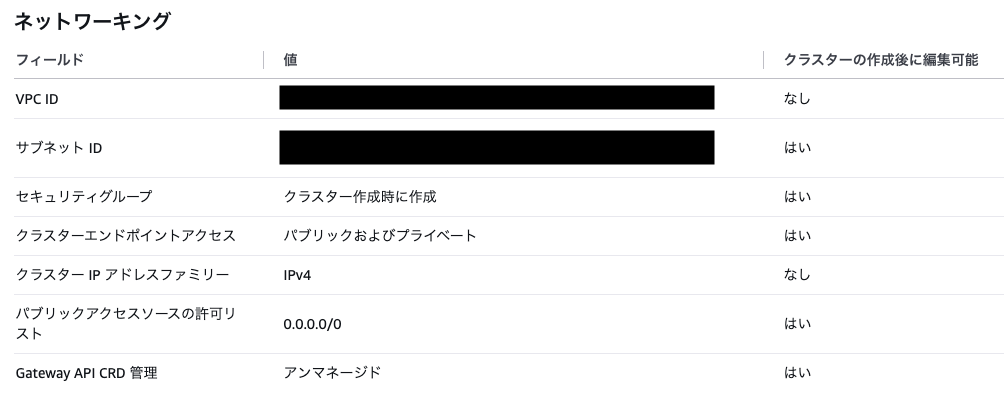
The Gateway API setting is chosen in the "Gateway API CRD management" item.
Unmanaged corresponds to managed: false, and Managed corresponds to managed: true.
This time I chose Managed so that AWS manages the CRDs.

Note that if Auto Mode is disabled, the message "Gateway API CRD management is only available when EKS Auto Mode is enabled." is displayed, and neither option can be selected.
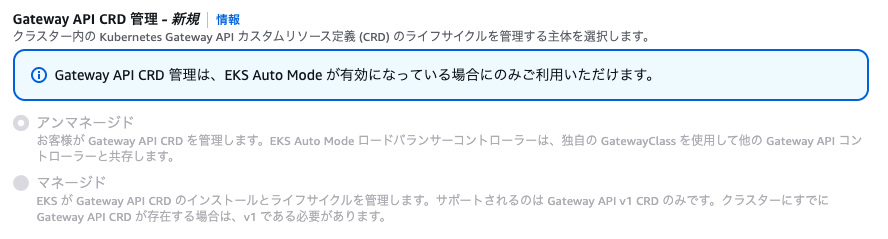
Also, with quick configuration (with EKS Auto Mode), "Gateway API CRD management" was shown as "Unmanaged" in the list of configuration values displayed on the screen.
I couldn't find an option to choose Managed at creation time, so if you create the cluster with quick configuration, it seems you need to change it to Managed after creation.
Checking the Gateway API CRDs
Once the cluster has been created, check whether the Gateway API CRDs are installed.
$ kubectl get crd -o custom-columns='NAME:.metadata.name,BUNDLE:.metadata.annotations.gateway\.networking\.k8s\.io/bundle-version,CHANNEL:.metadata.annotations.gateway\.networking\.k8s\.io/channel' | grep -E 'NAME|gateway'
NAME                                         BUNDLE   CHANNEL
gatewayclasses.gateway.networking.k8s.io     v1.6.0   standard
gateways.gateway.networking.k8s.io           v1.6.0   standard
grpcroutes.gateway.networking.k8s.io         v1.6.0   standard
httproutes.gateway.networking.k8s.io         v1.6.0   standard
listenerruleconfigurations.gateway.k8s.aws   <none>   <none>
listenersets.gateway.networking.k8s.io       v1.6.0   standard
loadbalancerconfigurations.gateway.k8s.aws   <none>   <none>
referencegrants.gateway.networking.k8s.io    v1.6.0   standard
targetgroupconfigurations.gateway.k8s.aws    <none>   <none>
tcproutes.gateway.networking.k8s.io          v1.6.0   standard
tlsroutes.gateway.networking.k8s.io          v1.6.0   standard
udproutes.gateway.networking.k8s.io          v1.6.0   standard
The Gateway API CRDs and the CRDs for the AWS extension resources (gateway.k8s.aws) were installed. The Gateway API CRDs were from the standard channel of v1.6.0.
Let's also look at the annotations on the GatewayClass CRD.
$ kubectl get crd gatewayclasses.gateway.networking.k8s.io -o jsonpath='{.metadata.annotations}' | jq .
{
  "api-approved.kubernetes.io": "https://github.com/kubernetes-sigs/gateway-api/pull/4530",
  "eks.amazonaws.com/managed": "true",
  "gateway.networking.k8s.io/bundle-version": "v1.6.0",
  "gateway.networking.k8s.io/channel": "standard"
}
The annotation eks.amazonaws.com/managed: "true" is attached, so we can tell that these CRDs are managed by AWS.
Deploying the Sample Apps
Next, create the Namespaces and sample apps.
There are three Namespaces: gateway-infra, team-a, and team-b, and only team-a gets the label gateway-access: "true".
apiVersion: v1
kind: Namespace
metadata:
  name: gateway-infra
---
apiVersion: v1
kind: Namespace
metadata:
  name: team-a
  labels:
    gateway-access: "true"
---
apiVersion: v1
kind: Namespace
metadata:
  name: team-b
For the apps, I create echo-v1 and echo-v2 in team-a, and echo-b in team-b.
All three use the same image, with only the returned string changed.
apiVersion: apps/v1
kind: Deployment
metadata:
  name: echo-v1
  namespace: team-a
spec:
  replicas: 1
  selector:
    matchLabels:
      app: echo-v1
  template:
    metadata:
      labels:
        app: echo-v1
    spec:
      containers:
        - name: echo
          image: hashicorp/http-echo:1.0
          args: ["-text=hello from team-a v1"]
          ports:
            - containerPort: 5678
          resources:
            requests:
              cpu: 50m
              memory: 32Mi
---
apiVersion: v1
kind: Service
metadata:
  name: echo-v1
  namespace: team-a
spec:
  selector:
    app: echo-v1
  ports:
    - port: 80
      targetPort: 5678
---
apiVersion: apps/v1
kind: Deployment
metadata:
  name: echo-v2
  namespace: team-a
spec:
  replicas: 1
  selector:
    matchLabels:
      app: echo-v2
  template:
    metadata:
      labels:
        app: echo-v2
    spec:
      containers:
        - name: echo
          image: hashicorp/http-echo:1.0
          args: ["-text=hello from team-a v2"]
          ports:
            - containerPort: 5678
          resources:
            requests:
              cpu: 50m
              memory: 32Mi
---
apiVersion: v1
kind: Service
metadata:
  name: echo-v2
  namespace: team-a
spec:
  selector:
    app: echo-v2
  ports:
    - port: 80
      targetPort: 5678
---
apiVersion: apps/v1
kind: Deployment
metadata:
  name: echo-b
  namespace: team-b
spec:
  replicas: 1
  selector:
    matchLabels:
      app: echo-b
  template:
    metadata:
      labels:
        app: echo-b
    spec:
      containers:
        - name: echo
          image: hashicorp/http-echo:1.0
          args: ["-text=hello from team-b"]
          ports:
            - containerPort: 5678
          resources:
            requests:
              cpu: 50m
              memory: 32Mi
---
apiVersion: v1
kind: Service
metadata:
  name: echo-b
  namespace: team-b
spec:
  selector:
    app: echo-b
  ports:
    - port: 80
      targetPort: 5678
$ kubectl apply -f 00-namespaces.yaml -f 02-apps.yaml
namespace/gateway-infra created
namespace/team-a created
namespace/team-b created
deployment.apps/echo-v1 created
service/echo-v1 created
deployment.apps/echo-v2 created
service/echo-v2 created
deployment.apps/echo-b created
service/echo-b created
After deploying, when I checked the Pods in all Namespaces, only the app Pods were shown.
$ kubectl get pods -A
NAMESPACE   NAME                       READY   STATUS    RESTARTS   AGE
team-a      echo-v1-d747fdc94-6gxzz    1/1     Running   0          71s
team-a      echo-v2-56445bbf74-mvg62   1/1     Running   0          71s
team-b      echo-b-76b465cc87-7zvwv    1/1     Running   0          71s
This also suggests that the Gateway controller does not run as a Pod in the cluster. So it seems users don't need to install or upgrade the controller.
Creating the GatewayClass and Gateway
Now let's finally create the Gateway API resources.
First, create the GatewayClass.
Specify the controller that creates ALBs in controllerName.
apiVersion: gateway.networking.k8s.io/v1
kind: GatewayClass
metadata:
  name: eks-auto-alb
spec:
  controllerName: eks.amazonaws.com/gateway-alb
It's OK if ACCEPTED becomes True.
$ kubectl apply -f 01-gatewayclass.yaml
gatewayclass.gateway.networking.k8s.io/eks-auto-alb created

$ kubectl get gatewayclass
NAME           CONTROLLER                      ACCEPTED   AGE
eks-auto-alb   eks.amazonaws.com/gateway-alb   True       1s
Next, create the Gateway.
The scheme of the ALB created from the Gateway is internal by default, but since I want to access the ALB directly from my local PC this time, I specify scheme: internet-facing in LoadBalancerConfiguration.
Place the LoadBalancerConfiguration in the same Namespace as the Gateway and reference it from the Gateway's spec.infrastructure.parametersRef.
Also, with allowedRoutes, I make it accept only routes from Namespaces labeled gateway-access: "true".
apiVersion: gateway.k8s.aws/v1
kind: LoadBalancerConfiguration
metadata:
  name: internet-facing
  namespace: gateway-infra
spec:
  scheme: internet-facing
---
apiVersion: gateway.networking.k8s.io/v1
kind: Gateway
metadata:
  name: shared-gateway
  namespace: gateway-infra
spec:
  gatewayClassName: eks-auto-alb
  infrastructure:
    parametersRef:
      group: gateway.k8s.aws
      kind: LoadBalancerConfiguration
      name: internet-facing
  listeners:
    - name: http
      protocol: HTTP
      port: 80
      allowedRoutes:
        namespaces:
          from: Selector
          selector:
            matchLabels:
              gateway-access: "true"
Within a few minutes, PROGRAMMED became True and the ALB was created.
The ALB has the internet-facing scheme and was created in the public subnets.
$ kubectl apply -f 03-gateway.yaml
loadbalancerconfiguration.gateway.k8s.aws/internet-facing created
gateway.gateway.networking.k8s.io/shared-gateway created

$ kubectl wait --for=condition=Programmed gateway/shared-gateway -n gateway-infra --timeout=300s
gateway.gateway.networking.k8s.io/shared-gateway condition met

$ kubectl get gateway -n gateway-infra
NAME             CLASS          ADDRESS                                                                       PROGRAMMED   AGE
shared-gateway   eks-auto-alb   k8s-gatewayi-sharedga-f98c6e5eb2-326408971.ap-northeast-1.elb.amazonaws.com   True         4m40s
Trying It Out (Checking Routing and HTTPS)
Next, using the Gateway created so far, I'll try the features introduced in the update announcement.
This time I'll try weighted routing, header-based routing, cross-Namespace routing, and automatic discovery of ACM certificates.
Note that the features I'm trying were already available through the AWS Load Balancer Controller's Gateway API support. Details such as supported fields are summarized in the AWS Load Balancer Controller documentation.
Weighted Routing and Header-Based Routing
Create an HTTPRoute in team-a.
There are two rules:
- Requests with the
x-canary: trueheader are sent toecho-v2 - All other requests are distributed to
echo-v1andecho-v2at a ratio of 80:20
Since the Gateway is in a different Namespace, specify namespace in parentRefs.
apiVersion: gateway.networking.k8s.io/v1
kind: HTTPRoute
metadata:
  name: echo-route
  namespace: team-a
spec:
  parentRefs:
    - name: shared-gateway
      namespace: gateway-infra
  rules:
    # Requests with the x-canary: true header go to v2
    - matches:
        - headers:
            - name: x-canary
              type: Exact
              value: "true"
      backendRefs:
        - name: echo-v2
          port: 80
    # Everything else is split v1:v2 = 80:20
    - matches:
        - path:
            type: PathPrefix
            value: /
      backendRefs:
        - name: echo-v1
          port: 80
          weight: 80
        - name: echo-v2
          port: 80
          weight: 20
After applying it, the HTTPRoute became Accepted.
$ kubectl get httproute echo-route -n team-a -o jsonpath='{.status.parents}' | jq -c '.[] | .conditions[] | {type,status,reason,message}'
{"type":"ResolvedRefs","status":"True","reason":"ResolvedRefs","message":""}
{"type":"Accepted","status":"True","reason":"Accepted","message":""}
I sent 100 requests with curl to see the distribution ratio.
$ ADDRESS=$(kubectl get gateway shared-gateway -n gateway-infra -o jsonpath='{.status.addresses[0].value}')

$ for i in $(seq 1 100); do curl -s http://$ADDRESS/; done | sort | uniq -c
  77 hello from team-a v1
  23 hello from team-a v2
The split was 77:23, close to the specified 80:20.
Next, I sent 20 requests with the x-canary: true header.
$ for i in $(seq 1 20); do curl -s -H 'x-canary: true' http://$ADDRESS/; done | sort | uniq -c
  20 hello from team-a v2
All 20 requests reached echo-v2.
When I checked the rules of the ALB's HTTP:80 listener, the contents of the HTTPRoute had been translated as follows.
| Priority | Condition | Action |
|---|---|---|
| 1 | Path is /* and header x-canary is true |
Forward to the echo-v2 target group |
| 2 | Path is /* |
Forward to the echo-v1 (weight 80) and echo-v2 (weight 20) target groups |
| default | None | Fixed response (404) |
The weights are set as the target group weights in the ALB's forward action.
The rule that only had a header condition also got a path condition of /*.
In the Gateway API, when matches doesn't specify a path, the path is treated as a prefix match on / (PathPrefix).
This default value is also reflected in the ALB's rules.
The target groups were created with target type ip and the container port (5678) as the port.
The ALB forwards directly to port 5678 on the Pod's IP address, without going through the Service port (80).
Cross-Namespace Routing
The team-a HTTPRoute from earlier was attached to a Gateway in a different Namespace (gateway-infra), so in fact it was already cross-Namespace routing in itself.
Just to be sure, let's also see what happens when we try to attach from a Namespace that the Gateway doesn't allow.
From team-b, which has no label, I attach an HTTPRoute to the same Gateway.
apiVersion: gateway.networking.k8s.io/v1
kind: HTTPRoute
metadata:
  name: echo-route
  namespace: team-b
spec:
  parentRefs:
    - name: shared-gateway
      namespace: gateway-infra
  rules:
    - matches:
        - path:
            type: PathPrefix
            value: /team-b
      backendRefs:
        - name: echo-b
          port: 80
Accepted became False with the reason NotAllowedByListeners, and the attachment was rejected.
It was rejected because the team-b Namespace doesn't have the label the Gateway requires.
$ kubectl get httproute echo-route -n team-b -o jsonpath='{.status.parents}' | jq -c '.[] | .conditions[] | {type,status,reason,message}'
{"type":"ResolvedRefs","status":"True","reason":"ResolvedRefs","message":""}
{"type":"Accepted","status":"False","reason":"NotAllowedByListeners","message":"Listener does not allow route attachment, namespace does not match between listener and route"}
Naturally, no rule for team-b was added to the ALB's listener rules either, and a request to /team-b was handled by the / rule from team-a.
(Since the team-a HTTPRoute is a prefix match on /, it matches all paths, so the request to /team-b is also handled by this rule.)
$ curl -s http://$ADDRESS/team-b
hello from team-a v2
In conclusion, the Namespaces whose routes are accepted can be decided by whoever manages the Gateway.
So even when multiple teams share one ALB, it seems a team that hasn't been permitted can't just add rules to the ALB on its own. (That said, this assumes that permissions are restricted with Kubernetes RBAC so that each team can't edit the Gateway or Namespace labels...)
Automatic Discovery of ACM Certificates
Issue a certificate for gwapi.example.com in ACM in the Tokyo region.
In the Gateway, add an HTTPS listener and specify the certificate's domain name gwapi.example.com in hostname.
apiVersion: gateway.networking.k8s.io/v1
kind: Gateway
metadata:
  name: shared-gateway
  namespace: gateway-infra
spec:
  gatewayClassName: eks-auto-alb
  infrastructure:
    parametersRef:
      group: gateway.k8s.aws
      kind: LoadBalancerConfiguration
      name: internet-facing
  listeners:
    - name: http
      protocol: HTTP
      port: 80
      allowedRoutes:
        namespaces:
          from: Selector
          selector:
            matchLabels:
              gateway-access: "true"
    - name: https
      protocol: HTTPS
      port: 443
      hostname: gwapi.example.com
      allowedRoutes:
        namespaces:
          from: Selector
          selector:
            matchLabels:
              gateway-access: "true"
According to the Gateway API specification, certificates are specified by referencing a Kubernetes Secret in the listener's tls.certificateRefs.
On the other hand, the AWS Load Balancer Controller documentation states that certificateRefs is not supported, and certificates are either specified in LoadBalancerConfiguration or automatically discovered based on hostname.
This time I specified only hostname without writing any tls settings, and the Gateway was accepted as is.
When I checked the ALB's listeners after applying, an HTTPS:443 listener had been added, and the ACM certificate was configured automatically.
| Listener | Certificate | SSL policy |
|---|---|---|
| HTTPS:443 | The gwapi.example.com certificate issued in ACM |
ELBSecurityPolicy-2016-08 |
| HTTP:80 | None | None |
The HTTPS:443 listener's rules had the same conditions as HTTP:80, plus a host-header condition of gwapi.example.com.
The hostname written on the Gateway listener becomes a listener rule condition on the ALB.
I pointed an alias record for gwapi.example.com in Route 53 at the ALB and tried accessing it over HTTPS.
$ curl -sv https://gwapi.example.com/ 2>&1 | grep -E 'SSL connection|subject:|expire date|issuer:|< HTTP/|^hello'
* SSL connection using TLSv1.2 / ECDHE-RSA-AES128-GCM-SHA256 / [blank] / UNDEF
*  subject: CN=gwapi.example.com
*  expire date: May 24 23:59:59 2027 GMT
*  issuer: C=US; O=Amazon; CN=Amazon RSA 2048 M01
< HTTP/2 200
hello from team-a v1
HTTPS communication worked with the certificate issued in ACM.
Side Note: About the Default SSL Policy
The HTTPS listener of the ALB created by the Gateway had ELBSecurityPolicy-2016-08 set as the SSL policy by default.
This policy also allows TLS 1.0 and TLS 1.1, so in production it seems best to specify sslPolicy in listenerConfigurations of LoadBalancerConfiguration.
I haven't tried it this time, but following the documentation, it seems you would write it as follows.
apiVersion: gateway.k8s.aws/v1
kind: LoadBalancerConfiguration
metadata:
  name: internet-facing
  namespace: gateway-infra
spec:
  scheme: internet-facing
  listenerConfigurations:
    - protocolPort: HTTPS:443
      sslPolicy: ELBSecurityPolicy-TLS13-1-2-2021-06
Conclusion
That was an introduction to Kubernetes Gateway API support in EKS Auto Mode.
With an Auto Mode cluster, you can use the Gateway API just by setting "Gateway API CRD management" to Managed.
Since you can use weighted routing and cross-Namespace routing without worrying about installing or upgrading a controller, it's pretty nice, isn't it?
I hope this is helpful for those who are about to use the Gateway API with EKS Auto Mode.
