I tried out the new custom event bus of Amazon EventBridge with CLI

This page has been translated by machine translation. View original
Introduction
On September 24, 2026, a new custom event bus was released.
The new method comes with built-in 24-hour retention, extendable up to 1 year. The billing model is based on data transfer volume rather than the traditional event count, and it is available in 14 regions including Tokyo.
With the addition of the new method, the traditional custom event bus was renamed to Custom event bus - classic.
This time, using a single-account configuration targeting SQS, I used the CLI to verify the entire process of creating a new custom event bus, publishing events, and receiving the message body at the destination.
Bus Creation Screen in the Console
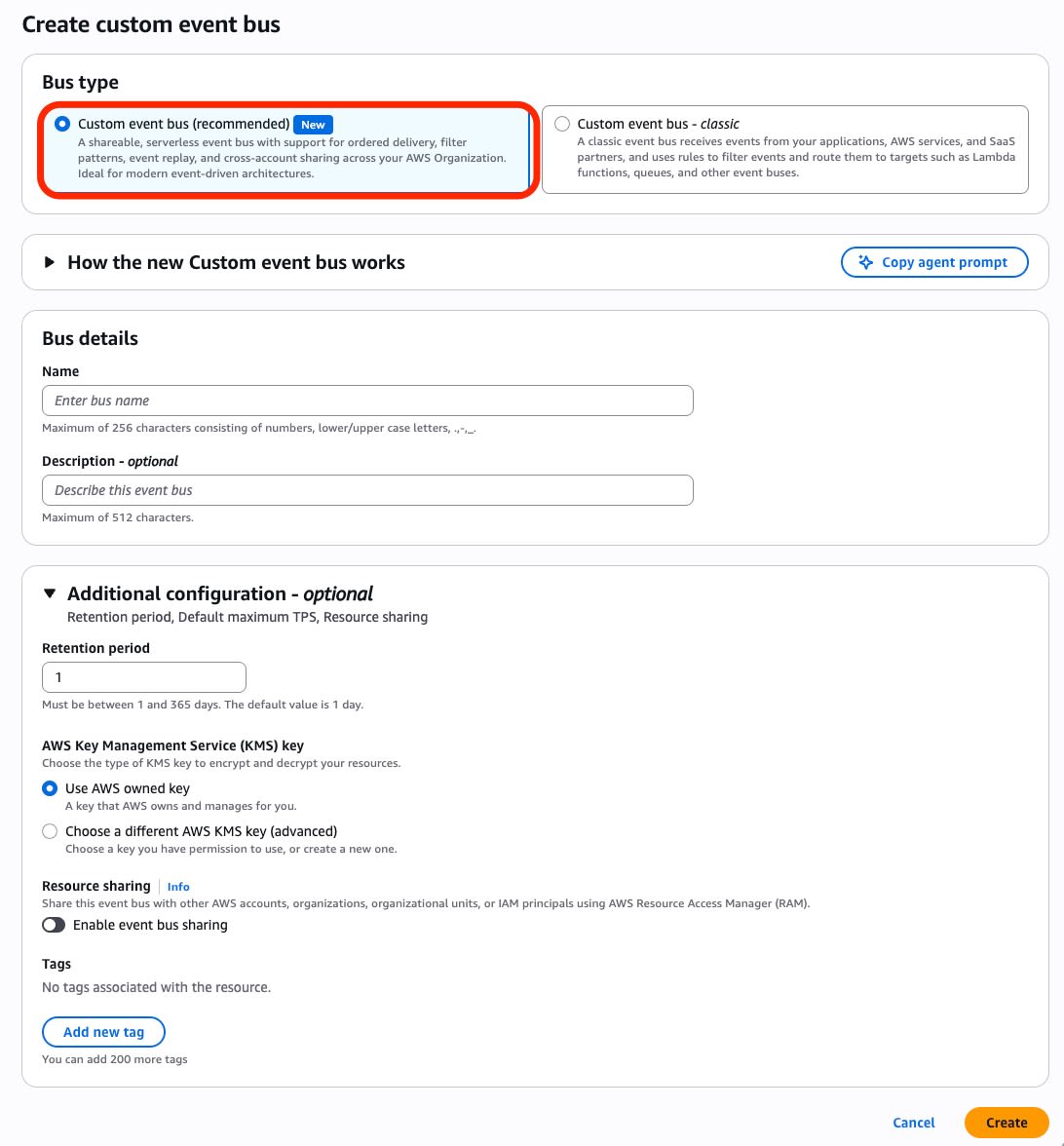
On the bus creation screen in the console, Bus type offers two choices: Custom event bus (recommended) and Custom event bus - classic, with a New badge on the former.
In the left menu, Event buses also has a New badge, and Classic routing is separated into a different group called Classic event routing.
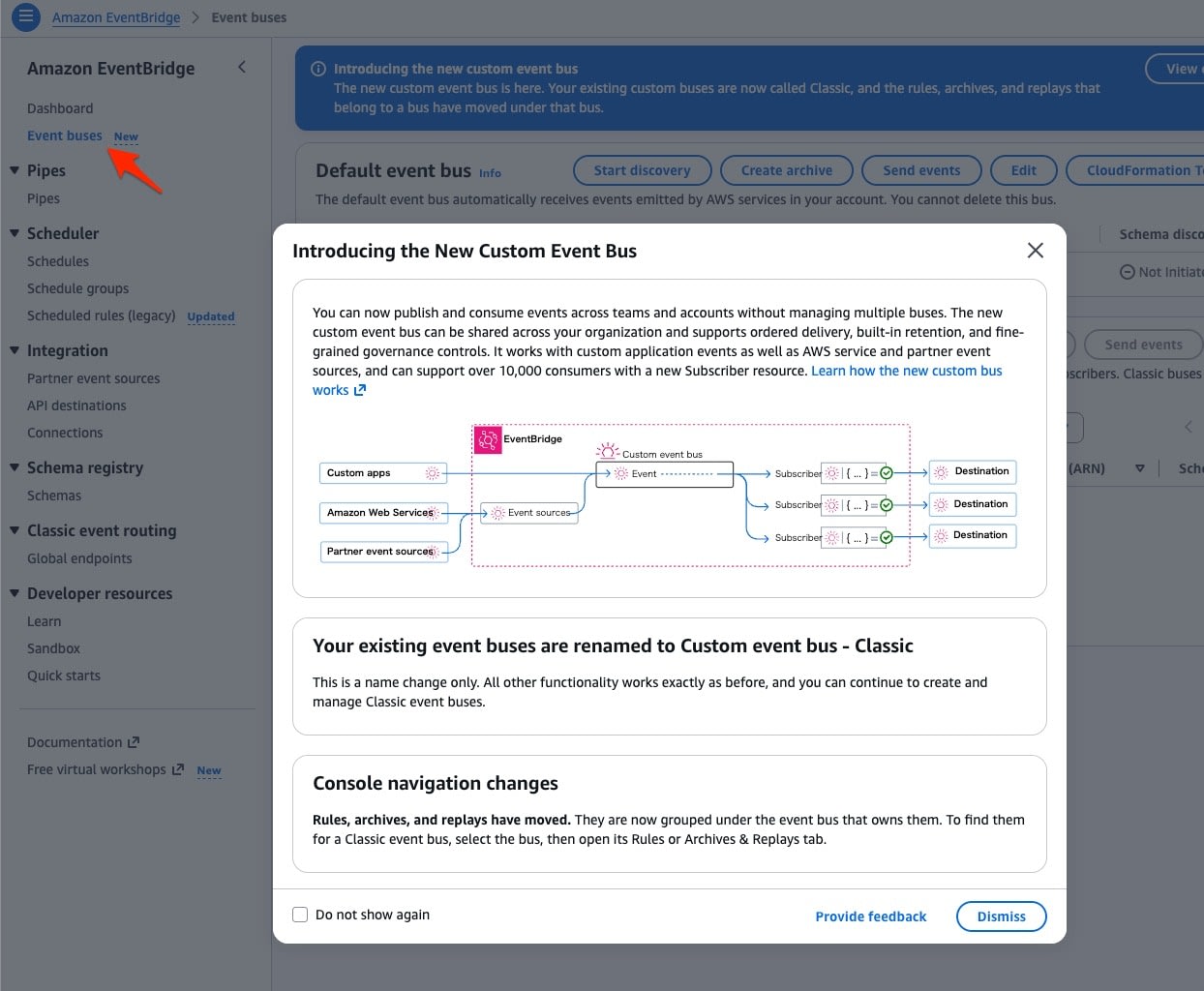
Regarding the renaming of existing buses, the console modal states: "This is a name change only. All other functionality works exactly as before, and you can continue to create and manage Classic event buses."
Verification Environment
I used the following AWS CLI in the Tokyo region (ap-northeast-1).
$ aws --version
aws-cli/2.37.5 Python/3.14.6 Linux/7.1.13-402.asahi.fc44.aarch64+16k
Creating a Bus with Retention
The new method bus is operated using the service name aws eventsv2, separate from Classic's aws events.
Retention is specified with --storage-configuration at creation time. Here, 7 days was specified.
$ aws eventsv2 create-event-bus \
    --name eb-v2-verify \
    --description "Verification bus for the new custom event bus" \
    --storage-configuration RetentionPeriodInDays=7
{
    "EventBusArn": "arn:aws:events:ap-northeast-1:123456789012:event-busv2/eb-v2-verify/32qiszt4hoa6md8szinvbjsqa",
    "Name": "eb-v2-verify",
    "Description": "Verification bus for the new custom event bus",
    "StorageConfiguration": {
        "RetentionPeriodInDays": 7,
        "RetentionWindowStartTime": "2026-09-29T15:13:47.341000+09:00"
    },
    "State": "CREATING",
    "CreationTime": "2026-09-29T15:13:47.372000+09:00"
}
The ARN format changes from Classic's event-bus/<name> to event-busv2/<name>/<generated-ID>, where the trailing ID is assigned by EventBridge. The ARN cannot be constructed from the bus name, and the bus is also specified by ARN when using describe-event-bus or creating a Subscriber.
Therefore, keep note of the EventBusArn from the creation response. In subsequent commands, this will be used as BUS_ARN.
$ BUS_ARN=arn:aws:events:ap-northeast-1:123456789012:event-busv2/eb-v2-verify/32qiszt4hoa6md8szinvbjsqa
Immediately after creation, State returns as CREATING, and after a short wait it becomes ACTIVE.
Delivering to SQS with a Subscriber
In the new method, instead of rules and targets, you create a Subscriber to specify the delivery destination. The required parameters are --name, --event-bus-arn, and --invoke-configuration; filters and Transformers are optional. This time, I created 3 Subscribers: one for put-events, one for put-raw-events, and one FIFO for ordering verification. For SQS, I prepared a total of 4 queues: 3 delivery queues and 1 DLQ.
$ aws eventsv2 create-subscriber \
    --name sub-raw \
    --event-bus-arn "$BUS_ARN" \
    --type UNORDERED \
    --filter-configuration '{"Filters":[{"Scope":"DATA","Pattern":"{\"data\":{\"amount\":[{\"numeric\":[\">\",500]}]}}"}]}' \
    --transformer '{"Type":"WITH_METADATA"}' \
    --invoke-configuration '{"TargetArn":"arn:aws:sqs:ap-northeast-1:123456789012:eb-v2-raw-q","RoleArn":"arn:aws:iam::123456789012:role/eb-v2-delivery-role"}' \
    --on-failure-configuration '{"Arn":"arn:aws:sqs:ap-northeast-1:123456789012:eb-v2-dlq"}'
{
    "SubscriberArn": "arn:aws:events:ap-northeast-1:123456789012:subscriber/sub-raw/bcnw8q9hke2hqo4c3noapzobg",
    "Name": "sub-raw",
    "EventBusArn": "arn:aws:events:ap-northeast-1:123456789012:event-busv2/eb-v2-verify/32qiszt4hoa6md8szinvbjsqa",
    "Type": "UNORDERED",
    "StartingPosition": "LATEST",
    "State": "RUNNING",
    "CreationTime": "2026-09-29T15:13:54.301000+09:00"
}
The default value for StartingPosition is LATEST, so events published before the Subscriber is created will not be delivered. For operational verification, create the Subscriber first.
Delivery permissions are granted through the IAM role passed to the Subscriber, not through the queue's resource policy. Include sqs:SendMessage to the destination queue and the DLQ specified in OnFailureConfiguration in the role. KMS and cross-account sharing are not covered this time.
Delivery role trust policy and permission policy
The trust policy is the minimal form used for verification and does not include caller restriction using aws:SourceAccount or aws:SourceArn. If used in a shared account, limit the trusted callers using these condition keys.
Trust policy (saved as trust.json and passed to aws iam create-role --role-name eb-v2-delivery-role --assume-role-policy-document file://trust.json):
{
  "Version": "2012-10-17",
  "Statement": [
    {
      "Effect": "Allow",
      "Principal": { "Service": "events.amazonaws.com" },
      "Action": "sts:AssumeRole"
    }
  ]
}
Permission policy (saved as perm.json and passed to aws iam put-role-policy --role-name eb-v2-delivery-role --policy-name send-to-queues --policy-document file://perm.json):
{
  "Version": "2012-10-17",
  "Statement": [
    {
      "Effect": "Allow",
      "Action": "sqs:SendMessage",
      "Resource": [
        "arn:aws:sqs:ap-northeast-1:123456789012:eb-v2-events-q",
        "arn:aws:sqs:ap-northeast-1:123456789012:eb-v2-raw-q",
        "arn:aws:sqs:ap-northeast-1:123456789012:eb-v2-ordered-q.fifo",
        "arn:aws:sqs:ap-northeast-1:123456789012:eb-v2-dlq"
      ]
    }
  ]
}
If retry and batch settings are not specified, default values are applied.
Default values visible with `describe-subscriber`
$ aws eventsv2 describe-subscriber --subscriber-arn "$SUB_ARN"
{
    "InvokeConfiguration": {
        "RoleArn": "arn:aws:iam::123456789012:role/eb-v2-delivery-role",
        "TargetArn": "arn:aws:sqs:ap-northeast-1:123456789012:eb-v2-raw-q"
    },
    "FilterConfiguration": {
        "Language": "EVENT_BRIDGE_PATTERN",
        "Filters": [
            { "Pattern": "{\"data\":{\"amount\":[{\"numeric\":[\">\",500]}]}}", "Scope": "DATA" }
        ]
    },
    "Type": "UNORDERED",
    "StartingPosition": "LATEST",
    "BatchConfiguration": { "MaxBatchSize": 10, "MaxBatchWindowInSeconds": 0 },
    "Transformer": { "Type": "WITH_METADATA" },
    "RetryPolicy": { "MaxRetryAttempts": 5, "MaxEventAgeInSeconds": 300, "RetryStrategy": "ALL" },
    "OnFailureConfiguration": { "Arn": "arn:aws:sqs:ap-northeast-1:123456789012:eb-v2-dlq" },
    "State": "RUNNING"
}
The Format Received Differs Between put-events and put-raw-events
There are two publish APIs. put-events takes Source, DetailType, and Detail in a form close to Classic, while put-raw-events passes the payload itself to Data.
The Data in put-raw-events is a base64 blob. With the AWS CLI's default binary format, it tries to interpret the passed JSON as base64 and fails.
$ aws eventsv2 put-raw-events --event-bus-arn "$BUS_ARN" \
    --entries '[{"Data":"{\"specversion\":\"1.0\", ...}", ...}]'

aws: [ERROR]: Invalid base64: "{\"specversion\":\"1.0\", ...}"
To pass raw JSON from the CLI, add --cli-binary-format raw-in-base64-out. Below are the results of publishing the same order data using both APIs. The put-raw-events side was formatted as CloudEvents.
$ aws eventsv2 put-events --event-bus-arn "$BUS_ARN" \
    --entries '[{"Source":"com.example.myapp","DetailType":"OrderCreated",
      "Detail":"{\"orderId\":\"ORD-101\",\"amount\":1980}",
      "SystemMetadata":{"EventGroupId":"customer-1"}}]'
{
    "FailedEntryCount": 0,
    "Entries": [
        { "EventId": "9d46baf1-640c-4663-9417-9d0e5dc65200", "SequenceNumber": "10000000000000003000", "SuccessCode": "PUBLISHED" }
    ]
}

$ aws eventsv2 put-raw-events --cli-binary-format raw-in-base64-out --event-bus-arn "$BUS_ARN" \
    --entries '[{"Data":"{\"specversion\":\"1.0\",\"type\":\"com.example.order.created\",\"source\":\"com.example.myapp\",\"id\":\"ce-101\",\"time\":\"2026-09-25T01:00:00Z\",\"datacontenttype\":\"application/json\",\"data\":{\"orderId\":\"ORD-101\",\"amount\":1980}}",
      "Metadata":{"producer":"checkout-service"},
      "SystemMetadata":{"ContentType":"application/json","EventGroupId":"customer-1"}}]'
{
    "FailedEntryCount": 0,
    "Entries": [
        { "EventId": "9944a059-17d2-4665-a323-d0bd3cb6530a", "SequenceNumber": "10000000000000004000", "SuccessCode": "PUBLISHED" }
    ]
}
The values that can be specified for SystemMetadata.ContentType are application/json / application/avro / application/protobuf / application/octet-stream. CloudEvents are sent as application/json.
The format received at the delivery destination is determined by the combination of the publish API and the Subscriber's Transformer. First, when a Subscriber without a Transformer receives a put-events event, only the structure called an envelope in the user guide is delivered. The structure wrapping the payload in detail is the same as Classic, and Metadata and SystemMetadata are not included in the body.
Body received with `put-events` on a Subscriber without a `Transformer` specified
{
  "version": "0",
  "id": "df3e557b-6282-4df1-84c5-1e8956a533e0",
  "detail-type": "OrderCreated",
  "source": "com.example.myapp",
  "account": "123456789012",
  "time": "2026-09-25T01:02:36Z",
  "region": "ap-northeast-1",
  "resources": [],
  "detail": { "orderId": "ORD-101", "amount": 1980 }
}
When a Subscriber with Transformer: WITH_METADATA receives a put-raw-events event, the body looks like this:
{
  "Data": {
    "specversion": "1.0",
    "type": "com.example.order.created",
    "source": "com.example.myapp",
    "id": "ce-101",
    "time": "2026-09-25T01:00:00Z",
    "datacontenttype": "application/json",
    "data": { "orderId": "ORD-101", "amount": 1980 }
  },
  "Metadata": { "producer": "checkout-service" },
  "SystemMetadata": {
    "EventGroupId": "customer-1",
    "DeduplicationId": "47befe33-072e-4afd-86d1-0d89ef4216d4",
    "ContentType": "application/json",
    "aws:IngestionTime": "2026-09-25T01:02:58.740Z",
    "aws:EventId": "9944a059-17d2-4665-a323-d0bd3cb6530a",
    "aws:SequenceNumber": "10000000000000004000",
    "aws:DeliveryType": "LIVE"
  }
}
The CloudEvents JSON that was sent is placed directly inside Data without being re-wrapped in an EventBridge envelope, so it does not become double-nested. The receiver can treat it directly as CloudEvents. The keys attached at publish time go into Metadata, and values assigned by EventBridge are separated into SystemMetadata.
Write Filters to Match the Publish API
Filters are written to match the data structure that is delivered. Even for the same condition of "amount exceeds 500," the root key changes depending on the publish API.
| Publish API | Filter pattern | amount: 1980 |
amount: 100 |
|---|---|---|---|
put-events |
{"detail":{"amount":[{"numeric":[">",500]}]}} |
Delivered | Not delivered |
put-raw-events |
{"data":{"amount":[{"numeric":[">",500]}]}} |
Delivered | Not delivered |
| Both APIs (Subscriber without a filter) | — | Delivered | Delivered |
A filter with an incorrect root key does not produce an error; it simply operates without matching any events.
Ordering Guarantees and Deduplication
If ordering is required, create a Subscriber with --type FIFO. Delivering to an SQS FIFO queue requires a MessageGroupId, and the EventGroupId from the publish time can be passed using a JSONata expression. The destination FIFO queue was created with FifoQueue=true,ContentBasedDeduplication=true.
$ aws eventsv2 create-subscriber \
    --name sub-fifo \
    --event-bus-arn "$BUS_ARN" \
    --type FIFO \
    --invoke-configuration '{"TargetArn":"arn:aws:sqs:ap-northeast-1:123456789012:eb-v2-ordered-q.fifo","RoleArn":"arn:aws:iam::123456789012:role/eb-v2-delivery-role","SqsParameters":{"MessageGroupId":"{% $events.SystemMetadata.EventGroupId %}"}}' \
    --on-failure-configuration '{"Arn":"arn:aws:sqs:ap-northeast-1:123456789012:eb-v2-dlq"}'
{
    "SubscriberArn": "arn:aws:events:ap-northeast-1:123456789012:subscriber/sub-fifo/2t64gmbke6pkb2sh6vlu6ichd",
    "Name": "sub-fifo",
    "EventBusArn": "arn:aws:events:ap-northeast-1:123456789012:event-busv2/eb-v2-verify/32qiszt4hoa6md8szinvbjsqa",
    "Type": "FIFO",
    "StartingPosition": "LATEST",
    "State": "RUNNING",
    "CreationTime": "2026-09-29T15:13:55.358000+09:00"
}
With EventGroupId set to customer-1, I published ORD-201 through ORD-205 one at a time. They arrived at the FIFO queue in the order they were published, and the SQS SequenceNumber was also in ascending order.
// Order of arrival in eb-v2-ordered-q.fifo (FIFO Subscriber)
[
  { "orderId": "ORD-201", "MessageGroupId": "customer-1", "SqsSequenceNumber": "18905060493981423616" },
  { "orderId": "ORD-202", "MessageGroupId": "customer-1", "SqsSequenceNumber": "18905060494079727616" },
  { "orderId": "ORD-203", "MessageGroupId": "customer-1", "SqsSequenceNumber": "18905060494186223616" },
  { "orderId": "ORD-204", "MessageGroupId": "customer-1", "SqsSequenceNumber": "18905060494296303616" },
  { "orderId": "ORD-205", "MessageGroupId": "customer-1", "SqsSequenceNumber": "18905060494416111872" }
]
When the same events were also received by a --type UNORDERED Subscriber, they arrived in the order ORD-202 → 205 → 201 → 203 → 204.
Deduplication is a publish-side setting. I attached --deduplication-configuration DeduplicationType=CONTENT_BASED to put-events and published the same content twice in a row.
// 1st time
{ "EventId": "f6fda443-afe5-4daa-a971-d254be085d74", "SequenceNumber": "10000000000000012000", "SuccessCode": "PUBLISHED" }
// 2nd time (same command)
{ "EventId": "f6fda443-afe5-4daa-a971-d254be085d74", "SequenceNumber": "10000000000000012000", "SuccessCode": "DEDUPLICATED" }
The second time, SuccessCode was DEDUPLICATED, and the EventId and SequenceNumber were the same as the first time. Only one item was delivered to the destination.
3 Things That Change When Migrating from Classic
I set up the configuration for delivering to SQS within the same account using both Classic and the new method.
Classic (aws events) |
New method (aws eventsv2) |
|
|---|---|---|
| Bus ARN | event-bus/<name> |
event-busv2/<name>/<generated-ID>. Cannot be constructed from the name |
| SQS delivery permissions | Queue resource policy | IAM role passed to the Subscriber |
EventId in publish response |
Matches the id in the delivered body |
Does not match. SystemMetadata.aws:EventId matches |
The user guide advises choosing put-events if you want the same envelope as Classic for JSON events.
The envelope structure was the same as Classic in actual measurement as well. Below are the results of preparing a Subscriber with Transformer: WITH_METADATA on a separately created bus for this verification, and receiving a put-events event.
// Publish response
{ "EventId": "0d8fd5c4-524b-4d4f-9149-b11cd66aecfd", "SuccessCode": "PUBLISHED" }

// Body received via SQS
{
  "Data": {
    // version / source / account / time / region / resources are omitted
    "id": "3027f30e-bfb2-4ab5-a5e5-d6b67c5790a4",
    "detail-type": "OrderCreated",
    "detail": { "orderId": "ORD-401", "amount": 1980 }
  },
  "Metadata": {},
  "SystemMetadata": {
    // EventGroupId / DeduplicationId / aws:IngestionTime are omitted
    "ContentType": "application/eventbridge+json",
    "aws:Source": "com.example.myapp",
    "aws:DetailType": "OrderCreated",
    "aws:EventId": "0d8fd5c4-524b-4d4f-9149-b11cd66aecfd",
    "aws:SequenceNumber": "10000000000000003000",
    "aws:DeliveryType": "LIVE"
  }
}
With put-events, the payload goes into detail under Data, and EventBridge sets application/eventbridge+json for SystemMetadata.ContentType (with put-raw-events, it is the value specified at publish time, in this case application/json). The receiver can use this value to determine whether the event came via put-events.
The EventId in the publish response matches SystemMetadata.aws:EventId, not the id in the delivered body. If you are correlating publish and delivery using EventId, set the Subscriber's Transformer to WITH_METADATA and reference SystemMetadata.aws:EventId.
Summary
The first decision to make with the new custom event bus is whether to publish using put-events or put-raw-events. This determines the format delivered to the destination.
For new implementations, put-raw-events is recommended. The user guide describes put-events as "for cases where you want the same envelope as Classic" and put-raw-events as "for cases where you want to deliver the payload as-is, attach custom metadata, or handle non-JSON formats." If Classic compatibility is not required, the latter applies. Since the sent JSON is delivered as-is without being wrapped in an envelope, formats with a defined schema like CloudEvents can be handled directly without inserting a step to extract them from an EventBridge-specific envelope on the receiving side. For targets that reference input using JSONata, such as Step Functions, you can expect to be able to handle the payload without digging one level into detail.
If you need to maintain Classic compatibility, use put-events. Since it creates an envelope with the same structure as Classic, existing receive processing and filter patterns can be used as-is.
For bus sharing to other accounts or Organizations via AWS RAM, which was not covered this time, I plan to verify and introduce that in a future article.
