October 2026 Floci Update Roundup: Lambda durable functions and Cognito MFA Added

This page has been translated by machine translation. View original
Hello. I'm Takeda from the Service Development Department.
Every month, we cover "Floci", an open-source AWS emulator that emerged as an alternative to LocalStack. The most recent three articles are as follows.
- A month that brought refined authorization and CloudTrail event recording (July 30, 2026)
- CloudFront distribution and AppSync GraphQL endpoints now work (August 29, 2026)
- A local CA arrives and IAM managed policies are now evaluated (September 30, 2026)
Another month has passed since the last article, and 2.2.0 and 2.3.0 have been released. This time, after summarizing the updates from this past month, I ran the following four features on 2.3.0.
- Lambda durable functions
- Cognito TOTP MFA
- S3 bucket policy evaluation and Block Public Access
- EventBridge retries and dead-letter queues
While running them, I found two behaviors that differ from AWS and filed issues for them. For one of them, the maintainer's fix landed on main on the same day I filed it.
Main changes this month (as of October 30, 2026)
Here is a summary of the changes from the previous article (at 2.1.0) to now (2.3.0).
- 2 releases (2.2.0 on October 6, 2.3.0 on October 15). 1,303 commits between 2.1.0 and 2.3.0
- The release notes have 744 items for 2.2.0 and 309 items for 2.3.0
- GitHub stars went from 26,051 → 27,280
- Docker image (amd64, compressed size) went from 80.6MB → 86.8MB
- The release schedule changed to an automatic cut on the 15th and the end of each month
- New services are SageMaker, Timestream for InfluxDB, CodeArtifact, DMS, Redshift Serverless, and Data Lifecycle Manager
- The landing page shown when opening
http://localhost:4566/in a browser became a dashboard
Release and coverage numbers
The release schedule changed just before 2.3.0 (#5698). Previously it was the first and third Tuesdays, but now the Release Cut workflow runs automatically at 00:30 (US Central time) on the 15th and the end of each month, and tags X.Y.Z from main. CONTRIBUTING.md describes this schedule and states that main is published daily with the nightly tag.
The breakdown of the release notes is Bug Fixes 499, Features 237, and Performance Improvements 8 for 2.2.0. For 2.3.0 it is Bug Fixes 249, Features 59, and Performance Improvements 1. The compatibility test count in the README remains 2,576.
The number of supported services is 125 according to the official blog's "State of the Flock #004" (October 15) and 126 according to the floci.io top page, so the published values do not match. On my local 2.3.0, the dashboard described below showed "127 running". This is the number of services registered in Floci that are enabled in the configuration, and does not mean that each individual service has been verified to work.
Among the new services in 2.2.0, SageMaker (#1949) runs training jobs on Docker. Timestream for InfluxDB (#3683) uses an InfluxDB 2.x container. CodeArtifact provides the management API (#3713) as well as Maven (#4059), npm (#4336), and PyPI (#4998) through sidecars.
Dashboard
The page shown when opening http://localhost:4566/ in a browser is the landing page I covered in the June article. When it was introduced in 1.5.26, it was a screen with only the endpoint, account, version, the number of enabled services, and an "Open Floci UI" button. In 2.3.0 this became a dashboard (#5594). It adds configuration snippets for the shell, AWS CLI, and boto3, a display of the startup phase, a list of running services, and the DynamoDB backend. The startup-wait screen, which used to be a separate page, has also been integrated into it.
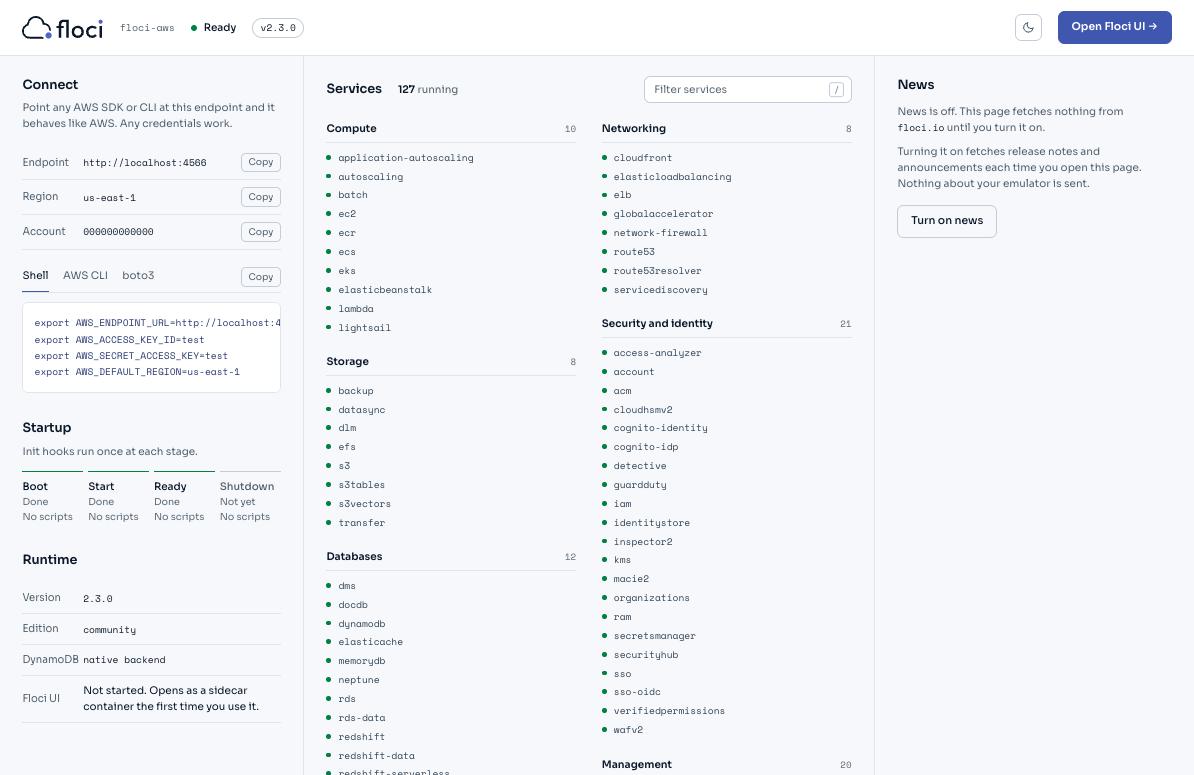
A GET to the root is a path handled as S3 ListBuckets, and the dashboard is returned only for requests whose Accept includes text/html. Bucket listing via the SDK or CLI works as before. Pressing "Open Floci UI" starts the web console (floci-ui) as a sidecar.
Test environment
I prepared a docker-compose.yml and started it. Persistence is enabled so that I can check restarts of durable functions. The persistence destination is /app/data, which is the image's VOLUME.
services:
  floci:
    image: floci/floci:2.3.0
    ports:
      - "4566:4566"
    volumes:
      - /var/run/docker.sock:/var/run/docker.sock
      - floci-data:/app/data
    environment:
      FLOCI_STORAGE_MODE: persistent
volumes:
  floci-data:
$ export AWS_ENDPOINT_URL=http://localhost:4566
$ export AWS_DEFAULT_REGION=us-east-1
$ export AWS_ACCESS_KEY_ID=test AWS_SECRET_ACCESS_KEY=test
Only for the S3 section, I used a separate container with the following two settings added so that authorization would be evaluated. Both are disabled by default.
    environment:
      FLOCI_SERVICES_S3_ENFORCE_AUTH: "true"
      FLOCI_SERVICES_IAM_ENFORCEMENT_ENABLED: "true"
The AWS CLI is 2.36.30.
Checking waiting and resuming with Lambda durable functions
Lambda durable functions is a feature AWS announced in December 2025. It splits the processing inside a handler into steps, and Lambda saves the results of the steps as checkpoints. During waits or callbacks from outside, the invocation ends, and a later invocation replays the checkpoints and continues from where it left off.
In Floci, 2.2.0 added saving of DurableConfig (#5007), checkpoints, waits, and step retries (#5047), and callbacks (#5100). 2.3.0 adds chained invoke (#5164), which calls another durable function. The documentation says that the AWS Durable Execution SDK works as is.
Bundling the SDK and deploying
The AWS managed runtime for Python 3.14 used here bundles the Durable Execution SDK. It is not included in the public.ecr.aws/lambda/python image that Floci uses to run functions, so I bundle it into the deployment package. The PyPI aws-durable-execution-sdk-python (3.0.0) depends on boto3, so the zip came to 17MB.
$ uv pip install --target pkg aws-durable-execution-sdk-python==3.0.0
$ cp lambda_function.py pkg/
$ (cd pkg && zip -qr ../function.zip .)
Following the example in the AWS documentation, I made the function with four stages: order validation, payment, wait, and confirmation.
import time
from aws_durable_execution_sdk_python import DurableContext, durable_execution, durable_step
from aws_durable_execution_sdk_python.config import Duration

@durable_step
def validate_order(step_context, order_id):
    return {"orderId": order_id, "status": "validated", "at": time.time()}

@durable_step
def process_payment(step_context, order_id):
    return {"orderId": order_id, "status": "paid", "amount": 99.99, "at": time.time()}

@durable_step
def confirm_order(step_context, order_id):
    return {"orderId": order_id, "status": "confirmed", "at": time.time()}

@durable_execution
def lambda_handler(event, context: DurableContext):
    order_id = event["orderId"]
    print(f"handler invoked for {order_id}")
    validation_result = context.step(validate_order(order_id))
    payment_result = context.step(process_payment(order_id))
    context.wait(Duration.from_seconds(event.get("waitSeconds", 10)))
    confirmation_result = context.step(confirm_order(order_id))
    return {"orderId": order_id, "status": "completed",
            "steps": [validation_result, payment_result, confirmation_result]}
Add --durable-config to create-function and publish a version with --publish. Invoking a durable function requires specifying a version or alias, and below I use order-durable:1.
$ aws lambda create-function --function-name order-durable \
    --runtime python3.14 --handler lambda_function.lambda_handler \
    --role arn:aws:iam::000000000000:role/lambda-role \
    --zip-file fileb://function.zip --timeout 60 \
    --durable-config '{"ExecutionTimeout":300,"RetentionPeriodInDays":1}' \
    --publish
Execution and history before and after the wait
Call invoke with --durable-execution-name. With a synchronous invocation (RequestResponse), it waits for a response until the execution, including the 10-second wait, finishes.
$ aws lambda invoke --function-name order-durable:1 \
    --durable-execution-name order-1 \
    --payload '{"orderId":"order-12345","waitSeconds":10}' \
    --cli-binary-format raw-in-base64-out out.json
{
    "StatusCode": 200,
    "ExecutedVersion": "1",
    "DurableExecutionArn": "arn:aws:lambda:us-east-1:000000000000:function:order-durable:1/durable-execution/order-1/b4438095-..."
}
$ cat out.json
{"orderId": "order-12345", "status": "completed", "steps": [{"orderId": "order-12345", "status": "validated", "at": 1793155188.36}, {"orderId": "order-12345", "status": "paid", "amount": 99.99, "at": 1793155188.37}, {"orderId": "order-12345", "status": "confirmed", "at": 1793155199.07}]}
The response took 45 seconds, of which 34 seconds was the first startup of the Lambda container. When I started a new execution with a different execution name in a warm state, it took 12 seconds including the 10-second wait.
The execution history can be retrieved with get-durable-execution-history. Extracting only the event types gives the following.
$ aws lambda get-durable-execution-history --durable-execution-arn "$ARN" \
    --query 'Events[].[EventType,Name]' --output text
ExecutionStarted        order-1
StepStarted             validate_order
StepSucceeded           validate_order
StepStarted             process_payment
StepSucceeded           process_payment
WaitStarted             None
InvocationCompleted     None
WaitSucceeded           None
StepStarted             confirm_order
StepSucceeded           confirm_order
InvocationCompleted     None
ExecutionSucceeded      order-1
There are two InvocationCompleted events, so the handler was started twice, before and after the wait. The handler invoked for in CloudWatch Logs also appeared on two lines. In the second invocation, the completed validate_order and process_payment are not re-executed, and the saved results are used. This can be confirmed by the fact that the at timestamps in the results have the same values as in the first invocation.
If you call it without specifying a version or alias, it is rejected with InvalidParameterValueException. The message is You cannot invoke a durable function using an unqualified ARN.
When you call again with the same --durable-execution-name, the response depends on the payload. With the same payload, the ARN and result of the existing execution are returned with a 200, and with a different payload it is DurableExecutionAlreadyStartedException. The AWS Invoke API reference also describes the same behavior.
Step retries and callbacks
I prepared another function and attached a retry configuration (RetryStrategyConfig, up to 5 attempts, 1 to 2 second interval) to a step that succeeds on the third try. After that it waits for an external callback with wait_for_callback. When invoked, the history shows StepFailed twice followed by StepSucceeded, and the handler was started three times in between. An InvocationCompleted follows the failed step, and it is retried in the next invocation.
In the subsequent wait_for_callback, the callback ID is included in the CallbackStarted event in the history. When I sent a success using the ID, the execution resumed, the Status of get-durable-execution was SUCCEEDED, and approval in Result contained the value I sent.
$ aws lambda send-durable-execution-callback-success --callback-id "$CALLBACK_ID" \
    --result '{"approved":true,"by":"manager"}'
I also checked the callback timeout. If nothing is sent beyond the heartbeat_timeout of 120 seconds, the history proceeds from CallbackTimedOut to ExecutionFailed. The error was CallbackTimeoutError: Callback timed out on heartbeat. Sending a success again to an already completed callback is rejected with CallbackTimeoutException. The AWS API reference also explains that this exception is returned for both expired and completed callbacks.
Waits continue even after restarting Floci
The documentation says that timers are persisted and that background processing monitors the deadline and resumes. I started an execution that waits 60 seconds and restarted Floci with docker compose restart during the wait (about 6 seconds). Right after the restart the status was still RUNNING, WaitSucceeded was added 60 seconds after the start, and it ended with SUCCEEDED. In the history, two InvocationCompleted events line up after WaitStarted, which shows that the handler started once right after the restart, replayed the checkpoints, and went on to continue the wait.
What I checked was the case of docker compose restart in persistent mode. I have not tried a forced termination or the case without persistence.
Listed as unsupported are invocation from Step Functions or Event Source Mapping, payload encryption, and event publishing to EventBridge. The limits of 3,000 operations per execution and 100MB of persisted payload are also not yet implemented.
Using TOTP with Cognito OPTIONAL MFA
Cognito saw a concentration of authentication updates this month. 2.2.0 added registration and challenge for software token (TOTP) MFA (#4620) and the USER_AUTH flow (#3930). Managed login with PKCE (#4238) and federated sign-in (#3748) are also in 2.2.0. 2.3.0 adds TOTP (#5101) and passkeys (#5102) for pools where MFA is OPTIONAL. The refresh_token grant on the OAuth token endpoint (#4948) and the token revocation endpoint (#4936) are also in 2.3.0.
Of these, I went through TOTP from registration to re-login in an OPTIONAL pool.
Registering TOTP and enabling it per user
Create the pool with OPTIONAL and enable software token MFA. The app client allows USER_PASSWORD_AUTH, and a permanent password is set for the user alice.
$ aws cognito-idp create-user-pool --pool-name app-pool --mfa-configuration OPTIONAL \
    --query UserPool.Id --output text
us-east-1_cfea00a4f
$ aws cognito-idp set-user-pool-mfa-config --user-pool-id us-east-1_cfea00a4f \
    --mfa-configuration OPTIONAL --software-token-mfa-configuration Enabled=true
If you log in without having registered MFA, tokens are returned without a challenge. Use that access token to get the TOTP secret. Instead of an authenticator app, I calculate the code with Python and confirm the registration.
$ aws cognito-idp initiate-auth --client-id "$CLIENT" --auth-flow USER_PASSWORD_AUTH \
    --auth-parameters USERNAME=alice,PASSWORD="$PASSWORD" \
    --query 'AuthenticationResult.AccessToken' --output text > access-token.txt
$ aws cognito-idp associate-software-token --access-token "$(cat access-token.txt)"
{
    "SecretCode": "6VLWV5..."   # 32-character Base32
}
$ aws cognito-idp verify-software-token --access-token "$(cat access-token.txt)" --user-code "$(python3 totp.py "$SECRET")"
{
    "Status": "SUCCESS"
}
totp.py calculates the 6-digit code for the current 30-second window using HMAC-SHA1, as in RFC 6238. $CLIENT and $SECRET are values from the responses of create-user-pool-client and associate-software-token. $SESSION is taken from the response of initiate-auth.
import base64, hmac, struct, sys, time
secret = sys.argv[1]
key = base64.b32decode(secret + '=' * (-len(secret) % 8), casefold=True)
counter = int(time.time()) // 30
h = hmac.new(key, struct.pack('>Q', counter), 'sha1').digest()
o = h[-1] & 15
print(f"{(struct.unpack('>I', h[o:o+4])[0] & 0x7fffffff) % 1000000:06d}")
Even when I logged in again right after confirming the registration, no challenge appeared. This matches the AWS documentation, which says that in an OPTIONAL pool no challenge appears until it is enabled with the per-user setting (set-user-mfa-preference). Once enabled, PreferredMfaSetting in admin-get-user becomes SOFTWARE_TOKEN_MFA.
$ aws cognito-idp set-user-mfa-preference --access-token "$(cat access-token.txt)" \
    --software-token-mfa-settings Enabled=true,PreferredMfa=true
Responding to the challenge
When you log in after enabling it, a SOFTWARE_TOKEN_MFA challenge is returned instead of tokens.
$ aws cognito-idp initiate-auth --client-id "$CLIENT" --auth-flow USER_PASSWORD_AUTH \
    --auth-parameters USERNAME=alice,PASSWORD="$PASSWORD"
{
    "ChallengeName": "SOFTWARE_TOKEN_MFA",
    "Session": "dXMtZWFzdC0x...",
    "ChallengeParameters": {
        "USERNAME": "alice"
    }
}
$ aws cognito-idp respond-to-auth-challenge --client-id "$CLIENT" --challenge-name SOFTWARE_TOKEN_MFA \
    --session "$SESSION" --challenge-responses USERNAME=alice,SOFTWARE_TOKEN_MFA_CODE="$CODE" \
    --query 'AuthenticationResult.TokenType'
"Bearer"
An incorrect code results in CodeMismatchException, both for verify-software-token at registration and for the response to the challenge.
The key in ChallengeParameters is USER_ID_FOR_SRP in AWS. 2.3.0 returns it as USERNAME, so a client that builds its response by reading this key cannot get the value. This was reported as issue #6074, and the fix (#6086) landed on main on October 20. It is not included in 2.3.0.
The same code can be used twice
When I sent the 6-digit code used for login again to the challenge of a new login (a different Session), Floci returned tokens in the same way.
RFC 6238 stipulates that a code that has been successfully authenticated once must not be accepted again. The 2.3.0 implementation only checks whether the code matches the current time window or one of the windows before or after it, and does not record codes that were used.
I checked AWS's behavior by running the same steps against a real user pool (Lite tier). The first attempt authenticated, the second attempt with the same code was rejected, and the code for the next 30-second window authenticated.
An error occurred (ExpiredCodeException) when calling the RespondToAuthChallenge operation: Your software token has already been used once.
I filed this difference as issue #6804. On October 28, the day I filed it, the maintainer's fix (#6808) landed on main. It stores the time window of the most recently accepted code per user, and rejects a code from the same window or the previous window with ExpiredCodeException. A code passed to verify-software-token is not counted, and re-registering the authenticator app resets it. It is not included in 2.3.0.
S3 bucket policy evaluation and Block Public Access
For S3 authorization, 2.2.0 added bucket policy evaluation for authenticated callers (#3632) and enforcement of Block Public Access on the data plane (#4253). In 2.3.0, GetPublicAccessBlock for a bucket with no configuration now returns true for all four items, the same as the AWS default since April 2023 (#5434).
Allowing an IAM user and an explicit Deny
I created an IAM user reader with no policy, and fetching an object with its access key is denied. If the bucket policy allows only s3:GetObject on hello.txt, only that object can be fetched.
{"Version":"2012-10-17","Statement":[{"Sid":"ReaderGetsHello","Effect":"Allow",
  "Principal":{"AWS":"arn:aws:iam::000000000000:user/reader"},
  "Action":"s3:GetObject","Resource":"arn:aws:s3:::policy-bucket/hello.txt"}]}
# Run with reader's access key
$ aws s3 cp s3://policy-bucket/hello.txt -
hello from policy-bucket
$ aws s3 cp s3://policy-bucket/private/secret.txt -
download failed: s3://policy-bucket/private/secret.txt to - An error occurred (403) when calling the HeadObject operation: Forbidden
$ echo x | aws s3 cp - s3://policy-bucket/new.txt
upload failed: - to s3://policy-bucket/new.txt An error occurred (AccessDenied) when calling the PutObject operation: User is not authorized to perform: s3:PutObject
I added an explicit Deny on private/* for Principal: "*". Even when the bucket owner (the root credentials of test) fetches private/secret.txt, it results in AccessDenied. The allowed hello.txt can still be fetched.
Explicitly configured Block Public Access
Using unsigned requests (curl), I looked at combinations of the presence of a public policy and Block Public Access. I start from a state where Block Public Access is explicitly set to all false.
$ curl -s -o /dev/null -w '%{http_code}\n' http://localhost:4566/policy-bucket/hello.txt
403
$ aws s3api put-bucket-policy --bucket policy-bucket --policy file://public.json   # Allow GetObject on hello.txt for Principal "*"
$ curl -s -w '  %{http_code}\n' http://localhost:4566/policy-bucket/hello.txt
hello from policy-bucket  200
$ aws s3api put-public-access-block --bucket policy-bucket \
    --public-access-block-configuration BlockPublicAcls=false,IgnorePublicAcls=false,BlockPublicPolicy=false,RestrictPublicBuckets=true
$ curl -s -o /dev/null -w '%{http_code}\n' http://localhost:4566/policy-bucket/hello.txt
403
In this comparison, enabling RestrictPublicBuckets made anonymous access return 403, while fetching with the root credentials succeeded. If you enable BlockPublicPolicy and then set the public policy again, put-bucket-policy results in AccessDenied at that point. The account-level setting (s3control put-public-access-block) was also combined, and setting a public policy on another bucket was rejected.
What I tried was this combination of Allow, Deny, and Block Public Access; I did not try condition keys or cross-account policies.
The default values for new buckets are only reported, not enforced
For a newly created bucket, 2.3.0 and later return true for all four items with get-public-access-block. However, setting a public policy on the same bucket succeeds, and anonymous access also succeeds. I tried this after deleting the account-level Block Public Access set in the previous section.
$ aws s3control delete-public-access-block --account-id 000000000000
$ aws s3api create-bucket --bucket fresh-bucket
$ aws s3api get-public-access-block --bucket fresh-bucket --query PublicAccessBlockConfiguration --output text
True    True    True    True
$ aws s3api put-bucket-policy --bucket fresh-bucket --policy file://public-fresh.json
$ echo $?
0
$ echo hello > hello.txt && aws s3 cp hello.txt s3://fresh-bucket/hello.txt
$ curl -s -w '  %{http_code}\n' http://localhost:4566/fresh-bucket/hello.txt
hello  200
When the same four items are explicitly set with put-public-access-block, the same policy results in AccessDenied. The reported default values and the values used for enforcement are inconsistent. Looking at the source, enforcement combines the stored bucket configuration and the account configuration, and if both are unset there is no blocking; the default values returned by the get API are not used. The comment on the change that returns the default values (#5434) says that it changes only the GetPublicAccessBlock response and does not change enforcement on the write path.
In AWS, setting a public policy on a new bucket is rejected because of Block Public Access. The result for a bucket created in a real account is as follows.
An error occurred (AccessDenied) when calling the PutBucketPolicy operation: User: ... is not authorized to perform: s3:PutBucketPolicy on resource: "arn:aws:s3:::..." because public policies are prevented by the BlockPublicPolicy setting in S3 Block Public Access.
A public policy that passes in Floci tests would be rejected when deployed to AWS. I filed this as issue #6803, proposing a change that also applies the default values at enforcement time. Because buckets persisted by earlier versions are also treated as having no configuration, there would be an impact where public policies start being rejected after an upgrade. Since this would be an intentional design change, I am discussing the direction in the issue before submitting a PR.
Relatedly, get-bucket-policy-status returns an empty PolicyStatus in 2.3.0. The fix that returns IsPublic (#6397) is in main.
EventBridge retries and dead-letter queues
In 2.2.0, the retry policy and dead-letter queue (DLQ) configured on EventBridge targets are now executed (#4736). To check retries when a target is down and where failed events are sent, I tried it against an API Destination.
Sending events to a destination that returns status 500
I started an HTTP server that always returns status 500 on the same Docker network as Floci, with the name eb-echo. The API Destination connection uses API key authentication (x-api-key header). On the rule target, I set 2 retries and an already created SQS queue eb-dlq as the DLQ. $CONN_ARN and $DEST_ARN are the ARNs in the creation responses.
$ aws events create-connection --name echo-conn --authorization-type API_KEY \
    --auth-parameters '{"ApiKeyAuthParameters":{"ApiKeyName":"x-api-key","ApiKeyValue":"secret-123"}}'
$ aws events create-api-destination --name echo-dest --connection-arn "$CONN_ARN" \
    --invocation-endpoint http://eb-echo:8080/orders --http-method POST
$ aws events put-rule --name order-rule --event-pattern '{"source":["blog.orders"]}'
$ aws events put-targets --rule order-rule --targets '[{
    "Id":"echo","Arn":"'"$DEST_ARN"'","RoleArn":"arn:aws:iam::000000000000:role/eb-role",
    "RetryPolicy":{"MaximumRetryAttempts":2,"MaximumEventAgeInSeconds":60},
    "DeadLetterConfig":{"Arn":"arn:aws:sqs:us-east-1:000000000000:eb-dlq"}}]'
When I sent one event, three POSTs were recorded in the eb-echo log. These were the initial attempt and 2 retries, with intervals of 1 second and 2 seconds.
$ aws events put-events --entries '[{"Source":"blog.orders","DetailType":"OrderPlaced","Detail":"{\"orderId\":\"o-200\"}"}]'
07:41:23 POST /orders api-key=secret-123 body={"version":"0","id":"bb37de11-...","source":"blog.orders",...
07:41:24 POST /orders api-key=secret-123 body=(同じイベント)
07:41:26 POST /orders api-key=secret-123 body=(同じイベント)
AWS retry intervals include jitter, so Floci's 1 and 2 seconds are not necessarily the same. What I could confirm is that retries occur the configured number of times and that the API key set on the connection is attached to the header.
The DLQ message after retries are exhausted
After the third attempt failed, a message was in the DLQ. The body is the original event, and the reason for the failure is in the message attributes.
$ aws sqs receive-message --queue-url http://localhost:4566/000000000000/eb-dlq \
    --message-attribute-names All --query 'Messages[0].MessageAttributes.*.StringValue'
[
    "arn:aws:events:us-east-1:000000000000:rule/order-rule",
    "arn:aws:events:us-east-1:000000000000:api-destination/echo-dest/f030e44a-...",
    "API destination echo-dest got HTTP 500 from http://eb-echo:8080/orders",
    "MaximumRetryAttempts",
    "2",
    "ERROR_FROM_TARGET"
]
The attribute names are RULE_ARN, TARGET_ARN, ERROR_MESSAGE, EXHAUSTED_RETRY_CONDITION, RETRY_ATTEMPTS, and ERROR_CODE. They match the DLQ message attributes in the AWS documentation.
According to the documentation, events waiting for retry are held in memory and are lost when Floci is restarted.
Homework from last time
All four items I raised in the previous article had fixes or implementations land in 2.2.0. Here is a summary of the results from running them on 2.3.0.
| Last time's item | State in 2.3.0 |
|---|---|
| The local CA certificate lacks key identifiers (SKI/AKI), causing verification to fail with Python 3.13's default settings (#4621) | Fixed in #4644. If you start 2.3.0 with the persisted data from 2.1.0, the CA is reissued with the same key and the fingerprint changes. It failed with the old ca.pem, and with a re-fetched ca.pem I could connect from Python 3.13 |
A compound filter (and/or) in Logs Insights returns Complete with 0 results. A PR to fix the documentation (#4717) |
The documentation was updated in 2.2.0. Behavior is unchanged: a compound filter is Complete with 0 results, and like and stats are Failed. Support for the FilterLogEvents filter pattern syntax (#5903) is on main only |
AppSync resolvers hit ClassNotFoundException on nightly |
Fixed in #4729. A VTL unit resolver worked with NONE and DynamoDB data sources. The template version is only 2018-05-29, and 2017-02-28 is rejected. The GraphQL engine moved to the sidecar floci/floci-sidecar-graphql, and it starts the first time it is needed for schema validation |
| In CloudFront, the query string and viewer headers do not reach the origin | In #4230, they are now forwarded according to the cache policy and origin request policy. The headers, query strings, and cookies limited by the policy arrived, and the others were not forwarded. AWS managed cache policies are not registered in 2.3.0, and the addition (#6698) is on main only |
The resource types supported by Cloud Control list-resources remain at 9, the same as last time.
Other updates
The following table lists updates described in the release notes that I only briefly checked locally or did not run.
| Category | Content | Version |
|---|---|---|
| SQS | Messages expire based on MessageRetentionPeriod (#4706). With a 60-second queue, messages could no longer be retrieved 75 seconds after sending |
2.2.0 |
| Logs | Delivery to Lambda, Kinesis, and Firehose via subscription filters (#5021) | 2.2.0 |
| Step Functions | Distributed Map ItemReader supports CSV (#3603), JSONL (#3602), and listObjectsV2 (#3460). ItemBatcher (#3604) |
2.2.0 |
| DynamoDB | Option to use DynamoDB Local as the backend (#4504). Vector indexes and SearchVectors (#4215) |
2.2.0 |
| ECS / EKS | ECS task metadata endpoint v4 (#4120) and ExecuteCommand (#4121). Association of IAM roles to EKS pods (#4012, #4124) and add-on management (#4038) |
2.2.0 |
| RDS | SQL Server (#3752), read replicas (#3813), pause and resume of Aurora Serverless v2 (#4232) | 2.2.0 |
| core | Foundation supporting all AWS partitions (#4317), and per-partition hostnames (#4451) and ARNs (#4444). Docker call timeout setting (#5431). Attestations of the public images are signed with cosign (#3914) | 2.2.0 / 2.3.0 |
| CloudFormation | Rejecting updates after a failed rollback and ContinueUpdateRollback (#4949). Lambda DurableConfig (#5218) |
2.3.0 |
| API Gateway | OpenAPI export of deployed REST APIs (#5131, 2.3.0). Enforcement of Cognito user pool authorizers (#4323, 2.2.0) | 2.2.0 / 2.3.0 |
| IAM | aws:username, aws:userid, aws:PrincipalType (#5568, 2.3.0). Policy variable resolution (#5639, 2.3.0): with a policy that includes ${aws:username} in Resource, only writes to the user's own prefix succeeded. TOTP verification for virtual MFA devices (#4820, 2.2.0) |
2.2.0 / 2.3.0 |
After 2.3.0, main has accumulated 887 commits as of October 30. Lambda Web Functions (announced by AWS on October 12) and Aurora DSQL are among them. CloudFront's managed cache policies and the FilterLogEvents filter pattern are also there. The Cognito USER_ID_FOR_SRP and TOTP code reuse fixes and the S3 PolicyStatus fix are also there, and all of them are unreleased. There is also a change (#5851) that moves the conversion of LocalStack-compatible environment variables from the entrypoint shell script to Java. With the implementation on main, the conversion is also applied when launching directly as a JVM or native binary.
Summary
When updating to 2.2.0 or later, there are two places to adjust. In environments that trust the 2.1.0 local CA, re-fetch ca.pem. For AppSync VTL request templates, use 2018-05-29, the version supported by 2.3.0. If you test S3 public policies with Floci, the results will differ from AWS unless you explicitly configure Block Public Access.
The two issues I filed this time are that the default Block Public Access for S3 is not enforced (#6803) and that Cognito TOTP codes can be reused (#6804). For the latter, the maintainer fixed it on the day I filed it (#6808) and it is on main. The former is awaiting a reply on the direction. When the next release comes out, I plan to check these two, as well as Lambda Web Functions, Aurora DSQL, and the Cognito USER_ID_FOR_SRP fix that are on main.
The figures and release contents in this article are based on the following primary sources.
- floci-io/floci (GitHub repository)
- Releases (release notes for 2.2.0 and 2.3.0)
- Floci official documentation
- Verification was performed with
floci/floci:2.3.0. I usedfloci/floci:2.1.0to check the local CA migration, and a real AWS account (ap-northeast-1) to check AWS-side behavior
